This Android toolkit turns selfies into live photos to hijack KYC verification
Live scan of your documents may be faked.
Image by Cybernews

 Follow us
- Cybernews researchers found an Android toolkit that can feed fake photos or videos into live identity checks.
- The tool can spoof front and rear cameras, helping fraudsters fake document scans and live selfies.
- Researchers found no evidence that any identity verification provider accepted fraudulent identities using the toolkit.
- If used successfully, the technique could enable fake accounts, account takeovers, identity theft, and higher fraud costs.
Key Takeaways by nexos.ai, reviewed by Cybernews staff.
Fraudsters may be exploiting identity verification tools using this Android toolkit that fools live camera checks.
The identity verification industry is growing. Verification is used for everything from opening financial accounts to validating age restrictions.
Typically, online services ask users to photograph a government-issued ID and then to take selfies from multiple angles.
However, this type of verification may not be as airtight as the industry believes.





Our researchers at Cybernews uncovered a sophisticated Android toolkit that seems to be designed to interfere with the identity verification process at the device level, putting users and companies at risk of fraud.
Using the tool, potential attackers can feed fake imagery from a phone into identity verification systems, fooling them into believing it is legitimate. This way, fraudsters can take over or create fake accounts and subsequently steal identities.
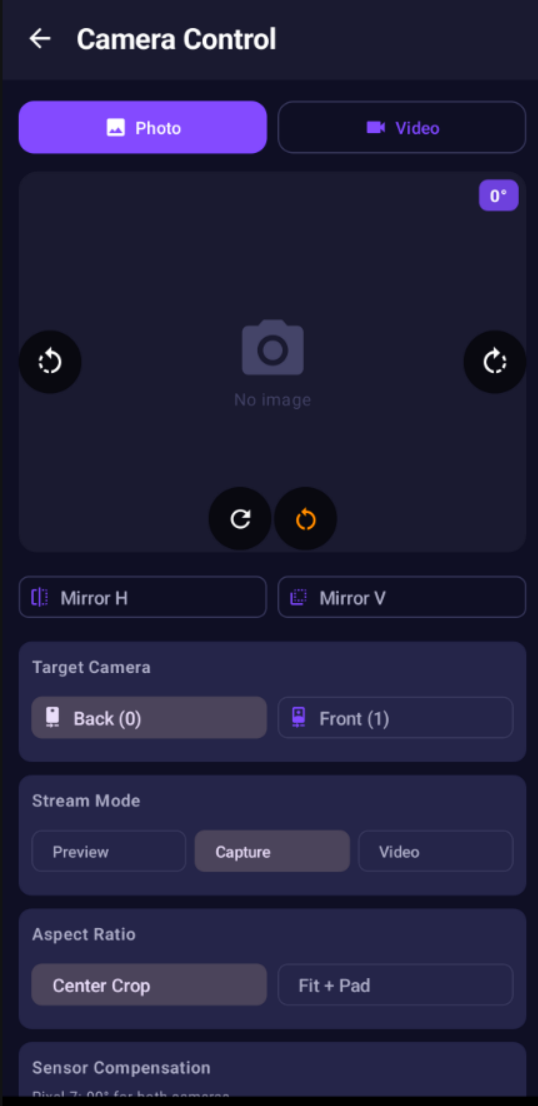
The tool sends fake imagery pretending it is from a camera
The tool our team discovered makes fake images and videos appear as if they were captured live by a phone camera during an identity check.
The tool feeds a saved photograph, prerecorded video, or remotely controlled video stream into an app as though it were coming directly from the device's camera.
It can also manipulate information about the phone, including its model, location, identifiers, browser characteristics, and security state.
Many digital identity verification systems use both cameras on device. They use a phone's rear camera to take a high-resolution photo of a physical ID card or passport. Then the application switches to the front-facing camera to capture a live selfie and run a face-match or liveness check.
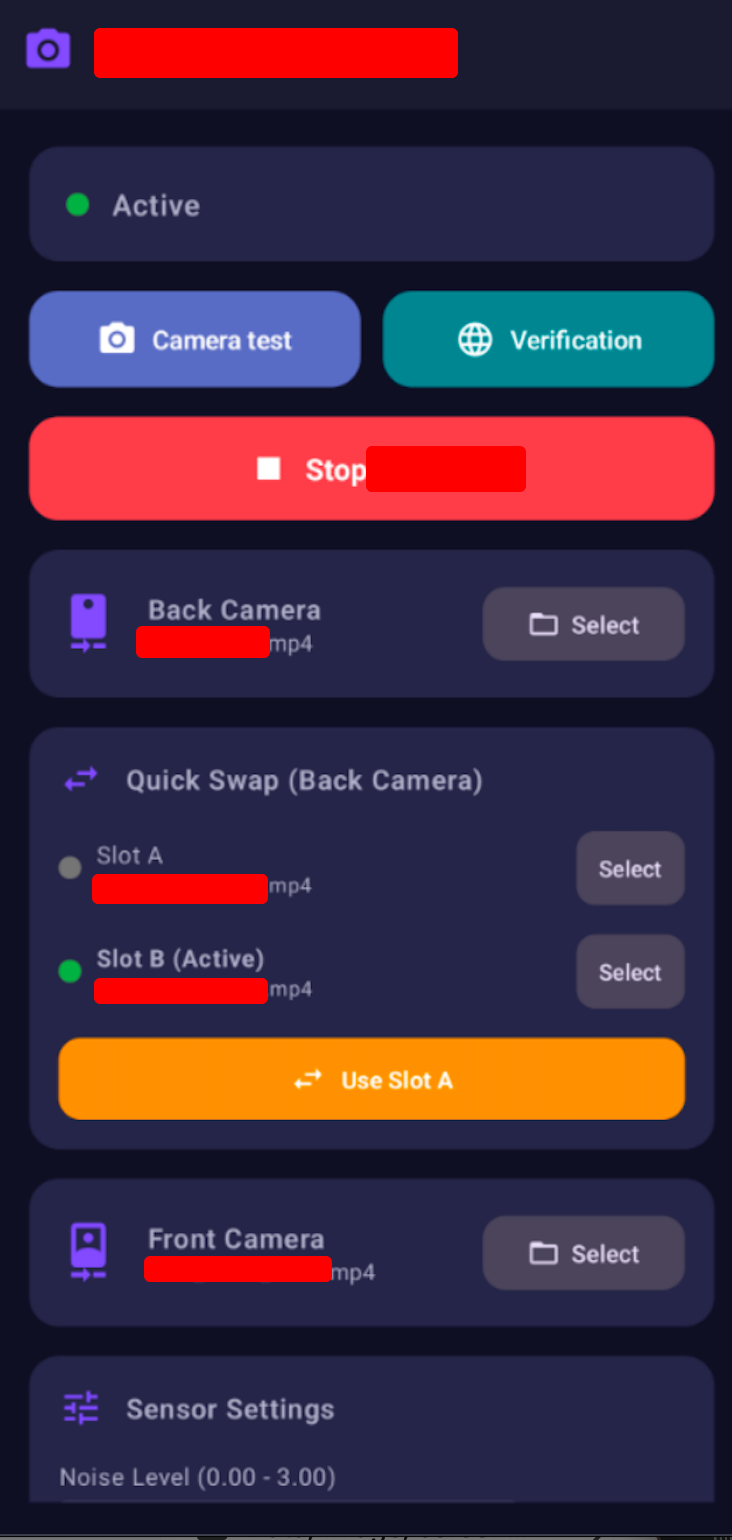
The tool allows potential attackers to use both cameras separately to trick the verification system. An operator could prepare an identity document for the rear camera while supplying a separate video of a face through the front camera.
Also, the toolkit’s components can emulate ordinary camera operation, including movement, timing, and other information that accompanies an image.
The evidence provided by our team includes deployable root modules, APKs, native binaries, device databases, attestation and keybox material, operational scripts, and identity media.
However, publishing the complete specimen or step-by-step deployment details could enable identity fraud and unauthorized access. Also, some evidence may also contain biometric or device-linked personal information.



Stay updated with our latest stories and follow us on social media
Be the first to discover new stories, ideas, and updates from our team.
Not a tool for the masses
Cybernews researchers determined that the setup may not have been widely used or massively downloaded by regular users. Mainly because an amateur user could not simply download and install it on an ordinary smartphone.
The research indicates that the operator would need an Android device with extensive system modifications.
The phone must be unlocked and given elevated access, commonly known as root access. Additional modules are then used to alter how the operating system and applications behave.
Strong password generator

That requirement creates its own risks. A phone configured this way would have weaker security protections and could expose the operator's own information. So it may only be used on a dedicated device.
While this limits the immediate pool of potential users, once a suitable device has been prepared, the same setup could potentially be used against multiple identity-verification services.
No proof of identity verification was exploited
Sure, when a website or app requires access to a live camera, a modified operating system can feed it an image that appears to be a real camera capture, even though it’s not. However, that does not mean every identity check can always be defeated this way.
Identity verification providers can combine camera input with other controls, including document authenticity checks, unpredictable liveness challenges, device analysis, fraud scoring, detection of reused identities, and manual review.
At this point, there is no evidence of an identity-verification exploit, nor is there evidence that a particular provider's systems accepted a fraudulent identity.
Increased risk of fraud
Nonetheless, the existence of such tools puts users and organizations at imminent risk.
If such a technique were successfully combined with stolen identity documents and convincing face imagery, the consequences could include fraudulent account creation, account takeovers, and identity theft.
Organizations could also face higher costs from manual investigations, fraudulent transactions, customer reimbursements, and disputes over whether their identity controls worked as intended.
For biometric systems, there is another concern. A fraudulent verification could result in the misuse of someone's face or other identity information, without requiring an attacker to compromise the company's database.
How to stay safe?
To mitigate any potential risks, Cybernews researchers advise organizations using identity verification services to take the following these steps:
- Reproduce the attack in an isolated lab using the supplied artifact hashes and representative web, Android SDK, and native mobile verification flows.
- Test which provider templates, selfie versions, capture methods, and passive-signal policies can detect or reject a compromised device.
- Do not treat Camera2, WebRTC, or disabled uploads as proof that an image was captured with a physical camera.
- Prefer server-generated, inquiry-specific, unpredictable active challenges with strict controls for freshness, sequence, and replay.
- Compare the camera scene's optical movement with accelerometer and gyroscope data. Also, examine changes in exposure, rolling-shutter effects, motion blur, lens geometry, and parallax rather than trusting individual signals in isolation.
- Build genuine device profiles covering the full range of front- and rear-camera characteristics. Look for impossible combinations of orientation, sensor dimensions, focal length, stream configuration, and claimed device model.
- Analyze video for unusual timing patterns, frozen frames, codec artifacts, loop boundaries, repeated backgrounds, and reused media across inquiries and customers, where legally permitted.
- Validate Play Integrity or app attestation on the server using a fresh, inquiry-specific nonce. Check the certificate chain, revocation status, app identity, timestamps, patch level, and device history. Treat a positive attestation as a single risk signal, not as proof that the camera feed is genuine.
- Flag impossible combinations involving the first Android API level, security patch, build fingerprint, verified-boot state, attestation-chain dates, WebView version, user agent, TLS behavior, and camera model.
- Combine server-side account, document, facial, IP, network, device-key, behavioral, and transaction-speed signals. This can prevent attackers from creating a clean identity simply by rotating device identifiers.
- Include this attack scenario in internal red-team exercises and third-party biometric penetration tests. Testing should cover privileged, hardware-abstraction-layer camera injection, not just emulators or application-level hooks.
- Search historical telemetry for the supplied hashes, package names, camera characteristics, repeated media fingerprints, and unusual or impossible Pixel-device profiles.
- Coordinate mitigations with Android and Google where stronger hardware-to-capture provenance or provider-integrity guarantees are needed.
- Give customers risk-based configuration guidance. High-value verification flows should combine document authenticity checks, authoritative identity data, NFC where available, liveness detection, device intelligence, relationship analysis, and manual review when necessary.
Research timeline
Repository supplied for analysis in the shared workspace: July 15th, 2026
Initial artifact inventory and CodeGraph review: July 15th, 2026
Relevant module ZIPs and APKs extracted into an isolated temporary analysis directory: July 16th, 2026
Full technical architecture report completed: July 22nd, 2026
Documentation and template completion: July 24th, 2026