Should you change passwords after PHP2Shell?

PHP2Shell has left millions of website services potentially exposed. Whether you need to change your passwords depends on what attackers accessed.
As of October 29th, a full week after the PHP2Shell patch was made public, Censys still flags around 30.2 million services as potentially vulnerable to PHP2Shell. While they aren’t explicitly breached, they are still unpatched.
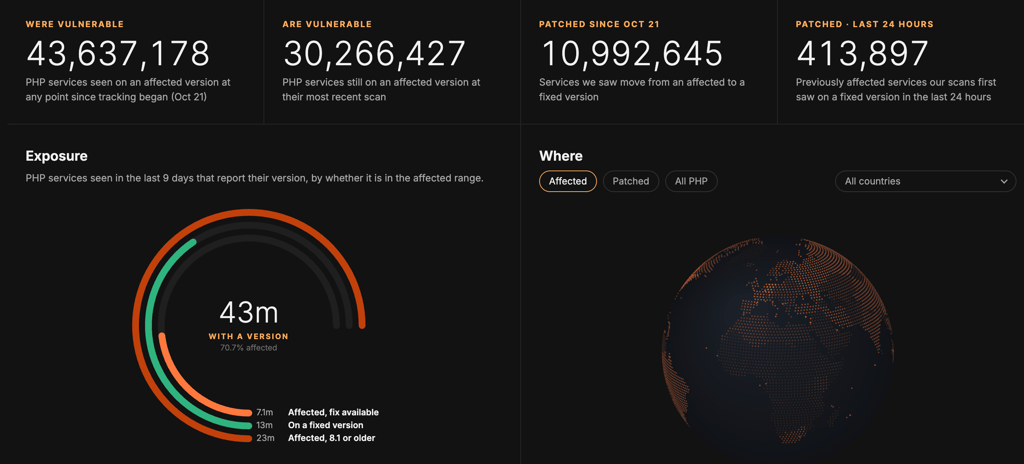
PHP2Shell refers to two critical vulnerabilities in PHP, the software that runs behind the scenes on approximately 70% of global websites. Attackers can exploit the flaws to run code on a vulnerable server without logging in.
While developers and website administrators have the most work to do, consumers could also be affected if a successful attack exposes their login details. That is where password security is crucially important.
How one breach can reach other accounts
An attacker who compromises a website could gain access to a database containing customer login details. If they recover usable passwords from that database, they can try them on other services.
The most important thing is how the website stores passwords. Services such as Dropbox use password hashing designed to make stolen passwords difficult to recover, even if someone accesses the database.
The bigger concern is a poorly maintained website that combines outdated PHP with weak password storage. That could be an old shop or forum you barely use anymore. If attackers recover a password you also use for email or other important accounts, the damage could spread beyond that website.
Password reuse can then turn one website’s breach into a problem for several accounts. Attackers can take a stolen email address and password combination and test it elsewhere, a practice called credential stuffing.
For example, you might have used the same password for a shop you visited once and the email account you use every day. If that password is recovered from the shop’s database, attackers could try it against your email.
How can a password manager help?
A decent password manager makes it easier to find repeated passwords and replace them without having to remember each new one.
For example, NordPass’s Password Health tool shows which accounts use the same password and flags passwords found in data breaches. This helps you see which passwords need changing first, while its password generator lets you create a strong, unique replacement for each account.
If a breach indeed occurs, the best course of action now would be to start with your email, banking, and other important accounts, then work through the rest of your reused passwords.
For each account, change the password on the website itself and save the new one in NordPass. Editing a password only in your vault won’t update it on the website.
Turn on two-factor authentication wherever it’s available. It adds another check when someone signs in, making a stolen password less useful to an attacker.

Which passwords should you change?
Start with any account where the service has warned you, or where you remember that your password may have been exposed. Follow its recovery instructions and choose a new password you haven’t used anywhere else.
Next, change that password on any other accounts where you used it. Updating the breached account won’t stop someone from trying the old login details elsewhere.
Prioritize your email if it shares the exposed password. Someone who gets into your inbox could use password-reset emails to access your other accounts.
Use best practices when creating a password, such as at least 15 characters long password for each service and save it in your password manager. Adding a number or changing a letter in the old password makes the replacement more predictable.
If your passwords are already unique and there’s no sign they were exposed, you don’t need to reset them all because of PHP2Shell. Any reused passwords are still worth replacing now.