Surfshark launches Scam Text Protection for suspicious SMS


Scam texts are rarely sophisticated. They do not need to be.
Phishing is on the rise, and the tactics are often strikingly familiar: a fake delivery notice, a supposedly frozen bank account, an unpaid toll, a tax refund waiting behind a shortened URL – the mechanics are familiar. The trick is timing. Catch someone distracted or mildly panicked, and even a mediocre scam can get surprisingly far.
Surfshark’s new Scam Text Protection feature is built around that reality.
Instead of asking users to become better at spotting every fraudulent SMS, it checks incoming messages for scam signals and intervenes before the user has to decide whether the message is legitimate.
What Surfshark Scam Text Protection does
The feature is aimed at SMS phishing, or smishing: fraudulent text messages designed to push recipients toward malicious links, fake login pages, payment requests, or other forms of social engineering.
Surfshark analyzes incoming messages for indicators associated with scams, including the sender, message content, suspicious language, and links.
The practical benefit is clear: some of the judgment normally left to the recipient is moved into the product itself.
Traditional anti-scam advice tends to put the burden on users. Check the URL. Verify the sender. Ignore urgency. Do not click unexpected links.
All sensible advice. Also, a small threat assessment exercise every time an odd message lands on your phone.
Surfshark’s approach is more useful precisely because it tries to reduce that burden.
On iOS, the best feature is what you do not see
The iPhone implementation takes the quieter approach.
When Surfshark identifies a suspicious incoming message, it moves the text into the Spam section of Apple’s Messages app. The message does not trigger the normal notification.
That is a small product decision with unusually clear value.
Social-engineering scams often rely on immediacy: act now, verify now, pay now. Removing the notification takes away one of the scammer’s most useful tools before the user even sees the pitch.
The suspicious message still exists, but it no longer gets equal billing with a genuine bank alert, a delivery update, or a text from someone you know.
For general users, that is a practical form of protection because it changes the experience at the exact point where a scam usually gains leverage.
How to enable Surfshark Scam Text Protection on iOS
Setting up Scam Text Protection only takes a few steps:
- Open the Surfshark app
-
From the bottom navigation bar, select Anti-scam
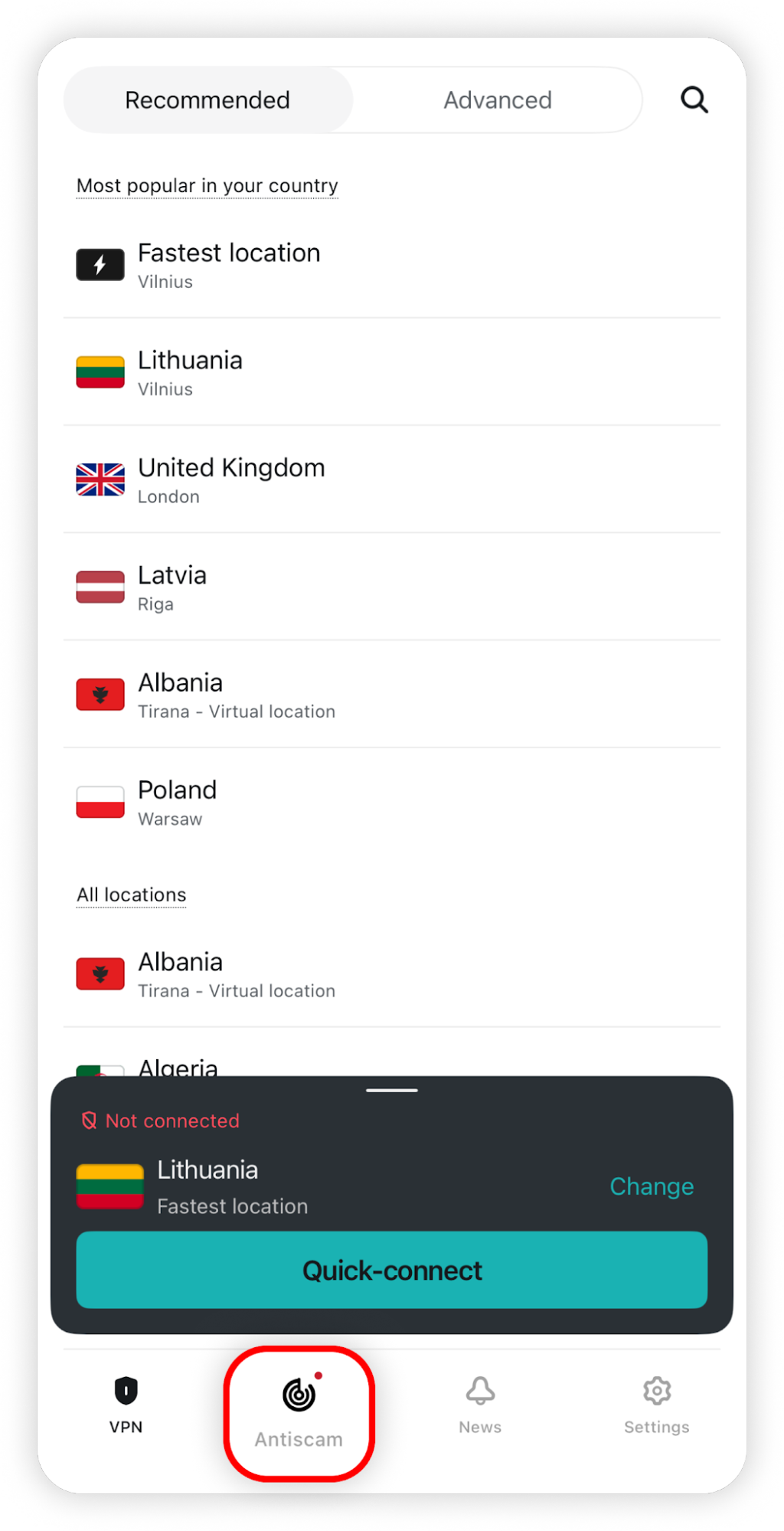
-
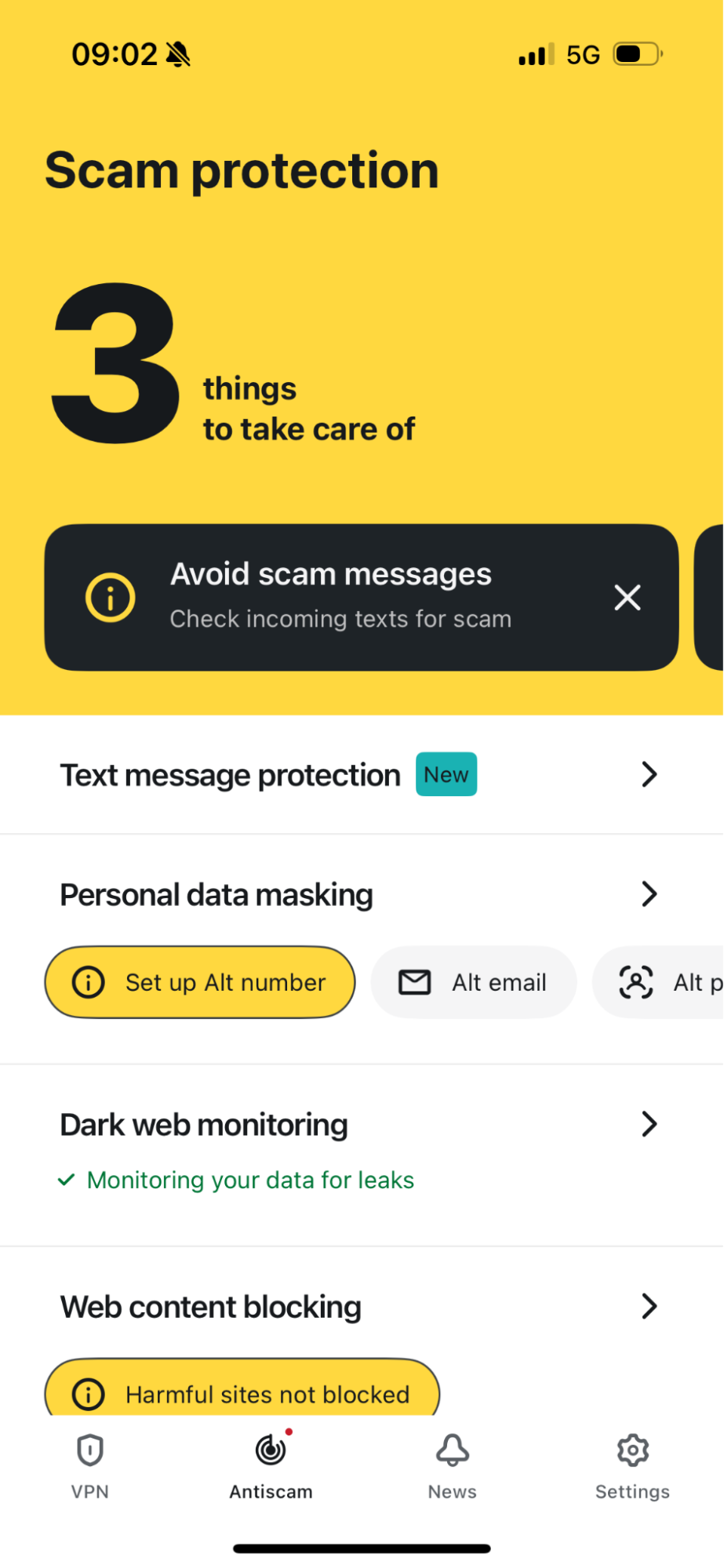
Tap Text Message Protection and turn the feature on
- Open your iPhone Settings
- Make sure Screen Unknown Senders is enabled
- Under Text Message Filter, select Surfshark
Once enabled, Surfshark can analyze incoming messages from unknown senders and filter suspicious texts automatically.
Android takes a more explanatory approach
Android handles suspicious texts differently.
According to the product information provided for this review, Surfshark sends a warning when it detects a likely scam. Opening that warning takes the user into the Surfshark app, where the message appears alongside the signals that triggered the flag.
This makes the Android version more interpretive than passive.
Many scam texts are effective because they occupy an uncomfortable middle ground between obviously fake and plausibly real. A convincing shipping notice or bank alert may not look fraudulent enough to dismiss immediately.
Surfshark’s Android implementation tries to replace that ambiguity with context.
Rather than simply telling users to be careful, it shows them why caution is warranted.
That makes the warning more useful than a generic red flag and helps make scam detection understandable rather than opaque.
Surfshark is moving beyond the VPN
Scam Text Protection also reflects Surfshark’s broader expansion beyond VPN functionality.
The company already offers security and privacy features that address threats beyond network traffic, including tools focused on malicious websites, data exposure, and online scams.
SMS protection extends that coverage to social engineering.
This is increasingly relevant because many scams do not involve compromising a device directly. Instead, attackers try to persuade users to click a malicious link, enter credentials, make a payment, or disclose sensitive information.
Detecting suspicious messages before that interaction happens adds another layer between the scam attempt and the user.
Early verdict
Surfshark Scam Text Protection addresses a common security problem in a relatively simple way.
On iOS, it automatically moves suspicious messages into Spam and prevents them from generating the usual notification. On Android, it warns users about likely scams and provides additional information explaining why the message was flagged.
The most useful aspect of the feature is that it reduces how much scam analysis users have to perform themselves.
It does not require people to become experts at recognizing every phishing technique. Instead, it adds an automated check before an unfamiliar or suspicious message is treated like an ordinary text.
For users already within the Surfshark ecosystem, Scam Text Protection is a practical addition to its broader anti-scam toolkit.