AI agents are leaking their owners’ secrets on GitHub: thousands of files exposed
Security tools like Gitleaks often fail to detect credentials exposed in AI agent memory and configuration files.

Image by Cybernews.

 Follow us
- Apiiro found 2,539 exposed secrets in public GitHub files tied to Claude Code settings.
- Approved commands stored passwords, API tokens, SSH logins, and cloud keys after developers chose “Yes, and don’t ask again.”
- Claude coauthored commits exposing real secrets in 539 of 1,105 affected repositories.
- Developers should rotate exposed credentials and keep agent folders and memory files out of source control.
Over two thousand real secrets, including passwords, API tokens, SSH root logins, and even admin-level cloud keys, were found leaking on GitHub after developers clicked “Yes, and don’t ask again” in Claude Code.
AI agents can’t do a job, such as running a migration, without knowing a corresponding secret. They keep live secrets in a hidden file for later access.
When a developer grants Claude Code permission to proceed with “Yes, and don’t ask again,” it saves the exact command, including secrets, to a file, .claude/settings.local.json, inside the project folder. This file should never be exposed publicly.
Apiiro, an application security company, found 104,185 public copies of such files on GitHub across 103,617 repositories.






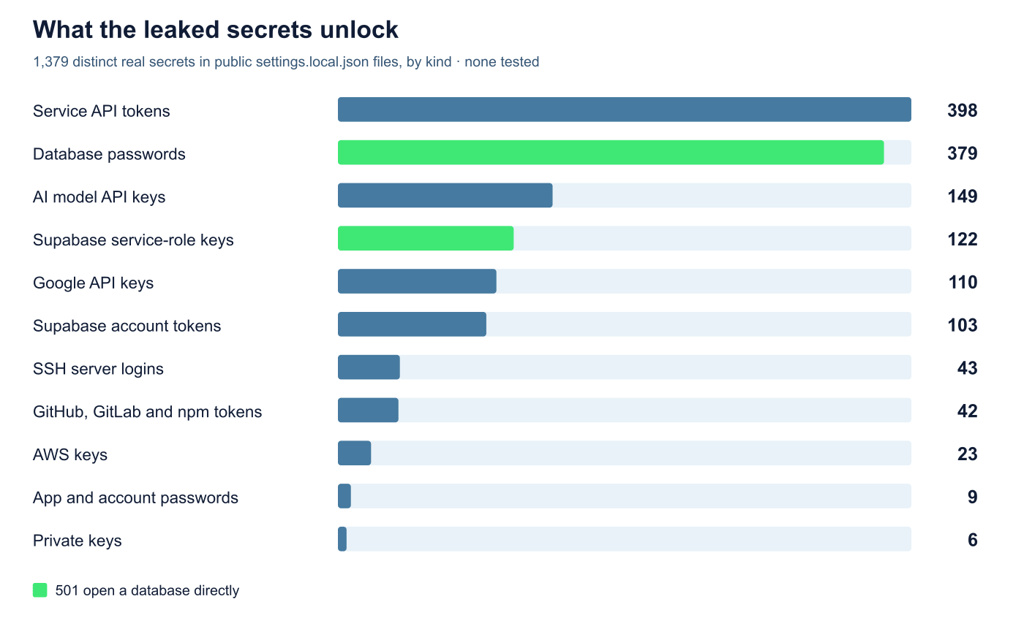
Moreover, they exposed 2,539 sensitive secrets across 1,994 repos.


Stay updated with our latest stories and follow us on social media
Be the first to discover new stories, ideas, and updates from our team.
“A database vendor's own admin-level cloud key, a production Azure Postgres password, a Square production token, and the owner password of a medical-records database,” Apiiro lists in a report on coding agents security.
The most common secrets are service API tokens, database passwords, and AI model API keys, but there were also dozens of SSH server root logins.
Most of the repositories belong to individual developers, but the researchers also counted 63 affected organizations, including startups, software agencies, and established vendors.
Anthropic’s team says it’s “looking into what we can do to prevent this.”
How do secrets end up on GitHub?
Every time Claude Code wants to run a terminal command, it asks for permission. After too many interruptions, developers may stop checking every AI-proposed command carefully, and a secret can slip through unnoticed.
When a developer selects “Yes, and don't ask again,” Claude Code stores the approved command, along with secrets, in the settings.local.json file.
Claude Code tries to prevent the file from being exposed by adding it to the developer's global .gitignore file. This means that Git, the tool that tracks code changes, will ignore the file. But this protection isn’t bulletproof.
“It doesn’t cover a folder that becomes a repo later, a clone on another machine, or a file someone already committed. The rule never goes into the repo’s own .gitignore, so nothing travels with the project to protect it,” the report explains.

Check if your data was exposed
Find out if your email and related personal information have appeared in known data breaches.
The researchers found that Claude itself committed many of the exposed files – in 539 of the 1,105 repos with exposed real secrets, Claude coauthored the commit that changed the file.
Moreover, security scanners, such as gitleaks and TruffleHog, often miss secrets stored in commands.
“Scanners look for key formats: a provider prefix, a long random string. A password typed after PGPASSWORD=, sshpass -p or mysql -p, or a bearer header in a curl call, is an ordinary word in an ordinary command line, and both tools mostly let it through,” the report warned.
AI agents also write secrets into other files. Apiiro found many exposed secrets in chat transcripts, agent memory files, handoff and deployment notes, and VS Code Copilot auto-approve settings that developers committed to GitHub.
Most of the exposed secrets sit in “allow” rules as part of exact commands.
Other code repositories are also leaking similar files – the researchers flagged dozens of them on Hugging Face and GitLab.

Anthropic’s looking into this
Boris Cherny, Anthropic’s Head of Claude Code, responded to the findings on Hacker News, saying the team is “looking into what we can do to prevent this.”
“This is not a file you should check into source control. We automatically gitignore it when Claude creates the file, so in this case the files were manually created and checked in,” Cherny noted.
The engineer also said that every developer should now use the safer “auto mode” rather than permissions, because it does not require manually maintaining “finicky allow/deny lists.”
Cherny also recommends having secret scanning enabled on GitHub “regardless of what agent you use.”
It’s a risk even when the file stays on the system
Even when agent-related files never reach GitHub, they’re still a risk, and developers should treat agent folders (.claude/, .cursor/, .gemini/, .specstory/) and agent memory files as secret-bearing, similar to .env.
The report urges deleting every rule that contains a secret in plain text.
The allowlist is plain JSON in the project folder. Malware already collects credentials from developer machines in bulk,the Apiiro report warns.
“The allowlist is plain JSON in the project folder. Malware already collects credentials from developer machines in bulk,” the report warns.
Sensitive files can be accidentally published in an npm package, copied to a Docker image, added to a zip archive, and exposed elsewhere.
Any exposed credential should be rotated immediately – removing it doesn’t clear git history, forks or clones.
Developers should avoid entering secrets directly into commands. Instead, they can use environment variables that reference credentials stored in a secrets manager.