How to watch NFL blackout games with a VPN in 2026
Our in-house cybersecurity experts and journalists, renowned for major reports like The Mother of All Breaches, conduct transparent, unbiased VPN testing and in-depth analysis.
With 750+ articles crafted based on real-world research, we empower readers to make informed purchasing decisions through first-hand expertise.
Learn more
-
An NFL blackout is really a form of geo-restriction, a game gets blocked in your area not because of ticket sales like in the past, but because a different broadcaster holds the regional rights to show it where you live.
-
Pairing DAZN NFL Game Pass International with a VPN turns out to be the cheapest way to catch blacked-out games, running roughly $110-$250 for the season compared to $240-$378 for Sunday Ticket alone, though a VPN isn't guaranteed to bypass every blackout since some services layer on extra location checks beyond just your IP address.
-
NordVPN stood out as the most reliable VPN for this in testing, with servers across 225 locations making it easy to switch when DAZN blocks a specific server, plus fast NordLynx speeds and a kill switch that keeps your connection protected if the VPN drops mid-stream.
With Week 4 of the 2026-27 NFL season underway, watching your favorite team can still be surprisingly tricky, even a month in. NFL games are scattered across several broadcasters and streaming services in the US, and regional broadcast rights can make certain games unavailable where you live. Depending on the matchup, broadcast rights may sit with CBS, FOX, NBC, ESPN, ABC, or NFL Network.
These restrictions are called NFL blackouts. It means a game you want to watch may not be available on your usual streaming service because another broadcaster holds the rights to show it in your area. If you want to catch every NFL game this season, you could end up needing multiple subscriptions, which can add up fast.
Outside the US, though, NFL Game Pass International is available through DAZN in many countries, giving access to the entire NFL season. In this guide, I'll show you how to watch blackout NFL games with DAZN using a VPN.
What is an NFL blackout?
An NFL blackout is a restriction that prevents viewers in a particular area from watching a game through a specific broadcaster or streaming service. Historically, NFL blackouts were tied to ticket sales, with games subject to blackout rules when teams failed to sell enough tickets.
Today, NFL blackout rules are related to regional broadcast rights. Depending on where you live, a game may be unavailable on a particular streaming service because another network or broadcaster has the rights to show it in your area. This is essentially a form of geo-restriction, with availability determined by your broadcast territory and market area.
Local and regional games are most likely to be blacked out, while nationally televised games are generally available nationwide through their designated broadcaster. When it comes to out-of-market NFL games, some subscription services offer access to these games, but local broadcast rights can still affect availability.
How can a VPN help you get around NFL blackouts?
A VPN can help you navigate NFL blackouts by changing the IP address that websites and streaming services use to determine your location. When you connect to a VPN server, your internet traffic is routed through that server, making it appear as though you’re connecting from its location rather than your actual one. For example, if you’re in Tennessee, you could connect to a UK VPN server, and the streaming service will think you’re in the UK.
This is useful when a game is subject to location-based viewing restrictions. However, a VPN isn’t guaranteed to bypass every blackout, as streaming services may use additional location checks, and blackout rules vary by game and service. Some services can combine your IP address with other location signals to enforce geo-blocking.
The cheapest way to stream NFL blackout games in 2026
The cheapest way to stream NFL blackout games is using DAZN NFL Game Pass International with a VPN. DAZN NFL Game Pass International offers access to live NFL games in supported international markets, but the service isn’t available to viewers in the US.
A VPN can change your virtual location, allowing you to connect to a server in a country where DAZN NFL Game Pass International is available. Below, I break down the pricing of this method.
| What you need | Cost | Notes |
| NordVPN (2-year plan) | $3.49/month, $17.45 for the NFL season | Servers in 225 locations, reliable at unblocking DAZN. |
| DAZN NFL Game Pass International | $90-$230/season, depending on the country | No blackouts except the UK and Ireland, so pick a VPN server in a supported country outside those two. Brazil is one of the cheapest regions. |
| Total | $110-$250/season | Compared with $240-$378 for only the NFL Sunday Ticket |
How to watch NFL blackout games 2026: step-by-step
In this section, I’ll show you how to watch the NFL from anywhere without blackouts using DAZN and a VPN. I recommend doing this on a desktop browser, as the DAZN mobile app often requires GPS-based location verification, which can be more difficult to work around.
Step 1. Pick your DAZN country
DAZN NFL Game Pass International is available in more than 200 countries, but some locations are less suitable due to local broadcast restrictions. For example, the UK and Ireland still have certain blackouts under the current DAZN deal. So, choosing a server location is an important step.
Canada and Germany are commonly the most reliable options, while Brazil is one of the cheapest regions.
Here’s a comparison of NFL Game Pass pricing on DAZN for the Season Pro Regular package when paid upfront:
- Germany: €199.99 (about $233)
- France: €219.99 (about $256)
- Spain: €199.99 (about $233)
- Italy: €209.99 (about $244)
- Australia: A$339.99 (about $244)
- Brazil: R$479.90 (about $93)
- Japan: ¥33,000 (about $207)
- Mexico: MXN3,100 (about $182)
- Note: prices checked on August 28th, 2026
Step 2. Connect to a VPN first
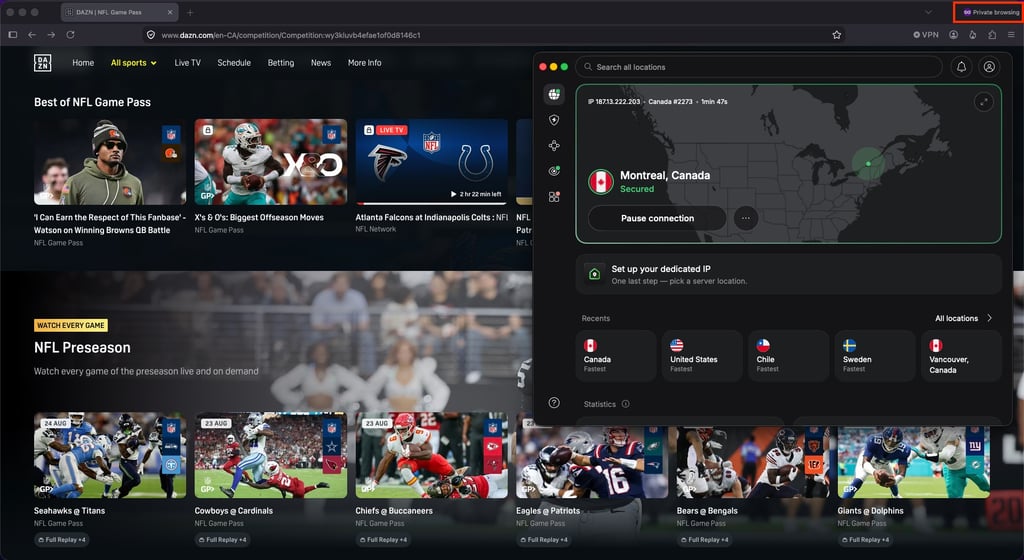
Open your VPN and connect to a server in your chosen country before visiting the DAZN website or opening the app. Starting with the VPN connected helps ensure that DAZN sees the intended location from the beginning of your session.
Based on my experience testing multiple streaming VPNs, NordVPN is the best option. It offers servers across 225 locations, making it easy to try a different server if one doesn't work. It also provides fast connection speeds through its NordLynx protocol and includes features such as a kill switch, which helps protect your connection if the VPN disconnects unexpectedly.
Step 3. Clear your cookies or use incognito mode
DAZN, like most streaming services, can use cookies and other browser data from previous visits to determine your location. To start with a clean session, open DAZN in an incognito or private browsing window after connecting to the VPN. Alternatively, you can use a different browser that you haven't previously used to access DAZN.
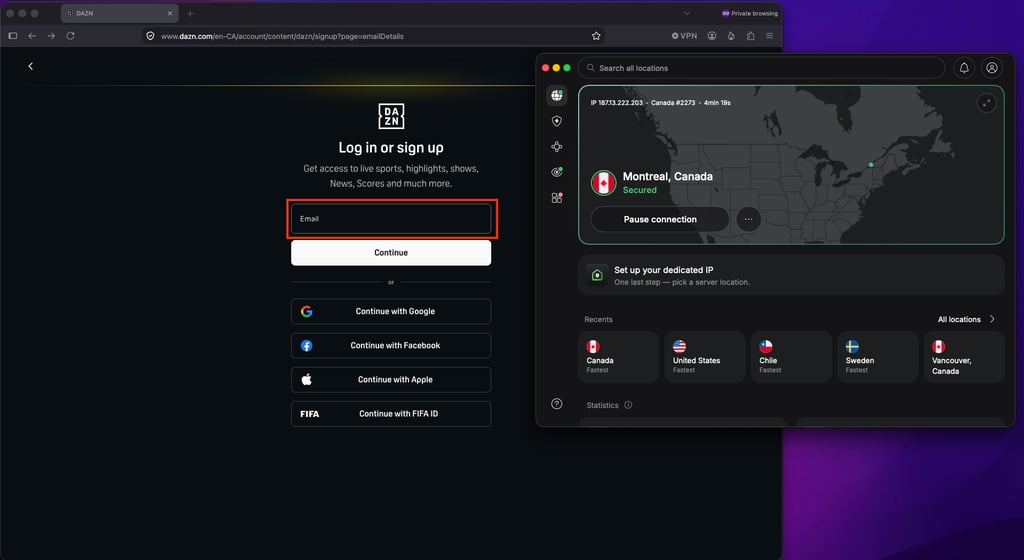
Step 4. Create a new DAZN account
While connected to the VPN, visit the DAZN website and create a new account. You'll need an email address that isn't already associated with a DAZN account. Your email address itself doesn't determine your billing country.
Step 5. Choose a payment method
This is one of the main bottlenecks you'll run into. DAZN checks your payment details against your subscription region, so using a card from another country can cause the payment to fail.
Here are the options that work:
- Virtual card. Use a virtual card that lets you set the billing country to match your DAZN region.
- PayPal. PayPal works in some DAZN markets and can bypass the need to enter a local card directly.
- Credit card. Use a card that supports international transactions and has no foreign transaction fees. The charge will appear in the local currency.
If your first payment method doesn't work, try another one rather than changing your DAZN region.
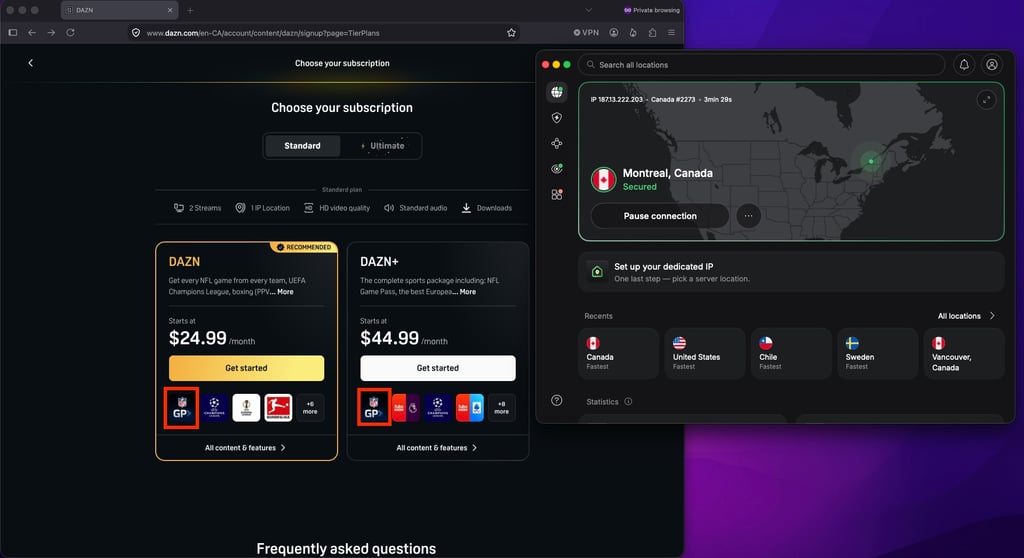
Step 6. Subscribe to NFL Game Pass
Once you're signed in and DAZN is displaying the correct regional offering, select NFL Game Pass. Depending on the country, Game Pass may be available as a standalone subscription or as part of a DAZN package, so make sure you’re getting one that has the NFL Game Pass.
Step 7. Always connect the VPN before watching
When you want to watch NFL Game Pass, connect to your VPN before opening DAZN or starting a stream.
Using the same country consistently can help avoid unnecessary location checks. If you switch between countries or servers frequently, DAZN may ask you to verify your location again or temporarily restrict access.
Step 8. Have a backup server ready
DAZN sometimes blocks VPN server IP addresses, especially when an IP is shared by a large number of VPN users. If your usual server stops working, don't waste time troubleshooting it.
Instead, disconnect and connect to a different server in the same country. If the first server is blocked, another server or city will often work.
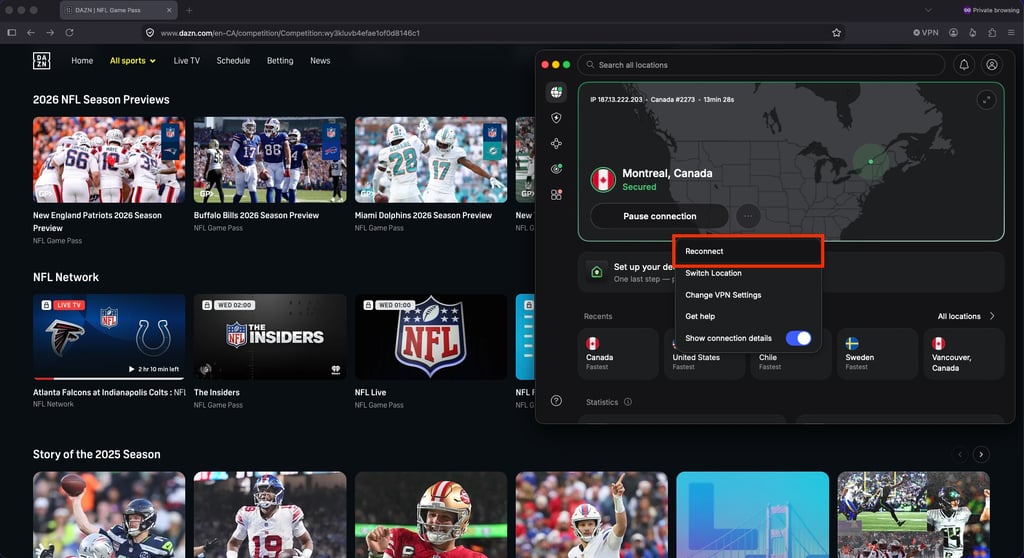
This is another reason to choose a streaming VPN with a large server network. The more servers you have available in your chosen country, the easier it is to switch when one gets blocked.
Best VPNs for streaming NFL blackout games 2026
For this guide, I tested multiple VPNs to see how well they work for bypassing NFL preseason blackouts and other restrictions. Based on my testing, I’ve compiled a list of the best VPNs for streaming blacked-out NFL games:
- NordVPN – best overall VPN for streaming NFL games
- Surfshark – best NFL VPN for streaming blacked-out games on unlimited devices
- IPVanish – best budget-friendly VPN for bypassing NFL blackouts
Is it legal to use a VPN to watch NFL blackout games?
Yes, using a VPN to watch NFL blackout games is legal. However, whether it violates a streaming service's terms of service (ToS) depends on the platform’s specific policies.
For example, DAZN’s Terms of Service don’t explicitly mention the use of VPNs or other technologies to bypass content restrictions. That said, some streaming services may restrict or suspend accounts if they determine that VPN use violates their terms of service, creating an account ban risk.
In any case, unless VPN use is illegal in your country, using a VPN to stream content isn’t something that would result in legal consequences. The potential issue is more likely to be a violation of the streaming service’s terms of service rather than a criminal or civil offense.
VPNs are legitimate privacy tools designed to protect your online activity. They encrypt your internet connection and give you greater privacy and control over your data. Using a VPN to bypass geo-blocks is simply another use case, although streaming platforms may take steps to prevent it.
Common problems and how to fix them
There are many little problems you can run into when streaming blackout NFL games with a VPN, but they’re usually not difficult to fix. Here are some of the most common issues and what you can do about them.
| Problem | Why it happens | How to fix it |
| VPN detected | A streaming service recognizes a VPN based on the IP address or due to a DNS or IP leak | Reconnect to a different VPN server, check for IP and DNS leaks, and try another server. A reputable VPN, such as NordVPN, can also be more reliable for streaming |
| Game is still blacked out | The service may still be detecting your actual location, or the VPN server you’re using may be associated with a blacked-out market | Connect to a different server in the desired location, clear your browser cookies and cache, and reload the stream |
| GPS location requested | Common with streaming apps, which use your device’s GPS location to verify where you are | Try watching in a web browser instead of the app, and don’t grant the streaming service access to your device’s location |
| Lag, buffering, or interruptions | A VPN server may be overloaded, too far away, or unable to provide enough bandwidth for a stable stream | Try a less congested or closer server, and use a stable internet connection. If necessary, reconnect to another VPN server |
| Real location is showing | Your IP or DNS may be leaking, or the browser or device may be sharing location information with the streaming service | Check for IP and DNS leaks, disable location permissions, reconnect to the VPN, and reload the streaming site |
| Wrong local market | The service may use your IP address, cookies, account information, device settings, or location data to determine your market | Connect to a VPN server in the correct market, clear the site's cookies and cache, check location settings, and reopen the stream |
| Works on one device but not another | Devices and operating systems handle VPNs, location services, and streaming apps differently | Make sure the VPN is connected on the affected device, check its location permissions, and try the browser version of the service |
| Works in browser but not in app | Apps can perform additional GPS or device-level location checks that aren't always used in the browser | Use the browser version if possible, or check the app's location permissions and VPN compatibility |
NFL blackout map for 2026
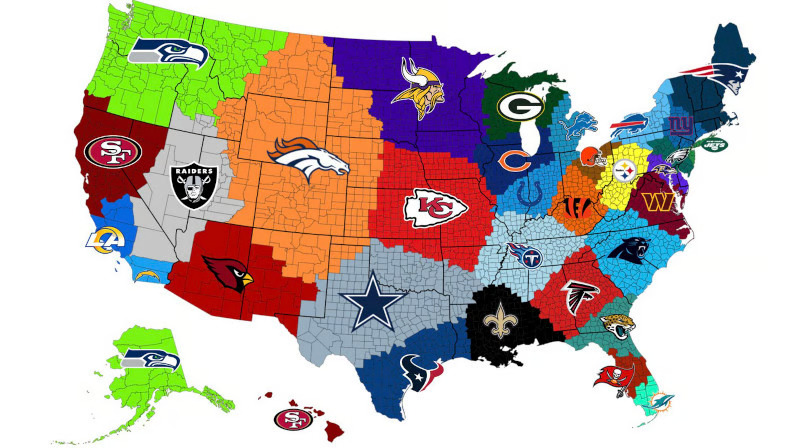
NFL broadcast territories aren’t simply based on how close you are to a team’s stadium. Today, broadcast territories are often associated with a DMA (Designated Market Area), which helps define the local market served by broadcasters. Which games you can watch depends on the broadcast region you’re in and the network’s rights.
The map below gives you a general idea of each NFL team’s territory, using distance from the stadium as a guide. Keep in mind that this is not an official NFL broadcast or blackout map. Actual local coverage can vary, since broadcast markets and team rights don’t always follow geographic boundaries.
Alternatives to using a VPN
There are legitimate ways to watch blackout NFL games without a VPN, but they’re generally more expensive and may require multiple subscriptions:
- Live TV services. YouTube TV, Hulu + Live TV, Fubo, and DIRECTV carry local CBS, FOX, NBC, and ABC affiliates. They’re convenient, but typically cost significantly more than a VPN.
- NFL+. Offers certain live local and nationally televised games on supported mobile devices, plus full-game replays. It does not include live out-of-market Sunday afternoon games.
- Official streaming services. Depending on the game, Paramount Plus, FOX One, Peacock, ESPN, or Prime Video may carry it. Amazon Prime Video is also the home of Thursday Night Football.
- Sunday Ticket. For genuinely out-of-market Sunday afternoon games, Sunday Ticket is the official option, but by far the most expensive choice.
Final thoughts
Missing a blackout game is a real frustration for die-hard NFL fans, and trying to cover the whole season across multiple streaming services gets expensive fast.
The most reliable fix is pairing DAZN NFL Game Pass International with a VPN. Connect to a supported country like Canada or Germany, and you get access to games that would otherwise be locked out of your region entirely.
Based on my testing, NordVPN is the VPN I'd recommend for this. It connects to DAZN reliably, keeps streaming smooth without buffering, and its large server network makes switching locations quick whenever a specific game calls for it. For NFL fans trying to catch every game this season, it's a solid piece of the puzzle.
FAQ
Does Paramount Plus blackout NFL games?
Yes, Paramount Plus blacks out NFL games that CBS broadcasts in your local market. Paramount Plus follows CBS’s local broadcast rights, so you cannot use the service to watch a different market’s CBS game.
Does NFL Sunday Ticket blackout local games?
Yes, NFL Sunday Ticket blacks out games that your local CBS or FOX station broadcasts. Sunday Ticket only provides out-of-market Sunday afternoon games, while local stations retain those broadcast rights.
Why are some NFL games blacked out in my area?
Some NFL games are blacked out in your area because of the local broadcast rules. Your local CBS or FOX station may hold exclusive rights to a game, preventing streaming services from showing it in your area.
Does NFL+ use GPS instead of an IP address to detect my location?
NFL+ uses GPS and your IP address to determine your location on mobile devices. Your device’s location services provide GPS data, while your internet connection provides IP-based location information.
Which VPN works best for watching NFL games?
NordVPN is the best VPN for watching NFL games because it offers a large server network, fast connections, and robust security. It also works reliably with streaming services like DAZN, Paramount Plus, and YouTube TV.