7 best cPanel and WHM VPS hosting in 2026
Our in-house experts conduct independent, hands-on testing and transparent reviews of VPS hosting providers by using real server environments, and industry-recognized benchmarking methods to ensure impartial and evidence-based assessments
Using the same criteria for all VPS services, we share our detailed methodologies and testing practices to help customers compare performance, reliability, scalability, and overall value before choosing a virtual private server.
Learn more
If you are used to cPanel and don’t want to use the command line to manage your VPS, consider going with a cPanel or even WebHostManager (WHM) VPS, if you’re looking to manage multiple cPanel accounts.
While cPanel VPS can be a lot more expensive than just a regular VPS server, there are still some providers that offer relatively affordable plans. Some even include 1-click cPanel installations, easy control panel migration, or include cPanel licenses in their plans.
In this article, I go over the 7 best cPanel and WHM VPS hosting providers in 2026, focusing on affordability, management, performance, and beginner-friendly hosts. Continue reading to find the best cPanel or WHM host for your needs.
7 best cPanel VPS services in 2026
- Hostinger – best budget cPanel VPS
- Bluehost – best cPanel VPS for beginners
- Hosting.com – best high-performance cPanel VPS
- InterServer – best flexible cPanel VPS
- Liquid Web – best managed VPS with cPanel
- UltaHost – best cPanel VPS for scalability
- HostArmada – cPanel VPS with the best support



Our in-house VPS research team and expert writers work together to regularly test VPS hosting services across different use cases and provide accurate, up-to-date insights. Learn more about how we test and evaluate virtual private servers.
What is cPanel and WHM, and why is it a perfect choice for VPS?
cPanel and WHM often go together – you will see both mentioned in various hosting forums or subreddits. But what is the actual difference between them, and what are the benefits of going with each for your VPS?
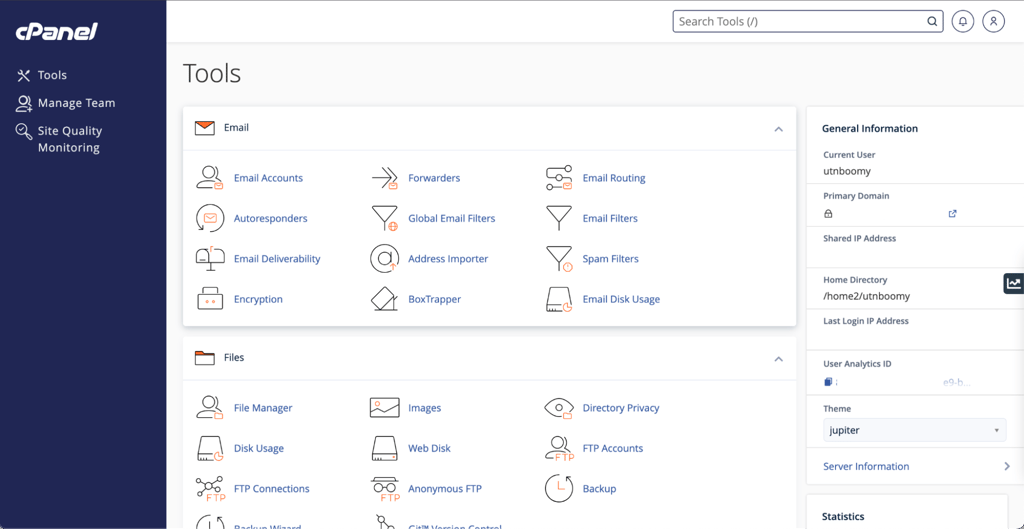
cPanel is one of the most popular control panels on the planet – you probably know it from shared hosting, since many shared hosting providers offer cPanel hosting as a default option. It’s been around for a long time and provides a comprehensive and relatively easy way to manage multiple websites. It is more common with shared hosting than with other hosting types. For VPS hosting, cPanel provides an alternative, easy-to-transition way for those who don’t want to learn a new control panel or use the command line for day-to-day operations.
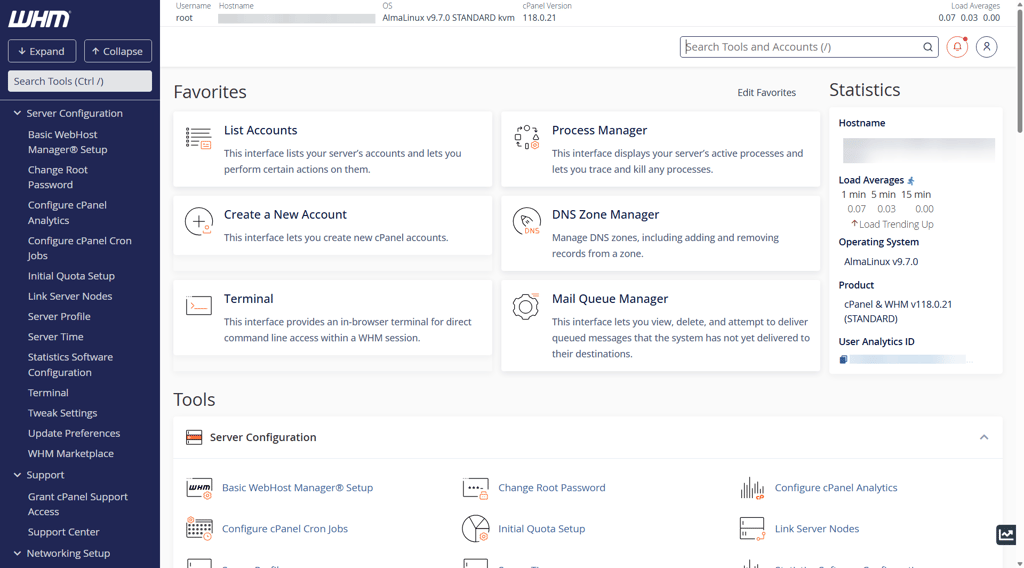
WHM, or a web host manager, is also an administrative control panel – but less for day-to-day operations, and more widely used by server administrators and hosting service resellers. WHM provides an easy way to oversee and manage multiple cPanel accounts (and therefore multiple VPSs), which is useful as a hosting service reseller. It also doesn’t require using the command line.
Best cPanel and WHM VPS hosting 2026 – detailed reviews
The Cybernews research team and I tested and reviewed around 64 hosting providers to find the best ones with cPanel and WHM VPS plans. Below is the final list with my genuine insights and best recommendations – from self-managed to fully managed cPanel VPS host for all use cases.
1. Hostinger – best budget cPanel VPS

| Rating: | |
| Price: | $6.49/month |
| Money-back guarantee: | 30 days |
| cPanel/WHM features: | Pre-configured VPS templates, 1-click cPanel installation |
| Special deal: | Get up to 73% OFF Hostinger VPS |
Hostinger is one of the most popular hosting providers all around. It also offers excellent, affordable KVM VPS solutions, with the option to easily install cPanel as your primary control panel. While the cPanel license is not included in Hostinger’s subscription cost, and will cost you an extra $35.99/month for 5 accounts, the low Hostinger VPS pricing, starting from x/month, makes it one of the most affordable hosts for cPanel.
- Modern hardware for a lower price. Hostinger offers relatively affordable VPS plans paired with AMD EPYC processors and NVMe storage, which not only helps ensure excellent performance but also makes it more than a cheap VPS option. Plus, the KVM virtualization makes it an ideal cPanel option.
- VPS plans come pre-configured. Hostinger offers VPS templates for all kinds of use cases with the option to install cPanel as the primary control panel. This makes the setup process relatively fast – although Bluehost is still the more beginner-friendly provider.
- AI-managed VPS option. Hostinger’s AI agent that can execute tasks gives the VPS dashboard a futuristic feel. I like that even though Hostinger’s VPS is only semi-managed, with the addition of the AI agent, you get a feel for a fully-managed VPS.
Hostinger’s pricing
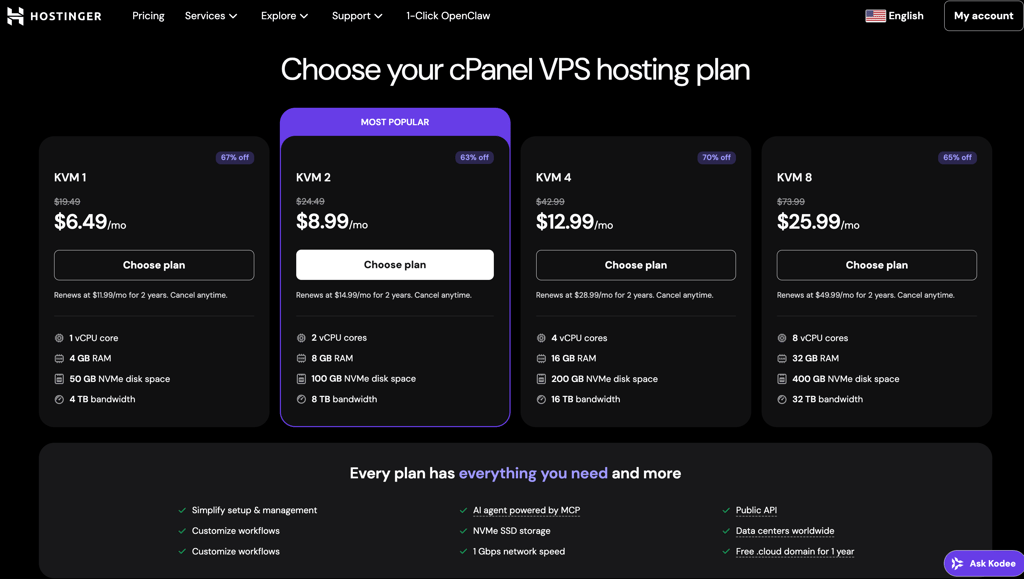
Hostinger offers 4 cPanel VPS subscription plans:
- KVM1 – from $6.49/month, includes 1 vCPU core, 4GB RAM, 50GB NVMe storage, 4TB bandwidth
- KVM2 – from $8.99/month, includes 2 vCPU cores, 8GB RAM, 100GB NVMe, 8TB bandwidth
- KVM4 – from $12.99/month, includes 4 vCPU cores, 16GB RAM, 200GB NVMe storage, 16TB bandwidth
- KVM8 – from $25.99/month, includes 8 vCPU cores, 32GB RAM, 400 GB NVMe storage, 32TB bandwidth
Hostinger is a great solution for budget-conscious users who prefer cPanel over the command line but are seeking an affordable VPS to pair with the cost of cPanel licensing. On the other hand, Hostinger is not the provider for users looking for a fully managed VPS.
2. Bluehost – best cPanel VPS for beginners

| Rating: | |
| Price: | $49.99/month |
| Money-back guarantee: | 30 days |
| cPanel/WHM features: | Pre-installed cPanel, price includes cPanel license |
| Special deal: | Get Bluehost VPS with 55% OFF |
Known for its simplicity and budget-friendly pricing, Bluehost is one of the best cPanel VPS options for beginners. Not only does it come with a pre-installed cPanel for 5 accounts, but also guides you, the user, through the setup.
- Explicit cPanel use guide. While it’s not the only provider with a setup guide – Hosting.com and InterServer being the other ones – I felt that Bluehost offers direction and guidance that is the most explicit and straightforward, leaving no questions unanswered. It is my top choice for beginner VPS and cPanel users.
Bluehost’s pricing
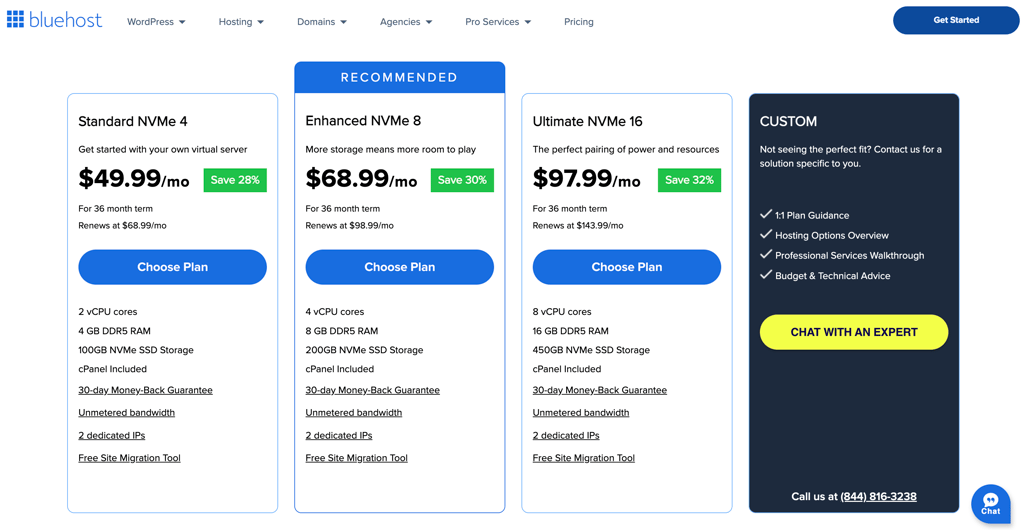
Bluehost offers 3 cPanel VPS plans:
- NVMe 4 – from $49.99/month, includes 2 vCPU cores, 4GB RAM, 100GB storage
- NVMe 8 – from $68.99/month, includes 4 vCPU cores, 8GB RAM, 200 GB storage
- NVMe 16 – from $97.99/month, includes 8vCPU cores, 16 GB RAM, 450GB storage
With pre-installed cPanel and helpful user guidance, Bluehost is the best option for VPS beginners used to cPanel-type server management. However, it is not the most budget-friendly. For cheaper options, users should choose a different host.
3. Hosting.com – high-performance cPanel VPS host

| Rating: | |
| Price: | $28.75/month |
| Money-back guarantee: | 30 days |
| cPanel/WHM features: | Pre-installed cPanel (1 user option), managed VPS |
| Special deal: | Get up to 50% OFF hosting.com VPS |
Hosting.com promises and delivers excellent performance not only with its shared hosting but also with its VPS plans. Plus, its fully-managed VPS plans come with pre-installed cPanel (for 1 user).
- Affordable pre-installed cPanel. Hosting.com’s cPanel VPS plans include a solo user cPanel license, which makes it a more affordable option than Bluehost – even though the pricing can still be high.
- Fast performance guarantees. Hosting.com’s managed VPS solutions not only include full management of updates and network security, but also the promise to make your server as fast as possible.
- Excellent, performance-focused hardware. Hosting.com uses NVMe storage, AMD EPYC processors, and each plan includes dedicated CPU cores – by comparison, Hostinger and Bluehost only offer virtual CPU cores. The top priority is speed and high performance.
Hosting.com’s pricing
Hosting.com offers 4 cPanel VPS plans, each including a cPanel license for a single user:
- Managed cPanel 4GB – from $28.75/month, includes 2 CPU cores, 4GB RAM, 100GB storage
- Managed cPanel 8GB – from $45.42/month, includes 4 CPU cores, 8GB RAM, 150GB storage
- Managed cPanel 16GB – from $70.42/month, includes 8 CPU cores, 16GB RAM, 300GB storage
- Managed cPanel 32GB – from $116.25/month, includes 16 CPU cores, 32GB RAM, 400GB storage
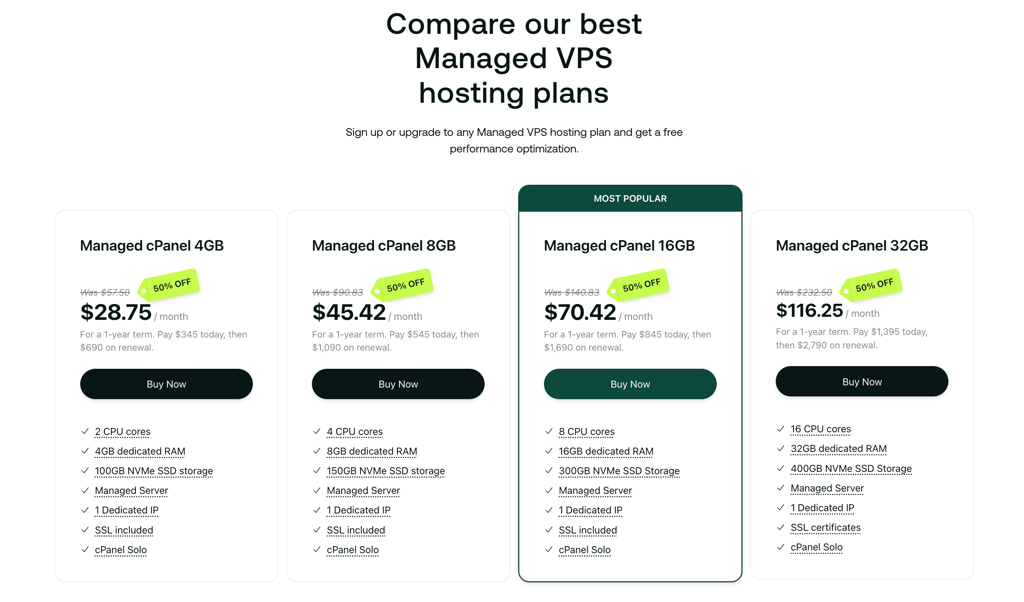
Hosting.com is the ideal solution for those seeking the highest performance for their cPanel VPS. With excellent hardware, dedicated CPU cores, and pre-installed cPanel with a dedicated IP, it is a relatively affordable 1-user cPanel VPS host.]
4. InterServer – best flexible cPanel VPS

| Rating: | |
| Price: | $3.00/month |
| Money-back guarantee: | 30 days |
| cPanel/WHM features: | Optional cPanel as an add-on license |
| Special deal: | Get Interserver VPS for just $3.00/month |
InterServer offers flexible Linux VPS pricing, with more varied CPU and RAM options than Hostinger or Bluehost, and exceptionally affordable VPS plans. Plus, the cPanel license is available for a lower price than buying directly from cPanel.
- cPanel is an optional control panel. The price for an InterServer cPanel add-on starts from $23.00/month for 5 user accounts. This is cheaper than what you pay with Hostinger, which makes InterServer a more flexible option.
- More granular resources. InterServer’s pricing plans are a bit unconventional, offering 6GB RAM options and 40GB storage increase with each plan. On the other hand, there are no options above 2 CPU cores – this felt a bit disappointing and kind of limiting in terms of scalability. Providers like Hostinger or Hosting.com are superior in this case.
- Managed and unmanaged VPS options. Besides offering more flexibility with its plans, InterServer offers both managed and unmanaged VPS options, both of which are compatible with cPanel. This way, you can choose based on your needs and preferences.
InterServer’s pricing
InterServer offers 4 VPS plans:
- 1 Slice – from $3.00/month, includes 1 CPU core, 2GB RAM, 40GB storage
- 2 Slice – from $6.00/month, includes 1 CPU core, 4GB RAM, 80GB storage
- 3 Slice – from $9.00/month, includes 2 CPU cores, 6GB RAM, 120GB storage
- 4 Slice – from $12.00/month, includes 2 CPU cores, 8GB RAM, 160GB storage
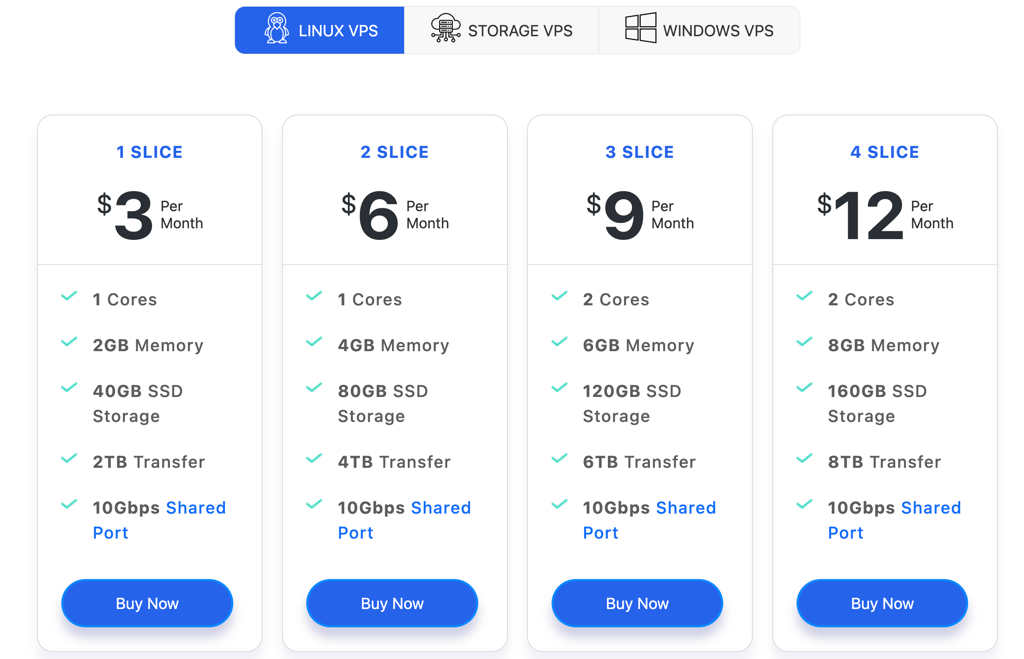
InterServer is a good cPanel VPS option for those looking for more granular resource allocation. Users will also appreciate the flexibility that comes with an unmanaged VPS option.Plus, its cPanel licenses are cheaper than the regular market price.
5. Liquid Web – best managed VPS for cPanel

| Rating: | |
| Price: | $5.00/month |
| Money-back guarantee: | 30 days |
| cPanel/WHM features: | cPanel as a paid add-on |
| Special deal: | Get up to 50% OFF Liquid Web VPS |
A premium VPS hosting provider, Liquid Web offers managed and unmanaged VPS services with cPanel as a paid add-on, with license prices starting from $31.00/month.
- Fully managed VPS with assisted cPanel installation. The managed Liquid Web VPS includes full support and optimization for cPanel, virtually taking everything off the users’ hands. Liquid Web offers a truly premium management experience, which I found even better than Hosting.com.
- cPanel licensing is cheaper than the regular market price. While the cost is not reduced by a lot – barely a couple of dollars – it is still a little bit cheaper than Hostinger’s cPanel add-on.
Liquid Web’s pricing
Liquid Web offers 4 unmanaged VPS plans, with cPanel as a paid add-on option:
- 1GB – from $5.00/month, includes 1 vCPU core, 1GB RAM, 30GB SSD storage.
- 4GB – from $8.50/month, includes 2 vCPU cores, 4GB RAM, 80GB SSD storage
- 8GB – from $22.50/month, includes 4 vCPU cores, 8GB RAM, 2400GB SSD storage
- 16GB – from $45.00/month, includes 6 vCPU cores, 16GB RAM, 440GB SSD
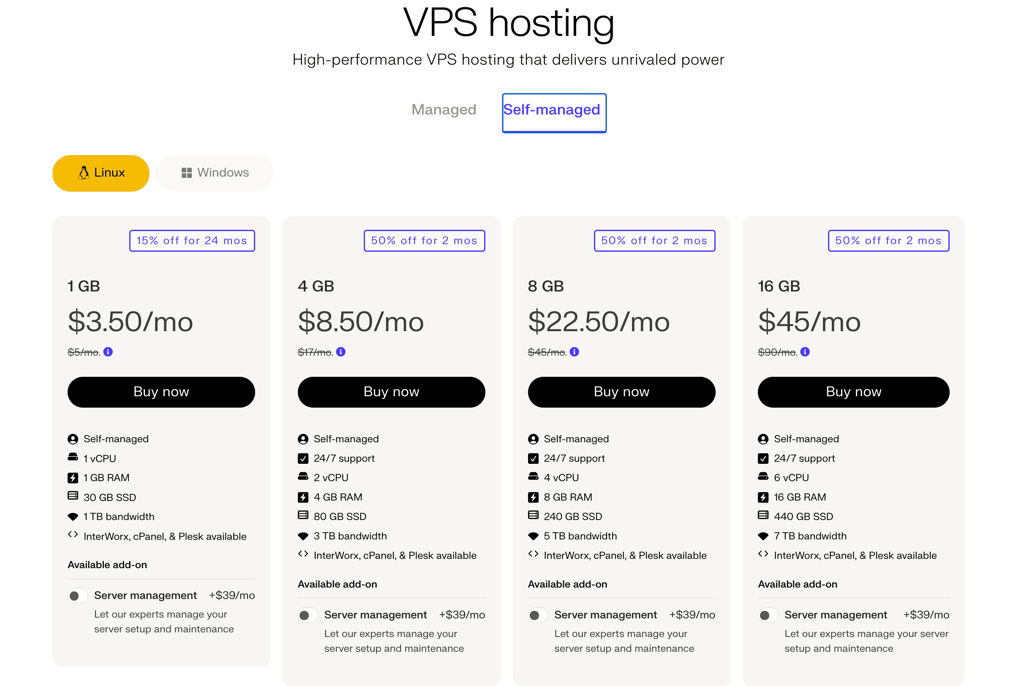
As a truly premium cPanel VPS, Liquid Web is the most suitable for users who would rather entrust server management and optimizations fully to the provider. It is therefore a good option for enterprises, or someone with a relatively high budget.
6. UltaHost – best cPanel VPS for easy scalability

| Rating: | |
| Price: | $4.80/month |
| Money-back guarantee: | 30 days |
| cPanel/WHM features: | cPanel as an add-on, managed installation, and support |
| Special deal: | Get Ultahost, save up to 50% |
UltaHost stands out for easy scalability, making it a strong fit for projects that may outgrow their initial server setup. It offers managed cPanel VPS hosting, highlights easy upgrades for CPU, RAM, and storage without downtime, and pairs that flexibility with root access and high-speed infrastructure. cPanel is not included in the base pricing, but is instead available as an add-on, starting at $19.99/month.
- Downtime-free scaling. With UltaHost, users can upgrade CPU, RAM, and storage without downtime, which is a major advantage for cPanel VPS hosting when a site starts pulling in more traffic or needs more room for additional projects.
- Managed cPanel environment. It offers managed VPS with cPanel, which makes server administration much easier for users who want the familiarity of cPanel without taking on every technical task themselves.
- Flexible server control. UltaHost includes root-level access, so users can start with what they need now and expand later.
UltaHost’s pricing
UltaHost offers 4 VPS subscription plans, each including a dedicated IP:
- Basic – from $4.80/month, includes 1 CPU core, 1GB RAM, 30GB NVMe storage
- Business – from $8.50/month, includes 2 CPU cores, 2GB RAM, 50GB NVMe storage
- Professional – from $13.80/month, includes 3 CPU cores, 4GB RAM, 75GB NVMe storage
- Enterprise – from $17.99/month, includes 4 CPU cores, 6GB RAM, 100GB NVMe storage
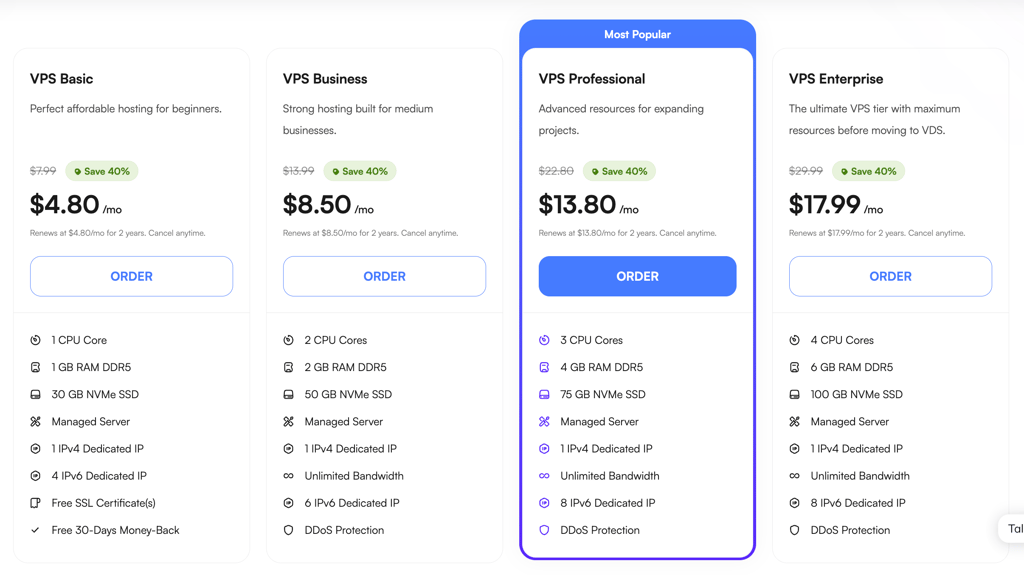
UltaHost is a good choice for users prioritizing future growth and scalability for their projects. It’s especially suitable for those who appreciate managed support and an affordable cPanel add-on, but still want full root access and the option to scale resources without downtime.
7. HostArmada – cPanel VPS with the best support

| Rating: | |
| Price: | $29.95/month |
| Money-back guarantee: | 30 days |
| cPanel/WHM features: | cPanel license included with subscription |
| Special deal: | Get up to 50% OFF HostArmada VPS |
HostArmada is a good option for users who want dependable support with their server. Its VPS plans are backed by 24/7 technical support. HostArmada’s managed environment includes software updates, monitoring, and maintenance. Additionally, HostArmada includes a free cPanel license for 5 accounts with all of its cPanel VPS plans.
- Always-available support. HostArmada promotes 24/7 technical support, which is one of the biggest reasons it fits this nomination and a strong selling point for cPanel VPS users who want help at any hour.
- Built-in recovery options. Its VPS plans include manual snapshots and instant restore, which adds an extra layer of reassurance for cPanel users making changes and wanting a quick way to roll back if needed.
HostArmada’s pricing
HostArmada offers 4 VPS plans, each with a cPanel license for 5 accounts included:
- Web Shuttle – from $29.95/month, includes 1 CPU core, 2GB RAM, 50GB NVMe storage
- Web Voyager – from $35.73/month, includes 2 CPU cores, 4GB RAM, 80GB NVMe storage
- Web Raider – from $46.73/month, includes 4 CPU cores, 8GB RAM, 160GB NVMe storage
- Site Carrier – from $74.23/month, includes 6 CPU cores, 16GB RAM, 320GB NVMe storage
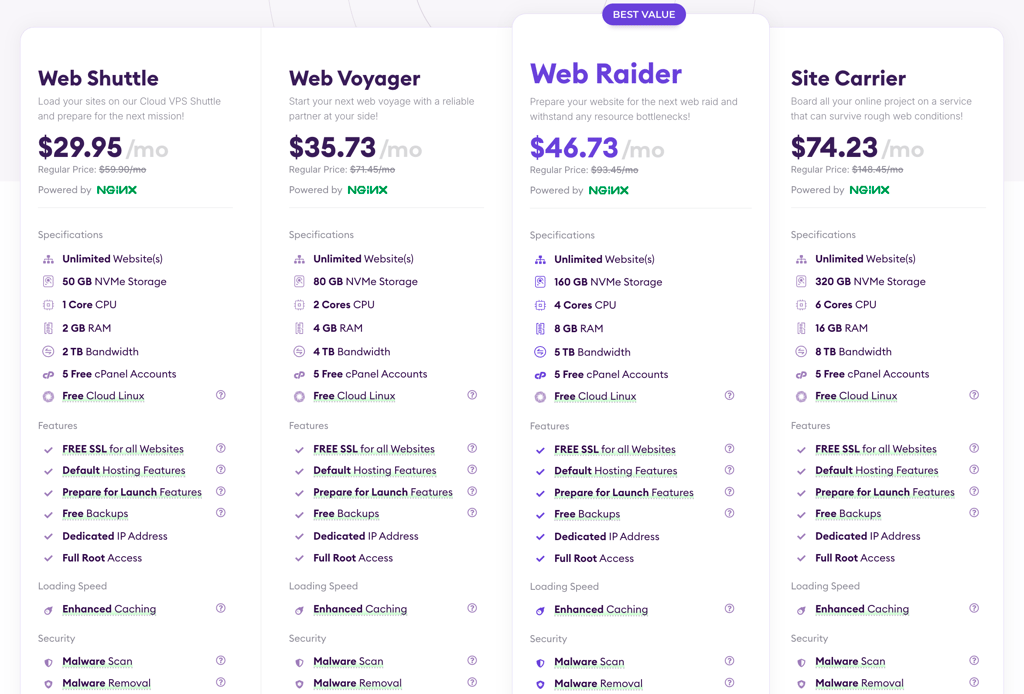
HostArmada is the best choice for users who prioritize premium, comprehensive support. It’s good for users who want a cPanel VPS without having to worry about complex server administration.
How to choose cPanel VPS
Besides the usual considerations when selecting a VPS provider, such as resources based on your workload (like site numbers and traffic) or your purpose (i.e., VPS for reselling or a VPS for multiple SaaS projects), there are a couple of other things to consider when choosing a cPanel VPS:
- Price, licenses, and add-ons. VPS hosts rarely include cPanel licensing in their plan pricing, so you need to carefully consider the additional costs you might incur with a VPS plan purchase. However, sometimes you can save by using discounts and deals or by choosing a long-term plan. Further, make sure the provider offers transparent pricing, and look into the cancellation and refund options. Lastly, consider whether any add-ons you might need come at an extra cost, or are they included in the base VPS subscription.
- Compatibility and virtualization type. Choose a provider with an OS that is compatible with cPanel, such as the latest versions of AlmaLinux, Rocky, CloudLinux, and others. I also recommend going with a KVM virtualization type, as it gives you kernel-level features necessary for an operational cPanel.
- Performance and resources. cPanel can be resource-heavy. Evaluate not only your approximate workload but also cPanel resource usage. The required resources and performance guarantees will depend on your use case, but as a minimum requirement, I recommend going with at least 2 vCPUs, >2–4GB RAM, and >80GB NVMe or another fast storage type.
- Security, backups, and management levels. Consider whether you want to take care of security and backup solutions yourself or entrust the provider with the management of your server. Keep in mind that managed servers tend to be more costly. In case you go with a managed option, review the security measures the host implements – firewalls, malware detection, brute force protection, automatic kernel/OS patching, and 2FA for cPanel/WHM logins are non-negotiable. For backups, ensure the host offers automatic and off-site backups and sound recovery options.
- Scalability and support. Your project will inevitably grow, and you want to be able to plan for such growth. Consider whether the provider makes it easy to scale – add resources without requiring a full rebuild, add dedicated IPs, upgrade bandwidth, and even move regions. Further, ensure the host offers adequate support options, such as migration assistance, to keep your cPanel VPS projects moving smoothly.
Final thoughts
A cPanel or a WHM VPS is a great option for those familiar with the control panel and who want an easier time managing their servers, or even users considering reseller hosting. Here is my final, short decision guide on how to choose a cPanel VPS that suits your needs best:
- For budget projects and affordable but modern VPS – Hostinger VPS
- For VPS beginners and pre-installed cPanel – Bluehost
- For high performance, reliability, and pre-installed cPanel – Hosting.com
- For flexible pricing and granular resources – InterServer
- For a fully managed premium cPanel VPS – Liquid Web
- For easy scalability options – UltaHost
- For the best supported cPanel VPS – HostArmada

FAQ
Who should use cPanel VPS?
cPanel VPS is a strong fit for users who want more control than shared hosting offers, without having to manage everything from the command line. It suits growing websites, agencies, developers, and businesses that need isolated resources and an easier server management interface.
Is cPanel free?
No, cPanel is not free. cPanel requires a paid license for each server. Pricing usually depends on the server type and account tier.
Can beginners use cPanel VPS?
Yes, beginners can use cPanel VPS, especially if they want a graphical dashboard instead of command-line server management. However, a VPS involves more responsibility than shared hosting, so basic knowledge of domains, email, backups, and security helps a lot.
Is cPanel VPS suitable for reseller hosting?
Yes, cPanel VPS works well for reseller hosting because cPanel and WHM let you create and manage separate hosting accounts on one server. cPanel’s licensing also includes VPS cloud licenses, which are commonly used for multi-account and reseller setups.