Does a domain name affect SEO? Myths vs reality (2026)


Launching a new website brings a rush of decisions, and picking a domain name is one I’ve watched trip up more site owners than almost anything else. In my experience, people type a few options into a registrar’s search bar and immediately start second-guessing themselves, unsure if .com really outranks .io, if keeping a keyword in the URL actually helps, or if a shorter domain is the safer bet.
That uncertainty pushes a lot of site owners toward domains chosen to please search engines instead of the people who will actually visit them. I want to clear this up early: a domain name isn’t a direct ranking factor. Google doesn’t hand out ranking points for keyword-stuffed URLs or trendy new extensions.
However, that doesn’t mean the choice is meaningless: your domain still shapes click-through rate, trust, and brand recognition. At the end of the day, all of those feed into your search performance indirectly.
That’s why in this guide, I break down what actually happens with keywords, top-level domains (TLDs), and domain age, so you can pick one that works for both Google and the people actually visiting your site.

The direct vs indirect impact of domain names on SEO
I’ve worked with plenty of site owners who assume their domain name is doing some of the same job as their content or backlink profile. Truth be told – it isn’t, and understanding why comes down to separating direct ranking factors from indirect ones.
Direct factors are the aspects Google’s algorithm actually scores on their own merit. Meanwhile, domain-related signals never touch that scoring directly, they just influence the human behavior that feeds it. See the full breakdown in the table below.
| Direct ranking factors | Domain-related indirect signals |
| Content quality and relevance to search intent | Click-through rate from search results |
| Backlink profile and site authority | Perceived trust and credibility |
| Page speed and Core Web Vitals | Brand recall and repeat, type-in traffic |
| Mobile usability | Natural backlink attraction |
| Site structure and internal linking | Bounce rate once visitors land |
Your domain name isn’t on the left side of that table, and it never has been. Google treats it as a brand identifier, handled the same way as a logo or a tagline, which means it’s useful for recognition, irrelevant to the actual scoring algorithm.
Where the domain earns its keep is everything on the right. A clean, professional domain that consists of your brand name and a .com inspires more confidence than something packed with hyphens and keywords.
That confidence turns into real behavior: people click it more often in search results, other sites and journalists link to it more readily, and visitors who already trusted it before clicking tend to stick around longer once they land.
Obviously, none of this happens overnight. But that steady stream of clicks, links, and repeat visits compounds into the kind of authority Google’s direct ranking factors are actually built to detect. Your domain doesn’t rank your site, it shapes the first impression that decides whether people click, stay, and link back, and that first impression is the raw material direct ranking factors are made from.
The power of exact match domains: premium EMDs that dominate search
Exact Match Domains (EDMs) are domains that contain your primary keyword word-for-word. Meanwhile, Partial Match Domains (PDMs) are domains that include a variation of your primary keyword. Both of these types of domains still carry real weight in specific corners of SEO.
I’ve seen them work well across eCommerce, finance, and local service sites, and the effectiveness isn’t a myth. Where EMDs and PMDs actually get site owners in trouble isn’t the keyword match itself, but overspamming. For instance, strings like buy-cheap-black-running-shoes-for-sale.com read as spam to Google and actual human visitors alike before the page even loads.
Used with restraint, EMDs and PMDs bring a few concrete advantages:
- Natural anchor text. Other sites tend to use your domain name as the link text when they link to you, so your target keyword ends up as anchor text without you having to ask for it.
- Elevated click-through rate. A domain that matches what someone just searched for reads as immediately relevant, pulling more clicks in the results page than a generic brand name would.
- Faster trust with visitors. Searchers recognize what the site does before they even click. This, in return, shortens the trust-building process compared to an unfamiliar brand.
- Proven market dominance. Think Hotels.com, CreditCards.com, and CarInsurance.com – they have all built durable, category-leading businesses on exact match domains, proof that the model scales when it’s backed by real content and authority, not just the name.
There’s a real cost to going all-in on an EMD, though, and it shows up the moment your business grows past what the domain describes. BuyRunningShoes.com works perfectly for a running shoe retailer. However, if that retailer wants to expand into hiking boots or general athletic apparel, the domain starts working against the new inventory instead of for it.
Let’s take another example into consideration – DetroitPlumbing.com. It is a strong local SEO asset for a single-city plumbing business, but it turns into a liability the moment that business expands into other places or adds HVAC services, since the name locks in both a location and a service the company has since outgrown.
An EMD is a bet on staying exactly what your domain says you are, a fine bet for a tightly focused business, but worth thinking through before you lock in a name your company might eventually outgrow.
Choosing your extension: TLDs and local SEO
Not all domain extensions behave the same way in search, and the split falls into two clear categories. Generic extensions get treated as pure branding choices, while country-specific ones actually carry ranking weight tied to geography.
Generic TLDs (gTLDs) and SEO
Search engines have been consistent on this point for years: .com, .net, .org, and newer generic extensions like .shop, .tech, or .app are all treated identically for indexing and ranking.
There’s no algorithmic bonus sitting behind .com that a .shop domain doesn’t also get. If you’ve been holding off on a newer extension because you assumed it would hurt your rankings, that assumption isn’t backed by how, for instance, Google actually works.
Where the extension does matter is user trust, and that’s a real factor even though it isn’t a ranking signal in itself. From my experience, .com still carries the most built-in credibility with searchers, simply because it’s the extension people have seen the most for the past three decades. A .shop or .app domain can absolutely work, especially when it fits the business naturally, but it may need to work slightly harder to earn the same click-through rate a familiar .com gets by default.
Country-code TLDs (ccTLDs) for local SEO
ccTLDs play by a different set of rules. Extensions like .de, .co.uk, or .ca act as geo-targeting signals rather than generic identifiers. For example, when someone in Germany runs a search, a search engine leans toward surfacing .de sites first, because the extension itself tells the algorithm that content is meant for a German audience.
That makes ccTLDs one of the strongest tools available for local SEO, particularly for businesses operating primarily or exclusively within one country. A UK-based service business gets a real, built-in search advantage from .co.uk that a generic .com competitor targeting the same local audience has to work harder to earn.
The trade-off is similar to what I covered with EMDs: a ccTLD can limit your reach the moment you expand beyond that country, since the same signal that boosts you locally can work against you internationally. Worth confirming and rethinking your growth plans before locking into a country-specific extension.
Does domain age affect rankings?
Domain age is one of the most persistent myths in SEO, and it’s worth putting to rest directly. Google’s John Mueller has confirmed multiple times that domain age is not a ranking factor on its own. A domain registered ten years ago doesn’t get treated any better by the algorithm than one registered last week, purely because of its age.
What actually creates the pattern people mistake for an age bonus is accumulated authority. Older domains have simply had more time to build a backlink profile, publish content, and earn the kind of trust signals that factor into rankings. Think of it like this: age is a byproduct of that process, not the cause of it.
This distinction matters most when you’re considering buying an aged or expired domain to fast-track that authority. It can work, but only if the domain’s history is clean, and a lot of expired domains aren’t. Many have been recycled through gambling, spam, or adult content networks before landing back on the market, and that history can drag a toxic backlink profile straight into your new site.
Before buying any expired domain, run a proper audit. Pull up the Wayback Machine and look through past versions of the site to see what it actually hosted, and run the domain through a backlink or spam-score tool to check for red flags in its link profile. Skipping that step means you could be inheriting someone else’s penalty along with the domain.
Best practices for choosing an SEO-friendly domain name
Everything I covered so far comes down to a handful of practical decisions, and most of them are things you can apply the moment you prepare to register a domain. Here are the things you should keep in mind:
- Keep the domain short and easy to spell. Avoid double letters, hyphens, and numbers, since all three are common sources of typos, and a single misplaced hyphen can send a chunk of your direct traffic to a competitor by accident
- Make it brandable. Aim for something brandable, rather than buy-books-cheap.com – a name with room to grow rather than one that locks you into a single product or service
- Match the extension to your audience. Use a ccTLD like .de, .co.uk, or .ca when you’re targeting one specific country and want the local SEO boost that comes with it, and stick with .com when you’re aiming for a broader or international audience
- Research the domain’s history before buying. This matters most for aged or expired domains bought specifically for their existing authority. Run it through the Wayback Machine to see what it hosted previously, and check its backlink profile for gambling, spam, or adult content history before you commit
- Choose a trusted, reliable domain vendor. A reputable registrar like one.com protects your domain with features like WHOIS privacy and optional transfer locks, keeps renewals and DNS management straightforward, and gives you room to add hosting or scale later without switching providers mid-project
Launch your website with one.com
Everything I’ve discussed above is about making smart decisions on paper: picking a brandable name, matching your TLD to your audience, avoiding an aged domain with a dirty history.
one.com is where those decisions actually turn into a live, ranking-ready website, and it’s built to remove the friction at nearly every step I’ve just walked through.
Finding a name worth building on
Rather than staring at a blank search bar, one.com’s Aida AI acts as a domain generator and alleviates the pains of coming up with ideas. The generator takes a short description of your business and returns brandable name options on the spot, pulling from a catalogue of more than 400 TLDs.
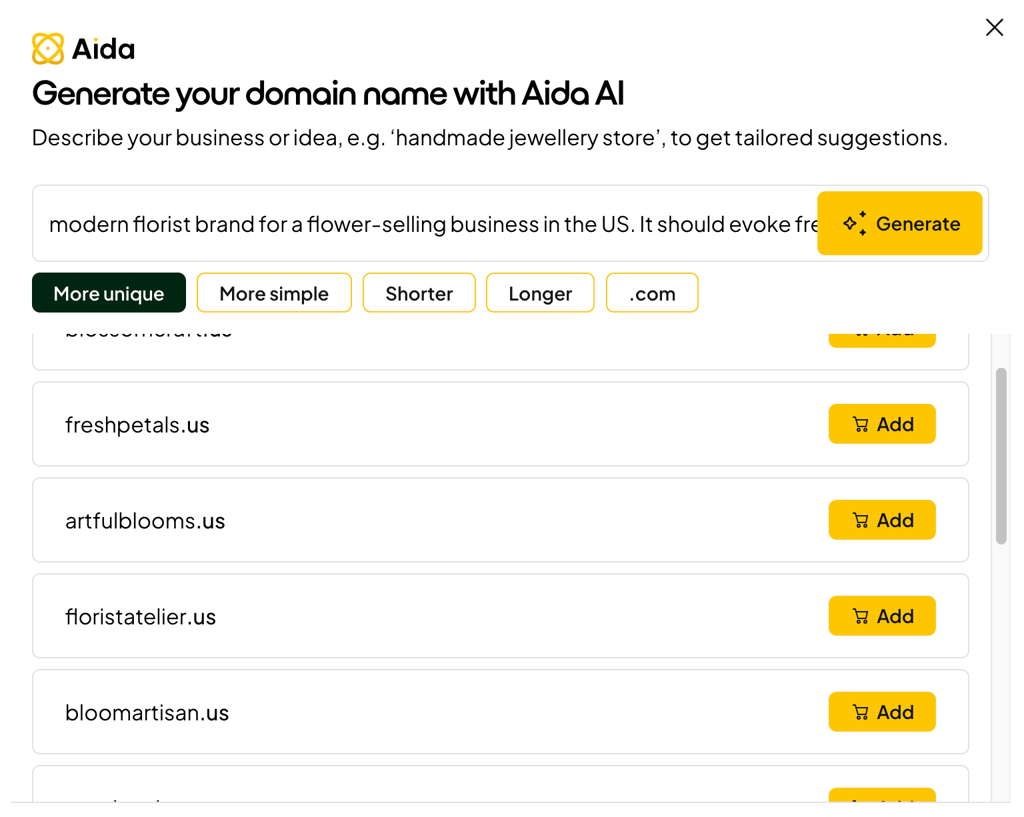
The generator covers both sides of the TLD decision from earlier in this guide: a global .com for broad reach, or a ccTLD like .co.uk, .de, or .be when local search visibility matters more than international reach.
And because you’re registering something fresh rather than buying aged or expired inventory, you skip the Wayback Machine audit altogether. There’s no inherited spam or gambling history to worry about on a domain that’s never belonged to anyone else.
Security that protects the trust you’re building
A domain’s reputation compounds over time, which is exactly why it’s worth locking down from day one. Domain-level add-ons like WHOIS privacy protection, Domain Lock against unauthorized transfers, and full DNS control, including DNSSEC, are available across all of one.com’s plans.
That means the brand equity you build through links, direct traffic, and repeat visits stays attached to a domain nobody can quietly hijack or transfer out from under you.
Plans built around actual SEO needs, not just hosting
one.com’s plans go beyond a basic domain-and-hosting bundle. Every plan bundles a free domain, SSD storage, and mail accounts, and the features scale up in ways that map directly onto the groundwork covered in this article, including tools you’d otherwise need a separate SEO stack for.
| Plan | Best for | Initial price/month (first-year) | Renewal price/month | What’s included |
| Starter | First website | $2.99 | $8.99 | Free domain for first year, 1 website, 1GB RAM, 1 CPU-prio, 1 free email account, 25GB SSD storage, SSL certificate, unlimited data traffic, 1-click WordPress install, daily backups |
| Professional | Growing website | $2.99 | $15.99 | Everything in Starter; plus 3 websites, 2GB RAM, 2 CPU-prio, 5 free email accounts, 50GB SSD storage, daily backup and restore |
| Business | High-traffic sites | $4.99 | $19.99 | Everything in Professional; plus 10 websites, 4GB RAM, 4 CPU-prio, 15 free email accounts, 100GB SSD storage, standard WordPress themes |
| Max | Multiple sites | $9.99 | $29.99 | Everything in Business, plus 25 website, 8GB RAM, 4 CPU-prio, 25 free email accounts, 200GB SSD storage, premium WordPress themes, SiteLock Find |
A couple of these details connect straight back to what I covered earlier. The SSL certificate included on every plan satisfies the HTTPS baseline a search engine expects before it takes a site seriously, and it’s not something a domain name alone can provide.
Meanwhile, the 1-click WordPress install from Explorer upward hands you the site structure and content flexibility that count as genuine direct ranking factors, the kind of work a great domain sets you up for but can’t do on its own.
Two ways to actually build the site
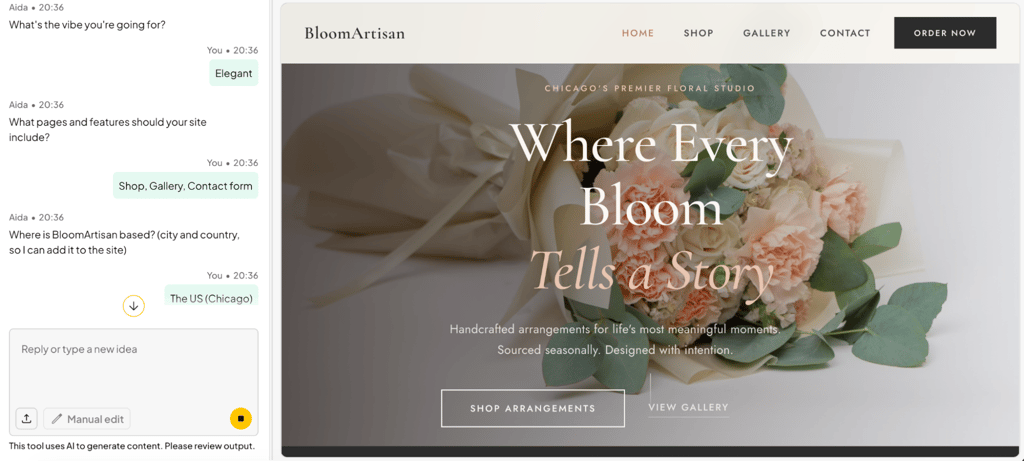
Beyond WordPress, every plan also includes one.com’s drag-and-drop Website Builder for full manual control, or you can hand the job to Aida AI, its AI website builder, describing what you want in plain language and letting it generate a working site around it.
one.com has also earned an excellent rating on Trustpilot across more than 24,000 reviews, backed by two decades serving customers across the globe. If you already have a domain sitting somewhere else, moving it over is a guided, one-time transfer rather than a technical headache.
FAQ
Does changing my domain name hurt my SEO?
Yes, changing your domain name hurts your SEO temporarily. A search engine needs time to reassess trust and authority for the new address. That’s why you’ll likely see a short dip in rankings during the transition. The fix is proper 301 redirects mapping every old URL to its new equivalent, which preserves most of your link equity and speeds up recovery.
Are hyphens in domain names bad for SEO?
No, hyphens in domain names aren’t directly bad for SEO. A search engine doesn’t penalize a domain just because it contains a hyphen. The real issue is perception: hyphenated domains look spammy to users, echo the keyword-stuffed EMDs from the early 2010s, and are genuinely harder to remember and say out loud, all of which quietly drags down click-through rate and direct traffic over time.
Should I buy multiple domain extensions?
Yes, buying multiple domain extensions is worth it, mainly for brand protection rather than SEO. Registering variations like .net or a relevant ccTLD stops competitors or squatters from grabbing them. one.com’s 400+ TLD catalog makes this easy from one dashboard – just make sure to redirect every extra extension to your primary domain with a 301 to consolidate authority.
Does domain registration length affect SEO?
No, domain registration length doesn’t affect SEO. Registering a domain for ten years instead of one doesn’t earn you any ranking advantage, despite a persistent theory that it signals legitimacy to Google. It’s worth doing for practical reasons, like avoiding accidental expiration, but treat it as an administrative safeguard, not an SEO strategy.