How to host your small business website: a step-by-step guide (2026)

For any shop or business, a storefront is the first point of contact for your customers. And in 2026, when increasingly more people are shopping online, that storefront turns into a website. It should be enticing and attractive, but the general presentation is only half of the work. Your website should also be easy to navigate, with a clear layout and, most importantly, run without a hitch. To achieve this, you need to know about different forms of hosting and how each can elevate your website.
In this article, I’ll present a 5-step guide that will help you choose a hosting plan that best matches your needs, discuss how to set up a few details that elevate your professional standing (such as a custom email address), and explain how to host your small business website without extensive coding knowledge.
Step 1: define your website’s requirements
Before you even try to set up your website, you should evaluate the site's and the business's intent and scope. There are several main types of websites:
- Brochure website
- Service website
- eCommerce store
Each serves a distinct purpose, so before launching your page, you should settle on not only the current scope of your business but also on the vision of the website and how you see it expanding. Keeping this vision in mind could help you save some hosting costs, especially if you choose the right website type for your business.
Brochure websites – you can think of them as giant landing pages. Brochure sites often have a static view with the main information laid out in a concise manner, not unlike the marketing brochures they borrow their name from. Because these sites don’t have many (if any) dynamic elements, they require only basic hosting. However, the downside of this type of website is that it has very little room to grow, and if you decide you want to add new elements like databases or interactive tools, you will likely need to change both the hosting type and the website’s layout, too.
Service website – as the name suggests, a service website is meant to support a business that offers some form of convenience or utility. For example, if you’re running a small travel agency, you will need pages that introduce the trips you’re offering, together with calendar integration, a review section, and other dynamic elements. This means the basic hosting might no longer be enough, especially if you’re planning to grow your business, so keep that in mind when planning how to host your small business website.
eCommerce store – the last site type I’d like to mention is an eCommerce store. Good (and large-scale) examples might be Amazon or Etsy. This type requires the site to have product databases and various interactive elements. Due to the site’s monetary nature, you should also ensure security measures and safe payment options are in place. The inclusion of all the additional elements requires a more advanced website type and more extensive hosting capabilities.
Step 2: choose your site builder or CMS (WordPress vs AI builder vs vibe coding)
Once you decide on what type of website you want for your business, the next step is to choose how to build it. The days of leaving this work to professional coders are over, and even a person with little to no experience can comfortably create their own custom sites. In this article, I’d like to highlight three types of site builders.
Self-hosted WordPress – WordPress, or WP for short, is one of the most prevalent site builders for hosting a small business website. It offers many customization options through plug-ins, allowing you to shape and control your site from a single dashboard. This flexibility is highly scalable, which is important for growing businesses. If you’re a WP beginner, keep in mind that plug-ins might require some tinkering to best suit your needs.
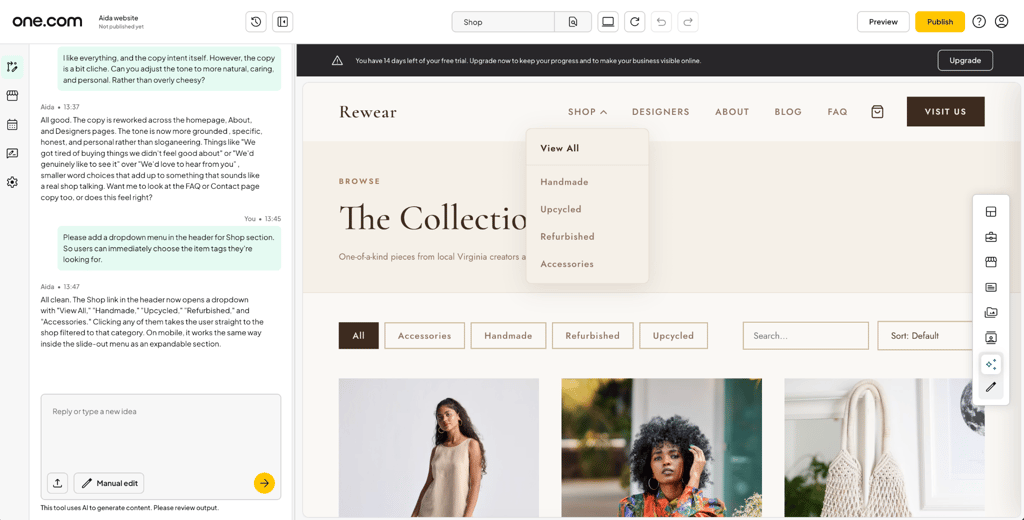
Conversational AI website builders – another option is to build your website using AI. Instead of working with templates and figuring out plug-ins, you can let AI handle the foundational details. Conversational AI builders, like one.com's Aida AI Website Builder, work by asking you questions about your business and generating a website draft to best match your intent. You can then adjust the pages using a visual editor, without having to start from scratch. What’s more, the process is a lot quicker than building a website from templates, as with WordPress.
Vibe-coded and AI-generated sites – vibe coding is a new way to create websites. It uses LLMs, such as Claude or Gemini, to generate software code according to your specifications. This code (HTML, CSS, or JavaScript) can then be uploaded to a hosting website, such as one.com. You can upload static files directly onto the platform, using the browser-based File Manager or standard sFTP. This allows beginner users to combine custom code with the site domain in a single system. Experienced users will have full creative control without having to juggle complex infrastructure elements.
Step 3: register your custom domain name
When it comes to learning how to host your small business website, a domain name is an important part. It needs to be clear and, most importantly, reliable. For example, if you see a business site under the domain business.weebly.com, it seems like an extension of Weebly rather than a unique business. Instead, you should register a custom domain, like yourbusiness.com, to convey to the visitors that the site and your brand are interconnected.
To further enhance the trustworthiness of your domain, it’s advisable to choose an appropriate extension. You can pick .com for international recognition, while country-coded extensions, like .co.uk or .de, underline the connection to the local market. You should consider how you envision your business scaling when choosing an extension. Keep in mind that many hosting services tend to bundle a 1-year custom domain lease with their plans, which helps get your site off the ground sooner. After the year is up, you will need to renew your domain name lease to keep your site accessible.
Step 4: choose the right type of web hosting
A website’s performance can also be impacted by the type of hosting you choose. Here are a few of the more popular hosting types.
Shared web hosting
As the name suggests, shared hosting relies on sharing resources with other users on the same server. You will have your own elements, files, and database to make your site look unique, while sharing server computing power and storage. Shared hosting is an ideal choice for small businesses or startups because it offers an exceptionally low barrier to entry with zero technical setup required.
Out of the box, shared hosting plans typically bundle all essential features, such as an SSL certificate, professional email accounts, built-in website builders like Aida AI Website Builder, and 1-click WordPress installation, so first-time site owners can launch immediately without needing to configure a server.
Additionally, server upkeep, infrastructure management, and ongoing security patching are entirely handled by the hosting provider, eliminating the maintenance burden that unmanaged servers present.
VPS / Cloud Server Hosting
VPS (Virtual Private Server) and VPS Cloud Server hosting bridge the gap between shared plans and fully dedicated infrastructure. While multiple users reside on the same overall physical hardware, VPS hosting partitions dedicated, guaranteed resources (such as specific CPU and RAM allocations) for your site. This ensures that even if another website on the server experiences a sudden traffic spike, your site remains unaffected.
VPS and cloud server infrastructure offer advanced customization and full root server access, making them extremely valuable for experienced developers or rapidly growing applications. However, this flexibility comes with a trade-off: unlike managed shared hosting, VPS users are often responsible for managing server maintenance, security patches, and configurations on their own, which can be daunting for beginners.
To help you get a better understanding of how to host your small business website, here’s a comparison of some of the more important aspects of hosting types:
| Feature | Shared hosting | VPS / Cloud Server hosting |
| Cost | Lowest | Moderate to High |
| Performance | Good for most small sites | Excellent, with guaranteed resources |
| Ease of use | Very easy | Advanced |
| Scalability | Standard | High |
| Server management | Provider handles everything | Customer manages server and maintenance |
The hidden trap of free web hosting
Like with many digital services, you might find free website hosting offers. However, as the saying goes: if it’s too good to be true… Many free services provide the bare minimum and charge for any add-ons. For example, you might be able to build a website using only a few templates, very few pages, and interactive elements. If you’d like to expand template selection or have a more intricate site design, you will need to pay additional fees.
What’s more, your website won’t even be yours, since free services mostly offer domain names with their own brand attached, such as business.weebly.com. From a technical point, subdomains can impact your SEO results, which is especially important in online marketing. If you have a site with a subdomain, your links will have less authority, and search engines will find it difficult to evaluate your site because, through the subdomain, you will be tied to other websites within the same free service. This can greatly impact not only SEO but user trust too, as subdomain sites have issues building reputation.
Free hosting services may also come with security risks. As I mentioned above, you will only get the bare minimum needed to launch your websites, and oftentimes, the free service will fill your site with ads. Because you’re essentially only borrowing a domain, you will have little to no control over these advertisements, which can range from offensive to malicious, and your brand will be tied to them.
Free hosting might be enough for personal websites or low-scale temporary projects, but to build a brand, you not only need a site – you should consider visibility, user experience, and even technical SEO and SERP results.
Bandwidth and SSD storage: how much space do you actually need?
Now that you have decided what type of website you want to create and how you’d like to host it, another important step is to identify the resource requirements.
SSD (Solid State Drive) serves as storage for all the files on your site, including text, images, videos, and even databases. SSDs are faster and smoother than their predecessor HDDs, which helps websites load more quickly. Different types of websites require different amounts of storage, and naturally, the more intricate your website, the more storage you will need.
Another important factor is bandwidth – the amount of data transferred between your site and visitors. If the site has many elements it needs to load – or if there’s an influx of visitors – bandwidth usage goes up.
Estimation of typical requirements for small businesses
| Website type | Recommended SSD storage | Monthly bandwidth |
| Simple brochure or service website | Less than 1GB | Less than 5GB |
| Active blog or content-rich business website | 2–5GB | 10–50GB |
| eCommerce store | 5–20GB | 50–200GB |
In most cases, if you’re just starting and want to learn how to host your small business website, a starter plan with 25GB/50GB of SSD storage is more than enough. For example, you can choose a starter plan from a reputable service like one.com web hosting that is cost-efficient and covers your website’s resource needs without overpaying for unnecessary features or storage. And as your website grows, you can upgrade to higher-tier plans with additional storage and features when needed.
How your web host directly impacts Google SEO
SEO is not just keywords or proper link maps. Your website’s infrastructure also affects how search engines, including Google, interact with and respond to your site. An important measurement of this interaction is speed.
TTFB (Time to First Byte) is the time between a browser requesting a page and receiving the first byte of data. The faster the TTFB, the sooner a browser can start loading the page, the sooner a visitor sees it. Reportedly, a good TTFB is generally under 200ms, and if it takes longer than 600ms, it can hurt your site’s performance.
Hosting infrastructure also affects TTFB, so your hosting choice matters:
| Hosting factor | Effect on TTFB |
| Shared hosting | High-quality shared infrastructure provides solid response times for most small businesses while keeping costs accessible. |
| VPS/Cloud hosting | Delivers very fast TTFB due to dedicated compute resources and scalable server environments. |
| Server location | Physical distance to the user adds latency, so a server in the US serving a user in Singapore will lag more |
| Server hardware/software | SSD vs HDD, database optimization, and caching layers all affect processing speed |
| Traffic load | Overburdened servers slow down during traffic spikes, which can increase TTFB |
Another measure of a site’s speed is LCP (Largest Contentful Paint), which shows how long it takes to load the largest visible element on the page. This can be an image, a banner, or even a block of text. LCP is also closely related to TTFB because the LCP process can’t begin before a response from the site is issued.
LCP is also part of Core Web Vitals, which Google uses to evaluate a page. It’s important to the ranking system – having better Core Web Vitals can give you an edge, while poor ones might impact your website’s performance.
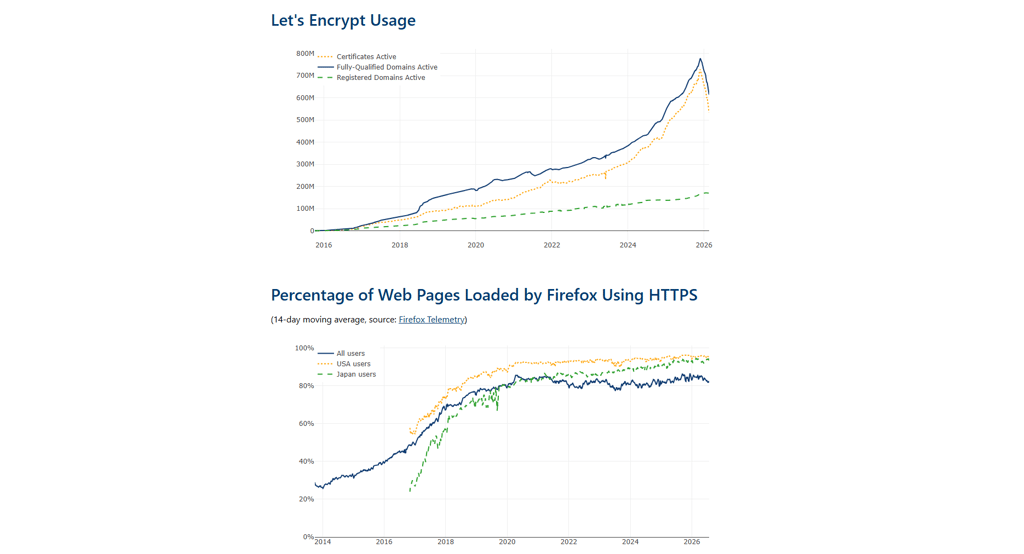
Rankings and SEO evaluation are also impacted by the security of your site. HTTPS encryption and SSL certificates will help visitors feel more assured in the legitimacy of your business. From a technical standpoint, HTTPS is considered in rankings, and using the outdated HTTP might result in visitors getting a warning about an unsafe connection, which might discourage them from staying or returning. SSL certificates are often included in premium hosting plans; for example, one.com offers a Wildcard SSL certificate from Let's Encrypt when you use its name servers.
You should also consider the physical distance between the server hosting your site and potential visitors. Let’s say you’re planning on hosting a small business website meant for a US client base. If your server is located in Europe or Asia, it will take longer to load pages for visitors from the United States. Alternatively, if your site is hosted in the same region as your main visitor base, it will reduce latency and provide a smoother experience.
Step 5: install, secure, and brand your website
Nowadays, modern hosting simplifies the process of launching your website. If we take WordPress as an example, you once had to create and configure WordPress databases and files. Current hosting services let you install and automate the process of preparing WordPress to meet your needs. This simplifies the entire launch because you no longer need to have extensive technical knowledge.
The security of the site mainly depends on the aforementioned SSL, which encrypts the connection and enables HTTPS. Without those two elements, your page will likely display warnings to all visitors. So, an SSL certificate is a must if you want your business website to be trustworthy.
One last element that solidifies your business as a professional outlet is an email address. Likely most of your communication with customers and visitors will include this seemingly small detail, but a branded email is more impactful when building brand recognition than a generic email address. Many hosting plans include the custom email service too, allowing you to manage your site and emails from the same platform.
Simplify your business launch with one.com
Now that we’ve gone over what makes for a good website and how to host your small business website, it’s important to choose a service that will provide as many benefits to small businesses as possible. Whether it’s your first website, you’re thinking of relaunching your brand, or simply want to grow, it’s advisable to have many features bundled into one plan for ease of access and maintenance. That’s where one.com web hosting comes in.
With one.com, you can choose a hosting plan that fits your needs: Starter, Professional, Business and Max. The service offers high-speed shared web hosting, SSL certificate, custom email (with more accounts available at higher tiers), and 24/7 technical customer support. Users may even choose between a 1-click WordPress install or the Aida AI Website Builder, which enables a smooth and easy launch of your site. You can even save on costs by taking advantage of the promotional offer, which provides a free custom domain for the first year.
one.com helps you consolidate tools and ensure a smooth launch of your website. If you’re looking for an all-in-one solution, check domain availability on one.com and host your business website today. While it’s a major step for your business, the launch of your website doesn’t have to be overwhelming or complicated when you have the right services at your disposal.
FAQ
1. Can I host my website for free?
Yes, you can host a website for free, but free hosting typically comes with significant drawbacks, such as third-party ads, shared subdomains, little to no security, and reduced reputation. You also won’t have a professional email address, which further alienates customers.
2. How much does hosting a business website cost?
The cost depends on the type of hosting you choose. Shared hosting plans generally start at $3–10/month, making them an affordable, feature-packed option for small businesses. VPS or cloud hosting plans typically range from $15–50/month, offering greater performance, scalability, and resource allocation.
3. What is the difference between domain registration and hosting?
The difference between a domain and hosting is what each provides for your website. A domain name is the address you have to enter into a browser to reach your site. It should be unique and user-friendly. Hosting, meanwhile, is the service that allows you to place your website’s files on a server, which facilitates connections and data transfers between the site and visitors.
4. Do I need professional email hosting?
Yes, because professional email hosting gives your brand more credibility and presents a professional communication to clients and visitors. What’s more, it protects your correspondence because it’s extremely hard to fake a professional email.