Fastest hosting for WordPress in 2026
Our in-house experts conduct internal independent, hands-on testing and transparent reviews of web hosting providers by using custom-built tools or utilizing industry-recognized tools and methods to ensure impartial and evidence-based assessments.
Using the same criteria for all services, we share our detailed methodologies and practices to help customers make informed hosting decisions.
Learn more

Based on my latest global testing, WordPress.com is the fastest WordPress hosting provider overall in 2026. It delivered the lowest average latency across all tested locations, with just 34.7ms in Europe, 105ms in the US, and 52.3ms in Asia.
Get up to 69% OFF Wordpress!I’ve been building websites on WordPress for over 3 years and the one thing I’ve learnt is that it doesn’t matter how good your website is if it doesn’t load fast. In fact, if your website doesn’t load within the first 3 seconds, you’ve already lost half of your visitors. The rest will end up with a poor user experience and most likely won’t spend any money or come back. So, picking the right host is just as important as making sure your website looks and feels good.
To find the fastest WordPress hosting providers, I teamed up with the Cybernews research team and hosted my websites with 64 different web hosts. Then, I selected the top 7 hosting services with the best response time, loading time, and overall uptime results. This list is based on my latest March 2026 performance tests.
7 fastest WordPress hosting providers in 2026
To find the fastest hosting for WordPress, I ran a ton of tests with the help of the Cybernews research team, including uptime monitoring, loading time, and average response time to see how it performs in real-world performance. I used Grafana and K6 for testing.
| Provider | Rating | Average load time | Uptime | Pricing | Exclusive deal |
| WordPress.com | 54.19ms | 100% | $2.75/month | Get up to 69% OFF Wordpress! | |
| Hostinger | 246.19ms | 100% | $2.69/month | Get up to 81% OFF Hostinger + 3 free months | |
| Bluehost | 1.60s | 100% | $1.99/month | Get up to 78% OFF Bluehost | |
| SiteGround | 1.06s | 100% | $2.99/month | Special deal! Get up to 83% OFF SiteGround + FREE TRANSFER | |
| Liquid Web | 83.77ms | 100% | $4.00/month | Get Liquid Web, now 52% OFF | |
| InMotion Hosting | 87.69ms | 100% | $4.59/month | Get InMotion Hosting, now 71% OFF | |
| IONOS | 853ms | 100% | $1.00/month | Get up to 94% OFF IONOS |





Our in-house research team and expert writers work hand in hand to regularly test hosting services and provide accurate and fact-checked information. Discover the ins and outs of how we test and evaluate website hosting providers.
Why does WordPress website speed matter?
Website loading time matters for a number of reasons, no matter if your website is built on WordPress or another platform. Here are the main ones:
- Higher conversion rates. Numerous studies show that faster websites get more conversions. For example, pages that loaded in 2.4 seconds had a 1.9% conversion rate, while 5.7+ seconds conversion rate was lower than 0.6%. This could mean more sales and more revenue, if that’s the goal of your website.
- Improved SEO rank. Page loading speed directly affects ranking, so websites that are well optimised rank better, and, in turn, get more people visiting their website.
- Positive user experience. Visitors are quick to leave websites that take more than 3 seconds to load, especially on mobile. A website that loads quickly ensures the user experience is as smooth as possible.
7 fastest WordPress hosting providers – detailed testing results and reviews
Together with our expert team, I have tested a bunch of hosting providers to present you with the fastest WordPress hosting solutions. To ensure the most accurate evaluation, I built a WordPress website using each provider. This allowed me to assess providers’ performance, WordPress-specific features, and speed.
1. WordPress.com – overall fastest WordPress hosting service

| Rating: | |
| Price: | From $2.75/month |
| Money-back guarantee: | ✅ Yes, 14-day |
| Average load time: | 54.16ms |
| Uptime: | 100% |
| Best deal: | Get up to 69% OFF Wordpress! |
WordPress.com is fast because it comes with a variety of built-in performance tools, such as caching, CDN, automatic optimisation, and Jetpack. When I set up a test site, all these features were active or easy to enable, so the site loaded quickly without manual optimisation.
WordPress.com performance testing
I tested WordPress to monitor uptime, latency, and overall stability. During this period, WordPress recorded 100% uptime and 99.98% reachability, with only a brief, isolated error spike. This shows excellent stability and reliability across regions.
| Region | Average latency |
| US | 105ms |
| EU | 34.7ms |
| Asia | 52.3ms |
WordPress delivered consistently fast response times, with the lowest latency in Europe and slightly higher latency in the US and Asia. Overall, it showed very high availability and stable performance, with only minor transient spikes that did not affect general usability.
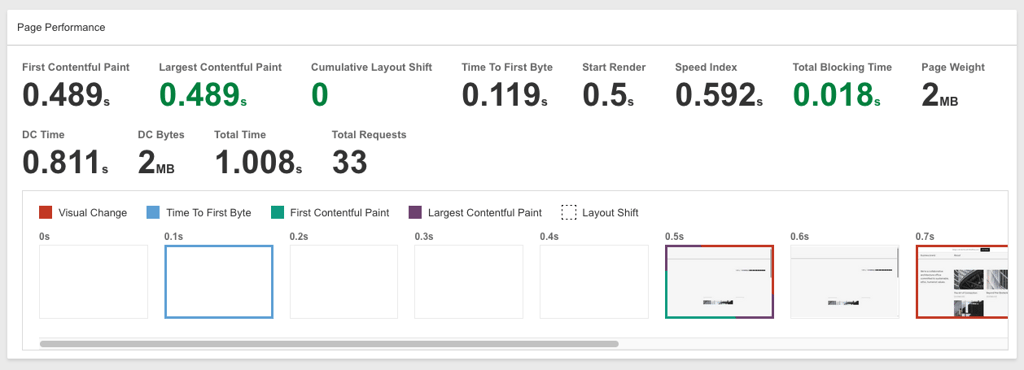
WordPress.com WordPress features and speed optimizations
- Global edge infrastructure. WordPress.com uses a worldwide server network and built-in CDN, so my website loaded quickly regardless of visitor location. I didn’t need to configure anything manually.
- Built-in caching and performance optimisation. Server-level caching and optimisation tools are enabled automatically. My site was fast from the start without installing additional plugins.
- Jetpack performance tools included. Built-in image optimisation, lazy loading, and performance monitoring helped improve loading speed without extra setup.
- Automatic WordPress and plugin updates. The platform keeps WordPress core and essential components updated automatically, which helps maintain both speed and security.
- Developer tools and advanced optimisation options. Features like SSH, WP-CLI, and GitHub integration gave me more control when testing performance improvements and deploying changes.
- Global data centres. With servers distributed worldwide, WordPress.com ensures low latency and fast loading times for international audiences.
If you want to learn more about the provider, read our full WordPress.com review.
2. Hostinger – overall fastest WordPress hosting service

| Rating: | |
| Price: | From $2.69/month |
| Money-back guarantee: | ✅ Yes, 30-day |
| Average load time: | 246.19ms |
| Uptime: | 100% |
| Best deal: | Get up to 82% OFF Hostinger + free months |
Hostinger is by far my top pick for fast WordPress hosting. It outperformed other WordPress hosts in our speed tests and offers one of the lowest starting prices. It’s also endorsed by WordPress.org for its focus on speed and security, which adds an extra layer of trust for me. On top of that, Hostinger includes a dedicated WordPress section in hPanel and a customized WordPress admin dashboard, making site management smooth.
Hostinger’s performance testing
I tested Hostinger to see how it performs under real-world conditions. Together with the Cybernews research team, I used a combination of in-house and industry-approved tools to measure uptime, server response times, and stress performance. Our tests included fully built websites to simulate real visitor experiences and check how Hostinger handles traffic spikes.
During this period, Hostinger maintained 100% uptime, proving reliable even under high load. We also measured page load times from multiple regions to see how location affects performance.
| Region | Average latency |
| US | 295ms |
| EU | 87.5ms |
| Asia | 396ms |
London delivered the fastest results, which is expected, given Hostinger’s strong European infrastructure. The US and Asia results were slower but still within a good range for shared hosting.
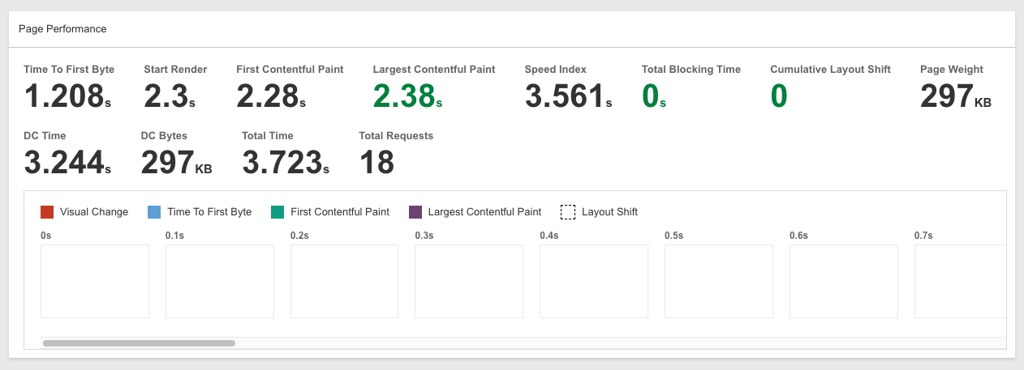
Hostinger’s WordPress features and speed optimizations
- AI features. Hostinger’s AI features are my personal favorite because of how convenient they are, especially for complete beginners. Hostinger includes an AI Content Creator, WordPress AI troubleshooter, and AI assistant.WordPress vulnerabilities scanner. Scans your site and alerts you about vulnerabilities in WordPress software, plugins, and themes. Again, I find it great for those who aren’t super tech-savvy or are just starting to learn about website security.
- Cache manager. A custom built caching solution that I run for faster website load times and increased speed.
- LiteSpeed Web Server technology and caching. The number one technology for quicker content delivery. I like it for websites that have or are anticipating sudden spikes in traffic since it can handle more visitors.
- Multiple server locations in different continents. Depending on where most of your audience is based, you can choose the most optimal location (the US, the UK, Lithuania, France, Germany, Brazil, India, or Indonesia) – it’s what I did to get better speed and overall performance.
- Numerous PHP versions. The provider allows you to host your website on your own terms by letting you choose the latest PHP version. I appreciate this feature since the PHP version can significantly impact security, speed, and overall performance of your website.
- WordPress core and plugin auto-updates. Hostinger automatically takes care of all WordPress updates, which I like for peace of mind, especially as a beginner.
If you want to learn more about Hostinger and its features, read our full Hostinger review.
3. Bluehost – fast WordPress hosting service with excellent uptime

| Rating: | |
| Price: | From $1.99/month |
| Money-back guarantee: | ✅ Yes, 30-day |
| Average load time: | 1.60s |
| Uptime: | 100% |
| Best deal: | Get up to 78% OFF Bluehost WP |
I recommend Bluehost for WordPress due to a combination of great speed testing results and a user-friendly experience. It’s also recognized by WordPress.org as the best hosting for WordPress. Bluehost is designed for beginners, and its price reflects that as well – it’s one of the cheapest hosting solutions you can find.
Bluehost’s performance testing
Together with the research team, I measured server response times from multiple global locations to evaluate how quickly the site loads for visitors in different regions. During this period, Bluehost maintained 100% uptime.
| Region | Average latency |
| US | 606ms |
| EU | 1.72s |
| Asia | 2.22s |
The results show that Bluehost performs best in the US, while response times increase significantly for visitors in Europe and Asia.

Bluehost’s WordPress features and speed optimizations
- Cloud infrastructure. It efficiently manages traffic spikes, ensuring consistent service without downtime.
- SSD storage. By using SSDs, Bluehost enables faster data retrieval compared to traditional hard drives. SSD storage is now more common, and I always recommend going for a hosting solution that supports it.
- CDN. A global network of servers delivers your site’s content from the closest location to each visitor, speeding up access and reducing latency. This means that even if your visitors are far away from the server, they’ll still get good speeds – very important for those focusing on international audiences.
- Latest PHP version support. Bluehost supports the latest PHP versions, providing faster processing speeds and enhanced security.
- Free malware scanning. Bluehost provides free malware scanning to help detect and remove potential threats. I run these scans regularly, and they serve as an additional layer of security for my website.
- AI-powered Website Builder. Bluehost’s AI Website Creator lets you build a website in minutes using AI. As someone short on time, I appreciated how quickly I could create a minimalistic yet functional site during testing.
- Yoast SEO integration. Bluehost supports the popular Yoast SEO plugin, helping you to optimize your content for search engines and improve rankings. They’re especially useful if you run a blog, but are just as important for any other website, like an online store.
- Automatic WP updates. Bluehost takes the guesswork out of maintenance by managing WordPress updates for you. Again, great for newbies.
If you want to learn more about the provider, read our Bluehost review.
4. SiteGround – WordPress hosting with the best performance optimization tools

| Rating: | |
| Price: | From $2.99/month |
| Money-back guarantee: | ✅ Yes, 30-day |
| Average load time: | 1.06s |
| Uptime: | 100% |
| Best deal: | Get up to 83% OFF SiteGround + FREE TRANSFER |
SiteGround stands out for its built-in tools that boost WordPress speed and performance. Features like SuperCacher, SG Optimizer, and automatic updates handle caching, site optimization, and security with minimal effort, letting you get a fast, smooth website without fiddling with complicated settings.
SiteGround’s performance testing
I evaluated SiteGround by tracking how quickly a live test website responded to visitors from different parts of the world. This helped me see whether performance stays consistent depending on where your audience is located. During the entire monitoring period, SiteGround maintained 100% uptime.
| Region | Average latency |
| US | 416ms |
| EU | 986ms |
| Asia | 1.77ms |
SiteGround delivered its fastest response times in the US, while Europe was slightly slower. Asia showed the highest latency, which is fairly typical when servers are located farther from the visitor.
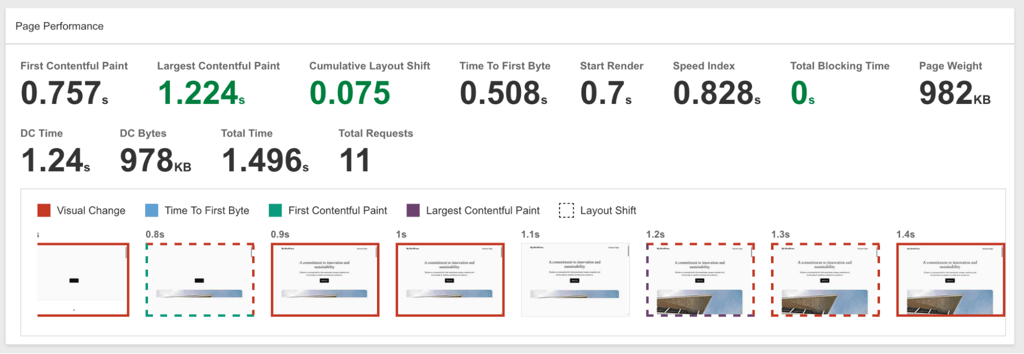
SiteGround’s WordPress features and speed optimizations
- Multiple PHP versions and Ultrafast PHP. SiteGround offers the latest PHP version. However, I particularly enjoyed using their in-house Ultrafast PHP feature, which can improve your website speed by up to 30%.
- SuperCacher. A 3-layer caching tool featuring NGINX Direct Delivery, Dynamic Cache, and Memcached. It helps to increase loading speed and traffic handling abilities. I always keep it enabled for improved performance, especially if I’m anticipating an increase in traffic.
- Speed Optimizer plugin for WordPress. Lets you manage cache settings and comes with speed-accelerating tools like image optimizations and lazy loading.
- Servers on 4 continents. SiteGround offers servers in North America, Europe, Asia, and Australia. So, you can choose the most optimal location for your target audience quicker.
- WordPress Auto-Migrator plugin. A user-friendly migrator plugin that allows you to transfer your website effortlessly. I like that the feature is completely free and, most importantly, results in little to no downtime.
- Security Optimizer WP plugin. Adds robust security features to protect your site against malware, bots, and other potential threats. I find the activity log the most useful as it helps me identify suspicious activity.
- WordPress Autoupdate. It keeps your WordPress version up to date, ensuring you're always using the latest version for optimal performance and security. It also creates a backup of my website before updating in case something goes wrong.
- WP-CLI and SSH. In-house SSH provides secure, encrypted access to manage files and databases, while the pre-installed WP-CLI allows for easy WordPress updates and theme installations via the command line. You can also use it to create posts or delete them.
To lean more about this provider, read our extensive SiteGround review.
5. Liquid Web – advanced speed-focused measures for WordPress sites

| Rating: | |
| Price: | From $4.00/month |
| Money-back guarantee: | ✅ Yes, 30-day |
| Average load time: | 83.77ms |
| Uptime: | 100% |
| Best deal: | Get Liquid Web, now 52% OFF |
Liquid Web earns its spot for its advanced speed-focused setup built specifically for WordPress. It offers fully managed hosting with performance-optimized solutions for demanding sites. While it’s slightly pricier than entry-level options, it’s a powerful choice for businesses and larger projects that prioritize speed and reliability.
Liquid Web’s performance testing
When testing Liquid Web, it stood out as the only provider on this list that backs its 100% uptime promise with a formal SLA, meaning you’re eligible for compensation if downtime occurs. During the testing period, Liquid Web maintained 100% uptime and handled traffic surges with ease, reflecting its strong infrastructure for professional and business-grade hosting.
| Region | Average latency |
| US | 98.2ms |
| EU | 12.0ms |
| Asia | 130ms |
Liquid Web delivered exceptionally fast response times in Europe and the US, with slightly higher latency in Asia, but still very competitive for a hosting provider.
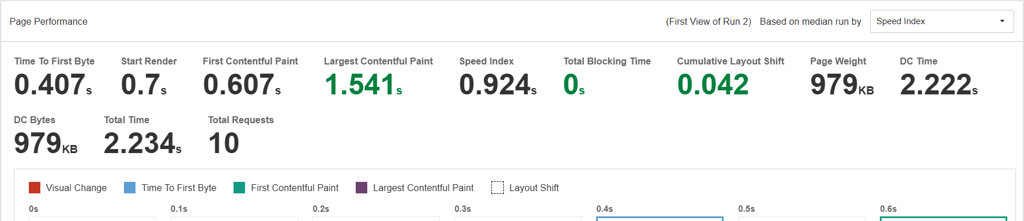
Liquid Web’s WordPress features and speed optimizations
- Virtual private server infrastructure. Liquid Web has VPS plans for WordPress, which are automatically faster and better optimized, mainly because you don’t have to share any of your resources.
- Solid Security Pro plugin. Every Liquid Web user gets access to Solid Security Pro. It protects your website from automated attacks, lets you monitor suspicious activity, and minimizes spam.
- Hassle-free migration. With Liquid Web's WordPress migration tool, you can effortlessly transfer your website. In my case, it took just an hour, but websites with more elements may take longer.
- Multi-site management. Provides a single dashboard to keep multiple WordPress sites organized in one place, making day-to-day management simpler.
- Dedicated IP address. Reduces lag time as the dedicated server handles the traffic only from your site, without having to fight for resources with other websites hosted on the same server. Unfortunately, dedicated IP is only included in the VPS and dedicated server plans.
- Numerous data centers. Liquid Web offers data centers in the US and Europe, which can be frustrating if your target audience is located outside of these regions. In that case, a hosting solution with a wider range of data centers, such as Hostinger or SiteGround, is a better option.
- Cloudflare CDN. A free Cloudflare CDN is integrated into Liquid Web’s data centers. It helps to deliver the pages faster to your target audiences all over the world.
- Memcached. A memory object caching system that makes data retrieval faster by reducing the number of times a database is queried. I was relieved to find it easy to deploy and use.
We have carefully prepared a Liquid Web review based on our testing if you want to learn more.
6. InMotion Hosting – faster WordPress hosting solution for businesses

| Rating: | |
| Price: | From $4.59/month |
| Money-back guarantee: | ✅ Yes, 90-day |
| Average load time: | 87.69ms |
| Uptime: | 100% |
| Best deal: | Get InMotion Hosting, now 71% OFF |
InMotion Hosting is well-suited for businesses due to its generous resources and performance-focused features that support growing traffic and heavier websites. In my tests, it delivered consistently good speeds. It also offers managed WordPress hosting, so maintenance and security updates are handled for you, which lets you focus on running your business.
InMotion Hosting performance testing
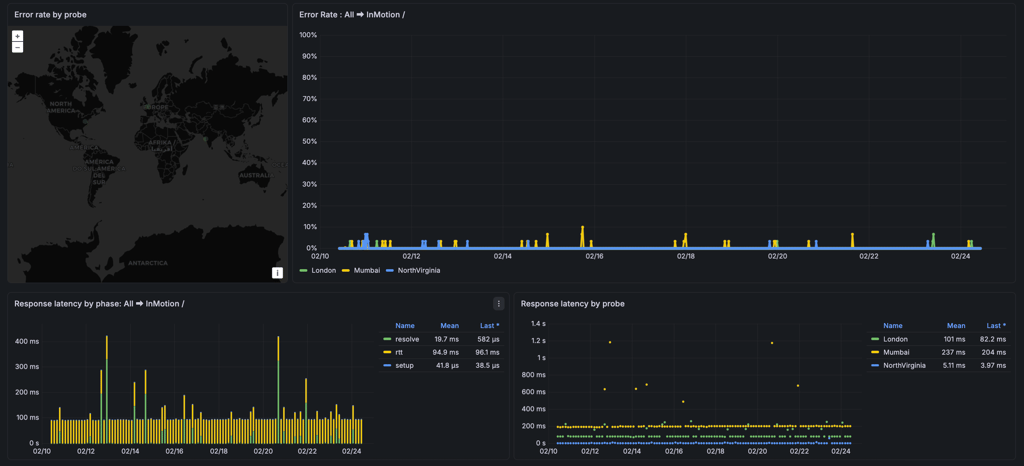
During InMotion testing, it showed 100% uptime and 99.91% reachability, indicating no full outages and only minor intermittent issues. We also measured DNS resolution and round-trip times to measure performance for visitors from different regions.
| Region | Average latency |
| US | 5.11ms |
| EU | 101ms |
| Asia | 237ms |
InMotion showed the fastest response times in the US, moderate latency in Europe, and higher latency in Asia, with only occasional brief spikes. Overall, it demonstrated strong availability and stable performance across all tested regions.
InMotion Hosting’s WordPress features and speed optimizations
- Proprietary UltraStack system. Managed WordPress hosting plans include preinstalled and configured NGINX, Redis, PHP-FPM, and Brotli Compression to handle more requests at high speed.
- NVMe SSD storage. Speed-optimized storage, which is included in all plans except the entry plan, for faster read-write speed. In my experience, NVME SSD delivers better speeds overall, so it’s a good choice for websites where speed matters above all.
- NGINX. The software processes millions of requests simultaneously while using less resources than other solutions. I always look for NGINX for enhanced loading times for my websites.
- Ability to choose the PHP version. InMotion Hosting allows you to choose any PHP version available. While you should always use the latest version, some situations require older PHP, so I appreciate the ability to use those.
- Unlimited NVMe storage. Included in WP Launch or higher level plans, which are more expensive, but it’s to be expected when unlimited resources are involved.
- Monarx Security. An advanced web firewall included as a complementary feature. In my experience, it ran smoothly, although it didn’t detect any issues on my website during testing.
- Hosting Plus. SSH access and control over Python, Node.JS, Ruby, and GIT versions. It helps with managing your website’s backend.
- Dedicated Opcode Cache Pool. Loads websites faster by storing compiled PHP code in the server’s memory. I like it because it optimizes my websites and improves speed.
Based on our testing, we’ve created an InMotion Hosting review for readers looking to dive deeper.
7. IONOS – fast WordPress hosting on a budget

| Rating: | |
| Price: | From $1.00/month |
| Money-back guarantee: | ✅ Yes, 30-day |
| Average load time: | 853ms |
| Uptime: | 100% |
| Best deal: | Get up to 94% OFF IONOS |
IONOS is a WordPress host with good performance for a low starting price. It’s also known for its user-friendly control panel, variety of hosting solutions, and well-rounded plans that include professional email, and advanced security.
IONOS performance testing
I tested IONOS over the past three months to see how its budget-friendly plans perform in real-world conditions. During testing it delivered 100% uptime, and we also measured page load times and stress performance using lightweight test websites to simulate realistic traffic.
| Region | Average latency |
| US | 970ms |
| EU | 241ms |
| Asia | 1.17s |
IONOS performed best in Europe, with higher latency in the US and Asia. Traffic surges quickly impacted performance, so this provider is most suitable for small-traffic websites rather than resource-intensive or high-visitor sites.

IONOS WordPress features and speed optimizations
- Google Cloud and AWS servers. Option to choose a data center location from 9 options in 2 continents. This enables you to deliver very good WordPress loading speeds to your target audience based on where they are.
- Customizable updates. Enable or disable automatic updates for core, theme, plugin, and PHP versions.
- PHP version selection. Can switch to any PHP version, up to the latest. Again, I like that it gives more control to the owner and doesn’t force updates.
- WP-CLI access. IONOS comes with access to the WP-CLI official command line tool for WordPress. I prefer it for most technical tasks.
- WordPress-optimized caching. With its more premium plans, IONOS provides a caching plugin that boosts page loading speed and reduces the load on the server. I find it great for shard hosting plans in particular, where loading time can be impacted the most.
We’ve carefully tested IONOS and put together a review for those interested in more details.
Methodology
To find the fastest WordPress hosting providers, together with the Cybernews research team we followed our website hosting testing methodology and ran performance tests using identical websites and monitored them from multiple global locations. Here’s the process in more detail.
1. Identical test website setup
To make sure every provider was tested fairly, we created the same WordPress website on each host. Each installation used the latest stable version of WordPress with the default Twenty Twenty-Five theme and identical demo content, including the same pages, posts, and images.
I didn’t install heavy plugins that could influence performance, since the goal was to measure the hosting itself rather than extra optimizations. Modern PHP versions significantly improve speed and security, so I did not include any hosts that failed to support the latest stable release. This ensured all providers were tested under equal and realistic conditions that reflect how most users run a standard WordPress site.
2. Tools we used for testing
To measure performance accurately, I used trusted industry tools used by hosting researchers and developers. GTmetrix was used to measure website load time from different global locations, helping me see how fast each site loads for real visitors. For uptime monitoring, I used Pingdom by SolarWinds, which continuously checks website availability and records any downtime.
To support the results, the Cybernews research team also used internal monitoring tools and global probes that measure server response and latency from different regions. These tools were chosen because they provide consistent data and allow direct comparison between providers.
3. Performance metrics we measured
I focused on load time and uptime. Load time shows how quickly a website responds to visitors, which directly affects user experience, bounce rates, and even search rankings. Faster websites keep visitors engaged and perform better overall.
Uptime reflects how reliable a hosting provider is. Even the fastest host is useless if the site frequently goes offline, so I monitored uptime throughout the testing period to confirm whether providers can keep sites consistently accessible.
4. Testing locations
Performance can vary depending on where visitors are located, so I tested each host from major global regions. The United States locations included Ohio and North Virginia, Europe was represented by London, and Asia by Mumbai. These regions reflect where most WordPress website visitors typically come from and provide a realistic view of global performance.
5. Testing results
The table below shows the average loading time from each region and overall uptime during testing.
| Hosting provider | US | Europe | Asia | Uptime |
| WordPress.com | 105ms | 34.7ms | 52.3ms | 100% |
| Hostinger | 295ms | 87.5ms | 396ms | 100% |
| Bluehost | 606ms | 1.72s | 2.22s | 100% |
| SiteGround | 416ms | 986ms | 1.77s | 100% |
| Liquid Web | 98.2ms | 12.0ms | 130ms | 100% |
| InMotion | 5.11ms | 101ms | 237ms | 100% |
| IONOS | 970ms | 241ms | 1.17s | 100% |
Some providers, such as Liquid Web and WordPress.com, delivered consistently fast response times worldwide, while others performed better in specific regions. All providers maintained excellent uptime during the testing period, confirming strong overall reliability.

FAQ
Is managed WordPress hosting faster?
No, managed WordPress hosting isn’t faster. Managed hosting means you’ll get technical support from your selected hosting provider, such as server maintenance. While it’s more convenient, it’s also significantly more expensive.
Can WordPress plugins slow down fast hosting?
Yes, plugins can slow down your website, no matter what hosting you use, but they’d have to be poorly configured or in massive numbers.
Does LiteSpeed really help?
Yes, LiteSpeed can improve speed and overall performance of a server. It’s particularly useful for shared hosting servers, where resources are limited.
Does shared WordPress hosting deliver fast speed?
Yes, shared WordPress hosting is specifically tailored for WordPress sites, offering fast load times and good performance. However, with shared WordPress hosting, the speed and performance may drop as your site grows. In such a case, you may want to consider the switch to dedicated WordPress hosting.
How can I test web hosting performance?
Web hosting performance is usually assessed with the help of specially designed tools. Most common tools used for web hosting performance testing are Google PageSpeed Insights, GTMetrix, and WebPageTest.
Does having a fast WordPress website impact SEO?
Yes, a fast WordPress website can significantly affect SEO. Since page speed is one of the factors based on which Google ranks pages, fast speed is important for your site. Also, website seed is one of the criteria Google uses to determine the quality of a website.


