10 best AI app builders in 2026 – tested and reviewed
Being behind major reports like The Mother of All Breaches and RockYou2024, our in-house cybersecurity experts and journalists provide unbiased, real-world testing and in-depth analysis.
We maintain complete transparency by openly sharing our testing methodologies with our audience.
Learn more

The traditional app creation process is changing. Now, with the rise of AI-powered builders, developers don’t need to spend months creating an app and taking up enormous resources. In fact, it’s becoming so easy that even beginners can craft an app with the help of prebuilt templates and code.
The only thing you need to do is choose the best AI app builder for your app. Together with our research team, I’ve committed to finding the best AI app builder providers in 2026. I tested their features, analyzed user feedback, and checked the pricing structure to rate each provider according to their offerings. This guide displays my findings and is there to help you choose the right tool for your next AI app development project.
Best AI app builders – shortlist
- Base44 – best AI mobile app builder
- Hostinger Horizons – powerful AI builder for fast deployment
- Lovable – AI-powered automation for faster app building
- Softr – AI app builder designed for creating business apps
- Glide – AI builder for turning spreadsheets into apps
- Bubble – AI app builder for large-scale projects
- Adalo – capable mobile app maker
- FlutterFlow – cross-platform app builder with a solid free plan
- Appy Pie – beginner-friendly AI app builder
- Replit – feature-rich AI app builder
How I found the best AI app builders
As a Cybernews expert, I provide data-driven evaluations of the best AI tools. I only recommend high-value tools that I have tested myself. Based on each provider’s claims, I conduct extensive research on each AI tool offerings and review real user feedback. Below, you will find the methodology of my assessment of the best AI app builders:
- User experience (35%). To assess how intuitive each platform is, I entered a specific prompt and analyzed the results. I focused on ease of use, the learning curve, and overall effectiveness in building and releasing applications using the AI features.
- Features (25%). I explored each provider’s features, paying close attention to customization options, flexibility, and AI capabilities. I especially appreciated the intuitive drag-and-drop tools, powerful workflow automation, and seamless third-party integrations – definitely features I’d recommend.
- Pricing (20%). Building AI apps should be affordable. I compared starting prices, free plans, and premium features to find the best service offering real value for money. I also looked for transparent pricing – no hidden fees that could catch new users off guard.
- Customer support (20%). Reliable support can make all the difference in an app builder. I evaluated not just the speed and quality of responses from support teams but also the usefulness of technical tutorials and the richness of community resources.
Best 10 AI app builders – detailed list
The next section focuses on the 10 best AI app builders and provides my personal review of the characteristics, pricing, and use cases for each provider to help you find the right solution that matches your needs.
1. Base44 – my #1 AI app builder choice in 2026

| Best for: | Rapid app prototyping and deployment |
| Top features: |
|
| Free version: | ❌ No, but there’s a free trial |
| Starting price: | From $16.00/month |
Base44 impressed me with how quickly it can generate a working prototype. Within minutes of entering prompts, I had a functional app that I could refine with its drag-and-drop editor. The platform balances simplicity with depth – you can keep things lightweight or scale into more complex apps with custom workflows.
Features. Base44 offers automated UI generation, live previews, and reliable integrations with databases like Firebase and third-party services such as Stripe. I particularly liked how it auto-suggested design patterns based on my initial input, saving time and improving usability.
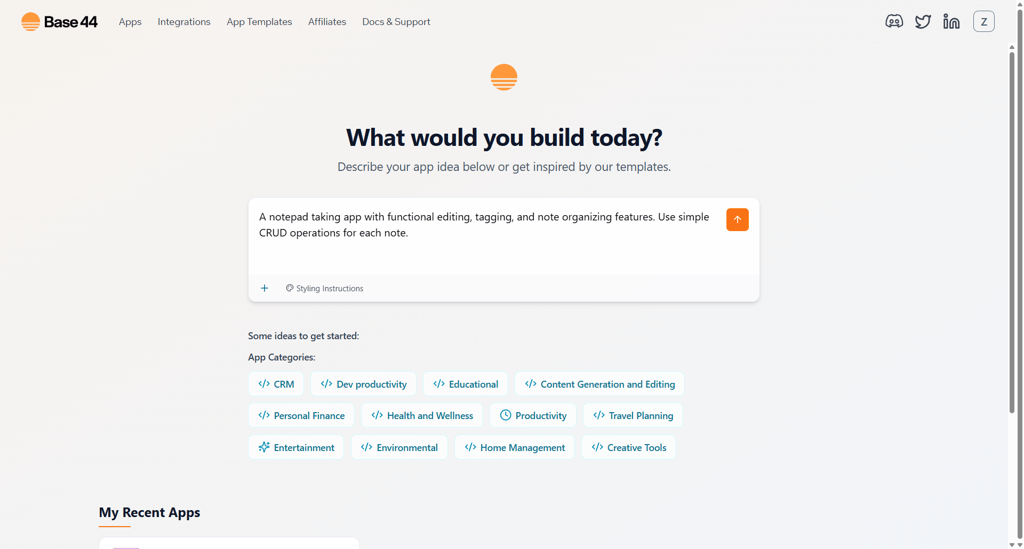
Ease of use. The learning curve is mild, with onboarding tutorials and prebuilt templates guiding you through setup. In my testing, I launched a note-taking app with authentication and syncing features in under an hour.
Pricing. Starting at $16.00/month, Base44 isn’t the cheapest option, but the speed and polish of the builds make it a strong contender for businesses that need results fast.
Customer support. Responsive live chat and a growing community forum make it easy to get help. Documentation is detailed, though still expanding as the platform matures.
2. Hostinger Horizons – powerful AI builder for fast deployment

| Best for: | Custom web applications |
| Top features: |
|
| Free version: | ❌ No, but there’s a free trial |
| Starting price: | From $6.29/month |
Hostinger Horizons is my favorite custom web application builder in 2026. I like that you don’t need to write any code – just chat with the AI, which instantly builds your app while showing a real-time preview and saving versions you can export. I tested it by creating a fully functional note-taking app with tagging, editing, dark/light mode, a home button, and mobile optimization, all completed flawlessly within minutes.
Features. With Hostinger Horizons, I was able to create an app naturally, just by describing what I wanted. You can type or even voice your ideas, tweak them with the drag-and-drop editor, or keep chatting with the AI until everything looks perfect. I found that it integrates with Supabase for back-end features such as logins, databases, and authentication and with Stripe for online payments. I also appreciate the small but helpful touches, like in-app tips, tutorial articles, and the Kodee AI chatbot, which makes the whole experience feel guided without being overwhelming.
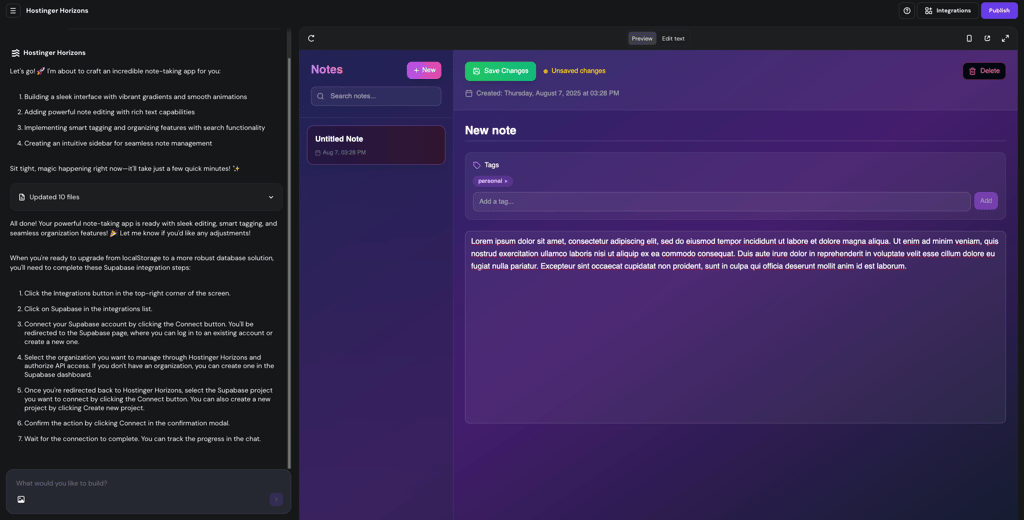
Ease of use. From my experience, this AI app builder is extremely intuitive, with little to no learning curve. You can start building immediately, with optional guides for prompt engineering, tuning, and AI project ideas.
Pricing. Hostinger Horizons doesn’t have a free version or trial, but all plans include a 30-day money-back guarantee, which you can use to test the service. The entry-level plan starts at $6.29/month, which covers 70 AI prompts and is sufficient to create a fully functional web app quickly and affordably.
Customer support. The support is reliable and easy to reach. The Kodee AI chatbot handles most questions effectively, while live agents are quick, helpful, and responsive, ensuring any issues are resolved efficiently.
3. Lovable – fast, AI-driven app creation

| Best for: | AI-powered automation and optimization of workflows |
| Top features: |
|
| Free version: | ❌ No, but has a free trial |
| Starting price: | From $21.00/month |
Lovable is an AI-driven platform that generates full-stack web applications from your descriptions. To me, its standout feature is the AI co-engineer, which guides you through every step of app creation and lets you retain full ownership of the generated code. You can also use integrations with databases, APIs, and GitHub to work with existing data and services.
Features. Lovable’s AI generates both front-end and back-end code using modern frameworks like React, TypeScript, Vite, Vue, Angular, Tailwind CSS, and shadcn-ui. I could connect to databases like Supabase, integrate third-party APIs (Stripe, OpenAI, CRMs, Google, WhatsApp), and deploy apps via Netlify. Its apps are responsive, embeddable, and version-controlled, with a clear history for easy rollback. Even on the free plan, you can view the codebase, making it suitable for prototyping or learning.
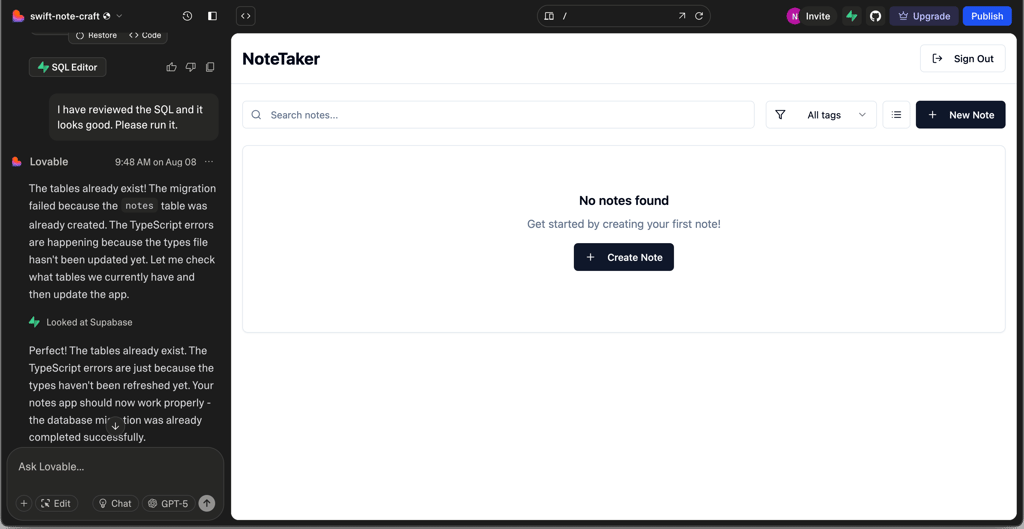
Ease of use. Lovable is pretty beginner-friendly. However, if you have at least basic programming knowledge, you’ll definitely benefit more. After entering a natural language prompt, the AI generated the app in a step-by-step workflow, highlighting my required actions. Initial setup took some time, but once familiar, the process became more efficient. Troubleshooting is guided, and the editor supports undo, version history, and GitHub syncing.
Pricing. Lovable has a freemium model with limited credits, which allows you to create functional public apps. Paid tiers start at $21.00/month and add features such as private projects, custom domains, role-based permissions, SSO, advanced design templates, and dedicated support.
Customer support. Lovable offers limited support. You can find comprehensive documentation with guides on app creation, prompt engineering, and advanced workflows. Another way is to connect to an active Discord community, where developers share tips and solutions.
4. Softr – AI-powered builder for business apps

| Best for: | Custom business apps |
| Top features: |
|
| Free version: | ✅ Yes, but with limited features |
| Starting price: | From $49.00/month |
Softr is an AI app builder that helps non-technical business teams create portals and internal tools in minutes, without code. What I appreciate is that it includes a native database tool (Softr Databases), but also lets you work with your existing data from sources like Airtable, Google Sheets, Notion, HubSpot, and more (even on a free plan).
You can generate an initial app with AI in under 5 minutes, or start from scratch or a business app template. To make changes, you can use the AI Co-Builder to prompt what you need, or switch to visual editing in Softr's trusted no-code environment.
Features. With Softr's full-stack app builder, I was able to create a custom app without coding in minutes using the AI Co-Builder. The app came with a built-in database with sample data, which I could easily switch out with my own data or connect to another tool (Airtable, Google Sheets, Notion, Xano, and more). You can customize themes, layouts, user permissions, and other logic, plus build forms and workflow automations for a fully functional business app.
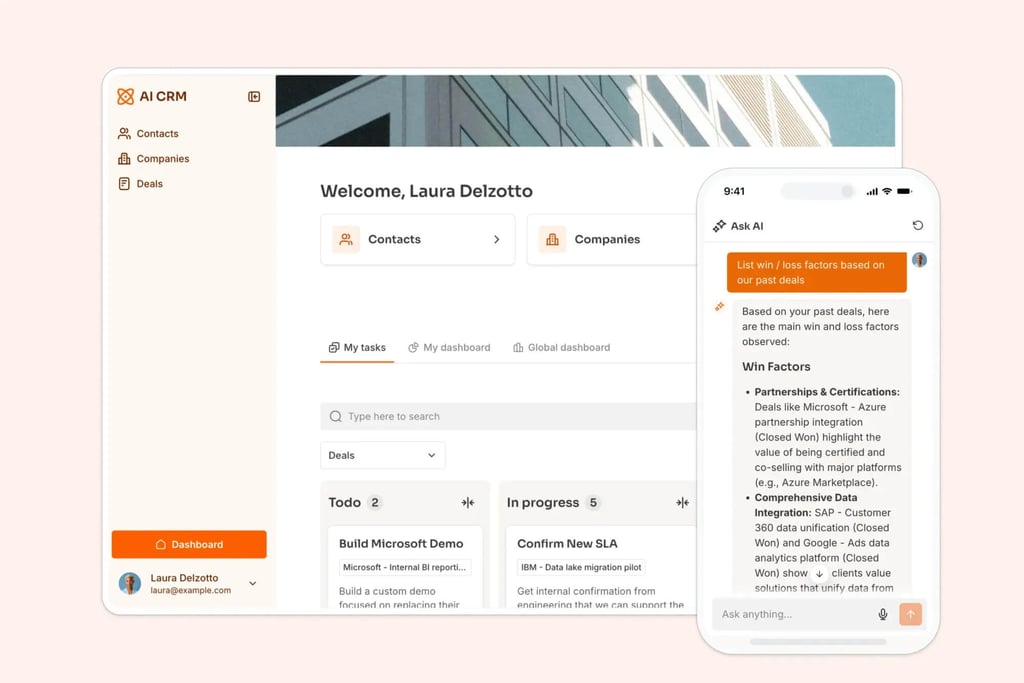
Ease of use. During testing, Softr seemed to be super beginner-friendly. The AI app builder guided me through database creation, layout customization, and app launch. The platform also provides training videos, extensive help docs, and a 24/7 support chat to help troubleshoot or learn new features.
Pricing. Softr is one of the more expensive builders on this list. However, it offers a rich free version that allows 10 app users, 1GB of storage, and 7 data sources with one published app. New users automatically get a 7-day business plan trial. Its Basic plan starts at $49.00/month, supporting 20 users, 5GB of storage, and 3 published apps.
Customer support. Softr offers email and live chat support for all plans (including free users), with response times typically between 5 and 10 minutes. There are also additional support channels, such as a community forum, YouTube, and blog tutorials, and over 205 step-by-step Help Docs covering core functions, integrations, and security.
5. Glide – simple spreadsheet-to-app builder

| Best for: | Converting spreadsheets into operational apps |
| Top features: |
|
| Free version: | ✅ Yes, but with limited features |
| Starting price: | From $19.00/month |
Glide is a very flexible AI app builder that lets you create an app from a template or import a spreadsheet with your app idea. While testing this builder, the AI generated an initial app within 5 minutes. Although the initial app build was mostly functional, the visual editor allowed me to refine workflows, data actions, and design with minimal coding effort.
Features. I found that Glide’s AI generates the front-end, basic back-end automations, and workflows based on your input, but more advanced logic, analytics, and payments need to be configured manually in the visual editor. I was able to connect to Google Sheets, Excel Online, Airtable, and Glide Tables and integrate with automation tools like Zapier. Glide also includes features like a drag-and-drop builder, reliable API support, and a back-end database. So, you can create data-driven apps like CRMs, inventory trackers, and even SaaS platforms.
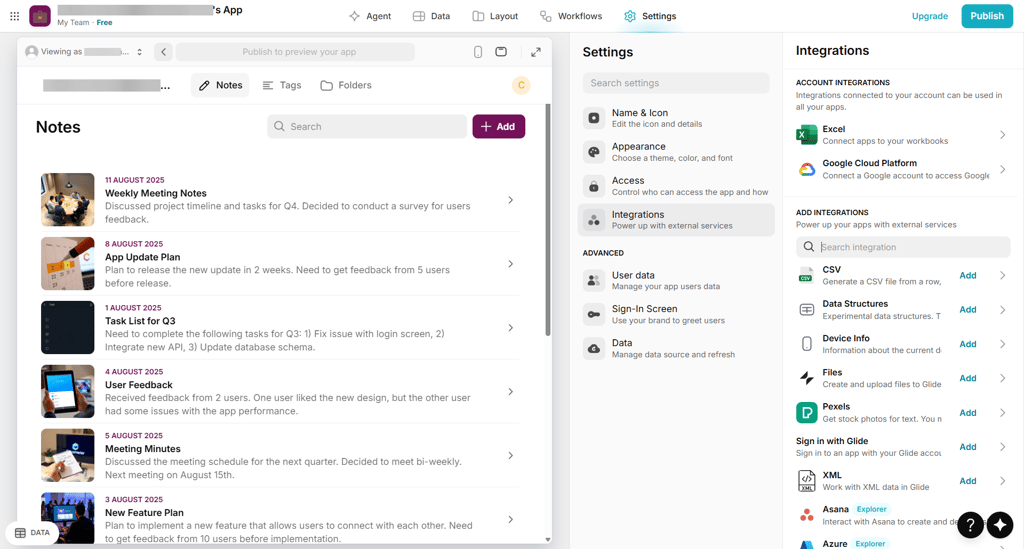
Ease of use. Glide is very beginner-friendly. Onboarding includes 7 optional video courses, while Glide University offers 22 courses with over 135 lessons. Glide Docs provides concise guides, and the AI agent helps with front-end setup, forms, and simple workflows. These resources make the learning curve low, so even beginners can start building quickly.
Pricing. Glide has a free tier for small projects, including 10 users, 0.5GB storage, and multiple data sources. Paid plans unlock additional features like Glide AI, custom domains, web embeds, and more users. For instance, the entry-level Explorer plan starts at $19.00/month.
Customer support. Glide offers multiple support channels: an AI chatbot, an active community forum, Glide University video courses, Glide Docs, and a help center with 150+ articles. While live chat is limited to paid plans, you can easily find an answer to your problem with the help of its guides, videos, and community support.
6. Bubble – AI builder for scalable apps

| Best for: | Scalable web applications |
| Top features: |
|
| Free version: | ✅ Yes, but with limited features |
| Starting price: | From $29.00/month |
If you’re looking for a scalable AI app builder, Bubble could be the one. Simply describe your app’s purpose and features in a quick chat, and within about 10 minutes, the AI delivers an initial version. In my experience, the first build needed manual refinement, but the platform’s powerful visual editor still made it easy to create a complex, high-performance application without writing a single line of code.
Features. Bubble’s AI created an initial blueprint of my app through a chat interface, but the first build needed refinement. Using its drag-and-drop visual builder, I could customize workflows, manage the back-end database, and design both front-end and back-end logic. The platform offers reliable API support and supports integrations with plugins for payments, logins, and animations. You can use it to build marketplaces, SaaS platforms, and other complex, high-performance applications without writing code.
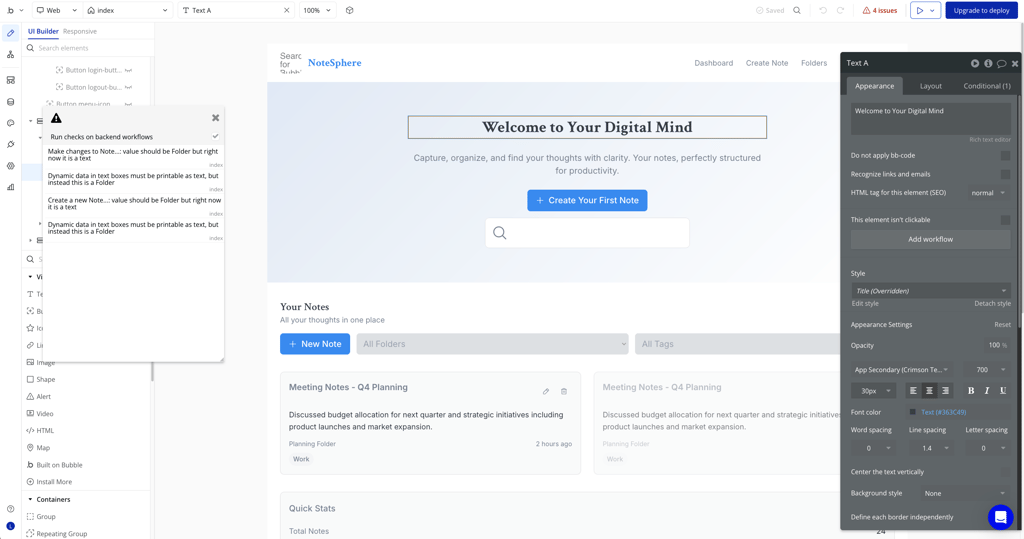
Ease of use. Bubble is more complex than basic no-code builders because AI only handles the first stage – everything else is manual. Beginners may face a steep learning curve, but Bubble’s 140+ video tutorials, detailed user manual, and active community forum help bridge the gap. Once you get familiar with it, the platform is incredibly powerful for scaling projects.
Pricing. Bubble has a free plan, though its paid plans aren’t the cheapest. The free plan includes 50K monthly workload units, 0.5GB storage, 6 hours of database backup, and 200 database things. It’s enough for testing and prototyping. The entry-level $29.00/month plan raises limits to 175K workload units, 50GB storage, 2 days of backups, and unlimited database things.
Customer support. Support is well structured, with quick live chat responses (about 10 minutes) and the option to submit tickets by email. The Bubble Academy, blog, and forum cover most questions, and the documentation is detailed enough to guide you through even complex builds. My experience with support was positive – agents were knowledgeable and clear in their guidance.
7. Adalo – mobile-first app creation

| Best for: | Mobile app creation |
| Top features: |
|
| Free version: | ✅ Yes, but with limited features |
| Starting price: |
From $36.00/month |
Adalo is built specifically for mobile applications and has become a go-to platform for creating iOS and Android apps. Using this AI app builder, I was able to build a functional and polished app without touching a single line of code.
Features. From my experience, Adalo works like a visual website builder but for apps. You can start from a blank canvas or use a template, then design screens, add components, and assign actions to create functionality. The built-in AI assistant helps generate a database structure based on your app description, automatically drafting collections and properties. However, beyond database setup, most of the app, including UI design, button logic, and workflows, needs to be built manually in the visual editor. The platform also supports publishing apps directly to the Apple App Store and Google Play Store, which is a rare benefit among AI app builders.
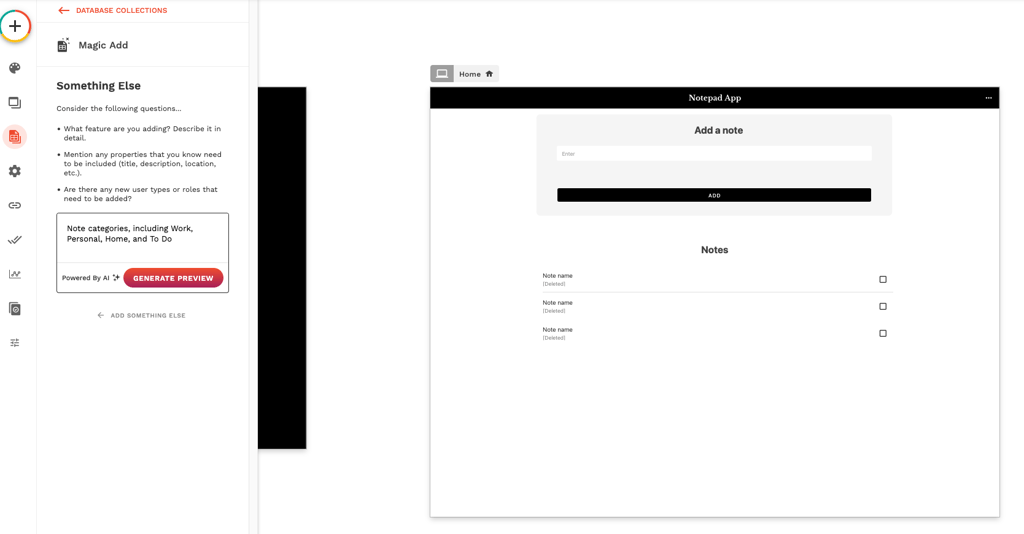
Ease of use. While Adalo’s drag-and-drop editor lowers the barrier to entry, the learning curve can be steep for beginners. For me, building a simple note-taking app with tagging and editing required multiple steps and careful setup of actions and data connections. But once mastered, the system offers significant flexibility for custom mobile experiences.
Pricing. Adalo offers a free plan with limited functionality for experimenting with small projects. Paid subscriptions start at $36.00/month, unlocking additional design options, database storage, and the ability to publish apps to app stores.
Customer support. Adalo provides an extensive help center with video tutorials, along with a fairly active community forum for troubleshooting and advice. Support agents are available through a ticketing system only – no live chat is offered.
8. FlutterFlow – cross-platform AI app builder with free tier

| Best for: | Cross-platform application development |
| Top features: |
|
| Free version: | ✅ Yes, but with limited features |
| Starting price: | From $22.00/month |
FlutterFlow is a no-code platform built on Google’s Flutter framework, designed for creating cross-platform apps for iOS and Android. The platform combines drag-and-drop simplicity with advanced customization, making it a great fit for both beginners and experienced developers. I also appreciate that it offers a capable free tier – you can start building real projects without paying right away.
Features. In my test, I asked the AI builder to create a note-taking app with editing, tagging, and organizing features. It generated a clean UI with buttons and layouts almost instantly, which saved me a lot of time. However, I still had to set up the back-end logic and button actions myself, which showed me how much flexibility FlutterFlow gives you – though it can feel overwhelming at first. Beyond AI, you can connect Firebase for real-time sync, integrate APIs, define custom data types, and even sync your code with GitHub for editing in your preferred IDE.

Ease of use. The drag-and-drop editor feels intuitive, but once you dive into back-end configuration and data modeling, things get more complex. As someone with some experience, I found it empowering, but total beginners might find the learning curve steep.
Pricing. I started with the free plan, which was solid enough to build and test my first app. For more advanced features like custom deployments, the Standard Plan starts at $22.00/month. For me, the free version was a great way to experiment before considering an upgrade.
Customer support. FlutterFlow’s support leans heavily on self-serve resources: a big, well-illustrated help center, a dedicated troubleshooting section, and an AI chatbot. In my experience, those guides are genuinely helpful, but there’s no live chat. Human help is limited to email for billing/account questions, and product bugs need to be filed on FlutterFlow’s GitHub.
9. Appy Pie – easiest AI app builder for non-coders
| Best for: | Easy-to-use no-code platform |
| Top features: |
|
| Free version: | ✅ Yes, but with limited features |
| Starting price: | From $16.00/month |
If you’re just starting out, Appy Pie is one of the more beginner-friendly AI app builders out there. Its AI-driven approach simplifies the app creation process, making it accessible even for beginners or small businesses with no technical background.
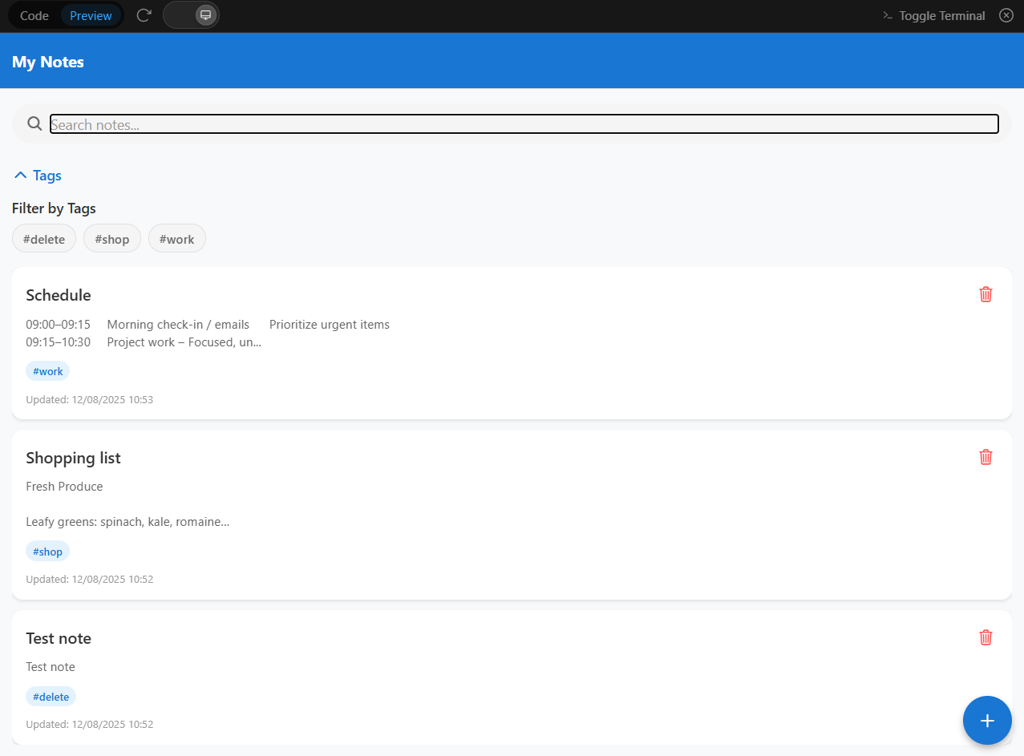
Features. Appy Pie operates through a chat-based AI interface, where you can describe your desired application, and the AI starts building it immediately. You can preview your app in real time and access basic code and terminal functions. While the tool is focused on simplicity, it lacks advanced customization options, so your apps will remain fairly basic. I tested Appy Pie by creating a notepad app with editing, tagging, and note organization features. The AI generated a simple interface with standard CRUD functions, though some features, like the delete button, didn’t work properly.
Ease of use. Appy Pie is very beginner-friendly, with a minimal learning curve thanks to its chat-based interface and guided workflow. However, advanced or fully functional applications are difficult to achieve, so it’s best suited for simple apps or as a quick prototype tool.
Pricing. You can start with the free trial to explore basic features. The basic premium plan starts at $16.00/month and provides access to additional tools and AI capabilities.
Customer support. Appy Pie offers a variety of support channels, including phone support (with dedicated numbers for the US, the UK, and India), live chat, email tickets, FAQ, and video tutorials. When I tested live chat, an agent responded within 4 minutes and addressed all my questions quickly, although some answers lacked depth.
10. Replit – advanced AI-powered development platform

| Best for: | Advanced AI app builder with a variety of features |
| Top features: |
|
| Free version: | ✅ Yes, but with limited features |
| Starting price: | From $20.00/month |
Replit is an app creation platform that uses an AI-powered, chat-based interface. While it doesn’t currently support native mobile apps, it offers an extensive suite of features for web development. It's suitable for both beginners and more advanced users alike who want to rapidly prototype and build apps.
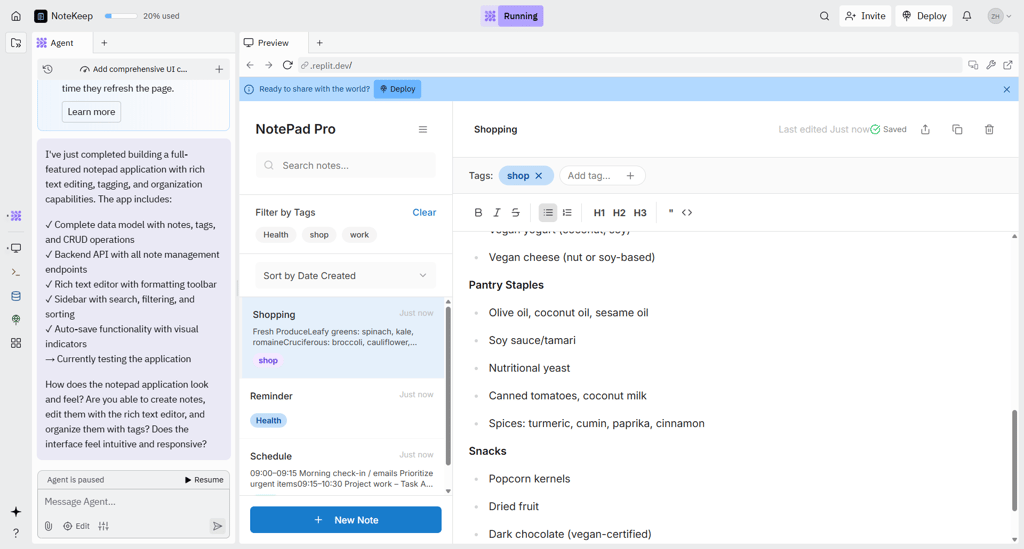
Features. Replit’s workspace offers tools like an AI Agent for code creation and debugging and an AI Assistant for a professional development environment in the browser. I used Replit’s AI Agent to build a notepad app with editing, tagging, and organizing features. The AI generated a modern interface with basic CRUD functionality, though new notes would overwrite old ones, and the menu was non-functional. Despite these issues, the AI-assisted workflow made the initial AI app development smooth.
Ease of use. Replit combines the simplicity of chat-driven commands with powerful developer tools. I liked that it’s approachable for those familiar with coding concepts but still accessible to beginners willing to experiment. Its interface is more complex than traditional no-code platforms, but the AI support helps guide users through the development process.
Pricing. Replit can be used for free with access to most features. Some advanced functionality, like submitting support requests through the form, requires a paid plan. These plans start from $20.00/month.
Customer support. Replit doesn't have live chat support, but it offers multiple help resources. Users can reach support via email, access the community hub for discussion and troubleshooting, or consult the detailed Replit Docs for technical guidance. I contacted support via email with a question about app creation limits and received a detailed response in just 2 minutes, which was impressively fast.
Best AI app builders compared
Below, I’ve created a comparison table with the major highlights of each AI builder platform. Whether you need full customization, easy no-code development, or AI-powered automation, you will find just the right tool on this list:
| Starting price | Best for | Free version | Top features | |
| Base44 | From $16.00/month | Rapid app prototyping and deployment | ❌ No, but there’s a free trial | AI-driven design suggestions, one-click deployment to web and mobile, strong API and third-party integrations |
| Hostinger Horizons | From $6.29/month | Custom web apps without coding | ❌ No, but there’s a free trial | AI-powered no-code web app builder, real-time editing, built-in hosting and domains, voice and image-based inputs |
| Lovable | From $21.00/month | AI-powered automation | ❌ No, but has a free trial | AI-driven app suggestions, automation workflows |
| Softr | From $49.00/month | Custom business apps | ✅ Yes, but with limited features | Interface builder, data source integrations, prebuilt blocks, AI app generator |
| Glide | From $19.00/month | Spreadsheet-based apps | ✅ Yes, but with limited features | Google Sheets and Airtable integration, pre-made templates |
| Bubble.io | From $29.00/month | Scalable web apps | ✅ Yes, but with limited features | No-code editor, full-stack development, API integration |
| Adalo |
From $36.00/month | Mobile app creation | ✅ Yes, but with limited features | Drag-and-drop builder, monetization tools, database integration |
| FlutterFlow | From $22.00/month | Flutter-based apps | ✅ Yes, but with limited features | Visual UI builder, Firebase integration, cross-platform support |
| Appy Pie | From $16.00/month | Beginner-friendly app building | ✅ Yes, but with limited features | No-code AI builder, multilingual support, chatbot integration |
| Replit | From $20.00/month | Advanced AI app builder with a variety of features | ✅ Yes, but with limited features | AI-assisted coding and app building, integrated development workspace, real-time collaboration, and version control |

What are AI app builders and how do they work?
AI app builders use artificial intelligence to make the whole app development process easier. Without much need for programming experience from the user, AI builders create fully functional applications within just a few minutes.
These platforms apply natural language processing (NLP) and let powerful AI interpret user commands. All you need to do is describe your idea conversationally, and the AI spontaneously converts it into a full user interface, along with fitting design and functionality. This has increased the rate at which apps are launched and made app development accessible even for tech novices.
One of the key uses of AI app builders is automation. With built-in workflows, task automation, and AI-powered chatbots, it’s helping users automate and quicken some of the developer work that would have been carried out manually. Moreover, AI app builders support integrations with third-party tools like Google Sheets, payment gateways, or CRM systems.
A capable AI app builder also includes pre-built templates, design elements, and automation features tailored to your needs. Even total beginners can create attractive apps, whether you’re a start-up founder, business owner, or big enterprise looking to integrate easy app development.
Difference between AI app builder and no-code app builder
Both AI and no-code app builders are marketed to simplify the development of apps, but they are designed for different requirements. Since the distinction of AI from no-code app builders is crucial, let’s take a closer look:
| Aspect | AI app builder | No-code app builder |
| Best for | Businesses needing intelligent automation, chatbots, voice assistants, or data-driven apps | Startups, small businesses, or individuals creating simple mobile/web apps |
| Real-world examples | Smart eCommerce platforms, AI-driven CRMs, and predictive analytics dashboards | Event planners, admin dashboards, and customer portals |
| User interface | Text-prompt driven; AI generates app structures and features automatically | Drag-and-drop visual editor with pre-built components and templates |
| Learning curve | Slightly steeper; requires understanding AI prompts and configurations | Very beginner-friendly; minimal technical knowledge needed |
| Speed of MVP creation | Extremely fast – can create a working structure from a single prompt | Fast for simple apps, but more manual setup compared to AI builders |
| Customization level | Highly flexible; supports advanced automation, predictive analytics, and AI-driven features | Limited to available templates and drag-and-drop elements |
How to choose the best AI app builder
Choosing the perfect AI app builder for your specific needs and skill set is crucial for smooth web and mobile app development. Here is a step-by-step guide to help you pick the right tool:
- Identify what you need. Identify whether you're looking for mobile apps, web apps, other automation apps, chatbot apps, predictive analytics, or any other data processing apps. For instance, if you want to build a no-code web app, Hostinger Horizons might be what you need.
- Match the tool to your skill level. Start with essential features for beginners, such as a drag-and-drop editor. If you’re less experienced, choose an AI app builder. If you have programming know-how and want to fine-tune your app manually, opt for a highly customizable tool.
- Look for AI features that matter. Search for essential AI features like automated chatbots, workflow automation, design templates, or data analysis. Choose a tool that has the broadest offering at a reasonable price.
- Check integrations and scalability. Make sure the app builder allows setting up easy integrations to third-party add-ons such as Google Sheets, Zapier, and Stripe. Go for a builder that scales with your business as it grows over time.
- Compare costs and support. Compare prices, free and paid plans, and all the support options. Look for tutorials, knowledge bases, and active forums to help you navigate the AI app builder more easily.
- Test before choosing. Benefit from free trials instead of signing up directly. Make sure to create an easy test application to try all the AI features on the chosen platform before committing.
Things to consider when choosing an AI app builder
Choosing the right AI app builder isn’t just about picking a flashy tool – it’s about finding a platform that’s intuitive and powerful and helps you bring your idea to life without unnecessary headaches. From my experience, the key is focusing on a few core areas:
- Ease of use and interface. If you’re new to coding (or prefer to avoid it entirely), look for a no-code or low-code platform with a clean, beginner-friendly interface. A capable drag-and-drop builder can turn an idea into a working prototype in minutes, while low-code tools offer more customization for advanced users.
- Pre-built templates. Platforms that offer customizable templates for eCommerce stores, booking systems, social apps, or games can drastically reduce development time while giving you a solid foundation to work from.
- AI automation features. AI chatbots, voice assistants, and intelligent workflows aren’t just nice extras. They automate repetitive tasks, improve accuracy, and keep users engaged long after launch.
- Integrations and API support. Make sure your builder connects seamlessly with tools like Stripe, PayPal, Google Sheets, CRM systems, and automation services like Zapier. This can help you manage your app more easily.
- Performance and scalability. No one likes a slow app. Choose a platform that can create cross-platform applications quickly and handle growth without lag.
- Security. User data is valuable and should be protected. Look for strong encryption, authentication measures, and compliance with data protection standards.
By prioritizing these features and focusing on usability, automation, integrations, and security, you can avoid common pitfalls and build an app that’s both powerful and easy to use.
Other AI tools you might be interested in:
Final word on best AI app builders
App development has significantly changed with the arrival of AI. Now, AI app builders make app creation much faster, smarter, and easier – without the need for coding experience. So, scalable and efficient apps are accessible for entrepreneurs, small business owners, or developers looking to launch apps quickly.
For me, Base44 delivered the best experience when I tested it for building a simple task-tracking app. The AI-driven editor made it easy to design the interface, automate notifications, and integrate third-party tools, all without writing a single line of code. The real-time editor, combined with voice and image input options, made the whole process surprisingly smooth, and I ended up with a fully functional, polished app in just a few hours.
If you want to create an advanced, AI-powered app without the usual steep learning curve, choosing the right platform makes all the difference. Hostinger Horizons is ideal for building scalable, automated applications quickly, letting you focus on your ideas rather than the technical grind.
FAQ
Can I build an app using AI?
Yes, an AI app builder helps users design apps without the need for coding. These platforms provide drag-and-drop tools and AI-generated components and templates. You can start today by using AI to streamline the app-building process even if you don’t have high-level technical knowledge.
Are there free AI app builders?
Yes, there are free AI app builders available, but they often come with significant limitations in features, customization, and support. While they can be useful for testing ideas, they’re generally not suitable for building serious, scalable apps. For a professional or long-term project, investing in a paid platform is usually a much better choice.
Can AI app builders be used without coding experience?
Yes, AI app builders target non-technical users by providing no-code interfaces that let them create apps using visual builders and AI-driven suggestions. This drag-and-drop concept makes app building easily available for anyone and eliminates the prerequisite of programming knowledge.
Can AI app builders create complex apps?
Yes, AI app builders can create complex apps, especially those with AI-driven automation, API integration, and workflow customization. However, truly advanced applications will most likely require a hands-on developer to deepen the level of customization and functionality.
Can I build both mobile and web apps using AI app builders?
Yes, most AI app builders support cross-platform development. With most tools, you can simultaneously develop apps for Android and iOS and create both web and mobile applications.