Grok 4 review in October 2026
Being behind major reports like The Mother of All Breaches and RockYou2024, our in-house cybersecurity experts and journalists provide unbiased, real-world testing and in-depth analysis.
We maintain complete transparency by openly sharing our testing methodologies with our audience.
Learn more-

-
Contribution by
Greta Čeponė



Grok AI is a large language model developed by xAI, Elon Musk’s artificial intelligence company. It’s built to serve as a conversational assistant, capable of answering questions, writing code, summarizing information, and even browsing the web in real time. In July 2025, xAI released Grok 4, a significant upgrade over Grok 3, with more reasoning power, higher accuracy, and greater autonomy.
xAI claims Grok 4 is the most intelligent model in the world. It can tackle more complex tasks, deliver safer and more reliable responses compared to its previous version, and now supports advanced capabilities like live web search, code execution, and multimodal input.
To test these bold claims, I teamed up with the Cybernews research team to evaluate Grok 4, focusing on coding, real-time research, and complex problem-solving tasks. I also took a look at its pricing, features, and potential alternatives.
Grok 4 AI overview
| Best for: | Anyone needing an advanced, multimodal AI assistant for complex reasoning, research, code, planning, and creative tasks. |
| Brief description: | Advanced multimodal AI handling text, images, and voice. Supports deep reasoning, real-time search, code execution, and multi-format analysis. Context window: 128K tokens (app), 256K tokens (API). Features include extended memory and improved voice mode. |
| Pricing: | Standard plans cost $32.92/month, and the full-featured Heavy plan is $300.00/month. API access costs $3.00 per million input tokens, $0.75 for cached input, and $15.00 per million output tokens. |
Grok 4 vs Grok 3: what’s actually new?
Grok 4 is noticeably more advanced than Grok 3. It’s better at solving complex problems, can understand images and voice, and gives more reliable answers due to stronger safety filters and higher reasoning. It also handles coding tasks more efficiently and can search the web in real time. The table below shows how Grok 4 compares to Grok’s previous version.
| Feature | Grok 3 | Grok 4 |
| Release date | February 2025 | July 2025 |
| Reasoning | Good at basic tasks, solid for everyday problems | Handles highly complex, multi-step logic and more complicated questions |
| Web browsing | Limited or unreliable, no real-time updates | Real-time, accurate integrated search and research |
| Code writing | Basic, standard coding help | Advanced with tool use, code interpreter, multi-language support |
| Image understanding | Can process images and provide strong results for image understanding tasks | Enhanced vision capabilities, including real-time camera analysis |
| Voice input | Supports voice input only in-app via the SuperGrok plan | Voice mode is more advanced, with ~250ms latency, a new realistic voice, and real-time video analysis during voice chats |
| Token limit | 1M | 128K tokens in the app and 256K via API |
| Safety filters | Faced criticism for weak safety filters, producing controversial content due to an anti-woke approach | Improved safety protocols, but reports of biased or inflammatory outputs are still being made |
| Overall performance | Decent, but behind top models in benchmarks | Competes with or exceeds top models in reasoning and coding |
New tools and upgrades
Grok 3 was more of a demo than a usable tool. Grok 4 adds improved features, though some parts still need polishing. Here’s what’s changed, what works, what doesn’t, and what made me side-eye.
Voice chat – real-time, custom personalities (a bit unfiltered)
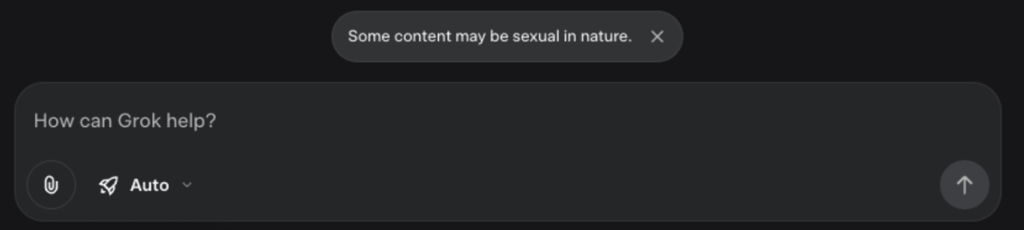
You can now talk to Grok directly through your mic, get responses in actual voices, and swap between personalities like Motivation, Argumentative, Therapist, or even a Sexy chatbot (yes, really. But it's supposed to be 18+). You can also control the voice speed (0.5x to 2x) and pick from different voices (Ara, Rex, Eve, etc.).
However, some personalities are clearly for adults, and yet there’s no age gate. No confirmation, no restrictions in the interface. Grok claims Baby Grok is coming for kids, but for now, it’s all one messy mix.
File handling – finally functional
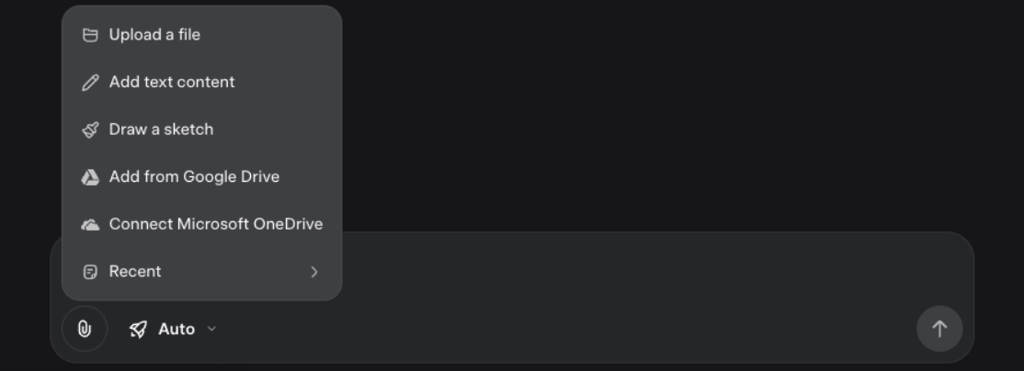
You can upload:
- Docs, PDFs, code files, ZIPs, images – all processable now
- Files from local storage or directly from Google Drive/OneDrive
Grok 4 actually parses content now. You can search within it, summarize, extract structured data, and use that in follow-up chats. Connected cloud storage also means you can browse your files without needing constant uploads.
Projects – persistent memory, finally
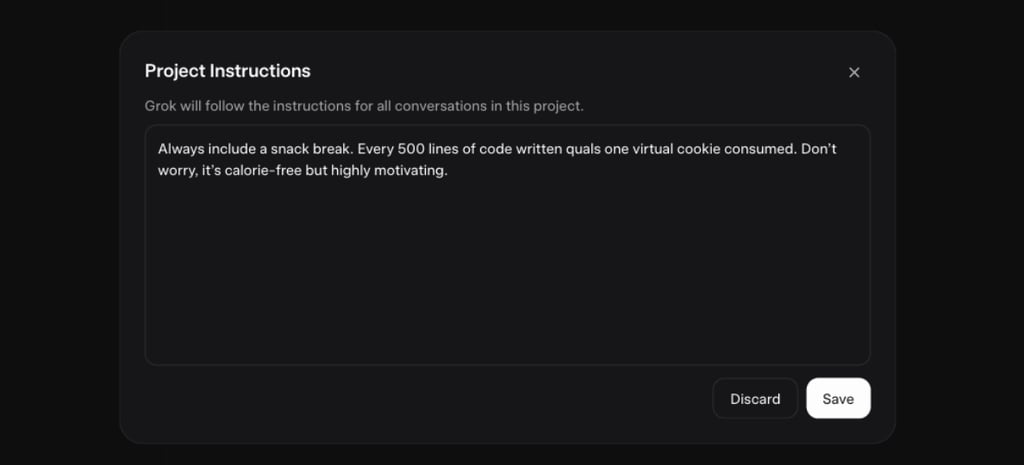
This is where Grok starts acting more like a real assistant. Projects are containers for context. They let you start a conversation, attach files, and keep track of notes across time. You’re no longer starting from zero with every message like you did in Grok 3. You can also invite others (if they’re on X), though collaboration features are in the early stages.
Tasks – automated actions with scheduling
Tasks let you assign recurring jobs like checking a feed, reading a document, or answering a question at specific intervals. Here’s what you can do:
- You can set frequency (once, daily, weekly, monthly, yearly)
- Choose where to be notified (via app, email, both, or neither)
- Add trigger conditions or set delays
This functionality didn’t exist at all in Grok 3. Now it’s arguably the most assistant-like feature Grok 4 has. Although, as our testing shows, it has much to improve.

Personality modes – not just gimmicks anymore
Now, you can switch between different Grok personas.
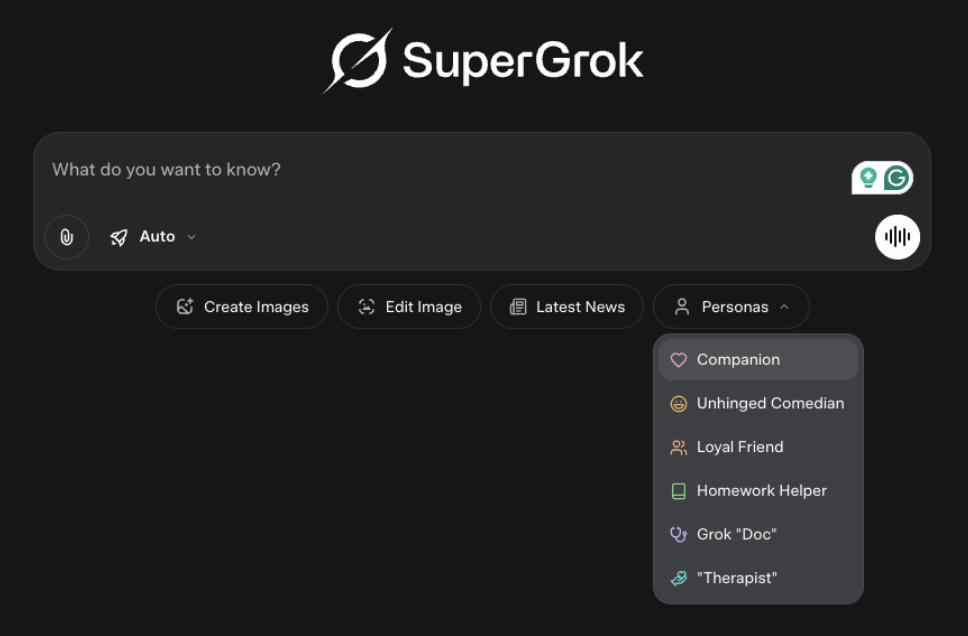
They do change how Grok behaves, especially Therapist and Unhinged Comedian, which consistently alter tone and phrasing.
However, there's zero filtering for age here. You can be a kid and switch into a suggestive mode without pushback, besides a small warning about explicit content.
Custom behavior settings
Grok now actually listens when you tell it how to act. Under Customize, you can choose:
- Concise – says less, cuts the needless babbling
- Formal – business-like tone
- Socratic – asks guiding questions instead of giving answers
- Custom – write your own behavior instructions
Unlike Grok 3, where settings disappeared like magic, these actually stick this time. Still, some modes, especially Socratic, can get weird and convoluted, so it’s mostly good for fun or casual use rather than serious stuff. Whether you’re drafting official docs or just messing around, you can now tweak it to your liking.

On top of all that, there are a few smaller but handy updates: image generation and editing are now faster and more reliable for quick visuals, there’s also a sidebar editor you can toggle for smoother doc and code work, and a private chat mode that doesn’t save your history or use your data for training, giving you better privacy.
How does Grok 4 actually work
Grok 4 is a large language model (LLM) created by xAI, designed to understand and generate human-like language. It was trained on a wide range of data, including text, math problems, code, and images.
What sets it apart is how it thinks. Instead of relying on 1 agent like most chatbots, Grok 4 uses 4 AI agents working together. Each agent approaches your question from a different angle. Then, their insights are combined into one final answer.
This setup helps Grok 4 tackle tasks that were too complex for earlier models, such as physics simulations and codebase optimizations.
Grok 4 supports live web search, voice input, and image understanding. You can speak to it, show it a photo, or ask it to browse the internet for real-time answers. It has a large context window of up to 256K tokens, letting it remember and reason through far more information than past versions.
However, Grok 4 can take a while to generate answers. It generates about 75 tokens per second, compared to OpenAI’s GPT-4-turbo, which generates around 188 tokens per second.
Grok 4 use cases
First of all, before doing things with AI, and especially LLMs, it is always worth reading about how prompting works. So I found the official source with advice for prompting Grok 4. I do think it could be more informative, especially when Grok has a variety of tools and modes to work with.
However, here is the main advice I found:
- Start with a strong verb like explain or analyze
- Add clear details: topic, tone, format, audience, and word count
- Specify the audience level (e.g., beginner, expert, child)
- Use creative constraints like “in the style of…” or “with humor”
- Refine the prompt as needed – Grok improves with tweaks
Keep in mind that Grok’s privacy policy warns users not to share personal information in prompts, as inputs may be used to train the model. You can also opt out of this or use Private Chat mode, where available, which doesn't use your data for training. However, even with these options, it’s still wise to be cautious about sharing sensitive information.
I treated Grok 4 like an assistant and used it to write working code, explain bugs, search the web for recent information, respond to live images and screenshots, and reason through tough logic puzzles.
Together with the Cybernews team, I tested the Grok.com web app using the SuperGrok plan in Expert mode with Grok 4.
| Task type | Average response time |
| General requests | 33s |
| Spot the difference | 8m 55s |
| Coding tasks | 42s |
Below, I'll go into more detail about how it performed in each area.
Advanced coding assistance
Before I get into this, I should mention that neither I nor the research team are professional programmers. We’re not evaluating Grok’s coding abilities like a senior or even junior developer would, so our experience may not reflect that of someone working in the field.
The research team tested Grok 4 code assistance with 8 different problems in several languages: PHP, JavaScript, Go, Python, and C#. They took all the problems from LeetCode, and Grok 4 managed to solve all 8 correctly. It also managed to explain its own presented solution for an entry level developer.

I also tested Grok with a coding challenge: building a Snake game using HTML. At first, it started writing the code in Python instead, which is a common default, since Python is the most popular language for AI development. I corrected it with a prompt, and Grok followed most of my instructions.
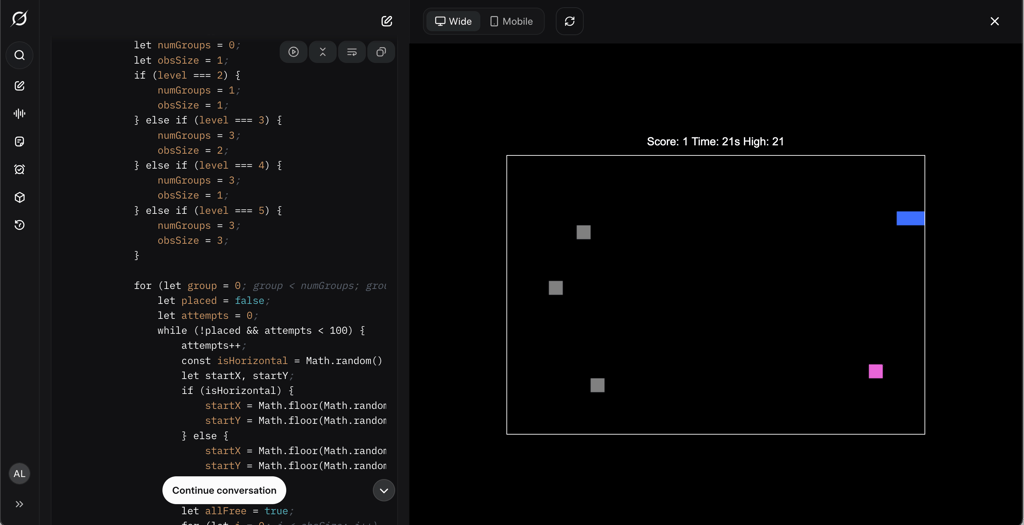
However, when I asked it to “Make the game design similar to the Nokia 3310 Snake Game,” it produced broken code, and the game didn’t work. This is likely because of the limits and challenges of doing this kind of design using only HTML.
Real-time research and data analysis
Grok’s real-time web search is used frequently, so I tested whether it knew the recent facts about the singer Sia’s reported sightings. This was a good test case, as it generated quite a bit of coverage.
First, I asked when Sia’s last performance was, and Grok answered correctly. It also found the correct date of her last performance. However, identifying her final public appearance took a few prompts, with me having to lead Grok onto the right path.

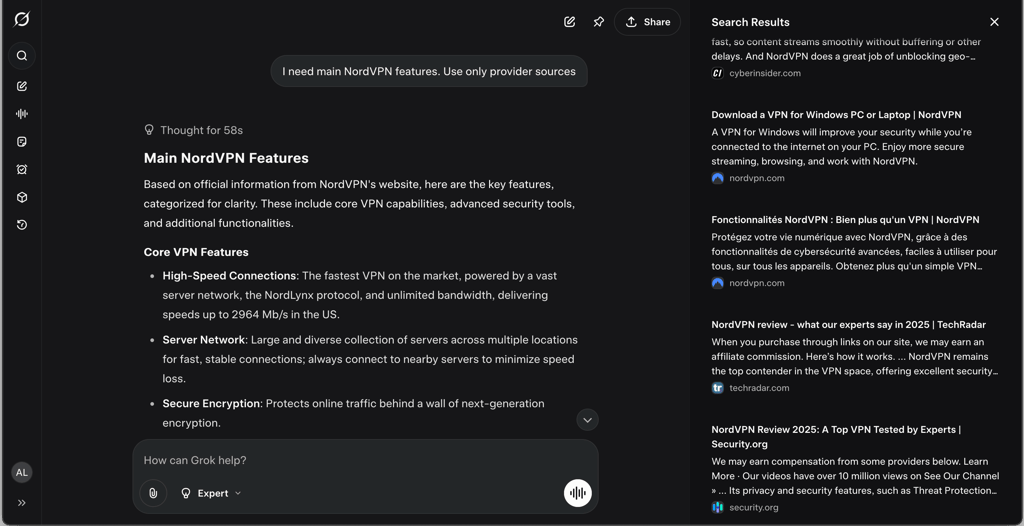
For the next task, I asked it to provide me with an answer using only specific sources, but Grok didn't listen. I requested it to use only sources from NordVPN’s website to find its main features, but it still used 3 additional sources, unrelated to NordVPN.
Voice and image interaction
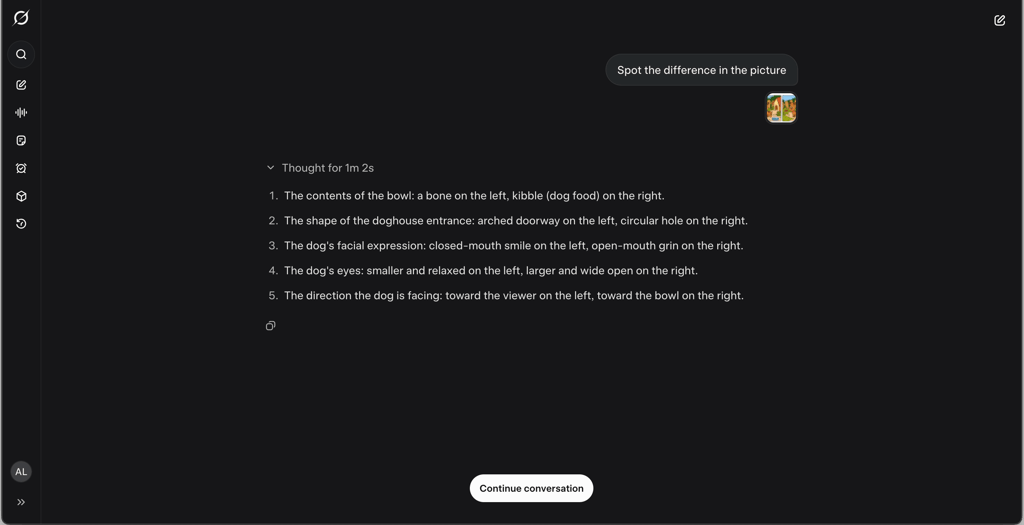
I uploaded 2 spot-the-difference image tasks, one very easy and the other much harder.
For the easy image, Grok responded in 1m 2s. The first 2 differences that Grok found were spot on. However, the next 3 were hallucinations. For example, it described a misplaced mouth, likely referring to a spot on the eye. It also missed 2 real differences: a missing flower and a different collar color.
The harder image took 16m 47s to solve and triggered Grok’s web search. It got stuck for over 10 minutes displaying: “Currently looking for solutions online to help find the differences.” Once it resumed, the results were accurate, and no hallucinations occurred.
I also asked Grok 4 to generate its own spot-the-difference images. The results weren’t what I was looking for, but that could have happened due to my vague prompt.

I also tested how Grok 4 picked up my voice input. There are several voice modes and personalities to choose from. In this chat, they both picked up my voice accurately.
I first used Gork (a predefined personality) and then switched to Sal (an assistant-type personality). Grok gave short, clipped answers, while Sal responded in a more natural, conversational way. I did find out one thing – getting into an argument with voice chat is possible.
Complex problem solving and simulations
Complex reasoning refers to an AI’s ability to draw logical conclusions, navigate ambiguity, and apply structured thought. This includes tasks like creating analogies, abstraction, spatial reasoning, and solving multi-step logic problems, basically anything beyond simple retrieval or surface-level language prediction.
Grok 4 claims improvements in both reasoning and simulation. This puts it in the same conversation as OpenAI's o3/o4-mini, Gemini 2.5 Flash, and Claude 4.1 Opus, where expectations have shifted from "can it answer?" to "can it think?"
To evaluate this, several reasoning-style tasks were run on Grok 4. These ranged from classic analogy and logic questions to a more challenging object stacking simulation. Below is what stood out.
Object stacking simulation (reasoning and spatial imagination)
Prompt: “Here we have a book, 9 eggs, a credit card, a bottle and a guitar. Please tell me how to stack them onto each other in a stable manner.”
Grok 4 answered:
- Guitar (flat on ground)
- Book (centered on the guitar body)
- 9 Eggs (arranged in a 3x3 grid on the book)
- Credit Card (balanced across central eggs)
- Bottle (placed upright on the credit card)
This is more than basic stacking. Grok 4 used clear spatial reasoning, basic physics assumptions, and plausible logic. It even considered the shape and weight distribution of the bottle and the credit card.
However, Grok 4 used a web search for this. It’s clear that it's not raw reasoning, but a retrieval plus synthesis. Still, compared to Grok 3 (which often relied more heavily on templated answers), this is a step forward.
Logic and analogy tasks
| Question type | Prompt | Grok 4's answer | Comment |
| Odd one out | Which word does NOT belong with the others? a. leopard b. cougar c. elephant d. lion | Elephant | ✅ Correct. Identified elephant isn’t a big cat. |
| Analogy | Pride is to lion as school is to: a. teacher b. student c. self-respect d. fish | Fish | ✅ Correct. Refers to collective nouns, not context. |
| Analogy | Window is to pane as book is to: a. novel b. glass c. cover d. page | Page | ✅ Correct. Obvious but solid. |
| Pattern series | Look at this series: J14, L16, __, P20, R22, ... What number should fill the blank? a. S24 b. N18 c. M18 d. T24 | N18 | ✅ Correct. Grok broke down the letter/number pattern logically. |
These are simple for our curvy brains to grasp, but still useful tests of pattern detection and analogical reasoning. Grok 4 does well here, better than its predecessor and roughly on par with current gen models like o1 or Gemini 2.5 on simple logic.
Notably, Grok took a few seconds to think (2-12s), which may imply internal reasoning chains are in play (or simulated as such).
So to recap, Grok 4 isn’t redefining complex reasoning, but it’s clearly improving. It’s still not fully agentic or capable of deep-chain logical problem solving.
What it does well:
- Handles structured analogies and pattern problems correctly
- Applies plausible physical logic in open-ended tasks like stacking
- Breaks down sequences and explains reasoning step-by-step
Where it leans on crutches:
- Uses web search to assist in harder reasoning (like spatial stacking)
- Struggles when context is abstract or intentionally misleading
- No clear sign of agentic reasoning (like ReAct-style iterative solving) in these tests
Task automation
Task automation in AI refers to the ability to handle repetitive or complex tasks without constant human input. This includes actions like file handling, data processing, scheduling, and interacting with external systems.
Grok 4’s task automation capabilities:
- File integration. Grok 4 supports connecting to cloud storage services (Google Drive, OneDrive) mainly to simplify uploading files. However, it cannot automatically access or modify these files post-upload. The model can read file content once attached and use that information in its responses.
- Current limitations. Despite reading the file content, Grok 4 was unable to perform data-driven tasks such as generating graphs from uploaded datasets in our tests.
How did task automation go with Grok 4?
I ran a few practical tests to see how well Grok 4 handles task automation. Below is a summary of what worked, what didn’t, and what kind of limitations I ran into:
| Test | Prompt | Result | Notes |
| File upload + data graph | Uploaded dataset and asked Grok to generate a graph | Failed to generate graph | Reads data but no graph creation |
| Scheduled daily facts | “Give me a daily cybersecurity fact for juniors” (ran over 3 days) | Delivered facts each day but facts repeated | Limited content variation, skims same sources |
File uploading and data graph extraction
I tested Grok 4’s ability to work with uploaded datasets by providing a simple table and asking it to generate a graph. Unfortunately, it failed to produce any visual representation in two separate attempts. While it could read and understand the data, converting it into charts or graphs seemed beyond its capabilities at this stage.
If you’re looking for models that can actually generate visualizations or interact with external services, GPT-4o and Gemini 2.5 are far more capable today.
Scheduling tasks with Grok 4
I also explored Grok 4’s task scheduling feature by setting a daily prompt to share cybersecurity facts for junior professionals. The tasks ran on schedule reliably over 3 days. However, the facts presented were repetitive and sometimes used the same sources across consecutive days.
Here are examples of the daily facts Grok 4 generated:
- Day 1 emphasized that human error accounts for 95% of data breaches, stressing the importance of user training
- Day 2 echoed a similar theme, with 88% of incidents tied to human mistakes, again recommending awareness programs
- Day 3 focused on social engineering as the cause of up to 98% of cyberattacks, suggesting multi-factor authentication and phishing simulations
While the content was relevant, the lack of variety suggests that more specific or refined prompts are needed for truly fresh daily insights.
In summary, Grok 4’s task automation capabilities currently cover basic file handling and scheduled tasks but fall short on more advanced automation, such as creating visual data outputs or deeper system integrations.
Compared to other language models that support plugins or seamless API connections for complex workflows, Grok 4 feels more limited.
Grok 4 pricing and plans
Grok 4 is available through xAI’s subscription tiers. The basic access is via the X Premium+ plan (around $32.92/month). This gives you the standard Grok 4, with all its major features (real-time search, code interpreter, voice chat, etc.).
Then there’s a premium tier: SuperGrok Heavy at $300.00/month. SuperGrok Heavy unlocks Grok 4 Heavy, which runs multiple reasoning agents in parallel and offers the highest rate limits and early access to new features. In practice, Heavy is meant for serious developers and researchers who need extra throughput.
| Plan | Price (USD) | Includes |
| X Premium+ (Grok 4) | $32.92/month | Access to Grok 4 standard model with all tools (web search, code, voice) |
| SuperGrok Heavy | $300.00/month | Grok 4 Heavy (multi-agent model), higher rate limits, early feature access |
The pricing is similar to other AI providers at the high end (e.g., OpenAI’s top tiers), but Grok’s Heavy tier is unusually expensive because it’s cutting-edge.
How to sign up for Premium+
If you want Grok 4 on X, you need to subscribe to X Premium+. Here’s how:
-
On desktop, you should see a Subscribe to Premium prompt in the top right corner of the interface, click Subscribe. On mobile, tap your profile and find Premium in the settings.

-
You’ll be prompted to choose a plan. Select Premium+ (the highest tier). If it asks, verify your phone number and choose monthly or yearly billing.
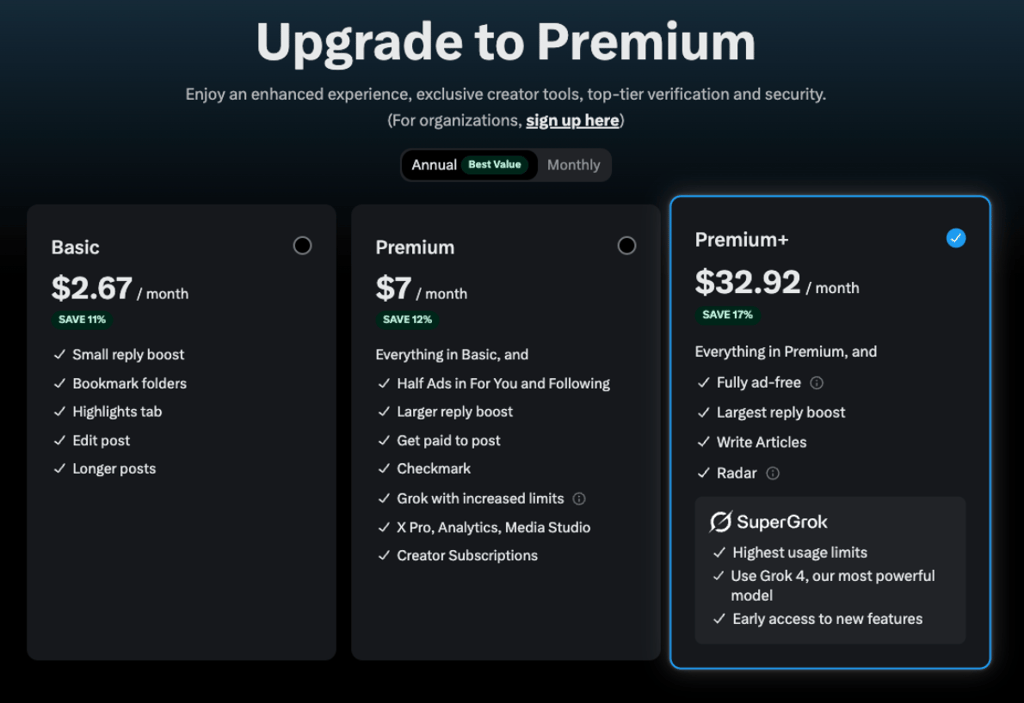
- Review the price ($32.92/month as of this writing) and confirm payment. The interface will upgrade your account and (if not already) add the blue checkmark.
-
Once subscribed, you’ll see a new Grok icon or button in X. You can click it to start chatting. Alternatively, you can go to grok.com or open the Grok mobile app for the full Grok 4 experience.

That’s it. After subscribing, Grok 4 becomes available anywhere on X Premium+.
Best Grok 4 alternatives
Grok 4 isn’t the only advanced chatbot out there, and different users may prefer others. However, each excels at different tasks, so it’s hard to pick a single Grok 4 alternative that does it all. So here are a few of the top alternatives I use based on the task at hand:
- ChatGPT (GPT-4o). One of the most popular Grok 4 alternatives overall, it's fast, intuitive, and great at creative tasks, everyday conversation, and problem-solving. It supports voice and image input and offers an optional Browse plugin for real-time web access.
- Claude 4.1 Opus. A top Grok alternative for long-form reasoning and analysis. Claude Opus can process up to 200K tokens at once, making it ideal for writing large documents, conducting deep analysis, or tackling multi-step tasks. It's often praised for its thoughtful, structured responses, though it can be slightly slower and more expensive per token than ChatGPT or Grok.
- Gemini 2.5 Pro. A Grok alternative built for those embedded in the Google ecosystem. Gemini offers fast responses and can handle massive input sizes (up to millions of tokens), with seamless integration across Gmail, Docs, and Drive. It's extremely efficient for productivity, but doesn’t yet match Grok’s real-time social media awareness.
- Mistral Mixtral. For those looking for an open-source Grok alternative, Mixtral is a strong choice. It supports up to 32K tokens and performs well at a lower cost. You won’t get native real-time data or integrations, but it’s ideal for developers wanting more control or private deployment options.
- Perplexity AI. While it’s not its own model, Perplexity wraps models like GPT‑4 and Claude and adds built-in web browsing. It delivers up-to-date answers with cited sources – no plugin required. It’s fast and accurate for factual queries and research, but less suited for long-form creative writing or complex reasoning.
Each of these has pros and cons. However, I believe that ChatGPT is still the go-to for most everyday tasks.
Final thoughts on Grok 4
Grok 4 is definitely a step up compared to Grok 3 – it’s faster, smarter, and can do more stuff like voice commands, image understanding, and live web searches. It remembers what you’ve said before, which helps it feel less robotic. The coding help is solid, and automation features are cool for saving time.
That said, it’s not flawless. Sometimes the web search feels clunky or gives generic results unless you’re super clear with prompts. Advanced features like data visualization aren’t fully there yet. Plus, the safety filters are hit-or-miss, which is a big deal with all the controversies flying around.
And honestly, unless you're making full use of its advanced capabilities, the value may not stand out, especially now that most top models are priced similarly.
With all that said, I think that Grok 4 is powerful and worth checking out if you need a strong AI assistant, but it still needs some polish before it’s perfect.
FAQ
Who owns Grok 4?
Grok 4 is owned by xAI, an artificial intelligence company founded by Elon Musk. xAI developed Grok 4 as an AI chatbot integrated into X (formerly Twitter). It is the flagship AI model of Elon Musk’s AI company and part of his push to compete with tools like ChatGPT.
Is Grok better than GPT-4o?
Neither is strictly better in all cases. It depends on what you need. GPT-4 in ChatGPT is easy to use and great for writing and coding. Grok 4 by xAI is built for real-time information and code search within Elon Musk’s X platform. Some users prefer Grok 4 for advanced research and coding, while GPT-4 is often better for beginners. GPT-4 is more user-friendly, but Grok 4 offers powerful tools for specific tasks.
Is Grok AI safe?
Grok 4 is mostly safe, but not fully reliable. It has filters and safety training, but it can still make mistakes, say controversial things, or be tricked into giving unsafe answers. Because it uses real-time web and social media data, there are also privacy and bias concerns. It’s best to use Grok carefully and not fully trust everything it says.
How much does Grok 4 cost?
Grok 4 costs $32.92/month for the standard version, which is available with X Premium Plus. For more advanced users, the Grok 4 Heavy version is part of the SuperGrok Heavy plan and costs $300.00/month.