n8n vs Zapier
Being behind major reports like The Mother of All Breaches and RockYou2024, our in-house cybersecurity experts and journalists provide unbiased, real-world testing and in-depth analysis.
We maintain complete transparency by openly sharing our testing methodologies with our audience.
Learn more-

-
Contribution by
Greta Čeponė



I tested both tools together with the Cybernews research team to see how n8n and Zapier compare in real-world use. Zapier is a hosted no-code automation platform built for quick setup and smooth integrations, while n8n is a flexible, developer-friendly workflow automation tool known for self-hosting and customization.
If you’re trying to pick between the two, the real differences come down to ease of use, overall power and flexibility, the platforms’ cost-effectiveness at scale, and their ability to handle sensitive data. In this Cybernews’ n8n vs Zapier comparison, I address these differences directly.
Just like in our earlier n8n vs Make comparison and other automation stack reviews, I highlight practical use cases and performance results. By the time you finish reading this article, you’ll know exactly who should pick Zapier and who benefits more from n8n.
Zapier vs n8n overview
Below is an overview of the differences between Zapier and n8n. Both platforms are powerful workflow automation tools, but they differ in flexibility, pricing, and data control.
| Feature | n8n | Zapier |
| Rating | ||
| Key features | 400+ nodes, complex conditional logic, self-hosting or cloud, credential encryption, open-source extensibility | 8000+ app integrations, multi-step Zaps, AI automation, intuitive drag-and-drop editor, hosted infrastructure |
| Pros | Total workflow flexibility, open-source and extendable, self-hosting option for full data privacy, better pricing at scale | Massive app library, easy setup, reliable uptime, no maintenance required |
| Cons | Slightly steeper learning curve, fewer built-in integrations, setup may require technical input | Price grows fast with task volume, limited customization, no on-premise deployment |
| Who’s this for? | Developers, startups, and privacy-focused users who want full control and scalability | Business teams and marketers seeking fast plug-and-play automation |
| Free/Trial version criteria | Free self-hosted edition or free cloud plan, 14-day free trial on the premium plans | Free plan with 100 tasks per month, 14-day trial for premium Zaps |
| Price | From $20.00/month | From $19.99/month |


Zapier vs n8n: side-by-side features comparison
Choosing between Zapier and n8n comes down to how much control you need over your automations and how much time you’re willing to invest in setup. Below is a quick side-by-side comparison of the two tools, highlighting their differences in structure, scalability, and customization options.
| Platform | Zapier | n8n |
|---|---|---|
| Nature | Cloud-based | Cloud and self-hosted |
| Integrations | 8000+ | 400+ native nodes and 1000+ using HTTP request nodes |
| Customization | Low, limited coding abilities | High, ability to add custom requests |
| AI capabilities | High | High |
| Scalability | Cloud managed | Flexible |
| Compliance | Strong (includes GDPR, SOC 2 type II, SOC 3, CCPA certifications) | Strong (includes GDPR, SOC 2 type II, SOC 3, CCPA certifications) |
| Data handling | Shared cloud | Shared cloud, but it can be private with self-hosting |
| Hosting and deployment | Cloud-only, zero maintenance | Self-hosted or cloud, depending on the plan |
| Triggers and webhooks | Takes priority for triggers from the apps. Includes possibility for webhooks | Takes priority for webhooks |
| Open source | No | Possible on self-host |
| Visual editor | Easy to use | Moderate, requires additional knowledge |
| Learning curve | Easy for beginners | Moderate, requires additional knowledge |
| Pricing model | Task based | Execution based |
| Target audience | Marketers, small/medium business owners, and tech-savvy users who do not code | Developers, IT specialists |
At a glance, the contrast is clear: Zapier favors simplicity and speed, while n8n leans toward flexibility and data autonomy. These traits make n8n more appealing to advanced users and privacy-sensitive teams.
- Zapier stands out for rapid deployment and user-friendliness, with its massive integration library and pre-built templates setting the industry standard. In our separate Zapier review, we found it hard to beat for quick and effortless setup.
- n8n excels in advanced workflow logic and developer freedom, offering the kind of control you’d expect from open-source software. Our dedicated n8n review highlights its ability to handle complex automations and custom API connections with ease.
- Ultimately, your choice comes down to cost, privacy, and workflow complexity, especially if you plan to scale operations.
Ease of use and learning curve
I tested Zapier and n8n to see how steep their learning curves are and how simple daily use is, from building the first workflow to troubleshooting errors and collaborating with my team.
Here’s where Zapier feels simpler:
- Zapier’s intuitive UI and straightforward trigger/action setup helped me get my first workflow running quickly. I found the prompts helpful, especially for those with little technical knowledge.
- Error messages weren’t very detailed, but Zapier often suggested clear next steps or fixes.
- The large library of templates, live chat, and help center guided me at every step. I could follow ready-made workflows or adapt them.
- Sharing workflows and managing approvals was simple, and it was easy to see who had access and who made changes.
Here’s where n8n feels more controllable:
- Setting up my first workflow took longer, but the extra options let me customize triggers and actions. However, I needed some coding knowledge to get it working.
- Error messages are very detailed, showing exactly what went wrong in the workflow.
- Templates are user-created, so there’s more variety and flexibility than pre-made guides.
- Even on the free plan, I could share a project with teammates. Paid plans expand the number of shared projects, which provides more control over workflow approvals and workspace structure.

AI and smart automation
In this section, I looked at how AI is used in Zapier and n8n, from building workflows to using AI steps inside them, and where it’s better to use traditional automation.
Both tools support AI-assisted workflow building. Zapier’s AI Copilot lets you describe what you want to automate, then suggests prompts, breaks the workflow into steps, and asks follow-up questions when something is unclear. It works well even with relatively basic prompts.
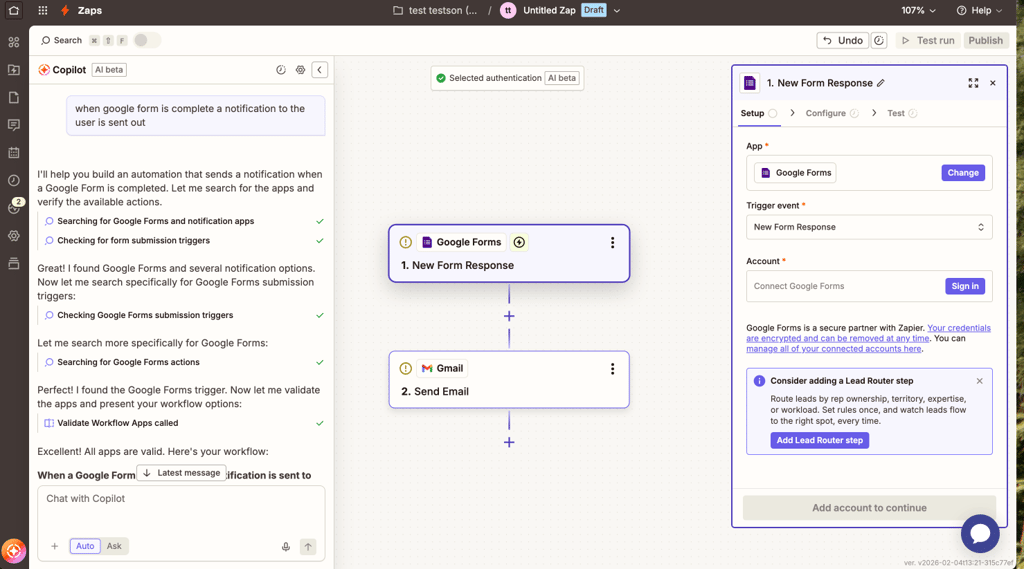
n8n’s AI builder follows a similar idea but expects more precise input, especially for workflows with branching or logic. In practice, both generated workable workflows, with no meaningful difference in setup speed.
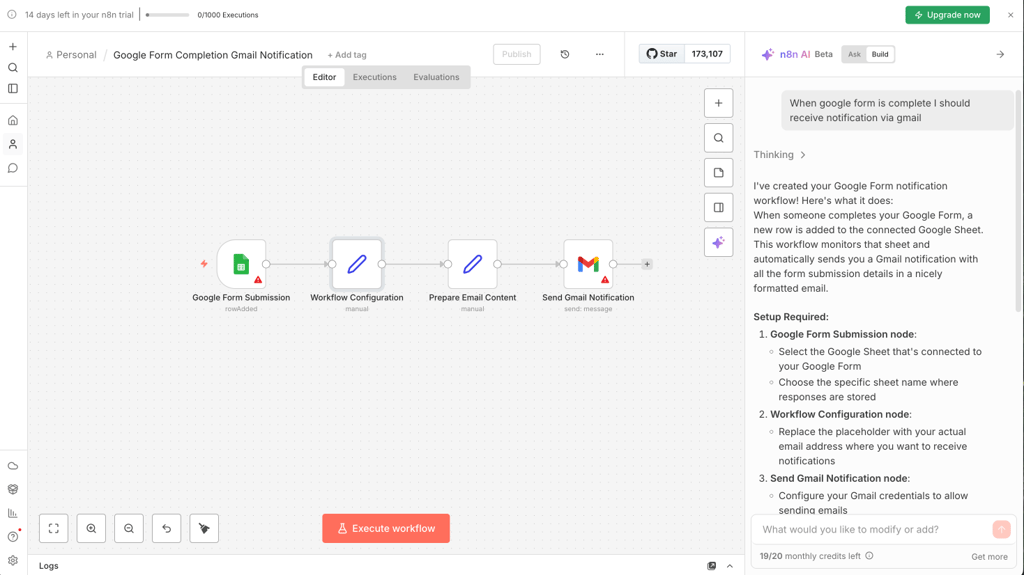
Within workflows, AI is most useful for summarizing text, classifying data, extracting fields from unstructured content, and routing tickets or leads. Zapier makes it quick to add these steps, while n8n provides more control when you need to combine AI output with conditions and custom logic.
However, AI isn’t fully reliable in either tool. For workflows where accuracy is your top priority, rule-based steps are still safer, and I’d recommend using AI only for interpretation or data enrichment.
Workflow logic (branching, conditions, error handling)
When it comes to workflow depth, Zapier and n8n differ sharply. Zapier keeps automations linear, relying on basic filters and a premium-only Paths feature for limited branching. It works well for simple logic, but in my experience, it quickly becomes restrictive and expensive for multi-step workflows.
On the other hand, n8n is built around complex branching. Using IF, Switch, and Merge nodes, you can design multi-path automations that process data dynamically across multiple conditions – without artificial limits or added cost.
Retries and fallbacks are another difference. Zapier automatically retries failed tasks, but users have little control beyond re-running a Zap. Conversely, n8n goes further, offering full retry control, custom fallbacks, and dedicated error branches that keep workflows resilient instead of stopping mid-run.
For loops and batching, Zapier struggled with large data sets, often requiring premium workarounds. At the same time, n8n handles loops and batches natively through Split Out, Aggregate, and Summarize nodes, which makes n8n a better fit for data-heavy or API-based automations.
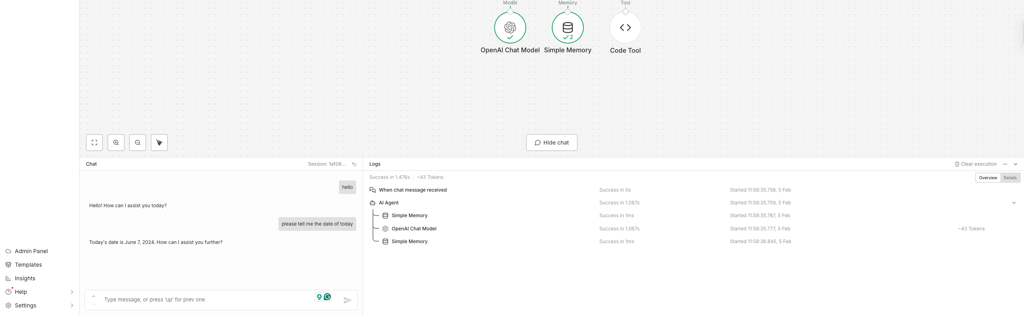
Observability is more advanced in n8n – you get detailed logs and step-by-step run history. What I appreciated the most was the ability to replay any failed run directly in the editor, giving engineers fine-grained debugging tools.
Developer and customization options
Another thing I couldn’t ignore while reviewing these tools is that Zapier and n8n differ significantly in terms of developer freedom.
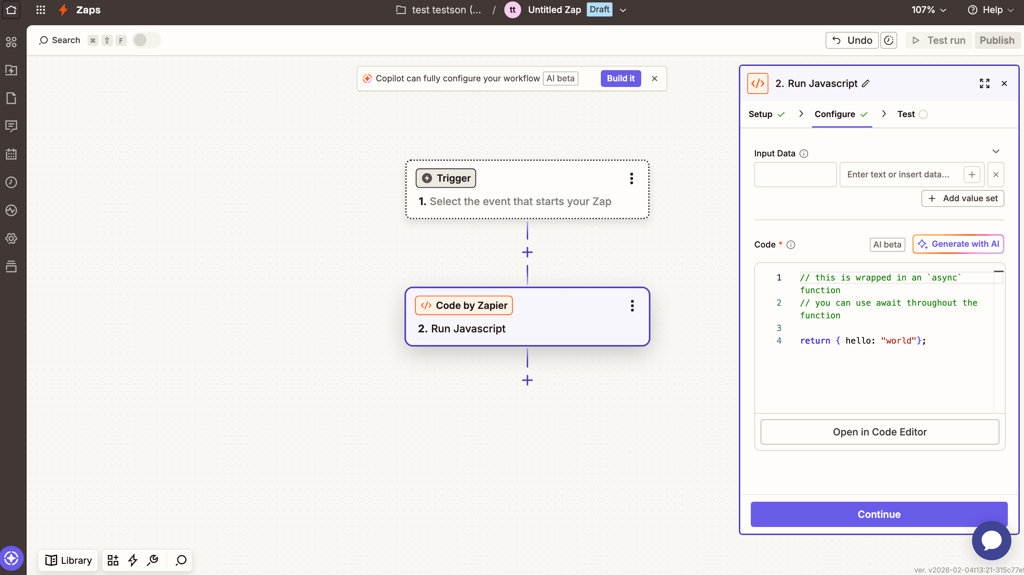
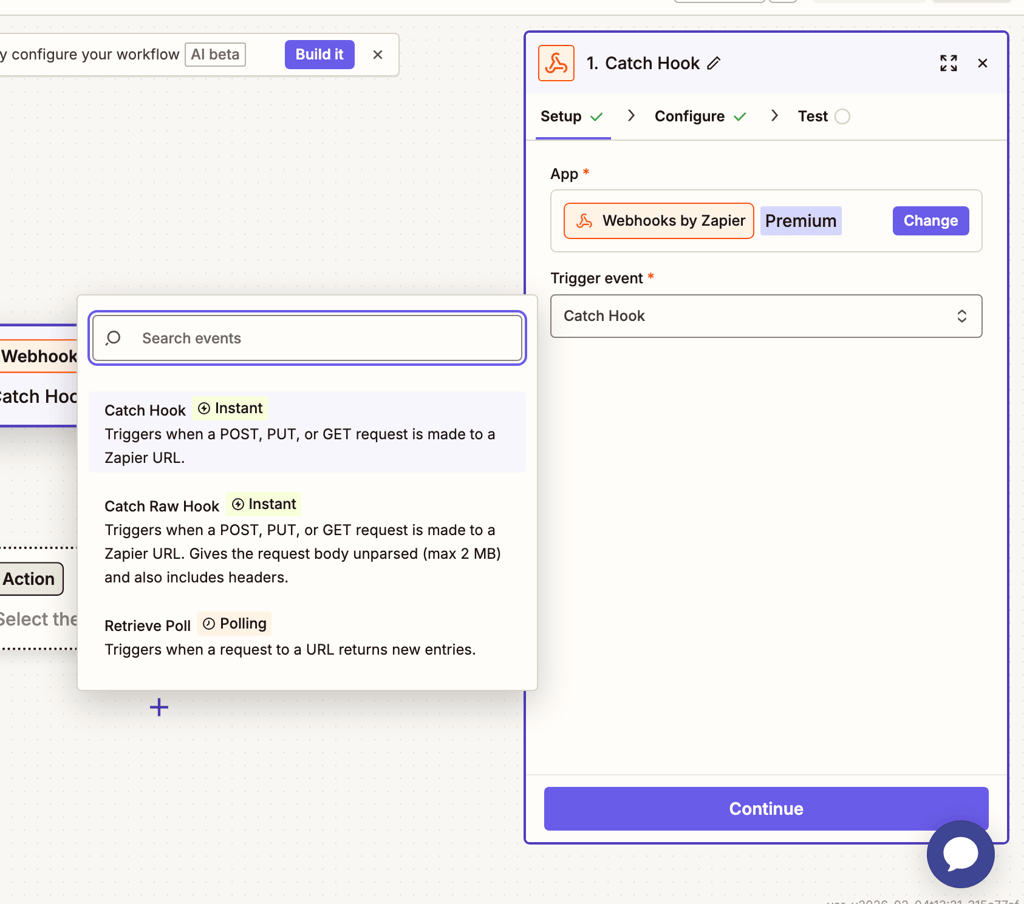
Zapier focuses on convenience over depth. It supports incoming and outgoing Webhooks, but only on premium plans, and its API Request feature is still limited. Code by Zapier allows small JavaScript or Python snippets, yet strict runtime, memory, and output caps make it viable only for light data formatting or a single API call. There’s no way to import external libraries or reuse code across workflows, which restricts serious development.

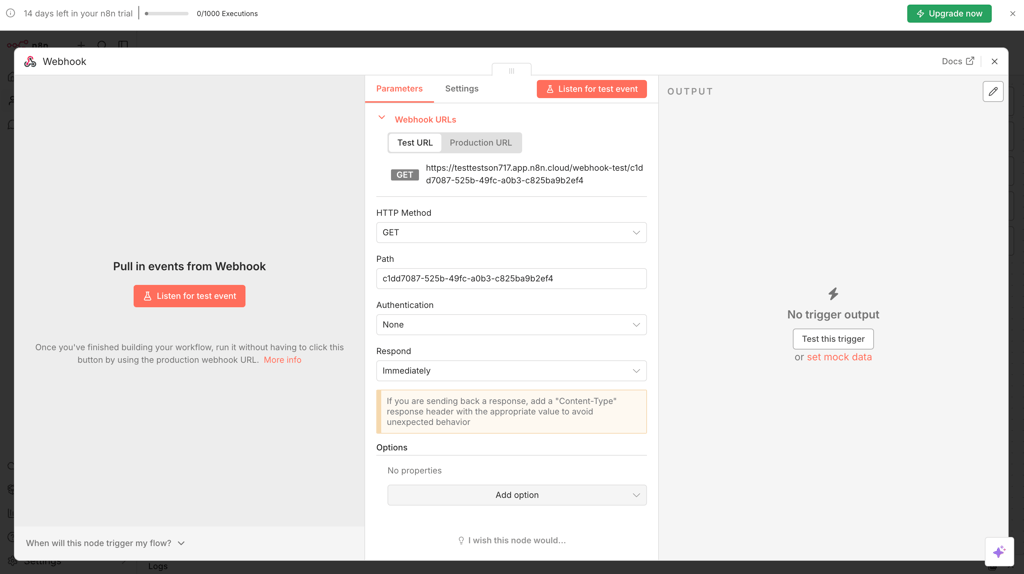
n8n, by contrast, is built for extensibility. Webhooks, raw API requests, and authentication handling are all first‑class features, while the Code node lets you write custom JavaScript or Python to transform data or call any API. Developers can install community or self‑built nodes, connect npm libraries, and even version workflows with Git integration. Self‑hosted users can fully customize the system or export workflows for CI/CD pipelines, avoiding vendor lock‑in.
Integrations and ecosystem
Zapier has a wide variety of integrations, with over 8000 apps covering the most popular SaaS tools. Most of them handle common tasks reliably, like syncing data, sending notifications, or creating records, without extra setup. Updates are handled automatically when APIs change, so you rarely run into broken workflows. This makes Zapier a solid choice if you rely on mainstream apps and want integrations that are predictable and rarely encounter issues. We’ve covered many of the most useful ones in our guide to the best Zapier apps to automate workflows.
n8n has fewer built-in integrations, with about 400 native nodes and over 1000 more available via HTTP request nodes. These integrations often give you more control, with extra options for triggers and actions. When something isn’t available, you can add custom code. You can use templates and nodes shared by the community, though not all are well-maintained, and some may lag behind API updates.
Hosting, security, and data privacy considerations
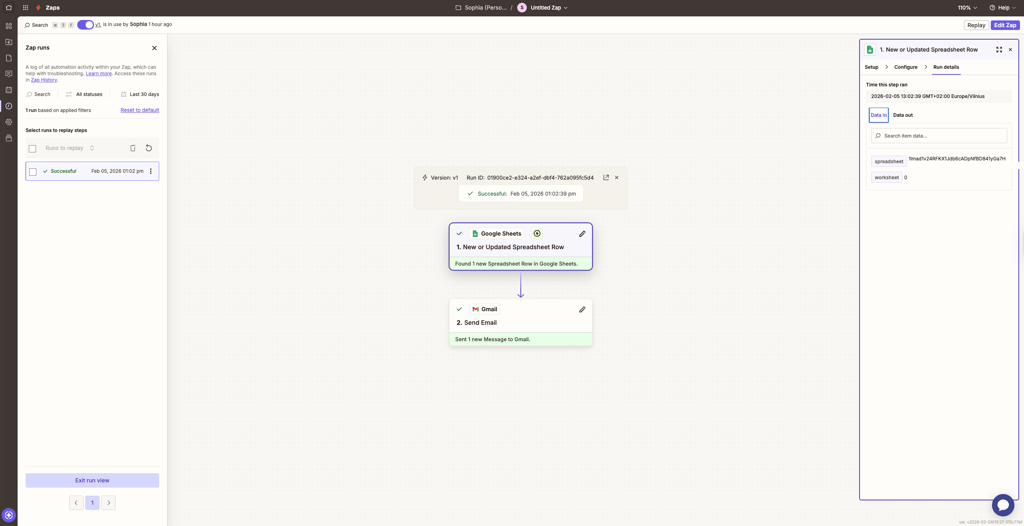
Zapier is cloud-only, so you don’t have to manage servers or infrastructure. Zapier handles updates automatically and maintains compliance with standards like GDPR and SOC 2. The trade-off is control. Zapier stores execution logs and payload data on its servers for a limited time, and anyone with account access can view that data during the retention window.
n8n gives you more flexibility. You can use its cloud version or self-host it, keeping data in your own environment. n8n encrypts stored credentials, lets you configure execution retention, and allows you to manage permissions. If you self-host, you are responsible for updates, uptime, and overall security configuration.
Both tools support RBAC and SSO on paid plans. In my experience, Zapier makes access management simpler, while n8n gives you more control, especially in self-hosted setups.
For sensitive workflows, I recommend using least-privilege access, redacting sensitive fields from logs, and separating development and production environments in either tool.
Pricing comparison
I looked at Zapier and n8n pricing to see how costs increase based on usage, features, and hosting options.
| Plan | Monthly price with annual plan | Usage | Feature gates | Best for | Cost at scale |
| Zapier Free | Free | 100 tasks/month | Two-step Zaps, limited AI Copilot | Testing, personal automations | Free forever, but the task limit is low |
| Zapier Professional | $19.99 | 750 tasks/month | Multi-step Zaps, premium apps, Webhooks, and AI fields | Small teams, complex workflows | Costs grow quickly with more tasks and premium apps |
| Zapier Team | $69.00 | 2000 tasks/month | Shared Zaps & folders, team app connections, SSO | Mid-size teams, collaboration | Can get expensive as users and tasks grow |
| n8n Starter | $20.00 | 2500 executions/month | Limited templates, no AI | Small dev teams, custom automations | Predictable for light usage |
| n8n Pro | $50.00 | 10,000 executions/month | Team management, advanced logic, and sharing | Technical teams or agencies | Linear scaling with execution volume |
| n8n Business | $800.00 | 40,000 executions/month | Advanced security, support, governance | Large orgs with compliance needs | High usage scales linearly, self-hosting adds server and operational costs |
Here’s a quick overview of how Zapier and n8n costs scale at different usage levels:
- Zapier costs increase quickly with task volume, premium apps, multi-step workflows, and larger teams, so even moderate usage can require upgrading to higher tiers.
- n8n costs grow with cloud execution volume, and if you self-host, you also need to factor in the time and effort required to set up and maintain the server.
- For low usage, like a single-person team testing automations, stick to Zapier Free or n8n Starter without any issues.
- At mid usage, small development teams running multiple workflows may find Zapier Professional costs add up faster, while n8n Pro handles the volume more efficiently.
- For high usage, large, complex workflows with hundreds of steps or multiple team members can get expensive on Zapier, whereas self-hosted or cloud n8n scales better, though self-hosting requires more hands-on management.
Support and learning resources
Both platforms provide extensive documentation and active communities, but here again, they take different approaches.
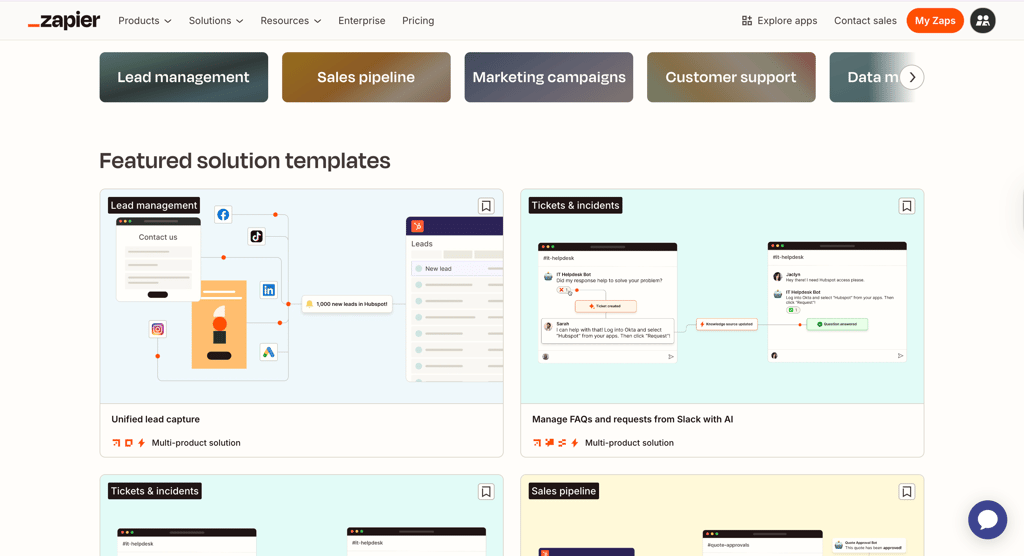
Zapier offers polished, business-oriented documentation and a massive template library – thousands of pre-built workflows that make onboarding nearly effortless.
Zapier employs a tiered customer support model: free and lower-tier users rely on a self-service help center and community forum, while Team and Enterprise subscribers gain access to live chat, faster response times, and dedicated success managers for complex builds.
n8n’s learning layer is more developer-driven. Its documentation is detailed, constantly updated, and geared toward hands-on experimentation. The n8n community – a 40,000-member forum plus GitHub and Discord channels – is highly active, with real engineers and contributors sharing reusable templates and debugging help daily. Paid tiers add direct email support and guaranteed SLAs for critical systems.

Use cases and recommendations
Choosing the right tool depends on what you need to automate. I’ve found that some tasks are easier in Zapier, while others benefit from n8n’s flexibility. Here are my recommendations:
- Choose Zapier for fast, no-code workflows. Its wide library of templates and intuitive UI lets me connect popular apps quickly without writing any code.
- Choose n8n for complex workflows. Branching, loops, and error handling are easier to manage thanks to custom scripting and flexible workflow paths.
- Choose n8n for sensitive data or self-hosting. Running it on my own server keeps information in-house and gives full control over security and retention policies.
- Choose Zapier for non-technical teams. The AI Copilot and AI Agents, pre-built Zaps, and help center make it easy for anyone to get started and follow step-by-step guidance.
- Choose n8n for engineering-led projects or custom APIs. I could add scripts, webhooks, or custom nodes without hitting platform limits.
- Choose the tool carefully for high-volume automations. Using Zapier, costs rise quickly with tasks, multi-step Zaps, and premium apps. Using n8n, cloud execution volume, or self-hosted server load drives expenses, so I always plan scaling needs and maintenance effort before committing.
Zapier vs n8n: user reviews
Together with the Cybernews research team, I analyzed public user feedback across Reddit, G2, and other forums to see what users think about Zapier and n8n. Many people praise Zapier for how easy it is to start. Users also often mention the wide app directory, reliable integrations, and how quickly they can build simple workflows without coding. Templates and AI Copilot are often highlighted as helpful for quickly getting automations up and running, especially for non-technical teams.
However, Zapier has recurring complaints about its pricing as usage grows. Users often say costs increase quickly with multi-step Zaps, higher task volumes, and premium apps. Some users also mention limits in advanced logic and occasional frustration when debugging more complex workflows, particularly on lower-tier plans.
n8n users consistently highlight the flexibility and control it offers. Many like the option to self-host, build complex workflows with branching and error handling, and extend functionality using scripts or custom nodes. Developers in particular value n8n's freedom compared to more structured tools.
On the downside, users often point out the steeper learning curve required by n8n. The interface can feel overwhelming at first, and self-hosting adds maintenance responsibility. Some reviewers also mention that templates and onboarding are less polished, which can slow down setup for beginners.
Verdict: which one should you choose?
After testing n8n and Zapier side by side, it’s clear to me that both tools serve different kinds of automation builders. Zapier focuses on accessibility and reliability, while n8n focuses on flexibility and developer power.
Choose Zapier if:
- You need a fast, no‑code setup for routine business automations
- Your workflows are simple and rely on mainstream app integrations
- You prioritize stability and polished templates over customization
- Your team is non‑technical and wants minimal setup or maintenance
- You value dependable, cloud‑managed infrastructure
Choose n8n if:
- You want deep workflow logic, loops, or conditional branching
- Your team includes developers or technically skilled users
- Data privacy and self‑hosting are priority requirements
- You need scalable automations without escalating task costs
- You plan to extend tools via code or custom API nodes
As such, while Zapier is a great solution for simplicity, n8n is my recommendation for more control and flexibility. However, your best choice depends on your team’s skill level, workflow complexity, and long‑term scaling goals.
Best alternative: nexos.ai
Not every team will find n8n or Zapier to be the perfect solution. Some may require a more AI-driven experience, simpler onboarding, or a pricing model that better suits their fast-scaling automation needs. That’s why I also tested nexos.ai with the Cybernews research team as a part of our broader look at emerging automation platforms.
nexos.ai combines no-code simplicity with intelligent task management, and this architecture makes it a true AI-first alternative to traditional automation platforms. Instead of manually defining every condition, you describe goals, and the platform suggests or even builds workflows using its built-in AI agents. It also integrates with popular business tools, supports natural-language automation design, and automatically optimizes workflows based on real usage data.
For teams looking beyond traditional automation platforms, nexos.ai is a fresh, intelligent alternative that blends usability and innovation.
FAQ
Is n8n better than Zapier for complex workflows?
Yes, n8n is built for complexity, with advanced branching, looping, and error-handling tools. You can design multi-path automations, run conditional logic, and natively manage retries – all these features go beyond Zapier’s linear workflow model.
Can I self-host n8n, and what does it require?
Yes, n8n can be hosted on any modern server or cloud instance supporting Node.js and Docker. This setup gives you full control over your data and customization options.
Which tool is cheaper for high-volume automation?
At scale, n8n is generally cheaper because it uses execution-based pricing as opposed to Zapier’s task-based model, which charges for each individual step. As a result, complex workflows cost less to run on n8n.
Does Zapier support advanced branching and error handling?
Yes, but not extensively. Zapier’s conditional system, called Paths, is a premium feature and limited in flexibility compared to n8n’s node‑based logic and built-in error branches.
Which platform is safer for sensitive business data?
n8n is safer for handling sensitive business data. Self-hosting keeps data within your own infrastructure, while Zapier’s cloud‑only setup means your automations always run through third‑party servers.