Zapier AI Agents: what they are, how they work, and how to use them
Being behind major reports like The Mother of All Breaches and RockYou2024, our in-house cybersecurity experts and journalists provide unbiased, real-world testing and in-depth analysis.
We maintain complete transparency by openly sharing our testing methodologies with our audience.
Learn more

Zapier AI Agents are AI-powered teammates you create to automate tasks with instructions and context you define. According to my research and testing, the key shift here is autonomy. Instead of a rigid, step-by-step automation, an Agent can interpret intent written in plain language, monitor incoming signals, and choose actions as situations change.
That difference matters for unpredictable workflows. When requests vary, inputs arrive half-structured, or follow-ups depend on judgment rather than strict rules, traditional automations start to strain. AI Agents are designed to operate within boundaries you set and make decisions without needing every possible scenario mapped in advance.
In this guide, I'll explain what Zapier AI Agents are in practical terms, how they fit into Zapier’s automation stack, and how they differ from standard Zaps. I’ll cover real-world use cases and show you a setup based on control, reliability, and making your life easier.
What are Zapier AI Agents?
Zapier AI Agents are AI-powered workflow automation tools that can interpret tasks, make decisions, and act autonomously across connected apps. They extend Zapier’s core automation model by allowing you to define goals or instructions in plain language. This is a shift from static rule-based automations toward workflows that adapt as conditions change.
Traditional Zaps follow a fixed sequence of trigger-to-action steps you configure in advance. AI Agents, by contrast, are designed to evaluate information, choose relevant actions, and adjust their behavior within the boundaries you set. That means they can handle variation and ambiguity that would otherwise need many conditional branches.
In practice, Zapier AI Agents combine natural language instructions with Zapier’s automation ecosystem so the agent itself can monitor events, interact with data sources, and take action on its own. They aim to act as AI assistants you train rather than just tools that run predefined steps.
How do Zapier AI agents work?
Zapier AI Agents follow a clear sequence: a trigger starts the workflow, AI interprets the task, and then the agent executes actions you allow. The process begins with a defined trigger. For example, a new form submission or an incoming email. After the event, the agent takes over and interprets your natural-language instructions within the context you’ve provided, deciding which connected apps to interact with and what steps to take next.
Unlike standard automations that run fixed triggers and predefined action steps, AI Agents integrate natural language understanding so they can make choices rather than just follow a checklist. They assess inputs, determine intent, and select actions from the tools you’ve granted access to.
Behind the scenes, Zapier’s platform uses models capable of natural language processing (the same class of AI that interprets human language and context). This lets the agent reason about your instructions and map them to concrete tasks. The result is a workflow that can respond to variation and carry out multi-step work with far fewer rigid conditions than a traditional Zap.
Key capabilities of Zapier AI Agents
Zapier AI Agents focus on handling work that doesn't fit neatly into a fixed automation path. Their main capabilities include:
- Reading natural language instructions. You describe what you want done in plain language. The Agent works from that instruction instead of relying on tightly scripted steps.
- Running multi-step tasks. An Agent can carry out several actions in one flow, choosing which steps matter for the situation instead of moving through a preset sequence every time.
- Making decisions based on data. In use, an Agent processes incoming data against the instructions you’ve given and carries out the appropriate actions rather than following a fixed rule path. That removes a lot of the brittle logic you normally end up maintaining in complex automations.
- Working across Zapier’s app ecosystem. Agents work with the same apps you already use in Zapier. They can pull information from one tool, act on it, and push updates into another without you rebuilding the workflow for every app combination.
You stay in control of how much freedom an Agent has. You decide which apps it can access, which actions it can run, and where human review is required. That balance lets Agents handle variation without turning automation into a black box.
Zapier AI Agents vs traditional Zaps
| Feature | Traditional Zaps | Zapier AI Agents |
| Trigger-based automation | ✅ Yes | ✅ Yes |
| Natural language input | ❌ No | ✅ Yes |
| Decision-making | Rule-based (filters, paths) | AI-driven within defined boundaries |
| Multistep logic | Limited and predefined | Advanced and adaptive |
| Flexibility | Best for predictable workflows | Better for variable or messy inputs |
| Setup complexity | Higher as logic grows | Lower for complex, changing workflows |
| Typical use cases | Simple data syncs, notifications, and fixed processes | Request triage, follow-ups, and workflows that require judgment |
Traditional Zaps are good for predictable, linear workflows, where you define one step at a time. You specify the trigger, then map actions precisely. They can include conditional paths (like simple branching), but those still rely on rules you configure ahead of time.
Zapier AI Agents interpret your intent in natural language, assess context, and decide which actions to run within the boundaries you set. This lets them adapt when inputs vary, or you want a broader class of work handled without building out every branch manually.
Practical use cases of Zapier AI Agents
Zapier AI Agents tend to work best in workflows with high volume and inconsistent inputs. Instead of forcing every case into a strict structure, the Agent handles the variation and keeps work moving. Here are some examples:
- Customer support ticket triage. When new tickets arrive, an Agent can scan the message, identify the request, and send it to the correct queue or owner. Teams use this to reduce manual sorting and keep urgent issues from getting buried. Start on Free for small queues, but move to Pro once tickets trigger multiple steps per case.
- Email summarization and follow-up. In shared inboxes, Agents can turn long threads into short notes that everyone on the team can scan quickly, then draft a reply that fits the situation. Sales teams use this most when the inbox starts to feel repetitive. Instead of drafting the same answer again and again, they let the Agent handle first drafts and step in only to polish or approve. If this runs daily on a shared inbox, the Pro plan is the safer pick because each thread burns several activities.
- Social media content creation and scheduling. Agents can take a topic or content source, turn it into draft posts, and pass those drafts into scheduling tools. Many teams still review before publishing, but the Agent handles the repetitive setup. The Free plan works for occasional posts, but Pro makes sense for regular, multi-platform publishing.
- Automated lead scoring and follow-ups. When a new lead enters your CRM, an Agent can pull in related data, assess fit based on your criteria, update the record, and trigger the next step. Lead enrichment plus CRM updates usually need Pro to avoid hitting activity limits.
- Data enrichment workflows. Agents can fill in missing fields by pulling data from connected tools or enrichment services. The Free plan is fine for light enrichment, but Pro becomes necessary at real volume.
Step-by-step: setting up your first Zapier AI Agent
Building your first Zapier AI Agent is all about giving clear instructions, testing them, and tightening things up. You move fast at first, then slow down to refine what the Agent actually does.
-
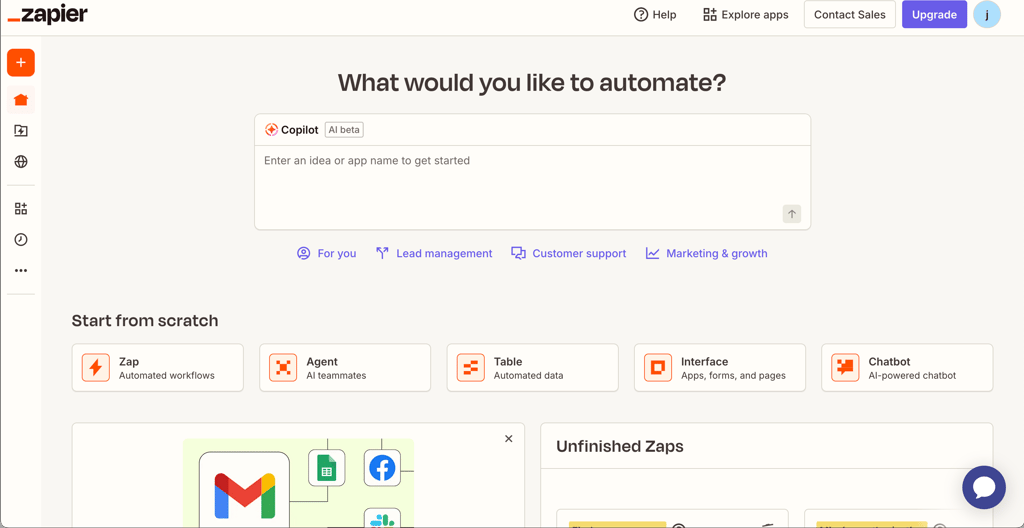
Find AI Agents in your workspace. Sign in, open the left-side menu, and click Agents (AI Teammates). This is the hub where all your Agents live.
-
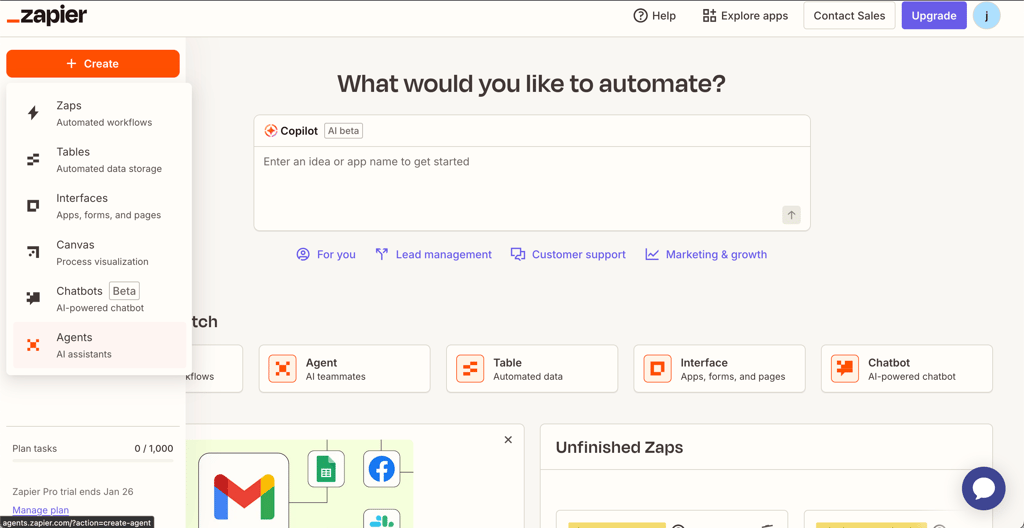
Start a new Agent. Hit Create > Agents and give it a name that tells you what it’s supposed to handle, not just what app it uses.
-
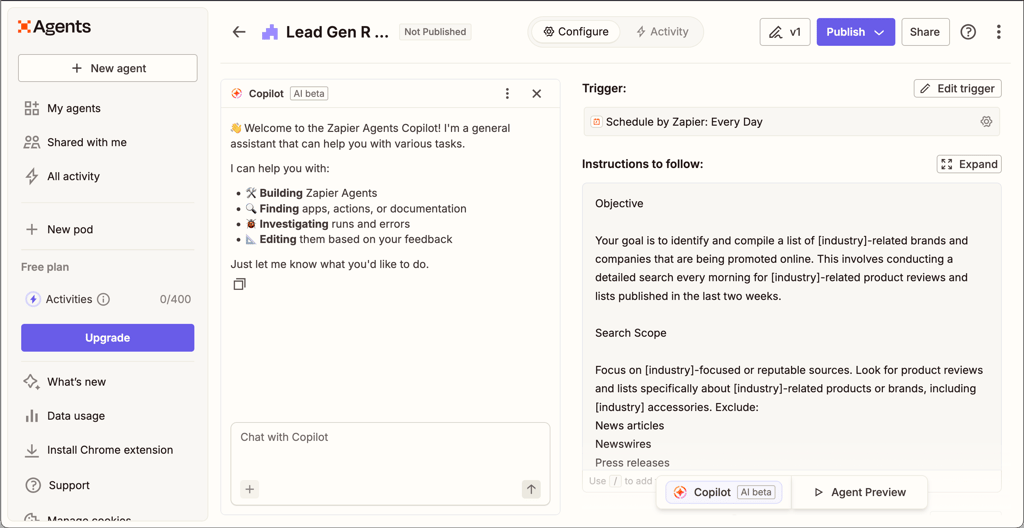
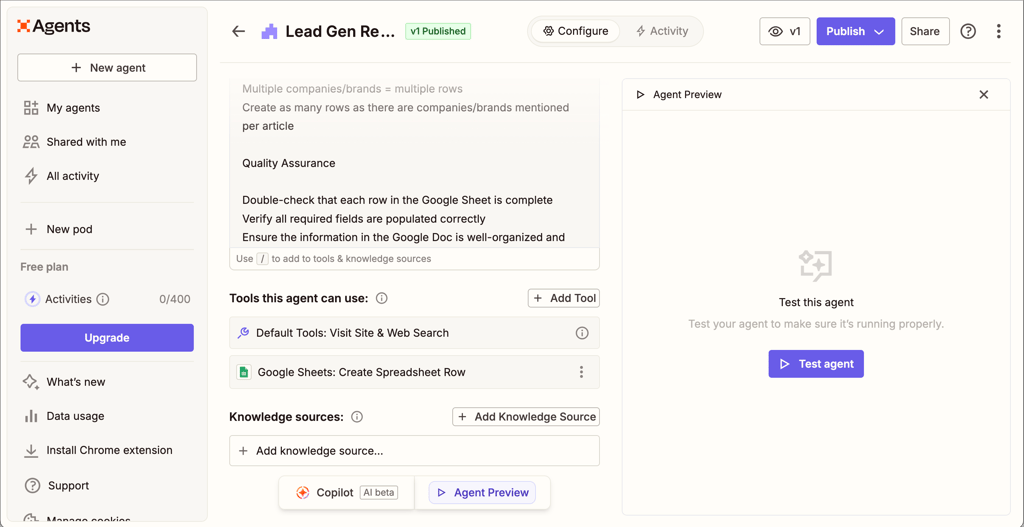
Write real instructions, not a script. In the builder, describe what you want done in plain language. Focus on outcomes, edge cases, and what the Agent should avoid. Don't just list steps – explain your expectations.
-
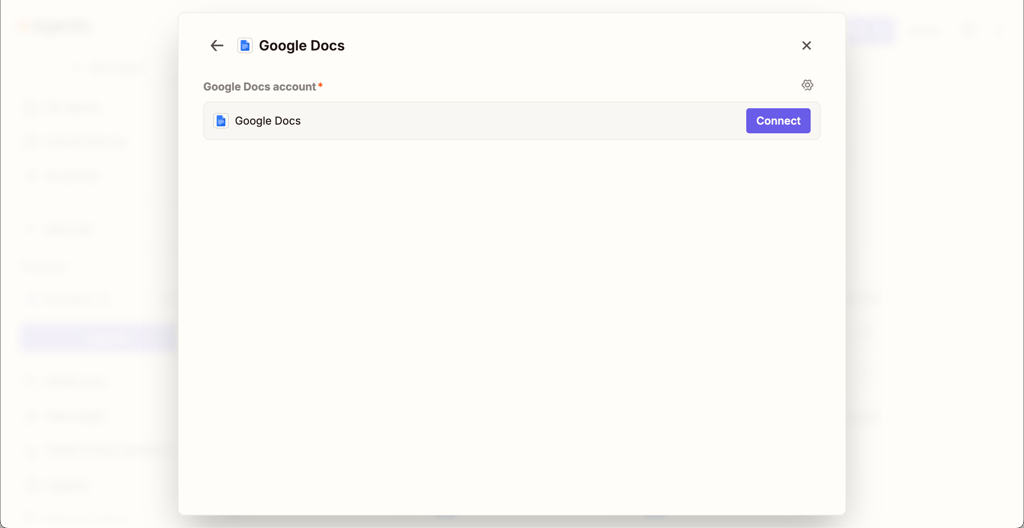
Pick the tools it’s allowed to use. Connect the apps the Agent needs, like your inbox, Slack, or CRM, and approve access to each one. Think in terms of “what data does this need?”
-
Run a real test, not a toy one. Trigger the workflow with actual data you care about. Watch what happens, then adjust your instructions if the result misses the mark.
-
Publish, then learn from real usage. Go live and let the Agent work on actual tasks. Look at the activity log to see how it behaved in practice, and tighten your instructions whenever needed.
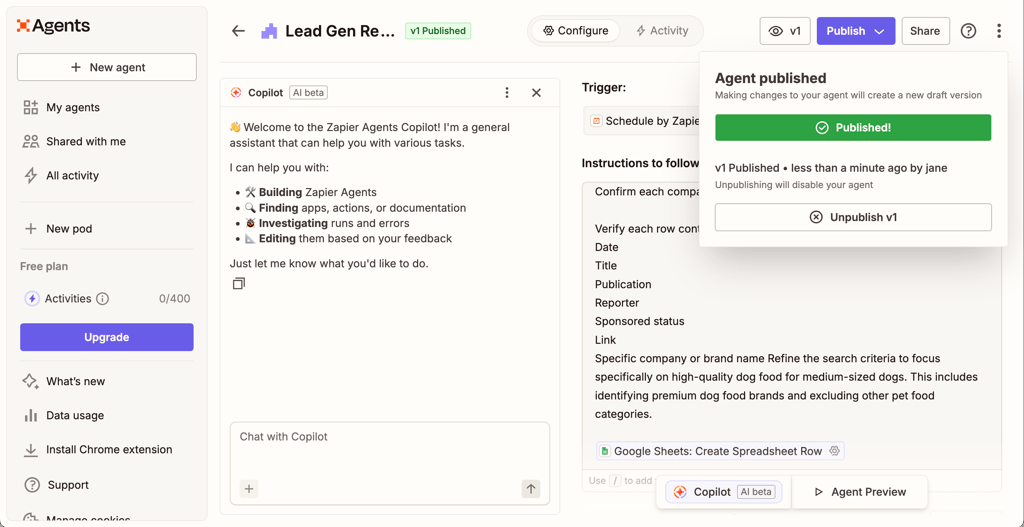
The first version rarely gets everything right. Let it handle a few real cases, notice what’s off, and adjust from there.
Best practices for Zapier AI Agent workflows
Here’s what tends to work best once you’ve built a few Agents and seen them run on real work:
- Keep instructions clear and specific. Write them the way you’d brief a teammate who can’t ask follow-up questions. Ambiguity shows up fast in real runs.
- Start with simple workflows and test incrementally. Begin with a tiny version that tackles one real task, let it run on real inputs, and add more pieces only after you’ve seen how it behaves.
- Use logs and feedback to refine workflow behavior. Revisit runs that looked odd and adjust your instructions based on what actually happened, not what you assumed.
- Set alerting for failures or exceptions. Route errors to Slack or email so you learn about problems quickly instead of discovering them later.
- Combine rule-based and AI logic where appropriate. Let standard Zaps handle predictable steps and reserve Agents for tasks that need judgment or flexibility.
These habits keep Agents useful, visible, and easier to control as your automation grows.
Zapier vs competitors
| Tool | AI automation focus | Ease of use | Integration range | Pricing |
| Zapier | Strong AI workflows + Agents | Easiest for non-technical teams | 8000+ app integrations | Automation plans start at $33.33/month (annual Pro subscription); free plan available |
| Make | AI features and tools across plans | Medium (visual, but for more tech-savvy users) | 3000+ apps | Plans start at $9.00/month (annual Core subscription); free plan available |
| n8n | Automation and developer-oriented AI via nodes | More technical than Zapier/Make | 500+ apps | Plans start at $20.00/month (annual Starter subscription); 14-day free trial available |
| Akira.ai | Agentic, enterprise-focused AI platform | Enterprise-oriented (less straightforward) | Integrations with business tools (not publicly disclosed) | Plans start at $15.00/month (Starter subscription); 30-day free trial available |
If you want the lowest-friction “connect apps and go” type of service, Zapier stays the easiest. If you want more control and don’t mind a steeper build experience, Make and n8n are better fits. Akira is more like an enterprise agent platform than an app-to-app automation hub.
Final thoughts: should you use Zapier AI Agents?
Yes, if your work is messy, high-volume, and hard to reduce to clean rules, Zapier AI Agents are worth using. They shine in places where inputs vary, context matters, and you don’t want to maintain endless conditional logic: ticket triage, shared inboxes, lead handling, and data enrichment are the obvious wins. You’ll get more done with less wiring, as long as you’re comfortable paying for higher activity limits once usage ramps up.
No, if your processes are already crisp, predictable, and highly structured. In that case, traditional Zaps will be simpler, cheaper, and easier to control.
In the broader automation space, Zapier is still the fastest way to connect lots of apps without friction. If speed and app coverage matter most, stick with Agents. If you need deep customization, self-hosting, or massive scale, tools like Make or n8n may suit you better.
FAQ
What are Zapier AI Agents?
Zapier AI Agents are smart automations you build inside Zapier that act on plain-language instructions, work across your connected apps, and adjust their behavior based on incoming data instead of following one fixed, prewritten path every time.
How do Zapier AI Agents differ from regular Zaps?
Regular Zaps run exactly the steps you design in advance. Zapier AI Agents can read context, react to messy inputs, and choose next actions within your boundaries, which makes them better for variable, real-world workflows.
Can Zapier AI Agents be used for free?
Yes. Zapier includes a free tier with a limited number of monthly AI activities, which is enough for testing, learning the tool, and running very low-volume automations before upgrading.
What apps can Zapier AI Agents integrate with?
Zapier AI Agents can work with most of Zapier’s 8000+ connected apps, including popular tools like Gmail, Slack, Salesforce, HubSpot, Google Sheets, Notion, and Zendesk, alongside marketing, support, and collaboration platforms your team already uses.
Are Zapier AI Agents secure for business data?
Yes. They operate inside Zapier’s existing security framework, using the same app permissions, access controls, encryption practices, and compliance protections as standard automations.