Bubble vs Webflow: honest no-code platform comparison for 2026
Being behind major reports like The Mother of All Breaches and RockYou2024, our in-house cybersecurity experts and journalists provide unbiased, real-world testing and in-depth analysis.
We maintain complete transparency by openly sharing our testing methodologies with our audience.
Learn more

If you’ve searched for tools to build websites and web applications, you likely noticed two market-dominating names – Webflow and Bubble. Both providers offer accessible web building for beginner and advanced users. What’s more, neither of the platforms requires extensive code knowledge. It's particularly important for the fast-growing no-code trend, which aims to make software development accessible to non-tech-savvy individuals.
For this comprehensive Webflow vs Bubble comparison, I tested both platforms side by side. This allowed me to highlight the pros and cons of each provider, so you can make a better decision about which platform suits your project's needs.
Webflow vs Bubble: quick overview
| Webflow | Bubble | |
| Key features: | Drag-and-drop editor, SEO optimization, AI-driven tools, and seamless integrations | Drag-and-drop editor, variety of add-ons, and AI-driven tools |
| Price: | From $14.00/month | From $29.00/month |
| Primary use cases: | eCommerce, portfolio, and blog projects | Web application and eCommerce projects |
| Ease of use: | Steep learning curve made very easy | Steep learning curve |
| Learning resources: | Internal tutorial platform | Internal tutorial platform and dedicated YouTube channel |
| Customization: | High level of customization | Moderate level of customization |
| Performance: | Fast and reliable performance for small to medium projects | Reliable performance for small to medium projects |
|
SEO:
|
Automatic sitemaps, SEO-friendly URLs, and built-in meta tag controls
|
Built-in meta tag and redirect controls, can be optimized for SEO with plugins
|
| Customer support: | 24/7 support | 24/7 support |
No matter which platform you’ll pick, a learning curve is inevitable. Luckily, both Webflow and Bubble.io have useful learning resources and, with a little effort, can be mastered even by beginners. However, which platform is better depends on individual needs. While Webflow is a great pick for brands that require visually complex websites, Bubble.io is best for businesses that need functionality.

Webflow vs Bubble: ease of use and interface
Even though both Bubble and Webflow are no-code platforms, you’ll need some time to get used to them. From my own experience, Webflow has a more user-friendly feel. However, both platforms offer useful learning resources, but I have to warn you that it will take time to read through them.
Webflow ease of use and interface
To test Webflow, I chose an already built template. In the beginning, I needed some time to familiarize myself with the interface. But whenever I needed assistance, I turned to Webflow’s learning assistant. Once I got used to the interface, I came to appreciate how intuitive it was. I could easily drag-and-drop elements and sections to the template. Also, I could see all the design changes I made in real time.
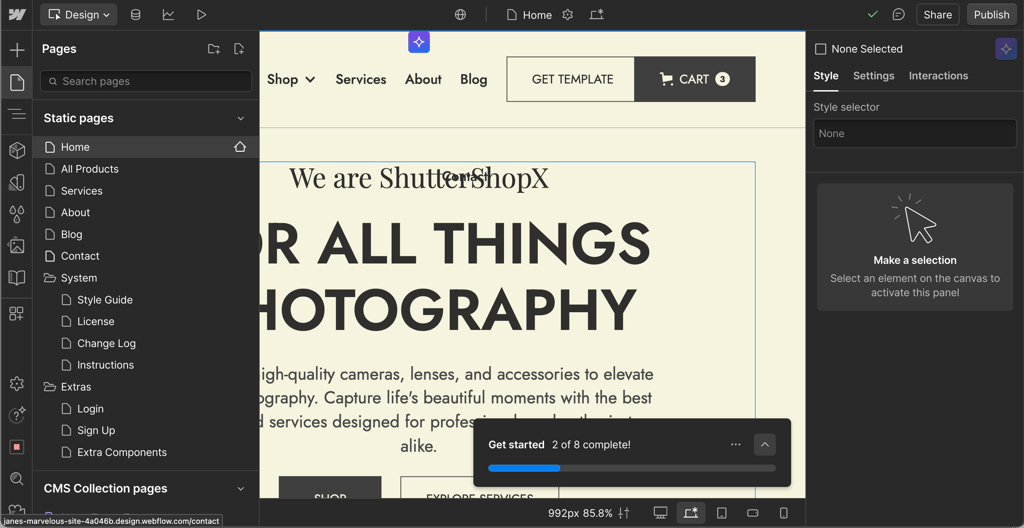
If you’re in search of a platform that allows you to build visually complex websites, I recommend Webflow over Bubble. It provides extensive design control – from layout to typography and styling. Read our Webflow review to learn more about the ins and outs of working with this platform.
Bubble ease of use and interface
I found Bubble less beginner-friendly than Webflow. Bubble meets the user with an emptier setup, which makes it more challenging for inexperienced users. Bubble definitely requires more time to learn how to get around it compared to Webflow. However, I think with time and patience, it’s possible to tackle the learning curve.
My recommendation is to use Bubble AI for a smoother experience. It requires less effort to build a good-looking and easy-to-navigate app. Building manually with the drag-and-drop editor, while not extremely complicated, was more time consuming. Read our Bubble review to learn more useful tricks to tackle the platform.
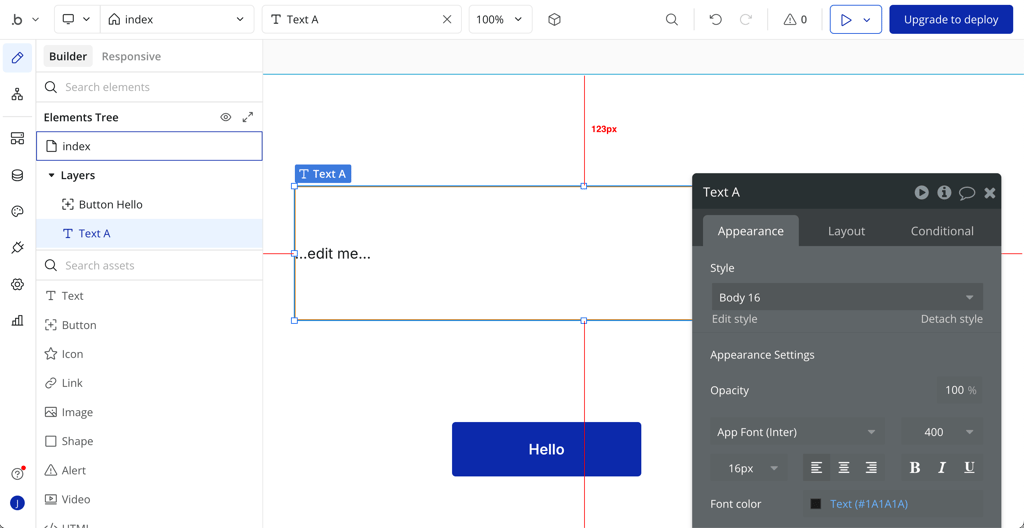
After trying out Bubble, it was clear that it’s a better fit for users who require functionality. It offers a wide range of features like user authentication, databases, workflows, and API integrations. Also, it’s less visually complex. For this reason, I see Bubble as more suitable for users who appreciate a developer-centered approach.
Webflow vs Bubble: templates
Another aspect to consider when choosing a web application building tool is its selection of templates. If you’re a beginner, you’ll appreciate a solid selection of customizable templates. They give a good starting point, save time, and are easy to personalize.
Webflow templates
Webflow offers over 7000 free and premium templates. The category options vary from education and medical to blogs and travel. Due to the broad selection of templates, it’s a versatile solution for many types of websites and web applications.
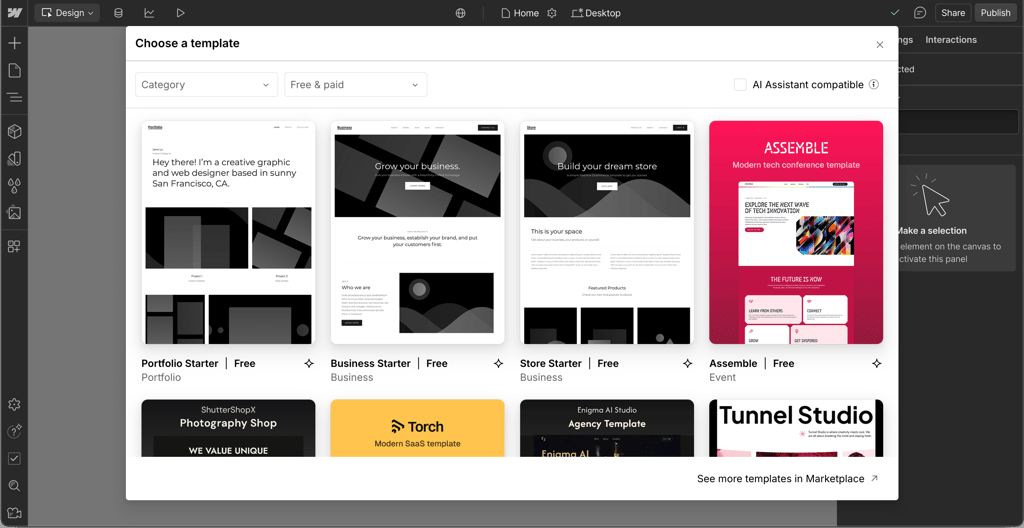
What stood out to me about using Webflow was the extensive customization freedom. I could drag and drop elements onto the canvas and personalize it the way I wanted. This allowed me to build a unique website even though I started with a prebuilt template. I also liked the available designs – they are modern and professionally looking.
Bubble templates
Compared to Webflow, Bubble has fewer template options, but there’s still plenty to choose from. Its gallery has over 1560 paid and free templates in various categories like Blog, Finance, and Portfolio. I appreciated the number of free templates Bubble has, which spans over 540. All styles are easily editable, allowing a good level of customization.
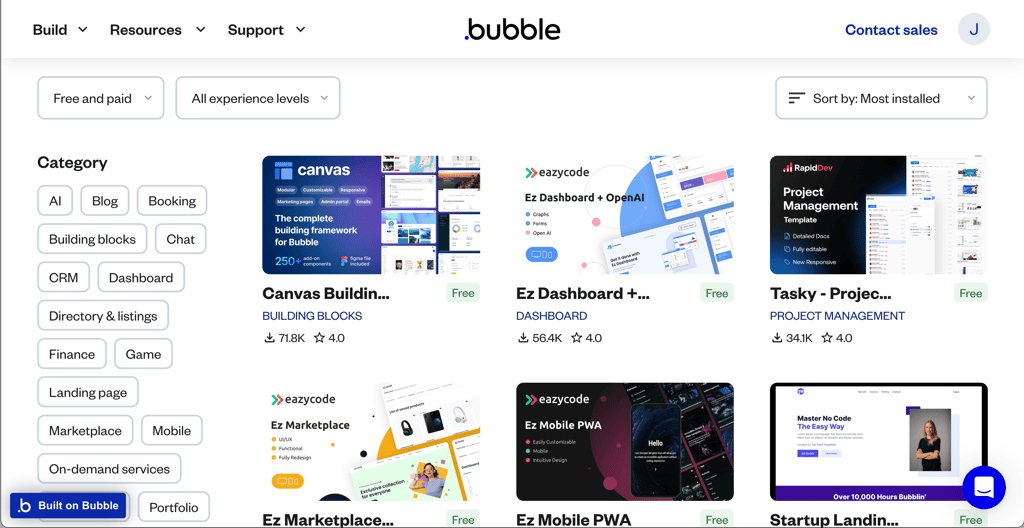
Bubble also has a drag-and-drop editor, which made it easy to customize nearly every aspect of my web application. I could arrange elements to my liking and style components – all without having to write a single line of code. However, I liked Webflow more due to its intuitive interface and a much broader selection of templates.
Webflow vs Bubble: integrations, plugins, and AI-driven tools
Integrations are important for workflow flexibility. They can expand the platform's capabilities by expanding its functionality, scalability, and customization.
Webflow integrations and AI-driven tools
Webflow has an extensive third-party integration library. It seamlessly integrates with such popular tools as Zapier, Shopify, and Google Analytics. With the help of these apps, you can add additional functionality and automation to the website. So you can streamline your operations, drive sales, and get necessary insights for growing your business.
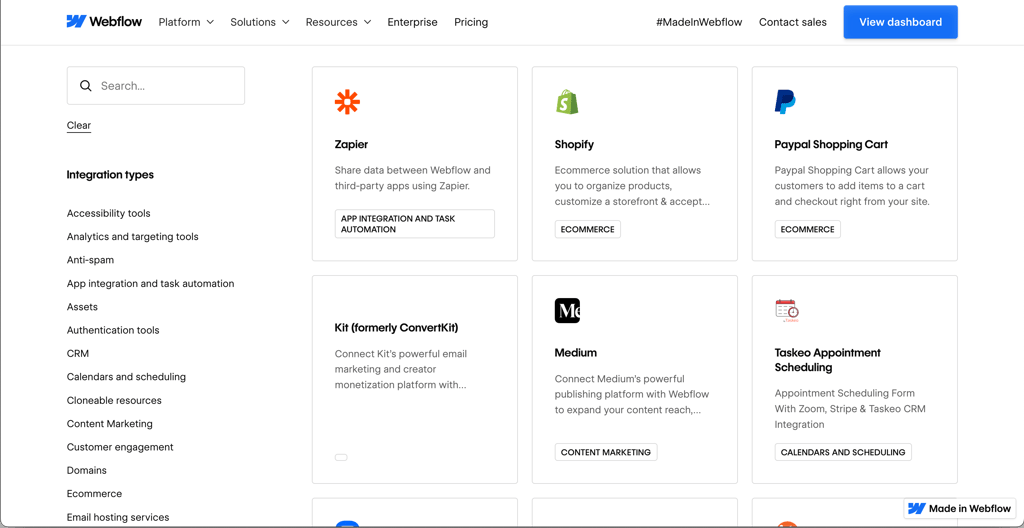
In addition to third-party apps, Webflow has a useful AI assistant. It’s capable of helping with building a site, quickly creating new content, and providing contextual help. I found the AI assistant particularly helpful when working with a canvas. Whenever I couldn’t find a feature I needed or had questions, it successfully guided me through it.
However, if you want to use the AI purely for designing your site, it has some limitations. In the designs, it doesn’t include images, components, or dynamic data. It also can’t generate individual elements.
Bubble plugins and AI-driven tools
Bubble.io can also be upgraded with various add-ons that extend your app with new features, extra UI elements, API connections, or workflow actions. For example, you can easily add an API connector, Stripe, or Airtable.
Bubble has over 6000 plugins in the marketplace. So you will easily find something useful there. However, keep in mind that only 57 plugins are partner-built, which means that only these are the official and safe integrations.
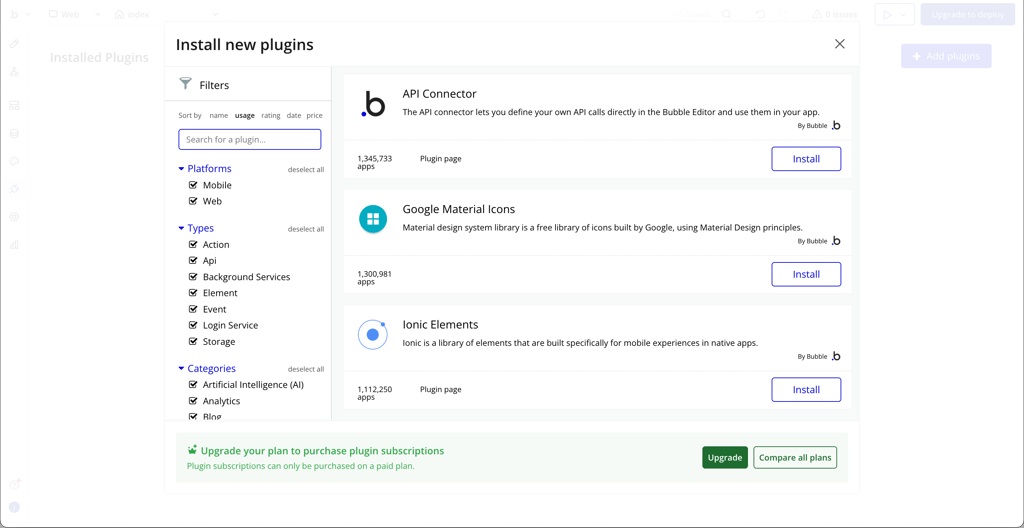
Besides third-party plugins, Bubble can be connected to external AI services. For example, you can easily connect to ChatGPT and other AI models and use them as chatbots and virtual assistants. Thanks to these third-party integrations, you can leverage AI-driven tools without deep technical expertise.

Webflow vs Bubble: SEO
In no-code platforms, SEO tools are important to help your project get seen. Strong SEO tools ensure your project ranks, attracts traffic, and drives real growth without extra plugins or coding.
Webflow SEO
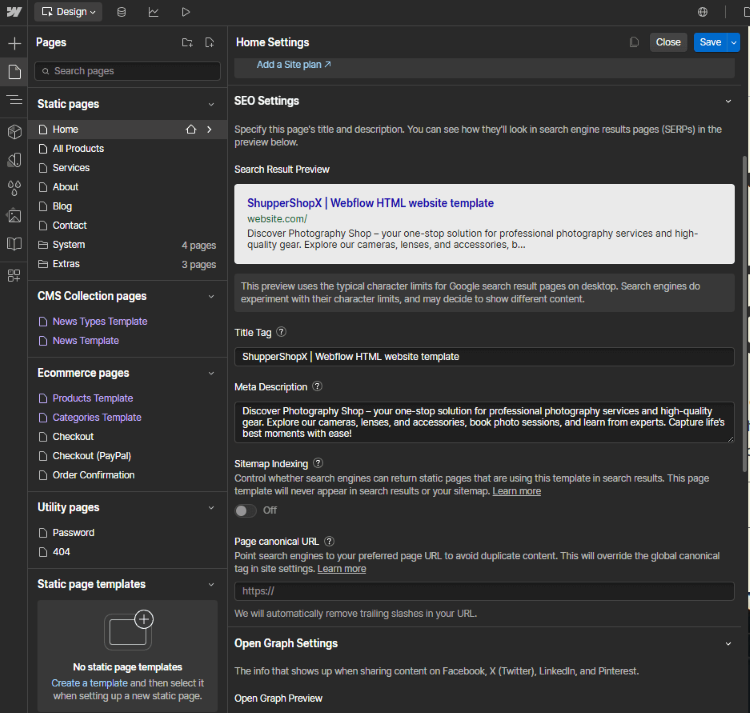
Webflow has a robust set of built-in SEO tools. They not only give you more flexibility but also allow:
- Enabling or disabling auto-generated sitemap
- Setting global canonical URL
- Connecting Google Analytics in the general settings area
- Integrating Facebook Pixel, Google Optimize, and Google Maps from the dashboard
- Setting custom SEO settings for each product, page, and category
- Creating and managing forms and mailing lists for email campaigns
And that’s not all. In addition to built-in tools that help you start, you can add more tools from the Integrations section to take your SEO game to the next level.
Bubble SEO
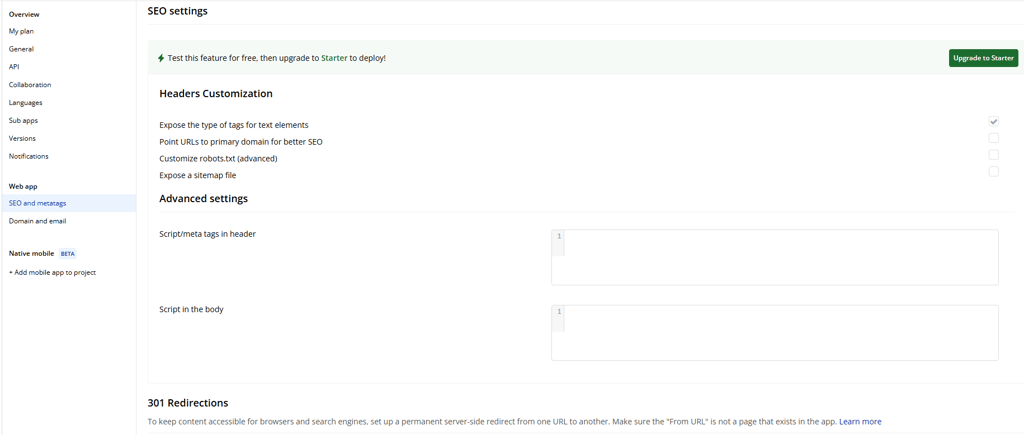
Compared to Webflow, Bubble has fewer SEO tools readily available within the platform. Among the built-in features, Bubble offers:
- Optimizing title and meta tags
- Site-wide SEO property configuration
- Managing 301 redirects
Bubble’s primary focus is web application development, so its SEO tools are pretty limited.
However, it’s possible to extend Bubble’s SEO capabilities. But, to achieve the same level of customization as with Webflow, you’ll need to put in more effort and turn to third-party tools.
Webflow vs Bubble: pricing
Both Webflow and Bubble have a free plan, which allows testing providers before financially committing to their services. In terms of paid plans, Webflow offers 3 plans for individual use and 3 eCommerce plans. While Bubble offers 3 fixed plans and a custom plan for Enterprise.
In the table below, you can see a side-by-side comparison of Webflow and Bubble pricing.
| Webflow | Bubble | |
| Free plan | ✅ Yes | ✅ Yes |
| Starting price | $14.00/month | $29.00/month |
| Most expensive plan | $39.00/month | $349/month |
At first glance, Webflow looks like a cheaper option. However, if you choose Webflow, you’ll also need to buy another solution to fully access your software’s backend. Since it’s not a full-stack solution, it’s hard to predict how much it will cost you in the end.
While Bubble’s pricing is quite complex too, it’s a more cost-effective option. It’s a full-stack solution, which handles every aspect you need to build an app. However, its pricing depends on the workload demands of your software and can get pretty expensive.
Webflow vs Bubble: my final verdict
Both Webflow and Bubble are reputable platforms for building websites and web applications. This makes choosing one as the ultimate best solution difficult. While Webflow is more user-friendly, easier to learn, and cheaper, it’s not a full-stack solution. On the other hand, Bubble is slightly more complex, but it has everything you might need to build your application in one place.
In the end, which platform is a better fit for your project comes down to the individual needs.
Choose Webflow if:
- You want to build a visually complex website
- An intuitive interface is important for you
- You need a more budget-friendly solution
Choose Bubble if:
- You appreciate a developer-centered approach
- Your project requires functionality over looks
- You want a full-stack solution for your project
FAQ
Which is better, Webflow or Bubble?
There’s no one answer to which is better, Webflow or Bubble. Webflow is a great option for visual websites that use custom interactions and animations. Bubble is targeted at building functional, database-driven web applications and complex workflows. So, which is better purely depends on your needs and the project you’re working on.
Is Bubble the best no-code platform?
Bubble is a popular and powerful no-code platform. However, if it’s the best platform out there, it depends on your individual needs and project requirements. It’s a great option for developer-centered tasks, but for specific use cases, other platforms might be a better fit.
Do professional web designers use Webflow?
Yes, many professional web designers use Webflow. Even though Webflow is known for its accessibility for beginners, it offers plenty of advanced tools. This makes it appealing to professional web designers, who work with complex websites.
Can you use Webflow and Bubble together?
Yes, Webflow and Bubble can be used together. Commonly, Webflow is used to design front-end aspects. Bubble, on the other hand, is leveraged for backend functionality and data management.
Which is cheaper, Webflow or Bubble?
Webflow is the cheaper option. However, it only covers front-end development processes, which means that you’ll need an additional application to cover the backend.