Bubble app builder review in 2026
Being behind major reports like The Mother of All Breaches and RockYou2024, our in-house cybersecurity experts and journalists provide unbiased, real-world testing and in-depth analysis.
We maintain complete transparency by openly sharing our testing methodologies with our audience.
Learn more

Bubble.io is an AI-powered app builder that allows you to create fully working web apps without writing any code. It’s a great opportunity for anyone with a solid idea who doesn’t want to spend months learning programming. Bubble aims to make app development accessible and doable for everyone, regardless of technical skills.
In September 2026, I tested Bubble.io to see how well it works in practice. I wanted to know if it really is as straightforward and worthwhile as it claims to be. Throughout this article, I share my experience and results.
Bubble.io review: quick overview
If you don’t have time to go through all the ins and outs below, this table sums up the main features and what to expect when using Bubble.io.
| Factor | Description |
| Ease of use | Bubble uses intuitive drag-and-drop tools and allows building apps with no coding knowledge |
| Learning curve | It can take a few days to a few weeks to get comfortable, depending on your skills and project needs |
| Customization | You can create very custom apps using workflows, APIs, and flexible design options |
| Features | Includes database setup, user login, API connections, and many plugins |
| Performance | Works well for small to medium apps, but may slow down as apps become more complex |
| Support | Offers tutorials, forums, email support, and a helpful community |
| Integrations | Supports many third-party services like Stripe, Zapier, and Google APIs |
| Security | Provides SSL encryption and GDPR compliance to keep data safe |
| Mobile responsiveness | Apps can be made mobile-friendly, but need careful design to work well on phones and tablets |
| Deployment | One-click publishing with Bubble hosting, without having to worry about server management |
| Pricing | Free plan is available with basic features, while paid plans start from $29.00/month |
Bubble.io pros and cons
Bubble.io lets you build powerful web apps without coding, with plenty of customization and integrations. It’s great for flexibility, but it has a learning curve and can get pricey as your app grows. Here’s a quick look at the things I liked about Bubble.io and the areas where it could be improved.
What is Bubble.io?
Bubble.io is a no-code platform that lets you build full-stack web applications without writing any code. It provides visual drag-and-drop tools to create your app’s interface and set up the steps and rules that control how it works. This makes building an app possible even if you only have an idea and no programming skills.
Bubble is focused on web apps, so you can build anything from simple websites to complex platforms with user accounts, databases, and interactive features. It handles both the design you see and the backend tasks like managing data and user login, all within one platform.
A key feature of Bubble is its wide variety of plugins. It supports many third-party plugins that add functions such as payment processing, API connections, and custom design elements, letting you expand your app without extra coding.
Bubble also includes hosting for every app you build. When your app is ready, you can launch it directly on Bubble’s servers, so you don’t have to manage servers or infrastructure yourself. This makes it faster and easier to get your web app up and running.
Bubble.io review: ease of use
Bubble lets you build apps without writing code, using a visual drag-and-drop editor to place elements like buttons, text, and images. You can start using free or paid templates, or use the AI app generator to create something from scratch.
I tested both approaches, starting with the AI app generator, and then tested out a few free templates to ease the manual building. Before you begin using either method, I recommend reading Bubble’s prompt guide and manual. It explains how prompts work, provides tips for structuring them, and offers other resources. I was naive enough to start without reading the guides, but I felt overwhelmed quickly.
My experience building an app
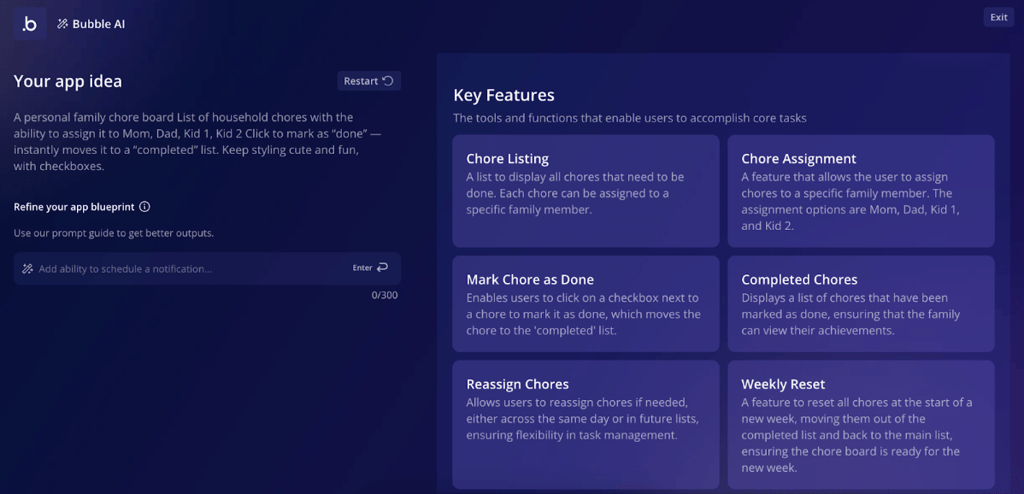
I first tried to generate an app with the help of AI, hoping it would instantly give me a clean, responsive app. Once I entered my prompt, Bubble showed me a preview screen of the app concept with a list of the key features it understood from my prompt.
At this stage, I reviewed what the AI picked up and added any extra features it might have missed before the actual build started.
Once the site was generated, the app looked good, but I noticed several elements and workflows were missing. As it’s not possible to edit the prompt after generation, I had to start over a few times, each time making my prompts more specific.
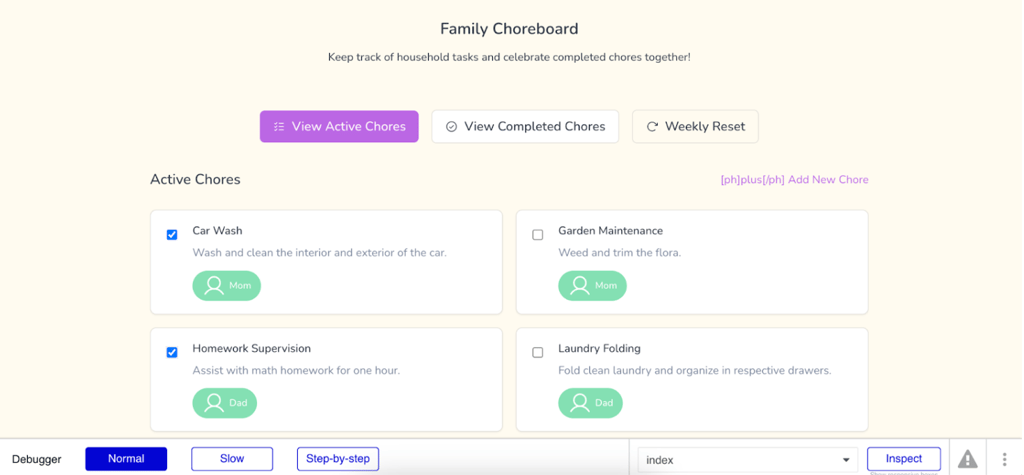
To get a better result, I added status options, user roles, and button actions, which made the results much closer to my vision. After a while, I also figured out how to add and edit workflows and elements.

I also tried building manually with the drag-and-drop editor. This was quite simple to do and gave me more control over the layout. However, it was slower to start and required effort to make sure the app looked good and was easy to navigate.
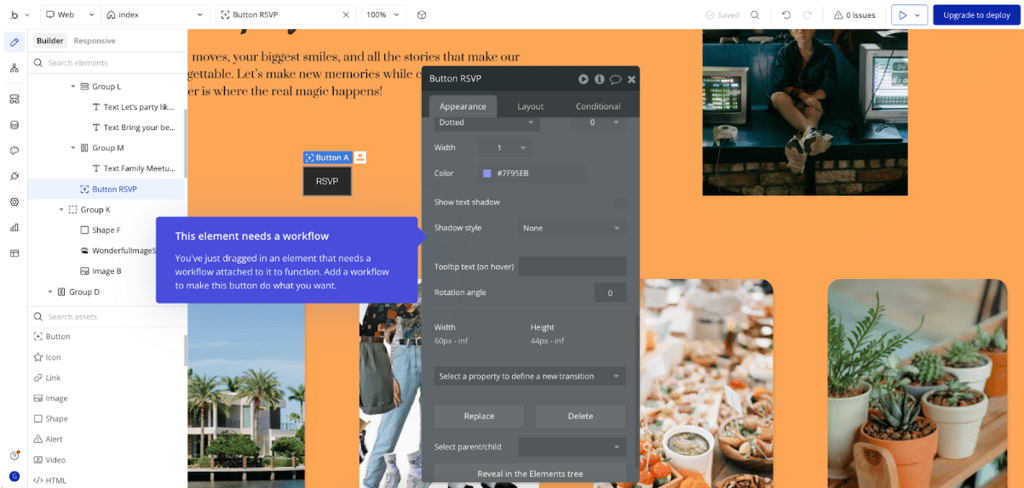
In short, whether you start with AI or from scratch, you’ll need to learn Bubble’s editor and workflows to get a polished, functional app. The interface is intuitive once you understand the basics, but you won't get something ready to launch quickly.
My experience was better using the AI option. It does a lot of the setup for you and provides a base app to work with. But it’s worth investing time upfront to write a precise, detailed prompt.
Bubble plugins explained
Plugins in Bubble are add-ons that let you extend your app with new features, like extra UI elements, API connections, or workflow actions. Bubble.io has over 6000 plugins in the marketplace, so a lot of options that can help users save time. However, only 57 plugins are partner-built, meaning they’re official integrations from Bubble or trusted partners.

Installing a plugin is easy. You just go to the plugin section in the marketplace and search or browse for what you need. After that, the plugin and its features appear in your app for you to configure.

Anyone can also create a plugin on Bubble. You can make one for yourself or publish it publicly in the marketplace for others to use. I tried out the plugin editor myself, and it lets you add new elements, API connections, or workflow actions. You can keep your plugin private, authorize certain apps to use it, or release it for everyone. It’s a great feature, but it also makes me cautious, as just because a plugin exists doesn’t mean it’s fully reliable.
The main risks are compatibility and security. Some plugins aren’t updated often, and multiple plugins can conflict with each other. Others might access sensitive data, so I always recommend testing carefully, preferably on a test app, and sticking to well-reviewed or partner-built options when possible.
Bubble.io plans and pricing
Bubble offers a range of plans depending on how complex your app is and how many users or workflows you need. You can start free to test the platform, then upgrade as your app grows. Here’s a quick overview of the plans.
| Plan | Price | Key features | Who it’s for |
| Free | Free | Basic Bubble editor, 0.5GB storage, API connector, Bubble branding, 50K workload units/month | Beginners who want to test ideas and learn the platform, without publishing live |
| Starter | $29.00/month | No branding, custom domain, 50GB storage, recurring workflows, app publishing, 175K workload units/month | Beginner developers or small projects that need a professional look and a custom domain |
| Growth | $119/month | 100GB storage, 250K workload units/month, 2 app editors, changelog | Small businesses or startups scaling their apps, needing more power and team collaboration |
| Team | $349/month | 1TB storage, 500K workload units/month, 5 app editors | Best for teams building apps with multiple contributors, high traffic, or complex workflows |
| Enterprise | Custom pricing | 1TB storage, 150 custom branches, choice of hosting region | Designed for large companies that need full control, high performance, and dedicated Bubble support |
Free plan
The Free plan includes 50K monthly workload units, 0.5GB of file storage, basic version control, and Bubble branding on your app. You can build and preview your project, but you can’t connect a custom domain, remove branding, publish, or use scheduled workflows. It’s best for testing ideas, learning the editor, and building simple prototypes.
Starter plan
It costs $29.00/month when billed annually, removes Bubble branding, lets you connect a custom domain, provides storage of 50GB, and increases workload capacity to 175K units. It’s a solid option for solo creators or small projects that need a professional look and live deployment.
Growth plan
Starting at $119/month, Growth provides 250K monthly workload units, 100GB storage, premium version control, and up to 2 app editors. It also improves backup retention and unlocks advanced integrations, such as full API Connector access for linking your app to CRMs, payment processors, and AI tools. This plan is recommended for startups or small businesses expecting growth in traffic and users.
Team plan
From $349/month, the Team plan provides 500K monthly workload units, 1TB of storage, sub apps, advanced security tests, and up to 5 editors collaborating at once. It’s designed for larger teams managing complex apps or multiple projects that need more performance and tighter coordination.
Enterprise
Enterprise pricing is customized based on your needs. It offers dedicated hosting, a choice of hosting regions, enterprise-grade security, centralized management tools, and a dedicated account manager. This plan is for large organizations with strict compliance requirements, high performance demands, and the need for technical support.
Bubble customer support experience
Bubble offers several customer support channels to assist its users in any situation. Below is a quick breakdown.
| Support type | Bubble.io |
| 24/7 live chat | ✅ Yes |
| Specialized support teams | ✅ Yes |
| Email support | ✅ Yes |
| Phone support | ❌ No |
| Guides and documentation | ✅ Yes |
| Community forum | ✅ Yes |
When I contacted Bubble’s support, I first interacted with their AI bot BubbleBot, which gave me a direct, step-by-step guide to deleting an app or project. While the bot initially assumed I was in the older interface, it quickly adapted after I clarified my issue and led me to the correct section.

Later, I asked about a technical issue because my app’s reset button wasn’t working. The bot immediately provided detailed workflow instructions. All of the answers were clear and relevant, and after I tried the given steps, my app worked as expected.
Bubble’s support system also includes human agents for more complex issues and specialized teams for technical topics. While I didn’t speak directly to a human during my tests, it wasn’t necessary, as the AI bot provided everything I needed.
Is Bubble.io worth it?
After testing Bubble.io, I realized that it has a lot to offer and allows you to build fully functional web apps without traditional coding. Its visual editor, responsive design tools, and wide range of plugins make it possible to create anything from simple prototypes to more complex applications.
The interface felt intuitive once I got the hang of it, and the AI-assisted help was useful for problem-solving. Bubble also has a helpful and active community that can offer insights and ideas. That said, the learning curve is steeper than most no-code builders, and design customization did feel too complex at times. More in-builder guidance, like popups with suggestions or tips, would definitely make getting started easier.
For beginners creating a basic app, Bubble might feel complex, but it’s worth considering. Keep in mind that you will need to invest the time to learn its tools and workflows carefully.
FAQ
Is Bubble.io difficult to learn?
Yes, it has a learning curve. Bubble can feel challenging at first because it’s very flexible and powerful. Its visual editor and workflow system take some practice to understand, especially for more complex apps. The Free plan is useful for experimenting and learning without committing to a paid plan, but it has limits on storage, workflows, and capacity, and you cannot publish using it.
Do I need to know how to code to use Bubble?
No, Bubble is designed for people with no coding experience. You build apps using drag-and-drop elements and visual workflows, allowing you to create interactive applications without writing traditional code.
Can I export my Bubble app’s code?
No, Bubble apps run entirely on Bubble’s platform. You cannot export the code to host your app elsewhere.
Can I build mobile apps with Bubble?
Yes, you can build mobile apps for iOS and Android. You can use the same editor for web and mobile apps, sharing the same database and workflows. The mobile builder lets you add mobile-specific elements, use gestures, and publish directly to the App Store or Google Play.