Flowise AI vs n8n
Being behind major reports like The Mother of All Breaches and RockYou2024, our in-house cybersecurity experts and journalists provide unbiased, real-world testing and in-depth analysis.
We maintain complete transparency by openly sharing our testing methodologies with our audience.
Learn more
Before comparing Flowise vs n8n, a short clarification is needed. They are largely complementary tools that often work side by side, though there is some overlap in functionality.
Flowise specializes in AI reasoning, chatbots, and intelligent agents, while n8n focuses on broader workflow automation and reliable task execution. Both can call APIs, trigger webhooks, and orchestrate multi-step flows. Many teams embed Flowise agents into n8n workflows to handle Slack, Google Drive, CRMs, and other tools. Some prebuilt stacks even pair them, making Flowise as the AI brain and n8n as the workflow engine.
To find out how they perform and which excels in the areas where their use overlaps, I tested both tools together with the Cybernews research team. I built workflows and observed how each handled tasks from start to finish. Keep reading to see where Flowise shines, where n8n excels, and how they can complement each other.
Flowise AI vs n8n overview
While Flowise AI excels at building AI agents and research tools, n8n is more versatile because it handles a wider range of automations and larger workflows more reliably.
| Provider | n8n | Flowise AI |
| Rating | ||
| Key features | 500+ connectors, webhooks, code nodes, retries, monitoring | LLM chains, RAG, vector DBs, multi-agent flows, chat UI |
| Who's this for? | Teams needing full automation, integrations, and control over workflows | Teams building chatbots, knowledge assistants, RAG prototypes |
| Pros | Broad app integrationsReliable execution and monitoringSelf-hosting and cloud optionsFlexible workflow control | Fast AI prototypingVisual agent flowsBuilt-in memoryRetrievers and RAG supportQuick document handling |
| Cons | Complex AI setups take time Learning curve grows with workflow complexityHosted plans can get costly | Limited general app integrationBroader automation often requires pairing with other appsAI usage costs can rise |
| Pricing | From $20.00/month | From $35.00/month |
| Free version | Yes | Yes |


How do Flowise AI and n8n differ in approach?
Flowise is AI-first, focusing on helping you build apps that use language models (LLMs), knowledge bases, chatbots, and other AI tools, while n8n focuses on automation, helping you connect apps and run tasks automatically.
With Flowise, you link AI building blocks like models, memory, search tools, and retrievers to create a workflow. This makes it easy to test AI responses, experiment with prompts, and quickly build AI-based apps. Changes happen immediately, so you can test different iterations fast.
n8n works by connecting triggers (like receiving an email or a schedule) to actions (like sending a message). It is designed to run reliably, handle mistakes, and keep track of everything, which is good for workflows you want to repeat every day without errors.
In short, Flowise is best for fast AI experimentation and prototyping, while n8n is best for reliability and controlling real-world workflows across multiple systems. Your choice depends on whether you need speed and AI flexibility or stability and operational coverage.
Flowise AI vs n8n: side-by-side features comparison
The table below shows key features and differences between Flowise and n8n.
| Feature | Flowise | n8n |
| Primary workflow type | AI chains with prompts, memory, and retrievers | Operational workflows with triggers, actions, and branching |
| Integrations breadth | Focused on AI tools and common apps | Broad library of apps, databases, CRMs, webhooks, and messaging platforms |
| Customization | Mostly ready-made nodes with limited scripting | Full coding support via JavaScript/Python, npm packages, and SDKs |
| AI capabilities | Built-in support for RAG, agents, and AI chains | Can connect to AI models via nodes or HTTP requests |
| Logic, retries, monitoring | Basic logging and retry options | Full error handling, retries, queueing, and workflow observability |
| Security and data control | Self-host recommended, proxy options | Self-host or cloud, credential vault, role-based access |
| Extensibility | Add custom nodes through LangChain connector model | Add custom nodes, packages, APIs, and community-built nodes |
| Hosting and deployment | Docker, self-host, hosted variants | Cloud, desktop, Docker, self-host options |
| Triggers and webhooks | Webhooks for AI nodes | Rich triggers, including webhooks, cron, events, and schedules |
| Open source | Yes | Yes |
| Visual editor | Node canvas optimized for AI flows | Mature workflow canvas for operational workflows |
| Learning curve | Easy for prototypes, harder for advanced agents | Moderate, grows with workflow complexity |
| Pricing model | Based on LLM usage, hosting, and storage | Execution-based tiers, hosting, and premium features |
| Target audience | Teams building AI apps, chatbots, and RAG pipelines | Teams needing full automation, multi-app workflows, and operational control |
Looking at the table, the main differences are clear: Flowise focuses on AI chains like prompts, memory, and retrievers, while n8n's main focus is on operational workflows with triggers and actions.
Quick takeaway:
- Flowise wins when you want to prototype chatbots, knowledge assistants, or AI-driven agents
- n8n wins when you need to move data between multiple apps, run scheduled tasks, or build workflows that must be reliable and observable
- If you need both, Flowise handles the AI logic, while n8n executes the full workflow across services and apps
First steps that matter (sign-up, install, first run)
I spent some time exploring Flowise and n8n to see how quickly I could get useful automation running.
Flowise workflow
I started with Flowise by going to the website and signing up. It was very simple. I just entered my name, email, and a password.
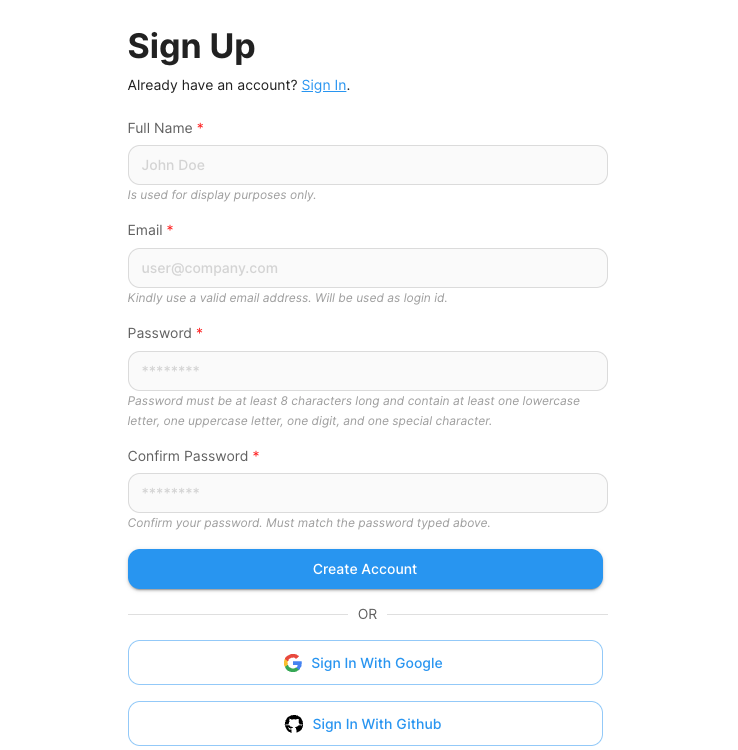
From there on, Flowise sent a verification link. That extra step added a minute, but it is a good step security-wise. After I clicked the link, I reached a clean-looking dashboard.
I personally appreciate that Flowise, unlike n8n, doesn’t bombard me with tutorials or a cluttered view outright. The empty No Chatflows Yet screen gives some space to breathe.
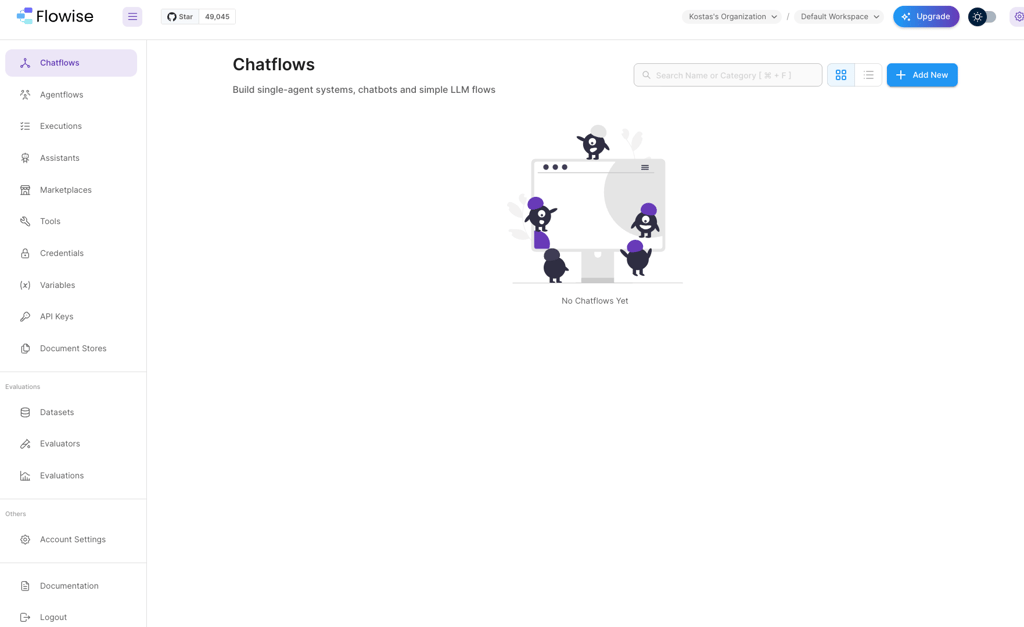
Overall, the layout elements are intuitive. On the left column, I could see the main paths for Chatflows, Agentflows, Executions, Tools, Credentials, and Document Stores.
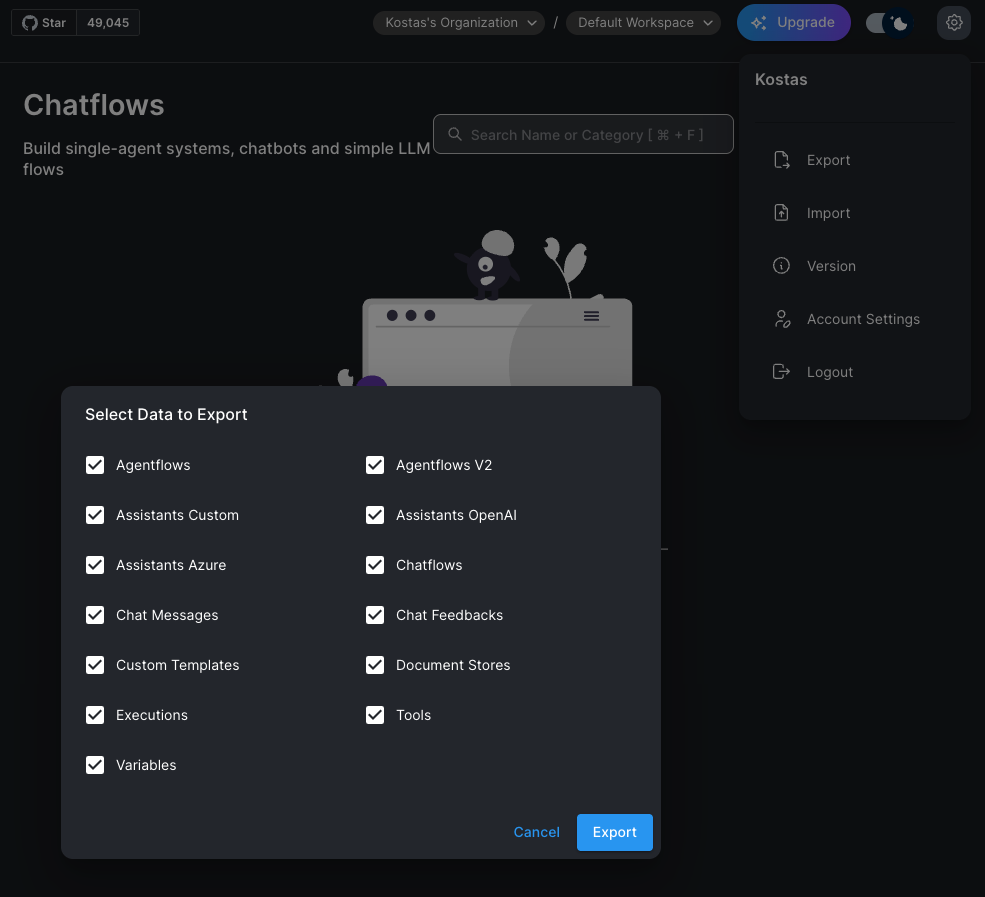
At the top of the screen, I could immediately switch to dark mode (which I did), explore upgrades, and reach settings where I could import or export all of the data, such as Agentflows, Chatflows, and so on.
For a quick test, I didn’t need to deal with servers, which made it easy to get something running quickly. I ran a test using Chatflows first, where I wanted to make a chat that could answer questions from a PDF.
First, I created a new Chatflow in the UI. Then I added a ChatHuggingFace node, a PDF loader, a vector store, and a Conversational Retrieval QA Chain node.
Next, I pasted my ChatHuggingFace API key into the credentials area. Flowise wouldn’t run without it, so this step was essential.
I uploaded my PDF and linked it to the vector store. After connecting all the nodes, I hit the Save Chatflow button.
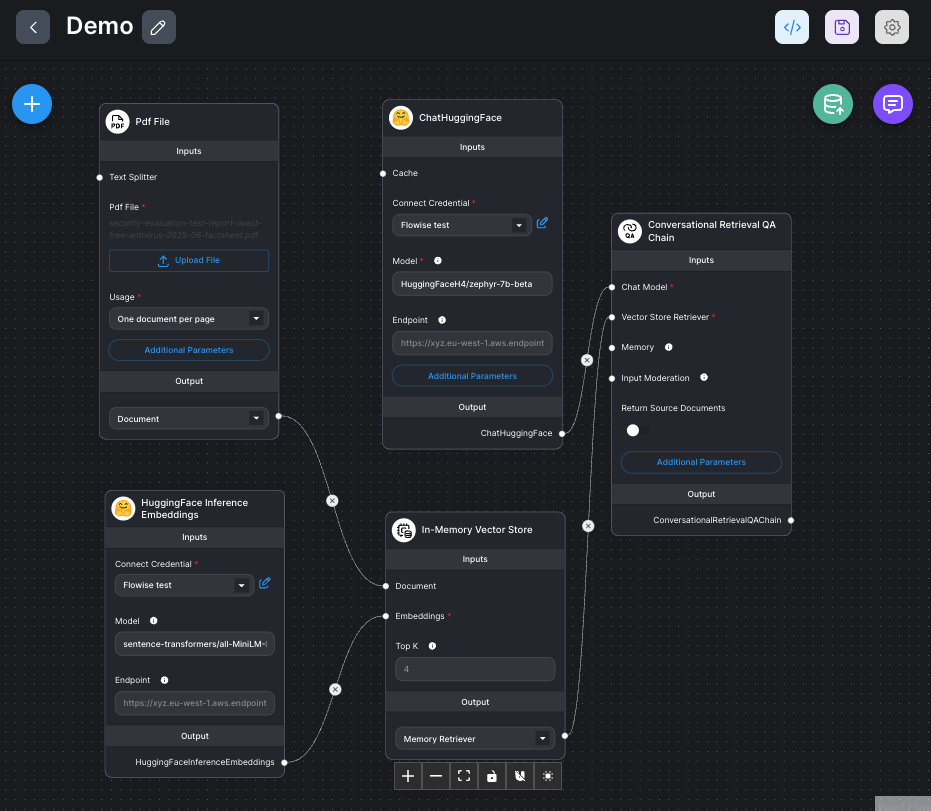
Finally, I opened the chat preview and asked a question from the PDF. To my relief, the bot answered correctly.
It may all sound complicated at first, with API keys, embeddings, and connecting nodes. But if you’re familiar with this kind of setup, it’s actually pretty easy.
Personally, for me, it wasn’t completely smooth. Figuring out the flow, the embeddings, and the nodes took a bit of trial and error. In the end, though, the basic pipeline worked: upload → embed → model → reply.
n8n wokflow
To start off, I quickly created an account with n8n, and it dropped me to its dashboard, which had my account manager, a help center, and a suggestion to seek help by visiting a forum.

Appreciate all the help, but I went straight to the main workflow area by clicking the Open instance button. Which, again, took me to a somewhat cluttered page with even more guidance, such as template suggestions and a pop-up for inspiration and use cases. I appreciate the guidance, but it felt a bit like unnecessary noise.
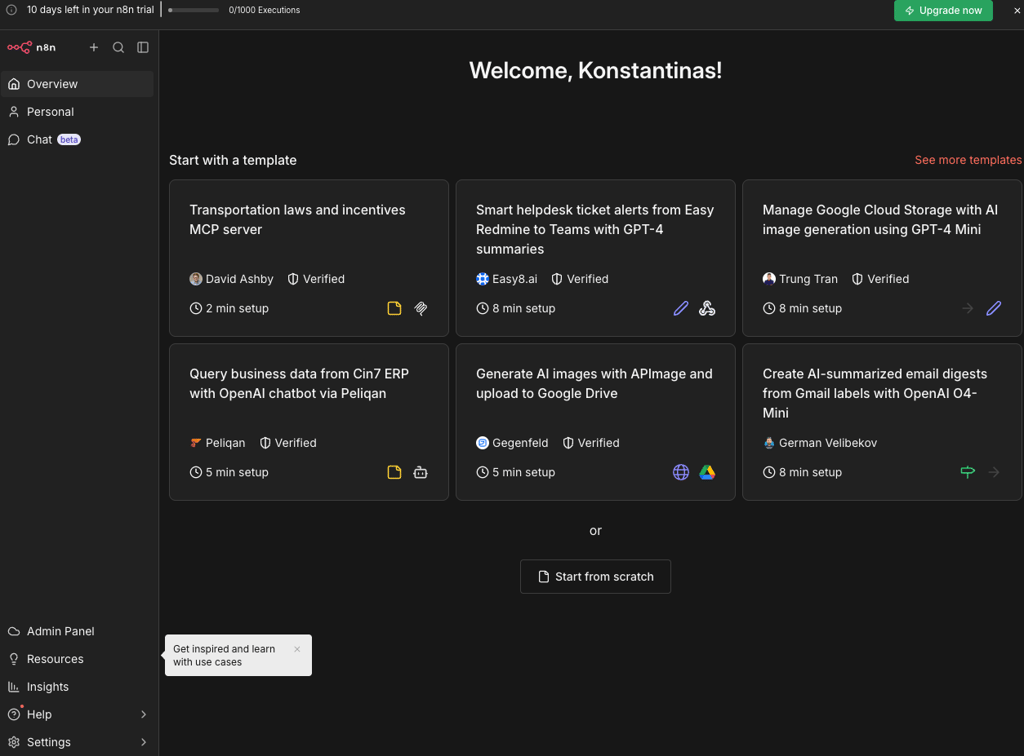
For a quick test, I stuck to built-in nodes. That made it easy to see how triggers work without worrying about breaking anything.
First, I created a new workflow in the n8n dashboard by hitting the Start from scratch button. I noticed it gave me two options: Add first step or Build with AI. I went with the AI option because I was curious what it would generate. After my quick prompt, I connected my OpenAI credentials to the AI model, as requested.
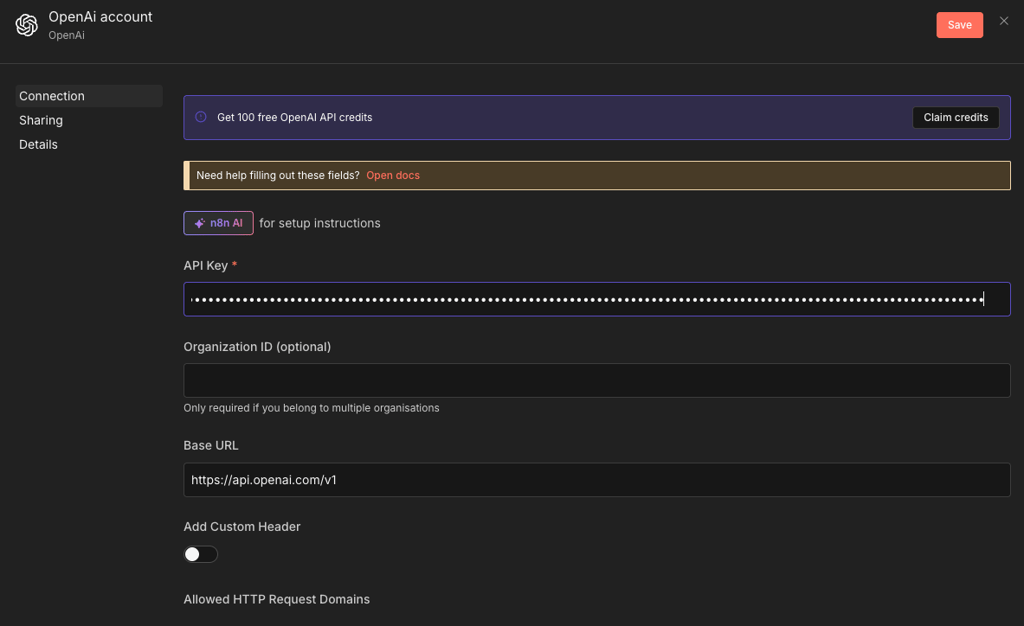
After that, n8n automatically created a workflow for me. It had:
- Webhook Trigger, which waits for any data I send to a URL
- Workflow Configuration node, which captures the incoming data and adds a timestamp
- AI Agent node, set up to use OpenAI to summarize the data
- Log Result node, which collects the original payload plus the summary, so I can see it

The workflow looked organized and easy to follow. I didn’t actually need to connect it to any live services to see the structure, but it was clear how data would flow from the trigger, through the AI, and into the final log. Everything was clearly labeled, and the nodes were well-explained when I clicked on them.
For a first exploration, this gave me a quick sense of n8n and Flowise. Flowise made it quick to build a chat, but n8n’s AI workflow creation was more impressive for automation and flexibility.
How workflows are built (the mental model difference)
Workflows let teams automate tasks, but Flowise and n8n do it in different ways:
Flowise AI pipelines. Flowise lets you build AI workflows using simple blocks called nodes. Each node does a specific job, like asking a question, looking up information, remembering context, or running an AI model. You can see exactly what information goes into each node and what comes out, so it’s easy to adjust and improve the results. The nodes can be reused in other workflows too, which saves time and means you don’t have to start from scratch every time. This makes Flowise perfect for quickly building demos, trying out AI ideas, and testing projects without a lot of setup.
n8n operational automation. n8n also lets you automate tasks by connecting steps with nodes, but every workflow starts with a trigger, like a schedule or the arrival of new information. The data moves through steps that can edit it, make decisions, or fix problems if something goes wrong. You can watch each step as it runs and retry if needed. This makes it easy to automate real business tasks, like summarizing emails, sending reports, or moving information between apps.
In short, Flowise is best when you want to build custom AI features, run experiments, or create prototypes, while n8n shines for repeatable workflows that save time, reduce errors, and can scale across your business. Which tool to use depends on whether your priority is fast AI testing or robust operational automation.
Integrations and AI capabilities (what you can actually connect and do)
Both tools can do AI and integrations, but they target different problems. Here’s what each can do and where they run into limits:
| Category | n8n | Flowise | When to use |
| Everyday apps | Connects many apps and databases like Slack, Gmail, Google Sheets, Notion, Airtable, and CRMs. Basically, any app with some setup. | Connects common apps like Gmail, Slack, Google Sheets, and Trello quickly, mostly for AI workflows. | Use n8n when you need to automate many systems. Use Flowise if you mostly stay within the teamwork tools. |
| AI models | You can use AI models like OpenAI, Hugging Face, or Google AI inside a workflow. Adding other models is possible but may need extra setup. | Flowise is built for AI. You can switch between many models, use memory and embeddings, and run flows entirely around AI. It supports cloud models and open-source models. | Use Flowise for deep AI workflows. Use n8n if AI is just part of automation. |
| Documents and search | Can process documents, but n8n doesn’t handle them automatically. To do searches or RAG workflows, you need to connect a database or service to store and search embeddings, and configure it yourself. | Flowise has built-in tools to load documents, split them into chunks, and search them with vector databases right inside the workflow. | Use Flowise for document-based AI. n8n works with extra setup. |
| Taking actions | n8n can perform real actions in connected apps, such as moving data, sending emails, updating records, or running multi‑step automation flows. | Needs connectors like Zapier or other integrations for actions. | Use n8n for real automation. Use Flowise when you want AI to decide next steps. |
| Limits | Some connectors may need extra work for advanced features. | AI costs and token limits can grow quickly. | Expect more setup for rare systems in n8n and higher AI costs in Flowise. |
| Easy vs hard | Easy for simple notifications, spreadsheets, and messaging. Harder for custom APIs. | Easy for AI demos, document search, and RAG workflows. Harder for complex enterprise tasks. | Pick n8n for broad automation. Pick Flowise for AI-first tasks. |
Flowise is built for AI workflows and document processing. It includes nodes for LLMs, retrievers, and other AI tools, making it easy to quickly set up flows.
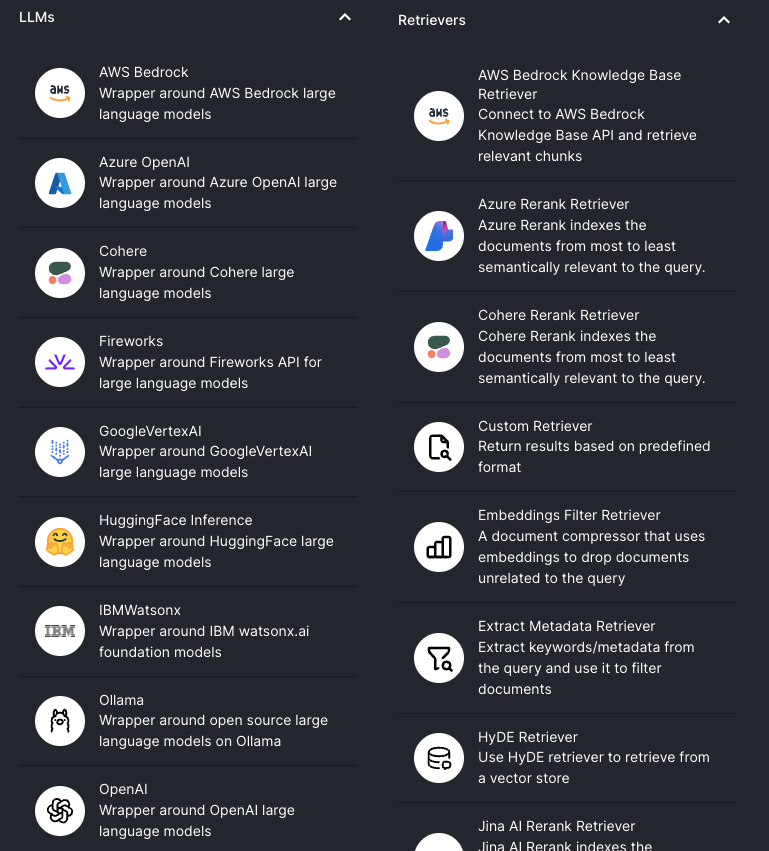
n8n, on the other hand, focuses on connecting external systems and running custom automations. It’s great for moving data, sending messages, or updating records across multiple apps.

Data control and privacy (where your inputs and outputs live)
Both n8n and Flowise offer cloud and self-hosted options. The key difference is simple: self-hosting means you keep the data, while cloud means the provider stores it.
If you self-host, your workflows, credentials, and execution data stay on your infrastructure. Flowise states it collects no usage data when self-hosted. n8n self-hosted sends limited technical information, such as error codes and workflow structure, but even this can be disabled.
If you use their cloud versions, your data is stored on their servers. n8n Cloud keeps workflows, credentials, and execution data until you delete them, and deletes most internal logs within 90 days. Flowise Cloud collects account details (like name and email), uses analytics tools, and stores data. Both platforms may send limited workflow context to external LLM providers if enabled.
Tips for sensitive environments:
- Choose self-hosting if you need maximum security
- Disable telemetry in self-hosted n8n if required
- Limit who can access workflows and credentials
- Reduce logging and set clear data retention rules
- Avoid putting confidential data into LLM prompts or unnecessary fields
Community and long-term support
n8n has a larger, more mature community, with lots of tutorials, forum threads, and official help for enterprise users. Flowise is newer, so its community is smaller, but it still has active users on GitHub and Discord.
In n8n, there is a built-in template library and a clear separation between official nodes and community nodes. Flowise gives you a template marketplace and reusable AI blocks directly in the visual builder.
In n8n, developers have broad documentation for building nodes. Flowise also has its documentation, release notes, and notices, but they are generally less detailed.
Here are the key risks to consider:
- Reliance on community nodes means some integrations may stop being maintained and break over time
- Changes in external services can unexpectedly disrupt existing workflows
The fast-moving AI ecosystem means frequent model, API, or pricing changes may require constant adjustments
Pricing and scalability
With n8n, costs rise as you run more workflows, add premium features, or scale hosting, while in Flowise, LLM usage, storage, and concurrent users drive spending. Here’s an overview of their pricing models:
- Free/self-host: both Flowise and n8n offer free tiers or self-host options for low-cost experimentation
- Hosted tiers: paid monthly plans unlock higher usage, team features, security, and support
| Plan | Starting monthly price | Usage metric | Feature gates | Best for |
| n8n Starter | $20.00 | 2.5K workflow executions | Basic templates, 5 concurrent executions | Getting started/hobby projects |
| n8n Pro | $50.00 | 10K executions | Extra projects, 20 concurrent executions, admin roles, 50–150 AI credits | Small teams |
| n8n Business | $800.00 | 40K executions | SSO/SAML, insights, scaling options | More established companies |
| n8n Enterprise | Custom | Custom | Unlimited projects, 200+ concurrent executions, SLA, log streaming | Large organizations |
| Flowise Free | $0.00 | 100 predictions/ month | 2 flows, 5MB storage | Trying out |
| Flowise Starter | $35.00 | 10K predictions/month | 1GB storage, unlimited flows | Small teams |
| Flowise Pro | $65.00 | 50K predictions/month | 10GB, admin roles, priority support | Medium-sized businesses |
Overall, in Flowise, the main costs come from LLM token usage as you run more AI predictions. Adding more users who run flows simultaneously or increasing storage for embeddings also raises costs, and larger hosting requirements push the bill higher as projects grow.
In n8n, expenses increase with the number of workflow executions and the use of premium features like AI workflow credits or advanced logic. If you self-host, scaling infrastructure and handling operations like backups and concurrency can further drive up costs. There are also some unspoken costs to consider:
- Setting up, backing up, scaling, and fixing the system takes time and effort
- Keeping track of activity and watching for problems can require extra tools or work
- Using LMMs can get very expensive
- Some integrations might be missing or unreliable, so you may need to build your own
Real-life workflow examples
Sometimes it’s easier to understand a tool by seeing how it works in real situations. These examples show how n8n and Flowise can handle real tasks, which tool works best, and what to watch out for:
- Support triage. Say you need to handle tickets from different channels, classify them with AI, send them to the right person, and log everything in your CRM. n8n is the better choice because it can connect all your tools and run the whole workflow automatically. Flowise can help with AI classification or drafting replies, but for routing and logging across multiple tools, you’d usually pair it with n8n.
- Internal knowledge assistant. For teams looking to get answers from documents in Slack, Flowise works very well. You can upload documents, make them searchable, and let AI provide answers quickly. n8n can do this too, but it requires connecting AI models, vector databases, and Slack yourself. Costs increase as document volume grows or AI is used more frequently.
- Lead pipeline. To capture leads, enrich their information, score them, route them to sales reps, and update the CRM, n8n handles everything in a single workflow. AI scoring can be added via Flowise. High workflow volume can increase costs, and Flowise is better suited for scoring rather than full automation.
- Ops monitoring. When monitoring system health, sending alerts, escalating issues, and logging incidents, n8n provides full control across Slack, Jira, or PagerDuty. Flowise can summarize logs and handle simple alerts, but broader monitoring usually requires combining it with n8n or other tools.
Flowise AI vs n8n: user reviews
To give you a complete picture, I, together with the Cybernews research team, have also reviewed public user feedback across forums, GitHub, and review sites to spot common patterns between Flowise and n8n.
In general, users say Flowise is excellent for quickly building AI workflows. It’s intuitive for RAG pipelines, chatbots, and quick AI prototyping.
n8n, on the other hand, is praised for flexibility and broad automation, like connecting multiple tools, handling workflows end-to-end, and giving full control over complex tasks.
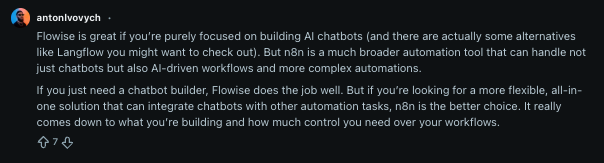
While Flowise stands out for its simplicity and speed, users also note its limitations. It handles AI workflows beautifully, but when it comes to multi-tool routing, logging, or broader automation, it often needs to be paired with n8n or some custom code.
Meanwhile, n8n can be slower to develop new features, and hosted plans can get costly. Some users find setting up advanced AI workflows in n8n more complex compared to Flowise.
n8n vs Flowise AI: which one should you choose?
After testing Flowise AI and n8n together, below is a summary of when to use each tool.
Use both if:
- You want to combine AI experimentation with reliable automation
- Flowise handles AI decisions, n8n executes actions
Overall, comparing Flowise AI and n8n isn’t exactly a fair fight, since they focus on different strengths. Flowise is built for AI workflows and agent prototyping, while n8n handles full automation and multi-tool orchestration. However, in the areas where they do overlap, n8n comes out ahead for integrations and executing workflows at scale.
Best alternative: Nexos.ai
Flowise AI and n8n work best when you already know what kind of automation environment you need. Flowise AI is more focused on building AI assistants and RAG-style tools, while n8n is stronger for broader workflow automation across apps and services. However, some teams may sit between these needs and want AI-powered automation without committing to a technical builder or a general automation platform that requires heavy setup.
That’s when I’d recommend considering Nexos.ai. I tested this tool with the Cybernews research team as part of the broader research, and it felt more like an operational workspace for applying AI to everyday business processes. It combines no-code AI agents, workflows, multi-model support, and integrations in a more guided environment.
Clearly, Nexos.ai isn’t a direct replacement for every Flowise AI or n8n use case. However, if your team wants AI automation that is easier to operationalize across daily work, I would definitely consider it.
FAQ
Can Flowise replace n8n for business automations?
No. Flowise handles AI tasks such as chatbots and RAG, but it lacks broad app integrations, workflow retries, and the operational controls needed for full business automation.
n8n vs Flowise: which tool is easier to self-host securely?
n8n. It offers clear credential vaults, role controls, and telemetry options. Flowise can be self-hosted, but data and access controls are more basic.
Is n8n suitable for building AI agents and RAG workflows?
Yes. n8n can run AI models, RAG pipelines, and vector searches, though setup is more manual and less intuitive than Flowise, which is optimized for AI-first pipelines.
What gets more expensive at scale: agent tokens or automation runs?
Both can get expensive, but agent tokens in Flowise can spike quickly with heavy AI usage, while n8n costs rise with workflow executions and premium features.
Can Flowise and n8n be used together in one workflow?
Yes. Many teams use Flowise as the AI “brain” for reasoning and RAG, and n8n to execute multi-step actions, connect apps, and reliably handle logging and automation.