Flowise AI review 2026
Being behind major reports like The Mother of All Breaches and RockYou2024, our in-house cybersecurity experts and journalists provide unbiased, real-world testing and in-depth analysis.
We maintain complete transparency by openly sharing our testing methodologies with our audience.
Learn more

Flowise is a visual builder for Large Language Model (LLM) workflows that lets you easily create complex processes using various AI models, such as ChatGPT or Gemini. Essentially, it lets you skip the coding required to build a pipeline, allowing you to create a simple flow that includes multiple agents.
During this Flowise AI review, I have found that it has several uses, but it's most often used for prototyping, shipping chatbots, and retrieval-augmentation-generation (RAG) models. However, given its no-code approach, it's better suited for demos than for production-ready tools, especially since debugging is tough if something goes wrong.
Given its limitations, I believe Flowise's biggest strengths lie in demos, prototypes, basic chatbots, and internal software. While it can surely work for some in a production environment, I believe that its difficult debugging and scaling limitations make it a poor choice for advanced production-grade solutions.
Quick overview of Flowise AI
| Rating | |
| Best for | Quickly creating AI workflows, iterating on ideas, or creating chatbots |
| Key features | Drag-and-drop AI workflow creator, integrations with multiple AI APIs and databases |
| Free version | ✅ Yes |
| Starting price | $35.00/month |
Pros and cons of Flowise AI
Flowise is a unique piece of software that has its advantages and drawbacks. When testing it, I noted down a set of pros and cons based on my experience. Here's what I found:

What is Flowise AI?
Flowise AI is a tool that you can use to build AI systems while writing little to no code. Its visual interface allows you to drag and drop boxes to create workflows. For example, these workflows can make the software respond to a prompt by accessing a given knowledge base, parsing its contents, and responding – all without training data for your actual knowledge base.
To show how it works, I prepared a simple RAG system that answers questions based on a provided text file using Google's Gemini AI model.

Flowise uses three elements to create its tools:
- Nodes, which are essentially the steps or tools you use to provide information to the system
- Edges, which are connections between various steps
- Outputs, which give the user the expected end result
You can easily arrange all these elements in graphical form to create interactions of varied complexity. However, note that the more complex your system is, the more likely it is that a single buggy element will disrupt the whole process.
Who gets the most value
When testing Flowise, I found that it's an excellent choice for certain professionals and teams, while carrying some unacceptable challenges for others. Here's who I believe Flowise is the right pick for:
- Internal tool developers. Since internal tools don't usually need massive scalability, Flowise is a great pick for internal tools. Whether it's an internal knowledge bot or a search tool, Flowise is useful to quickly build simple tools to help your team.
- Startups. Startups looking to quickly experiment, iterate, and demo their products will find Flowise a useful tool to start off with. While not really suitable for scaling, it can be an element of a prototype or a proof of concept.
- Developers who want a self-hosted orchestration solution. Flowise can be self-hosted, giving you full control over orchestration. This increases data safety and ensures it won't flow through third parties.
However, there are also situations in which you should avoid using Flowise. Here’s who shouldn't use the tool:
- Regulated organizations that need enterprise-grade audit/role controls out of the box. Flowise doesn't allow you to perform enterprise-grade audits or give you role controls within the software. This means that implementing these governance features may be difficult and time-consuming for your team.
- Teams that require a code-first approach. While Flowise's no-code approach is handy for less technical teams, it can also be limiting. If you're a code-first team, you might find Flowise frustrating to integrate with your system and hard to debug.
- Complex orchestration at scale. The more complex a process and Flowise, is the more likely it is to start having issues. This makes scaling orchestration with Flowise complicated and much harder than with code-first setups.
What you can build with Flowise AI (key features and capabilities)
Flowise allows you to build a multitude of functionalities into both internal and external solutions. To go in-depth into what Flowise offers, I picked the five most useful features and capabilities, and found real-life examples of how they can be used.
Visual graph orchestration
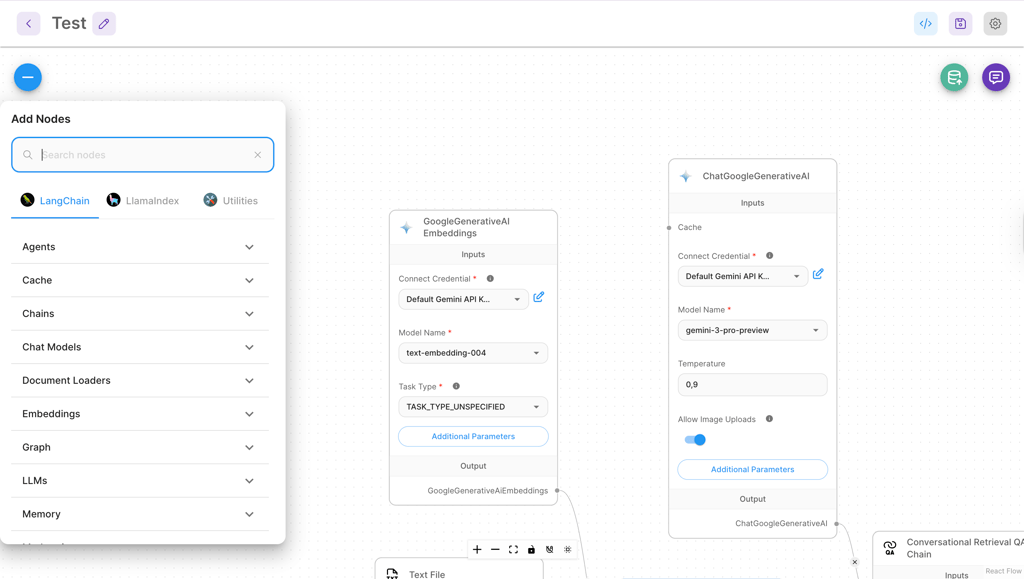
Flowise's drag-and-drop is an intuitive way to define a visual flow of data. Essentially, it allows you to create a set of AI functionalities in the form of a graph. The process is straightforward, allowing even non-technical users to create a functional AI workflow.
Using this visual graph, you can build a functionality like a support chatbot pretty fast. For example, if you're running an eCommerce business, you can connect an input from an AI model embedded on your website with your order database to give users up-to-date information about their transaction status.
The graph orchestration allows you not only to quickly set up this chatbot, but also to iterate on it. For example, if you need to add an additional data source, you can do so with a few clicks, clearly showing the changes to the process to all stakeholders.
Flexibility across model providers
Different AI models excel at different things. You may find that ChatGPT-5 works better for generating creative text, while Gemini 3 Pro may be better for complex research tasks. Flowise allows you to include different models at different points in your process.
For example, you're building a knowledge base for your company, and you want to avoid hallucinations. In this case, you can start with a fast model (e.g., Claude Haiku 4.5), parse your request, and answer based on the documentation provided to it via integrations. However, instead of answering straight to the users, it can then send the answer to a more powerful model (e.g., Gemini 3 Pro), which is trained for fact-checking and reviewing answers. If it finds any mistakes, it rewrites the answers, giving you a more reliable output.
Overall, there are many other uses for Flowise's multi-model support, allowing you to suit the model you're using to your needs and budget. After all, you wouldn't want to spend credits on Gemini 3 Pro to answer a simple question about somebody's tracking number. You can even set up a model to parse prompts to decide on which model should be used to answer the prompt.
Tools, agents, and function calling
The visual provider also lets you switch between proprietary connectors like OpenAI and open-source alternatives like Llama without changing any code. Switching models is pretty simple, but note that if one model lacks the features of the previously used AI, it may break your entire workflow. These models can then be orchestrated to be agents, interacting with various other platforms or each other.
The agents in your workflow can also easily perform function calls, which is essentially the ability to send commands to other tools via an API. This can be useful in many scenarios, but I'll give you a simple example. Say you're creating an internal management assistant, and using Flowise to help set up its workflow. Using function calls, it can send API requests to schedule calls via Google Calendar or create new tasks in JIRA or ClickUp.
Note that these integrations also bring about some risk. Whenever you're interacting with other tools, it's possible for threat actors to inject commands that will impact your platform's security. Since Flowise has limited coding capabilities to prevent this, I would recommend using it for very specific tasks or internal tools where the risk is far lower.
Integrations and connectors (databases, APIs, vector stores)
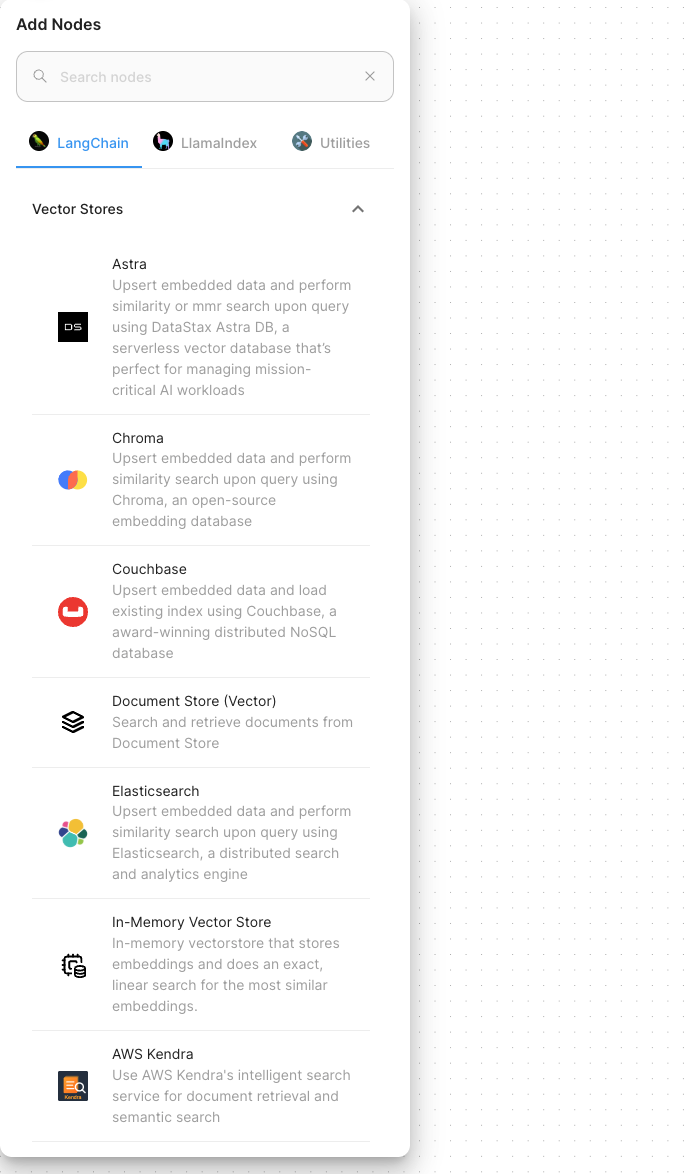
To make your work easier, Flowise includes a robust set of integrations and connections. These include standard REST API connections, as well as integrations with platforms like Zapier or Make.com, which can then interact with software such as your CRM.
In terms of databases, Flowise integrates well with multiple types, including SQL, MongoDB, and, most notably, vector databases. Vector databases are by far the best for AI interaction, enabling Flowise to quickly search a knowledge base and reducing the risk of hallucinations.
Deployment options and extensibility (self-host, customization, templates)
Flowise is available both as a managed cloud service from the provider itself and as an open-source, self-hosted solution. Deployment templates also allow you to quickly install it on a cloud platform.
Self-hosted Flowise is highly customizable for use. The drag-and-drop canvas is accessible right after installation, and it also offers an embeddable chat or headless API, allowing you to create your own interface or integrate it with your existing tools like Slack.
If you require a specific functionality, Flowise offers over 100 pre-built flows in its built-in marketplace. Since flows are saved as JSON files, you can also share them with the Flowise community, allowing you to cooperate with others using the solution. Flowise's code can be forked and modified, but that will require a specialized engineering team. If you have one of those, it's worth considering using or creating a code-first orchestration platform.
Flowise AI setup and ease of use
Flowise is easy to set up on any platform. If you choose the Flowise managed cloud, you'll have a completely hands-off experience, with the platform providing instant access to a managed instance of the software. However, self-hosting is also easy. You can either choose to install a template on a cloud platform of your choice or go in-depth with an installation on your dedicated server.
Installing Flowise on a cloud platform is extremely intuitive. Using a tool like Railway or Replit takes only a few minutes. If you need to install the software on a dedicated server, you can do so with a single npm command or by using Docker.
Once Flowise is installed, the harder part begins. Setting up Flowise properly is straightforward – as long as you set the correct environmental variables for your database or storage and configure your credentials correctly. If you don't do that, you may end up struggling to launch the tool.
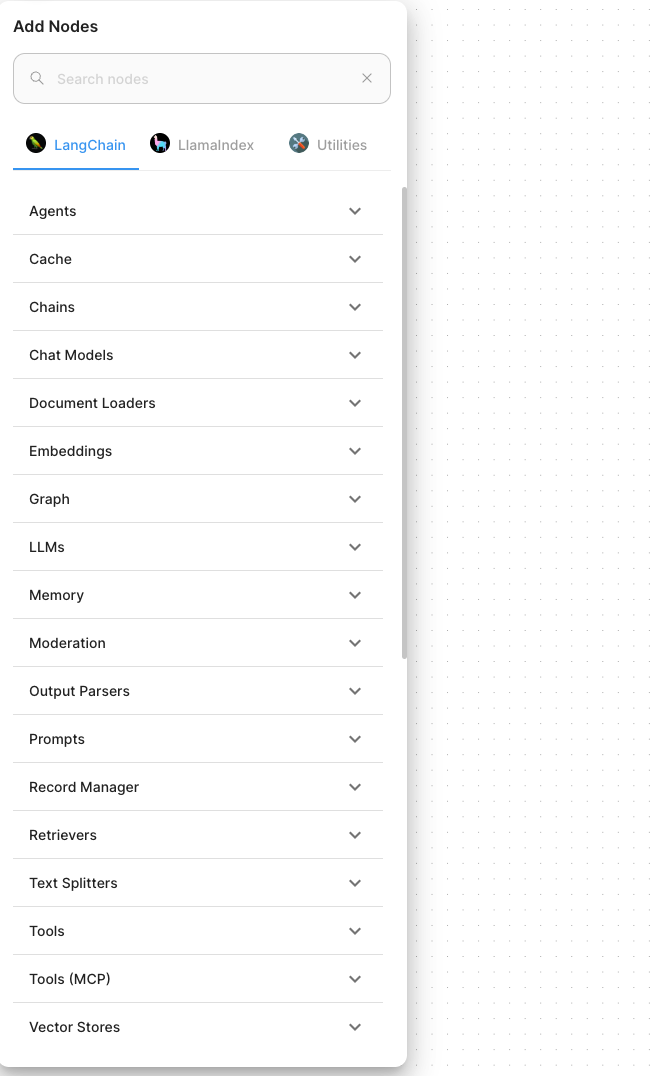
While the UI is intuitive, it does have a steep learning curve. Understanding which output ports fit into which input ports and setting up basic logic takes a moment.
To help you start off strong with Flowise, I have some tips:
- Use consistent naming conventions to avoid confusion deeper down in the setup.
- Start from templates, as the prebuilt workflows from Flowise are easier to customize than to build from scratch.
- Save backup duplicates when you iterate on a workflow for easier debugging in case a future one stops functioning.
Performance and reliability in real workflows
The performance of Flowise primarily depends on the size of your workflow and the models you use within it. If you use fast models like Claude Haiku, your speed will be much higher than with models like Gemini 3 Pro or ChatGPT-5.
If the model is too slow to respond, Flowise will time out. However, you can configure it to retry a few times before doing so. It also offers real-time feedback to point you to the node that failed, helping with troubleshooting.
A big drawback is that Flowise doesn't offer automatic backups. Instead, you have to save each iteration of your flow separately to ensure that you can roll back the changes in case of an error. This also makes larger flows hard to manage, as they can lead to unexpected loops.
Safety, governance, and compliance
Flowise is primarily designed as a self-hosted tool, which gives you a lot of control over its governance and data. Your flows, chat history, and documents will stay on your server. Naturally, the prompts will go through the AI providers you picked if you're not running local models. You can also easily link to a vector database on a different server, allowing you to choose where you store your data.
Security-wise, API keys are stored and encrypted in Flowise's centralized credentials system. This ensures that API keys won't be hardcoded into the flow, as long as you use environment variables, lowering the risk of a threat actor hijacking them. Unfortunately, RBAC and SSO are locked behind Flowise's enterprise license and are not available in the open-source self-hosted version.
Flowise credentials screen
Pro tipIf you're using the open-source version, you can still use an external authentication layer like Cloudflare Zero Trust to ensure that users can access Flowise with simple SSO authentication.
In terms of the workflow itself, Flowise allows you to set up guardrails, including a human-in-the-loop approval within your system. It also follows least-privilege principles by using read-only keys wherever possible.
Finally, in terms of compliance, Flowise has its pros and cons. While self-hosting makes it easy to maintain data residency compliance, the system also has limited audit logging capabilities. This means that in order to guarantee full enterprise compliance, your engineering team will need to modify the codebase quite a bit.
How much does Flowise AI cost?
Being an open-source solution, Flowise's pricing oftentimes isn't as simple as the price you'll find on its website. Unfortunately, even the self-hosted version has an Enterprise version that locks certain features like RBAC and SSO behind a paywall. On top of that, the price you pay is impacted by additional costs like vector database storage and LLM API usage.
So, before I dive deep into the details, I decided to look at Flowise's cloud hosting offer to show you how the base pricing for a version hosted by the provider:
| Plan | Price | Key limits | Key features |
|---|---|---|---|
| Free | $0.00/month | 2 flows | Community support |
| Starter | $35.00/month | Unlimited flows | Community support |
| Pro | $65.00/month | 50,000 predictions/month | 5 users included (+$15.00/user extra) |
| Enterprise | Custom | Custom prediction volume | SSO (OIDC and SAML) |
Note: A prediction is counted every time an AI agent processes a message and replies. If you have a large loop, one full loop can consume several predictions.
The biggest price impact for both self-hosted and Flowise-hosted solutions is caused by LLM API prices. Here's a breakdown of the most popular models and prices depending on the number of prompts sent every month:
| Model name | 1000 prompts (1M tokens) | 10,000 prompts (10M tokens) | 100,000 prompts (100M tokens) | 1,000,000 prompts (1B tokens) |
|---|---|---|---|---|
| GPT-5 (Standard) | $3.00 | $30.00 | $300.00 | $3000.00 |
| GPT-5 Mini (Lite) | 0.60 | $6.00 | $60.00 | $600.00 |
| Gemini 3 Pro | $3.00 | $30.00 | $300.00 | $3000.00 |
| Gemini 3 Flash | $1.00 | $10.00 | $100.00 | $1000.00 |
| Claude Sonnet 4 | $5.40 | $54.00 | $540.00 | $5400.00 |
| Claude Haiku 4.5 | $1.80 | $18.00 | $180.00 | $1800.00 |
(Based on an 80% input, 20% output token split, average 1000 tokens per prompt)
As you can see, prices can increase drastically as your model’s usage increases. Add cloud or dedicated server hosting prices, which can range from a couple to thousands of dollars, and even a self-hosted version of Flowise can ramp up in costs pretty quickly. Essentially, the more your flow is used, the higher your costs will be.
Use cases in practice
Flowise is a unique tool that works well in certain situations. To show you how you can integrate the tool into your workflow, I looked at several use cases for its solutions:
- Knowledge assistants. Flowise is an excellent tool for creating knowledge assistants, routing questions between a knowledge base and correct models based on the prompt.
- Sales and marketing support. Creating a simple support bot that will help you complete sales and communicate with your customers is very easy with Flowise.
- Developer copilots. If you need an internal tool to help developers with coding, using your documentation as a base, Flowise can help you set up a good, workable flow.
- Database querying. You can use Flowise to set up a Text-to-SQL Agent, which allows your team to ask questions in plain English and have the AI generate the complex SQL queries to find the answers instantly.
- Rapid prototyping tool. Flowise lets you quickly iterate on workflows and showcase prototypes of various tools in a way understandable even to non-technical stakeholders. This was actually the most common use I’ve seen among users who've given their opinions about Flowise online.
Flowise AI alternatives and how they compare
While Flowise is unique, there are some alternatives to it that may suit your needs. I looked at several of them and compared them to Flowise to help you decide which is the best fit for your needs:
| Platform | Ease of use | Templates | Customization | Hosting | Learning curve | Best for |
|---|---|---|---|---|---|---|
| Flowise | High; intuitive drag-and-drop | Strong; 100+ LLM-specific templates | High (JS); allows custom Node.js code | Self-hosted (Docker/npm) or cloud | Medium; requires LangChain knowledge | JS developers building internal tools |
| nexos.ai | High, chatbot interface with flow builder | Strong; 100+ agent templates | Limited; fully no-code | Cloud hosted | Low; designed for non-technical users | Teams needing robust AI automation |
| Langflow | Medium; feels like an IDE | Moderate; smaller library than Flowise | High (Python); native Python support | Self-hosted or HuggingFace | Steep; best for data scientists | Python-heavy teams and data scientists |
| n8n | High; polished UI | Excellent; massive automation library | Very high; 1000+ native app integrations | Strong self-hosted or managed cloud | Medium; logic can get complex | General business automation workflows |
| Dust AI | Very high; no-code focus | Niche; focused on team productivity | Limited; connects to specific docs/apps | SaaS only; difficult to self-host | Low; designed for non-technical users | Non-technical teams needing unified search |
Essentially, Flowise is a sweet spot between the non-technical strengths of Dust, and the advanced customizability of Langflow and n8n. Each of these tools has different strengths and weaknesses, and you should consider your needs before deciding on one.
Best alternative: Nexos.ai
If you're looking for the best alternative to Flowise, I recommend nexos.ai. Compared to Flowise, nexos.ai is far more focused on providing no-code solutions to AI automation. Yet, despite the lack of customizable code, Nexos is capable of delivering a similar user experience to Flowise while offering usability for non-technical users.
If your team doesn't need in-depth code customization but needs an AI tool that will automate your workflows, I would recommend starting off with Nexos. While it might not have the advanced coding features Flowise has, it will create an intuitive way for your team to automate day-to-day tasks without the need to involve developers.
Bottom line: should you use Flowise AI?
Flowise AI is a unique product that will best serve unique needs. If you need a knowledge assistant for your internal tools or a self-hosted support bot for a small business, Flowise will do a great job.
However, Flowise also has its drawbacks, particularly related to its scalability and customizability for large companies and enterprises. If you're looking for a solution for a larger business, I'd suggest looking at code-first solutions like Langchain – the framework Flowise is based on.
In short, if you're a low-code business looking to expand your use of AI for prototyping, knowledge search, or support, Flowise is a great place to start. If you're a larger company with specialists on board, you may find Flowise limiting and hard to scale.
FAQ
Is Flowise AI suitable for production apps or mainly prototypes?
Flowise can be used for simple production apps just as well as prototypes. However, I wouldn't recommend using it for complex or large-scale applications.
Can I self-host Flowise AI securely for sensitive data?
Yes, you can self-host Flowise AI securely on your own server. Note that for maximum security, you will need to purchase a custom-priced Enterprise license.
What’s the biggest limitation of Flowise for larger teams?
Flowise's biggest limitation for larger teams is scalability. The larger your workflow, the more hard-to-debug failure points are possible. Additionally, with no version control system, iterating upon your flow can be complex and frustrating.
How does Flowise compare to LangFlow and Dify?
Flowise is best for web developers who want to build custom tools, while LangFlow is designed for people who prefer working with Python code. Dify is different because it handles everything for you, including the end-user interface, making it the easiest way to quickly launch a complete app.
What are the real costs beyond the subscription (models, hosting, databases)?
While the Flowise cloud subscription includes a database and hosting, if you choose the self-hosted model, you'll have to cover these costs. In addition, your costs will depend on the AI API you're using and its price – the more capable the model, the more expensive your Flowise use will be.