Dust AI review 2026
Being behind major reports like The Mother of All Breaches and RockYou2024, our in-house cybersecurity experts and journalists provide unbiased, real-world testing and in-depth analysis.
We maintain complete transparency by openly sharing our testing methodologies with our audience.
Learn more
Dust AI is a platform that provides organizations with everything they need to quickly build custom AI agents. It’s a handy tool for businesses looking to increase productivity by creating AI assistants that can be easily integrated into existing protocols and data systems.
To test whether Dust AI delivers on its promise, I teamed up with the Cybernews research team. During our testing, we found that Dust AI’s biggest strengths are flexibility, a user-friendly interface, and agent customization, while its limitations include challenges with large, multi-source data sets and the need for governance.
In this Dust AI review, I further dive into Dust AI’s features, security, pricing, and real use cases. I also compare it to other AI assistant-building platforms to better understand whether it’s worth your investment.
Quick overview of Dust AI
| Best for: | Anyone looking for a scalable AI platform that seamlessly connects internal tools and data systems |
| Key features: | No-code AI agent creation, context-aware infrastructure, and team orchestration |
| Free version: | ✅ Yes, 14-day free trial |
| Starting price: | $29.00/month |
| Overall rating: | 4.5 |
Pros and cons of Dust AI

What is Dust AI
Dust AI is a platform for creating customizable and secure AI agents powered by large language models (LLMs). These agents can be used to support workflows and connect to the company's tools, powered by various AI models, helping enhance productivity and improve work processes.
Dust AI not only improves your team's productivity but also operates in an environment that meets enterprise-grade security standards. Its comprehensive compliance certifications include GDPR, HIPAA, and SOC 2 Type II. The platform's access control is managed through Single Sign-On (SSO) integration, ensuring that only authorized personnel can access specific data or functionalities.

Who gets the most value from Dust
Dust AI is a great platform, but it’s not perfect. While it might be the best fit for one organization, others can find it far from ideal. Below, I summarize who can get the most of it and who might want to consider alternatives.
Best fit:
- Support and operations teams that need faster, standardized answers
- Product and engineering teams that need summaries, sharing internal documents and incident notes
- Sales and CS teams using approved messaging from trusted sources
- Leadership or strategy teams synthesizing insights from internal documents and briefs
Not ideal for:
- Solo users who want a basic chatbot
- Teams that don’t have knowledge sources or documentation to connect to
- Users, who need heavy no-code automation beyond what the tool supports
Dust AI key features and capabilities
Dust AI includes five main feature groups that help teams improve productivity. In the sections below, I review each feature in detail, including what it does, why it matters, and its limitations.
Custom assistants and customization
One of the main feature groups is custom assistants and customization. Through these features, Dust AI allows configuring user roles, including permissions and constraints, agent instructions and prompts, knowledge, tools, triggers, and AI models.
Thanks to these customization options, Dust AI enables:
- Standardised support responses. You can create agents that are connected to help center documents or Zendesk, giving drafted responses in a specific company’s style and tone.
- Internal knowledge base assistant. An agent that can provide information from selected data folders, for example, a specialized onboarding bot that provides information on HR policies or a tech-spec bot that can summarize the last 10 pull requests from GitHub.
- Multi-agent workflow. Creating workflows with multiple agents that can communicate with each other, such as a research bot that provides information to a writer bot to draft a report.
- Proactive automation. Using the triggers feature, you can set up schedules for your agents, such as summarising the whole week’s Slack discussions every Friday.
While Dust AI is a capable creation and deployment platform, it has several limitations, including technical, operational, and governance. Since Dust AI operates on the data you provide, it can have issues if the company’s base is cluttered and includes outdated or contradictory information. What’s more, Dust AI may need governance to ensure that the agent has access to necessary data, but not to any sensitive or private information.
Knowledge connections and retrieval
Dust AI can be connected to various sources, including Notion, Slack, GitHub, Confluence, Hubspot, Salesforce, Gmail, Google Calendar, Outlook, and Zendesk. It can also retrieve data from web pages, internal folders, and APIs.
One thing to keep in mind is that retrieval might be broken or impact accuracy. Dust AI uses a Retrieval Augmented Generation (RAG) agent, which works based on semantic search to understand context and uses citations to increase accuracy. What can break the retrieval is outdated data, duplicate sources, vague documentation titles, non-textual data, and deep content.
Team collaboration and sharing
With Dust AI, all workspace members can create agents and share them with each other. Once a member creates a new agent, they can decide whether to make it accessible to all members of the workspace (published) or only visible to the creator (unpublished). The creators can also add selected editors, who can further configure the agent.
What I liked about Dust is that you don’t have to start your agent from scratch. There are over 50 pre-made templates that save time during the initial setup of a new agent. Also, all the agents created by the workspace members are saved in the agent library and can be duplicated and reused for new cases. What I did find lacking is that Dust AI doesn’t provide any form of versioning.
However, working in a workspace with multiple agents increases the risk of agent mix-ups and sprawl. Luckily, there are several features that can prevent that. Dust provides a tagging system that helps organize and manage agents. Additionally, publishing options can limit visibility of those agents that are still being developed, while analytics help identify rarely used or unused agents and clean up the workspace.
Integrations and API options
Dust can be integrated with several tools. To make things easier, Dust differentiates integrations based on how they are connected. Tools that can be integrated into Dust are called Connection, while Dust integration into another platform is simply referred to as integration.
Thanks to the tools that can be integrated with Dust, members can get access to seamless data exchange and workflow integration. Here’s a table summarizing Dust AI’s connections and integrations:
| Connections | Integrations |
| Google Drive, Notion, Confluence, Intercom, GitHub, Microsoft, Snowflake, BigQuery, Zendesk, Gong, and Slack | Google Chrome extension, Slack bit, Google Meet, Gong.io, Modjo.io. Google Sheets, Teams, Zendesk, Raycast, Zapier, Make.com, n8n, and Power Automate |
Besides integrations, Dust also includes several native webhook providers (Jira, Fathom, and Linear) and custom integrations with user-provided signature verification and API connections.

Admin controls and governance
Dust AI has 3 permission-based roles: Admin, Builder, and Member. Here’s what each role has access to:
- Members can talk to agents and build new agents in the workspace
- Builders have access to everything members do, plus they can add folders to the workspace, create Dust apps, and use the Dust API
- Admins have full access to the platform, can manage workspace connections, add members, change their roles, manage AI model providers, and change subscriptions
Platform administrators can download .csv files of workspace analytics, including registered users, agent message logs, agent creation and editing logs, and a list of agents ordered by activity level.
To ensure the smooth running of your workspace, consider a few practical governance tips. First, you may want to avoid having multiple admins, limiting the count to 2 or 3. If you have a provisioning setup, map restricted spaces to your existing organizational groups for easier management. Lastly, enable necessary security practices, like SSO and domain verification.
Dust AI ease of use and implementation
Dust AI is built to be flexible, serving technical and non-technical users. What I think makes it accessible are pre-made templates that enable AI assistant creation through a no-code interface. Technical users can opt for the platform’s builder resources, enabling greater customization and control over agent behavior and data interactions.
While Dust is flexible, it still has a learning curve for non-technical users. However, with time and patience, going through Dust’s tutorials and supporting materials, such users can build a functional AI agent in a day.
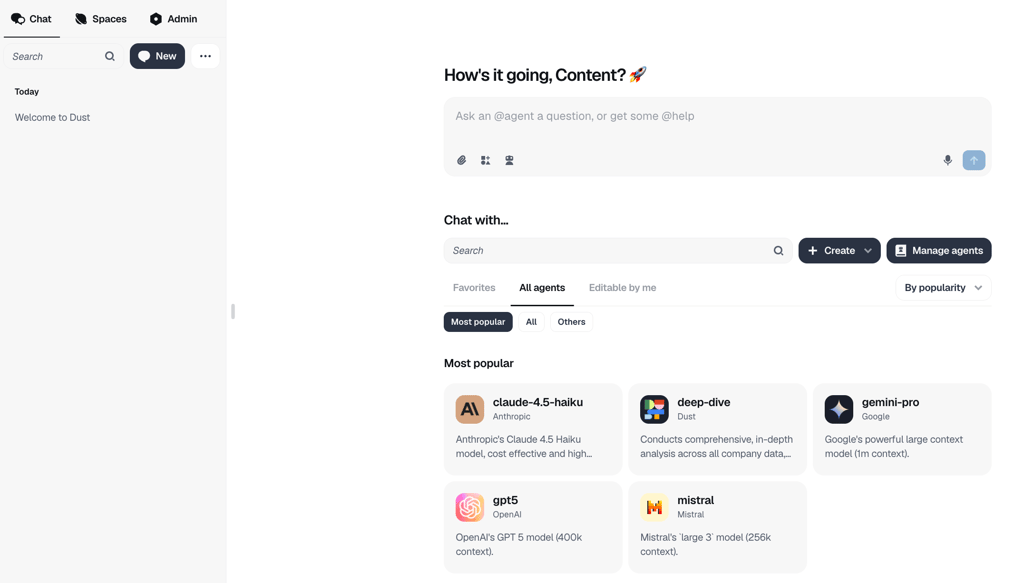
In practice, a typical Dust AI rollout looks like this: teams create a workspace, connect knowledge sources, such as Google Drive, Notion, or internal documentation, and build the first AI assistant. After that, the testing process commonly includes 3 to 5 scenarios to see where answers break, whether instructions need tightening, and to take note of any hallucinations. Then the AI assistant is shared with a pilot group, and if no further adjustments are needed, it’s rolled out with usage guidelines.
Make sure to do your preparation work as clean documents and clear ownership make the setup faster, while messy permissions and unclear rules slow everything down. In day-to-day use, it’s easy to find and reuse assistants. I liked that outputs can be shared or copied across tools without issues.
For the smooth process of AI agent implementation, you can follow this implementation checklist:
- Decide owners
- Define safe-use rules
- Choose knowledge sources
- Set access levels
- Create 2–3 assistants for the highest-impact workflows
Safety, privacy, and compliance
Dust AI places great importance on safety, privacy, and compliance. It follows strict data protection practices, preventing model training on company information. Access control is managed through SSO integration, which combines role-based access control with restrictions on private spaces. Such an approach ensures that only authorized personnel can access specific data or functionality within the platform.
At rest, Dust AI encrypts all data with AES-256 and switches to TLS protocols when in transit. In addition, Dust AI meets the highest standards through compliance certifications, including GDPR, HIPAA, and SOC2 Type II.
Despite all the safety features, organizations employing AI agents are advised to practice risk management. For example, set access boundaries to control and restrict AI agents’ autonomous behaviors, and don’t upload credentials or personal data. Use enterprise features when your assistant is handling legal, HR, or customer information, where auditability and tighter controls matter most.

Plans, pricing, and what you get
Dust AI pricing is simple as it offers two plans: the Pro plan for smaller businesses and the Enterprise plan for teams with over 100 users. While the Pro plan is extensive, it doesn’t have the capacity of the Enterprise plan, which supports over 100 users, offers larger storage limits, user provisioning, and advanced security controls. Here’s how the two plans compare side by side:
| Pro | Enterprise | |
| Price | $29.00/month/user | Custom |
| Key features | Advanced AI models Custom agents which action execution abilities Custom actions Native integration for Slack, Zendesk, Chrome Extension Privacy and data security Unlimited messages Can be connected to GitHub, Google Drive, Notion, and Slack | Advanced security and controls Larger storage and file size limits Single sign-on Flexible payment options Priority support US/EU data hosting User provisioning Salesforce tool |
| Key limits | Fixed price on additional programmatic usage One private space Up to 1GB per user of data sources A limit of 100 messages a day per seat | A limit of 200 messages a day per seat |
Dust AI also offers a 14-day free trial. However, it’s only available to subscribers of the Pro plan.
Use cases in practice
In practice, Dust AI can be used in various instances:
Internal support and knowledge Q&A. Dust AI is successfully used for internal information retrieval, providing instant access and summary of any document in a company's knowledge base.
Product and engineering enablement. Engineering teams use the platform to streamline coding processes, manage incidents, and access documentation efficiently.
Sales and customer enablement. Sales teams leverage Dust AI to streamline communication, handle customer inquiries, create cold emails and re-engagement messages using call transcripts, CRM data, and industry insights.
Research and synthesis. Data teams use Dust AI to debug and optimize SQL queries to explore, clean, and analyze their data, enable their non-technical stakeholders to write self-serve SQL inquiries, and get immediate data insights without disrupting data analysts.
User feedback: the patterns that show up
To learn more about the users’ experience with Dust AI, I searched for user reviews. I headed to the G2 review page, and I could see a pattern instantly.
The majority of the users praised Dust AI’s user-friendliness, emphasizing that it makes it easy to use and contributes to the fast creation of powerful AI agents. Users also acknowledged that it’s flexible, easy to customize, and is useful for different teams' workflows.
However, the platform also has some shortcomings. Users mention that some features require a bit of learning, some agent tools are confusing, and there is a lack of connections to some data sources.
How Dust stacks up against alternatives
Dust AI has some very specific use cases in which it excels, and other use cases in which it doesn't perform quite as well as other products. To help you visualize the potential differences between Dust AI and other products in this space, I created a breakdown table that will help you understand each product's unique selling points.
| Tool | Dust AI | nexos.ai | Microsoft 365 Copilot | ZoomInfo | n8n |
| Strengths | User-friendly interface, no-code AI agent creation, good cross-team work streamlining | Unified multi-model gateway (200+ LLMs), robust AI governance/guardrails, visual no-code agent builder with smart fallback logic | Deep integration across Microsoft tools, context-aware assistance, strong data analysis | Strong sales intelligence and enrichment features | Highly flexible, open-source-friendly workflow automation with many integrations and self-host option |
| Weaknesses | Requires preparation of internal data and workflows for smooth setup, may need admin support | Overkill for casual solo users; API credits for custom developer builds are sold separately | Limited value outside Microsoft ecosystem | Can be expensive for smaller teams | Steeper learning curve for non-technical users, complex flows can be harder to maintain |
| Pricing | From $29.00/month | From €20.00/month (approx $21.00/month) | From $18.00/month | Quote based | From $20.00/month |
| Best use case | Small and mid-size teams wanting to create powerful custom AI agents quickly | Businesses wanting to roll out structured AI agents across teams without vendor lock-in or "shadow AI" risks | Users already working with Microsoft 365 who want AI assistance within other Office apps | Sales and marketing teams | Teams looking for customizable workflow automation and integration without being dependent on one vendor |
Best alternative: nexos.ai
In case you're looking for AI software with wider capabilities, nexos.ai is my top pick for Dust AI alternative. In testing, I found that Nexos stood out with its automation and no-code capabilities, allowing it to perform a similar role to Dust, while also offering more robust features than simply creating a knowledge base. While Dust excels at streamlining communication between teams and handling inquiries for nexos, that's just part of the deal.
Nexos includes access to over 200 AI models and over 100 customizable templates, allowing you to build tailored no-code workflows for your needs. So, if you're looking for a tool that will help you build AI agentic workflows and allow you to create a wide array of automations, Nexos.ai is definitely a great choice. However, it won't have the same depth in terms of knowledge sharing that Dust offers.
Final verdict: should you use Dust AI
Dust AI is a noteworthy AI-agent-creation platform that is accessible to technical and non-technical users. Dust AI is best suited for organizations that rely on shared knowledge and repeatable workflows. However, solo users, teams without connected knowledge bases, or those looking for heavy no-code automation may find Dust AI unnecessarily complex or limiting.
FAQ
Is Dust AI safe for company data?
Yes, Dust AI is safe for company data. It offers strong security, privacy, and compliance, making it a great option for handling sensitive company data.
Can Dust AI connect to internal knowledge bases?
Yes, Dust AI is designed to connect and leverage internal knowledge bases. It integrates tools like Slack, Google Drive, and Notion to create AI agents granting instant access and providing summaries of internal knowledge bases.
Does Dust AI support team permissions and admin controls?
Yes, Dust AI offers team permissions and admin controls, which allow role-based access, granular control over integrations, and management of data access within spaces (containers in Dust). Admins manage users and grant permissions through a central console.
Which Dust AI plan is best for small teams?
Dust AI’s Pro plan is the best for small teams. It costs from $29.00/month/user and includes a 14-day trial, making it a great option for small teams to test the tool.
What are the best alternatives to Dust AI?
The best alternatives to Dust AI are Microsoft 365 Copilot, ZoomInfo, and n8n. Microsoft 365 is a cost-effective alternative, while ZoomInfo has a strong orientation towards sales teams. If you value flexibility and customizability – consider n8n.