Sana AI review 2026
Being behind major reports like The Mother of All Breaches and RockYou2024, our in-house cybersecurity experts and journalists provide unbiased, real-world testing and in-depth analysis.
We maintain complete transparency by openly sharing our testing methodologies with our audience.
Learn more
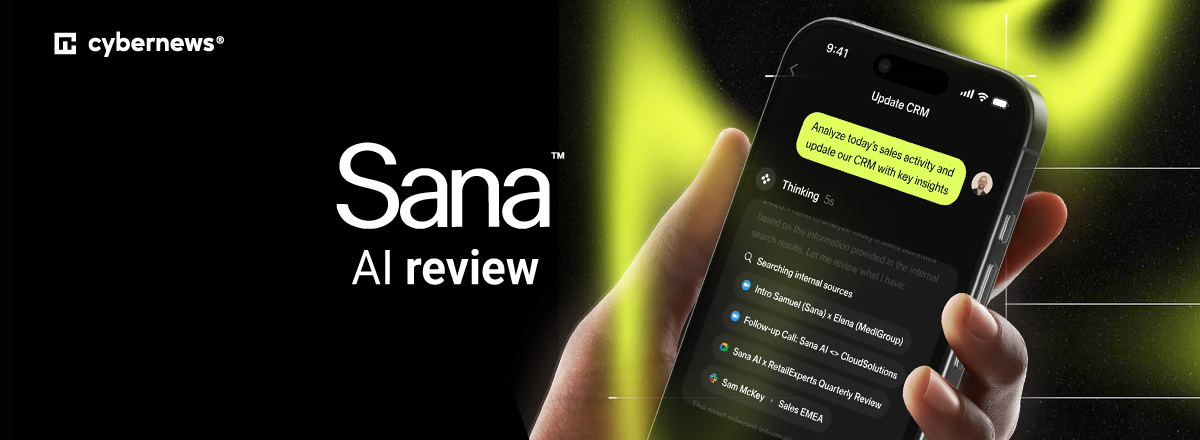
Sana AI is a workplace AI solution that gathers all of the internal company information into a centralized knowledge base. Employees can ask questions, and the AI will pull answers directly from company documentation.
It delivers easy access to verified company knowledge, faster and smoother onboarding, fewer repetitive questions, and personalized training material and management. It’s expensive, but for the right company, Sana AI can be more than worth it.
I collaborated with the Cybernews research team for this Sana AI review to explore where Sana AI shines, where it falls short, and who will get the most value from it. Together, we tested Sana AI hands-on, evaluating AI search and answer quality, integrations, learning, permissions, and more.
Quick overview of Sana AI
Sana AI has two products: Sana Agent and Sana Learn. Here’s a quick breakdown of their roles in the workplace:
| Sana Agent | Sana Learn | |
| Rating: | ||
| Best for: | Teams that need an AI assistant for summarizing internal documents and automation | Mid-to-large businesses for employee onboarding, training, and personalized learning |
| Key features: | AI-powered search across company documents and apps, meeting summaries, customizable AI agents, workflow automation, and enterprise security controls | Learning course creation, personalized learning, interactive live classroom, learning management, and analytics |
| Free version: | ✅ Yes | ❌ No |
| Starting price: | $30.00/user/month | $13.00/license, minimum 300 licenses |
What I liked and what I didn’t about Sana AI

What Sana AI is and how it is pioneering AI at workplace
So, what is Sana AI? Simply put, Sana AI is a workplace AI that helps teams find and understand internal company knowledge. It doesn’t work like a general-purpose chatbot. In fact, it pulls information from your internal company documents, policies, and knowledge bases, and uses it to answer questions or provide summaries. Best of all, Sana AI shows a preview of exactly where the information was pulled from, so you can easily verify it yourself.
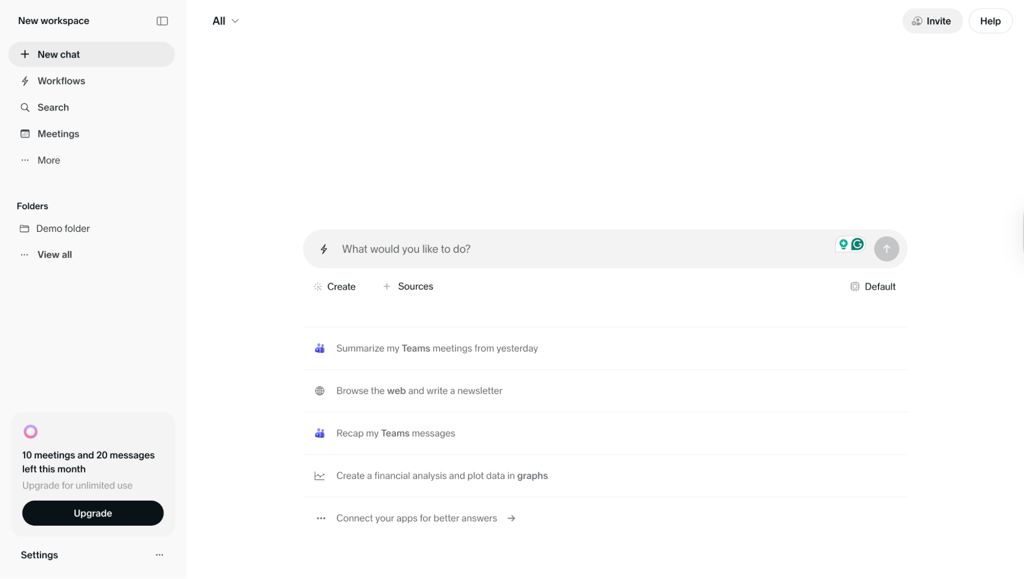
Sana is pushing AI forward in the workplace by solving real problems, such as speeding up onboarding, reducing repetitive questions to HR or IT departments, and giving employees a reliable place to access company knowledge. The end result is less time spent searching internal documentation, fewer interruptions across teams, and more consistent information across the organization.
Still, it’s important to understand what it is and isn’t. Sana doesn’t replace wikis and knowledge bases, LMS and L&D tools, intranets, and collaboration platforms like Slack or Teams. It works alongside them, collecting all the information into one place and making it easier for everyone within the organization to find.
While Sana helps you create a centralized knowledge hub, it falls to management to ensure that the information is relevant and up-to-date. Used well, Sana amplifies good knowledge practices, but it can’t compensate for missing structure or weak internal documentation.
Who gets the most value from Sana
Sana AI is ideal for businesses that work with loads of information, have extensive, structured documentation, and rely on shared knowledge. Some examples of different departments utilizing Sana include:
- HR, People Operations, and L&D. Onboarding, training, personal development, building and maintaining skills.
- IT. Recurring questions, basic and complex troubleshooting, quickly resolves issues and leaves the IT team with more time to tackle more important tasks.
- Product/engineering. Shared knowledge base, easy access to important information, generate reports, summarize meetings.
That being said, Sana isn’t the best fit for everyone. Businesses and organizations without extensive documentation will see limited value in Sana as it greatly relies on a structured internal knowledge base to perform day-to-day tasks.
What Sana can do day to day
Based on my testing with the Cybernews research team, these are the standout capabilities of Sana AI and Sana Learn:
- Centralized internal company knowledge hub
- AI search enables easy knowledge sharing
- Summarization with sources
- Learning content creation (programs, courses, modules, interactive activities)
- Personalized learning experience, placement tests, assessments
- Analytics dashboard with highly customizable widgets
Below, you’ll find a deeper look into our findings.
AI search and answer quality
The Cybernews research team and I tested Sana AI’s search and answer quality using the demo folder, which includes demo documentation of internal company knowledge.
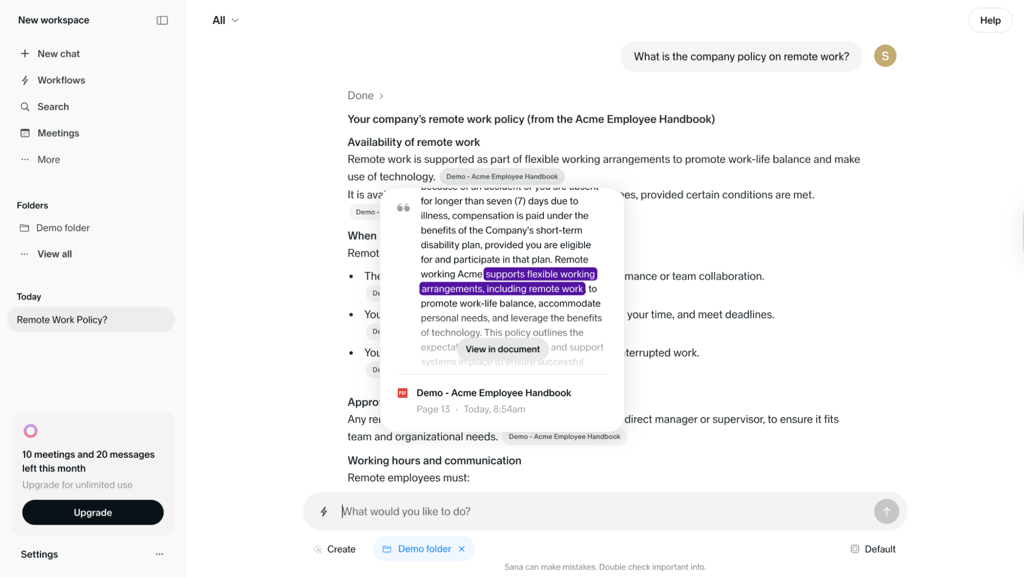
Prompt 1: “What is the company policy on remote work?”
Sana AI found exactly what I needed in the internal company documents and gave a detailed answer. I especially liked that it showed the source snippet, so I was able to verify the information or dive deeper without sorting through documentation myself.
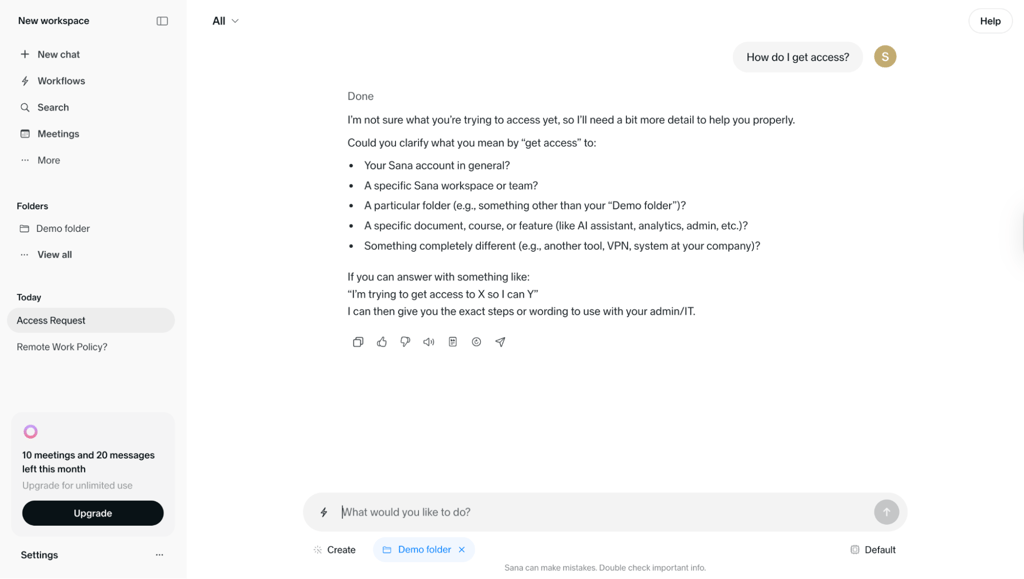
Prompt 2: “How do I get access?”
In this case, we asked an ambiguous question on purpose – our goal was to see if Sana AI would ask clarifying questions or just roll with it. Instead of guessing what we meant, the AI asked follow up questions to provide an accurate and relevant answer. It even went a step further and suggested the best format for the answer – an easy way to teach newbies how to interact with the AI.
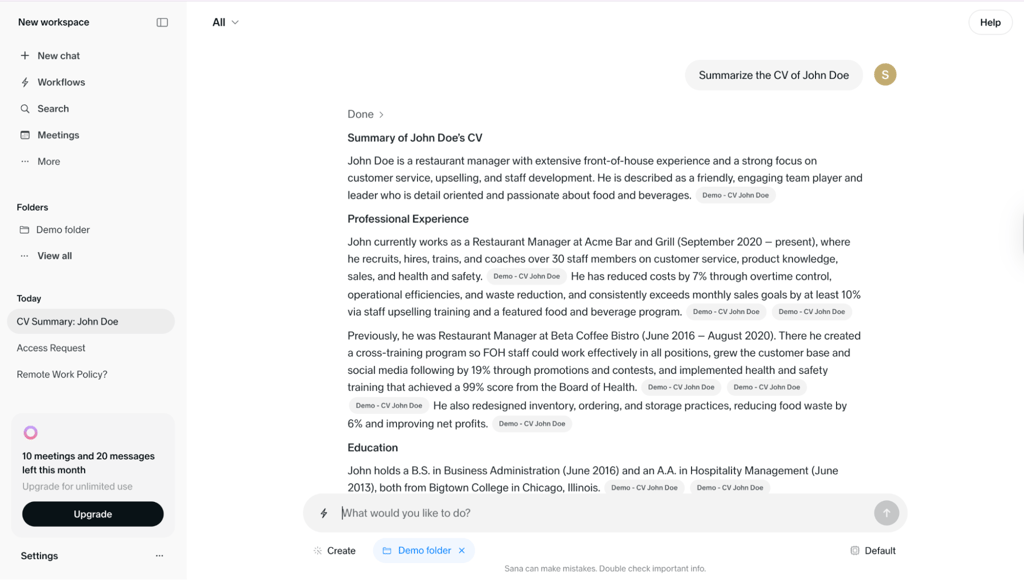
Prompt 3: “Summarize the CV of John Doe.”
Sana AI generated a clean summary of the CV. Again, it showed the preview of the source and where the information came from, which is great for verifying the facts quickly and efficiently.
Knowledge connections and content coverage
During testing, we found that Sana AI’s answer quality depends heavily on its connectors, so coverage is the main driver behind accuracy. When important apps are missing, its answers can be vague, incomplete, or outright wrong. Simply put, Sana is only as good as the data it can access.
It makes sense. After all, Sana AI is a workplace assistant that answers questions based on your company’s documents and internal knowledge, and you must provide it if you want accurate and relevant answers. To do so, you need to connect it with company tools like Google Drive, Slack, Jira, and others. Sana AI supports over a hundred integrators and connectors.
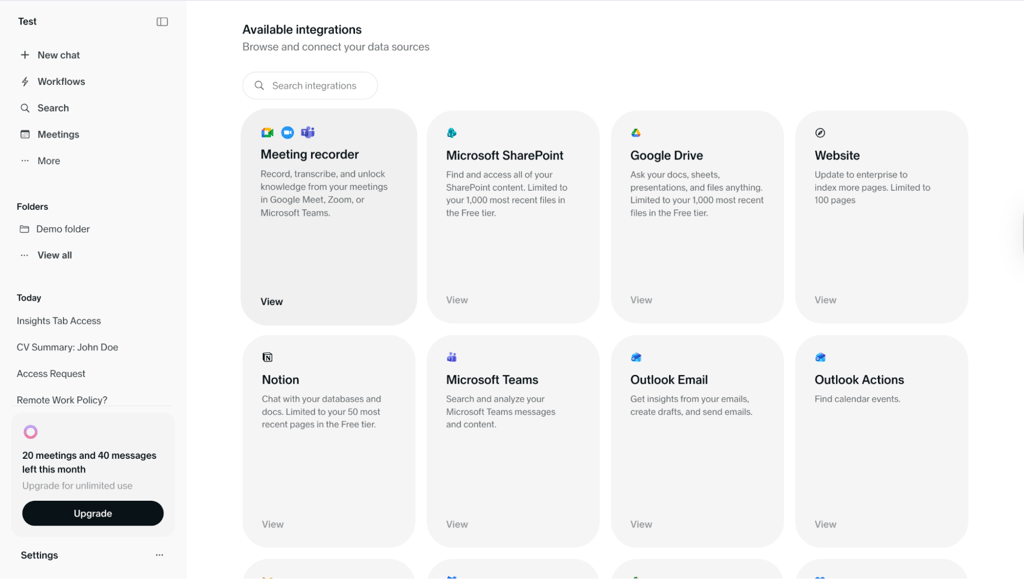
A good setup means linking your main work tools, organizing content with folders and labels so it’s easy to find, and assigning owners for each tool to keep information up to date. When everything is connected and organized, Sana becomes a reliable helper that saves time and reduces confusion.
Learning workflows
Sana Learn helps you create and manage internal training, such as onboarding, personal development, and compliance training. It’s not just a course generation tool – it’s an entire system that guides employees through courses, providing personalized support, learning reminders, and analytics.
The system uses Programs, which are learning paths made up of courses and modules that include interactive elements like quizzes, polls, and live assessments. It also adapts to each learner using placement tests, so people don’t waste time on studying material they already know.
Users report that the courses feel organized and engaging, which makes it easier to finish the course and actually remember what you learned. Of course, the quality of the courses greatly depends on the connectors and internal knowledge quality, so it’s essential to start with internal documentation before jumping into generating courses.
Governance, permissions, and admin controls
Sana AI uses a role-based access model to handle permissions, which is pretty straightforward. Anyone can invite team members to their workspace and assign them a role: owner, editor, or viewer. This also applies to sharing folders, assets, and agents.
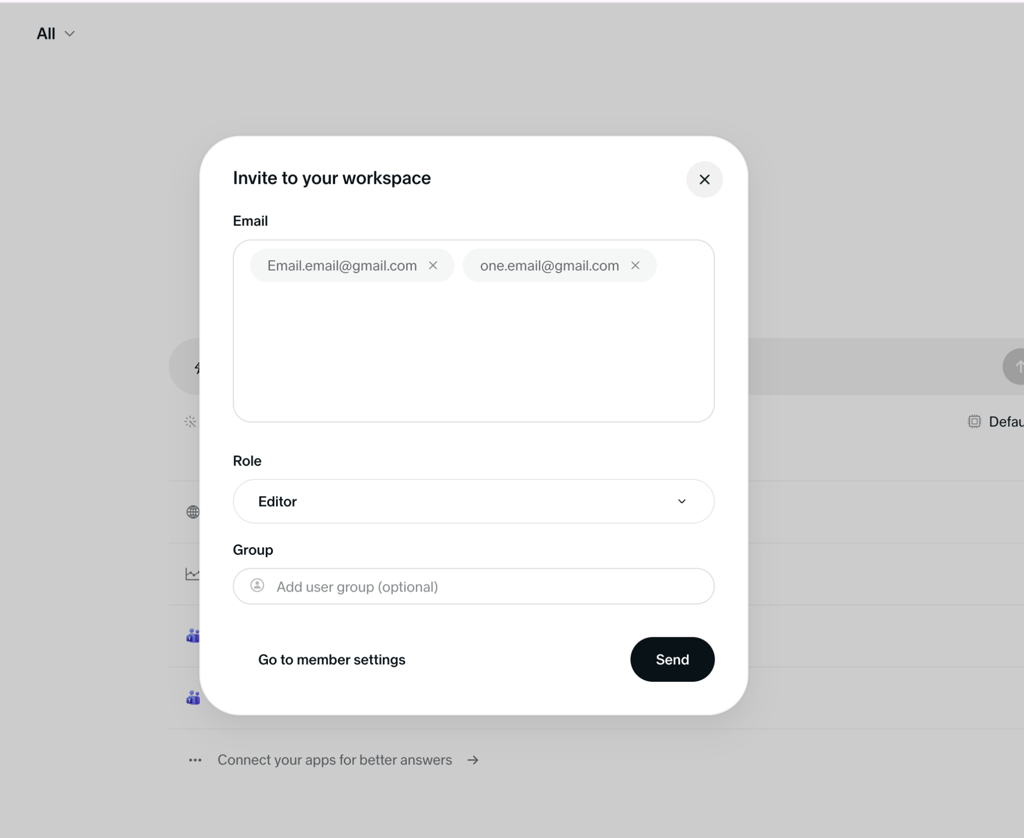
Apart from sharing, there are three other roles: administrators, group admins, and learners. Starting from the top, administrators have full control. They can set up the platform, manage all users and groups, and decide what content and tools are available across the company. Group admins sit in the middle – they manage specific teams or learner groups assigned by administrators. This lets managers tailor training and support for specific needs. Lastly, learners are end-users. They mainly access Home and Search to find and use content, and can create content only if admins allow it.
It’s especially beneficial for larger organizations. Sana Labs enterprise AI agents can support multiple departments with consistent governance and security controls.
Analytics, adoption, and insights
Another great benefit of Sana AI is its analytics dashboard, which helps management understand how employees use the platform and how they can improve it. It’s called Insights and you can find it under the Manage tab.
Once you set it up, you’ll be able to see the total number of users, monthly and weekly active users, and course start and completion rates. Adding Widgets will provide more statistics, but you need to set them up yourself, which requires a bit of technical know-how. Sana has a step-by-step guide in the Help Center for the entire process and you can contact support if you need more help.
With Widgets you can (and should) measure search activity, unanswered questions, training completion, content gaps, and onboarding progress. Here’s how it could look:
Search activity
- Top searches
- Raw search data to spot patterns and knowledge gaps
Unanswered questions
- Correct rate
- First attempt correct rate
- Question attempts
Training completion
- Course completions
- Path completions
- Program completions
- Completion rate
- Progress tracking
Content gaps
- Feedback and search behavior
- User behavior patterns
Onboarding progress
- Breakdown by registration stage
- Number of user accounts
- Start rate for assigned content
- Overdue status
All in all, Sana Labs AI agents for work will give you insight into AI adoption, learning outcomes, and other areas that need attention.
Where Sana AI shines
Sana AI is the best at creating a centralized knowledge hub on top of your organization’s existing tools. This way, information isn’t scattered across wikis, teams, and private messages. Instead, it’s all gathered in one place and can be accessed by those who need it.
There are many benefits to this. One of the main ones is faster onboarding. A centralized knowledge hub gives new hires all of the information they need, allowing them to learn at their own pace without having to wait on answers from their mentors.
Having all of the information in one place also helps to ensure that everyone is on the same page. Since all employees get answers from the same verified source, it reduces mixed messages and different interpretations of policies or processes. It also means less time spent trying to find the right information by contacting HR or other teams, minimizing internal support load. In specialized use cases, Sana Labs AI agents for finance perform well when teams need fast access to internal policies, reports, and other documentation.
Finally, Sana supports continuous learning. Teams can generate courses with information from the internal documents and update them as documentation is changed or updated. When source content is refreshed, learning materials stay aligned, which helps prevent outdated training.
Where Sana falls short
How useful Sana is going to be for your business greatly depends on how knowledge is created, maintained, and controlled internally.
Firstly, Sana is only as good as the documentation it has access to. If the documentation is low quality, fragmented, or outdated, Sana AI won’t be able to provide accurate and relevant information. Moreover, if the admins upload conflicting information, Sana may provide answers that are technically correct but contextually misleading. Teams can avoid this by ensuring there are dedicated owners for every type of content, maintaining data hygiene, and regularly reviewing information to make sure it’s up to date.
But quality documentation is just one part of the puzzle. Management has to tackle the technical setup: installing apps, configuring connectors, and assigning roles.
Lastly, management is responsible for ensuring that their employees are actually using Sana. Without onboarding and reinforcement, teams may fall back to old habits like Slack pings or manual searches, reducing Sana’s impact.
Before buying, verify these 6 things:
- Integration coverage. Ensure that Sana supports apps that you already use in your business. Custom connectors may not be possible or will cost you significantly.
- Permission model. Make sure Sana’s role-based controls fit your structure.
- Admin effort. Consider how much time and effort from your team is going to go into implementing Sana AI and whether it’s something your business can afford.
- Learning needs. Decide whether you need an extensive learning creation and management tool or is what Sana Agent can provide enough.
- Analytics needs. Check whether the insights you need (usage, gaps, performance) are available in your selected tier.
- Budget. Sana AI is expensive, so make sure that the plan you choose fits within your budget.
Sana AI pricing and what you actually pay for
As for pricing, Sana AI can be costly. Here’s a breakdown of the pricing options:
| Price | Features | Best for | |
| Sana Agent | Free | Free | Up to 5 members, 10 meetings per month,unlimited assistants and prompt templates, meeting and data integrations | Individuals and small teams exploring AI assistant tools |
| Sana Agent | Team | $30.00/user/month | Up to 50 members, more comprehensive list of integrations, enterprise data processing agreement, priority email and chat support | Mid-to-large sized businesses that need deeper AI agentic and automation capabilities |
| Sana Agent | Enterprise | Custom | Unlimited number of members, domain verification, SAML-based SSO, SCIM, more LLM options, analytics, dedicated support team | Large businesses and enterprises that need compliance tools, custom integration, and scalability |
| Sana Learn | Core | $13.00/license | Course templates and generation, personalized learning base, live sessions, multilanguage support | Mid-to-large businesses and organizations investing in structured learning |
| Sana Learn | Enterprise | Custom | Same features as Core plus dedicated account and success team, tailored onboarding, priority support, API access, SSO, user management (SCIM), and EU geo-fencing of data | Large businesses and organizations that need priority support, advanced security and management options, compliance tools |
The pricing is structured per user/license per month. Most of the plans require a minimum number of seats, with Sana Learn Core requiring at least 300 seats, which adds up to a considerable sum.
If you’re going with one of the Enterprise plans, you’ll have to contact Sana directly to get a quote. Keep in mind that certain aspects could drive the cost up. The biggest cost drivers tend to be scale and scope: the number of users or licenses, access to advanced features like SSO and SCIM, advanced analytics, additional AI models, and premium connectors.
That being said, you can try out Sana Agent for free. There’s a free tier (although quite limited) and a demo you can book after talking to sales. Before committing, make sure to clarify minimum seat requirements, monthly/annual billing cycles, and renewal terms.
What real users say about Sana AI
I went through hundreds of user reviews (G2, Capterra, Reddit, and more) of Sana AI and noticed that, for the most part, Sana AI users are more than satisfied. They find the tool easy to use and appreciate how its AI search makes knowledge sharing simple and straightforward. Managers praise Sana’s content creation capabilities, particularly its interactive training material, which employees find engaging and more fun. Sana’s customer support received a lot of positive feedback as well.
That being said, there are a few downsides to Sana AI that many users mention. One of the most common ones is the setup, which takes a significant amount of time and heavily relies on your existing internal documentation. If the documentation isn’t up to par, the setup could take even longer as you improve your company docs. In addition, some users found that Sana’s capabilities outside of content creation were not as smooth and some features still need some minor tweaks.
Sana AI vs competitors
Sana AI is unique in the way it’s built to support workplaces and workplace learning, but that doesn’t mean there aren’t alternatives. Here’s a quick comparison of Sana AI with similar AI-powered tools for work automations and development.
| Sana AI | Continu | Zapier | Copilot Studio | n8n | |
| Starting price | $30.00/user/month | Undisclosed | $19.99/month | $30.00/user/month | $20.00/month |
| Free tier | ✅ Yes | ❌ No | ✅ Yes | ❌ No | ✅ Yes |
| Strengths | Reliable AI search, pulls information from internal company knowledge, AI employee training and analytics | Enterprise-focused employee training tool, effective training material creation and management | Affordable, generative AI, workflow automation, supports app integrations | Part of the Microsoft ecosystem, conversational AI, pay-as-you go option available | Flexible AI automation tool, easy-to-use for simple day-to-day tasks, scalable, open-source, supports self-hosting |
| Weaknesses | Can get expensive, especially investing in Sana Learn, limited workflow automations | Not a good fit for smaller businesses and organizations | No AI-powered training capabilities | Unintuitive UI, users report lots of bugs | Requires some technical know-how, steep learning curve for more complex automations |
| Best for | Mid-to-large businesses and enterprises that have quality documentation and want an AI-powered, centralized knowledge hub | Enterprises | Any size business that needs an easy-to-use workflow automation tool | Businesses that are deep in the Microsoft ecosystem | Individuals, small teams, and businesses that need complex automation |
Each of these tools serves a specific set of needs. Sana AI still stands out as one of the best AI-powered solutions for company knowledge retrieval and employee training. Continu can cover some of your learning and development needs, but doesn’t have such AI search capabilities as Sana AI. If you need a tool for automating workflows, Zapier and n8n are solid choices while Copilot Studio is ideal for businesses that already rely on the Microsoft ecosystem.
I tested Sana AI together with the Cybernews research team using structured scenarios that reflect real workplace needs. We followed our comprehensive AI testing process across the following criteria:
- Answer quality and retrieval (25%). We tested how accurately Sana answers questions using internal documents, meeting notes, and connected tools with the demo documentation. We also checked how it cites sources.
- Knowledge setup and integrations (20%). We evaluated how easy it is to connect Sana AI to tools like Google Drive and calendar apps, index content, and keep knowledge up to date without constant manual work.
- Learning workflows (15%). We reviewed Sana Labs AI learning platform features and assessed how well Sana supports onboarding and training, including AI-generated courses, personalized learning paths, and progress tracking.
- Admin, permissions, and governance (15%). We assessed role-based access, permission controls, and visibility.
- User experience (15%). We looked at the interface, response speed, and how intuitive Sana feels for both admins and regular users.
- Pricing and value (10%). We compared pricing tiers against feature depth and real-world usefulness to judge whether Sana delivers good value.
Verdict: is Sana the right fit for you?
Sana is a powerful tool for the right company.
Choose Sana if:
- Your company has extensive, structured documentation
- Knowledge management and learning are top priorities, not side projects
- You want to make it easy to access information for everyone in the company
- HR, enablement, or operations teams spend too much time answering the same questions
- Onboarding is a regular occurrence
Avoid Sana if:
- Your company’s documentation is low quality, fragmented, or non-existent
- Knowledge sharing isn’t a priority
- You have limited employee training needs
- You’re a small or mid-size company on a tight budget
- You’re not ready to invest time and effort in setup, governance, and content upkeep
All in all, Sana is best at turning company documentation into a centralized, easy-to-use knowledge and training hub that simplifies onboarding, takes the load off other teams, and improves day-to-day efficiency. However, it’s highly dependent on well-structured and high-quality internal content, which is usually reserved for more mature companies.
Best alternative: nexos.ai
While Sana AI is great for centralizing company knowledge and build structured learning programs, it may not be something your team needs. If you’re more interested in automating daily tasks and building no-code AI agents, check nexos.ai.
I tested it while comparing Sana with other platforms to see how they handle different workplace needs. What stood out to me about nexos.ai is that its approach is more centered around active process automation rather than static knowledge retrieval.
Compared to Sana, nexos.ai is an operational AI workspace. It allows teams to build no-code AI agents and orchestrate workflows across your existing integrations. Instead of managing internal documentation, it serves as an autonomous agent orchestration layer that gives you access to 99+ AI models in one unified platform. So, for businesses looking for an automation-oriented enterprise AI tool, nexos.ai is a more practical alternative.
FAQ
Is Sana AI secure for internal company knowledge and sensitive documents?
Yes, Sana AI is secure for internal company knowledge and sensitive documents because it uses end-to-end encryption and doesn’t train on your data. It’s also ISO 27001 and SOC 2 certified and complies with GDPR.
What integrations and knowledge sources does Sana support?
Sana AI can be integrated with 100+ apps, including Google, Microsoft, Slack, and many more.
Can Sana Learn replace a traditional LLM?
No, Sana Learn can’t exactly replace traditional LLMS because it relies on them, particularly GPT-4 and Claude, to perform tasks.
How does Sana handle permissions and role-based access control?
Sana AI uses roles like Owner, Editor, or Viewer for access and permissions.
What are the best alternatives to Sana for small teams?
The best alternatives to Sana AI for small teams are ChatGPT and Claude, as they can handle most generative tasks. You can integrate them with other work tools, such as Slack, ClickUp, or Notion, for more automation.