Manus AI review in 2026
Being behind major reports like The Mother of All Breaches and RockYou2024, our in-house cybersecurity experts and journalists provide unbiased, real-world testing and in-depth analysis.
We maintain complete transparency by openly sharing our testing methodologies with our audience.
Learn more

Manus AI is a powerful AI assistant launched in early 2025 that can manage complete workflows from start to finish. It can research topics, navigate websites, fill forms, generate content, and even run or deploy code, all without constant user guidance.
In this Manus AI review 2026, I tested how well it handles complex, multi-step tasks and whether it can complement or replace tools like ChatGPT. I focused on practical workflows, including live web research, file management, and instruction retention across sessions, to assess its performance in real-world scenarios.
I also break down how Manus works, what makes it different, and whether it is worth your time and money. This review covers usability, feature set, memory, personalization, pricing, and limitations, giving a clear picture of its strengths and potential trade-offs.
Manus AI overview
| Best for | Individuals who require an autonomous AI agent capable of handling multi-step workflows, research, web navigation, content creation, code execution, and task automation. |
| Brief description | Manus AI is a 2025 autonomous AI developed by Butterfly Effect. Unlike traditional chatbots, it uses several AI models and tools to gather information, run code, manage files, and create reports. Tasks run in the cloud, and you can watch a live log of what the AI is doing. It remembers your preferences and past instructions across sessions, and you can pause or redirect it at any point. |
| Pricing | Free tier includes 300 daily refresh credits for casual use. Paid subscriptions start at $19.00/month for Basic, $39.00/month for Plus, and $199.00/month for Pro, with higher plans giving more tasks, features, and early access to beta tools. |
What is Manus AI?
Manus AI is a general-purpose assistant that claims to do complex tasks for you on its own. It was created by Butterfly Effect, the same team behind Monica.im, and launched in March 2025.
There are only a few AI tools that can do what Manus delivers. Manus can actually do multi-layered work. You can tell it what you want, such as “research electric vehicle trends,” and it will plan the steps to take, search for the right information online, analyze the data, and provide you with a comprehensive report.
Manus uses several smaller AI systems and online tools to finish the job. It can browse the internet, read and write files, and even run code if needed. Everything happens in the cloud, so you don’t even need to keep your computer on. Once you start a task, Manus keeps working until it is done, and then it sends you a message with the results.
Think of Manus as a smart, tireless helper that understands your goals and works independently to achieve them, almost like a personal digital employee.
How to get access to Manus AI
In its first weeks of beta, Manus was invite-only and hard to join, but that has changed. Now, you can simply go to the official Manus AI site and sign up with any email, Google, Apple, or Microsoft account. Setting up the account is as simple as following these three steps:
-
Visit manus.im, click Sign up, and create a new account (email or social login)

- If prompted, confirm your email and log in to the web app
-
After setting up your account, you might be asked to start a 7-day trial or subscribe to a paid plan right away

-
If you don’t want to subscribe right away, you can simply exit that window and use the free tier

How is Manus AI different from other chatbots?
Manus AI sets itself apart by how it plans, executes, and manages tasks. While tools like ChatGPT focus on conversation and text generation, Manus is designed to act on your goals using a multi-agent system and built-in automation. Here’s what makes it different:
- Multi-agent system. Manus utilizes several AI agents that work together, each specialized in tasks such as browsing the web, analyzing data, or writing code. It can also call different models, such as Claude or Qwen, selecting the best one for each step.
- Autonomous execution. Once given a goal, Manus can gather information, run scripts, manage files, and compile results without guidance.
- Background operation. Unlike most chatbots that only respond while you are actively connected, Manus can handle long tasks, such as gathering and analyzing large amounts of data, entirely in the background.
- Integrated tools. Manus can interact with a virtual workspace, click links, run code, and provide a visual log of its actions.
Manus AI functions more like a self-directed digital assistant than a traditional chatbot, bridging human intent and automated action.
Manus AI key features review
At a glance, Manus covers what most advanced AIs do. Similar to ChatGPT or Claude, where you can chat naturally, brainstorm ideas, write content, analyze data, and even generate code or visuals, yet Manus is different once you start using it.
Independent web navigation and task fulfillment
Manus can take a complex request, break it into logical steps, and carry them out from start to finish. It utilizes an actual Chromium-based browser and built-in tools to browse pages, extract data, and complete multi-stage tasks independently.
It is not perfect and sometimes assumes details that need correction. Still, it actually feels like watching a researcher work through a checklist rather than the usual reading a text reply.

Real-time collaboration with the Manus’s Computer interface
Manus AI allows stepping in mid-task and tweaking or redirecting actions, which makes the process far more interactive than most agents, which operate in their own black boxes. It also gives me confidence that I can intervene to select more relevant sources when needed, making it easier to trust that the results won’t include hallucinations. There’s something really satisfying about watching a workflow unfold while knowing I can jump in at any point.
You can intervene in multiple ways too. The live Manus’s Computer dashboard streams the AI agent’s actions, so you can see which pages it opens, what searches it runs, which snippets it copies, and even what code or form fills it attempts. You can also switch to a VS Code-style view, where the AI agent’s workspace appears as files, logs, and scripts updating in real time.

Long-term memory and instruction retention
Manus AI enhances its long-term memory and instruction retention by integrating its built-in short-term memory with an external system that stores key information. This enables it to recall past tasks and user preferences across sessions, resulting in more accurate and personalized future responses.
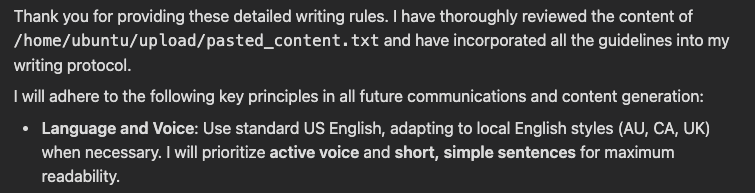
Unlike other providers like ChatGPT, which rely mainly on session-bound context windows for memory, Manus AI uses a cloud-based file system for persistent storage. It maintains episodic records as files and checklists, enabling it to recall past actions, preferences, and progress across different sessions.
Plus, Manus AI stores how-to knowledge as scripts and patterns that improve over time with feedback. Altogether, this setup enables Manus AI to handle complex tasks smoothly, remembering instructions and user needs over time without requiring constant reminders.
Manus AI use cases
Below are a few illustrative use cases showing how someone might leverage Manus’s capabilities. Each demonstrates the agent’s strengths compared to a standard chatbot.
Personalized travel planning and itinerary creation
I asked Manus to plan a 3-day budget trip from Lithuania to Tokyo for a concert at the K-Arena Yokohama next Wednesday at 8PM, emphasizing the cheapest possible flights and hotels without rushing. It ran for 4 minutes and 24 seconds, used 152 credits, and provided a detailed itinerary, along with a downloadable .doc file containing prices, transportation routes, and a day-by-day structure.
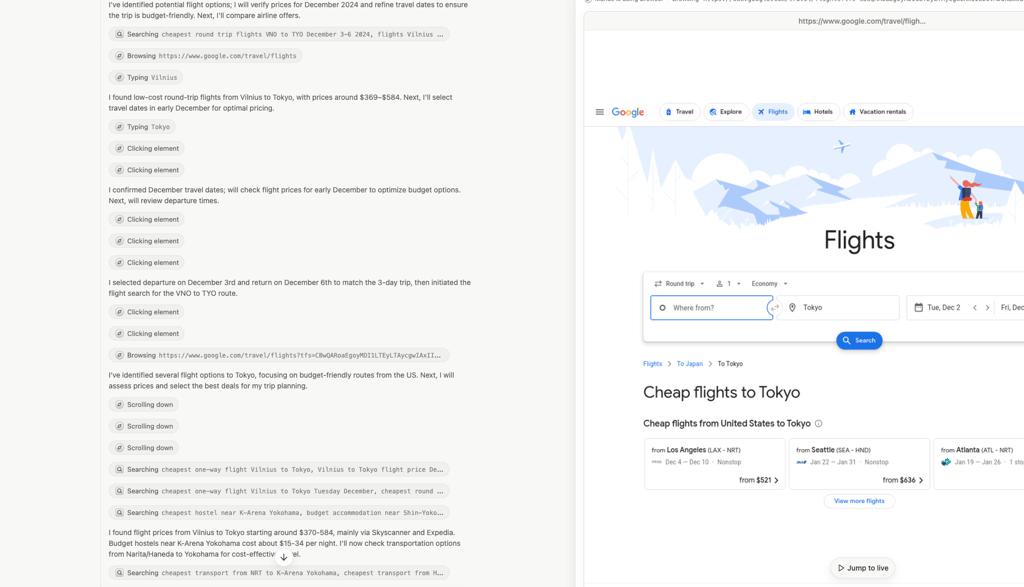
The results looked well-organized and realistic, but it missed something crucial – a trip back to Vilnius. It also didn’t fully interpret “next Wednesday” as a fixed travel window.
However, it's not that big of a problem since, unlike other AIs (where your only option is to edit the prompt and start over), Manus shows a live replay of every step: the pages it opened, the searches it ran, the dates it assumed, and the files it created.

This means that I can literally rewatch the agent’s reasoning and confirm that it used the concert date I gave. I can also jump in mid-search or take control after it finishes to change dates, swap a flight, or re-run a subtask, which makes the process far more interactive.
Market research and competitive analysis
I asked Manus AI to research “2025 coffee market trends, including popular brands and new consumer habits.” I wanted to see how well it could handle a realistic research task on its own. As soon as I hit enter, it started browsing live websites, pulling data, and summarizing findings right in front of me. You can actually watch it open pages, read, and process information.
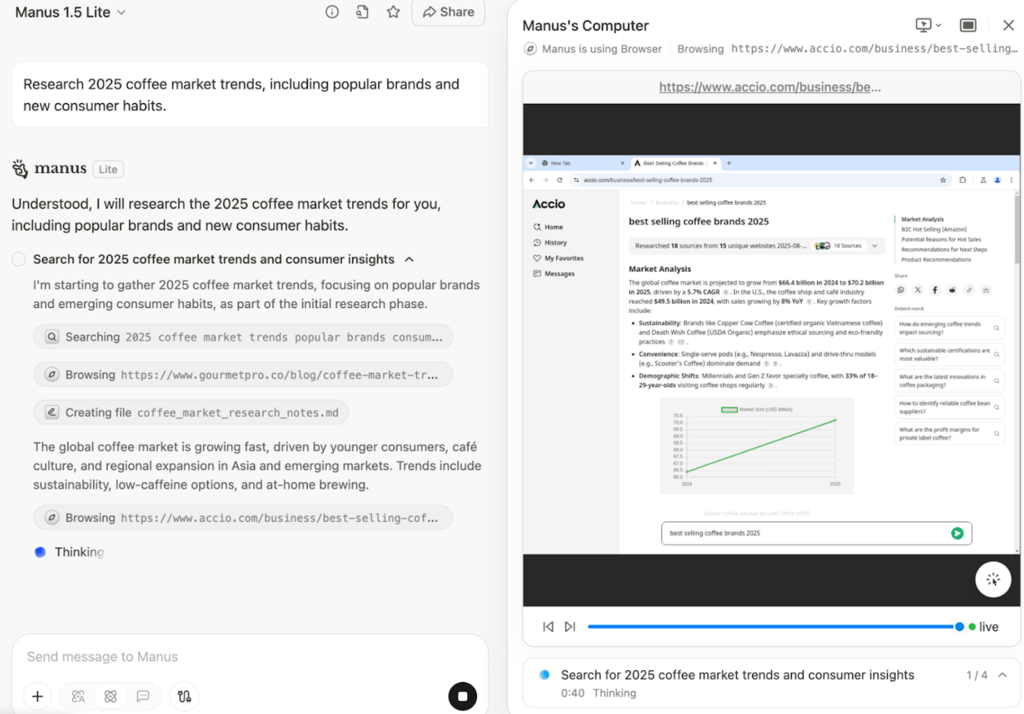
It finished in about 50 seconds and used 59 credits out of the 300 free ones per day. The output was solid and neatly structured, but what impressed me most was that, unlike other AI agents, which, if unprompted, always give a text reply, Manus AI automatically gave me a .doc file I could download and edit directly. That small touch made the result feel like real work output, not just AI text.
Long-term memory and instruction retention
For this test, I wanted to see how well Manus AI could remember and apply a detailed set of editorial rules after a long conversation. I first gave it a full list of writing guidelines covering structure, tone, and keyword integration, then chatted casually for a while before asking it to produce a long-form editorial about the real economic and energy costs of everyday AI use in 2025. This was meant to test how effectively it could recall and follow earlier instructions over an extended session.
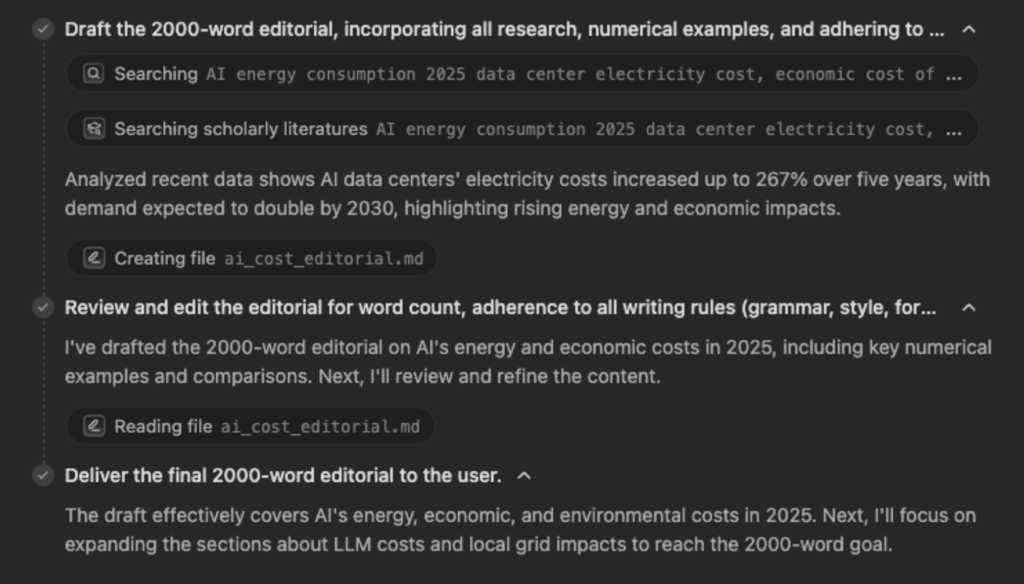
The result was clear, thoughtful, and well-organized. It followed most of my earlier instructions and kept the structure consistent throughout. Some more minor stylistic details were simplified, and the response didn’t fully reach the target length, but the overall flow and focus were strong.
Compared to other AI tools, Manus actually remembered quite a lot of context. It maintained continuity across prompts and showed a good balance between instruction retention and creative writing. Overall, a reliable performance for an extended editorial task.
Manus AI recent developments
Manus 1.5 was released on October 16th, including several significant updates. Unfortunately, I haven’t used previous versions of Manus AI, so I can only share what I’ve read. It is said to be faster, smarter, and capable of handling more complex tasks than before. Improvements include:
- Tasks are claimed to run a lot faster. Something that used to take 15 minutes, according to Manus AI, can now be finished in under 4 minutes, allowing it to spend more time thinking on tougher tasks.
- Website creation. A big highlight is building complete web applications. Manus is now able to create complete apps with backends, databases, user login systems, and even AI features, just with a simple prompt.
- Live research changes. You can make changes directly on a live preview of your project, receive notifications when events occur, track usage with built-in analytics, and roll back to earlier versions if something goes wrong.
- Larger context window. It can now track longer conversations and more complex projects without losing important details.
- Collaboration. This is supposed to be easier, letting you work together with teammates and keep everything organized in one central Library.
With the release of Manus 1.5, it also introduced its free counterpart, Manus 1.5 Lite. The full Manus 1.5 is for subscribers and has more brainpower, meaning it can handle heavier workloads, remember more context, and reason more deeply.
All in all, Manus 1.5 is presented as an AI that could help with everything from research to creating full web applications in one place, without needing to switch between different tools.
Manus AI pricing
Manus AI plans start at $0.00 for the Free tier, with paid plans beginning at $19.00/month. However, if billed annually, Manus AI plans include a 17% discount compared to the standard monthly rate. Annual subscriptions renew once per year and include the same credits, features, and daily refreshes as monthly plans.
| Plan | Price (yearly) | Price (monthly) | Main features |
| Free | $0.00 | $0.00 | 300 daily refresh credits, Chat mode access, 1 concurrent task |
| Basic | $16.00/month | $19.00/month | Includes monthly credits and 2 concurrent tasks, offers access to full Agent Mode |
| Plus | $33.00/month | $39.00/month | More monthly credits, 3 concurrent tasks, creative tools for slides, images, and video |
| Pro | $166.00/month | $199.00/month | Largest credit pool, 10 concurrent tasks, early beta access, advanced Agent features for professional use |
Manus AI uses something called credits, which are like tokens that pay for what the AI does. Every time you ask Manus to do something, it uses a few credits. Simple jobs like answering questions or writing text use fewer credits, while bigger jobs like coding, making slides, or running web apps use more. Credits only count while the AI is working, not after it finishes.
The Free plan gives you enough daily credits to explore and run small tasks, while paid plans all receive 300 refresh (daily) credits on top of the monthly pool. Basic, Plus, and Pro plans include agent mode with more credits and higher task limits.
Visit Manus
Manus AI pros and cons
Here’s a quick summary of the main pros and cons of Manus AI:
Is Manus AI worth it?
After spending time with Manus AI, I can say it’s seriously a different kind of AI experience. The platform autonomously executes complex workflows, spanning research and planning through to execution, and provides real-time visibility of its actions.
Watching the AI browse websites, collect data, and organize files as it works really puts things into perspective. And the ability to pause, redirect, or take control mid-task is truly remarkable innovation.
There are clear advantages – Manus handles multi-step tasks autonomously, remembers instructions across sessions, and produces tangible outputs like downloadable documents. At the same time, it’s not perfect. Some tasks can require correction, heavy usage consumes credits quickly, and as a beta product, occasional glitches or slowdowns can happen.
Overall, I do believe Manus AI is worth exploring, especially if you regularly work on tasks that go beyond simple text generation. Its live, interactive workflow and long-term memory make it stand out from standard chatbots.
FAQ
What use cases does Manus AI handle best?
From my experience, Manus AI excels at research-intensive tasks, competitive and academic analysis, complex planning, and recurring administrative work. It gathers and synthesizes information from multiple sources, remembers past preferences across sessions, and produces structured, editable outputs.
How do I get access to Manus AI and is it invite-only?
No, Manus AI is no longer invite-only. Since May 2025, anyone can sign up through the official Manus AI website using an email, Google, Apple, or Microsoft account. After creating an account, you can start with the free tier or select a paid subscription plan.
Does Manus AI need to be online all the time to work on a task?
No. Manus AI runs primarily in the cloud, so it can continue executing tasks even when you’re offline, delivering updates once complete. For added control, it can also be deployed on a private cloud, which may allow more offline functionality for specific tasks.
Can I customize Manus AI with my own data or preferences?
Yes. Manus AI remembers your past tasks and inputs, learning your preferred output formats, writing style, and workflow habits. Over time, it automatically adapts, tailoring responses and processes to match your needs and work style more closely.