ChatGPT 5 review 2025
Being behind major reports like The Mother of All Breaches and RockYou2024, our in-house cybersecurity experts and journalists provide unbiased, real-world testing and in-depth analysis.
We maintain complete transparency by openly sharing our testing methodologies with our audience.
Learn more

ChatGPT is an AI assistant, created by OpenAI, that can answer questions, write content, explain ideas, and even help with coding. It’s built on a large language model, which means it has learned from a massive amount of text to generate responses that sound natural and useful.
In August 2025, OpenAI released ChatGPT 5, the newest version of its AI assistant. It brings significant improvements over its predecessor, ChatGPT 4, with stronger reasoning, safer answers, and upgraded tools. OpenAI describes it as its most capable model yet.
In this article, I review ChatGPT 5 and compare it to ChatGPT 4 in 5 key areas: coding help, real-time research, voice and image use, complex problem solving, and task automation. So, keep reading to see how ChatGPT 5 has improved over ChatGPT 4.
ChatGPT 5 overview
| Best for | People who want a versatile AI assistant that can handle research, coding, planning, creative work, and everyday problem-solving. |
| Brief description | ChatGPT 5 is OpenAI’s latest multimodal AI, built on a large language model. It can handle text, code, images, and voice and includes a Thinking mode to solve complex questions step by step. The model offers improved visual analysis, longer conversation memory, real-time search, and task scheduling. Its persistent, customizable memory also lets it remember context across sessions, making it more versatile than ChatGPT 4 for research, coding, planning, and creative tasks. |
| Pricing | GPT-5 offers a Free tier with up to 10 messages every 5 hours and one Thinking message per day. The Plus plan costs $20.00/month with higher message limits, while the Pro plan is $200.00/month for unlimited GPT-5 and Thinking mode. The Business plan is $25.00/user/month and adds company tools, security, and advanced content features. |
ChatGPT 5 vs ChatGPT 4: what’s changed?
ChatGPT 5 is a big step up from ChatGPT 4. It’s faster, smarter, and handles tricky tasks like coding, research, and problem-solving much more smoothly. While GPT-4 could already work with text, images, and audio, GPT-5 takes it further with sharper visual understanding and fewer errors, becoming one of the best AI tools to-date. I’ve noticed its new Thinking mode really helps with tough questions, breaking them down step by step to give answers that actually make sense. It feels like having a more reliable, capable assistant right at your fingertips.
Side by side: ChatGPT 5 vs 4
| Category | ChatGPT 5 | ChatGPT-4o |
| Release date | Released on August 7, 2025. | Released on May 13, 2024. |
| Reasoning and accuracy | It’s 45% less likely to have factual errors than GPT-4o, and it has a special Thinking mode to help it solve tricky problems step by step. | Prone to more factual errors and hallucinations compared to GPT-5. |
| Context window size | A tiered access model. Fast mode offers up to 128,000 tokens for Pro/Enterprise users. Thinking mode provides a 196,000-token context window for all paid tiers. | 128,000 tokens for the API and Enterprise tiers. The effective context in the standard ChatGPT interface varies. |
| Multimodal support | Advanced visual perception and analytical reasoning over complex non-text inputs like charts, graphs, and technical diagrams. Fully integrated as a core tool. | A defining feature; the first native, end-to-end model trained across text, audio, and image, enabling fluid, real-time interaction. |
| Web browsing | Real-time, always-on web browsing with up-to-date knowledge. It is a core, default feature that is more seamless than in previous versions. | An integrated tool, typically Browse with Bing, used to access real-time information beyond the model's training data. |
| Code execution | Supercharged abilities for complex, end-to-end tasks. Can handle more complex, multi-file projects, debug more effectively, and even scaffold entire applications. | Advanced Data Analysis feature, enabling a Python interpreter to analyze data, create visualizations, and perform mathematical tasks on uploaded files. |
| Memory capabilities | Features persistent, customizable memory. It can automatically remember user preferences and details from conversations across sessions. Users can manage, edit, or delete these memories for privacy and control. | A memory feature exists, which allows it to remember user preferences and details. However, it is less advanced and seamless than GPT-5's memory, and sometimes memory retrieval can be inconsistent. |
How does ChatGPT 5 actually work?
At its core, ChatGPT 5 is built on a large language model. This means it has been trained on massive amounts of text – trillions of sentences from places like Wikipedia, books, and parts of the internet. Instead of reading word by word like older systems, it uses a transformer design, which lets it look at whole sentences at once. That’s how it understands context and produces natural answers.
The model is also refined with extra steps like human feedback and synthetic data (AI-generated examples). These processes make its answers more accurate, safe, and aligned with how people actually communicate.
Because of these improvements, GPT-5 handles real-time tools and multimodal inputs – like browsing the web, analyzing images, and processing voice – more smoothly than before. It can keep longer conversations coherent, analyze visuals with more detail, and even switch into a Thinking mode for complex problems.
ChatGPT 5 use cases
In testing ChatGPT 5, I focused on 5 practical areas to evaluate its real-world usefulness: coding assistance, research and analysis, voice and image interaction, complex problem solving, and task automation.
For each one, I gave it specific prompts, checked how well and how fast it responded, and noted any mistakes or limits. This way, I could see both the strengths and the weak spots of the model in real-world situations.
Advanced coding assistance
Before exploring this part, I should mention upfront that I’m not a professional programmer, not even a junior one, so I can’t judge ChatGPT 5’s coding abilities from a developer’s perspective. My goal was simply to see if it could follow my instructions and help me get tasks done.
To test this, I gave it a mix of structured and creative challenges. On one hand, I asked it to solve standard LeetCode problems using prompts like “Solve Two Sum in C++” or “Solve Sliding Window Maximum in Java.” On the other hand, I challenged it to build a simple Snake Game with just the prompt: “Make a simple Snake Game in HTML/JS.”
The results were mixed. On the LeetCode side, it performed exceptionally well – solving 8 problems across C++, Go, JS, and PHP with working code. One solution for “Max Points on a Line” in PHP was generated in only 12 seconds, which was impressive in both accuracy and speed.

However, the Snake Game task exposed its limitations. While the base game worked, extending it with new features like obstacles, high scores, and wall-passing mechanics was frustrating. It often forgot previous instructions, broke earlier functionality, or provided only partial edits instead of a complete runnable file. It felt quick but inconsistent when working on longer code projects.
Real-time research and data analysis
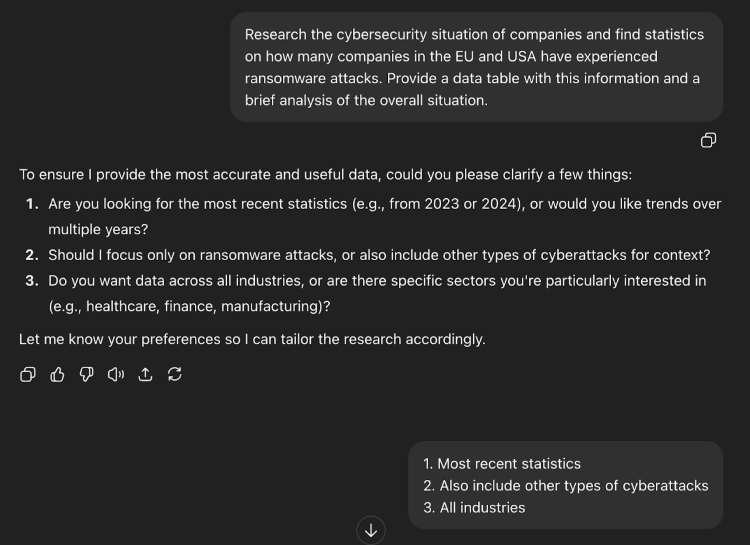
For research, I wanted to see how well GPT-5 could gather and synthesize current information. My test prompt was “Research the cybersecurity situation of companies and find statistics on how many companies in the EU and the USA have experienced ransomware attacks. Provide a data table with this information and a brief analysis of the overall situation.”
Before even beginning, the model impressed me by asking clarifying questions: did I want the most recent statistics, trends over time, or industry-specific data? This gave the whole process a more guided, collaborative feel. It then ran 97 searches across 23 sources, completing the task in about 8 minutes.
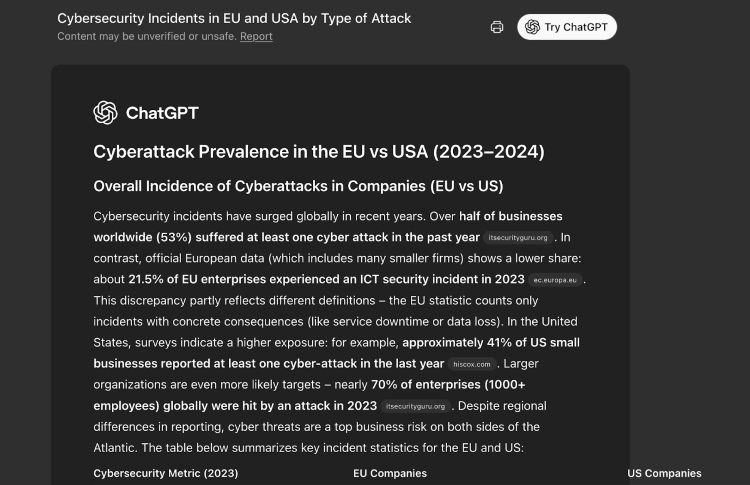
The final report included exactly what I asked for – a clear data table and short analysis. While I would have liked a bit more depth in the commentary, the accuracy and speed of the research stood out as a significant improvement over earlier versions.
Voice and image interaction
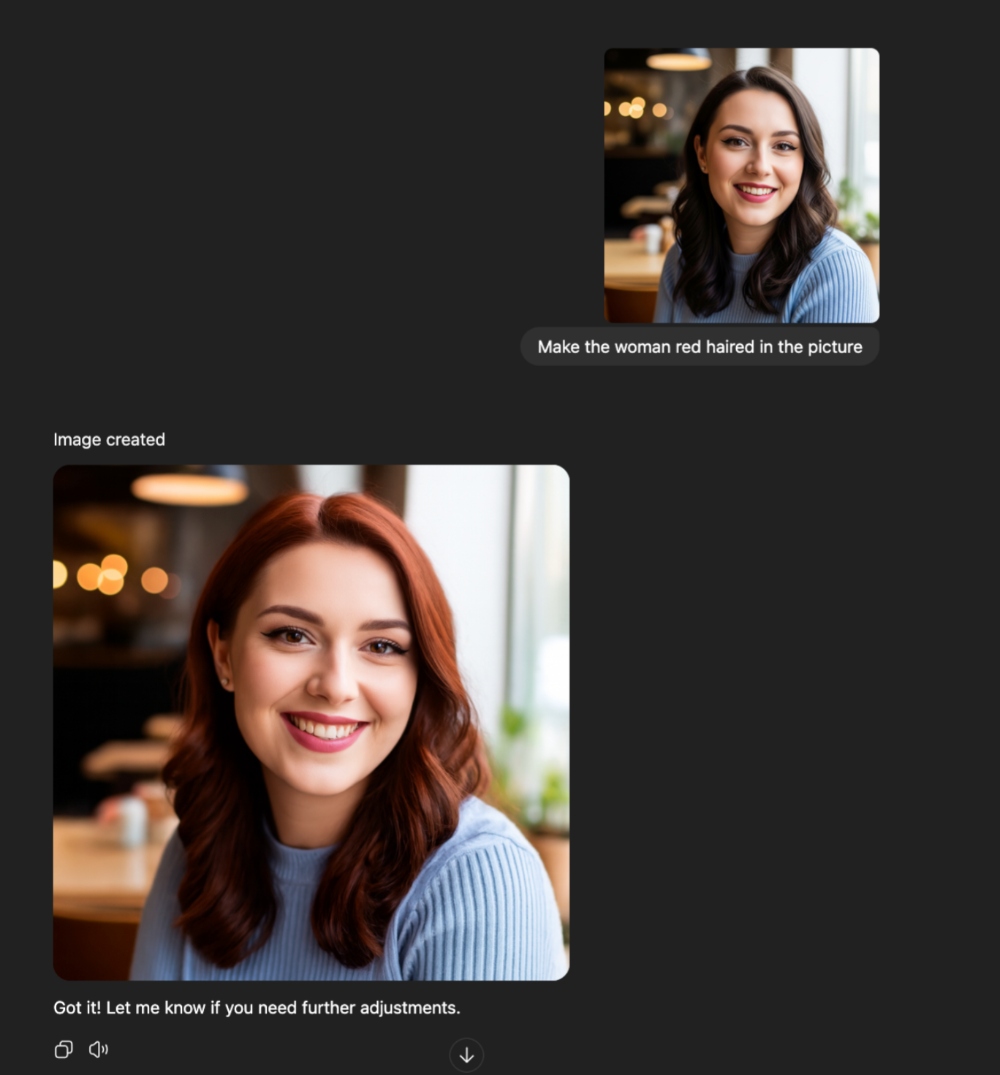
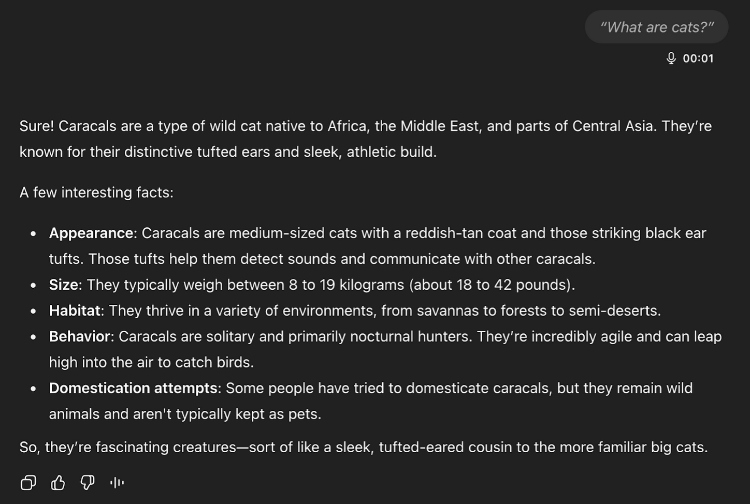
Here, my experience was less positive. For image testing, I uploaded two sets of “spot the difference” challenges (one easy, one hard) and prompted ChatGPT with “Spot the difference.” For editing, I uploaded an image of a woman and asked: “Make the woman red-haired in the picture. Don’t change the woman’s face at all, just her hair color.” For voice, I gave it both a simple query (“What are cats?”) and a more challenging one (“Speak in Lithuanian”).
In the “spot the difference” tasks, ChatGPT 5 had a surprisingly hard time. With the easier image pair, it misidentified details and overlooked obvious differences. On the harder one, it failed completely, giving answers that weren’t even close. When my colleagues tested the same challenge with Grok 4, the experience was slower because it relied on search to find the answers. Still, Grok eventually spotted the correct differences, making it more accurate, while ChatGPT 5 was quicker but less dependable.
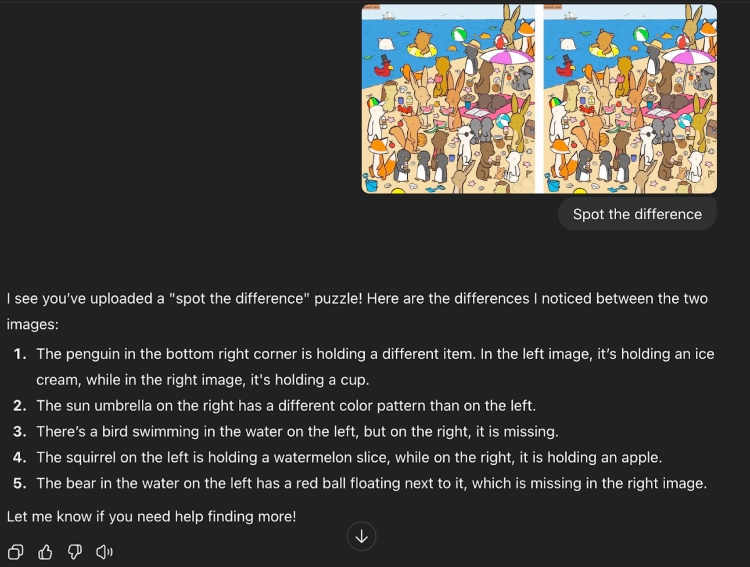
Image editing wasn’t much better. Even after being told only to change the hair color, the model kept altering the woman’s face as well. The results didn’t look natural, which showed that it struggles with making precise edits and sticking to narrow instructions.
Voice interaction, however, was a much stronger area. It handled simple questions with smooth recognition and natural-sounding flow, making it pleasant to use in conversation. The only real flaw came with switching languages: when asked to reply in Lithuanian, it instead responded in Ukrainian. That mistake aside, voice felt like one of ChatGPT 5’s better features, while image understanding still clearly lags.
Problem solving
Before reading this part, I must state that I’m not an AI specialist or scientist, so I can’t accurately test the problem-solving capabilities of ChatGPT 5. However, I did try it out with some simple queries to get a sense of how it handles basic logical reasoning.
With that said, ChatGPT 5 solved most of the small challenges I gave it. For example, it correctly identified “flute” as the odd one out in a word problem, and it spotted that the three numbers 1, 2, and 3 give the same result when added and multiplied. However, it stumbled on an easy number series, suggesting 13 instead of the correct answer 15.
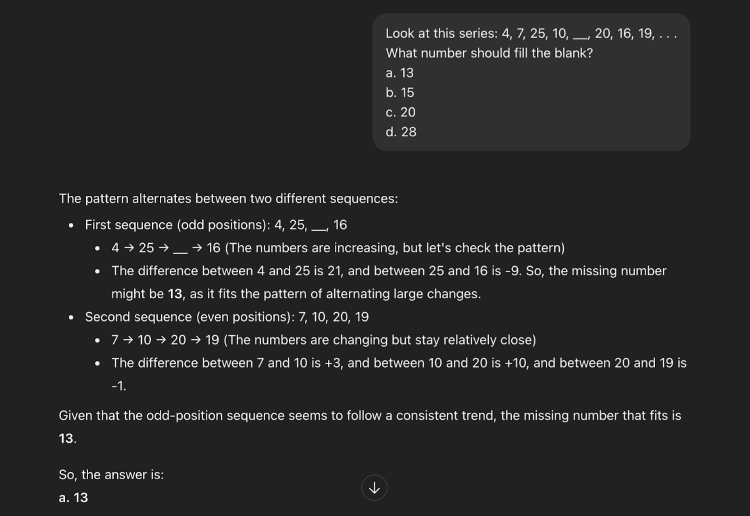
So while it got the majority of these lightweight puzzles right, they were very easy ones. ChatGPT 5 was fun to test here, but in no way should it be seen as reliable for critical or complex reasoning.
Task automation
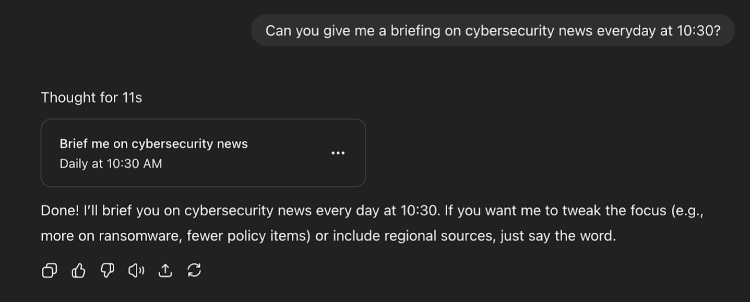
Lastly, I tried ChatGPT 5’s new scheduling feature. I wanted a daily cybersecurity news briefing, so I asked, “Can you give me a briefing on cybersecurity news every day at 10:30?”
The experience here was smooth and seamless. The model immediately confirmed the task, scheduled it, and showed me what the daily output would look like. Unlike older versions, where scheduling was a separate process, this integration felt natural and user-friendly. It was fast, required no extra setup, and delivered exactly what I wanted.
ChatGPT 5 pricing and plans
OpenAI provides several ChatGPT plans designed for different types of users. The free option covers basic use, while paid tiers add things like faster responses, team tools, or higher usage limits. Check the table below for a breakdown of each plan.
| Plan | Cost | Key features and limits |
| Free | $0.00/month | Free tier users can send up to 10 messages every 5 hours, after which chats switch to the mini model until the limit resets. They also get 1 GPT-5 Thinking message per day. |
| Plus | $20.00/month | ChatGPT Plus users can send up to 160 GPT-5 messages every 3 hours, after which chats switch to the mini model until the limit resets. This is a temporary increase and will return to the old limit soon. |
| Pro | $200.00/month | The Pro plan gives you unlimited use of GPT-5 and GPT-5 Thinking, with higher computational limits. |
| Business | $25.00/user/month | The ChatGPT Business plan offers unlimited GPT-5 access, company tool integrations, strong security, meeting recording, project management, and advanced content creation and analysis tools. |
How to sign up for ChatGPT Plus
Signing up for ChatGPT Plus is quick and easy. Follow these steps to upgrade your account and start enjoying the benefits right away:
- Visit the ChatGPT website or open the mobile app and log in using your existing free OpenAI account
- In the bottom-left corner of the screen, click on your profile and click the Upgrade plan option
- In the pop-up window, choose the plan that best fits your needs
- Complete the subscription
- Enter your payment information and follow the on-screen instructions to finalize your subscription
Once completed, you’ll immediately have access to all the features included with ChatGPT Plus.
Best ChatGPT 5 alternatives
While ChatGPT 5 is a widely used AI model, there are other tools that offer similar features or different strengths. In this section, I highlight some key alternatives and explain what makes each of them different.
Grok 4
Grok AI is a large language model developed by xAI, Elon Musk's artificial intelligence company. In July 2025, xAI released Grok 4, a major upgrade over Grok 3, with more reasoning power, higher accuracy, and greater independence in solving problems. It's designed to be a conversational assistant, able to answer questions, write code, summarize information, and even browse the web in real time.
Grok 4 is particularly strong at handling complex technical questions. It has performed well on difficult tests like Humanity's Last Exam, which contains PhD-level questions across science and engineering. One notable feature is its multi-agent Heavy mode, which uses extra computing power to tackle challenging tasks, reaching 50.7% accuracy – more than double what earlier tool-free models could achieve.
When my colleagues tested Grok 4, they found it innovative, responsive, and more natural to interact with. It remembered past conversations and handled tasks like coding and file management effectively. Some features, such as web searches, data visualization, and safety filters, were inconsistent, and specific personality modes lack age restrictions.
Claude 3 Opus
Claude 3 Opus is a powerful AI model developed by Anthropic, designed to handle complex tasks like reasoning, math, and coding. One of its main features is something called Constitutional AI, which is a set of rules that helps the AI give answers that are safe, helpful, and aligned with human values.
A big advantage of Claude 3 Opus is its huge context window. This means it can look at very long documents, like entire research papers, all at once, instead of in small pieces, which helps it give more accurate and complete answers. Claude 3 Opus is also multimodal, which means it can work with more than just text, including images. This makes it useful for tasks that combine different types of information.
Overall, Claude 3 Opus is excellent at solving problems and handling complex questions. It can occasionally find very creative or open-ended prompts challenging, but it remains a capable AI assistant. With its focus on safe, human-aligned responses, it stands out as a strong alternative to ChatGPT 5.
Gemini 1.5 Pro
Google’s Gemini 1.5 Pro is a strong alternative to ChatGPT 5, especially for handling huge amounts of information. Its massive context window can process up to 1 million tokens at once, and internal tests have gone up to 10 million tokens. In simple terms, this means it can read thousands of pages, hours of video, or entire code projects in a single request – something most other models can’t do.
Gemini 1.5 Pro uses a mixture-of-experts system, which makes it more efficient by only using the parts of the AI needed for each task. It can also work with different types of input, such as text, images, audio, and video, making it very versatile. Compared to ChatGPT 5, it’s better at handling long documents and large datasets, and it’s often more cost-effective for text and audio-heavy tasks. However, ChatGPT 5 may still be stronger for general conversation and everyday use.
Final thoughts on ChatGPT 5
To conclude this article, ChatGPT 5 is a clear step forward compared to ChatGPT 4. It’s faster, better at handling structured coding problems, and much more helpful when it comes to real-time research. The new scheduling feature also makes automation easier and more natural to use. Voice interaction worked smoothly too, making conversations feel fluid and responsive.
That said, it still has some weak spots. Image understanding and editing weren’t reliable, and its logical reasoning sometimes failed on surprisingly simple tasks. So while ChatGPT 5 is definitely more capable and polished than the previous version, it’s not perfect. It’s a strong everyday assistant for coding, research, and automation, but you shouldn’t expect flawless performance in more complex or visual tasks.
Is ChatGPT 5 better than ChatGPT 4?
Yes, ChatGPT 5 is better than ChatGPT 4 in areas like complex reasoning, coding, math, and factual accuracy. It also handles text, images, and voice together and can work with much longer documents thanks to its larger context window.
Is ChatGPT 5 free to use?
Yes, ChatGPT 5 can be used for free, but with some limitations. The free version lets you use the model, but there’s a limit on how many messages you can send. Once you reach that limit, you may have to wait or switch to a less capable model. To get full access, including higher usage limits, priority access during busy times, and advanced features like Thinking mode for complex queries, you need a subscription.
Is it worth it to pay for ChatGPT 5 Plus?
Yes, paying for ChatGPT 5 Plus is worth it for heavy users or those who need advanced AI capabilities. Subscribers get faster responses, higher message limits, priority access, and access to the newest features like multimodal input, custom GPTs, and improved reasoning abilities.