I reviewed the most popular AI detectors – only few impressed me
Being behind major reports like The Mother of All Breaches and RockYou2024, our in-house cybersecurity experts and journalists provide unbiased, real-world testing and in-depth analysis.
We maintain complete transparency by openly sharing our testing methodologies with our audience.
Learn more

These days, AI is doing everything – from writing student essays and blog posts to crafting news stories and business reports. With AI-generated content becoming nearly identical to human writing, it’s no surprise that tools claiming to detect AI content are popping up everywhere.
After spending several weeks digging into dozens of these tools, I started asking the real question: how can we actually tell whether content is AI-generated or written by a human? While most AI detectors rely on similar (if not identical) algorithms, I noticed some were far more prone to false positives – wrongly flagging human-written text as AI-made.
To get a clearer picture, I tested the most promising tools on the market. I’ve narrowed the list down to the top 9 AI content detectors of 2026 – the ones that actually work and can help you spot AI-generated content with confidence.
Best AI detectors in 2026
- QuillBot – best AI detector in 2026
- Humalingo – simplistic AI detector
- Undetectable AI – top AI detector for bypassing AI detection tools
- Originality AI – excellent AI detector for distinguishing between human and AI-written text
- Grammarly – top AI detector featuring built-in writing tools
- Pangram – most reliable research-backed AI detector
- Quetext – best AI detector across different AI writing tools
- TruthScan – enterprise-grade AI detector
- Winston AI – best AI detector with advanced features
- GPTZero – leading AI detector offering comprehensive analytics
How we tested and found best AI detectors
To find the best AI detectors in 2026, I didn’t just rely on feature lists or bold marketing claims. I spent several weeks testing popular AI detection tools – from free browser extensions to full-on professional platforms.
Here’s what I focused on during testing:
- Accuracy (50%). I ran both AI-generated, AI-generated with human edits, and human-written texts through each detector to see how well it could tell the difference. For AI content generation tools, I used the same prompts to get the results as accurate as possible.
- Ease of use (20%). I tested how intuitive and beginner-friendly each tool was, whether it was a simple browser extension or a full dashboard experience.
- Extra features (20%). Some tools offered more than just detection – like plagiarism checks, writing suggestions, content certification, or SEO insights. I noted which tools brought extra value.
- Pricing (10%). I looked at both free plans and paid tiers to evaluate which detectors offer the best bang for your buck.
First of all, I prepared a set of nine test texts: three were entirely written by humans, three were completely generated by AI, and the remaining three were a mix – AI-generated articles with human edits.
The table below shows how much AI-generated content each tool detected (in percent).
| QuillBot | Humalingo | Undetectable AI | Originality AI | Grammarly | Pangram | Quetext | TruthScan | Winston AI | GPTZero | |
| AI output from ChatGPT | 82% | 91% | 65% | 100% | 30% | 100% | 79% | 69% | 75% | 74% |
| AI output from Claude | 92% | 95% | 87% | 100% | 63% | 91% | 100% | 88% | 98% | 100% |
| AI output from Perplexity | 91% | 44% | 69% | 100% | 50% | 77% | 80% | 65% | 84% | 96% |
| AI-written + my edits | 0% | 95% | 62% | 67% | 28% | 62% | 74% | 71% | 11% | 9% |
| Fully human written | 0% | 41% | 1% | 80% | 0% | 0% | 100% | 76% | 0% | 0% |
| Accuracy rate | 80% | 60% | 70% | 70% | 60% | 65% | 65% | 65% | 60% | 60% |
To evaluate how accurately an AI detector identifies AI-generated content, I use a simple point-based scoring system based on detection percentage:
- If the tool detects over 80% AI content – 1 full point
- If the detection rate is between 40% and 80% – 0.5 points
- If the detection is below 40% – 0 points
For fully human-written texts, if the tool correctly detects 0% AI, it is also awarded 1 point for accuracy. After that, I converted these points to percentages.
While testing various AI detectors, I noticed that the results weren’t always consistent. Some tools correctly identified AI-generated content in one instance but failed in another with a similar structure or tone. This inconsistency highlights a key challenge: AI detection isn’t 100% reliable.
The accuracy of each tool can vary depending on several factors, including:
- Prompt complexity. Simpler, more formulaic text tends to be flagged more easily, while nuanced or edited AI content can slip through detection.
- Detection patterns. Each tool relies on its own algorithms and training data, meaning some are more sensitive to certain linguistic patterns than others.
- Content style and topic. Technical, academic, or overly polished writing can sometimes trigger false positives, even when the text is human-written.
So while the tests I conducted provide useful insight into how these tools perform, they should be taken as directional, not definitive. No AI detector can currently guarantee 100% accuracy – and results may vary depending on how and what you test.
The best AI detectors – our detailed list
Not sure if AI checkers actually work? I reviewed the 7 best AI detectors in-depth. So, let’s learn more about them and their performance.
1. QuillBot – best AI detector that is the easiest to use

| 💵 Starting price: | $8.33/month |
| 🎯 Accuracy: | 80% |
| 🆓 Free version: | Yes |
| 🔝 Top features: | AI-powered text analysis, continuously updated dataset, highlights suspicious text |
If you’re looking for a reliable AI detection tool, QuillBot AI detector is a solid pick. In my tests, it achieved an accuracy rate of 80%, making it one of the more effective tools out there. It can analyze text in English, French, German, and Spanish – and unlike many competitors, QuillBot integrates AI detection into a full writing suite that includes paraphrasing, grammar correction, and plagiarism checks.
QuillBot AI detection accuracy overview
In my tests, QuillBot achieved an accuracy rate of 80%, handling most fully AI-generated content quite well. However, one clear weak spot emerged – it failed to detect any AI in text that had been lightly edited by a human, with a 0% detection rate. This suggests the tool can be relatively easy to bypass with just minor tweaks. Luckily, it correctly recognized the human-written text.
- QuillBot detected AI text from ChatGPT, Claude, and Perplexity
- The tool can be fooled with just small edits
- It correctly flagged the text as human-written
Features
QuillBot stands out for its simplicity and speed. It also has a wide range of tools that you can use, such as the famous paraphraser.
As one of the free AI detector tools, you don’t need to sign up or create an account. Once I pasted the content, QuillBot flagged AI-generated content while providing a probability score that helps assess authenticity.

It also highlights specific sections that contain AI patterns.
Thanks to the straightforward interface, you can see the results clearly, and the tool provides an overall sense of whether the content seems to be human-written or AI-generated.
While it’s useful, I’d still recommend taking the results with a grain of salt. It’s a helpful starting point, but like with any tool, it’s not foolproof. There are instances where the AI detector may flag content that’s actually human-written or miss AI-generated content that’s been edited or rephrased. The provider also states that although the AI detector is trained on a large amount of human-written and AI-written texts, when the patterns are unclear for the tool, it can lead to false results.
User experience
QuillBot is easy to use, with a free version that lets you scan text and get an AI probability score in seconds. Its clean, intuitive interface is popular among students, writers, and professionals. Many users appreciate how straightforward it is and how well it integrates with other tools. That said, reviews also mention that QuillBot's accuracy can vary, especially when it comes to detecting AI-human hybrid content, where tools like GPTZero or Copyleaks often perform better.
Price
QuillBot’s AI Detector is included in both the free and premium plans, but with limits. The free version lets you check short texts (up to 1200 characters), while the premium version, which costs $8.33/month, increases that limit to 20,000 characters per check.
2. Humalingo – easy-to-use AI detection tool

| 💵 Starting price: | $2.00/month |
| 🎯 Accuracy: | 60% |
| 🆓 Free version: | No |
| 🔝 Top features: | Sentence-level AI highlights, unlimited work history, result explanation |
Humalingo is a great AI detection tool for speed and simplicity. It has a simple interface, which lets you use the tool in seconds. It can also be used as an all-in-one solution that not only detects AI-generated content but also humanizes AI-written text.
Humalingo AI detection accuracy overview
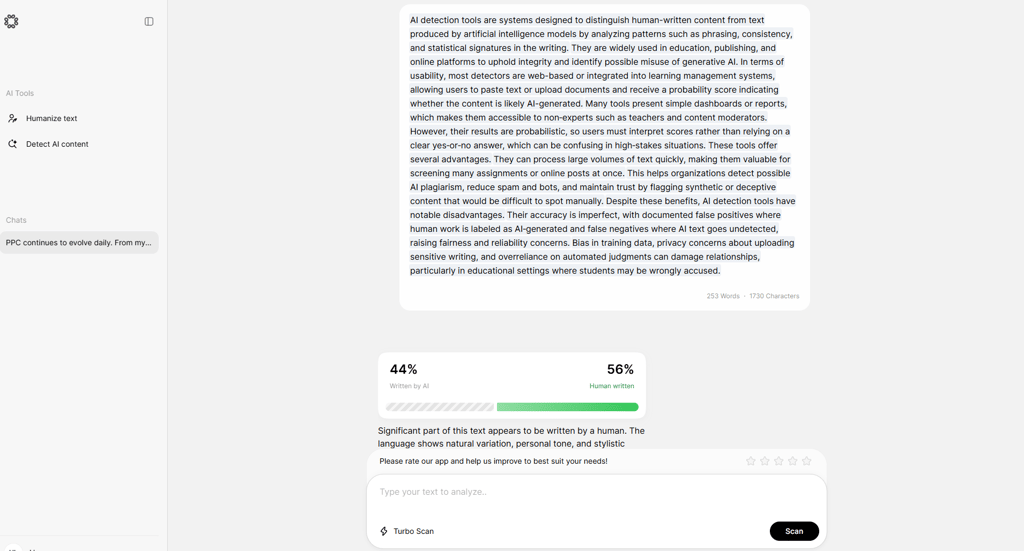
When I tested Humalingo, it showed average accuracy. It successfully identified AI-generated text with ChatGPT and Clause, reporting 91% and 95% AI scores, respectively. However, Perplexity threw Humalingo off track, as it reported only 44% AI. Human-written text got a 59% score, which indicates that there’s space for improvement. Based on the results, I gave Humalingo an accuracy score of 60%.
- Performs well in identifying fully AI-generated content
- Can overestimate AI use in mixed writing
Features
Humalingo uses an advanced AI detector that allows sentence-level AI highlights. It has a very simple interface that lets you paste the text you want to check for AI. Since Humalingo includes unlimited monthly uses, you can scan as many texts as you want. Also, Humalingo uses two modes to scan your content: default Turbo mode and Teacher mode.
Additionally, Humalingo uses advanced AI detection algorithms and regularly updates them to ensure better results. It also has a text humanizer functionality. It helps users to easily rewrite their text by applying auto grammar and style fixes.
User experience
Humalingo’s dashboard is exceptionally minimalistic. The interface design reminded me of ChatGPT, yet its functionality is limited to AI detection and a paraphrasing tool. In the left-hand menu, you can choose the tool you want to use, and it immediately opens a chat for you to work in. It allows you to quickly run checks and get results with explanations.
Price
Sadly, Humalingo doesn’t offer a free version or a free trial. However, you can test it for 7 days for $2.00. 7-day access gives you access to all features, so you can get a sense of what it’s like to use a paid version. If you decide to commit to a full plan, the prices start at $9.99/month.
3. Undetectable AI – best AI detector for multi-detector analysis

| 💵 Starting price: | $14.99/month |
| 🎯 Accuracy: | 70% |
| 🆓 Free version: | Yes |
| 🔝 Top features: | Multi-detector comparison, real-time AI analysis, detailed probability scoring, supports 50+ languages |
If you’re looking for an AI detection tool that compares results across several detectors, Undetectable AI stands out. It checks your text in real time using multiple models – like GPTZero, OpenAI, Copyleaks, and QuillBot. In my tests, its overall detection accuracy was around 70%, so while the tool is helpful for quick comparisons and edits, it’s not foolproof. Regarding features, it also includes a built-in AI Humanizer that rewrites text to help it pass as human-written, which is a nice addition.
Undetectable AI detection accuracy overview
In my tests, Undetectable AI showed mixed accuracy. It flagged most AI-generated content fairly well – Claude at 87%, Perplexity at 69%, and ChatGPT at 65%. It also detected lightly edited AI text at 62%. Interestingly, it gave a 1% AI score to fully human-written content, which is such a small percentage that it could easily be interpreted as human-written. Still, this result lowered the overall accuracy to 70%. While the tool is handy for comparing results across detectors, its performance with hybrid or nuanced content isn’t perfect.
- Undetectable AI checks your text using multiple detectors like GPTZero, Copyleaks, and QuillBot
- Correctly identifies most of the AI content
Features
One of its unique features is multi-detector functionality, which displays instant AI likelihood scores from various detection tools in one place. It flags sections of text likely to be AI-generated so you can adjust content as needed.

On top of that, this tool offers real-time probability scores and claims to detect AI-generated content from ChatGPT, GPT-4, Claude, Gemini, and Llama. However, some users note that its AI humanization feature makes the text appear unnatural.
It’s also great that Undetectable AI supports over 50 languages, including English, Spanish, Arabic, and Japanese. This makes a case for its global usability.
User experience
Undetectable AI is simple to use – just paste your text and get detection results within seconds. One of its biggest advantages is the ability to cross-check multiple AI detectors at once, offering a side-by-side comparison that saves time and effort. This makes it especially useful for marketers, students, and researchers who need quick and reliable insights. User reviews often highlight the convenience of multi-detector checks, though some found the AI Humanizer underwhelming and criticized the platform’s cancellation policies.
Price
Undetectable AI offers flexible pricing tiers to suit different usage patterns. You can start with a free plan that provides limited AI detection and humanization features. For heavier use, their paid plans begin at about $5.99/month (~10,000 words per month).
4. Originality AI – best AI detector with built-in tools for enhancing content quality
| 💵 Starting price: | $14.95/month |
| 🎯 Accuracy: | 70% |
| 🆓 Free version: | Yes, limited |
| 🔝 Top features: | Multilanguage AI detection, Chrome extension, built-in content optimization tools, line-by-line plagiarism detection |
Another AI detector that I recommend is Originality AI. This tool is a relatively accurate AI detector, which is user-friendly and has a wide range of features. Aside from its regularly updated AI model, you can enjoy the plagiarism checker, content optimization suggestions, and readability score. Overall, my tests revealed an accuracy of 70%.
Originality AI detection accuracy overview
Originality AI showed a bit of mixed results while I was testing it. Overall, it can detect AI-generated content pretty well, as it flagged the content by ChatGPT, Claude, and Perplexity with 100%.
However, the edited AI text got a score of 67%, which pretty surprised me in comparison to my entirely human-written article. The human-written piece got a score of 80% confidence it might be AI, indicating that it might not be perfect. Based on this, I gave Originality AI an accuracy score of 70%.
- Reliable AI detection across multiple AI models, such as GPT-5, ChatGPT, Claude 4, Gemini 2.5, Grok 3, and other popular models
- Potential issues with hybrid and human-written content
Features
One of the things I liked the most is that Originality AI has different AI detection models with various accuracy and sensitivity levels. Therefore, you can scan your content using the Turbo, Academic, Lite, or Multi-Language Model.
Keep in mind that the score it provides isn’t how much of the content is AI-written, but the percentage of confidence that it may be written with the help of a certain tool.

Originality AI has a lot of unique features, but the one that’s definitely worth mentioning is the Bulk Scan Checks. Basically, it can process multiple content scans, both text and URLs, and provide you with a comprehensive analysis of AI, plagiarism, readability, grammar, and factual accuracy.
Plus, its Multi-Language model supports over 30 languages, including English, Russian, Spanish, Turkish, Italian, French, German, and Chinese Traditional.
User experience
Originality AI is super-easy to use. You can either upload your document, drag and drop your file, or copy and paste the text. Then, you just click scan, and you get the results within a few seconds. Due to this, Originality AI is perfect for personal use, students, employees, and even businesses who need assistance with their work.
Price
When it comes to the price, you can run three free scans up to 12,000 characters. However, for a heavier workload, you can pick one of the three monthly or annual subscriptions that start at $14.95/month. There’s even an option to pay as you go and get 3,000 credits for scanning.
5. Pangram – most accurate AI detector with near-zero false positive rate
| 💵 Starting price: | Free (4 credits/day) |
| 🎯 Accuracy: | 65% |
| 🆓 Free version: | Yes |
| 🔝 Top features: | Interpretability features, file upload and OCR for scanned documents, 20 languages, Chrome extension, Google Docs integration |
Pangram is a research-grade AI detector created by engineers who previously worked at Stanford, Tesla, and Google AI. It has quickly gained popularity in education and publishing because of its high reliability. Groups like the University of Maryland have independently tested Pangram, confirming its third-party verified results and near-zero false positive rate. This makes it a safe choice for teachers and higher education institutions concerned about mislabeling real student work.
Pangram AI detection accuracy overview
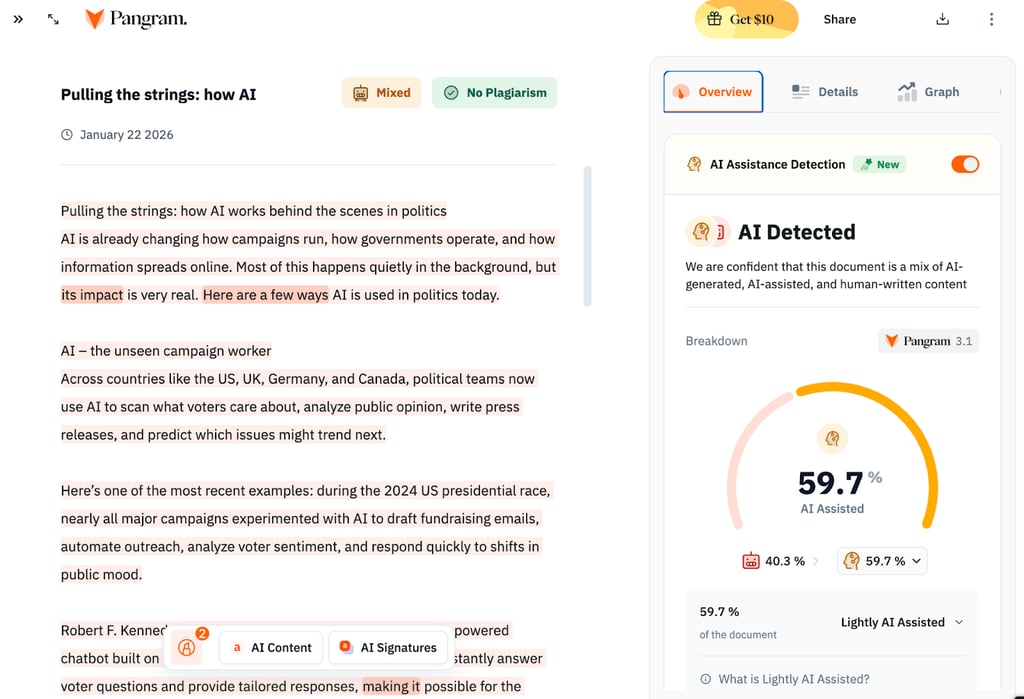
When I tested Pangram, it did very well with both fully AI-generated and fully human-written text, reaching 100% accuracy. This helps reduce false positives and supports its reputation for reliability in serious academic situations. However, with mixed or AI-assisted content, the results were less reliable. Sometimes, Pangram estimated AI involvement at about 59.7%, which was close to the real amount of AI help. Other times, it marked mixed content as completely human-written and missed the AI part.
- High accuracy for entirely AI or human-written content
- Mixed content AI detection results are inconsistent
Features
This tool has a simple AI detection dashboard where you can paste text or upload files. The interface highlights sections it suspects are AI-generated and shows authorship patterns, making it easier to review long essays or submissions. From my experience, this detailed visual breakdown is helpful for teachers and editors who want more than just an 'AI vs. human' score.
Pangram also has a text comparison feature that lets you check different drafts or versions side by side. It includes an AI Phrases tool that highlights words and phrases more common in AI-generated text than in human writing, which helps you see what might need to be revised.
This AI detection platform saves a searchable history of all your past checks, which you can organize by date, tags, type, and more. This is useful if you handle a lot of work. There is also a Chrome extension that lets you scan web pages, social media posts, and Google Docs right in your browser. Additional integrations are available for educators, and you can request custom setups. Pangram supports AI detection in 20 languages, including Spanish, French, Arabic, Japanese, Korean, and Hindi.
User experience
Pangram is easy to start using. When you create a free account, you get 4 AI checks per day, which is enough for light or occasional use. The dashboard is clean and simple, and I found it easy to navigate reports and history without much effort. However, advanced features like detailed AI assistance detection require a paid subscription. Reviews on Reddit and Trustpilot are mixed – many teachers and editors like the interface and features, but some are more cautious or critical.
Price
There are plans for individuals, developers, and larger organizations. After the free tier, individual paid plans start at $20/month for 600 credits, which works for lighter use. The Professional plan offers 3000 credits per month for $65, which is better for departments or busy editors. Pricing for enterprise and institutional plans is available on request and can be customized for school districts, universities, or large publishers.
6. Quetext – best AI detector for all AI language models
| 💵 Starting price: | Free |
| 🎯 Accuracy: | 65% |
| 🆓 Free version: | Yes |
| 🔝 Top features: | Bulk uploads, source exclusion, paraphrasing tool, citation generator, spell and grammar check, support for 14 languages |
Quetext combines plagiarism checking and AI detection using its own DeepSearch technology, which looks at context, word order, and other patterns to spot copied or AI-generated text. It works quickly and can scan for AI use across models like ChatGPT, GPT-5, Gemini, and others. It also includes AITutorMe, a tool that helps users rephrase ideas and create accurate citations.
Pangram AI detection accuracy overview
In my tests, Quetext handled clear-cut cases reasonably well, performing more or less accurately on both fully AI-generated and fully human-written text. Problems came up with mixed content. For example, Quetext marked a passage as 99.9% AI, even though most of it was written by a person. This shows that Quetext is good at finding clear cases of AI use, but it might overestimate AI in blended writing.
- Performs reasonably well on fully AI-generated and fully human-written text
- Struggles with mixed content and can overestimate AI use in blended writing
Features
This platform uses its DeepSearch engine, but it also offers useful tools for daily writing and review. You can upload and scan many documents at once, which helps teachers or teams with lots of files. There is also a source exclusion feature, so you can ignore certain URLs or documents, like your own work, to avoid false plagiarism flags.
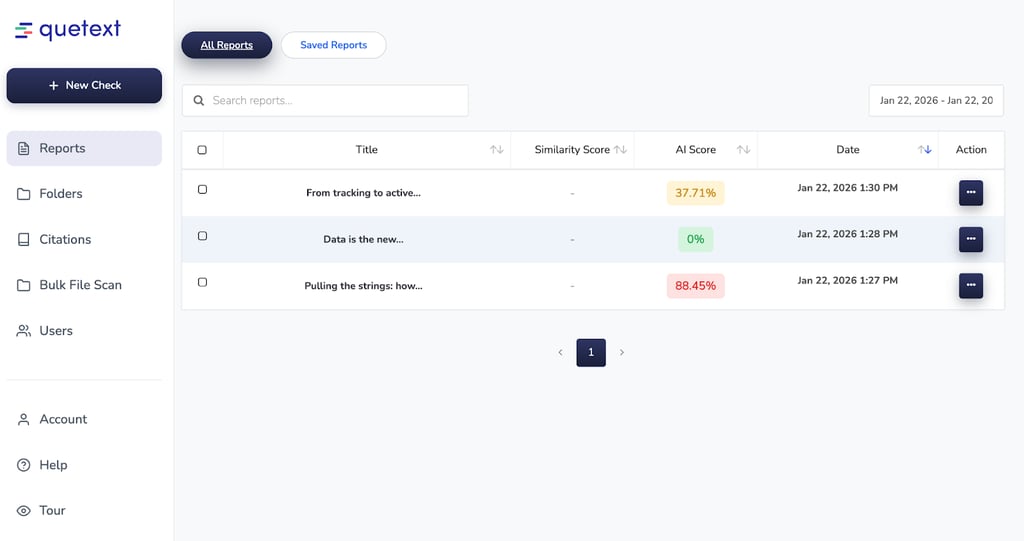
Quetext also has a paraphrasing tool and a citation generator to help users rewrite text and create accurate references in common formats. It includes spell and grammar checking, so you can fix writing issues while checking for AI and plagiarism.
All of this is available with support for 14 languages, making it accessible for international classrooms and multilingual content.
User experience
People online often say Quetext is easy to use, with a simple interface that makes plagiarism and AI checks clear for students, teachers, and professionals. Most reviews are positive and mention how fast it scans and finds matches or AI risk. However, some users are frustrated with the billing and subscription system, especially when changing or renewing plans, so it’s a good idea to check the details before paying.
Price
Quetext has 3 plans: Free, Essential, and Professional. The Essential plan costs $8.25/month and adds AI-powered paraphrasing, a 100,000-word limit, bulk uploads, and more. The Professional plan is $16.50/month, increases the word limit to 200,000, and allows more bulk uploads, making it better for heavy academic or editorial work.
7. TruthScan – best AI detector for large organizations
| 💵 Starting price: | $49.99/month |
| 🎯 Accuracy: | 65% |
| 🆓 Free version: | No |
| 🔝 Top features: | Real-time API integration, enterprise security and compliance, sentence-level analysis, high-volume processing |
TruthScan is an enterprise-grade AI detector built for universities, corporations, and governments that need to guard against increasingly sophisticated AI-generated threats at scale. Rather than focusing solely on text, TruthScan offers comprehensive coverage across text, images, voice, and video, positioning itself as a full-stack defense layer against AI fraud.
TruthScan AI detection accuracy overview
When I tested TruthScan, its accuracy was mixed but generally acceptable. For a sample that was half human and half AI, it reported 79% AI and did not distinguish between fully AI-generated and AI-assisted text. This result did not match the actual ratio and lacked detail. In another test, a completely human-written sample was marked as 27% AI. While this is not a high score, it is still a clear false positive. Overall, TruthScan is better at spotting if AI is present than at measuring exactly how much of a document is machine-generated.
- It can detect if AI is present, but it is not accurate when measuring the mix of human and AI content
- Sometimes, it may label text written entirely by a person as partly AI-generated
Features
TruthScan is built specifically for enterprise environments, with AI detection capabilities designed to plug into existing systems at scale. Its core text detector targets AI-generated content from models like ChatGPT, Claude, and GPT‑4, offering sentence-level detection that highlights individual sentences and paragraphs so reviewers can see exactly where AI patterns appear.
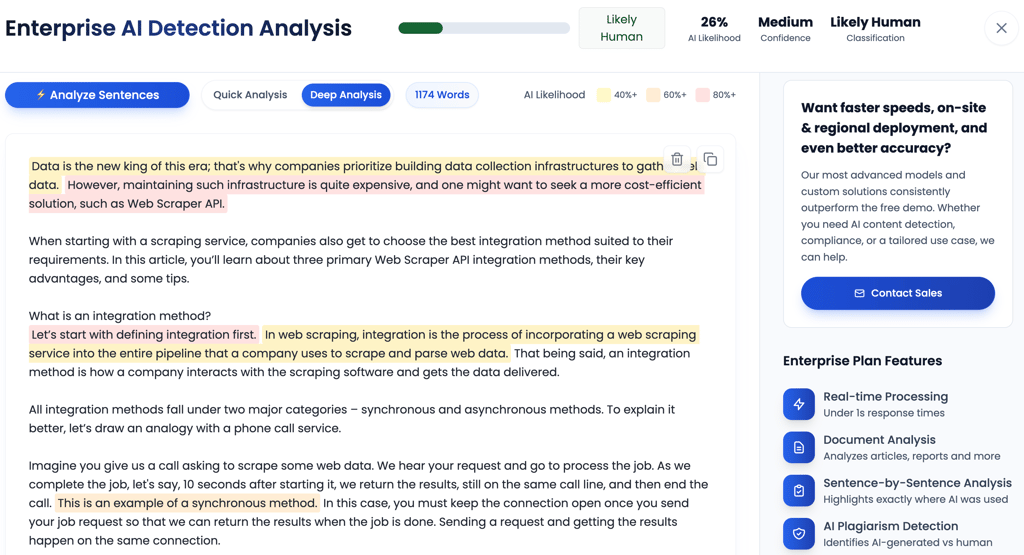
For high-volume and time-sensitive use cases, TruthScan supports real-time processing with sub‑1‑second API response times, enabling immediate content checks and automated response workflows. It also handles batch processing, allowing organizations to process thousands of documents simultaneously via scalable cloud infrastructure.
On the security side, TruthScan runs on SOC 2 and ISO 27001-compliant infrastructure, with enterprise-grade security, data privacy controls, and audit trails. Beyond text, the same enterprise stack extends to image, email scam, and deepfake detection, positioning TruthScan as a multi-modal AI risk management solution rather than just a simple text scanner.
User experience
TruthScan’s dashboard is clean and focused. Each detector, text, image, video, and voice, has its own tab, making it easy to switch between types of analysis. There are no distractions or cluttered menus. The layout is straightforward, so you can quickly run checks and understand results. This is especially helpful in busy enterprise settings where clarity and speed are important.
Price
TruthScan offers a free trial with 20,000 credits and no credit card required, which is generous enough for substantial testing or pilot projects. Paid plans start with the Professional tier at $49.99/month for 500,000 credits, aimed at teams or smaller institutions that need regular, high-volume checks. For larger organizations and government-scale deployments, an Enterprise plan is available via contact with sales, with large-volume discounts applied based on usage and integration needs.
8. Winston AI – best AI detector with content certification

| 💵 Starting price: | $10.00/month |
| 🎯 Accuracy: | 70% |
| 🆓 Free version: | No |
| 🔝 Top features: | HUMN-1 certification, API integration, advanced AI, and plagiarism detection |
Launched in 2023, Winston AI sets itself apart with its unique HUMN-1 Certification, a feature that lets you prove your content is 100% human-written. You can even display a verification badge on your website – something that could help build trust with readers and possibly appeal to Google’s algorithm as AI content becomes more widespread. In my tests, however, Winston AI reached an accuracy rate of 70%, meaning it’s a decent tool but not the most precise when it comes to detecting subtle AI use.
Winston AI detection accuracy overview
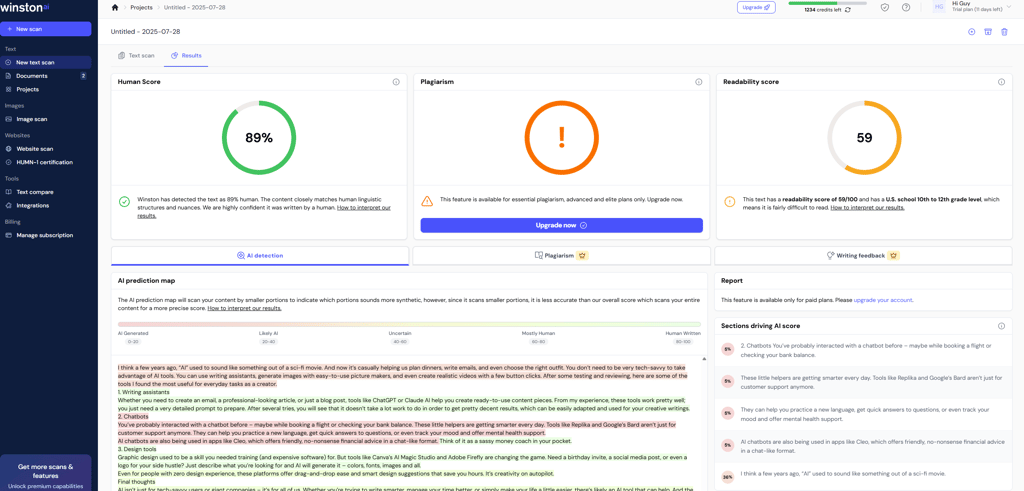
In my tests, Winston AI performed well with fully AI-generated content. It also correctly identified the fully human-written text, showing 0% AI, which is a good sign for avoiding false positives. However, it struggled with hybrid content – flagging only 11% of an AI-written text that I had lightly edited, even though at least half of it was still AI-generated. This brought the overall accuracy to 70%, showing that while Winston AI is reliable for clear-cut cases, it has trouble catching subtle AI edits.
- High accuracy for AI content
- Only flagged 11% of lightly edited AI content
Features
Winston AI claims 99.98% accuracy. According to the company, it flags paraphrased and “humanized” AI-generated content, too, which is an area where many detectors fall short. Plus, it’s not limited to text. Winston AI can even scan images, deepfakes, and handwritten notes. It uses OCR (Optical Character Recognition) to achieve this.
Furthermore, it has an AI Prediction Map that breaks down your content, sentence by sentence, to flag bits that might look AI-generated. It’s useful but not perfect. Users report that the tool can sometimes overdo it, flagging human-written content as AI.
The company claims its detector can catch content generated by several AI systems, such as ChatGPT (including GPT-4), Google Gemini, LLaMa, and Claude.
User experience
Trying out Winston AI is easy. It offers a 14-day free trial, which gives you 2000 credits. I think teachers and editors will appreciate this tool. However, I didn’t find many user reviews for Winston AI. Writers who mix AI with their work say it can be strict. Still, for anyone who cares about content credibility, it’s hard to argue against.
Price
You can begin with a 14-day free trial, giving you 2000 credits (enough to scan ~2000 words) at no cost, perfect for small tests. Paid plans start at around $10.00/month for the Essential tier (roughly 80,000 words/month), while the Advanced tier jumps to $16/month for about 200,000 words/month plus team access, and the Elite plan at $26/month covers 500,000 credits and extra features including plagiarism detection and team management.
9. Grammarly – best AI detector with integrated writing tools

| 💵 Starting price: | $12.00/month |
| 🎯 Accuracy: | 50% |
| 🆓 Free version: | Yes, periodically |
| 🔝 Top features: | AI percentage scoring, citation formatting, integrated grammar tools |
Grammarly, best known for its grammar, rewriting, and proofreading tools, also includes an AI detector. It highlights what percentage of your text might be AI-generated and gives you the chance to adjust accordingly. That said, in my tests, its AI detection accuracy was only around 50%, so while it’s useful for basic checks, it’s not the most reliable tool for spotting AI-generated content.
Grammarly AI detection accuracy overview
In my tests, Grammarly’s AI detector showed mixed performance, reaching an overall accuracy of 50%. It flagged AI-generated content inconsistently – 30% for ChatGPT, 63% for Claude, and 50% for Perplexity. It also detected only 28% of AI-written text that I had lightly edited, missing a significant portion of it. On the bright side, it correctly identified fully human-written content with a 0% AI score, but overall, it’s not as reliable as specialized AI detectors.
- Inconsistent detection of AI content
- Fully human-written text was correctly detected
Features
According to Grammarly, its AI detector analyzes patterns within the text, providing insights into potential AI usage. It does not guarantee 100% accuracy, but it offers a transparent way to assess content. Furthermore, it provides insights into why it marks a phrase, sentence, or paragraph as AI-written content. But you have to create an account in order to access these insights.

User experience
Getting started with Grammarly’s AI detector is easy – you can scan up to 2000 words for free or unlock more detailed checks with a Grammarly Premium subscription. The interface is user-friendly, offering clear feedback on both originality and writing quality. Grammarly also emphasizes privacy, ensuring your data is handled securely. It's a solid all-in-one choice for writers, students, and professionals who want writing support alongside basic AI detection. While some users appreciate how it flags common AI writing patterns, others note that detection can be inconsistent, especially with shorter or more nuanced texts.
Price
Grammarly’s AI detector is free for checks up to about 2000 words. For more advanced features, Grammarly Pro starts at around $12.00/month (billed annually), which includes AI detection, plagiarism checks, and writing feedback. There’s also an enterprise plan for larger teams with custom pricing.
10. GPTZero – best AI detector with in-depth analytics

| 💵 Starting price: | $8.33/month |
| 🎯 Accuracy: | 70% |
| 🆓 Free version: | Yes |
| 🔝 Top features: | Multi-detector comparison, advanced AI scans, numerous integrations |
Out of all the AI detectors I tested, GPTZero is one I highly recommend. It scans content across multiple models – including ChatGPT, Claude, Gemini, and Llama. What really stood out to me was its detailed AI analytics, sentence-level detection, and smooth integrations with workspaces and classrooms. That said, in my tests, its overall accuracy was 70%, so while it's a strong all-around tool with thoughtful features, it's not flawless.
GPTZero AI detection accuracy overview
In my tests, GPTZero accurately flagged most AI-generated content. However, it struggled with detecting lightly edited AI text, only 9%. Gladly, it correctly detected fully human-written content. Overall, the issues brought its overall accuracy rate down to 70%, showing it's effective for pure AI content but less reliable with mixed or human-written text.
- Struggled with hybrid text, meaning it could be easy to trick this detector
- Good AI content detection
Features
The first thing I liked is that you can easily copy and paste text, documents, PDFs, and image files. This lets you scan a maximum of 50 files simultaneously against the biggest AI models. These include ChatGPT, GPT-4, Gemini, and Llama.
After a few seconds, I got an AI probability score with pretty big accuracy with docx, PDF, and image files, analyzing up to 50 files at a time.
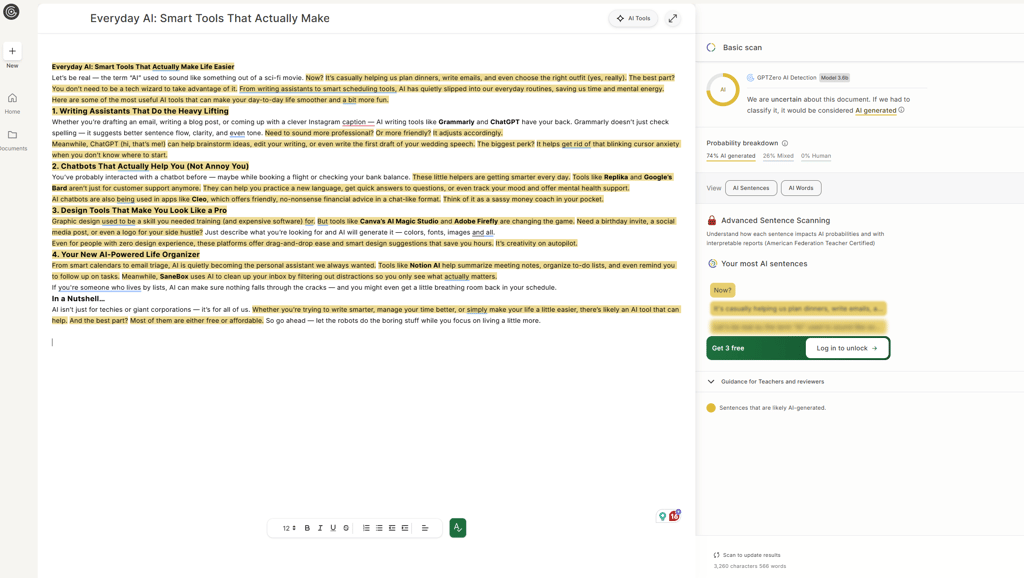
But I also liked that there are advanced AI scans and AI vocabulary, which carefully check each sentence or word and mark those that have the highest AI probability.
On top of this, you can connect GPTZero with learning systems, like Moodle, Canvas, and Google Classroom. As for now, this AI detection software only works in English, but the company plans to expand the range to Spanish and French soon.
Ultimately, you can even check whether the text was plagiarized with the GPTZero AI Plagiarism tool.
User experience
GPTZero stands out for its ease of use – you simply paste your text and get results within seconds. It highlights AI-flagged content at the sentence or word level, making it easy to spot problem areas and improve your writing. Users generally leave strong reviews, praising its speed, detailed feedback, and overall accuracy. However, some have pointed out occasional false positives as a drawback.
Price
GPTZero has a free plan with up to 10,000 words per month, great for casual users. Paid plans start at GPT Zero price/month for features like plagiarism checks and grammar feedback.
11. Scribbr – simple AI detector with yes-or-no verdicts

| 💵 Starting price: | Free |
| 🎯 Accuracy: | 50% |
| 🆓 Free version: | Yes |
| 🔝 Top features: | Simple AI/human verdict, no registration required, embedded in plagiarism checker |
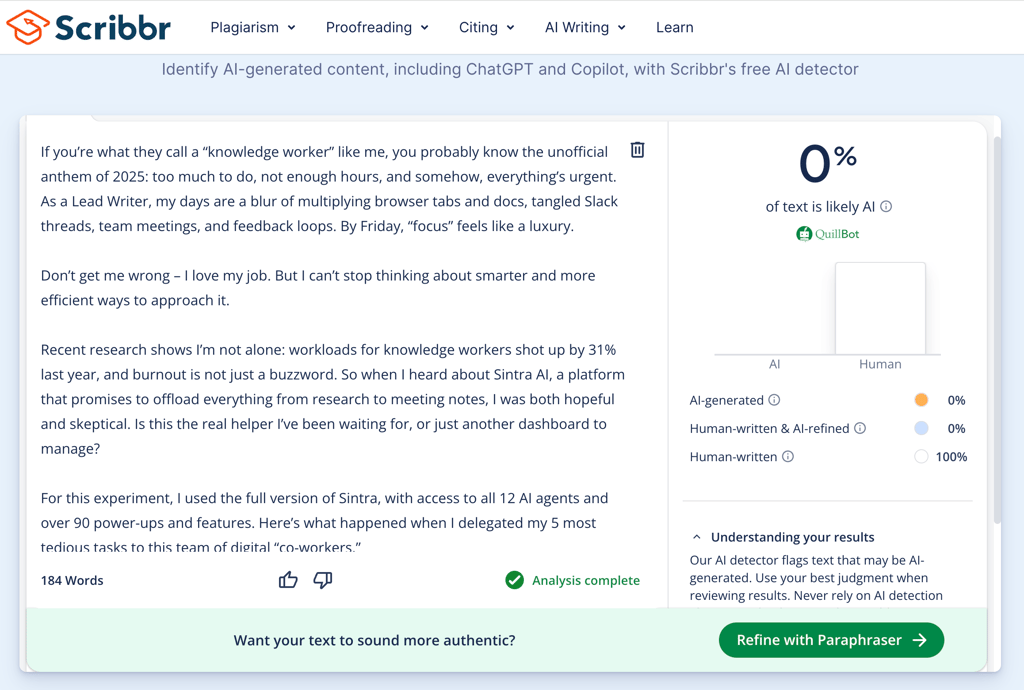
Scribbr’s AI detector is simple and easy to use. You just paste your text and get an instant verdict. While other tools show percentages or highlight sentences, Scribbr gives a clear label: either “AI” or “Human.”
In my tests, this method had mixed results. It correctly identified a fully human-written text as 0% AI and a completely AI-generated text. But when I tested a mix of human and AI writing, Scribbr marked the 50/50 blend as 0% AI, missing the AI-generated part.
Scribbr AI detector accuracy overview
For pure content, either all human or all AI, Scribbr did excellently, nailing the right answer every time. But when confronted with a mix, it leaned heavily toward “human” and failed to spot the AI origins in hybrid text. This makes it useful for clear-cut cases, but unreliable when you’re checking something that might mix both writing sources.
- Clear “Human” or “AI” classification with no gradients
- Works well for text that is fully human or fully AI
- Not suited for detecting blended or paraphrased content
Features
Scribbr’s main strength is its simple interface. You don’t need to register, and you get results in seconds. For students and educators, it is part of the larger Scribbr plagiarism checker, which adds an extra layer of verification. However, it does not offer advanced breakdowns, document uploads, or integrations, and it only works with English text.
User experience
Scribbr is very easy to use. You just paste your text, submit it, and get a result. There is no learning curve, so anyone can start right away. The tool works well for clear cases, but it struggles with more complex, mixed, or paraphrased content. This makes it less useful for people who need deeper analysis.
Price
Scribbr’s AI detector is free to use – no sign-up required.
12. Sapling – AI detector with good integrations

| 💵 Starting price: | $0.00/month |
| 🎯 Accuracy: | 10% |
| 🆓 Free version: | Yes |
| 🔝 Top features: | Real-time text scanning, browser extension, integrations with CRMs and helpdesks |
Sapling stood out as the most straightforward AI detector to blend into my workflow among all the ones I assessed. Its browser extension lets you scan text wherever you work, like Google Docs, Gmail, Zendesk, or Salesforce.
However, even though Sapling is easy to use, its AI detector let me down. Every test I ran, whether the text was fully human-written or fully AI-generated, was flagged as “100% fake.” Because it treated all content as AI-generated, I found its accuracy questionable. If you need reliable verification, this is a dealbreaker.
Sapling AI detection accuracy overview
When I tested Sapling, it marked everything as AI-generated, whether the text was written by a person or a machine. This is better than missing obvious AI text, but it’s not useful if you want to check your own original writing. Right now, Sapling tends to over-detect, giving a 100% AI score every time. Because of this, it isn’t reliable for people who need to tell the difference between human and AI writing.
- Consistently flagged everything as “100% AI”
- Not reliable for distinguishing real from fake
- Easy to use and very fast to deliver results
Features
Sapling’s biggest advantage is how easily it fits into your workflow. The AI detector works as a browser extension for Chrome and Edge, so you get instant feedback while writing emails, managing customer tickets, or reviewing internal documents. It supports platforms like Google Workspace, Office 365, Zendesk, Salesforce, HubSpot, and others. Just highlight your text to launch the detector and check your work in real time, all without leaving your current app.

But its detection analysis is limited compared to other tools. You only get a simple “AI%” score, without any sentence or word highlights. It also supports only English and can’t check documents or PDFs against each other.
User experience
Sapling’s design is refreshingly simple. You just install the browser extension, and it’s ready to use. Results appear instantly, but I found there is little useful feedback because every test I ran got a “100% AI” verdict. It might be helpful as a quick first check for suspected AI content, but I wouldn’t rely on it for more complex or mixed text. Many users online have had similar experiences and say false positives are common.
Price
Sapling’s free tier gives you basic detection on the web extension, while paid plans with advanced CRM features start at $25/month. For most writers and editors, the free version will feel limiting, especially given the present accuracy issues.
The best AI detectors compared
There are plenty of AI detectors out there, and they all work a little differently. Some, like QuillBot and Copyleaks, are known for being pretty accurate. Others – like Undetectable AI, GPTZero, and the Ahrefs AI Detector – also get good feedback. Winston AI and Grammarly are also solid picks, especially if you want extra features.
The table below highlights key features of the 7 best AI detectors above to help you compare them at a glance.
| AI detector name | Starting price | Accuracy (%) | Free version | Top features |
| Quillbot | $8.33/month | 80% | Yes | AI-powered text analysis, continuously updated massive dataset, highlights suspicious text |
| Humalingo | $2.00 for 7 day access | 60% | No | Sentence-level AI highlights, unlimited work history, result explanation |
| Undetectable AI | $14.99/month | 70% | Yes | Multi-detector comparison real-time AI analysis, detailed probability scoring, supports 50+ languages |
| Originality AI | $14.95/month | 70% | Yes, limited | Multi-language AI detection, Chrome extension, built-in content optimization tools, line-by-line plagiarism detection |
| Grammarly | $12.00/month | 50% | Yes, periodically | AI percentage scoring, citation formatting, integrated grammar tools |
| Pangram | Free | 65% | Yes | Interpretability features, file upload and OCR for scanned documents, 20 languages, Chrome extension, Google Docs integration |
| Quetext | Free | 65% | Yes | Bulk uploads, source exclusion, paraphrasing tool, citation generator, spell and grammar check, support for 14 languages |
| TruthScan | $49.99/month | 65% | No | Real-time API integration, enterprise security and compliance, sentence-level analysis, high-volume processing |
| Winston AI | $10.00/month | 70% | No | HUMN-1 certification, multi-format detection (text, images, handwritten notes), advanced OCR |
| GPTZero | $8.33/month | 70% | Yes | Multi-detector comparison, advanced AI scans, classroom and workspace integrations |
While all these AI detectors have a free version, their functionality will differ from that of the paid versions. Hive is one exception to that rule.
Overall, I think it is worth purchasing at least one tier above the free version, as you will usually get many more features and capabilities. This is especially important if you are an educator or writer.
I also believe it is important to try different AI detectors to see which one best suits your needs. Remember, the most expensive product is not always the best option.
Things to consider when choosing an AI detector
Here are some things you should consider when choosing an AI detector:
- Accuracy rate. If an AI detector isn’t accurate, why even use it? Look for tools with proven high accuracy rates (if possible). For instance, the top options above are quite reliable in this regard. This minimizes false positives (flagging human text as AI) and errors or misses (failing to detect AI-generated material).
- Speed. Speed is essential for managing large volumes of work or satisfying quick turnaround times, especially for professionals (educators, writers, companies). However, speed should not compromise accuracy. Ensure the AI detector you choose can detect AI-generated content quickly and accurately.
- Interface. Choose an AI content detection tool with a neat and tidy interface that’s easy to navigate. Too much clutter or unclear elements can slow you down or distract you from the task.
- Integration. Ensure the AI detector can easily integrate with tools you rely on, such as a plagiarism checker, learning management systems (LMSs), or document editors like Google Docs. API support is also important for developers and enterprises.
- Free vs paid options. Ensure the tool has a free version or trial period for testing and experimentation. This will allow you to assess the tool's performance before committing to it.
What is an AI detector?
AI detectors help you check whether any written content is AI-generated or human-written. More precisely, these tools scan for specific patterns, as AI tools produce content with a specific structure.
That’s because they utilize different techniques to break down text, examine the writing style, and determine whether the content is structured.
With AI-generated content showing up everywhere, such as articles, news, and social media posts, AI detectors can help you separate fake content from valuable and human-written material.
How does an AI detector work?
AI detectors scan content to identify typical AI-like patterns. They use techniques like natural language processing (NLP), stylometric analysis, entropy measurements, and others to determine if a text, image, or video is AI-generated.
More precisely, AI detectors use language models like the ones that popular AI tools rely on. That said, the language model searches whether the input is something that it would write. If the answer is positive, it marks the text or part of the text as AI-generated.
For example, AI detection software always checks the perplexity of the written piece, meaning how unpredictable the text is. As the language model works by predicting what word will come next, it will mark it as AI if the predictability is high.
Another measure that AI detectors focus on is the burstiness, or the text’s variation in sentence structure and length. Human-written articles have higher burstiness, while the AI-generated ones are more predictable and have the same sentence structure and usage of words.
Are AI detectors really reliable?
Trusting the results of an AI detector completely isn’t a wise decision. This is because AI detectors are known to sometimes (and unpredictably) produce false positives or negatives.
A false positive means the detector incorrectly labeled human-written text as AI-generated. On the other hand, a false negative means that the detector failed to identify AI-generated content and mistakenly classified it as human-written. A false positive can unfairly penalize someone who has written their own content, while a false negative allows AI-generated content to pass as human-written.
A 2023 study from Stanford University found that AI detectors often mislabeled essays written by non-native English speakers as AI-generated because they misinterpreted the linguistic patterns common among these writers. This caused a high rate of false positives.
This study shows that trusting AI detectors outright isn’t wise. These potential biases could unfairly impact people in academic or professional settings.
Ultimately, AI systems have inherent flaws, such as the potential for false positives and false negatives. AI language models are constantly evolving, which makes it difficult for AI detectors to catch all the patterns reliably. I recommend using AI detector results as a guide and not as definitive proof that a text is AI-generated or human-written.
AI detectors vs human checkers: which is better?
AI detectors rely on machine learning models to recognize patterns, like a lack of emotions, complex phrases, and repetitiveness. Such detectors can quickly process a large amount of content and offer consistency in flagging AI text. However, they can show false positives or fail to detect advanced AI-generated content.
On the other hand, human checkers, such as teachers or editors, use their experience and intuition to analyze the content. While the strengths include changes in the tone, style, and the author’s voice, this takes more time.
When it comes to the effectiveness of AI detectors and human checks, you need to consider the context. For example, professors can provide better feedback than AI detector software in academic scenarios. But for deepfakes, AI detectors can be quite good due to their recognition of unrealistic video or audio content.
Additionally, both AI detectors and human checkers are crucial for checking. While AI tools spot specific phrases, humans can evaluate the tone and creativity in the content.
How AI detectors can help spot threats across different fields
AI detectors can identify potential threats, such as cybersecurity, education, and media. They do this thanks to their machine learning methods that can detect fraud, fake news, AI-generated essays, or manipulated images and videos by scanning for specific patterns.
For example, freelancers may use AI checkers to prevent fake and unnatural-sounding content. Also, businesses often use such tools to prevent any cybersecurity risks, such as detecting unusual patterns in their systems that may highlight some malicious activities.
Thanks to this, they help professionals in different sectors stay ahead of emerging threats.
Real-world applications of AI detection tools
AI detection tools are now widely used in everyday situations to help teachers, businesses, and writers spot AI-generated content and keep things original.
Shaping the education sector
AI detectors are crucial in academic institutions because they help teachers identify AI-generated assignments, essays, and even research papers. Nowadays, more and more schools implement such tools because students often use AI to complete their work.
Due to this, professors try to prevent dishonest practices and maintain academic integrity. More precisely, AI tools help educators detect any suspicious content, verify the originality of different papers, and prove the fairness of the exam answers.
Help combat deepfakes
AI detector tools also help detect deepfakes, such as videos, audio, and images. Thanks to their usage of machine learning, they spot unnatural movements or some inconsistencies in audio.
This is very beneficial, as many people use deepfakes to spread political misinformation, scam businesses, and even damage the banking sector. For instance, there are cases in which individuals used deepfake audio to steal a huge amount of money from banks.
Luckily, AI detectors run scans in real time, which reduces these risks and safeguards various sectors.
Identifying unqualified workers
You can even identify unqualified workers with AI detection software. As many potential workers create CVs with AI, these detectors scan them and search for inconsistencies. Some of these can be the usage of generic languages and mismatched employment dates.
On top of this, AI detectors can search online databases to verify that all information and work history is reliable. For example, if a candidate claims they have experience in a certain field, AI checkers can browse various databases to prove this.
AI detectors are also crucial in interviews, as job seekers can use deepfakes to present themselves in a different way.
That said, these tools help employers make the right hiring decision and ensure that each candidate has the necessary qualifications.
Future of AI detectors: what’s next?
The future of AI detectors is closely tied to rapid advancements in AI itself, driving ongoing improvements in detection technology. As generative models become more sophisticated, AI detection tools are evolving to deliver greater accuracy, faster detection speeds, and an enhanced ability to spot increasingly complex AI-generated text, images, and deepfakes. For example, new methods like generative watermarking embed invisible digital signatures into AI-generated content, making it easier to identify and flag synthetic media.
This evolution is crucial so that AI detectors can handle the upcoming challenges of more advanced AI-generated content, such as complex text and more realistic deepfakes.
But as there are many concerns about ethical issues with AI, like harming the confidentiality of individuals, AI detectors need to adapt to the evolving technology and consider the safety of users as well.
Other AI tools you might be interested in:
Best AI apps for iPhone: Explore the best iPhone AI picks
Best AI headshot generator: Create realistic-looking headshots
Best AI chatbots: Gain in-depth information
Best AI video generators: Learn the best video-generation tools
A final word on the best AI detector
AI detectors still have a long way to go, but many reliable tools already do a great job at spotting AI-generated content. From text detection to identifying deepfakes and other synthetic material, these tools can help protect your work and reputation.
For 2026, I recommend QuillBot as the top pick – it offers a solid free version, and the premium plan unlocks even more advanced features. Other great tools are Copyleaks and Undetectable AI. Just have in mind, that these tools can flag human-written text as AI, too. So, be aware of this anytime you're using AI detectors and use a common sense.
That said, AI detection is far from perfect. As AI models evolve rapidly, it’s still uncertain how well these tools will keep pace with future developments.
FAQ
What is the most accurate AI detector?
QuillBot and Undetectable AI claim a high detection rate. However, I tested these tools with several texts and don’t think they’re 99% accurate. The real accuracy rate is closer to 70–80%, so no detector is completely reliable. You shouldn’t base your decisions solely on one tool’s results.
Are there any free AI detectors available?
Yes, many AI detectors are available for free, albeit with limited features. In most cases, paid plans unlock more features and capabilities. Paid versions of AI detectors are almost always superior to the free version (unless the full version is free).
Can AI detectors be used for academic purposes?
Yes, they have been used in academia for years to check for the authenticity of students' work. While this does not prevent misuse, it has been shown to discourage the use of AI in essays, assignments, and projects.
Is there a way to improve AI detection accuracy?
Yes, if you are submitting content to check for AI-generated patterns, try using multiple detectors to cross-verify. Developers can refine algorithms by using diverse datasets and updating them to recognize the latest AI-generated patterns.