SciSpace Literature review 2026
Being behind major reports like The Mother of All Breaches and RockYou2024, our in-house cybersecurity experts and journalists provide unbiased, real-world testing and in-depth analysis.
We maintain complete transparency by openly sharing our testing methodologies with our audience.
Learn more-

-
Contribution by
Yelyzaveta Hunchenko



Even a simple research task can suddenly take you down a rabbit hole – and hours disappear in seconds. If you’re writing a literature review or academic paper, it can consume weeks, if not months. Fortunately, AI-powered research assistants like SciSpace Literature can save you time by scanning hundreds of papers, summarizing key findings, and identifying connections.
In this SciSpace Literature review, we set out to test the tool’s capabilities. Together with our research team, we evaluated how well it handles literature and systematic reviews, as well as early-stage discovery. Whether you’re a student, PhD researcher, or academic, read on to see how you can simplify and enrich your research process.
SciSpace Literature overview
| Best for | Researchers, students, and teams who need a fast, AI-powered way to conduct literature reviews, summarize papers, find citations, and overall simplify large-scale research projects. |
| Brief description | SciSpace Literature is an AI-powered research assistant that helps you write literature reviews and academic papers by offering fast paper summaries, organized review and citation tools, and an AI chat-with-PDF feature. |
| Pricing | SciSpace Literature offers a free Basic plan with limited AI features, a Premium plan from $12.00/month with unlimited actions and full exports, an Advanced plan from $70.00/month with higher credits and the Review model, and a Teams plan from $8.00/user/month for collaboration and role management. |
Pros and cons of using SciSpace Literature
What is SciSpace Literature, and who is it for?
SciSpace Literature (with its Deep Review) is an AI research assistant that can dig deep across 280M+ academic papers, summarize findings, and connect insights between studies. If you’re an academic, graduate student, researcher, or evidence-based professional, this tool can help you write structured literature reviews or full system reviews without going through mountains of PDFs manually.
SciSpace Literature can come in handy in different research stages: from handling semantic research and comparing papers to finding citations and organizing your work. It can actually save you tons of time and ensure you deliver high-quality papers with far less manual effort.
Key features you get with SciSpace Literature
SciSpace Literature serves as a unified AI research agent, as it integrates a wide range of powerful tools into one seamless platform. Among these, you will find:
- Semantic search across 280M+ papers
- Deep Review workflows
- Chat with PDF
- AI summaries
- Topic extraction
- AI writing and paraphrasing
- Citation tools
- AI detection
As such, with this feature set, you can build your task and streamline the entire research cycle – from discovery and analysis to writing and generating proper citations.

Deep Review for systematic literature reviews
Deep Review speeds up literature research, data extraction, and preliminary synthesis, saving weeks of manual work. Here’s how it works: once you define a clear research question, the AI searches for and identifies relevant papers from its database. It filters out less relevant studies, extracts key findings from selected papers, and organizes the results into structured summaries. Finally, it gathers insights across studies, identifying trends, gaps, and connections.
Semantic search and research discovery
One thing many of us struggle with while researching is finding relevant studies using rigid keywords and exact phrasing. Semantic search solves that – you can ask natural questions, and the AI understands the meaning behind your query. This allows it to surface contextually relevant papers, even if they don’t include the exact terms you typed. No important studies slip through the cracks, and you can easily uncover related literature.
Chat with PDF and multi-paper summaries
With the Chat with PDF feature, you have a conversational interface on top of your paper. From there, you can go in any direction you need to for a specific task: ask it to clarify unfamiliar concepts, generate quick TL;DR-style summaries, and pull out the key arguments and findings directly from the document in seconds. We found it extremely time-saving, as this feature allows you to proceed with tasks without opening multiple tabs to double-check any unfamiliar concept you may stumble upon along the way.
When you work at scale, SciSpace can also summarize and compare multiple PDFs at once, thus eliminating hours of note-taking, cross-referencing, and filtering duplicates. This is extremely handy when you need to align your findings and spot conflicting claims, and it helps build a more structured paper overall – in a fraction of the usual time.
AI writing, paraphrasing, and citations
While SciSpace’s ancillary tools won’t replace human judgment or act as a full-fledged AI paper writer, they can be used as a trusty writing co-pilot. We found the AI Writer useful for drafting outlines, intros, and sections, especially considering that it can pull citations from your library. Speaking of which, its Citation Generator formats your references in APA, MLA, and other styles.
Moreover, you can use the Paraphraser for better flow, and if you’re hesitant about writing with AI in general, its AI Detector flags AI-generated content to ensure originality. With all these tools at hand, you can turn your research insights into polished drafts without removing your own voice or expertise.
Our hands-on experience with SciSpace Literature
SciSpace Library felt super familiar right off the bat – as if you were using tools you already knew, such as Perplexity, QuillBot, or Grammarly. Everything revolves around simple prompt chats, like many familiar LLMs, so there’s basically zero learning curve for starting out. However, if you want to explore its more advanced features, such as Deep Review, you may need to allocate some time to get used to them.
We dove in and tested it by feeding the AI a research dataset and asking it to review it and provide a report.
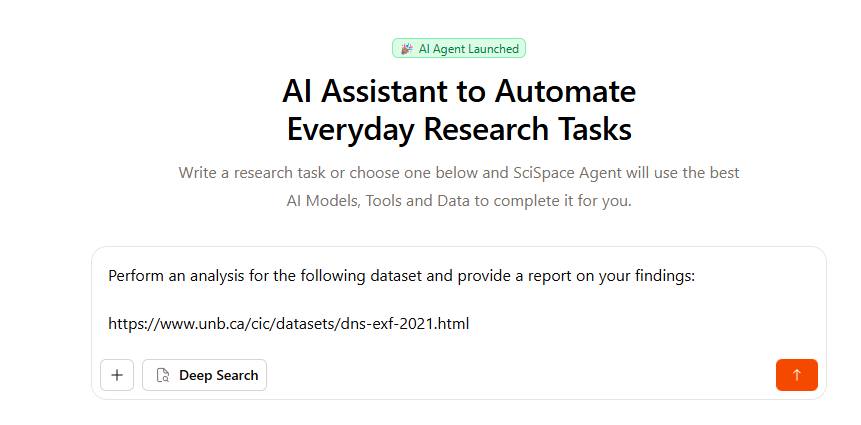
It scraped the data from the URL we provided but also downloaded some extra files and provided a detailed analytical report – so the approach is highly academic.
Accuracy and relevance of AI suggestions
The AI’s output was spot-on, as we noticed it surfaced precise insights from our dataset without unnecessary repetitions or irrelevant information from the files it gathered itself. In our opinion, SciSpace nailed the analysis, highlighting key takeaways we would’ve spent hours digging for ourselves.
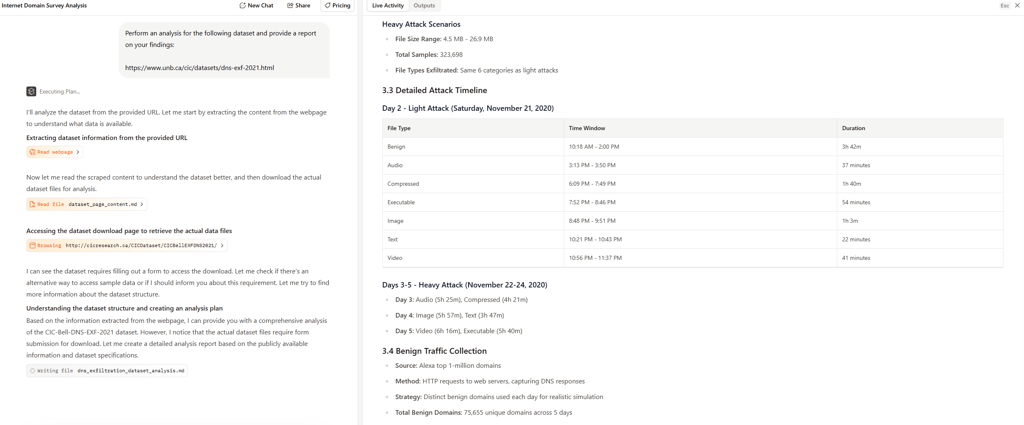
Relevance was also high: we found AI suggestions closely tied to our query, with accurately cited sources and a clear avoidance of generic fillers. That said, we strongly recommend always double-checking anyway, as AIs can occasionally miss nuances in complex data.
Speed and performance on larger projects
On bigger tasks, like our dataset review request, SciSpace took around 5 minutes to complete its report. This is pretty long – definitely longer than a quick chat with LLM. However, considering the quality of its output and the fact that it’s still faster than performing such a task by hand, speed isn’t an issue here.
For literature reviews with multiple papers, it handles bulk processing smoothly, although we noticed that AI agents use a lot of credits. As such, its 100 free credits are good only for one or two larger projects. During our AI testing, performance was solid – we experienced no crashing, so SciSpace Literature is suitable for scaling projects despite the wait on intensive runs.
Pricing, plans, and what you get for free
SciSpace Literature offers 4 plans: Basic, Premium, Advanced, and Teams. The Basic plan is a free tier, while paid plans start from $12.00/month. Here’s what you can expect to get with each of the plans:
| Plan | Basic | Premium | Advanced | Teams |
| Features | 1 parallel task, basic Literature Review (5 columns), standard model access, limited chats, AI actions, paraphraser, notebooks, paper summaries, citations, topic searches, podcast plays, AI detections, no export | 2 parallel tasks, unlimited Literature Review (50 columns), high-quality model access, unlimited chats, AI actions, paraphraser, notebooks, paper summaries, citations, topic searches, podcast plays, AI detections, full exports (RIS, CSV, BIB, Excel, XML), customizable chat settings | All Premium features plus access to the Deep Review model for deeper analysis, systematic review, and meta‑analysis workflows | All Premium and Advanced features, role management for admins, discounted per‑user pricing, collaboration, multi‑user support |
| Credits | 100 credits/month | 1200 credits/month | 5500 credits/month | 5500 credits/month (per user) |
| Price | FREE | From $12.00/month | From $70.00/month | From $8.00/month (per user) |
Final verdict: should you use SciSpace Literature for your next review?
If you’re looking for a tool to cut your research time from days to hours, SciSpace Literature is worth using. It’s best for fast discovery, structured synthesis, semantic research, and AI-assisted deep dives across dozens – or hundreds – of papers. However, like any other AI tool, it still can hallucinate and over-interpret findings, so you always need to double-check the key claims. After all, strong and evidence-based research is the basis for any literature review or academic work.
Our tip is to pair SciSpace Literature with trusted databases (Google Scholar, PubMed, or Scopus) for source verification and reference managers (Zotero or EndNote) for checking final citations. If you’re using it willingly, you can significantly improve your research workflow.
How does SciSpace Literature differ from traditional literature reviews?
SciSpace Literature flips the script on traditional literature reviews by using AI to instantly summarize, compare, and visualize thousands of research papers. Unlike manual reviews, which can take weeks, it delivers insights in real-time, so researchers can spot trends and gaps faster.
Is SciSpace the best tool to write a literature review?
It depends on your goals. If you need a fast, AI-driven overview of thousands of papers, SciSpace Literature can save weeks of work. However, for in-depth, critical analysis where nuance and methodology matter, traditional reading and synthesis remain essential.
Is it okay to use AI for literature review?
It depends. AI can supercharge your literature review, instantly summarizing papers and spotting trends that would take humans weeks. But don’t ditch critical thinking: nuance, methodology, and context still need a human eye to avoid AI oversights.