How to use AI to write without losing your voice
Being behind major reports like The Mother of All Breaches and RockYou2024, our in-house cybersecurity experts and journalists provide unbiased, real-world testing and in-depth analysis.
We maintain complete transparency by openly sharing our testing methodologies with our audience.
Learn more

AI can absolutely help writers produce sharper, faster, and more engaging work – but human creativity, control, and accountability must always lead. I personally like to use AI as a co-pilot that helps me turn rough ideas into detailed outlines and then polished drafts.
The key is remembering that AI is a tool to fuel creativity, not replace it. The story, argument, or meaning – that’s all yours. With the right balance between what AI can do and what only a human can express, your writing process can indeed become more efficient – but also truly authentic, however counterintuitive it may sound.
In this quick guide on how to write with AI, I share the best practices for generating high-quality content without sacrificing your own voice.
Quick-start workflow: from idea to publish-ready copy in 7 steps
When I want to get from an idea to a polished piece fast, I follow a structured, repeatable workflow that allows me to streamline the process. Here are the key steps it incorporates:
- Brief the project. Define the topic, audience, its search intent, tone, and desired outcome before you even open an AI tool.
- Co-create outlines with Jasper – one of the best AI writing tools out there. Ask for structure ideas, then select what truly fits your vision.
- Draft sections. It’s best to go by sections rather than generate the whole piece at once. This way, you can minimize AI hallucinations and avoid repetitiveness. Generate initial paragraphs or phrasing options, focusing on the overall flow rather than perfecting results – you’ll come back later to tuck in all the corners.
- Refine your sections with targeted prompts. This is where you can add your personal perspective, findings, mentions, and any other information you would like to include in the text. Also, request clarity, smoother transitions, or stylistic upgrades in specific areas.
- Pause AI use for a checkpoint. Step back and independently judge the flow, logic, and emotion of the piece. Don’t rush it – this step is essential to ensure precision and consistency.
- Fact-check diligently. Verify all claims using human-vetted, credible sources only.
- Do a human voice pass and format for publication. Review and rewrite parts where tone or personal perspective feels too generic. Apply the required formatting.
For this last step, you can use AI humanizer tools to save even more time. However, I prefer to go over the whole text myself to ensure it sounds not just like a human but like me specifically.
Hit pause on the AI at key checkpoints and give yourself enough time to review the pacing, clarity, and tone of your piece. Making these independent editorial calls along the way keeps your work sharp and true to your own style.
Overall, by working through these steps, I can control both the process and the final voice of my writing. The rhythm becomes natural over time – AI speeds things up, but I’m always steering the narrative. That balance between automation and intention is where the best work happens.
What “good quality” looks like with ChatGPT and other LLMs
It can be tricky to assess whether what you’re generating with ChatGPT (or other LLMs of your choice) is genuinely good or just sounds good. That’s why it helps to have a few clear standards to check against.
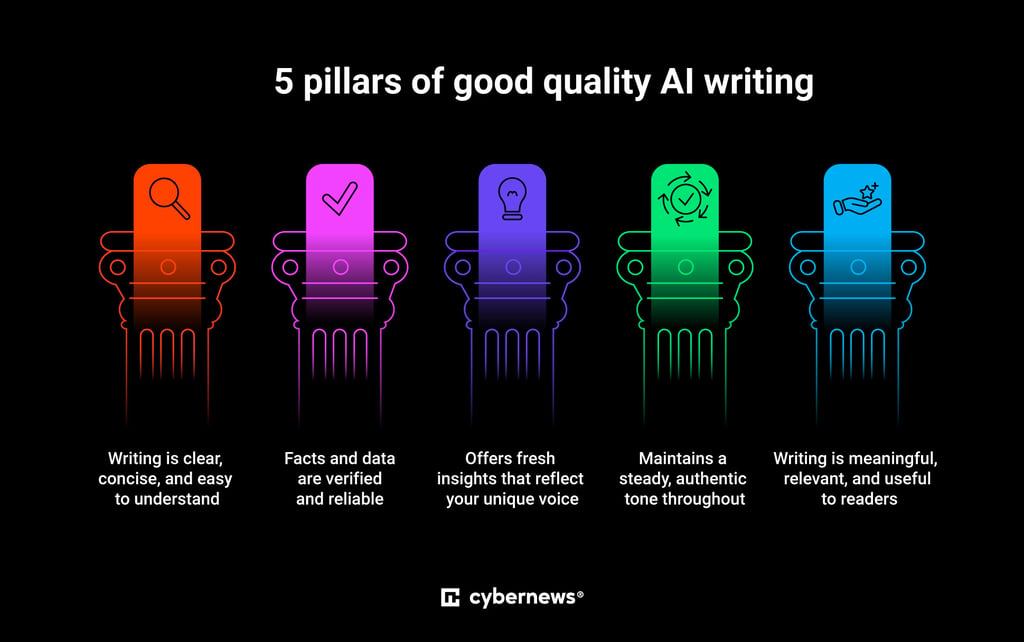
Good AI writing rests on five key pillars that keep your work strong, clear, and authentic and ensure the AI supports your voice instead of diluting it:
- Clarity. Writing should flow naturally, staying organized and free of unnecessary jargon or confusion.
- Accuracy. Facts, figures, details, and references must be correct and verifiable. AI can generate plausible but false information, so human fact-checking is obligatory.
- Original perspective. The content should offer fresh viewpoints that reflect your unique understanding. Bring your insights forward to avoid sounding generic or automated.
- Consistent voice. The tone and style should feel authentically yours, maintaining a steady personality throughout the text.
- Reader value. Keep your audience in mind – educate, engage, or help them solve something real.
Final quality check: quick self-audit
For a quick quality check after drafting with AI, ask yourself:
- Does this piece sound like me? Is the tone consistent?
- Does it reflect my personal angle or expertise?
- Are all facts and claims verifiable?
- Would my audience find this genuinely helpful or interesting?
- Did AI make this clearer or just faster to produce?
If you can answer “yes” to all of these with confidence, AI is helping – not replacing – your writing.
The essential AI tool stack for writers (and how to choose)
To write effectively with AI in 2026, you need to assemble the right toolkit. The tools you’ll rely on the most will greatly depend on your niche and the types of content you produce. Here’s the universal stack I rely on:
| Type of AI tool | Purpose | Examples |
| General large language models (LLMs) | Generating text, brainstorming, and drafting – very versatile and powerful for most AI writing workflows | Jasper, ChatGPT (GPT-4o), Claude, Gemini |
| Research assistants | Fact-finding, gathering data, organizing research – essential for accuracy | Perplexity AI, Elicit, SciSpace |
| Grammar and style checkers | Correct grammar, improve style, polish writing – ensure your writing is of professional quality | Grammarly, QuillBot |
| Co-originality and plagiarism checkers, AI detectors | Ensure content originality and avoid duplicate and/or plagiarized text | TurnItIn-compatible checkers, Justdone, Copyleaks |
This is by no means an exhaustive list of AI tools that can help you write. Depending on your needs, you may also want a paraphrasing tool, a PDF summarizer, or perhaps an essay-writing AI tool specifically.
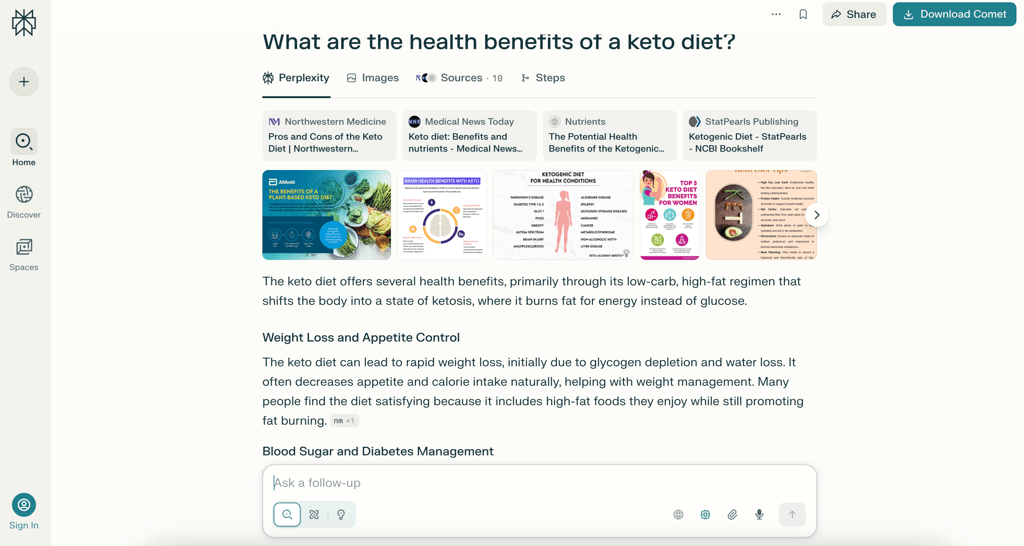
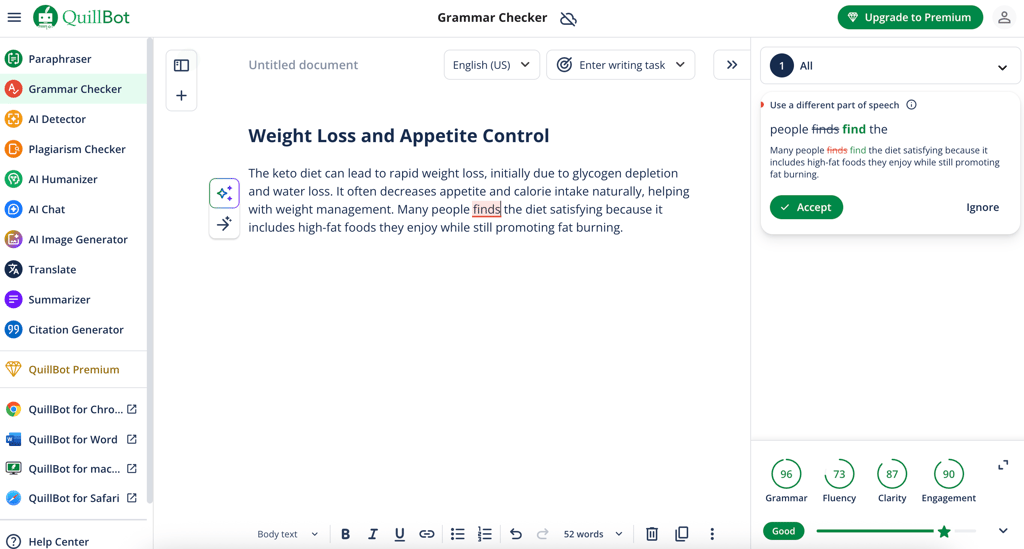
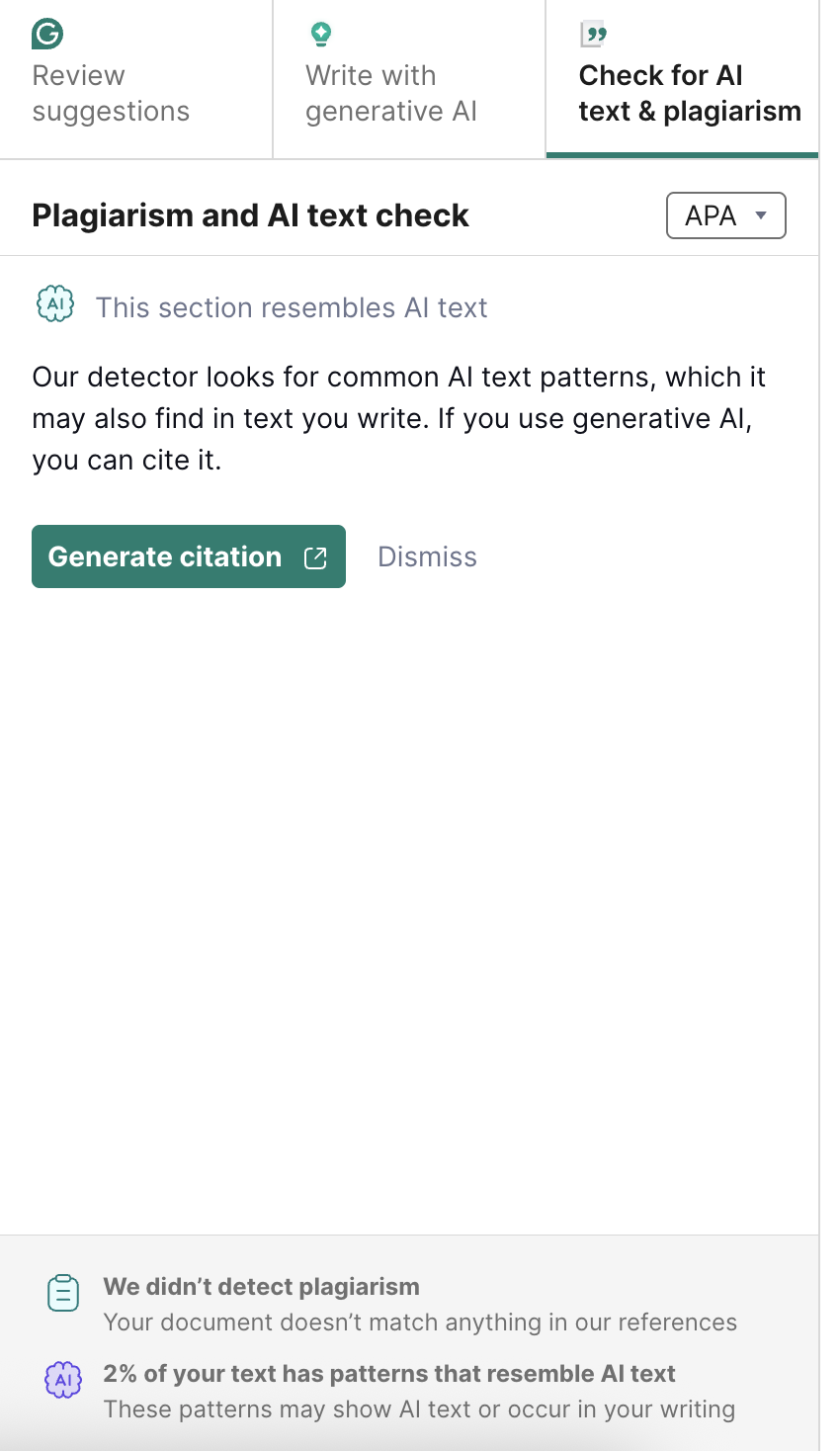
However, pay close attention when choosing AI tools – what looks powerful on the surface may not always align with your workflow or data-sharing preferences. A few key checks can help you pick wisely. When customizing your AI toolkit, consider these criteria carefully:
- Privacy posture. Verify that the tool protects your data and clearly limits how it’s stored and shared.
- Training opt-outs. See if you can prevent your content from being used to train other models.
- Export and audit logs. Ensure the prompts, outputs, and edits are easy to export and review for transparency.
- Cost. Check if the pricing and tiers suit your actual writing needs and budget.
You should be aware of where your data is stored and be able to track or delete your activity if necessary. If a tool makes your creative process easier without making it more vulnerable, it deserves a place in your stack.
Prompting that works: roles, constraints, and examples
Getting strong results from AI starts with clear prompting. Treat it like briefing a collaborator: the better your context, the better the output. When crafting a prompt, always clarify three essentials: role, audience, and goal, and then add limits for scope and tone.
Here’s how to come up with a prompt that will deliver the results you want:
- Define the role. Tell the AI who it’s acting as to set expectations for expertise and style.
- Describe the audience. Share who the writing is for – audience cues shape vocabulary, pacing, and complexity.
- Clarify your goal. Clearly stating what you want keeps revisions aligned with your intent rather than focusing on generic polish.
- Add constraints. Control length, tone, and content depth. These limits help prevent overlong, repetitive, or irrelevant answers.
- Request several options. If you ask for 2-3 variations, you can then compare the outputs and refine what resonates most.
Together, these steps turn prompting into a repeatable creative method – one that keeps AI serving your vision, not steering it. Here’s an example prompt that incorporates all of these steps:
You’re a witty copywriter writing a short piece on healthy holiday eating tips for a nutritionist's newsletter audience. The tone should be conversational, clever, and easy to skim. Keep it under 250 words, use natural phrasing, and highlight one memorable line readers will quote.
This structure gives AI context, direction, and limits, resulting in more tailored outputs. Let’s see how different AI tools performed with it:
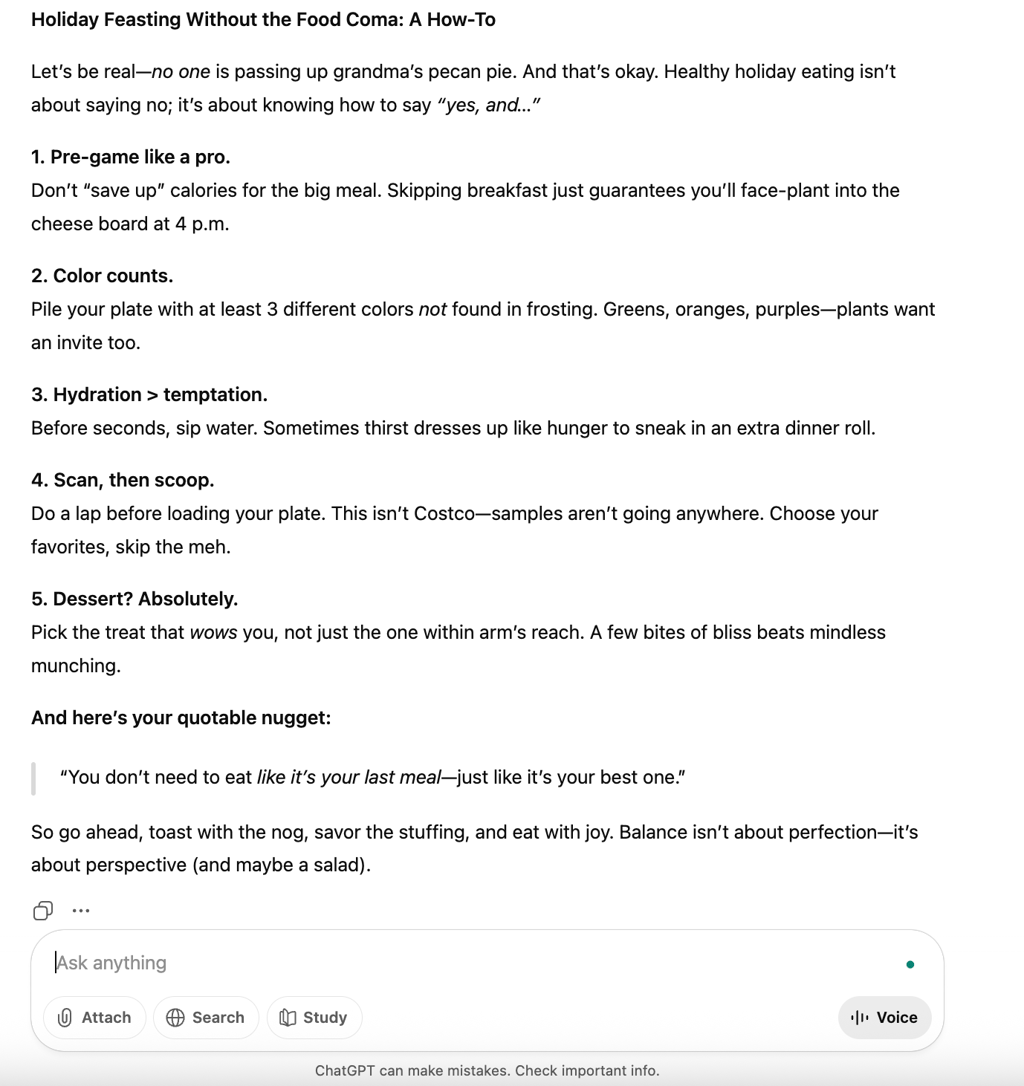
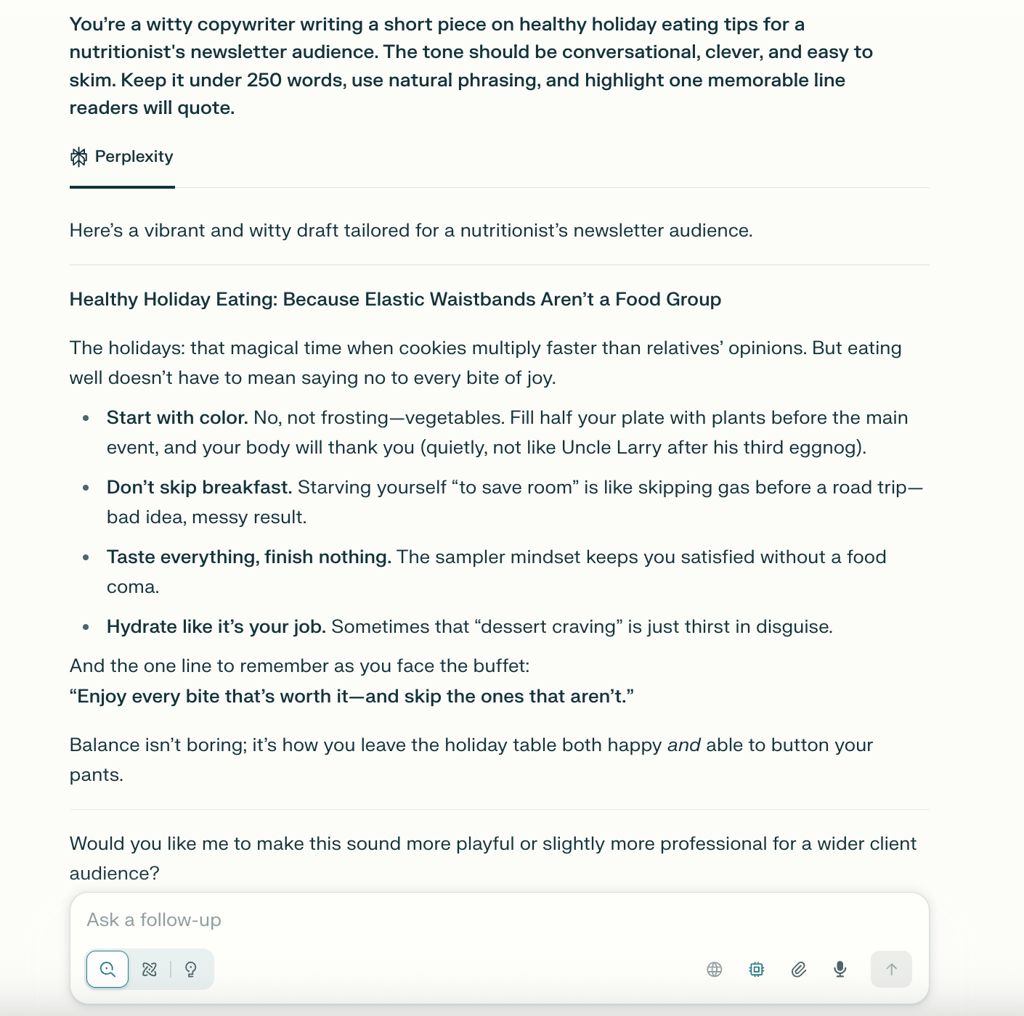
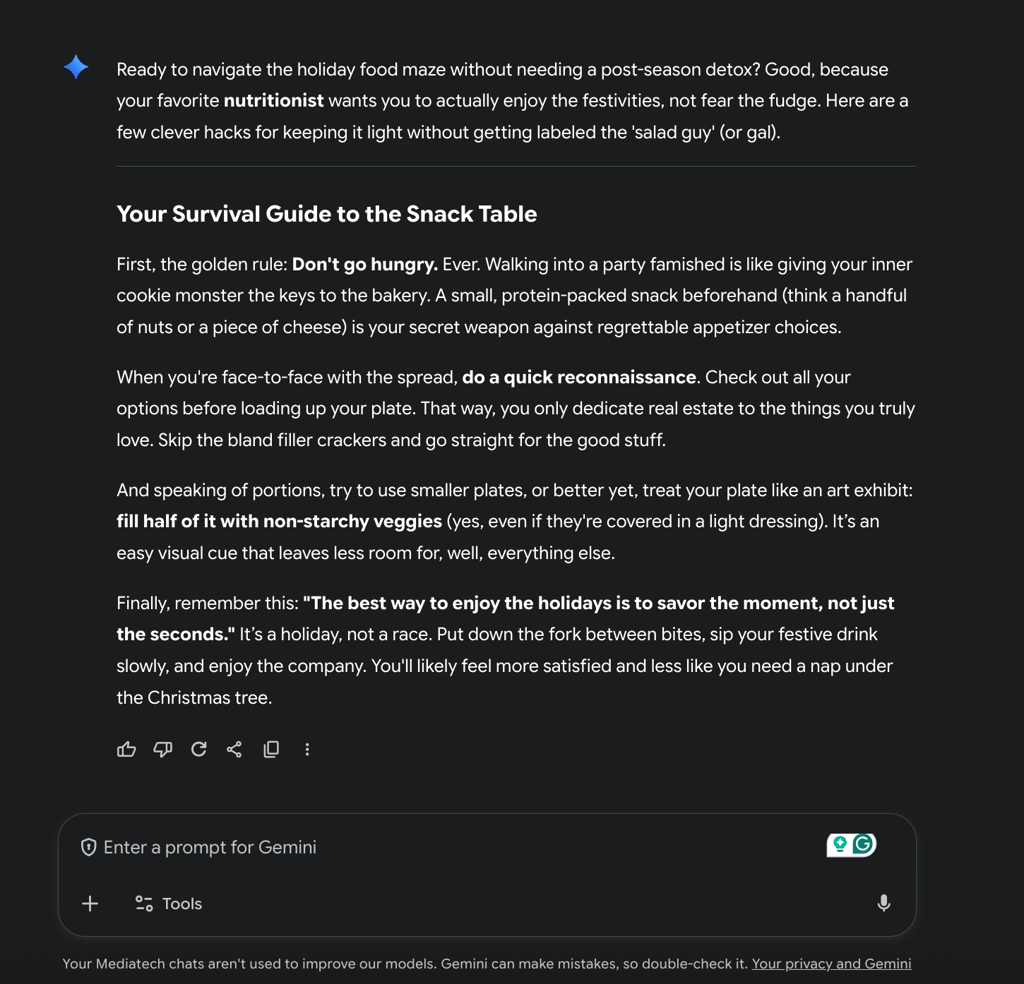
As you can see, all three AI tools actually followed the prompt and generated pretty decent examples within the provided limits. Now you can take the output in several practical directions with more targeted prompts:
- Ask for specific changes, such as tone adjustment or content expansion
- Request to expand certain sections with more detail or examples
- Add a compelling introduction or conclusion to frame the piece effectively
This approach lets you gradually refine AI-generated drafts to ensure that the final content aligns perfectly with your vision. Ultimately, prompting combined with your editorial judgment is the best way for using AI to write authentic, engaging content.
Using ChatGPT well for drafting and development
Using ChatGPT for drafting and development works best when you treat it as a smart collaborator, not a ghostwriter. Start broad: brainstorm ideas, generate headlines, or explore angles before committing to a specific direction. Then narrow down. Ask it to outline a structure for your topic or to expand bullet points into readable paragraphs that keep your voice front and center.
Once you have a draft, lean on ChatGPT to stress-test your ideas:
- Prompt it to spot gaps, missing logic, or weak transitions
- Ask for counterpoints to strengthen your argument or balance your narrative
- Use it for flow and coherence checks – ask to highlight any jumps in reasoning or awkward shifts between sections
The key is maintaining control – AI can assist with shaping and sharpening, but you make the final calls on content, tone, and direction.
Editing with AI: developmental, line, and copy passes
From my experience, editing with AI works best when you move in three deliberate stages:
- Start with the developmental pass. Ask for feedback on structure, flow, and clarity. Have it identify missing logic, weak sections, or places where ideas need reordering or depth.
- Switch to a line edit once the big-picture issues are fixed. Focus on rhythm, sentence variety, and word choice. Ask the AI to smooth transitions or tighten language without changing tone.
- Finish with a copy pass for grammar, punctuation, and typos. Keep this mechanical but precise.
At each stage, review and manually accept or reject every suggestion. By layering edits this way, you can ensure that your own judgment stays visible in the final text.
Fact-checking and hallucination control
Fact-checking with AI requires active oversight. Never assume generated facts, names, or data are correct – they may sound plausible but be wrong. As you review, pull out every claim that looks factual or specific: numbers, quotes, studies, dates, or historical details. Verify each one through trusted primary or reputable secondary sources.
Ask the AI to flag statements that require confirmation or provide brief source lists for manual verification. When facts are confirmed, add citations or notes to show evidence and maintain transparency. Remember to ensure that all the information is still up to date – while provided sources can be legitimate, they won’t necessarily be the most recent.
This process – validate, cite, and curate – keeps misinformation out of your writing and protects your credibility. AI amplifies ideas, but you guarantee truth. Treat each generated fact as a draft, not a certainty, and the result will always be stronger, accurate, and reliable.
Originality, plagiarism, and why “anti-detect” is the wrong goal
AI can be a powerful creative tool, but while working with it, you’re probably thinking about that final score on the AI detector. However, if you’re trying to “beat detectors,” you’re missing the point. The real goal isn’t to hide AI use but to make work so authentically yours that detection doesn’t matter.
Focus on originality, factuality, and ownership to keep your process both ethical and human. Here’s what you should consider.
Why detectors fail
AI detectors often produce unreliable results: they can flag human writing as “AI-generated” or miss AI text if it’s been heavily edited. This is because detectors rely on linguistic patterns and probability models, not a true understanding of authorship.
A false alarm can hurt credibility even when you’ve written with integrity. That’s why energy spent on evading systems is better spent on improving substance. Incorporating strong arguments, clear narratives, and personal insight into the generated text makes authenticity self-evident.
How to be original
True originality isn’t about fancy phrasing – it’s about bringing something only you can add.
Blend verified information with your own perspectives, experiences, or examples. Use AI to explore structures, transitions, or phrasing, but ensure the core ideas, interpretations, and tone come from you. Refresh routine topics with new data points or overlooked angles.
When your writing shows curiosity, specificity, and lived understanding, it becomes personal – and immune to sameness, whether human or machine-made.
Safe checks and style risks
Always run a plagiarism check, even on your own AI-assisted drafts. Sometimes, large language models echo public-domain phrases or mimic stylistic fragments too closely. Verify that any quotes, stats, or referenced text are cited correctly.
Keep caution when asking AI to “write like” a living author – imitation of their tone or structure risks crossing ethical or copyright lines. Instead, analyze what exactly you admire – clarity, rhythm, empathy – and adapt these qualities into your own unique voice.
You can ensure your work remains grounded and credible by blending transparency with good editorial practice. After all, the mark of professional creativity is accountability. When you own your process and refine your voice at each step of the way, authenticity isn’t something you need to prove to the reader. It’s something the reader feels.
FAQ
How can AI be used for writing?
AI can help at every stage – from brainstorming and outlining to drafting, editing, and fact-checking. It’s especially useful for exploring new ideas, improving clarity and tone, or summarizing complex content. The key is to maintain control over your message while letting AI handle structure or language suggestions.
What is the best AI tool for writing?
The best tool depends on your writing goals. ChatGPT and Jasper are popular for general writing and idea development, while tools like Claude, Grammarly, and QuillBot are more useful for editing or tone refinement. Choose one that aligns with your workflow, privacy needs, and writing style.
Is writing AI free to use?
Yes, many tools offer free versions, but advanced features, such as longer memory, research access, or improved reasoning, typically require a paid plan. You can start free, and then upgrade if needed.
How to start with AI for beginners?
Begin with simple prompts: ask AI to outline a topic, rewrite a short paragraph, or improve clarity. Learn by experimenting. Review every output critically, edit for accuracy and voice, and build confidence one section at a time.