13 best AI humanizer tools for text in 2026
Being behind major reports like The Mother of All Breaches and RockYou2024, our in-house cybersecurity experts and journalists provide unbiased, real-world testing and in-depth analysis.
We maintain complete transparency by openly sharing our testing methodologies with our audience.
Learn more

Do you use AI in your daily life to write, but aren’t satisfied with the outputs? Do you think AI writing lacks human touch? I thought that too, and would spend hours editing AI-generated text to make it sound more human. Luckily, there is a way around this – AI humanizers.
AI humanizers are tools that rephrase AI-generated text to make it sound more human. They help with sentence structure, overall flow, and vocabulary. You can even make a text sound more academic or more casual, depending on what you need. AI humanizer outputs can also frequently bypass AI detection.
However, with so many AI humanizers out there, it can be difficult to know which ones are reliable. Some humanizers might struggle to match tone or insert awkward phrasing. Lucky for you, I tested a bunch myself, with the help of the Cybernews research team. Keep reading to find my top 13 AI humanizers for text in 2026 below.
Top 13 AI humanizer tools – shortlist
- Undetectable AI – best AI humanizer for bypassing AI detection
- Humalingo – flexible AI humanizer for multi-style rewriting
- Quillbot – best AI humanizer for multiple languages and grammar accuracy
- Surfer – best AI humanizer for SEO-aligned rewriting
- EssayDone – AI humanizer for students
- Grammarly – AI humanizer for clarity and tone
- WriteHuman – AI humanizer for long-form storytelling
- Phrasly – budget-friendly AI humanization tool
- humanizeaitext.ai – versatile AI humanizer
- Humbot – beginner-friendly AI humanizer
- Sumarizer.org – free AI humanizer for instant rewrites
- Justdone – workflow-focused AI humanizer
- BypassGPT – high-end AI humanizer for customization and multilingual support
The best AI humanizer tools compared
To help you see the full picture, take a look at the 13 best AI humanizers at a glance: their starting price, available tools, and supported languages.
| Brand | Best for | Starting price | Standout feature | User rating | Free version | Supported languages |
| Undetectable | Bypassing AI detectors | $5.00/month | Customizable output | 2.5/5 | ✅ Yes | 7000+ languages |
| Humalingo | Different types of written content | $9.99/month | All-in-one tool | 3.3/5 | ✅ Yes | One (English only) |
| Quillbot | Academic writing and essays | $8.33/month | Paraphrasing in 23 languages | 4.8/5 | ✅ Yes | 23 languages |
| Surfer | Natural written content | $29.00/month | Brand knowledge | 4.6/5 | ✅ Yes | One (English only) |
| EssayDone | Academic essay writing | $19.00/month | Reference manager | 4.4/5 | ✅ Yes | 50+ languages |
| Grammarly | Academic and technical writing | $12.00/month | Built-in plagiarism detector | 3.8/5 | ✅ Yes | Five languages |
| WriteHuman | AI humanization for different tone texts | $12.00/month | AI paraphraser | 3.9/5 | ✅ Yes | 10 languages |
| Phrasly | AI humanization on a budget | $19.99/month | Unlimited AI humanizations for a flat fee | 4.6/5 | ✅ Yes | 4 languages |
| humanizeaitext.ai | Writing articles and blogs | $14.00/month | Content optimization for SEO | 4.2/5 | ✅ Yes | 26 languages |
| Humbot | Quick humanization with simple controls | $7.99/month | Highlights changes | 2.5/5 | ✅ Yes | 50+ languages |
| Summarizer.org | Affordable AI detection | Free or from $3.00/month | Unlimited free version | 3.8/5 | ✅ Yes | 6 languages |
| Justdone | Bulk writing and content flows | $2.00 for 7-day access | Suggestions for manual revisions | 4.3/5 | ✅ Yes | Multiple languages |
| BypassGPT | Free AI detection, multilingual customization | $8.00/month | Language diversity | 3.5/5 | ✅ Yes | 50+ languages |
Top AI humanizer tools of 2026 – detailed list
In this section, I highlight the best undetectable AI humanizer tools on my list in detail, analyzing each for its strengths, weaknesses and key features. This will help you choose the best humanizer for your needs.
1. Undetectable AI - best tool for bypassing AI detection

| Pricing: | $5.00/month |
| Free trial: | Yes |
| Free version: | Yes |
| Money-back guarantee: | 7 days |
Undetectable AI is one of the most effective tools for bypassing AI detection on the market. It can humanize your text for authenticity, making it perfect for any type of use, such as your term papers, blog articles, and professional emails.
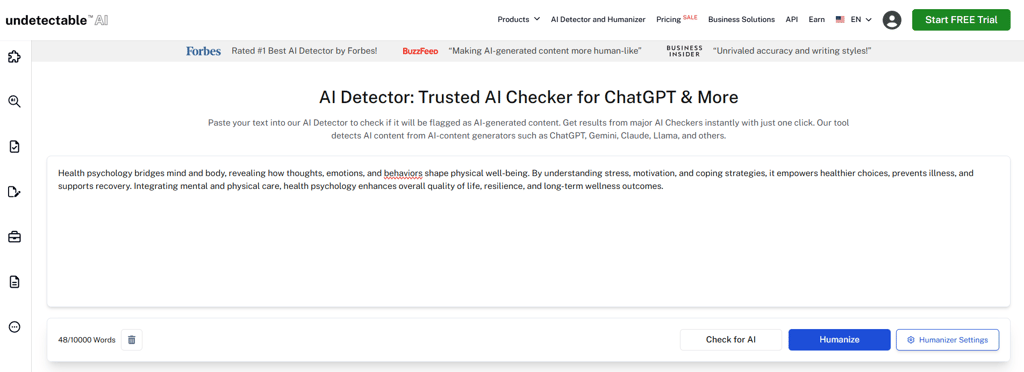
When examining Undetectable AI, I noted how effectively it converted robotic language and AI-typical sentence patterns into engaging and genuine writing. It can save a lot of time for people who want polished, high-quality content but don’t have time to write it on their own.
A feature that stood out to me was that I could get instant results from all major AI checkers in one place, including GPTZero, OpenAI, Quillbot, Copyleaks, Grammarly, and Sapling. That way, I could humanize my text and check how well it passes multiple AI checks across the most-used tools. Overall, I thought Undetectable AI was very effective at bypassing AI detection, and the output felt natural. I barely needed to edit it. The only issue I had was that it was a little bit inconsistent in tone with more complex texts.
Undetectable AIi has a free version with limited features. It allows you to humanize text, but takes considerably longer than the premium version. The paid plans are a little expensive, but they are still worth getting, considering the quality of the output is very good.
| Plan | Free | Yearly | Monthly | For business |
| Cost | Free | $5.00/month + 6 months free | $19.00/month | Custom |
| AI humanizer | ✅ Yes | ✅ Yes | ✅ Yes | ✅ Yes |
| Word limit | Limited | 10,000/month | 20,000/month | Custom |
| AI checker | ❌ No | ✅ Yes | ✅ Yes | ✅ Yes |
| AI generator | ❌ No | ✅ Yes | ✅ Yes | ✅ Yes |
2. Humalingo – AI humanizer for multi-style text

| Pricing: | $9.99/month |
| Free trial: | Yes |
| Free version: | Yes |
| Money-back guarantee: | None |
Humalingo is a solid AI humanizer designed to refine machine-generated content into more natural, human-like text. It focuses on readability and tone adjustment, offering variety of options for types of texts it can tailor to. The tool is based on simplicity, making it accessible even for users who don’t have prior experience with similar tools.
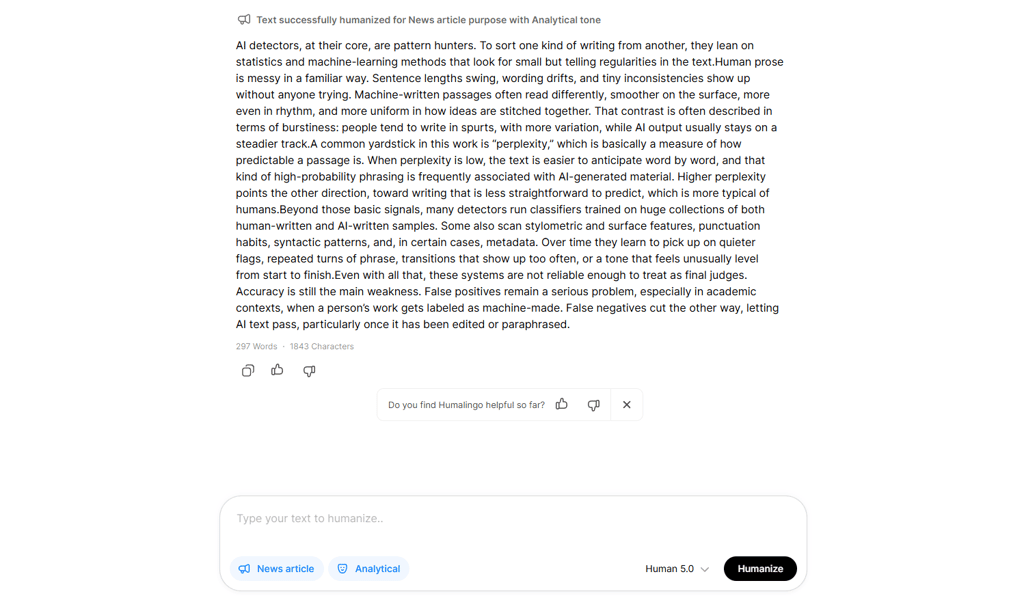
During testing, Humalingo felt like an elaborate text humanization tool. The options for the type of text I wanted were impressively broad. I could also further customize the output by choosing the tone I want for the text. For testing, I picked a news article as the output type and selected an analytical tone.
I liked Humalingo's simplistic dashboard. It took no time to start using the tool. Also, it's fast, giving you a solid output in a couple of seconds.
The main limitation is its free version, which restricts usage and may not be sufficient for longer pieces. To unlock extended input limits and more consistent performance, you’ll need a paid plan. That said, the overall speed and quality make it a competitive option.
| Plan | Free version | Premium |
| Cost | Free | $9.99/month |
| AI humanizer | ❌ No | ✅ Yes |
| Word limit | Not applicable | Unlimited |
| AI checker | ✅ Yes | ✅ Yes |
| AI generator | ❌ No | ❌ No |
3. Quillbot – best AI humanizer for multiple languages and grammar accuracy

| Pricing: | $8.33/month |
| Free trial: | Yes, 125 words per input |
| Free version: | Yes |
| Money-back guarantee: | No |
Quillbot is another AI humanizer fit for working in multiple languages. It also includes grammar checks, can generate accurate citations, and is now more affordable than ever. With the code CYBERNEWSQB40 you can save 40% of its annual subscriptions.

I found Quillbot to be fast and reliable. For testing, I used a sample written in a rather formal language, and it managed to make it sound more casual while still retaining the same sentence structure. I was also satisfied with how it detected and matched the tone.
The AI checker detected the text as 95% written by a human, which is a pretty good result – although if you’re going for a 100% human-like text, you’ll probably need to do some editing. You can also humanize text in languages other than English, like Spanish or German.
Another limitation that I found was the free version’s word limit. I could only humanize 125-word paragraphs at a time. If you’re looking to humanize longer pieces, you’ll need to get a subscription. The paid version starts at $8.33/month and comes with a full set of features, including unlimited paraphrasing, plagiarism checkers, and text refining.
| Plan | Free version | Premium |
| Cost | Free | $8.33/month |
| AI humanizer | ✅ Yes | ✅ Yes |
| Word limit | 125 per input | Unlimited |
| AI checker | ✅ Yes | ✅ Yes |
| AI generator | ❌ No | ❌ No |
4. Surfer – AI humanizer for SEO-ready content rewriting

| Pricing: | $29.00/month |
| Free trial: | Yes, 500 humanization words |
| Free version: | Yes |
| Money-back guarantee: | No |
Surfer blends AI rewriting with SEO precision, making it a strong choice for those who need content that ranks well. It can help optimize text for keyword density, readability, and search intent, which helps boost engagement.

When I tested Surfer’s AI Content Humanizer, I was impressed by how well it balanced natural-sounding text with SEO optimization. I could rewrite AI-generated drafts without losing key keywords or readability.
The interface was clean and intuitive, so I could tweak content quickly. My outputs felt polished, requiring only minor adjustments. The only drawback I noticed was its excessive use of ampersand and quite informal language. This means that the content needs revision and some extra manual fine-tuning to maintain the flow and style you want.
You can try Surfer for free with a 500-word cap. For extended resources, including unlimited AI detection and up to 50,000 words a month, Surfer has an AI Humanizer and Detector plan that costs from $29.00/month.
| Plan | Free trial | AI Humanizer and Detector | Essential | Scale | Enterprise |
| Cost | Free | $29.00/month | $79.00/month | $175.00/month | $999.00/month |
| AI humanizer | ✅ Yes | ✅ Yes | ✅ Yes | ✅ Yes | ✅ Yes |
| Word limit | 500 per input | 50,000/month | 600,000 words/year | 1,200,000 words/year | Unlimited |
| AI checker | ✅ Yes | ✅ Yes | ✅ Yes | ✅ Yes | ✅ Yes |
| AI generator | ❌ No | ❌ No | ✅ Yes | ✅ Yes | ✅ Yes |
5. EssayDone – student-friendly AI humanizer

| Pricing: | $19.00/month |
| Free trial: | Yes |
| Free version: | Yes |
| Money-back guarantee: | No |
EssayDone is a solid AI humanizer that brings the most value for students. It transforms AI-generated drafts into polished, natural-sounding essays and papers while preserving meaning and citations.

I was impressed by how user-friendly EssayDone’s interface is. While it had pretty standard looks, most of its functionalities included explanations. The platform had different levels of AI text humanization, ranging from 1 (basic humanization) to 10 (advanced humanization).
As per the platform's recommendation, for testing, I picked level 7. I was pleased that EssayDone gave me 3 versions of humanized text. Once I picked the version I liked the most, I could also use EssayDone’s grammar check for further improvements. Overall, I had a positive experience with EssayDone, from the simple interface to the quality of output.
EssayDone has a free version, which lets you humanize 800 words per day. It’s good for very short pieces, but if you need more in-depth texts, it’s very limiting. For more resources and functionalities, EssayDone offers paid plans starting at $19.00/month.
| Plan | Free trial | Basic Plan | Pro Plan | Ultra Plan |
| Cost | Free | $19.00/month | $15.00/month | $23.34/month |
| AI humanizer | ✅ Yes | ✅ Yes | ✅ Yes | ✅ Yes |
| Word limit | 800 words daily | 20,000 words | 50,000 words | 400,000 words |
| AI checker | ✅ Yes | ✅ Yes | ✅ Yes | ✅ Yes |
| AI generator | ✅ Yes | ✅ Yes | ✅ Yes | ✅ Yes |
6. Grammarly – AI humanizer for precise tone

| Pricing: | $12.00/month |
| Free trial: | Yes |
| Free version: | Yes |
| Money-back guarantee: | No |
Grammarly is best known as a tool for fixing up grammar and editing, but it’s more than that. Recently, it has introduced other attention-worthy features, including AI humanizer.
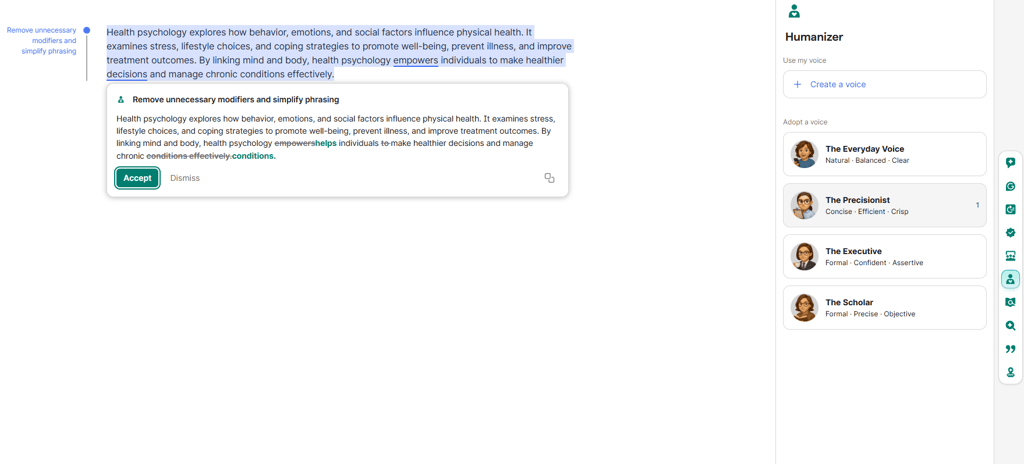
When I tried Grammarly Humanizer, I found it effective at making AI-generated text read more natural and clear. Its grammar and tone suggestions were helpful, and I appreciated the ability to adjust content for different voices: Everyday, Perfectionist, Executive, and Scholar. If the options were not enough, I was able to create my own, custom voice.
However, I’ve noticed that the outputs needed some minor edits. On the positive side, the interface was intuitive, while real-time feedback made writing smoother.
Grammarly has a resourceful free version. However, if you want more customization, I recommend a paid plan.
| Plan | Free trial | Pro | Enterprise |
| Cost | Free | $12.00/month | Custom |
| AI humanizer | ✅ Yes | ✅ Yes | ✅ Yes |
| Word limit | Unlimited | Unlimited | Unlimited |
| AI checker | ✅ Yes | ✅ Yes | ✅ Yes |
| AI generator | ✅ Yes | ✅ Yes | ✅ Yes |
7. WriteHuman – AI humanizer for long texts

| Pricing: | $12.00/month |
| Free trial: | Yes, 200 humanization words |
| Free version: | Yes |
| Money-back guarantee: | No |
WriteHuman is an AI-powered tool designed to make AI-generated content sound more natural and readable. It offers tone adjustment options and works well with long-form writing.
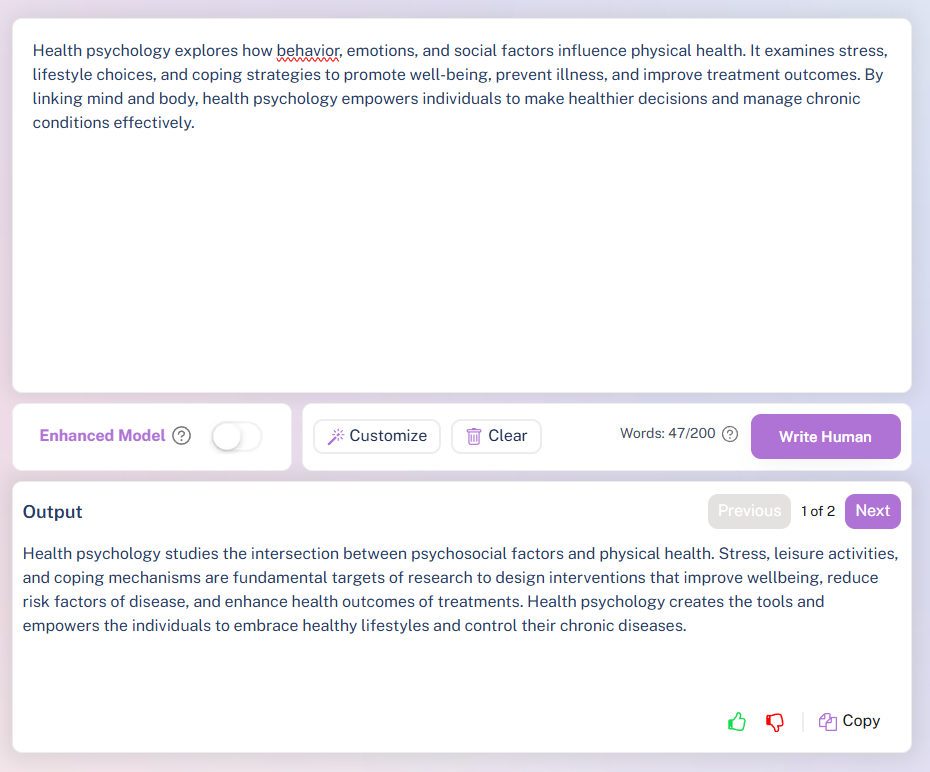
When I tried WriteHuman, I found it effective in making AI-generated text sound more natural and readable. It handled long-form content well, and I liked the abundance of tone adjustment options, which were broader than Grammarly’s. Most outputs needed only minor edits.
On the downside, processing larger documents could be slow, and very technical topics sometimes require extra refinement. Overall, it’s a reliable tool, though not as advanced as higher-ranked providers.
WriteHuman has a limited free version, which is only enough to test the tool. If you’re planning to use it properly, the provider has 3 plaid plans to choose from, starting at $12.00/month.
| Plan | Free trial | Basic | Pro | Ultra |
| Cost | Free | $12.00/month | $18.00/month | $36.00/month |
| AI humanizer | ✅ Yes | ✅ Yes | ✅ Yes | ✅ Yes |
| Word limit | 200 per input | 600 per input | 1200 per input | 3000 per input |
| AI checker | ✅ Yes | ✅ Yes | ✅ Yes | ✅ Yes |
| AI generator | ✅ Yes | ✅ Yes | ✅ Yes | ✅ Yes |
8. Phrasly – the budget-friendliest AI humanization tool

| Pricing: | $12.99/month |
| Free trial: | Yes, 500 humanization words + 3 content generation credits |
| Free version: | No |
| Money-back guarantee: | Yes, 14 days (only if there's absolutely no usage on your account) |
Phrasly is a good AI Humanizer that offers unlimited AI humanizations at the lowest price tag. I recommend it if you want to do a lot of AI humanization work on a budget. It also comes with three or 15 content generation credits, depending on your plan.
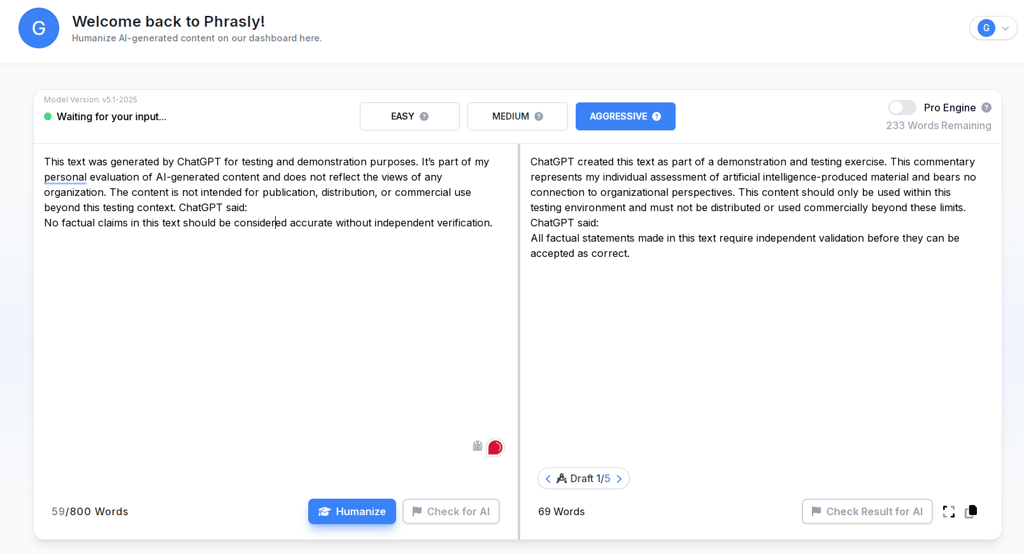
After registration, I was pleasantly surprised by a user-friendly dashboard where I could monitor my work and performance. Apart from advanced AI humanization, the premium plan gives you 15 AI writer generations per month and future-proofs your work by removing watermarks. In my experience, Phrasly is pretty good for writing essays.
The output text looks natural, reads fluently, and doesn’t flag any plagiarism detection tools. Its low pricing is also one of the most attractive things about Phrasly. However, if you’re writing in British English, I would be careful – some users reported typos.
You can try Phrasly for free with a 550-word cap per request. The premium plan offers unlimited AI humanizations for $12.99/month.
| Plan | Free Trial | Premium |
| Cost | Free (500 words + 3 credits) | $12.99/month |
| AI humanizer | ✅ Yes | ✅ Yes |
| Word limit | 550 per input | Unlimited |
| AI checker | ✅ Yes | ✅ Yes |
| AI generator | ✅ Yes (3 credits) | ✅ Yes (15 credits/month) |
9. humanizetextai.ai – reliable AI humanizer for different types of text

| Pricing: | $14.00/month |
| Free trial: | Yes (500 words/process) |
| Free version: | Yes |
| Money-back guarantee: | 3 days |
Humanizeaitext.ai is best for texts of different purposes, including email, legal, academic, and marketing pieces. It’s also great for beginners, as its interface is super intuitive and doesn’t require lots of knowledge.

Having used it myself, I can definitely say humanizeaitext.ai creates outputs that are good at matching selected purposes. Whether it’s legal, academic, or general writing, it converts its outputs accordingly, making it incredibly versatile. Humanizeaitext.ai has readability, freeze words, and brand voice settings that improve outputs for the intended aim and maintain specific keywords unchanged. I also liked the simple and easy-to-navigate user interface.
A downside of this tool is its free plan limitations. You can only humanize 500 words at once. However, the yearly subscription starts at just $14.00/month, which is a reasonable price compared to other tools..
| Plan | Free | Grow | Scale |
| Cost | Free | $14.00/month | $28.00/month |
| AI humanizer | ✅ Yes | ✅ Yes | ✅ Yes |
| Word limit | 500/process | 40,000/month | Unlimited |
| AI checker | ✅ Yes | ✅ Yes | ✅ Yes |
| AI generator | ❌ No | ✅ Yes | ✅ Yes |
10. Humbot – AI humanizer for quick rewrites
| Pricing: | $7.99/month |
| Free trial: | Yes |
| Free version: | Yes |
| Money-back guarantee: | 7 days |
Humbot is an AI humanizer built for speed, turning AI-generated text into natural, readable content in moments. It’s ideal for quick rewrites, helping users polish short-form content efficiently with minimal effort.

When I used Humbot, I appreciated how fast and straightforward the humanization process was. Its minimal interface relies on simple controls, so I didn’t have to spend much time analyzing and considering settings. Short pieces came out naturally and barely required any edits. Also, it tracked the changes, so I could easily see what was improved. Overall, Humbot is a reliable option for quick rewrites.
While Humbot has a free version, it’s very restrictive as its limit is 200 words a month. However, the prices for its paid plans are average, making it an accessible option.
| Plan | Free trial | Basic | Pro | Unlimited |
| Cost | Free | $7.99/month | $9.99/month | $9.99/month |
| AI humanizer | ✅ Yes | ✅ Yes | ✅ Yes | ✅ Yes |
| Word limit | 200/month | 3,000/month | 30,000/month | Unlimited |
| AI checker | ❌ No | ✅ Yes | ✅ Yes | ✅ Yes |
| AI generator | ✅ Yes | ✅ Yes | ✅ Yes | ✅ Yes |
11. Summarizer.org – cheap AI humanizer
| Pricing: | $3.00/month |
| Free trial: | Yes |
| Free version: | Yes |
| Money-back guarantee: | No |
Summarizer.org stands out by offering a generous free version and very low prices for its paid plans. Despite its low price tag, it includes instant multiple rewrite options, letting users compare outputs side by side for fast, effortless text humanization.
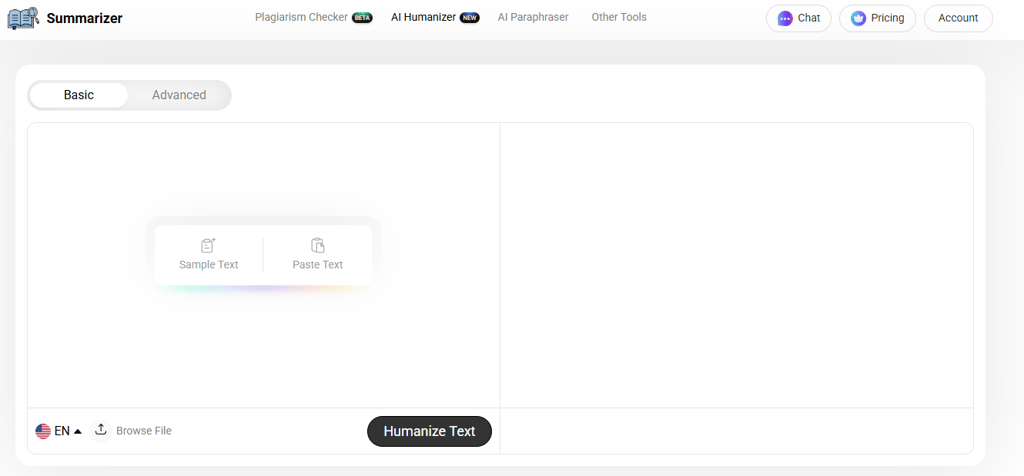
When I tried Summarizer.org, what surprised me was how fast and effortless the humanization process felt. I could paste AI-generated text and get multiple rewritten versions instantly, which made comparing outputs easy and efficient.
Most of the results were readable and natural, requiring only minor tweaks. I liked that it’s completely free, so testing different variations didn’t feel restricted. On the downside, it’s better suited for short to medium-length texts. Overall, it’s a simple, reliable tool for quick AI text rewrites.
Summarizer.org is one of the cheapest AI humanizers on my list. Besides its great free plan, paid options start at $3.00/month.
| Plan | Free trial | AI Assistant | Pro |
| Cost | Free | $3.00/month | $4.80/month |
| AI humanizer | ✅ Yes | ✅ Yes | ✅ Yes |
| Word limit | 400 per input | 300,000/month | 300,000/month |
| AI checker | ❌ No | ✅ Yes | ✅ Yes |
| AI generator | ✅ Yes | ✅ Yes | ✅ Yes |
12. JustDone – AI humanizer for different content formats
| Pricing: | $19.99/month |
| Free trial: | No |
| Free version: | No |
| Money-back guarantee: | 7 days |
JustDone offers task-specific humanization tools for emails, blogs, academic content, and other types of writing. It adapts outputs to different content formats, helping users produce natural, readable text efficiently.
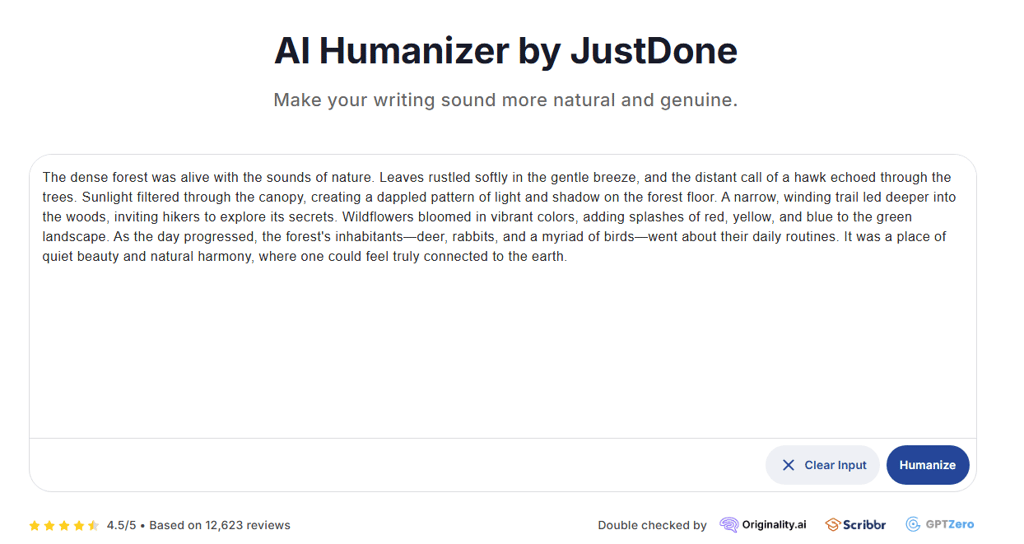
Using JustDone AI Humanizer, I found it highly versatile for different types of content. However, I found that most rewrites needed minimal editing. Another downside was that very long or highly technical documents required extra manual adjustments and careful revision. The interface was clean and intuitive, which made the overall experience of navigating the tool pleasant.
JustDone AI Humanizer is on the pricier end. It has 2 subscription tiers, which can be purchased either as a monthly or manual description. For testing, you can get a 7-day trial for $2.00, which gives you access to all the functionalities.
| Plan | 7-day Access | Unlimited Monthly Plan | Unlimited Annual Plan |
| Cost | $2.00 | $19.99/month | $24.99/month |
| AI humanizer | ✅ Yes | ✅ Yes | ✅ Yes |
| Word limit | Unlimited | Unlimited | Unlimited |
| AI checker | ✅ Yes | ✅ Yes | ✅ Yes |
| AI generator | ❌ No | ❌ No | ❌ No |
13. BypassGPT – high-level AI humanizer tool for customizable content in multiple languages

| Pricing: | $6.40/month |
| Free trial: | Yes |
| Free version: | Yes |
| Money-back guarantee: | 3 days |
BypassGPT is great for creating content that passes AI detection and plagiarism checks while staying customized to your needs. It can handle multiple languages, so it might be useful if you work with global teams.

When I explored BypassGPT, I was impressed by its multilingual capabilities and customization features, though it has a steep learning curve and slower processing for larger projects. For localized, undetectable content, it’s still an excellent choice for global teams. I liked the custom templates. They really do help speed up work. However, I found that it’s not very beginner-friendly, not beginner-friendly, and is kind of slow when it comes to big projects.
The thing that I didn’t appreciate was that bypassing AI detectors is guaranteed only with higher-tier plans, starting from Pro. I don’t really see a point in humanizing text or having “bypass” in the name of the product if the actual output can still be flagged as AI-generated.
BypassGPT offers 80 free words to humanize, which is a really small sample. If you need more than that, you need to purchase a premium plan, which comes with some other premium features. The cheapest paid plan isn’t too expensive, but you’re limited to 500 words per request.
| Plan | Free | Basic | Pro | Unlimited |
| Cost | Free | $6.40/month | $12.00/month | $15.20/month |
| AI humanizer | ✅ Yes | ✅ Yes | ✅ Yes | ✅ Yes |
| Word limit | 150/month | 5000/month | 30,000/month | Unlimited |
| AI checker | ✅ Yes | ✅ Yes | ✅ Yes | ✅ Yes |
| AI generator | ❌ No | ✅ Yes | ✅ Yes | ✅ Yes |
What is an AI humanizer?
AI humanizers are tools designed to remake AI-generated content (text, voice audio, images, and video) to appear more human. Since AI content can come across as robotic and emotionless, it has become easier to spot this type of content, which includes text and images.
A humanizer tool will take content that has been generated by AI and rework it to include more human-like elements. For example, these tools can take AI-generated text from an essay writing AI and add more emotion, improve the tone, and enhance the overall structure and flow of the text. In theory, this makes it seem more like a human wrote the text and would also mean that the text could bypass AI detectors.
How to choose the best AI humanizer for your needs
Choosing the right AI humanizer starts with understanding your specific goals. Are you looking to improve chatbot interactions, create lifelike voiceovers, or improve text readability? Pinpointing your needs will help narrow down your options. By following these steps, you’ll find a tool that aligns with your needs, budget, and offers a great user experience:
- Define your goals. Determine whether you require the tool for voiceovers, chatbot interactions, or improving text readability. Being aware of your mission will help you make fewer decisions.
- Set a budget. AI humanizers are available at different pricing tiers. Seek solutions with adjustable price structures that satisfy your needs without sacrificing necessary features.
- Focus on features. Prioritize features such as emotive tone control, natural voice modulation, multilingualism, and smooth connection with content systems or CRMs.
- Try the tool. A lot of tools come with free trials. Before committing, use them to assess customization choices, output quality, and usability. The best AI software guides you through the steps intuitively, so there’s very little learning curve.
Key features to look for in AI humanizer tools
When analyzing AI humanizer tools, there are some key features I always focus on. Here’s what I’ve found to be the must-have ones:
- Natural voice modulation. Nobody wants just a dry, AI-generated copy anymore. Therefore, one of the most important features I look for is the ability to produce speech that sounds fluid and human-like rather than robotic or unnatural.
- Emotional tone control. I’ve noticed that tools with this capability can replicate subtle emotional cues, making outputs more relatable and engaging.
- Multilingual support. Personally, I tend to turn down some AI tools just because they can’t deliver quality content in other languages I need. So, if you’re aiming to reach audiences that speak languages other than English, a tool that works across multiple languages is a must. It makes it inclusive and makes it more versatile.
- Ease of use. I appreciate tools that are beginner-friendly with intuitive interfaces. They save time and eliminate the effort of trying to wrap your head around how it works. Also, quality AI humanizer tools are more about how well they integrate into your workflow and improve the productivity of your projects.
- Customization options. Another very important feature is the ability to tweak tone, style, or customize other details. It guarantees outputs meet your specific prompts. So, before getting the tool, I’d recommend going through the customization options and checking what’s available.
- Integration with other tools. Tools that work well with platforms like content management systems or chatbots can take your efficiency and productivity to the next level.
Benefits of using an AI humanizer
I know from firsthand experience that AI humanizers can transform content creation and user engagement. A chatbot that not only burps out generic responses but acts like you’re having a real conversation with a real person. That’s the (new and improved) power of lifelike AI tools. Here are some of the AI humanizer benefits:
- You get dynamic interactivity. AI humanizers are designed to make artificial intelligence feel more human. Rather than a voiceover that sounds like Siri, you get a natural speaking voice with realistic tone, pauses, and emotion. Instead of a chatbot that looks for keywords to direct you, you get an AI that can understand your questions and the context behind them, responding to you as a helpful friend.
- More efficient work. AI humanizers automate tasks such as text refinement or professional voiceover generation, saving hours of work. This frees you to focus on creativity and strategy rather than repetitive edits.
- Saves you money. Hiring voice actors or professional editors can cost you a lot. With AI tools, you can get the same quality for a fraction of the cost, whether you’re creating explainer videos or refining blogs.
Limitations and challenges of using AI humanizer
Like any technology in its early stages, AI humanizers also come with their own set of limits.
While they’re good at improving the style and flow, the final output may still feel processed and lack the organic touch of human writing. Here are the most common challenges I noticed AI humanizers have:
- Lack of human creativity. AI humanizers can fill in the blanks and polish the writing, but cannot reflect the unique touch of human creativity and subtleties in writing. The output may still feel more processed than authentic.
- Costly subscriptions. The best AI tools tend to be expensive, which is not always affordable for freelancers on a tight budget.
- Occasional unnatural outputs. Even the best AI humanizers sometimes produce awkward or unnatural outputs, especially with complex or nuanced content.
- Ethical concerns. Misuse of these tools, such as creating deceptive deepfakes or plagiarized content, poses risks. Additionally, Google’s algorithms are now better at recognizing AI-generated material, which could impact your site rankings.
How to maximize the effectiveness of AI humanizers
Here are some helpful tips if you want to maximize the effectiveness of AI humanizers.
- Use advanced prompting – You can use detailed prompts to train AI to generate more human-like content. This ensures that your text is authentic and engaging from the start.
- Manually edit for style and engagement – Once you’re done generating content, try manually rephrasing it to add personality and clarity. This makes your text more readable and less robotic.
- Inject personal insights or unique takes – AI struggles to recreate human insights it experiences. It’s important to add your expertise, opinions, or personal thoughts to make it more credible.
- Break up predictable structures – There’s a similar pattern with AI-generated texts. It might be helpful to rearrange ideas, vary the sentence structure, adjust the tone, and rewrite it to improve readability.
Best AI humanizer in 2026 – final thoughts
Using AI for writing texts might come with shortcomings, such as unnatural-sounding text or inconsistent tone. Luckily, AI humanizers can be a versatile and practical tool, checking for grammar mistakes and rephrasing text to make it more human.
Plus, AI humanizers like Quillbot can also help you improve the quality of your content, which may raise your potential to rank on Google. Additionally, these tools are a great help for other kinds of textual tools, such as improving chatbot interactions or crafting voiceovers for videos.
In any case, if you frequently use AI to write, I encourage you to save yourself some editing trouble and look into the best AI humanizers in 2026.
Other AI tools you might be interested in:
Best AI detector: avoid detection on your texts
Best AI story generator: generate unique and authentic stories
Best AI chatbot: top AI chatbots to try out this year
Best AI image generator: generate top-notch images
FAQ
What is the most accurate AI detector?
Some of the most accurate AI detectors are Originality.ai and Content at Scale Detector. These tools are stellar for their precision and adaptability, consistently identifying AI-generated content across various contexts.
What is the cost of an AI humanizer?
Typically, AI humanizers cost between $3.00 and $30.00 per month. The price highly depends on the features and the provider. Some AI tools also have limited free plans with tokens, so you can try the service out.
Are AI humanizer tools suitable for small businesses?
Yes, there are many AI humanizer tools that are perfect for small businesses. They improve customer engagement, simplify content creation, and require little technical expertise. You can find many quality AI humanizer tools with flexible pricing plans and user-friendly interfaces.
How to ensure the ethical use of AI humanizers?
To ensure the ethical use of AI humanizers, avoid creating false content, respect the privacy rules, and use tools according to their purpose. Look for tools that promote accountability and provide clear documentation for ethical integration.
Are AI humanizers ethical?
AI humanizers are ethical since they’re primarily designed to improve the quality of AI-generated work to make it more engaging and interesting to read. The issue arises when you use it to misrepresent content as purely human-written.
How do AI humanizers work?
AI humanizers are intelligent systems that analyze machine-generated text, optimize it, and make it sound less robotic. They correct sentence structure, change the tone, and use better words to make the entire piece sound like you. It uses natural language processing to replicate human writing style and remove script-like expressions.
What’s the best AI humanizer for generating text?
Undetectable AI is the best undetectable AI humanizer to bypass any detector. It converts AI-written text to sound natural and human-like. This makes it more difficult to detect using AI-detection systems. It is multilingual, has different humanization modes, and an in-built AI detector.