SeaArt AI review – features, pricing, and ethical concerns
Being behind major reports like The Mother of All Breaches and RockYou2024, our in-house cybersecurity experts and journalists provide unbiased, real-world testing and in-depth analysis.
We maintain complete transparency by openly sharing our testing methodologies with our audience.
Learn more

Recently, SeaArt AI became popular among the content creator community. It’s a cloud-based video and image generator with lots of versatile AI features, ranging from standard text-to-image and image-to-image to advanced LoRA training, face swap, and video generation. The promise is impressive, but does the output match the marketing?
I decided to test SeaArt and form my own opinion based on the actual usage, rather than ads. Read on for a SeaArt AI review with hands-on testing results, an explanation of the pricing system, and detailed feature descriptions. I also delved into ethical considerations and licensing to help you decide if it’s legal to use for professional purposes.
What is SeaArt AI?
SeaArt AI is an online, cloud-based AI platform for art generation in various styles. It includes basic and highly advanced features, such as:
- Image and video generation via text, images, and video inputs
- LoRa training to teach the AI your own style
- AI characters that work as customized chatbots
- ComfyUI to build complex art generation workflows
- Advanced AI tools for upscaling, cinematic video effects, and artistic filters
Ethical concerns of SeaArt AI
SeaArt AI is a controversial tool due to its ethical policies. One of its popular use cases is generating provocative, graphically violent, or sexually explicit art that can be further shared and used for commercial purposes. The platform has NSFW filters, but there are various loopholes to get around them.
In June 2025, an independent research revealed that the tool is used for generating sexually explicit materials depicting underage people. As all users’ creations are visible in an open library, SeaArt reacted by asking the community to immediately report such unlawful instances so that the creators can be blocked.
Key features and tools
SeaArt AI offers a vast range of AI-powered features. Here are the detailed descriptions of the most popular ones.
Image generation
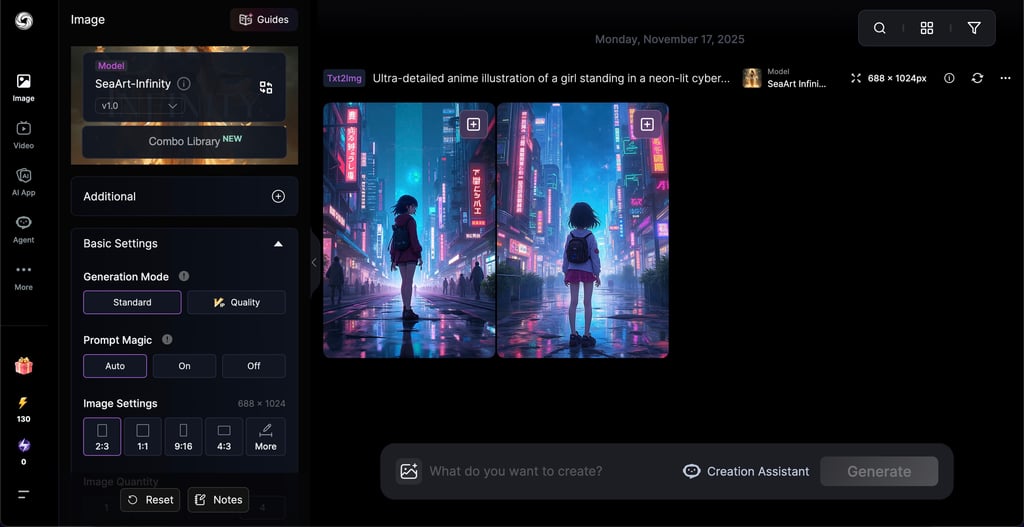
You can generate an image based on a text prompt, another image, or both of them together. I especially like giving negative prompts – telling AI what I don’t want to see in the image.
The tool has multiple AI models to choose from and a diverse library of art that can be used as a prompt or template. You can also tweak the level of prompt adherence and keep modifying the generated image until the result is perfect.
Face Swap
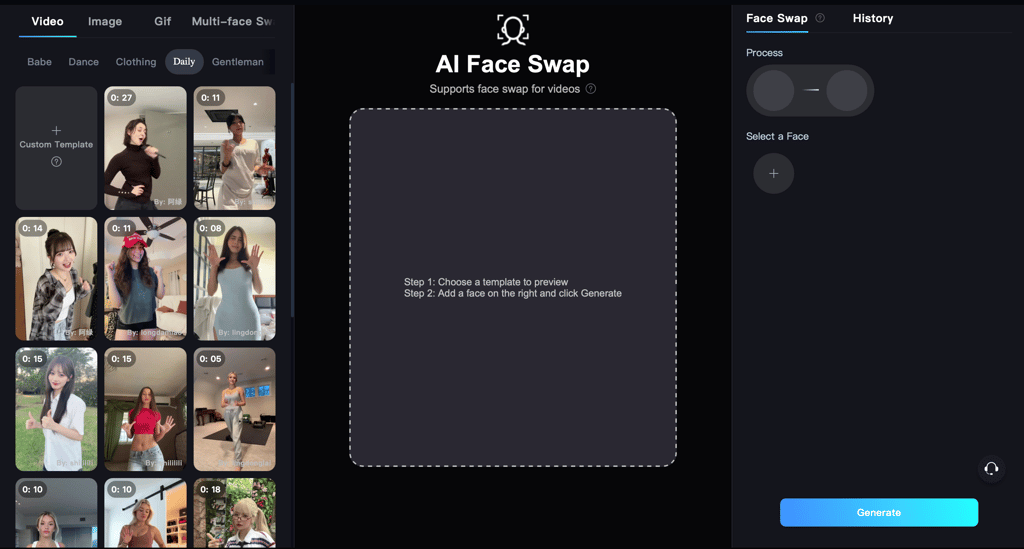
SeaArt AI Face Swap allows you to replace faces in photos and videos. The process is the following:
- Choose a perfect model from the library or upload your own video or image.
- Upload a close-up face shot of the person you want to swap in. Make sure the lighting and quality are as clean as possible for natural-looking results.
- Click Generate and have the face integrated into a new body.
AI Character
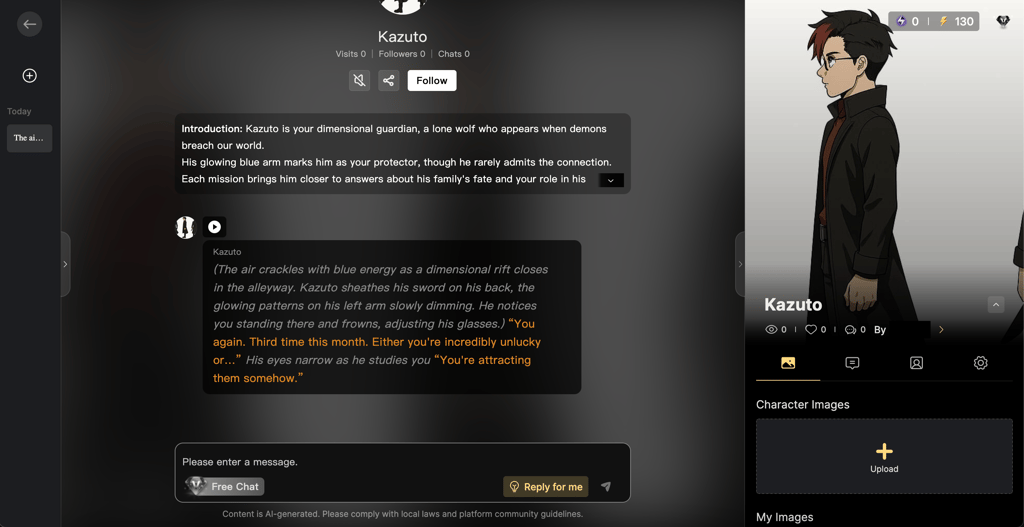
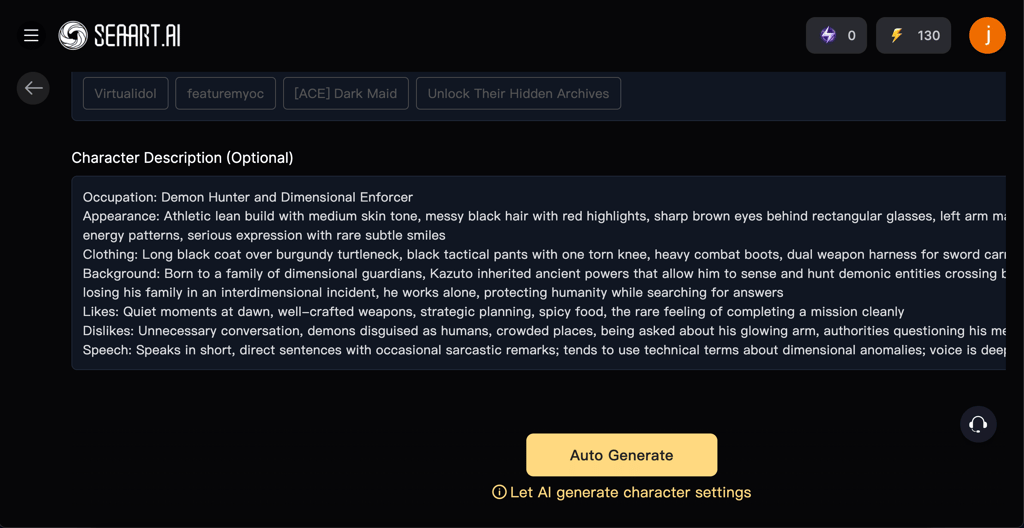
The feature is about creating a unique chatbot that behaves and responds exactly the way you described. You can shape the character by:
- Providing its background, mentality, and tone of communication, including the most unhinged and specific details
- Describing the setting, such as a dimly lit office on a rainy day
- Adding example dialogue by showing the desired answers to sample questions
Then, you can talk to the character to get ideas for your creative storytelling or keep you company. There’s also a big library of ready-made AI chatbots to interact with.
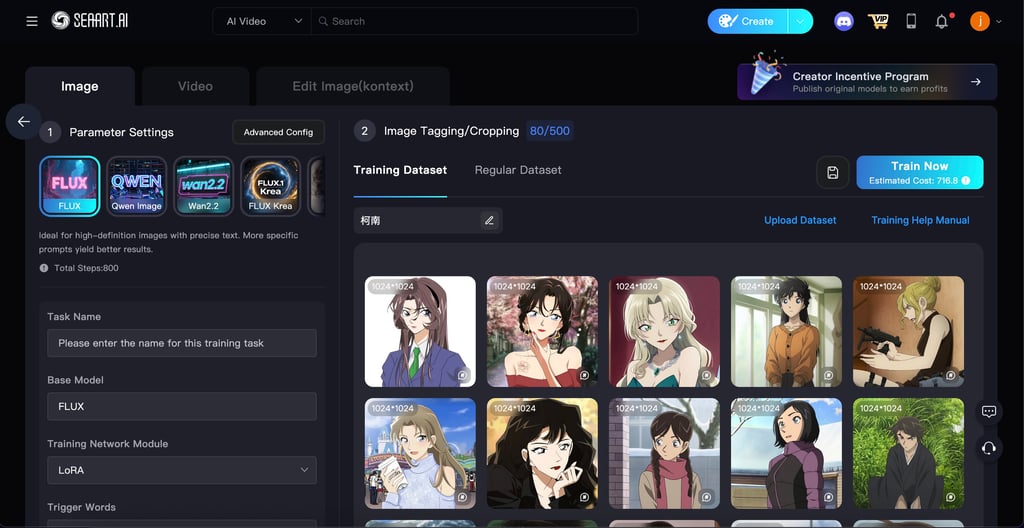
LoRA training
Instead of training a whole model with a large dataset (minimum 100 images), SeaArt lets you train a lightweight file called LoRA. You simply download 20-30 images as a reference, and the tool learns their style.
The key to high-quality results isn’t the number of images, but their variety – diverse angles, characters, and colors give AI a bigger creative range. So, every time you generate art, you can choose a specific LoRa to get the results in the needed style.
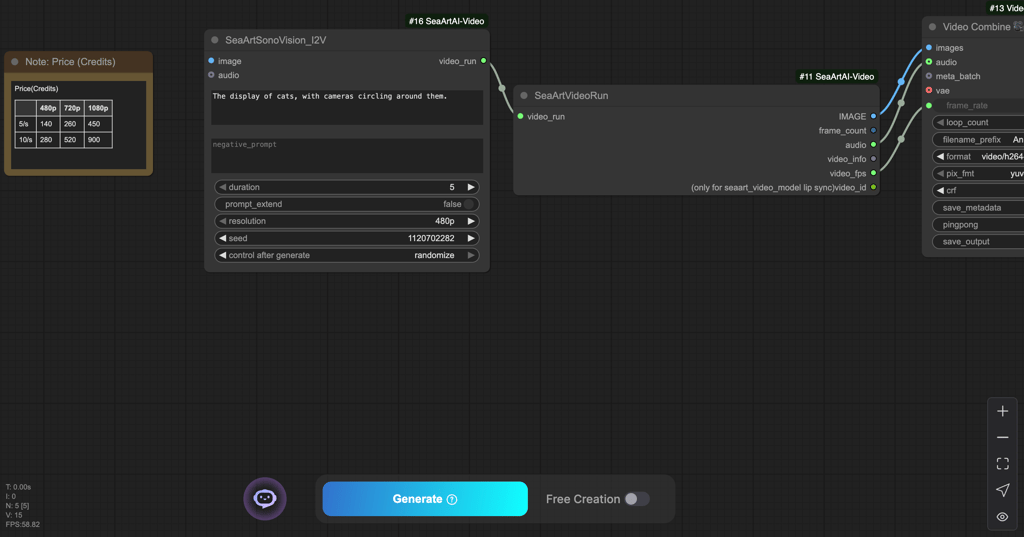
ComfyUI for complex editing
ComfyUI is an advanced node-based interface that gives you great control over every tiny detail in art creation. It has many nodes, including:
- Encoding for converting your images into instructions that the AI model understands
- Inpainting for adjusting only a part of an image, such as a face, hair, or background
- Samplers for controlling how the style, smoothness, and overall look of the final images are generated
- Combine for merging multiple prompts, LoRAs, or images in a custom way
ComfyUI lets you choose how prompts mix and weigh, the level of involvement of specific LoRAs and models, as well as adjust the diffusion flow. The main reason to use it is that you can reuse the same workflow to consistently get perfect outputs by just tweaking a few nodes.
On the other hand, the traditional SeaArt AI image generator produces different results with the same prompt, as the models, diffusion level, and other parameters are chosen by default every time.
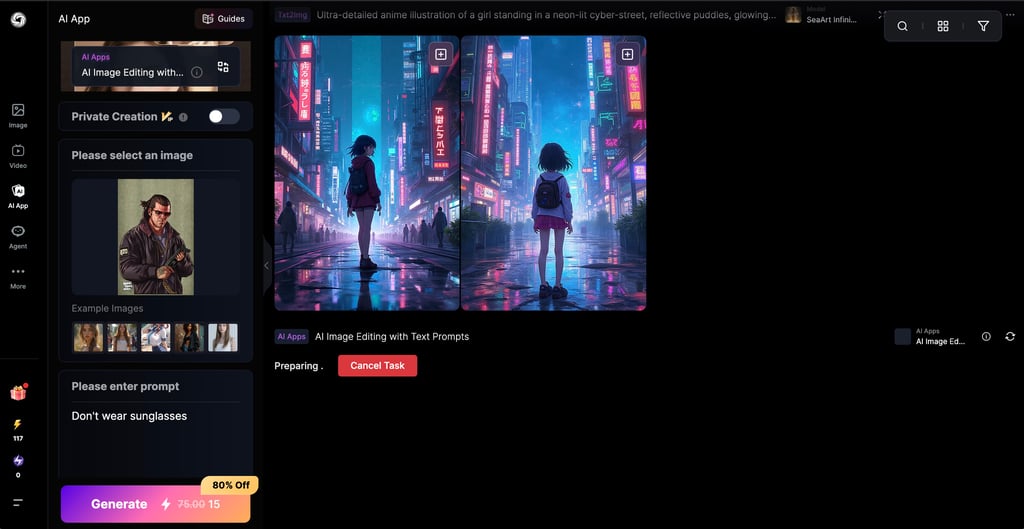
AI image editor
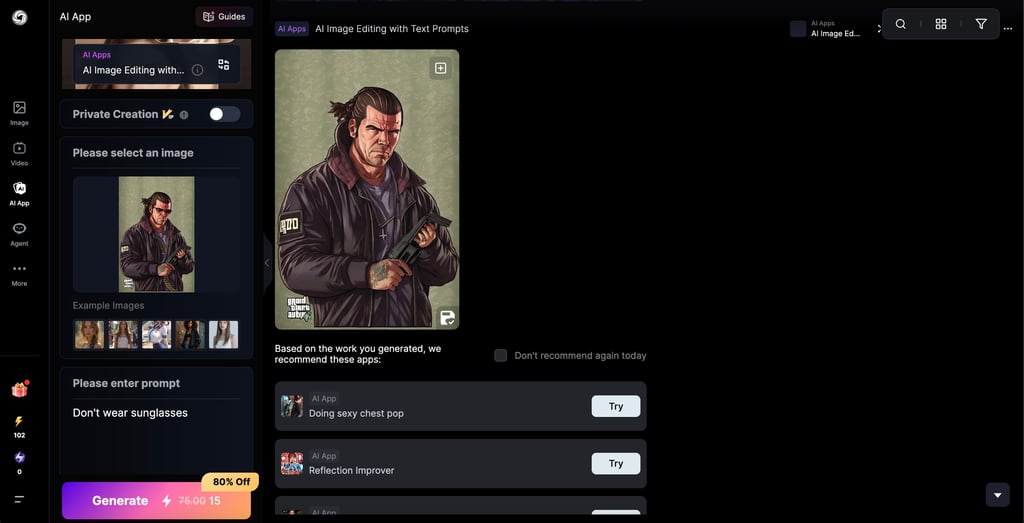
SeaArt’s AI image editor works on text prompts. Basically, you can upload any image and type what you’d like to change. It’s capable not only of image upscaling, but of adding new elements, replacing the background, or even modifying body parts.
I liked that useful AI tools pop up automatically below the generated image. It can be an AI chest pump, Studio Ghibli filter, reflection improver, or other tools for further image enhancement.
Video generation
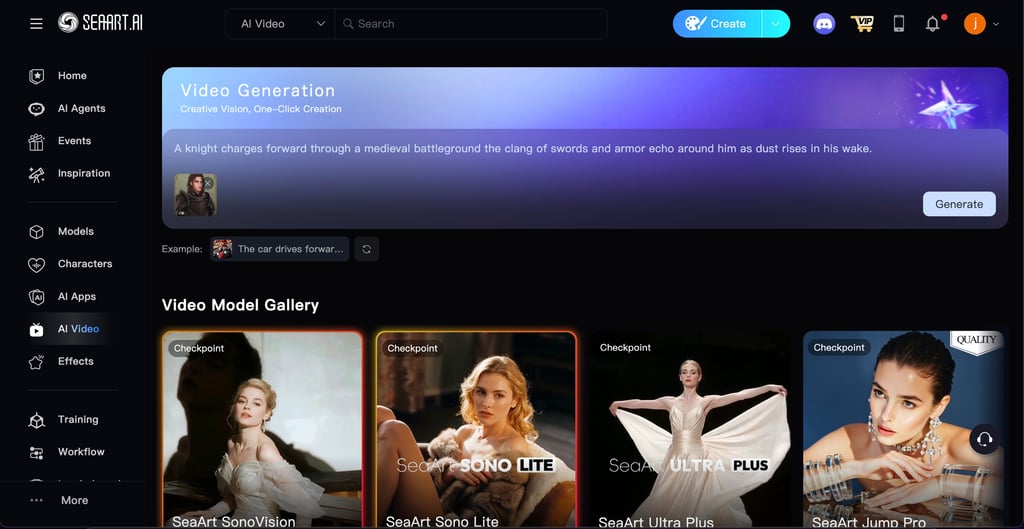
Similarly to image generation, you can create a video based on a text or image prompt. Here, you can select an AI model, size, duration, speed, and video effects, as well as give a negative prompt. The generated video can be further modified within the same editor with other AI tools.
You can also use LoRA trained on your dataset of videos and manage camera control with the prompts. I like that SeaArt has a knowledge base where you can find how to structure your video prompt for the best results. For example, it’s better to describe elements in the following order:
- Main subject movement
- Environment
- Camera movement, actions, perspective
- Lighting and atmosphere
Styles, filters, and effects
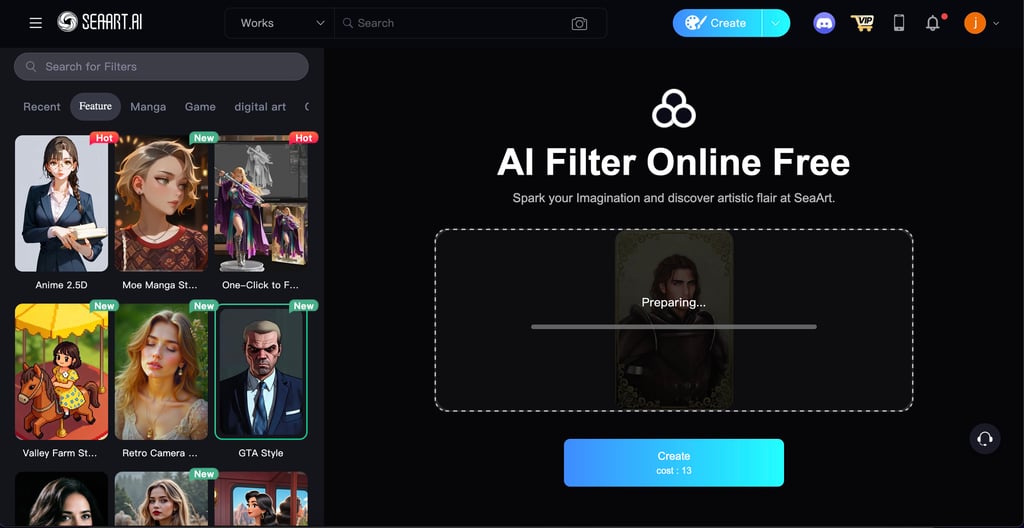
The range of styles, filters, and effects in SeaArt is truly vast. Together with classic filters, there are collections based on movies, cartoons, and games. When generating art, you can go for various styles such as Ghibli studio, American comics, Van Gogh, or thousands of custom ones created by other users.
Besides, there are many unique AI video effects that professional directors usually achieve through time-consuming manual work – here, you can apply them in one click. Some of SeaArt’s AI effects are:
- Cute Anime Shift that turns a video from a realistic to an anime style
- Go live to make it look like you’re live on social media
- Dolly zoom when the background stretches, but the character stays the same
- Eye dive that slowly zooms in on your eye
- Car effect that makes an AI-generated car drive up to you
- Bullet time that slows down movements around the character
Other one-click AI tools
SeaArt is packed with AI tools, and it’s impossible to cover all of them within one review. However, I decided to highlight a few fun and useful ones:
- Virtual try-on clothes. Yes, you can upload a set of clothes and a model you’d like to put them on. It not only helps you try on new clothes yourself, but also allows your characters to wear different outfits.
- AI dance. You can put any face on a dancing video. First, upload or choose a video of someone dancing, and then upload a photo of the person whose face will appear in the dancing video.
- ASMR video generator. Quirky enough, but ASMR video generation in SeaArt AI is limited to cutting fruits. Essentially, you can type any fruit as a prompt and see it getting cut in the ASMR style.
- Fat maker. This AI tool makes any character in an image chubbier. It works for real-life photos, too, if you want to visualize someone as plus-size.
Pricing and plans: how it works in SeaArt
SeaArt AI pricing may be confusing because of its hybrid model of AI tokens. Every plan comes with free points, called Stamina. Stamina is renewed daily and doesn’t collect, unlike Credits, which never expire. Credits, however, should be bought separately from the plan itself.
Every time you’re generating videos, training LoRA, or performing other AI tasks, Stamina is consumed first. Once you run out of it, the system starts to use Credits. Every day, you can open a free daily Lucky Box that contains extra Stamina and Credits.
The Stamina and Credit consumption depend on the model you use, the complexity of the prompt, and the quality of the art. Usually, creating one image costs around six Credits, while generating one video costs from 30 to 90 Credits. The final price depends on the actual computing power involved.
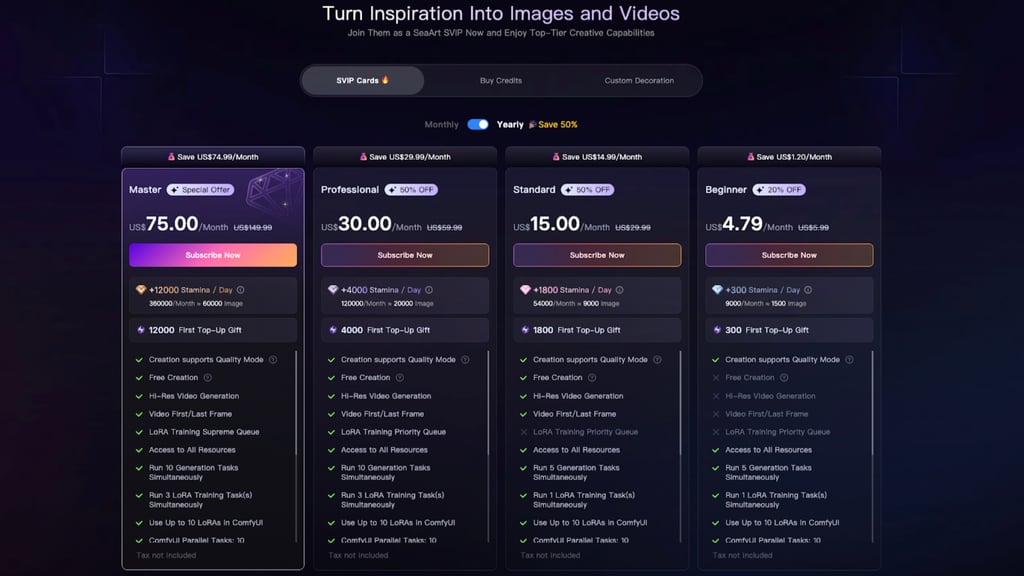
Below are the four SeaArt AI pricing plans with their main features:
| Plan | Beginner | Standard | Professional | Master |
| Features |
|
|
|
|
| Price | $4.79/month | $15.00/month | $30.00/month | $75.00/month |
Each plan comes with the option to generate in private mode – it means that all the artworks are visible only to you.
SeaArt AI has a three-day free trial, after which you’re automatically charged for a subscription. The platform itself warns users that the safest option is to cancel the free trial a day in advance. The problem is that due to time zone differences, money can be charged a few hours earlier than midnight.
SeaArt AI doesn’t offer money refunds, so if you cancel a subscription midway through, you’ll still be able to use the service till the end of the paid subscription period. However, you may still try to request a refund and describe your case via customer support.
Earning with SeaArt AI art
SeaArt AI allows people to use the generated art for commercial purposes. When you use someone else’s creation for commercial purposes, you are required to contact the author. Keep in mind that the rules for using AI content for commercial purposes vary by country. Even if SeaArt grants you the rights, check out the official country policies.
You can also monetize your LoRA, AI models, and AI characters through the SeaArt AI Creator Incentive Program. The earnings depend on user satisfaction and downloads of your works, so it’s important to produce high-quality art. The platform approves your AI creations for monetization if they’re original, unique, and align with positive and healthy artistic direction.
Pros and cons of SeaArt
Every tool boasts something and lacks something, and SeaArt is no exception. Here’s a concise pros-and-cons breakdown of all my findings.
Pros
There are many advantages of SeaArt:
High-quality art. SeaArt’s artworks are high-quality by default, but you can also adjust resolution and sharpness manually.
One-click tools. Many AI tools here are time savers, as you can upscale, enhance, or add effects and filters with just one click.
Monetization possibility. SeaArt has a special program to monetize your AI creations within the platform itself. Moreover, you have commercial use rights for every generated artwork.
Quirky features. You can find the most creative and unexpected AI tools, like a Muscle Generator, Fat Maker, and even French Kiss.
Knowledge base. SeaArt’s knowledge base is vast, covering practically all the use cases step-by-step. So, it’s easy to learn how to use any feature.
Cons
Before getting started, keep in mind the following SeaArt drawbacks:
Ethical concerns. For some, it may be an advantage, but SeaArt is popular among explicit content creators. As you use a shared library, you may come across disturbing or adult content.
Learning curve for ComfyUI. ComfyUI is an advanced tool that makes generations much higher-quality and more customized. However, it requires time and training to learn how to use it to your advantage.
Only online mode. Like many AI tools, SeaArt works only online through a web browser. Although it offers mobile apps for Android and iOS, the full range of features is available only in the browser.
Inconsistent AI generations. Even if you’re generating content with the same prompt and settings, SeaArt may produce different results. The thing is that in every generation, the tool interprets the prompt differently and introduces randomness.
Who should use SeaArt AI
SeaArt AI caters to a diverse range of audiences thanks to the variety of styles, genres, and levels of realism. Generally, three categories of users benefit the most from the SeaArt AI tool suite:
Visual novella creators and game designers. If you need one tool for all your visual storytelling endeavors, SeaArt AI is the right choice. The main advantage is the creation of consistent characters who look and behave exactly the way you want, with no random elements.
The AI Character feature lets you interact with your characters and understand their personalities, while ComfyUI gives you full control over their style, appearance, and setting. Also, the art and unique AI chatbots of other users can inspire you for your own creative works.
Hobbyists. If you’re like me, you’ll have fun experimenting with various filters, effects, and AI functionalities. SeaArt opens lots of space for creative pastimes: you can delve into advanced ComfyUI to learn how to build advanced workflows or generate art quickly and simply based on text prompts. This hobby can also turn into a source of income, as you can monetize your most creative works.
Content creators. SeaArt works great with real photos and videos, whether you’re creating content for marketing, social media, or your personal brand. I find it most useful for quick upscaling, face swaps, and applying video effects to improve engagement – it’s much easier (and faster) to get into trends with one-click AI tools. You can also create a series of videos and generate images based on your previous works or desired style.
Alternatives to SeaArt AI
SeaArt is a high-quality and versatile tool, but you may not like it for a number of reasons: lots of provocative content, the focus on fantasy art, or the price of the subscription. I tried out other AI generation tools, and here are three alternatives similar to SeaArt, but with a different focus.
HeyGen – best for video generation with AI avatars
HeyGen is all about AI avatars. You can choose one from a library with diverse genders, races, and ages, or create your own by uploading your photo. Instead of spending hours on filming videos, you can just paste a script that will be pronounced instead of you.
As we noted in the HeyGen review, it has templates for learning courses, marketing videos, social media clips, and how-to videos. Basically, here you can find every tool to reduce the time-to-market for talking videos.
Three three-minute videos (three per month) in 720p quality are free in HeyGen. The subscription starts at $5.00/month.
Veed.io – best for realistic content generation and editing
Veed is an all-in-one tool for realistic photo and video generation. Here, you can also work with AI avatars, generate photos and videos based on text prompts, and edit them with AI.
I like Veed because it combines both a powerful AI generator and an AI editor. So, you can manually edit, merge, and tweak video content details after the generation itself – you can read the detailed feature overview in our Veed.io review.
Some of Veed’s features are available for free, but only for limited usage. The subscription starts at $10.00/month.
OpenArt – best for generating fantasy art
OpenArt is a solid alternative for creating stylized art and illustrations. Here, you can create artistic videos and images based on text prompts, images, and other videos.
You can deeply customize the characters in the generated art by uploading reference images for faces, poses, and composition. It even has a pose editor with a mockup of a person that you can rotate to provide the perfect reference pose.
OpenArt’s first 40 credits are free to test the premium AI features. The subscription starts at $7.00/month.
How to get started and test SeaArt AI
If it’s your first time using the tool, it’s possible to understand if SeaArt suits you even within the limited number of free Stamina. I prepared some sample first steps to help you try out most features and get a clear picture of SeaArt’s capabilities:
- Create a SeaArt account to get your daily free Stamina and access your dashboard.
- Enter a text prompt in the image generator. Start with something simple like: “a serene beach sunset” to test colors, quality, and composition.
- Then, go for something more complex like “A futuristic beach sunset with two people chilling on the sand. A person on the right has pink hair.” This way, you can see how the output differs depending on your prompt and if SeaArt interprets multiple elements correctly.
- Ask the image generator for a forest in spring in the style of Vincent van Gogh or another painter to test how well SeaArt imitates famous artists.
- Go to LoRA Training and upload a dataset of images to train your own LoRA model and check how well SeaArt learns from your data. Experiment with learning rate and epoch parameters.
- Visit the AI Character or the Face Swap tools, depending on your needs. Upload a high‑quality photo to swap faces or create a character to make sure the tool fits your creative projects.
- Upload an image and turn it into a short video to test how SeaArt handles motion and details like swaying leaves, blinking, or falling hair. Make sure to give a specific prompt for the details you’d like to test.
My tip is to use negative prompts, as it raises the chances of generating a better image or video. Also, keep in mind that the more complex your prompt is, the more Stamina it’s going to consume. So, choose the features that you’re actually going to use regularly and concentrate on testing them.
Conclusion
SeaArt is a decent AI generator of fantasy and creative art. Its ComfyUI provides a high level of art customization that visual novella artists and designers can use for creating consistent characters. Hobbyists can benefit from a variety of one-click AI effects and filters that boost creativity.
Together with a range of AI tools come ethical concerns and inconsistency in AI generations. So, experiment with the three-day trial first, using the tips above to decide whether the tool is worth your money and time.
FAQ
Is SeaArt AI free to use?
No, SeaArt AI requires a subscription. However, it has a three-day trial period, and every plan comes with free usage points called Stamina.
Can I use SeaArt AI commercially?
Yes, you can. SeaArt provides users with commercial usage rights for the art they generate themselves. If you want to use another user’s work from the open library commercially, you must contact the creator.
Does SeaArt AI support NSFW content?
No, SeaArt claims that generating illegal or pornographic content is prohibited. NSFW content is labeled and automatically blurred in the open library.
What are LoRA models, and how do I train them on SeaArt?
LoRA is a lightweight file that you can train with your data. Basically, you train only a small part of the AI model, instead of the big model itself. You need to download 20-30 diverse images or videos in your preferred style for LoRA to learn their contents and imitate their style in future generations. Training the big model would require a minimum of 100 images or videos.
Why do my SeaArt images look different every day?
Every time you generate an image, SeaArt processes the prompt differently and engages different resources and parameters for its generation. So, even if the settings and the prompt are the same, the tool may still produce different results. For more consistent generations, you can explore SeaArt’s ComfyUI.