Winston AI vs Originality.ai (2026): which AI detector can you actually trust?
Being behind major reports like The Mother of All Breaches and RockYou2024, our in-house cybersecurity experts and journalists provide unbiased, real-world testing and in-depth analysis.
We maintain complete transparency by openly sharing our testing methodologies with our audience.
Learn more
The Winston AI vs Originality.ai debate comes up frequently among editors, SEOs, and content teams who are tired of relying on guessing. Both tools claim they can tell AI text from human writing, but the real test is how they behave outside of marketing ads.
So, I tested them side by side with the Cybernews research team. I ran pure AI text, human-written articles, and messy in-between drafts.
I focused on accuracy, consistency, usability, pricing, and whether their scores actually help in real publishing and SEO work.
Winston AI vs Originality.ai overview
| Category | Winston AI | Originality.ai |
| Key features | AI detection with human score, fact checking, writing feedback, document and website scans, strong education integrations | AI detection with confidence labels, plagiarism checker, bulk URL scanning, content optimization metrics, and site-level scanning |
| Pros | Clear scoring system | Strong plagiarism detection |
| Cons | No true bulk URL scanning | Interface can feel more complex at first |
| Price | $10.00/month (Essential plan) | $14.95/month (Pro plan) |
On the surface, Winston AI and Originality.ai solve the same problem. In practice, they fit different kinds of work:
- Winston AI fits document checks and review workflows
- Originality.ai leans toward site content, SEO, and larger publishing pipelines
The table above shows the basics. The real differences show up once you look at accuracy, reporting, and how each tool holds up in real testing.

Why AI content detection tools matter more than ever
AI-generated content is everywhere – blog posts, landing pages, product descriptions, student essays, and even research summaries. As a result, anyone responsible for publishing, grading, or writing content is under real pressure.
Here’s why AI detection tools are getting so much attention:
- Editorial trust. Publishers need to know who’s behind the content carrying their brand name.
- Academic integrity. Teachers and universities now have to figure out how much of a student’s work actually came from them.
- SEO risk. Search engines keep warning against low-quality, automated content built just to rank.
At the same time, there’s a danger in treating detectors like lie tests. False positives and negatives can happen – human writing can look like AI, and edited AI text can slip through.
No detector is perfect. The goal isn’t putting blind trust in a score. It’s spotting patterns, understanding limitations, and using these tools as part of a broader review process.
Winston AI and Originality.ai: different, but with the same goal
Winston AI and Originality.ai both look at a piece of text and try to judge how it was written. That's where the overlap ends. Everything else starts to split pretty quickly once you spend some time with each platform.
Winston AI feels more like a document checker you’d use while reviewing a draft. Originality.ai feels closer to a system built for people managing a lot of content at once, especially in publishing and SEO.
Here’s my quick side-by-side before we get into the deeper testing:
| Winston AI | Originality.ai | |
| Core detection focus | Human-authorship confidence | AI-generation likelihood |
| AI-Detection accuracy | Strong across tests, clear human vs AI scoring | Strong across tests, confidence label |
| Plagiarism detection | Broad plagiarism support but less academic coverage in testing | Deep phrase-level matching, strong source tracing |
| Reporting and explanations | Tab-based results, fact-checking, and writing feedback | Multi-metric dashboard, optimization insights |
| Bulk scanning | No native bulk URL feature | Native bulk URL scanning (CSV) |
| Website scanning | Post-level detection via sitemap or CMS integration | Domain-level site scanning with toggle options |
| Integrations | Browser extensions, LMS, Zapier, WordPress, API | WordPress, Chrome, Moodle, API |
| Best for | Educators, content validation, readability | Publishers, SEO teams, agencies |
| Ease of use | Intuitive, step-by-step explanations | Comprehensive, slightly steeper learning curve |
Winston AI
Winston AI often shows up in education and document review settings. Its scoring focuses on how human a text appears, and its reports walk you through results with clear explanations.
Features like fact-checking and writing feedback make it useful when reviewing individual drafts rather than auditing entire websites.
Originality.ai
Originality.ai feels built with publishers and SEO teams in mind. It combines AI detection with plagiarism checks, optimization signals, and tools that scan multiple pages at once.
Its workflow is more useful if you’re responsible for large volumes of content, not just one document at a time.
How I compared Winston AI vs Originality.ai
I didn’t want this to come down to one lucky (or unlucky) text sample. AI detectors can look great on one type of writing and fall apart on another. So, I ran both tools through a mix that reflects how content actually gets created and used.
Here’s what went into the comparison:
- Fully AI-generated content to see how confidently each tool flags clear machine-written text
- Human-written content to check for false positives on natural, editorial-style writing
- Heavily edited AI-assisted text to test how both tools handle hybrid drafts
- Published academic text to evaluate plagiarism detection and source matching
- Original AI text with no known sources to confirm how plagiarism tools treat new wording
- Repeated scans of the same texts to check result consistency over time
AI detectors can’t deliver absolute judgments. They work on patterns and probabilities, so performance can shift depending on structure, tone, and editing level.
Running these different samples through both tools showed how their scores changed when I varied the writing style, editing level, or source material.
Feature comparison
Here, I share how the tools behave once you actually start using them. I focused on detection results, plagiarism checks, large-scale scanning, and the extra features that affect day-to-day work.
AI detection, reporting, and scoring
Both tools flagged fully AI-generated text without hesitation, but the way they explain their results feels very different.
Winston AI centers everything around a Human Score. In my AI-only test, it dropped to 1% human. In the human-written sample, it jumped to 98% human.
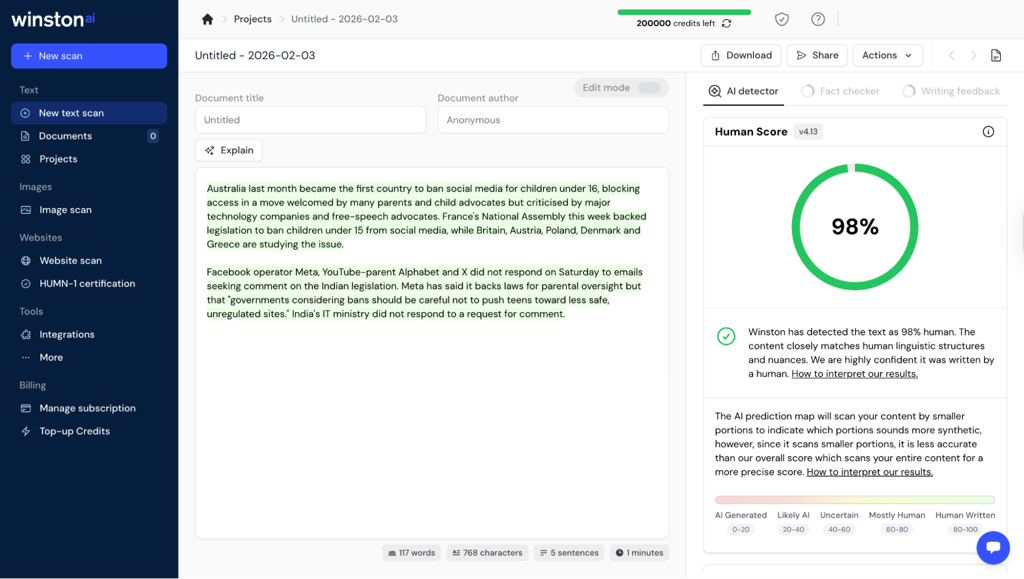
The score sits on a clear scale from AI to human, and Winston backs it up with short explanations and segment highlights. It feels like the tool is trying to walk you through its reasoning, not just throw a label at you.
Originality.ai uses confidence-based labels like “Likely AI – 100% Confident” or “Likely Original – 100% Confident.” The meaning is clear, but it’s more categorical.
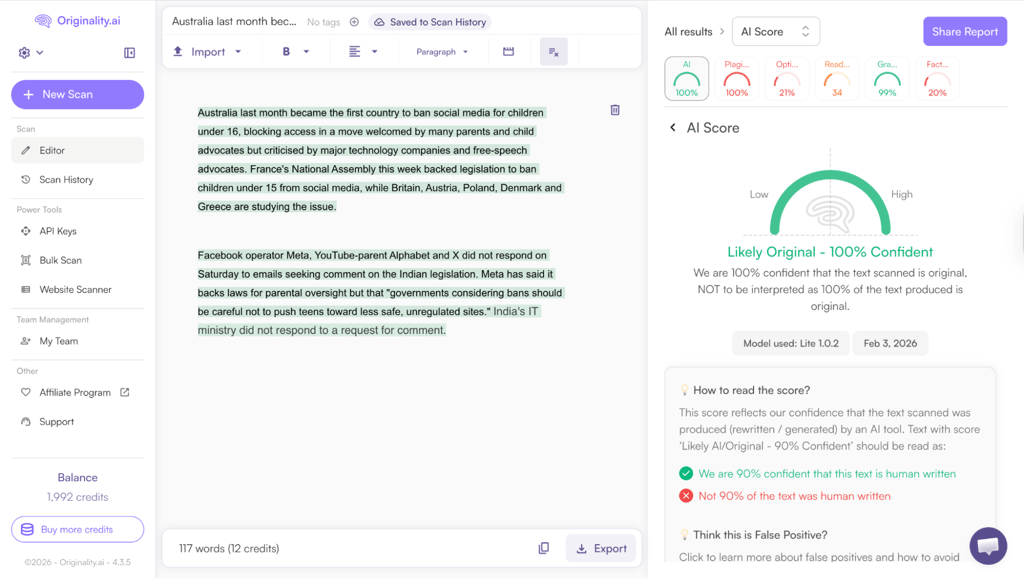
The verdict is clear, but you get less narrative context about why specific parts triggered the specific result unless you dig into the highlights.
Plagiarism detection capabilities
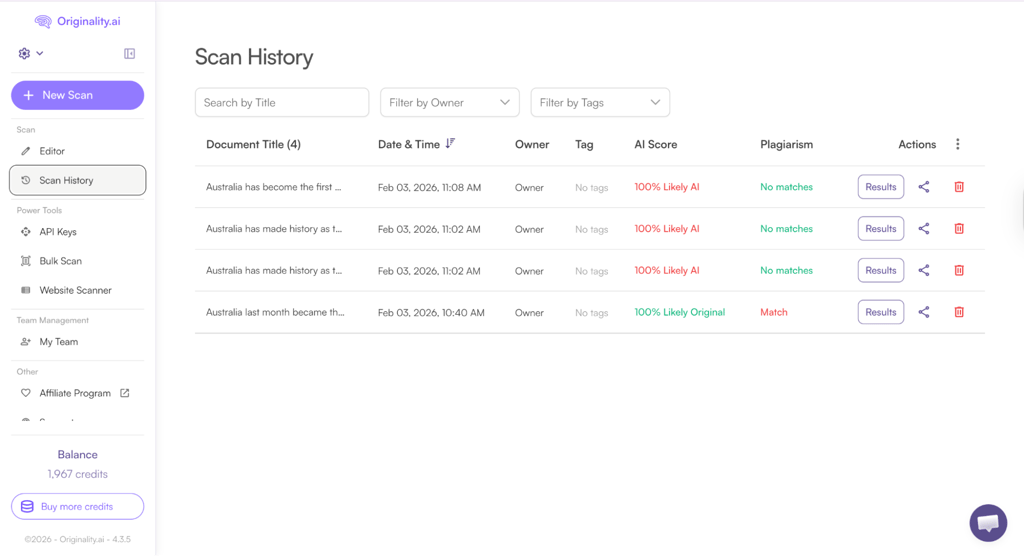
Plagiarism is where the difference between the two tools becomes hard to ignore. I used a passage taken directly from a published Springer source. Originality.ai flagged it right away and reported 100% plagiarism. It highlighted matching text and listed sources with overlap percentages, so it was easy to see what needed rewriting or proper citation.
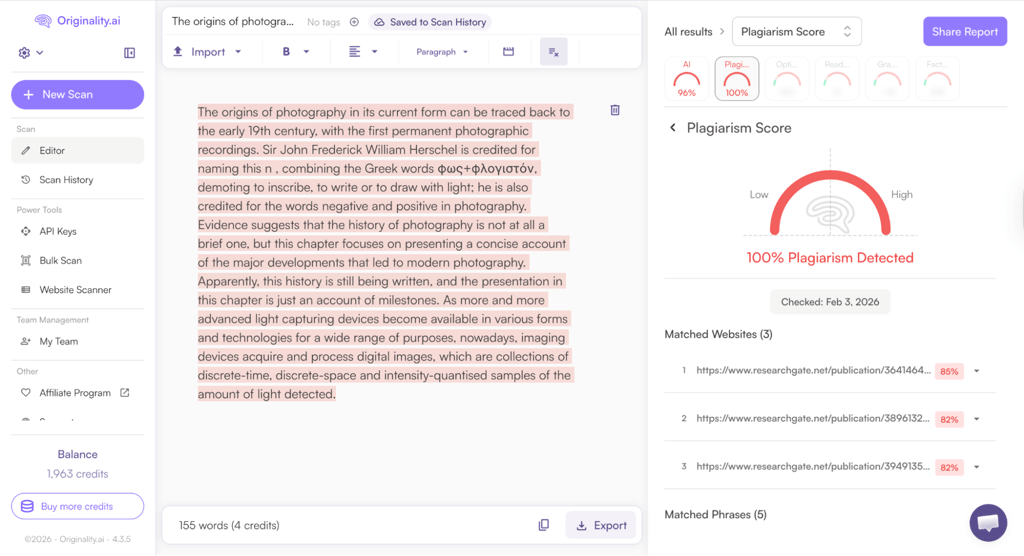
Winston AI, using the same passage, reported 0% plagiarism and didn’t show any matches. That doesn’t mean its checker never works, but in this case, it missed content that clearly had a published source. For academic or research-heavy material, that’s a serious limitation.
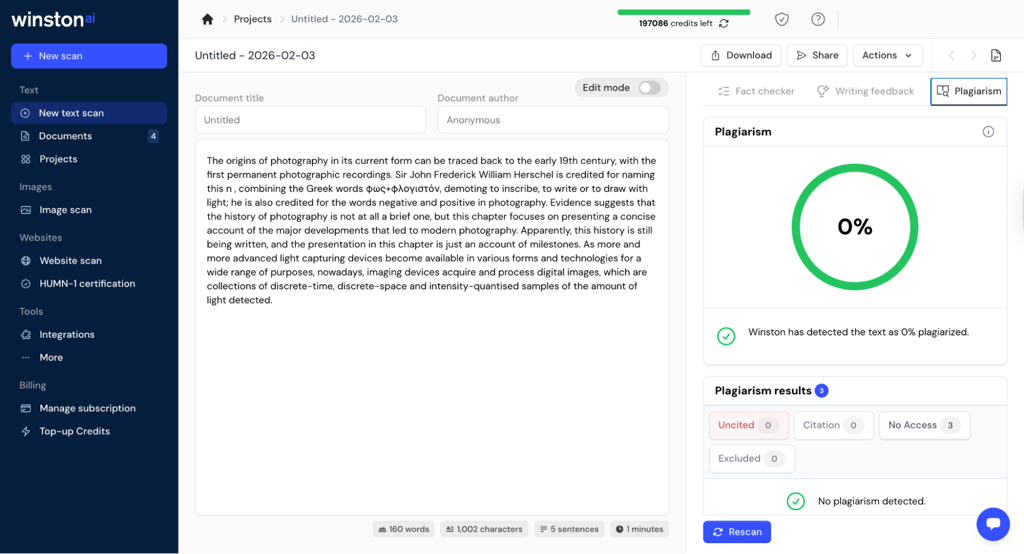
Both tools gave the AI-written sample a clean plagiarism score. That’s expected, since the wording wasn’t copied from anywhere, even if a model produced it.

Bulk scanning and site-level analysis
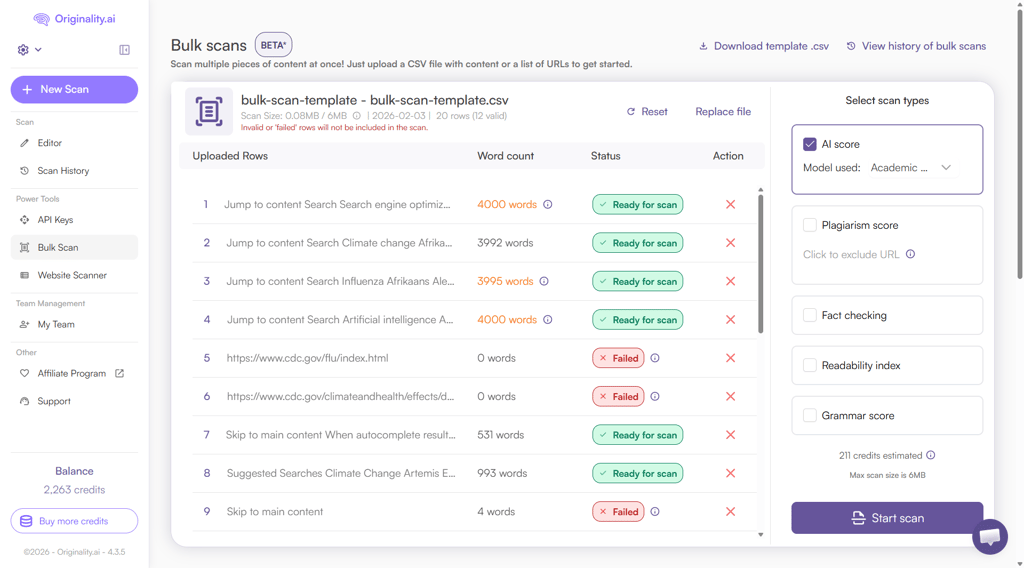
Originality.ai includes a dedicated Bulk Scan feature that lets you upload a CSV file with multiple URLs. In testing, it quickly checked which pages it could access, scanned the rest in seconds, and flagged a few that showed strong AI signals. It’s not perfect (some pages couldn’t be scraped), but the workflow clearly supports reviewing lots of content at once.
With Winston AI, you can check one URL at a time, paste text, or upload a file. There’s no built-in way to drop in a long list of pages and scan them all at once, which makes high-volume review slower and more manual.
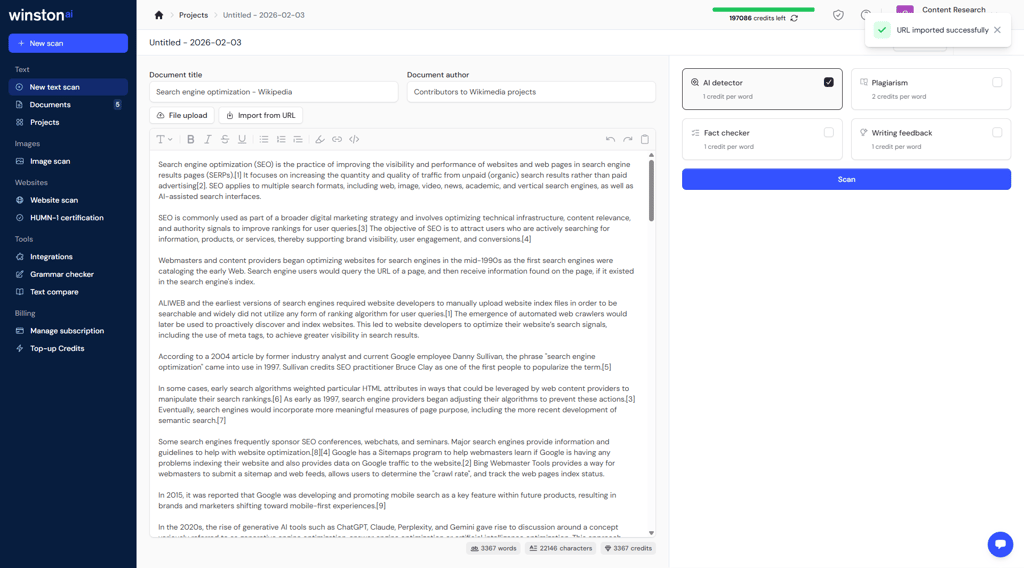
Both tools also offer some form of site-level scanning, but with different setups. Originality.ai is designed more like a domain-wide audit tool, though in testing, its website scanner ran into legacy issues. Winston AI relies on sitemap or CMS integration and scans posts more like individual documents pulled from a site.
Additional tools and integrations
Both platforms go beyond simple AI detection, but the extra features point to different priorities.
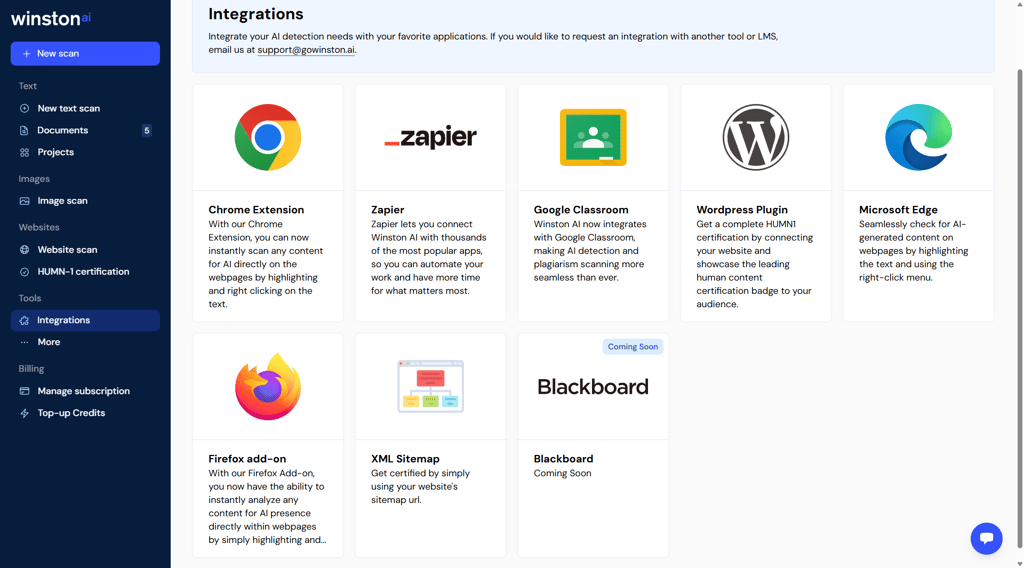
Winston AI adds fact-checking, writing feedback, and readability-style guidance alongside detection. Its browser extensions and education-focused integrations, like Google Classroom, make it easy to check content in learning or document-review environments. Zapier support also helps connect it to lightweight automation workflows.
Originality.ai builds more around publishing and content quality control. Alongside AI detection and plagiarism checks, it includes optimization signals, readability metrics, and grammar-style indicators inside the same ecosystem. Its WordPress plugin, Moodle integration, and API access work best for teams that want detection built directly into editorial pipelines.
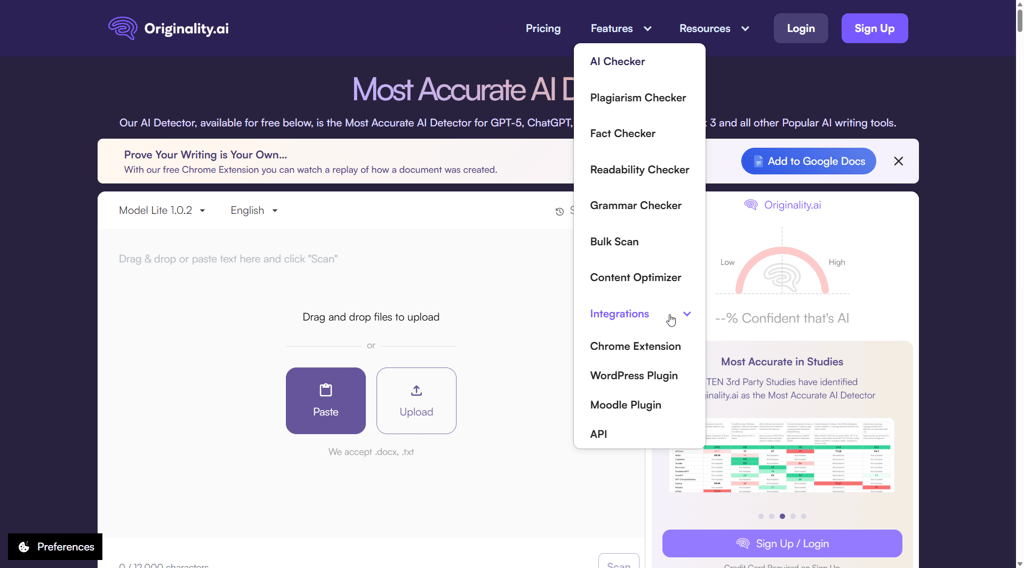
Both tools offer APIs and browser extensions, but they serve different kinds of workflows. Winston fits better into document review and classroom-style use. Originality.ai fits more naturally into SEO, publishing, and multi-page content management.
Ease of use and day-to-day workflows
A tool can be incredibly powerful, but if it takes you a week to find the results, that power doesn’t help much. So, ease of use is an important factor.
While running both platforms through real tests, I monitored how they behave when you’re moving fast – checking drafts, reviewing pages, and trying to make decisions without digging through menus.
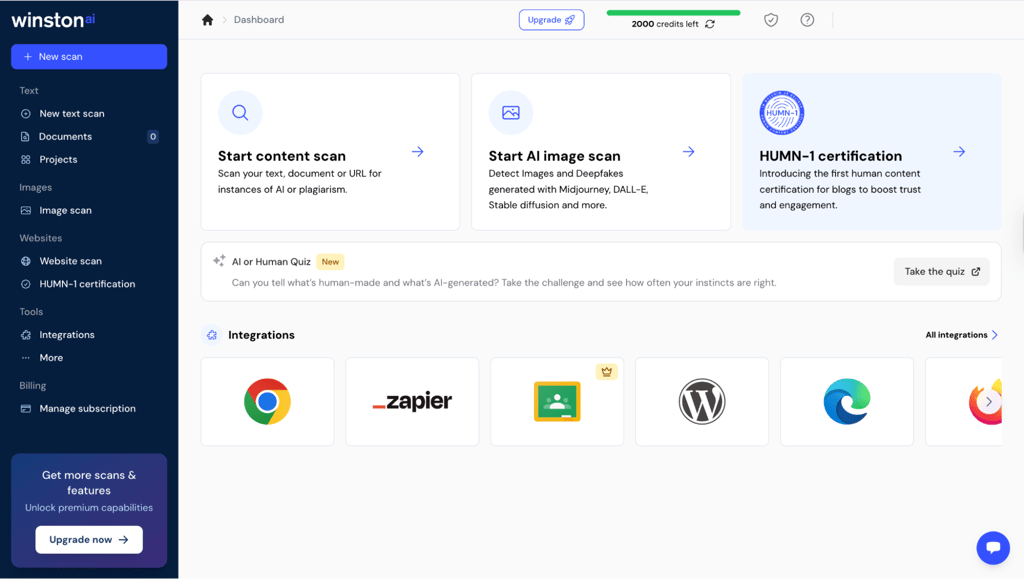
Winston AI feels lighter and more guided, with results separated into clear tabs.
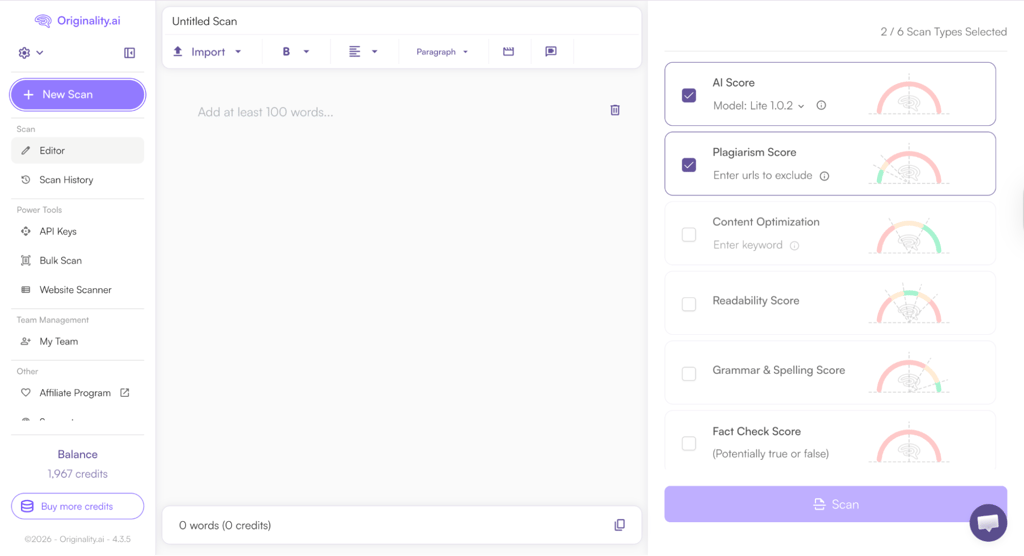
Originality.ai shows more data at once, which can feel busy at first but becomes efficient once you know where things live.
For short and medium texts, both tools ran quickly in my testing. Neither felt noticeably slower in everyday editorial use.
Winston AI felt easier to kick off on day one, especially for reviewing single documents. Originality.ai takes a bit more time to get used to because it offers more options and views.
During my tests, I found that Winston AI works well when you're reviewing a single draft and want clear explanations. Originality.ai feels more practical when checking multiple pages and looking at several quality signals at once.
When it comes to things that may confuse non-technical users, the number of metrics shown at once in Originality.ai can feel overwhelming at first.
I also noticed that Winston AI puts some results lower on the page, which makes them easy to miss.
Pricing models and long-term value
Here’s how Winston AI and Originality.ai pricing work, and what happens once you move past a few test runs and into regular use.
Winston AI pricing:
- Free trial – 2000 credits for 14 days
- Essential – $10.00/month with 80,000 credits and shareable PDF reports
- Advanced – $29.00/month with 200,000 credits and up to five team members
- Elite – $49.00/month with 500,000 credits, unlimited team members, and top-up credits
Winston AI uses credits (1 credit per word for AI detection, 2 for plagiarism checker, and so on). Each plan gives you a set monthly pool, and scans draw from that balance.
Originality.ai pricing:
- Pay-as-you-go (one-time payment) – $30.00 for 3000 credits that you can use for two years
- Pro (recurring payment) – $14.95/month for 2000 credits + file upload, website scanning tools, team management
- Enterprise (recurring payment) – $179.00/month for 15,000 credits, priority support, dedicated support manager, 365-day scan history, and API access
Originality.ai also runs on credits (1 credit for 100 words), whether you’re on a subscription or using the pay-as-you-go plan.
For cost predictability, both tools can be easy to budget if your workload stays steady. Monthly plans on either platform give you a clear idea of how much scanning you can do before hitting a limit.
The bigger difference shows up in flexibility and scaling. With Originality.ai, it's simple to add credits when workloads spike, helping teams with uneven publishing schedules. Winston AI scales well too, especially if you unlock top-up credits, but its structure fits best when usage is more consistent month to month.
In both cases, the real value isn’t just the price per scan. It’s the reduction in editorial risk and the added confidence before you publish or approve content.
Which tool should you choose? Practical recommendations
Winston AI and Originality.ai both handle AI detection well. After testing them side by side, though, it became clear they suit different kinds of work.
When to choose Winston AI
Winston AI makes more sense when your work centers around authorship and AI detection at the document level, not deep plagiarism research.
It’s a strong fit if you:
- Review student writing to understand how much of it sounds AI-generated
- Need a clear human vs AI scoring you can explain to non-technical users
- Want fact-checking and writing feedback alongside detection
- Work mostly with individual documents rather than large content libraries
In testing, Winston AI did well at separating clearly human writing from AI-generated drafts, and its reports are easier to walk through with a writer or student. That makes it useful for conversations about authorship and the writing process.
However, if your priority is catching copied academic material from published sources, Winston AI’s plagiarism checker was less reliable in my tests. In that case, pairing it with a dedicated plagiarism tool (or using Originality.ai instead) makes more sense.
When to choose Originality.ai
Originality.ai makes more sense when your job involves managing content, not just reviewing it. Instead of focusing on a single draft, it helps when you’re responsible for what goes live across a site or content network.
It’s a strong fit if you:
- Manage websites or large content libraries
- Care about SEO and publishing quality signals
- Need plagiarism checks that dig deeper into published sources
- Want tools that support bulk scans and site-level review
In my testing, Originality.ai stood out when volume entered the picture. Bulk scanning, website tools, and its plagiarism reports make more sense when you’re reviewing dozens or hundreds of pages.
The platform also surfaces readability and optimization signals alongside AI detection, which helps when decisions affect rankings and long-term traffic.
Final verdict
When you line everything up, the split is pretty clear. Winston AI feels better for document-level review and clear scoring. Originality.ai pulls ahead once scale, publishing, and deeper content checks come into play.
If I had to name one overall, Originality.ai wins for broader editorial use.
| Category | Originality.ai | Winston AI |
| AI detection reporting and scoring | ❌ | ✅ |
| Plagiarism detection capabilities | ✅ | ❌ |
| Bulk scanning and site-level analysis | ✅ | ❌ |
| Additional tools and integrations | ✅ | ✅ |
| Ease of use | ✅ | ❌ |
| Pricing | ❌ | ✅ |
Winston AI works best when you’re focused on understanding authorship and reviewing individual pieces of writing. Its scoring is easier to explain, and the interface feels more straightforward when you’re walking someone through why a text looks AI-generated.
Originality.ai wins overall because it handles scale better. Bulk scans, site-level tools, and stronger plagiarism reporting make more sense when you’re responsible for a lot of published content, not just one document at a time. Its extra content quality signals also fit naturally into SEO and editorial workflows.
I spend more time looking at sites and content pipelines than single essays, so Originality.ai edges ahead for me. That doesn’t make it the default for everyone – it depends on whether your work revolves around documents or entire content ecosystems.
FAQ
Is Winston AI more accurate than Originality.ai?
In my testing, Winston AI and Originality.ai were evenly matched when it comes to flagging AI content. However, Originality.ai was better at detecting plagiarism and finding sources that my test excerpts were pulled from.
Do these tools detect ChatGPT content reliably?
Yes, in clear-cut cases. However, if a human heavily edits AI drafts, detection becomes less predictable, and some false negatives can happen. But if the text has any semblance of AI patterns, these tools will flag it.
Can either tool be trusted for SEO decisions?
Yes, you can use them to support your SEO decisions, but I wouldn't recommend them as the only factors. They can help you flag AI-heavy and potentially low-quality content, but those are not the only ranking signals. I like to use them as risk indicators, rather than final verdicts.
Which tool has fewer false positives?
In my testing, neither tool showed a clear advantage. They both labeled human-written content as human. False positives are definitely possible, though, especially on highly structured or formal writing.