6 best AI PowerPoint generators in 2026
Being behind major reports like The Mother of All Breaches and RockYou2024, our in-house cybersecurity experts and journalists provide unbiased, real-world testing and in-depth analysis.
We maintain complete transparency by openly sharing our testing methodologies with our audience.
Learn more

Creating presentations that stand out can be a real challenge, especially when you're short on time or ideas. That's where an AI PowerPoint generator comes in. These tools use artificial intelligence to automate slide creation, making it quick and easy to design professional-looking presentations.
Whether you're a student working on a project, a marketer pitching an idea, or a professional preparing for a meeting, these AI tools are becoming a go-to solution for saving time and producing impressive results.
As part of the Cybernews research team, I've spent countless hours testing and comparing a range of AI presentation-maker tools to bring you this list of the six best AI PowerPoint generators in 2026. In this guide, I'll share in-depth reviews, highlight the standout features of each tool, and help you figure out which one suits your needs best.
If you're looking for the best AI presentation tool that simplifies automated slide creation and helps you work smarter, you're in the right place. Let's dive in!
Top 5 AI PowerPoint generators – shortlist
- nexos.ai – best for integrating presentations in an AI workflow
- SlidesAI – best for automated slide creation from text input
- Canva – best for designing beautiful presentations
- Gamma – best for interactive and modern presentation design
- Designs.ai – best for AI-powered branding and visually appealing slides
Key features to look for in AI PowerPoint generators
When looking for the right AI PowerPoint generator, you'll want to focus on features that make creating presentations easier, faster, and more polished. The right AI productivity tools won't just help you build better slides; they'll help you work smarter and faster. Here are the key features of AI presentation tools that you should look for.
Smart content suggestions
A huge time-saver, smart content suggestions help generate relevant text, layouts, and visuals based on your topic or input. Instead of starting from scratch, the AI gives you a strong foundation so you can focus on fine-tuning the message.
Design templates and themes
Good design matters and a good AI tool should offer a variety of presentation templates and themes. Whether you're looking for something sleek and corporate or fun and creative, templates make your slides look professional without much effort. Plus, you'll want customizable slides that allow you to tweak everything—colors, fonts, or layouts—to fit your style.
Compatibility with PowerPoint and Google slides
An AI tool that integrates seamlessly with PowerPoint or Google Slides makes life easier. You can edit or share your presentations across platforms without any hassle, ensuring flexibility in how you work and present.
Real-time collaboration
If you're working with a team, real-time collaboration is a game-changer. Features like shared editing and live feedback make it easy for everyone to work on the same presentation together, saving time and avoiding endless back-and-forth emails.
Ease of use and customization
An AI tool should feel easy and intuitive, even if you're not a design expert. At the same time, it should allow plenty of room for customizable slides so your presentations reflect your unique voice or brand.
Top AI PowerPoint generators in 2026 – our detailed list
In 2026, AI-powered tools are transforming how we design, making the process faster, smarter, and stress-free. Whether you're a professional on a tight deadline, an educator preparing lessons, or an entrepreneur pitching ideas, I've put together a list of the seven best AI PowerPoint generators to help you find the perfect match for your needs.
1. nexos.ai – best AI assistant with presentation generation capabilities
| Rating: | |
| Starting price: | $9.00/month |
| Free version: | No |
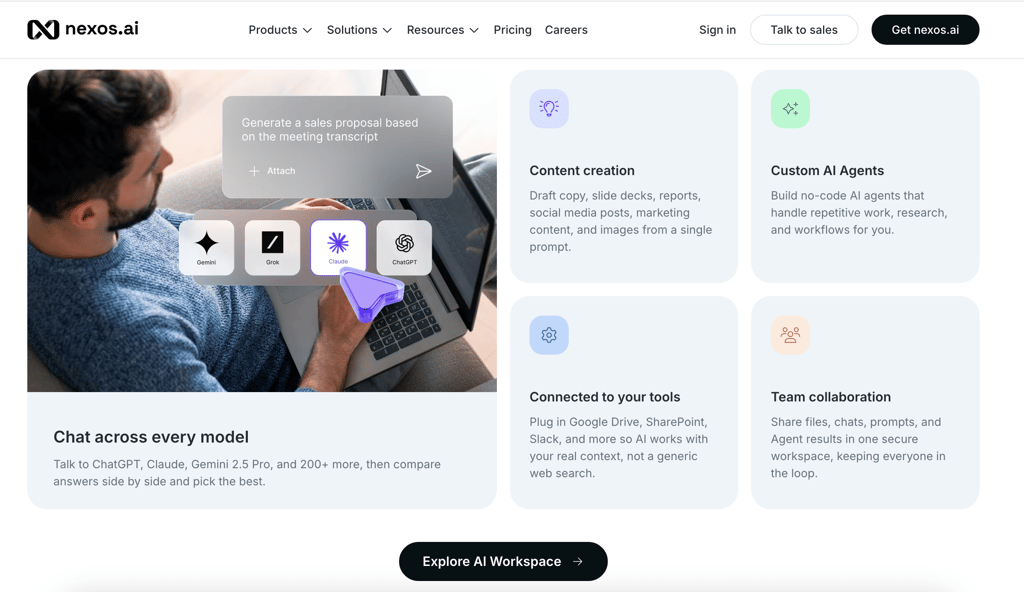
nexos.ai is an AI assistant giving you access to over 100 premium AI models. It also has a special presentation-generating agent that will create beautiful slides in minutes.
What it's best for
nexos.ai is perfect for users who want a solid presentation generator bundled in a general-use AI assistant, letting you pay one fee for multiple useful features.
Top features
The nexos.ai presentation agent can generate a fully-fledged presentation from a simple prompt, document, or any other source. By default, the presentations are built in HTML but can be converted to other formats, such as PPTX, or exported to Google Slides via an integration. The tool's automation features will also help you quickly build a workflow that automates creating presentations or slide decks.
User reviews
Users appreciate nexos.ai's ease of use and overall capabilities. Many pointed out the ease with which they could automate the process of creating slides, adding them into large pipelines. Others also noted that nexos is excellent at turning large documents into simple, digestible slides.
Pricing
nexos.ai costs $9.75/month when bought with a 1-year subscription. You can also pay $19.50/month if you want to pay monthly. Note that the renewal price increases to $39.00/month after the first year.
2. SlidesAI – Best for automated slide creation from text input

| Rating: | |
| Starting price: | $6.67/month |
| Free version: | Yes |
SlidesAI takes the pain out of creating presentations. Whether you have raw text or just an idea, it transforms your content into clean, well-structured slides. It's integrated with Google Slides, making it easy to use and accessible for anyone.

What it's best for
SlidesAI is great for teachers, professionals, and students who need to create visually appealing presentations quickly and without hassle.
Top features
SlidesAI does the heavy lifting for you with automatic content generation—just paste your text and watch it create slides instantly. The Magic Write tool adds polish by paraphrasing, suggesting visuals, and even handling citations. You can also tweak themes to suit your style and its version history lets you backtrack and make edits stress-free.
User reviews
SlidesAi users really like the intuitive interface and design features that make presentations look very professional. They also mention that this software is ideal for last-minute presentations.
Pricing
The Basic plan is free and includes up to 36 presentations a year. The Pro plan costs $6.67/month (billed annually) for 120 presentations, while the Premium plan at $8.33/month unlocks unlimited presentations for power users.
3. Canva – Best for creating professional-quality graphics

| Rating: | |
| Starting price: | $14.99/month |
| Free version: | Yes |
Canva helps you create beautiful, professional presentations in seconds, turning your ideas into visually striking slides effortlessly. Canva's Magic Design uses AI to generate presentations based on a simple text prompt. It gives you a professional starting point that you can easily customize to fit your needs.

What it's best for
It's perfect for anyone who needs to create polished presentations quickly, whether for pitch decks, client proposals, or classroom slides.
Top features
Canva stands out with its ability to generate slides from just a few words. It also includes Magic Write, which helps refine presentation text, and a Translate tool that supports over 100 languages. Additional tools like Magic Animate, Magic Media, and AI-powered apps for images and motion add extra flair to your slides.
User reviews
Users love Canva for its user-friendly interface and time-saving features. The AI-driven tools help create professional-quality presentations quickly and the collaboration options are a big plus.
Pricing
Canva offers a free version with premium features available via Canva Pro for $14.99/month.
4. Gamma – Best for interactive and modern presentation design

| Rating: | |
| Starting price: | $8–10/month |
| Free version: | Yes |
Gamma makes content creation a breeze. It offers a fresh alternative to traditional slides by using AI to help you craft professional presentations in just a few minutes. Whether you're creating a presentation for work or building a website, Gamma simplifies the e

What it's best for
Gamma is perfect for creating presentations, websites, and documents quickly and easily, with no design or coding skills required. It's ideal for startups, marketers, and educators who need to create polished, engaging content quickly.
Top features
With Gamma, you can generate text, images, and layouts instantly, saving time on design tasks. It lets you import/export PowerPoint and PDFs seamlessly and add interactive elements like videos and charts. Plus, with built-in analytics and password protection, you can track user engagement and keep your content secure. Everything is designed to look great and work smoothly on any device.
User reviews
Users mention that they enjoy creating a PowerPoint with the software as the interface is easy to use and it takes a lot less time to turn documents into presentations.
Pricing
Gamma offers a free plan with 10 cards, 400 AI credits, and basic exports. The Plus plan, at $8–10/month, gives you unlimited AI creation, custom branding, and priority support. The Pro plan, at $15–20/month, adds advanced AI tools, custom domains, and detailed analytics.
5. Designs AI – Best for AI-powered branding and visually appealing slides

| Rating: | |
| Starting price: | $17.00/month |
| Free version: | No |
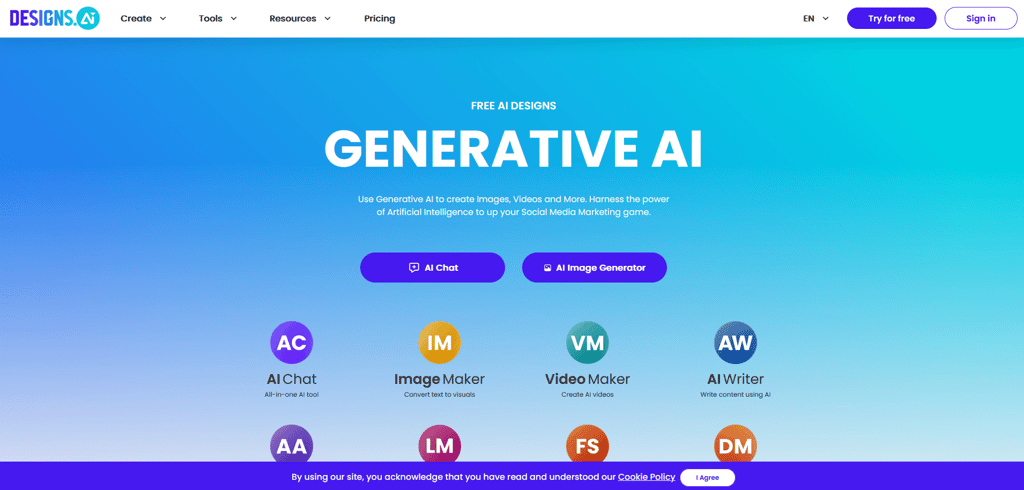
Designs AI is an AI-powered tool that simplifies and accelerates the creation of professional graphics, videos, and marketing materials. Its unique feature is the ability to generate thousands of design variations quickly, saving time while ensuring high-quality results.
What it's best for
Designs AI is ideal for businesses, marketers, educators, and content creators who need fast, customizable visuals for social media ads, promotional materials, and educational content.
Top features
Designs AI offers AI-driven design generation, smart font, color and layout suggestions, and a library of 170 million premium images and 10,000+ graphics. It integrates with Mockup Maker for easy product mockup customization and allows one-click resizing for all platforms.
User reviews
Users commend Designs AI for its ease of use and the speed of AI-generated designs. The wide range of templates and customization options are highly appreciated.
Pricing
Designs AI offers three plans: Lite ($8/month, 350 AI credits), Basic ($17.00/month, 1,000 AI credits), and Pro ($49/month, 3,000 AI credits), with each tier providing varying levels of features and customization.
6. Simplified– Best all-in-one tool for design, content, and presentations

| Rating: | |
| Starting price: | $24.00/month |
| Free version: | No |
Simplified generates complete presentations in seconds—just input your topic and it does the rest. It automatically adds text, images, and design elements. Plus, it's easy to customize so your presentation aligns perfectly with your brand.

What it's best for
Simplified AI Presentation Maker is a great tool for anyone who needs to create professional presentations quickly. Whether you're working solo or part of a team, this AI-powered platform helps you craft stunning slides without the hassle of design work.
Top features
Simplified shines with its ability to generate presentations instantly based on any topic. You can customize templates to suit your needs and the Brand Kit ensures everything stays on-brand. There's also access to premium stock media, customizable fonts, and multi-language support, making it a versatile option for global audiences.
User reviews
Users love how quickly they can produce polished, professional presentations. The AI's design suggestions are praised for their visual appeal and many find the tool simple and efficient to use.
Pricing
The Simplified One plan is $24.00/month (billed annually) and includes everything you need, including AI tools and 200GB storage. The Simplified Growth plan at $85/month offers more features for teams, while Simplified Enterprise offers a custom pricing plan for large businesses.
The best AI PowerPoint generators compared
This AI PowerPoint comparison table provides a quick overview of the best AI PowerPoint generators. Whether you need seamless integration with existing platforms, budget-friendly pricing, or advanced slide generator features, these tools have you covered. From Canva's collaborative tools to SlidesAI's text-to-slide feature, there is a solution for every type of presentation creator.
| Tool | Price | Unique features | Platform compatibility |
| nexos.ai | $9.00/month | Generates from documents, can be automated, integrates with Google Drive | Web-based, integrated with Google Drive |
| SlidesAI | Free-$8.33/month | Converts text to slides, Magic Write for references, version history | Google Slides |
| Canva | Free-$14.99/month | Offers Magic Design, Magic Animate, and easy team collaboration | Web, desktop, and mobile apps |
| Gamma | Free-$20/month | Creates interactive presentations, built-in analytics, and password protection | Web-based |
| Designs.ai | $8-$49/month | AI design generator, mockup creator, access to 170M stock images | Web-based |
| Simplified | $24.00-$85/month | Generates topic-based slides instantly, includes brand kit and media library | Web-based |
How did we select these AI generators for PowerPoint?
When it comes to selecting the best AI tools for creating PowerPoint presentations, I wanted to ensure that each option met real-world needs. I didn't just pick names off a list—I evaluated these tools based on availability, reliability, cost, and use cases to help you find the perfect match.
- Availability: I prioritized tools that are easy to access, whether you're working on a desktop, mobile device, or directly through the web. A great AI presentation tool should fit into your workflow seamlessly, without requiring complicated installations or advanced setups.
- Reliability: A tool is only as good as its performance, so I focused on AI generators that consistently deliver polished, error-free results. I tested each one to ensure it could handle complex inputs, generate visually appealing designs, and work without crashes or glitches.
- Cost: Budget matters, especially if you're a student, freelancer, or small business owner. I looked for tools offering value at every price point—whether it’s free basic plans or premium subscriptions packed with advanced features. Transparent pricing and flexible plans were a big plus.
- Use cases: Different people have different needs. Some tools work best for simple slide decks, while others shine in creating interactive, multimedia-rich presentations. I made sure my picks cater to everyone—from educators and marketers to startup teams and corporate professionals.
What is an AI PowerPoint generator?
An AI PowerPoint generator is a smart tool that helps you create professional, eye-catching presentations with minimal effort. Powered by artificial intelligence (AI) and machine learning, these tools take your input—like text, images, or even just a topic—and turn it into well-designed slides in seconds.
The AI analyzes your content and suggests layouts, colors, fonts, and even animations that match your message. Some tools can summarize long paragraphs, pick out key points, or create flowcharts automatically, thanks to natural language processing. Essentially, the automated presentation tools take the guesswork out of design and make your ideas look polished and cohesive.
The benefits are huge. For starters, AI presentation software saves you a ton of time by automating tedious tasks like formatting and arranging slides. Even if you're not a design expert, you can still end up with AI-driven designs that look like they were made by a pro. Plus, these tools simplify content creation by offering templates and suggestions tailored to your goals, making the whole process much easier.
In short, AI-powered slides take the hassle out of creating presentations, so you can focus on what really matters—delivering your message. Whether you're preparing for a meeting, a class, or a big pitch, these tools make the process faster, smarter, and stress-free.
How to choose the right AI PowerPoint generator
Choosing an AI presentation tool starts with understanding your needs. What do you want the tool to do for you? If you're in business, look for the best AI slide maker for businesses that simplifies data visualization, offers collaborative features, and supports branding consistency. These are game-changers for creating polished, professional presentations.
Your budget is another key factor. While many AI tools have free versions, they often limit features. If you need advanced options like analytics or custom templates, investing in a premium plan might be worth it. Compare plans to find one that balances cost and value.
Skill level matters too. If you're not a pro at creating presentations, look for tools that are simple and intuitive, with templates or drag-and-drop designs. If you're more advanced, explore tools that allow for customization or integrate with platforms like Google Workspace or Power BI.
Think about the tool's features and how they fit your goals. For instance, if you need quick results, choose a generator with automated presentation tools for text inputs. For creative, visually stunning slides, go for tools with AI-driven design suggestions for layouts, colors, and fonts.
Before committing, take advantage of free trials or demos to ensure the tool feels right. The goal is to find something that aligns with your AI presentation needs, saves time, and helps you create impressive, engaging presentations without stress.
Benefits of using AI in presentation creation
AI presentation tools are changing the game when it comes to creating slides, offering significant AI presentation benefits. The biggest perk is saving time. Instead of spending hours arranging content or tweaking designs, AI can build a complete presentation for you in just a few minutes.
Another major benefit is boosting creativity. These tools suggest layouts, colors, and fonts that you might not have thought of, helping you craft slides that stand out without the hassle. Even if you're not a designer, you'll still get a polished, professional look.
With AI, consistency in design becomes effortless. Every slide matches in style, spacing, and color, making your presentation look clean and cohesive. This is especially important for businesses aiming to maintain a strong, professional brand identity.
For those of us who aren't design pros, AI tools make the process accessible. You don't need to know the ins and outs of design software—just input your content and experience AI slide maker advantages.
Lastly, the automated presentation benefits extend to integrating content seamlessly. AI tools can import data, images, or text directly, simplifying everything.
Whether you're on a tight deadline or just want your slides to look amazing without breaking a sweat, AI tools are there to help. They're fast, creative, and user-friendly, so anyone can create impressive presentations with ease.
Other AI tools you might be interested in:
Best AI PowerPoint generators in 2026 – wrap up
AI PowerPoint generators are changing the game when it comes to creating presentations. These tools make it easier than ever to design beautiful slides, organize content, and save time. Whether you're a professional, student, or teacher, they can help you create polished, engaging presentations in less time.
nexos.ai is my top pick for its user-friendly features, excellent automation capabilities and integration with platforms like Google Slides, making it an excellent choice for anyone looking to improve their workflow.
If you're tired of spending hours perfecting your slides or need inspiration to get started, these tools are worth exploring. They'll not only boost your productivity but also take your presentations to the next level. Don't wait—try one today and see how AI can transform the way you present.
FAQs
Are AI PowerPoint generators free?
Many AI PowerPoint generators offer free versions or trials with basic features, but for advanced tools and customization options, a subscription or one-time payment may be required.
What is the best AI tool to generate PPT?
nexos.ai is a top choice for its powerful features, including automated slide generation, making it ideal for creating professional and visually appealing presentations quickly.
Can AI generate a PowerPoint presentation?
Yes, AI can generate PowerPoint presentations. With just a topic or outline, AI tools can create slides with organized content, appealing visuals, and ready-to-use designs.
What is the best free AI slideshow maker?
For free options, tools like Canva provide user-friendly interfaces and templates for creating high-quality slideshows without needing a paid subscription.