ChatGPT Atlas vs Perplexity Comet – which AI browser should you use?
Being behind major reports like The Mother of All Breaches and RockYou2024, our in-house cybersecurity experts and journalists provide unbiased, real-world testing and in-depth analysis.
We maintain complete transparency by openly sharing our testing methodologies with our audience.
Learn more

Over the past few months, AI browsers have started gaining attention as a new way to interact with the internet. Instead of just providing access to a website, they can summarize and interpret information, answer questions, and even automate tasks.
Two of the most popular AI browsers at the moment are ChatGPT Atlas and Perplexity Comet. Both rely on multiple AI models to make browsing the web more efficient, but each takes a slightly different approach. ChatGPT Atlas shines at improving productivity and automating tasks, while Perplexity Comet is the stronger option for deep research.
In this ChatGPT Atlas vs Perplexity Comet comparison, I sum up my hands-on experience and testing results in key areas, including real-world use cases, ease of use, privacy, integrations, and cost.
What are AI browsers?
An AI browser is just like any other browser, but with built-in AI features. You can still browse the internet as you normally would, but its AI agent can help you optimize the process.
This doesn’t mean that AI browsers are here to replace traditional ones like Chrome, Safari, or Firefox. At least, not yet. They still lack security and privacy, and tend to give biased output.
Currently, AI browsers complement traditional browsers by saving time on research, interpreting data, and automating daily tasks. This could change in the future as AI browsers improve over time.
ChatGPT Atlas overview
ChatGPT Atlas is a Chromium-based browser with integrated ChatGPT. You can access ChatGPT in the sidebar of every webpage you visit, enabling you to ask questions, summarize content, and delegate tasks without leaving the site. You can also interact with ChatGPT by using your cursor – mark something on the page and ask ChatGPT to give you more context and insights on the topic.
Its Agent mode can handle basic and complex tasks – from summarizing research to scheduling appointments to booking hotels – all without any input from you. However, it’s only available for premium users. All in all, Atlas feels closer to an all-in-one productivity hub than just your regular browser.

Perplexity Comet overview
Perplexity Comet is an AI browser based on Perplexity, an AI-powered search engine that provides accurate and relevant information with sources and citations. It's designed around workspaces and tab groups, which let you keep your projects neat and organized, eliminating the need to switch between dozens of browser windows while researching. Workspaces can be collaborative, making it a great space for research projects and bigger collaborative tasks. Learn more about it in our Perplexity Comet review.
ChatGPT Atlas vs Perplexity Comet – head-to-head comparison
Together with the research team, I spent a few days using ChatGPT Atlas and Perplexity Comet for all of my daily tasks. Our goal was to see how they handle day-to-day operations and whether they have any benefits over just having ChatGPT or Perplexity open in a normal browser.
Here’s a short overview of our findings.
| Category | ChatGPT Atlas | Perplexity Comet | Winner |
| Best for | General research, insights, context, handling multi-step tasks | Deep research, summarizing content, answering questions | Draw (depends on user needs) |
| Design and navigation | Clean and minimalistic interface, can be organized into projects | Clean and minimalistic interface, can be organized into workspaces and tab groups, collaboration tools included | Perplexity Comet |
| User experience | Easy to use, low learning curve | While beginner-friendly, Comet can take a while to get used to | ChatGPT Atlas |
| Real-world use | Agent mode handles repetitive tasks such as planning and booking travel, grocery shopping, scheduling appointments, converting documents, updating spreadsheets, and completing multi-step workflows | Research tasks, fact-checking, finding current information, and academic work. Better for tasks requiring source verification and quick answers with citations | Draw (depends on user needs) |
| Privacy and data control | Collects user data to improve AI models, opt-out available; additional privacy controls in settings; Agent Mode operates under strict safeguards – it cannot run code, download files, install extensions, or access apps | Collects user data to improve AI models, stored locally, opt-out available; additional privacy controls in settings | ChatGPT Atlas |
| Integrations and ecosystem | ChatGPT’s large ecosystem, can be integrated with Google and hundreds of other plugins | Significantly smaller ecosystem, can be connected with Google and WhatsApp | ChatGPT Atlas |
| Cost and accessibility | Free to use, can upgrade to a paid plan for more advanced tools; Agent mode is only available to paying users | Free to use, can upgrade to a paid plan for more advanced tools; Assistant is available for all users | Perplexity Comet |
Positioning
Atlas positions itself as an agentic assistant that can handle multi-step tasks. This includes basics like summarizing content, creating reminders to more complex tasks like comparing prices, booking flights, and even planning events. Overall, it feels more like a productivity tool than a browser.
Perplexity’s primary focus is retrieving and summarizing information from the web – it’s essentially a search engine with AI capabilities. Since Comet is built on Perplexity, it’s more of a research hub that helps users dive deeper into different topics and provides unique insights. It’s ideal for students, professors, researchers, and analysts. That being said, Comet also has an agentic mode and can handle basic tasks, but since it doesn’t have the capabilities of ChatGPT, it’s not as reliable as an assistant.
Design and navigation
ChatGPT Atlas and Perplexity Comet are quite similar. Both have the look of a traditional browser like Chrome or Safari and are built on Chromium.
Atlas feels familiar, especially if you’re already an avid ChatGPT user. Upon opening the browser, you’ll be greeted by the same type of search bar as you would with ChatGPT. Except this time, there’s also the option to visit websites.
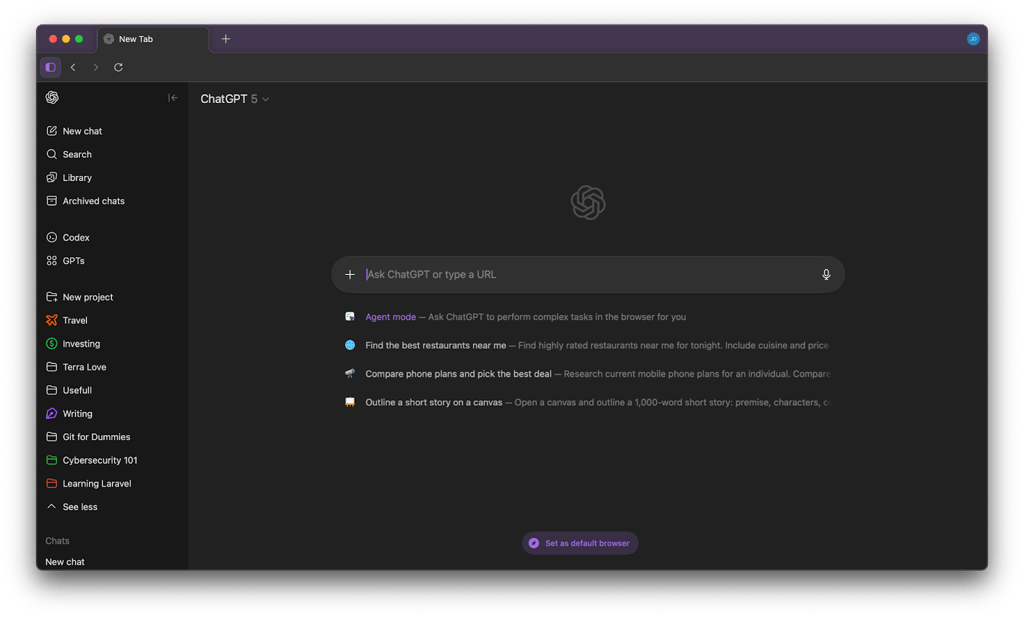
If you visit a website, ChatGPT is available in the sidebar. Each tab starts a new conversation with ChatGPT. There, you can ask it to summarize the content, provide context, answer questions, and more. It’s great for quick research or multitasking.
Similarly, Comet has the same interface as the Perplexity website, so it’s also familiar. You can also chat with AI in the sidebar of each tab. However, unlike Atlas, Comet lets you add tabs into groups, making it easy to organize your work.
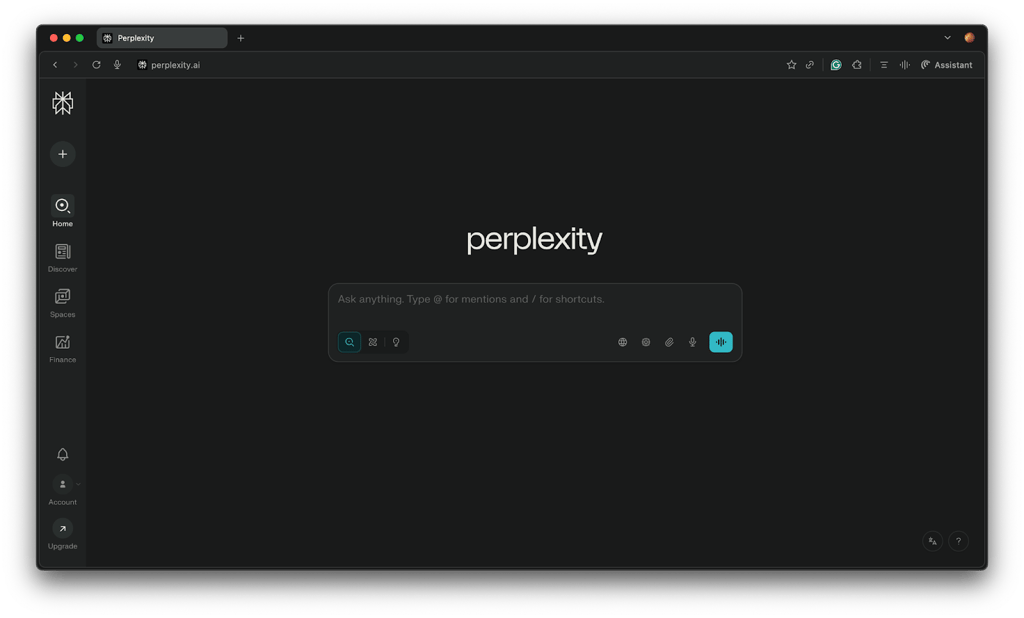
You can also set up spaces for different projects, add specific instructions, select AI models for that specific space, and use it as a workspace to collaborate with other users.
User experience
Both ChatGPT Atlas and Perplexity Comet are designed with user experience in mind. The browsers are minimalistic, with a straightforward interface that feels a lot like the original ChatGPT and Perplexity websites. I’d say that Atlas is easier to use, as it doesn’t have much of a learning curve, especially for those who use ChatGPT on a daily basis.
Perplexity Comet, on the other hand, is slightly more complex. It can be used like Atlas, but shines when you rely on its workspace features, which can take some time learning and getting used to. Still, the learning curve isn’t that steep, so I’d say it’s just as beginner-friendly.
Real-world use and tasks
AI browsers have a lot of practical uses – from summarizing web pages, answering questions, and explaining concepts to handling small tasks like grocery shopping or booking flight tickets. The agentic part of these AI browsers is what makes it all possible.
Our research team put Atlas’ agent mode to the test. First, we prompted it to find a good recipe for chicken pasta. After we received the recipe, we asked it to order these ingredients from Walmart. This is where the agentic mode took over. It opened Walmart, searched for each item, and added them to our cart. When the agent mode is active, you can see it interact with your browser as if it were a human.
It took Atlas 11 minutes to add 11 ingredients to our cart, which is quite long. Then again, you could just walk away, as it usually doesn’t require additional input from you and can handle these tasks independently.
The main downside is that ChatGPT Atlas can’t perform tasks without the agent mode enabled, but it’s only available for paying users. If you’re a free user, Comet’s Assistant may be the better option for you, as it’s included in the free tier.
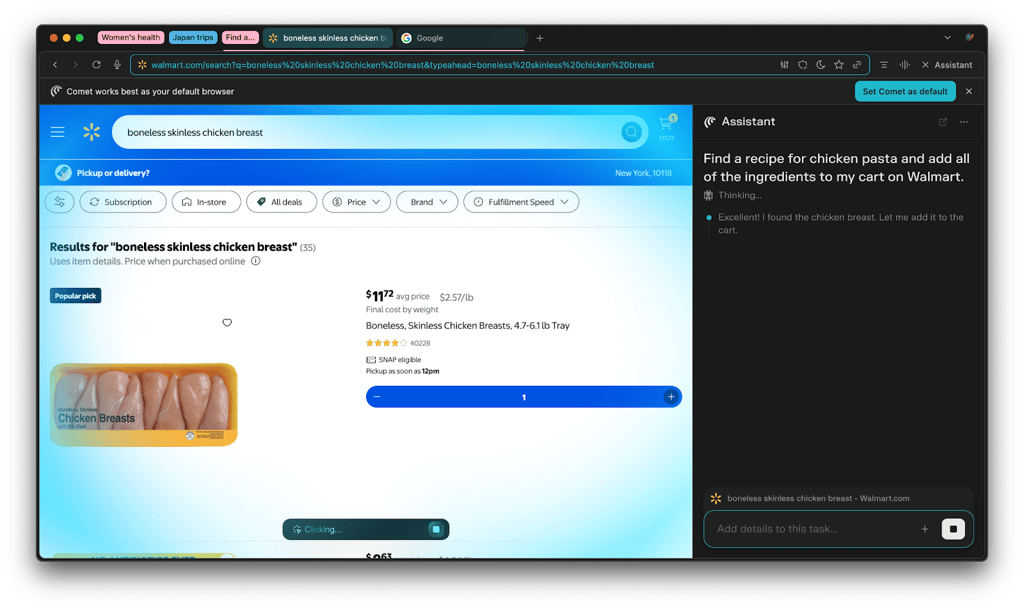
We also used the same prompt as Atlas to test Comet’s Assistant. This time, we asked it to find a chicken pasta recipe and add the required ingredients in the same prompt. The process was the same as with Atlas – you can watch the Assistant take over the browser and perform the task as a human would. Comet was slightly slower than Atlas, but it had more ingredients to add.
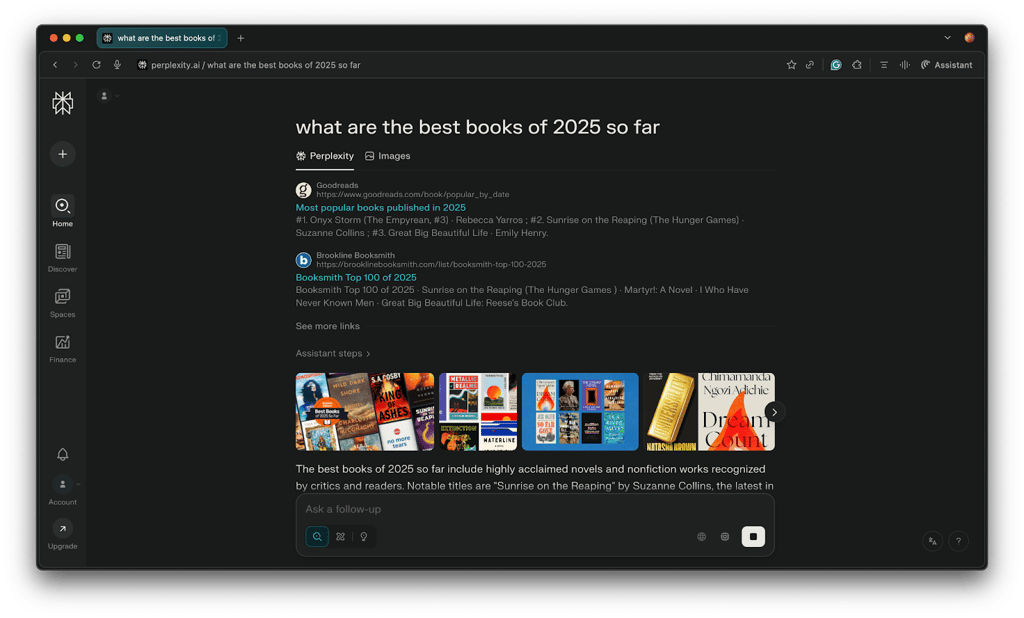
While it’s more than capable of handling agentic tasks, I mainly recommend Comet for research as this is where it truly shines. It can read multiple articles, gather facts, and build summaries, all with legitimate and relevant sources and proper citations. That makes Comet great for academic research, analytics, reports, or any kind of task where accuracy and context matter more than speed. Its interface also makes organizing research and being productive easier.
Privacy and security
Privacy is a big topic when it comes to AI. ChatGPT and Perplexity let you opt out of AI training, even on the free tiers, which is appreciated. In addition, ChatGPT lets you manage memories for better data control. Perplexity also has this feature, but it’s still in the beta stage.
As for security, the main vulnerability all AI browsers face is prompt injection, which is basically a malicious actor tricking the AI to follow their instructions instead of yours. This can lead to leaking sensitive information and even financial loss, especially if you’re logged in to important accounts like your bank. While it was initially found in Perplexity Comet, it can virtually happen in any AI browser, including ChatGPT Atlas.
Integration and ecosystem
Atlas stands out with a massive ecosystem – ChatGPT, DALL·E for image generation, and hundreds of third-party plugins that enhance its functionality for specific use cases. Plugins in particular are important for automations as they extend what the AI agent can access and control. This means you can automate tasks that would normally take multiple tabs and manual copy-pasting, thus improving productivity.
Comet’s ecosystem is nowhere as expansive as Atlas’. You get Perplexity, the AI-powered search engine and can connect the browser with your Google and WhatsApp accounts. This enables the AI assistant to handle simple tasks like drafting emails, managing appointments, and more. As for plugins, you don’t get many options.
Cost and accessibility
You can use both ChatGPT Atlas and Perplexity Comet for free, but they have some limitations.
| Free tier | Starting price | Agentic mode | Operating systems | |
| ChatGPT Atlas | Yes | $20.00/month | Only with paid plans | macOS |
| Perplexity Comet | Yes | $20/month | Available on the free tier | macOS and Windows |
If you want the more advanced features such as the agent mode, you’ll have to get a ChatGPT Plus subscription, which starts at $20.00/month. I find the free version of ChatGPT Atlas somewhat basic without the agentic part. Agent mode is the feature that handles tasks and automates processes – without it, you’re better off just using ChatGPT on your normal browser. Plus, the Atlas browser is only available on Mac, so a big chunk of users is blocked from using it in the first place.
Comet has an advantage over Atlas in this case, as its free version includes the AI assistant. Of course, for x, you can upgrade to a paid plan for more advanced features and AI models. The best part is that Perplexity Comet supports both macOS and Windows with more coming soon, unlike ChatGPT Atlas.
Other AI browsers worth considering
While ChatGPT Atlas and Perplexity Comet are the hottest AI browsers at the moment, there are plenty of other options to choose from. Here are some of the most notable ones:
- Arc. A favorite among Redditors, Arc is an AI browser with an intuitive design to help you stay organized. Although Arc has been discontinued as of May, 2025, it still receives quality-of-life updates, but is no longer bringing in new features.
- Microsoft Edge with Copilot. Microsoft has incorporated Copilot into the Edge browser. It can summarize websites, rewrite text, and quickly answer questions.
- Brave Leo. Brought by the team behind the privacy-focused Brave browser, Brave Leo is a solid choice for those who are concerned about privacy and data collection.
- Opera Aria. Opera’s AI assistant Aria is built into Opera and can be enabled to help you summarize research, generate content, and automate repetitive tasks.
- Dia. Created as the successor of Arc, Dia is a minimalistic AI browser built for improving focus.
- You.com. Business-oriented AI browser designed to streamline workflows and automate more complex tasks.
- Sigma. AI browser that’s ideal for deep research and task automation.
- Fellou. An agentic AI browser that prioritizes privacy, offering customizable AI models and local data storage options.
Is it safe to use AI browsers?
It’s mostly safe to use AI browsers, but as with every emerging technology, it’s important to keep in mind the risks that come with it. Here’s a short overview:
- Privacy and data collection. AI browsers may collect your prompts and browsing activity to improve performance, raising privacy concerns.
- Weak security and prompt injection. AI browsers are vulnerable to prompt injection attacks, where hidden instructions by malicious actors can manipulate the AI’s behaviour.
- Bias and hallucinations. Since LLMs are prone to hallucinations AI browsers can generate inaccurate or one-sided answers.
While these risks are real, there are a few things you can do to mitigate them:
- Review the AI browser’s privacy settings and opt out of AI training
- Keep the browser updated
- Don’t share sensitive information
- Fact-check important information
Which AI browser should I choose?
With ChatGPT Atlas and Perplexity Comet being launched just this year, AI browsers are still a relatively new technology. They have a lot of potential to change the way we interact with the internet, but currently, they’re not doing anything extraordinary.
Choose ChatGPT Atlas if you want an AI assistant that helps you do things – automate tasks, plan and organize projects, or schedule appointments. Perplexity Comet feels more natural for research purposes, such as gathering information, comparing sources, verifying facts, and using relevant references with proper citations.
In the end, both are solid tools to boost your productivity, and which one is better for you depends on your needs and expectations.
FAQ
Which AI browser gives more accurate and reliable real-time search results, ChatGPT Atlas or Perplexity Comet?
Perplexity Comet’s web searches are generally more accurate than ChatGPT’s. This is because Perplexity Comet is an AI-powered search engine designed for research and quick answers.
How do the speed and loading times compare between ChatGPT Atlas vs Perplexity Comet?
Perplexity Comet is faster and more efficient when it comes to searches.
Which AI browser, ChatGPT Atlas or Perplexity Comet, is more clear and transparent about its sources and links?
Perplexity Comet is more transparent as it always lists all of the sources used to generate a response. ChatGPT doesn’t always cite all of the sources used.
How does content summarization work differently in ChatGPT Atlas vs Perplexity Comet?
Atlas uses ChatGPT’s reasoning to produce natural, contextual summaries that resemble human explanations. Comet’s summaries are shorter but accurate and include a list of factual sources.
Which one, ChatGPT Atlas or Perplexity Comet, is better for research or academic work?
Perplexity Comet is better at providing accurate, relevant, and factual information with citations. ChatGPT Atlas is better for brainstorming and creative work.
Which AI browser, ChatGPT Atlas or Perplexity Comet, can handle complex or multi-step questions more effectively?
ChatGPT Atlas is better at handling complex or multi-step questions than Perplexity Comet.