Perplexity Comet browser review 2026: is it worth the hype?
Being behind major reports like The Mother of All Breaches and RockYou2024, our in-house cybersecurity experts and journalists provide unbiased, real-world testing and in-depth analysis.
We maintain complete transparency by openly sharing our testing methodologies with our audience.
Learn more

Comet is now free worldwide – no sign-up walls, no region locks, and the mobile version is on the way.
Perplexity’s new browser blends AI with regular browsing: it lets you search, summarize, and act on content right in the page (without switching tabs). It’s built on Chromium (yes, the open-source core behind Chrome) after Perplexity’s bold bid to buy Chrome never panned out.
I spent time testing Comet to see if it lives up to the hype. In this Perplexity Comet browser review, I’ll share how it handles speed, features, usability, and whether it’s a realistic Chrome alternative.
Perplexity Comet review: quick overview
| Factor | Description |
| What it is | An AI-powered web browser built on Chromium, launched in July 2025 |
| Availability | Free. For Premium content, there’s a Comet Plus add-on for $5.00/month |
| Ease of use | Familiar Chrome-like interface with AI sidebar and automation tools |
| Key features | AI search with citations, in-page actions, automation of tasks, Chrome extension support |
| Platforms | macOS and Windows |
| Best for | Researchers, students, and professionals who want AI-driven browsing and workflow automation |
Perplexity Comet pros and cons
Perplexity Comet is off to a great start technologically, ready to fully AI-ify browsing. However, in its current state, it is far from perfect. Below are the main pros and cons of this AI-powered browser.
What is Perplexity Comet?
Perplexity Comet is an AI-powered web browser built to redefine how you browse the web — with a smart assistant built right in. Launched in July 2025, it’s built on Chromium (not to be confused with the Chrome browser), so it feels instantly familiar and supports your favorite Chrome extensions.
Now available for everyone, Comet runs on macOS and Windows, with a mobile version for iOS and Android currently rolling out.
What sets Comet apart is that it does more than just interpret your queries — it acts directly on web pages. It can summarize content, answer questions, fill out forms, and even help you book services or complete shopping flows right within the browser. Designed with productivity in mind, Comet aims to make online tasks faster and more efficient by offering smart, in-context assistance without requiring you to switch between tools.
I spent time putting Comet through its paces, testing everything from usability and automation features to how well it keeps up with everyday browsing. In the full review, I break down its strengths, usability, and where it still has room to grow.
Perplexity Comet pricing
Perplexity Comet is now available free for all Perplexity account holders. There is no subscription fee or regional restriction to use the browser. Premium plans like Perplexity Max (still priced at $200.00/month) remain available for users who need faster AI responses, advanced features, priority support, and early access to upcoming tools, but Comet is no longer tied to this tier.
Also, there is a Comet Plus add-on for $5.00/month, a standalone subscription to Perplexity Comet, which gives users access to premium content from trusted publishers and journalists.
| Plan | Price | Includes |
| Free (Comet) | $0.00/month | Access to Comet browser + core AI browsing features, summaries, form-filling |
| Perplexity Max | $200.00/month | Faster AI responses + advanced Perplexity features + priority support |
By making Comet free, Perplexity has opened AI-powered browsing to a wider audience while still offering premium options for power users, businesses, and researchers who need maximum speed and advanced capabilities. Casual users can now try Comet without committing to a paid plan.
Perplexity Comet key feature review
Overall, Perplexity Comet has a lot to offer. From helping with your shopping to bringing you back to pages you thought you'd lost, it acts as both a browser and a virtual assistant. However, that’s mostly in theory. In practice, I still encountered some growing pains.

While some issues seem solvable over time – after all, Comet is still fairly new – others are problems I’ve seen across multiple AI tools I’ve used, and they’ll likely only be fixed once we reach true AGI (artificial general intelligence). So, let me guide you through Perplexity Comet’s main features.
Import from Chrome
One thing I noticed right away while setting up Perplexity Comet was how simple it was to bring everything over from Chrome. The import process is easy and straightforward, whether you do it during the initial setup or decide to handle it later through the settings. I don’t think that even brand-new users would have any difficulty with this feature. If you are coming from Chrome, you will feel right at home quickly.

Chrome extension compatibility
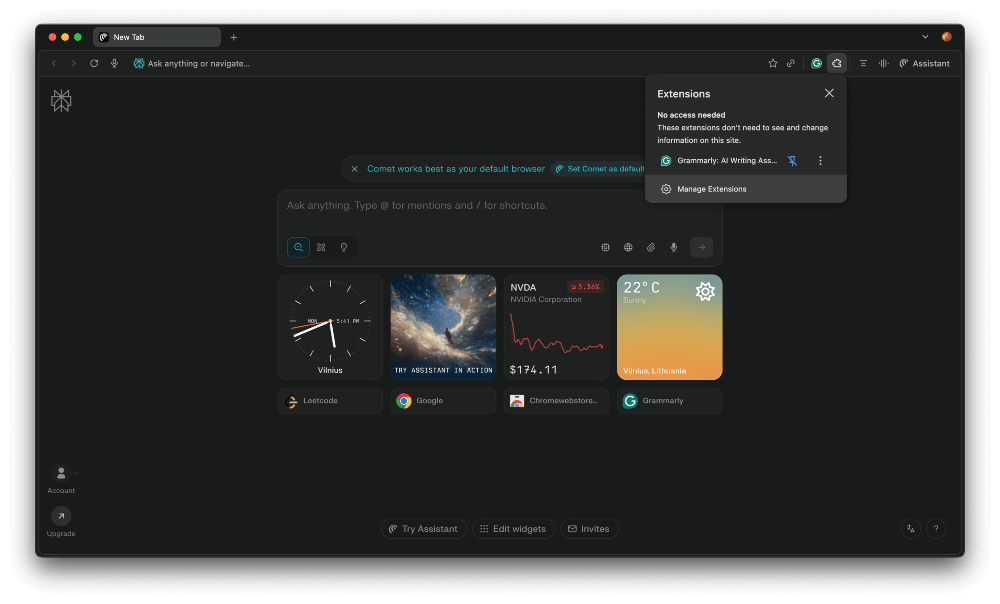
Perplexity Comet seamlessly supports Chrome extensions. You’ll find them in the top right corner next to Assistant functions, or manage them directly at comet://extensions/. Just head to the Chrome Web Store to discover what you need, then click Add to Comet on the extension’s page. In my tests, this made it easy to bring in useful tools without extra steps.
AI sidebar/answer box
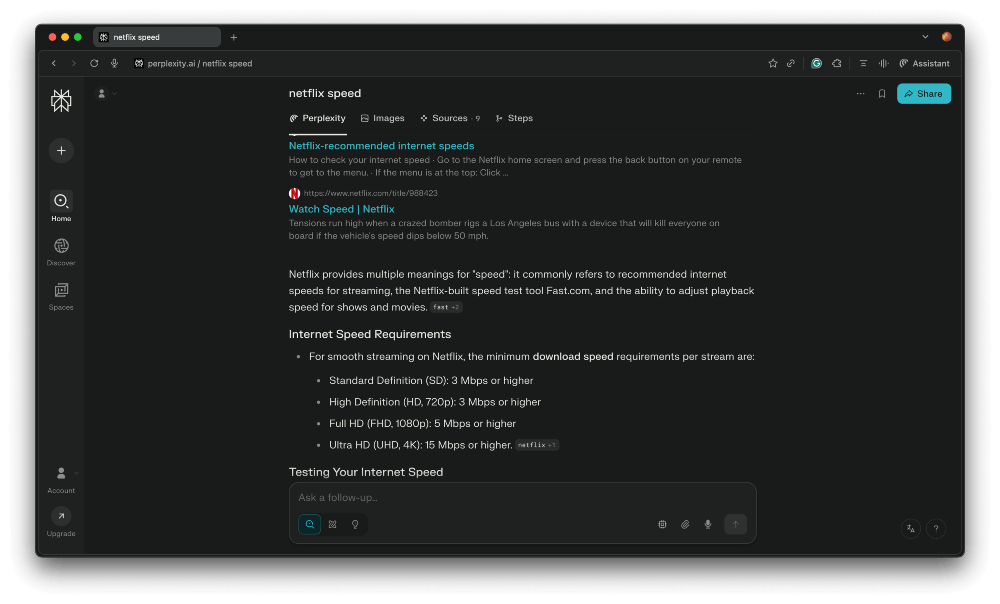
One of the first things I tried in Perplexity Comet was the built-in AI sidebar, also called the Answer box. I was simply curious if it’s as good as a regular Perplexity chatbox. You can open it by clicking the Assistant icon in the top right corner of the browser. At first, the window is empty, but once you start typing, it becomes an interactive space for real-time chatting. You can ask it to find specific information or even toss out general prompts for suggestions. It works smoothly and adds an extra layer of usefulness to the browsing experience.
Page summarization
I found Perplexity Comet’s built-in page summarization to be one of its best features. Located right next to the Assistant icon in the top right corner, a quick click on the three horizontal lines instantly prompts the Assistant to generate a short summary of the webpage you are currently viewing. It is a useful tool when you want to quickly understand the key points of an article or webpage without reading through the entire content. This feature fits seamlessly into Comet’s goal of making browsing more efficient.

Ad blocker (accessible through settings)
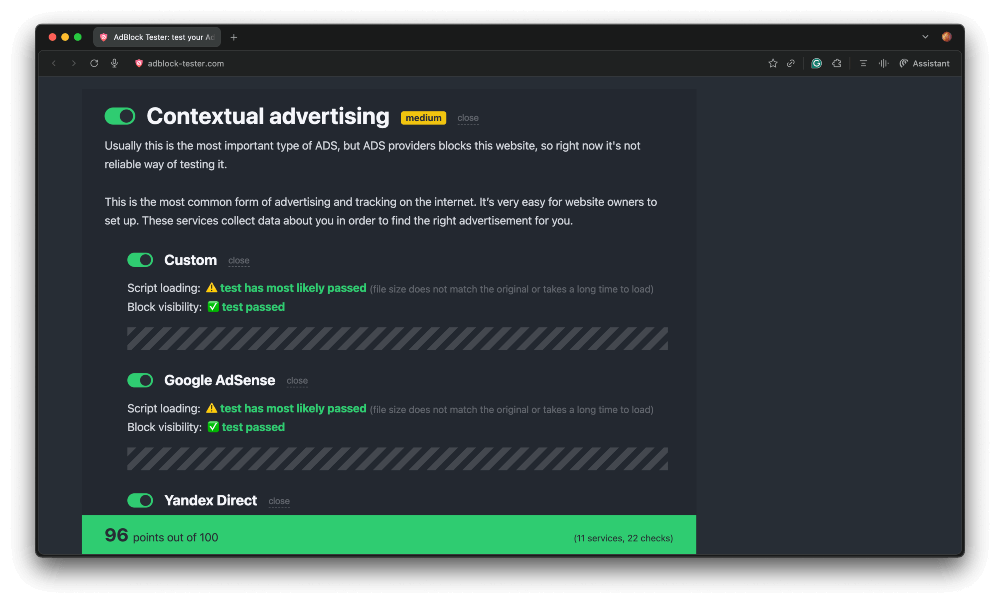
Perplexity Comet includes a built-in ad and tracker blocker, which can be enabled directly from the browser’s settings. During my testing, I found that the integrated protection worked quite well, blocking a noticeable amount of ads and third-party trackers across popular websites. While it may not be as advanced as dedicated ad blockers, it still adds a solid layer of privacy and improves the browsing experience. For anyone who values cleaner, less intrusive web browsing, this feature is definitely a welcome addition.
@tab context feature/cross-tab search
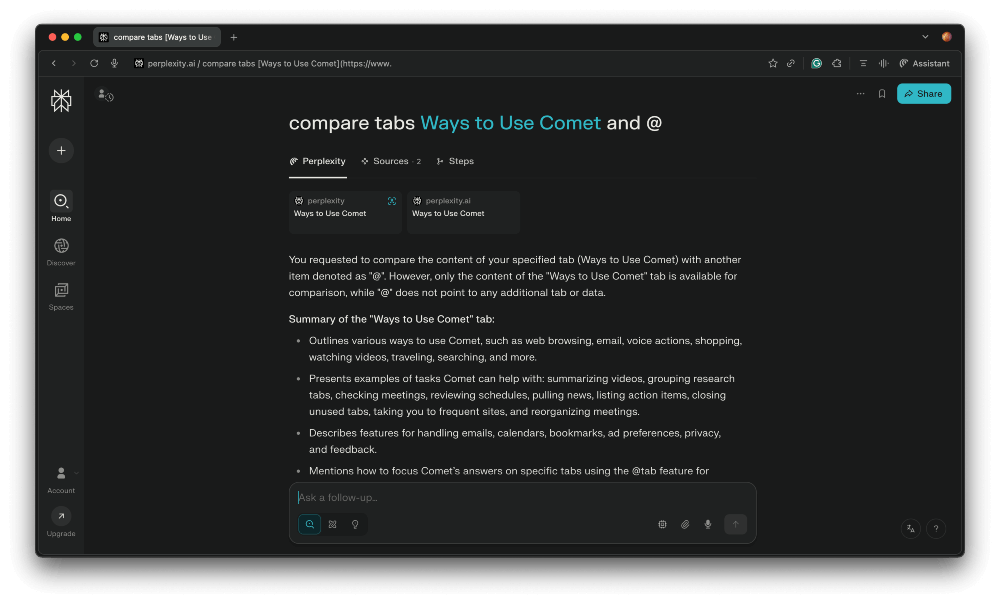
One of the more advanced features in Perplexity Comet is the ability to reference open tabs using the @tab command, such as @tab1 or @tab2, when asking the assistant questions. In theory, this allows users to guide the AI to consider specific pages. However, in my experience, tagging the right tab was not always easy. Sometimes it worked as intended, but other times, it felt inconsistent or a bit buggy. It is a promising feature, but one that may still need refinement to be truly reliable.
Automation in action
I completed a fun test in Perplexity Comet, involving asking the Assistant to find the cat food with the most meat. It successfully identified options with both meat and fish, and I could even add the cat food to my basket through Perplexity’s interface. You can actually watch the AI “browse” pages in real time – highlighted with blue frames – so you see exactly where it’s pulling information from.
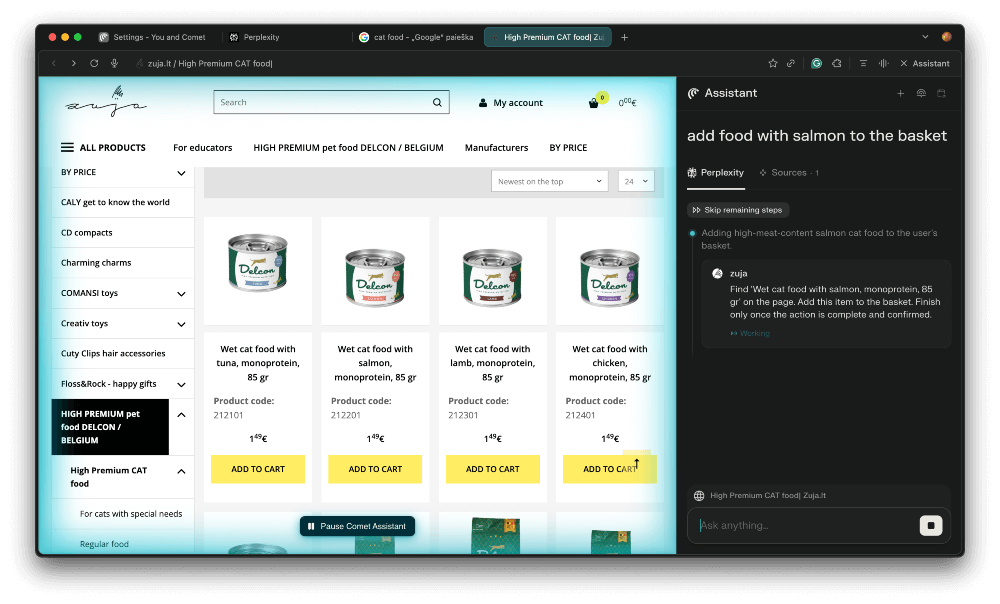
That said, I noticed it didn’t seem to check every cat food item in the shop. A visible list of the pages it reviewed would be helpful. I also tried asking it to find the cheapest shop in Google search results, but it only analyzed the snippet, not the full page, so it missed the deeper answer. Perplexity shows what AI can do today, but it’s not perfect yet.
Memory recall
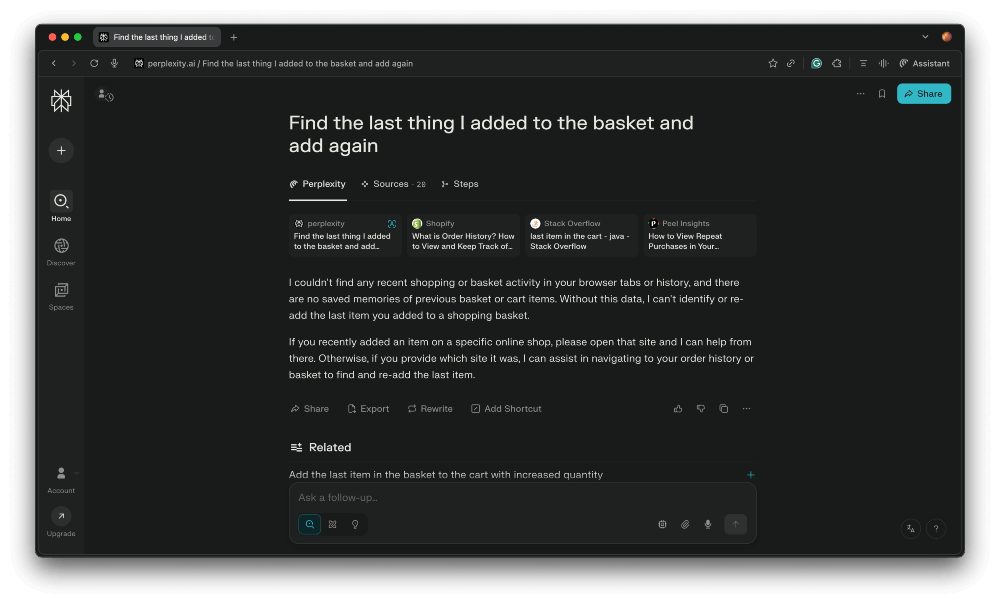
Memory recall in Perplexity Comet did not work that well for me. After I added cat food to my basket, I closed the browser and later asked the Assistant to “find the last thing I added to the basket and add it again.” Instead of picking up where I left off, Comet replied that it could not find any recent basket activity or saved memories. When I specified the shop I had used earlier, the Assistant completed the task correctly. So while it can follow instructions with enough detail, the contextual memory feature still feels a bit underdeveloped.
Full day of using Perplexity Comet browser
I began my morning by setting up the Perplexity Comet browser. Right away, its setup felt more visual and user-friendly than I expected. There were videos and a clear user guide to walk me through everything. That made me feel confident about giving it a real test day.
Once I jumped into browsing, the experience was fairly smooth. I spent the late morning doing standard searches: some research for articles, checking the weather, and catching up on news. In general, Comet worked just fine. If you’re already a Perplexity fan, this browser makes a lot of sense. Otherwise, it might feel a bit different from your usual search engine environment.

Around mid-day, I really began to notice the AI Assistant wizardry. When I was comparing products or trying to quickly fill forms, the Assistant acted almost like a smarter version of Google’s AI Mode, complete with automation that did much of the clicking or navigation. That felt like Comet’s main selling point, but it wasn’t quite perfect, as explained in my feature overview.
Later, during lunch, I sat back and just browsed, checking social media and YouTube. For casual browsing, there wasn’t much that stood out in Comet versus Chrome or another familiar browser. I found myself missing some of the extension-based workflow I already have set up in Chrome, so I hopped back there when I needed to.
As the evening rolled around, I tried the Assistant again to wrap up a search I’d done earlier. It helped me with summaries and fill-in tasks, but nothing felt revolutionary outside of that. I would use Perplexity Comet as I already enjoy Perplexity’s tools. But if you prefer a traditional search engine or rely heavily on extensions, you'd likely fall back on Chrome for some parts of the day.
Can Comet fully replace Chrome?
Based on my experience, Comet is not ready to fully replace Chrome just yet. While its built-in AI tools are useful, Chrome still offers better performance, higher stability, and more mature search and extension ecosystem. However, Comet does have some special tools that Chrome doesn’t.
The standout feature of Perplexity Comet is its AI Assistant and seamless access to Perplexity.ai’s tools. With customizable models in settings and a one-click page summary feature, Comet offers productivity boosts beyond what traditional browsers provide. That said, it does not radically reinvent the classic chatbot experience – it simply makes those AI features more integrated and easier to use.
In my tests, contextual memory felt limited. While built-in summarization and automation are strong entry points into AI-assisted browsing, using Comet as a search engine still falls short compared to Google, since it only shows the top three results. The ability to switch search engines makes the browser more flexible, but it does not yet surpass standard options like Chrome in search depth.
Comet gives a glimpse into the future of AI-powered browsing, where automation and smart context are built into the browser itself. It may not yet replace mainstream browsers for everyone, but it offers a promising foundation for what’s to come.
FAQ
Is Perplexity Comet free to use?
Perplexity Comet is free to use for everyone worldwide. There is no paid subscription required to access its core AI browsing features, and users can try it without any cost.
Which platforms support Perplexity Comet?
Only desktop platforms – macOS and Windows – support Perplexity Comet. It makes accessibility a bit limited, especially since most people nowadays use their phones more than desktop devices to browse. Fortunately, the mobile version is said to be coming soon.
Can I install Chrome extensions in Comet?
Yes. Since Comet is built on Chromium, most Chrome extensions can be installed and used. It is fairly easy to do as well, and you can even have your search history transferred to Perplexity’s Comet, too.
Can I use Perplexity Comet for team collaboration?
Yes, Perplexity plans to support enterprise features like team accounts and admin controls, though these are limited at launch. Pre-existing tools, like automations and cross-tab search also indicate a potential for collaborative team use.