10 Best AI assistants for home and work in 2026
Being behind major reports like The Mother of All Breaches and RockYou2024, our in-house cybersecurity experts and journalists provide unbiased, real-world testing and in-depth analysis.
We maintain complete transparency by openly sharing our testing methodologies with our audience.
Learn more

With the increasing demands of daily life, we all need all the help we can get. Luckily, the best AI assistant tools can boost our productivity and make work easier, giving us more time to spend on our hobbies and interests.
As of late 2024, ChatGPT alone averages 123.5 million daily active users worldwide. The market for AI continues to grow, with more and more AI services appearing daily. Whether you’re writing an essay for school, scheduling a meeting with busy coworkers, or making a resume, these virtual assistants will help streamline your workflow.
Together with the research team at Cybernews, I reviewed various AI tools and compared them against each other to present this definitive list of the best AI assistants in 2026. Keep reading below to see our rankings.
Disclaimer: A discount code is valid from November 17th to December 1st, 2025
Top 6 AI assistants - shortlist
- Motion – best AI scheduling and productivity assistant
- nexos.ai – best AI agents powered by leading LLMs
- Fieldy – top AI-boosted note-taking device
- Sintra – best AI platform with virtual employees
- Google Assistant – top AI for voice-based searching
- Jasper – best AI writing assistant
Factors to consider when choosing an AI assistant
A wide variety of AI tools are available today, each with its own specialty. Choosing the best AI assistant depends on what you’ll use it for. Motion is a strong choice. Want hands-free note-taking? Try Fieldy. Need AI “employees” to automate workflows? Sintra is perfect. As for video creation, Heygen leads the pack, while Winston leads AI and plagiarized content detection.
Still, regardless of your purposes for using AI, there are some universal factors you should take into account. Here are the best features of AI tools to look out for:
- Compatibility: Your AI assistant should be compatible with your devices. However, not all voice assistants, such as Google Assistant, Siri, and Amazon Alexa, may work with your home security cameras.
- Functionality: Much like human assistants, AI assistants have their specialties, so make sure you get the right tool for the job. For instance, Resume.io is the top choice for resume-building, but it’s not the best pick to check for plagiarism. Copyleaks is great for detecting AI writing and plagiarism but not so good at helping you create resumes and cover letters.
- Pricing: Voice assistants are typically free to use. However, other AI tools may require a paid subscription. Choose an AI assistant whose price tag matches its use case.
- Privacy: Like other digital tools, AI assistants carry the risk of malicious actors attempting to hijack weak points in these systems. As such, you should opt for an AI tool that values and protects your data and privacy. Avoid AI tools with ambiguous data privacy statements or a history of data breaches.
These criteria will help you narrow your search for the best AI assistant. Better yet, check out our AI assistant comparison below for recommendations.

Best AI personal assistants for work
Do you feel distracted from the more strategic aspects of your job because of all your mundane tasks? Learning to delegate can help your productivity soar. Below are some of the best AI assistants for work:
1. Motion – best AI daily organizer

| Starting price: | $19/month |
| Free version: | No |
| Top features: | AI calendar, automatic meeting notes, project management dashboard, booking link |
Motion is a fantastic AI organizer that combines scheduling, calendar management, and task automation in one platform. It uses machine learning (ML) to automatically order your day, block focus time, and reschedule events when conflicts come about. Over time, Motion also learns your productivity patterns. Furthermore, teams can benefit from shared booking links, meeting transcription, and integrated dashboard (highlights bottlenecks in real time). For individuals, it’s great to reduce context-switching and organize deadlines and appointments.
Best for: Streamlining daily scheduling and task management
Top features: Motion excels at AI-driven calendars, smart task prioritization, meeting summaries, and automated reorganization when plans change.
User reviews: Many users praise Motion for dramatically improving productivity and simplifying scheduling. Its AI-powered calendar is praised highly by busy professionals. As for the negatives, its steep learning curve is one of them, as well as the lack of deeper project management tools like advanced subtasks or broader integrations. The negative reviews have dropped its Trustpilot score to 3.8, even though there are many positive reviews.
Pricing: Motion’s entry plan starts at $19/seat/month. Higher tiers are available for larger teams and organizations.
2. nexos.ai – best AI agents for workflow automation
| Starting price: | €18.00/month (≈$21.16) |
| Free version: | No |
| Top features: | Centralized AI dashboard and ready-made AI agents |
nexos.ai allows you to build your personal AI agents that autonomously execute marketing, sales, HR, and IT management tasks. It integrates with Jira, Slack, Confluence, and 20 more business apps for you to easily create a complete business ecosystem without additional human workers. I like that there are plenty of ready-made templates for AI agents, like an HR policy agent that automatically answers employees’ questions or a brand content writer that knows your brand voice and generates content accordingly.
Best for: Marketing, sales, IT management, and HR teams needing to reduce repetitive work
Top features: It has a centralized AI dashboard that shows responses to the same question from a few leading LLMs so that you can compare their outputs and choose the best. I also like its customizable guardrails, which let employees use only permitted AI models for a defined set of tasks.
User reviews: Users appreciate that nexos.ai has 99+ LLMs that can power AI agents, serve as chat-based assistants, or integrate into their products as an API. Both small and large businesses run it mainly to automate tasks such as content creation and report generation based on data from CRMs, emails, and separate documents. Some mention that the cost is too high for multiple users, but nexos.ai offers custom pricing for teams with 50+ employees.
Pricing: nexos.ai offers the Pro plan, starting at €18.00/month (≈$21.16) per user, which provides comprehensive AI assistance, e.g., scheduled AI agents, report generation, and text, image, and data analysis. You can also buy separate API credits to plug nexos.ai into your other business products.
3. Fieldy – top AI note-taking device

| Starting price: | $9.99/month |
| Free version: | No |
| Top features: | Wearable pendant recorder, automatic transcription and summaries, calendar sync, smart reminders, 100+ language support |
Fieldy isn’t like a traditional AI assistant. To use it, you must purchase the hands-free pendant-shaped wearable that clips onto your clothing. The pendant records conversations once activated via the app. Fieldy’s specialty is memory support: real-time transcription, searchable transcripts, and summaries which you can turn into reminders or calendar events. It’s invaluable for professionals juggling non-stop meetings or if you prefer voice-first tools. With Fieldy, no details are left behind.
Best for: Hands-free note-taking and on-the-go productivity
Top features: It’s a wearable, stylish AI pendant that offers accurate live transcription, auto-generated summaries, and reminders (linked directly to your conversations). It also syncs with calendars, and supports over 100 languages.
User reviews: With a 4.2 Trustpilot score, Fieldy is doing well. Users love its transcription accuracy, especially in settings where there are many speakers. Users also like its privacy features (like manual activation and HIPAA protection). However, users also complain about occasional app glitches, battery life falling short of advertised claims, and missing integrations with some business tools.
Pricing: Fieldy’s pendant costs $89 and comes with 150 free minutes/month. After that, subscriptions start at $9.99/month for the Plus plan and $15.99/month for Unlimited. The Unlimited plan is the sweet spot (unlimited minutes and priority support).
4. Sintra – best AI platform with virtual employees

| Starting price: | $6.83/month |
| Free version: | No |
| Top features: | 12 role-based AI assistants, workflow automations, 90+ Power-Ups, Brain AI memory, 100+ language support |
Sintra AI is a productivity suite that has “AI employees”: a team of 12 specialized assistants – from a copywriter and SEO expert to a customer support manager and data analyst. This team learns from your inputs and company data via Brain AI – adapting and learning as you go along. With 90+ Power-Ups for automating tasks like emails, finances, and landing pages, Sintra is a time-saver for startups and freelancers.
Best for: Founders, small teams, and entrepreneurs looking to automate everyday tasks with a bit of fun
Top features: Definitely its cast of AI employees with defined roles, workflow automations, 90+ Power-Ups for specific tasks, and Brain AI memory that evolves together with you.
User reviews: A 4.6 score on Trustpilot is excellent, and the reviews are proof of this. Users appreciate how Sintra reduces the need for additional staff with its context-aware AI helpers. It makes users feel like these helpers are real partners. Users also noted increased social media interactions, and inspiration for new business ideas. On the downside, some say the AI helpers can miss simple tasks, or give wrong results.
Pricing: Individual assistants start at $6.83/month. The Sintra X plan, at $97/month, gets you all 12 assistants plus Brain AI features and 90+ Power-Ups.
Best AI personal assistants for home
Amazon’s Alexa, Google Assistant, and Apple’s Siri come pre-loaded on their respective devices, making them the most popular AI assistants worldwide by default. Their widespread availability also makes them hard to beat in convenience and accessibility.
1. Alexa – best AI for smart home integration

| Starting price: | Free (Bundled with devices) |
| Free version: | Yes |
| Top features: | Ability to shop, play music, set alarms, and get weather information through voice commands |
Most smart home devices are compatible with Amazon Alexa, from home security sensors to smart light bulbs and speakers. Anyone who needs automated home routines must only say the magic word “Alexa,” and they can watch their home come to life.
Best for: Smart home integration
Top features: Alexa’s wide compatibility allows you to easily turn your home into a smart home. I also use it to shop, play music, set alarms, and get weather information through voice commands alone.
User reviews: Many users enjoy all the ways they can configure Alexa, like using it to automatically turn lights on and off. However, some hope for new features and want to see Alexa improve its voice recognition.
Pricing: Amazon Alexa is free to use. However, you’ll need to pay between $17.99 and $399.99 for Amazon Echo, Amazon’s AI home device.
2. Google Assistant – top AI for voice-based searching

| Starting price: | Free (Bundled with devices) |
| Free version: | Yes |
| Top features: | Google search engine, smart home integration, routines, search syncing across devices, alarms, music, navigation while driving. |
Google Assistant – now powered by Google Gemini – is my top pick for voice-based searching, which comes as no surprise since it has the backing of the most powerful search engine in the world. Like Alexa, Google Assistant is widely compatible with many smart home devices and performs exceptionally well on Android phones.
Best for: AI-assisted voice search
Top features: Google Assistant benefits from the Google search engine, smart home integration, routines, search syncing across devices, and car support through Android Auto. Android users can also use Google Assistant to set alarms, play music, get directions while driving, and start lists.
User reviews: User reviews of Google Assistant are largely positive, with many enjoying its reliable search features. One reviewer writes, “I feel terrible how lazy it has made me. I offload so many reminders, math problems, general fact inquiries [onto Google Assistant].”
Pricing: Google Assistant is free to use. However, you can also opt for the home device, Google Nest speakers, which range from $49.00 to $99.99.
3. Siri – best AI for Apple users

| Starting price: | Free (Bundled with devices) |
| Free version: | Yes |
| Top features: | dictate text messages and emails, phone your loved ones, create appointments, and ask for restaurant recommendations |
Launched in 2011, Siri is the first widely available virtual assistant on a major tech company’s smartphone. All Apple products ship with Siri built into their OS, from iPhones to iPads, AirPods, and MacBooks. Like other AI voice assistants, Siri can perform many tasks, such as updating calendars and giving directions. However, it pales in comparison to other voice command tools on this list.
Best for: Productivity on iOS and macOS devices
Top features: You can use Siri to dictate text messages and emails, phone your loved ones, create appointments, and ask for restaurant recommendations.
User reviews: iOS and macOS enthusiasts use Siri widely, but this AI voice assistant is not perfect. Users switching from Android are often disappointed by its performance compared to Google Assistant. One complaint detailed how Siri failed to identify and dial the phone number of a local grocery store, whereas Google Assistant had no problem doing so.
Pricing: Siri is free to use, but you first need an iOS or macOS device.
Best AI writing assistants
While AI has yet to catch up to human-quality writing and creativity, it can still prove useful for researching, outlining, refining, and grammar-checking work. These are my top picks for the AI writing assistants that can augment and support your tasks.
1. Jasper – best AI writing assistant

| Starting price: | $59.00/seat/month |
| Free version: | No |
| Top features: | Generates content based on the topic, keywords, and outline, as well as customizable “brand voice” |
Though it recently pivoted to marketing campaigns, Jasper – formerly Jarvis – is still an ideal AI assistant for all kinds of writing projects. As one of the oldest and most mature AI content generators, Jasper utilizes multiple large language models (LLMs) to produce high-quality output.
Best for: All kinds of writing projects, but especially content marketing
Top features: Jasper generates content based on the topic, keywords, and outline you provide, allowing for customizability. You can also calibrate your “brand voice” by describing your writing style and entering writing samples so Jasper can try to emulate your unique style.
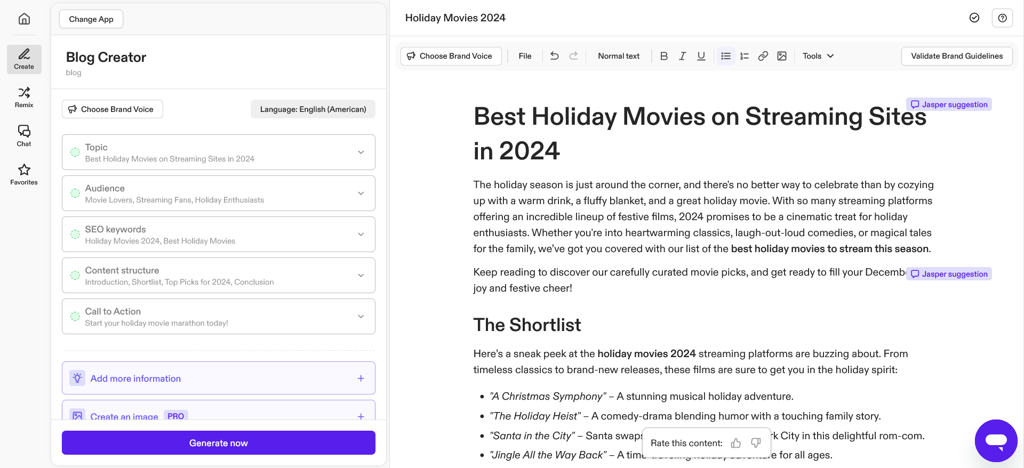
User reviews: Users enjoy how Jasper lets them save time when creating engaging content. The brand voice feature is particularly useful, but you need to tweak and tune it to get your writing style. Some also express concern that generated text can require further editing to ensure accuracy and originality.
Pricing: Jasper offers a free 7-day trial, but you must sign up for a plan before using it for free. Subscription rates are $39 per seat per month for the Creator plan and $59 per seat per month for the Pro plan.
2. Writesonic – great AI SEO copywriter

| Starting price: | $0.00/month |
| Free version: | Yes |
| Top features: | Generate content for blogs, landing pages, newsletters, social media posts, keywords, citations, and images |
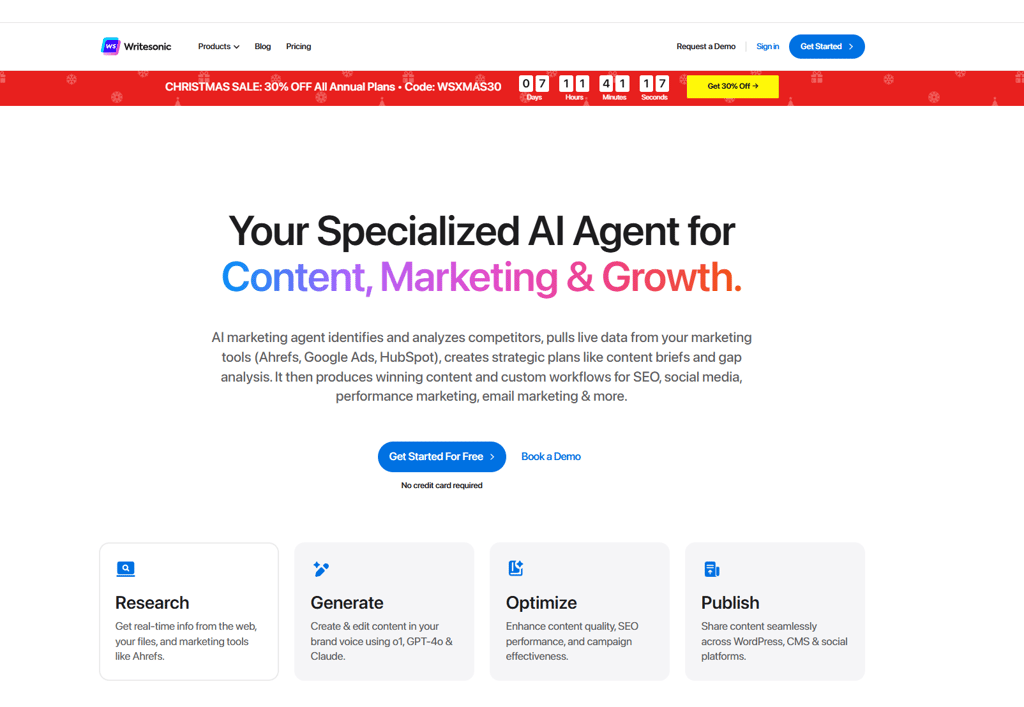
For search-engine-optimized content, Writesonic is my AI assistant pick. With only one subscription, you can get help with keyword analysis, competitor research, article writing, internal linking, proofreading, and streamlining your content creation process. Unfortunately, Writesonic needs to improve its user-friendliness and accessibility. Using it can be intimidating, and the service isn’t yet available in all countries.
Best for: Bulk generation of SEO content
Top features: Writesonic can generate content for blogs, landing pages, newsletters, and social media posts. You also get writing-adjacent tools that generate keywords, citations, and images.
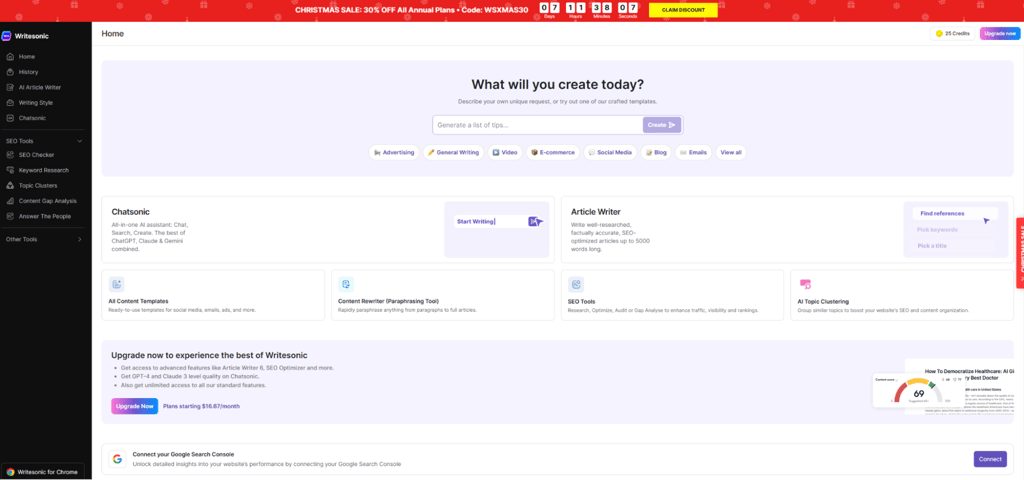
User reviews: Reviews laud Writesonic for its robust features, including the browser extension and integrations for services and platforms like Zapier, Airtable, and HubSpot. However, users also mention drawbacks, such as a learning curve that can be intimidating for beginners. The site's performance also needs work, as screens can sometimes take a while to load.
Pricing: Writesonic’s free version gives you 25 credits and limited access to its AI models. The Individual plan is $0.00/month and grants you 100 monthly credits plus unlimited access to all generative AI models and writing tools. The Standard version is $79.00/month and has 1,000 monthly credits. For reference, the AI writer requires 20 credits each time you generate content.
3. Copyleaks – AI detector and plagiarism checker

| Starting price: | $7.99/month |
| Free version: | No |
| Top features: | Minimalistic AI and plagiarism detection |
Copyleaks is a solid choice if you need an AI and plagiarism detector to ensure academic integrity or protect intellectual property. It can process 31 languages with 99% accuracy, making it especially useful for multilingual organizations.
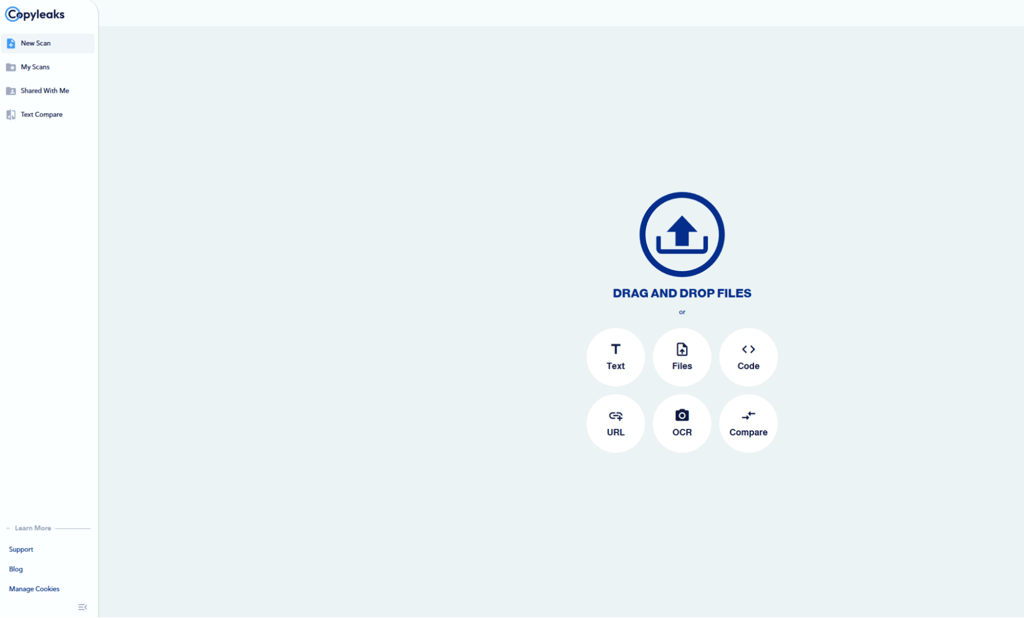
Best for: Detecting AI and plagiarism
Top features: Copyleaks is a straightforward app that promises AI and plagiarism detection. It delivers on its promises without unnecessary bells and whistles.
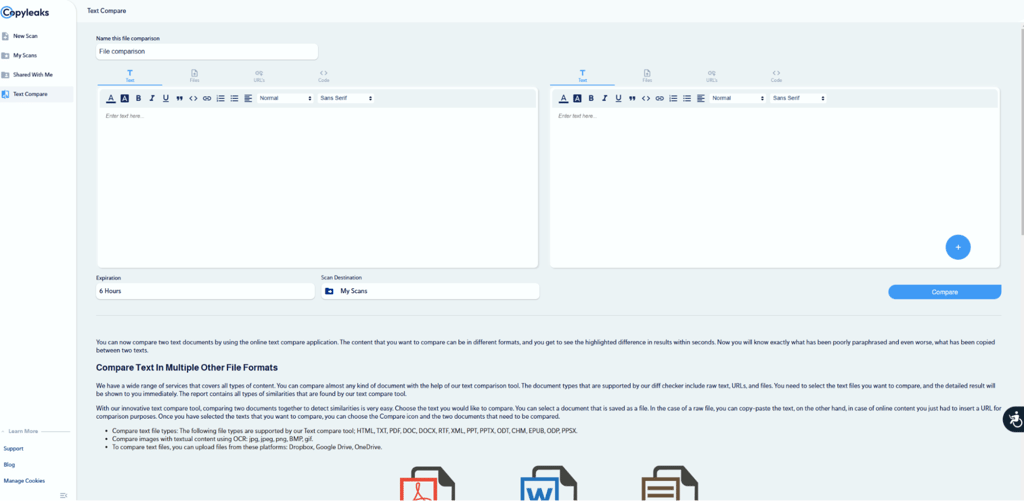
User reviews: Like many other AI detectors, Copyleaks can be hit-or-miss. Some users claim it never gets anything right, while others swear it has a 100% success rate. The truth is likely somewhere in between, which the app’s 3.2-star rating on Trustpilot seems to support. I also found the detector’s interface outdated, and the free trial barely works. The website insists you sign up before you can get your results.
Pricing: Copyleaks’s AI + Plagiarism Detection plan costs $13.99 per month, the AI Detection-only plan costs $7.99 per month, and the Plagiarism Checker costs $8.99 per month. Each plan comes with up to 1,200 credits every month. Since a credit equals 250 words, these paid plans cover 300,000 words per month.
The best AI assistants compared
To help you determine the best AI assistant, we prepared the comparison table below:
| AI tool | Free version | Pricing | User rating | Best for | Standout feature |
| Motion | ❌ No (7-day trial only) | Starts at $19/month | G2: 4.1/5 Trustpilot: 3.8/5 | Streamlining daily scheduling and task management | AI calendar with automatic reorganization and summaries |
| nexos.ai | ❌ No | Starts at €18.00/month | Ratings Unavailable | Automating content creation, data analysis, and client research via AI agents | Centralized AI dashboard that allows you to compare answers from a few LLMs |
| Fieldy | ❌ No | Starts at $9.99/month + $89 device | Trustpilot: 4.2/5 | Hands-free note-taking on the go | Wearable pendant recorder with real-time transcription |
| Sintra | ❌ No (14-day money-back) | Starts at $6.83/month (per assistant) | Trustpilot: 4.6/5 | Entrepreneurs and small teams automating workflows | 12 AI “employees” acting as virtual specialists |
| Alexa | ✅ Yes | Free | G2: 4..75/5 | Smart home integration | Integration with thousands of third-party devices |
| Google Assistant | ✅ Yes | Free | Ratings Unavailable, bundled assistant | Voice-based searching | Google-powered voice search and conversational AI |
| Siri | ✅ Yes | Free | Ratings Unavailable, bundled assistant | Productivity on Apple devices | Built-in iOS and macOS voice search |
| Jasper | ❌️ No, free trial only | Starts at $59.00/seat/month | G2: 4.5/5, Trustpilot: 4.9/5 | All kinds of writing tasks | Brand voice configuration and customizable content generation |
| Writesonic | ✅ Yes | Starts at $0.00/month | G2: 4.8/5, Trustpilot: 4.8/5 | SEO content writing | SEO-focused content generation, keyword research, and link-building |
| Copyleaks | ❌️ No, free trial only | Starts at $7.99/month | G2: 4.7/5, Trustpilot: 3.2/5 | AI and plagiarism detection | No-frills detection of AI-generated and plagiarized content |
How did I select these AI assistants?
To create this shortlist, the Cybernews research team and I studied multiple AI assistants available in the market and chose the best ones for home and work use based on the following criteria:
- Advanced AI models: For this list, I opted for AI assistants that utilize the most recent and stable AI models, such as GPT-4, Gemini 1.5, Llama 3, DALL-E 3, and Stable Diffusion 3.5. These versions typically have better and more consistent output than their predecessors.
- Features: Some AI apps, like Motion or Sintra, have specific use cases, while others are more for general use, such as Siri or Alexa. Either way, I chose apps whose features matched the intended use.
- Availability: I wanted AI apps that were widely available globally and preferably in a variety of languages. I also focused on compatibility, ensuring these tools were usable on different devices and operating systems or integrated with different productivity services.
- Reliability: The AI tools on this list all have reliable uptime and generally have consistent output quality. Additionally, I wanted AI apps that frequently receive updates for better performance.
- Cost: One of AI's benefits is cost efficiency, so I prioritized apps with affordable paid subscription plans or free versions. I also prioritized apps with free trials so users could try these tools without committing to a subscription.
Benefits of using AI assistants
There are several benefits of AI assistants, such as:
- Time efficiency: AI productivity apps can speed up many of our daily tasks, allowing us to focus our energies on what we enjoy most. Tools like Motion can automatically schedule meetings. Writesonic can suggest internal links for your website, so you don’t have to refer to your database every time you produce an article.
- 24/7 availability: While human assistants are still preferable for many reasons, around-the-clock availability is an unreasonable expectation. AI assistants can fill the gap when other kinds of support are unavailable. This accessibility makes AI tools a great addition to organizations with team members in different time zones. For instance, you can get Copyleaks to check your blog posts for plagiarism while your editor is out of the office.
- Easier scalability: The increasing demands for productivity and output can put a strain on your budget or your team’s morale. AI-driven tasks can boost output frequency by taking over or supporting some of the more mundane tasks involved in content production. For example, you can jumpstart brainstorming sessions by asking Sintra’s AI helpers for campaign ideas.
Use cases for AI assistants
AI assistant use cases are already plenty, but more are becoming apparent as AI models mature. Here are some of the most common ways to utilize these popular AI tools:
- Personal organization: More and more people use AI tools for productivity. Voice control apps like Alexa, Google Assistant, and Siri can help manage your calendar and tasks to keep your day in order even when you’re busy. These apps can also provide weather information, driving instructions, news and current events.
- Process automation: The best AI tools for business can automate tasks across different departments. You can use AI processing for invoices, enhance content production with AI writing assistants, and support decision-making by analyzing data.
- Customer service: AI-powered chatbots can supplement your existing customer service team and lighten their load, especially during high-volume hours. You can train these chatbots using your knowledge base to give customers accurate and actionable results.
- Education: AI can automate time-consuming tasks like grading standardized questions, analyzing student grades, and proofreading lesson plans. Students, too, benefit from AI through interactive and self-paced learning.
Other AI tools you might be interested in:
Best AI chatbots for businesses: boost your sales with these AI chatbots
Best AI chatbot: discover our top AI chatbot recommendations
Best AI personal assistant: keep your work and home life organized with an AI assistant
Best AI note-taking app: focus on productivity better with these AI note-taking apps
Best AI assistants in 2026 – wrap up
AI assistants help streamline your workflow and organize your personal life. These helpful tools save you time, energy, and money by supporting tasks such as resume building, research, writing, proofreading, data analysis, and AI detection.
Like choosing a human personal assistant, picking the best AI assistant requires care and thought. Consider your needs: Do you need help with specific tasks like scheduling or writing? Do you have dynamic needs that require a diverse toolset?
Need to stay on top of scheduling? Use Motion. Want AI agents that execute repetitive marketing and HR tasks for you? Give nexos.ai a try. For high-level task automation, try Sintra. Fieldy is perfect for hands-free notes, and for more basic uses, such as voice search, driving directions, and weather updates, you can use whatever voice assistant is most convenient: Alexa, Google Assistant/Gemini, or Siri.
For marketing content, try either Jasper or Writesonic, which have configurable content generation tools. If you need to check academic papers for plagiarism and AI use, use Copyleaks.
Choosing the right AI assistant is a straightforward process. Just determine your needs, and find the tool that best matches them. As AI develops, you’ll be sure that, no matter the task at hand, you’re sure to find AI tools for productivity assistance.
FAQ
Which AI assistant is the best?
The best AI assistant is the one that best meets your needs. For productivity, choose Motion. Amazon Alexa is the best voice assistant for your home. For hands-free notes, pick Fieldy.
What's the best free AI assistant?
The best free AI assistant is Amazon Alexa, as it has the most smart home integrations and is easily available on the home device Amazon Echo.
What is the best AI coding assistant?
The best AI coding assistants today are GitHub Copilot and Amazon CodeWhisperer, as both accelerate your coding process through code suggestions and automation of repetitive tasks.
Are AI assistants secure?
It depends. While AI assistants typically have data privacy policies that promise to handle user data confidentially, they still collect and process large amounts of user data. Even with good intentions, this data collection has the potential for misuse or breaches.