Best AI aggregators: all-in-one AI tools
Being behind major reports like The Mother of All Breaches and RockYou2024, our in-house cybersecurity experts and journalists provide unbiased, real-world testing and in-depth analysis.
We maintain complete transparency by openly sharing our testing methodologies with our audience.
Learn more

Back when ChatGPT was still Da Vinci Playground, the early days of AI felt highly experimental. You had to craft prompts carefully just to get a usable response, all through a web-based interface that looked like a command prompt. Years later, after countless AI tools emerged, the landscape evolved. Gone are the days of switching between ChatGPT for text generation and DALL-E for awkward-looking images.
We now have AI aggregators – platforms that bundle multiple AI models, agents, or apps into one interface. They simplify everything: one login, one payment, endless tools. In this guide, I explain what they do, why they matter, and which are worth using.
Top 6 best AI aggregators: shortlist
- nexos.ai – best AI aggregator for businesses
- Claude by Anthropic – best for long projects and privacy
- Sintra – best business AI aggregator overall
- Motion – best AI aggregator to automate workflows
- Make AI – best for AI integration
- Magai – AI aggregator for creators
- Poe – best for highly specialized bots
What is an AI aggregator?
An AI aggregator is a platform that consolidates access to multiple AI services in one place. These tools fall into three main categories, each serving different needs:
- Model/chatbot aggregators are probably what you think of first. Platforms like nexos.ai, Poe, Magai, and Sintra give you access to multiple large language models (LLMs). ChatGPT, Claude, Gemini, Llama, and other tools all live under one roof. You can switch between them without leaving the interface, and with no separate subscriptions required. Why does this matter? Different models excel at different tasks. Claude might nail creative writing while GPT-4 crushes code. Gemini might handle research better than both. With an aggregator, you pick the right tool for the job without switching platforms.
- AI tool aggregators take a broader approach. They unify access to productivity apps, design software, writing assistants, and coding tools. Instead of specializing in chatbots, they integrate diverse AI-powered applications. Need to generate an image, write copy, and analyze data? You can do so all from one dashboard.
- AI news aggregators serve an entirely different purpose. They curate news, research papers, and developments in the AI space. These platforms sift through the research to surface the information that really matters. You get summaries, trending topics, and research updates without doom-scrolling Twitter or Reddit. They're essential for anyone who needs to stay current without the time investment.
Here's a quick breakdown of how these categories compare:
| Type | Primary function | Example use case | Target user |
| Model aggregators | Multi-LLM access | Comparing outputs across models | Content creators, developers |
| Tool aggregators | Unified AI app suite | End-to-end project workflows | Teams, agencies |
| News aggregators | AI content curation | Staying informed on trends | Researchers, executives |
Market trends for AI aggregators
The AI platform market is in hyperdrive, with demand showing no signs of slowing down. According to the International Data Corporation (IDC), global revenue for AI platform software jumped 44.4% in 2023, reaching $27.9 billion, and is expected to soar to $153 billion by 2028, a compound annual growth rate of 40.6%.
Such growth reflects how fast LLMs and generative AI are reshaping industries. As more models emerge, from open-source options to enterprise-grade tools, the ecosystem becomes increasingly fragmented. AI aggregators solve that problem by giving users one interface to access, compare, and deploy multiple AI systems without constant switching.

You can see the shift in how everyday tools have evolved. Motion AI, for instance, automatically reschedules tasks when you cancel a meeting, finding the best available time slot using predictive logic.
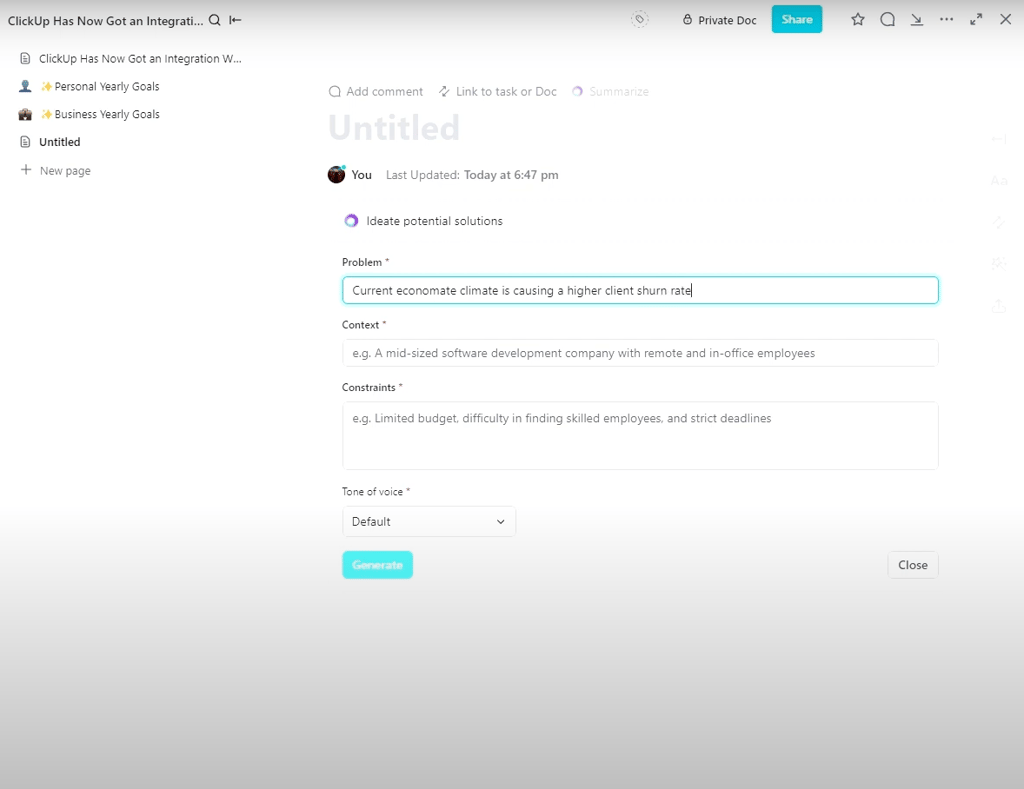
Compare that to ClickUp’s early AI rollout, which only used LLMs to generate dashboard templates and basic content suggestions. Today’s aggregators don’t just create, but also coordinate, automate, and adapt.
Features of AI aggregators
As with any other apps, the best ones share features that make them powerful, not just convenient.
- Unified interface across models. Interact with GPT-4, Claude, and Gemini through the same chat window using a unified prompt style. No relearning shortcuts or layouts, and the consistency keeps your workflow smooth.
- Model switching and benchmarking. Average tools let you toggle models, but great ones test prompts across several and highlight the best output. Magai stands out with its split-screen comparisons.
- Subscription consolidation. One plan replaces multiple subscriptions. The key is transparency, no hidden costs, or usage caps. nexos.ai and Motion offer genuine all-inclusive pricing.
- Discovery and search filters. Filter by capability, cost, or speed to find the right model for each task. Poe pioneered this approach, and competitors quickly followed.
- Team and collaboration tools. Shared chat histories, co-editing, and admin permissions turn solo work into coordinated output. Make AI builds entire workflows around team management.
- File handling and memory management. Upload documents, maintain context across sessions, and isolate projects. Claude’s Projects and Sintra’s persistent memory make ongoing work seamless.
The right aggregator should blend into your workflow, letting you focus on results and not the interface.
How we tested the best AI aggregators
The Cybernews team and I didn’t just read documentation and call it research. Over three months, we used these platforms for real work.
Our testing focused on how each AI aggregator performs in daily use rather than on theoretical claims. Every platform promises to be fast, secure, and versatile, but we wanted proof.
We evaluated five key factors to determine overall performance and usability:
- Privacy and data handling (25%). I examined encryption, retention policies, and compliance with major privacy standards. Platforms that allowed users full control of their data ranked higher.
- Accuracy and reliability (25%). Identical prompts were tested across each aggregator to measure factual precision, uptime, and stability under load.
- Pricing and value (20%). I compared plan tiers, hidden costs, and rate limits to see which platforms offered genuine value for money.
- Model range and coverage (15%). I looked at the variety of available models, how frequently they’re updated, and whether they support specialized use cases.
- User experience and integrations (15%). I tested how intuitive each platform felt, how well it connected with third-party apps, and how quickly common tasks could be completed.
Each factor revealed how these platforms perform when used in real-world workflows.
Best AI aggregators in 2026: our top picks
I tested over a dozen platforms. These six stood out for different reasons. Your ideal choice depends on your specific needs, but one of these will likely fit.
1. nexos.ai – best overall AI aggregator for businesses
| Starting price: | $9.75/month |
| Aggregates: | 100+ leading LLMs, including ChatGPT, Claude, and Gemini |
| Top features: | Workspace lets you compare answers from different models for your prompt, AI Gateway lets you connect your business tools to 100 LLMs via a single API |
| Who it’s for: | Small and medium-sized businesses looking to implement AI for automating routine work and power their tools with AI models |
nexos.ai is an all-in-one platform for using AI in business operations. It’s comprised of two tools: Workspace and AI Gateway, both built to give you total control over how your business adopts and manages AI.
The Workspace provides your teams with a chat-based interface for interacting with 100+ AI models, including the latest versions of ChatGPT, Gemini, and Claude. What I liked most is that you can choose a few models and compare their responses to the same prompt side-by-side.
AI Gateway, on the other hand, is for developers and engineers who want to plug those 100+ models into third-party tools and apps. Basically, nexos.ai gives you a single, centralized API for all LLMs, so you can track costs and usage in one place.
nexos.ai’s interface is simple and modern. For example, in the Workspace, you can build an AI agent without coding by simply describing what you want or choosing a template.
You can read more in our nexos.ai review, but based on my testing, I can surely say it’s a comprehensive solution to implement LLMs across every aspect of your business. It not only provides full transparency over how those AI models work, but also doesn’t train on your data, unlike some other AI platforms (e.g., the free default version of ChatGPT).
Small and medium-sized businesses looking to automate routine work with the Workspace and connect their business or consumer software with 100+ AI models.
2. Claude (Anthropic platform) – best for long-form work and privacy

| Starting price: | $17.00/month |
| Aggregates: | Claude family models: Opus, Sonnet, and Haiku |
| Top features: | 200K+ token context window, project-based memory, deep reasoning, data privacy guarantees |
| Who it’s for: | Writers, researchers, developers, and professionals working on complex or sensitive data |
Claude by Anthropic isn’t a full aggregator in the traditional sense, but its platform offers some aggregator-like features by providing access to multiple Claude-based models.
Claude Projects allows context to persist, and uploaded documents, conversation history, and instructions to carry over within a project environment. This helps when handling complex, long-term tasks.

Claude’s models support large token windows (e.g., 200,000 tokens or more, depending on your plan), letting you input long documents, code bases, or deep research files and have the system maintain context.
The Claude family (Opus, Sonnet, Haiku, etc.) offers models optimized for different tasks. Some models prioritize quality, others prioritize speed. You choose based on the assignment.
Anthropic states it does not train on user conversations by default, and data is deleted after processing unless users opt in. This helps users handling sensitive info feel safer.
Writers, researchers, developers working on long-form projects who value context retention and privacy.
3. Sintra – best overall AI aggregator for businesses

| Starting price: | $15.60/month |
| Aggregates: | 12+ specialized AI Helpers for tasks like social media, data analysis, writing, and support |
| Top features: | Brain AI context memory, 90+ power-ups, multi-language support, 14-day refund policy |
| Who it’s for: | Entrepreneurs, freelancers, and small teams wanting AI assistants for daily work |
Sintra designs its platform for businesses first, and that orientation shows. It markets itself as a suite of 12 specialized AI Helpers for tasks ranging from copywriting, social media, data analysis, support, and more. Its Brain AI stores context (brand guidelines, documents, preferences) that its assistants use to produce more personalized outputs.
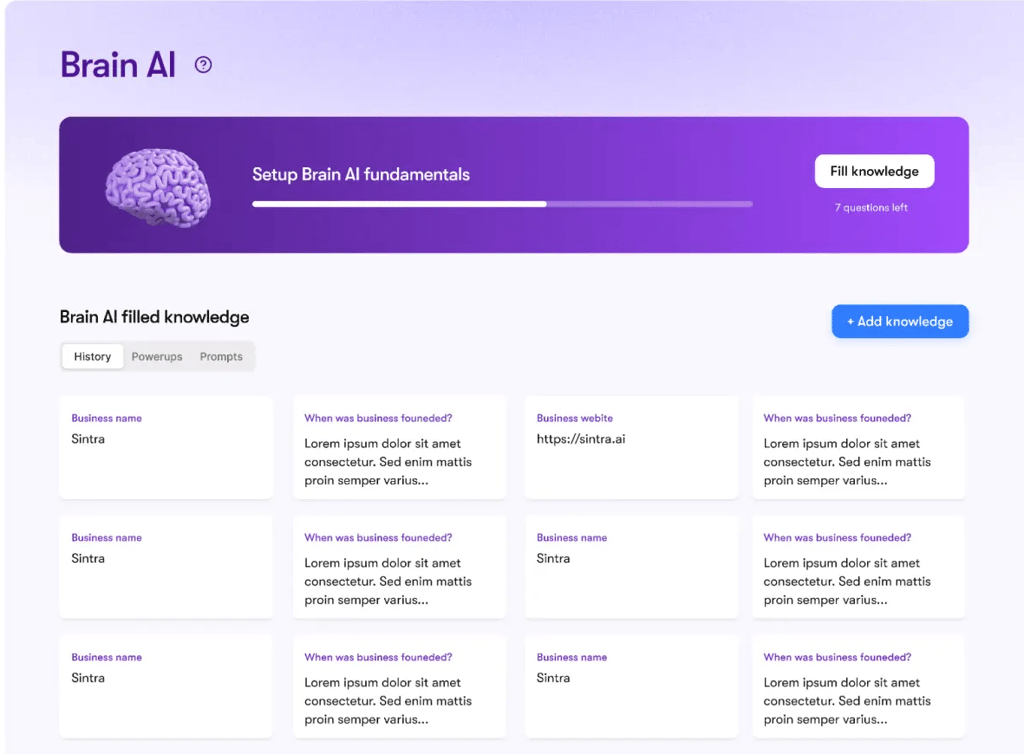
Sintra offers role-based access and team settings, though full enterprise-style permissions (prompt approval, fine-grained auditing) aren’t clearly documented in public sources. Its privacy features claim that user data is not shared with third parties and that contexts remain within secure workspaces.
The user interface leans functional over dazzling, but it supports switching between helpers (bots) and context persistence across sessions. The learning curve is fairly manageable for business users.
Because of Brain AI, Sintra retains context across sessions, where uploaded files, writing style patterns, and conversation history are preserved. That means you don’t have to re-input background or brand guidelines each time you switch tasks.
Agencies, small-to-medium teams, businesses wanting to replace multiple tools with a unified AI team.
4. Motion – best for AI workflow automation

| Starting price: | $19.00/month |
| Aggregates: | Multi-agent AI employee system for project management, scheduling, and automation |
| Top features: | Visual agent builder, workflow orchestration, team dashboards, SOC 2 Type II compliance |
| Who it’s for: | Operations teams, agencies, and SMBs automating structured, repeatable processes |
Motion approaches aggregation through agent orchestration rather than simple model switching. Instead of one chat interface, you build chains of specialized agents (e.g., research → writing → editing).
With Motion, you can visually connect agents in a workflow builder. You can test each agent independently before deploying the chain. The system handles routing and context passing between agents.
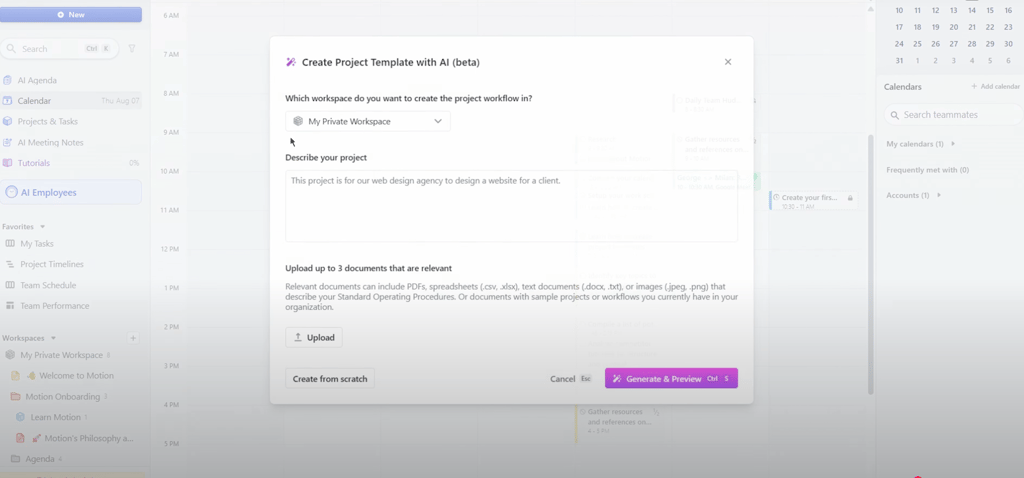
Each agent can use a different model. For example, your research agent might use a web-search-enabled LLM, your writing agent might use Claude, and your editing agent might use GPT-4. The platform picks which model fits the agent’s role.
Once a workflow works, you save it as a template, which is repeatable across tasks or clients. That makes Motion strong for repeatable business processes, not just one-off chats.
Power users, operations teams, businesses automating consistent workflows or content pipelines.
5. Make AI – best for app integrations and automation

| Starting price: | $9.00/month |
| Aggregates: | Connects 2,000+ SaaS apps and AI tools (Slack, Notion, Sheets, CRMs, etc.) |
| Top features: | Visual no-code builder, automation templates, variable control, multi-app routing |
| Who it’s for: | Freelancers, solopreneurs, and small teams automating daily workflows across apps |
Make AI emphasizes integration and automation over direct chat. It connects AI models to your existing tools (Slack, Sheets, Notion, email, CRMs) and builds scenario-based automations.
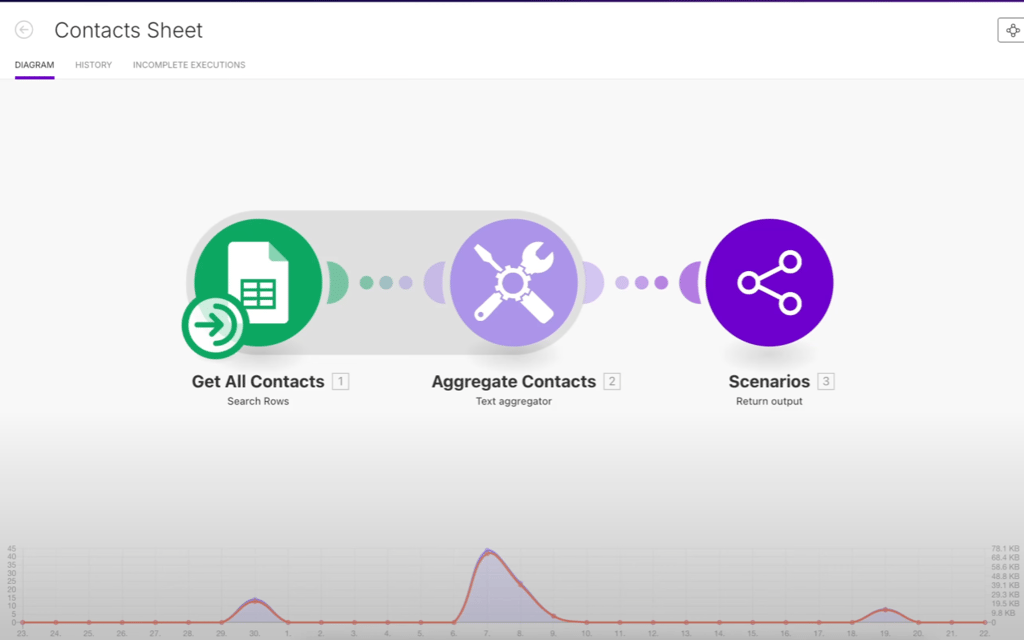
You can build flows like this: Get all contacts from Google Sheets → aggregate their details → output the results to your chosen scenario or app.
You set cost, quality, and speed rules, and Make AI picks which model to use at each step. For example, fast models for sentiment analysis and higher-quality ones for content generation.
This makes Make AI powerful for bridging AI with actual applications and workflows.
Teams already dispersed across SaaS tools who want to integrate AI behind the scenes, operations and growth teams seeking automation, and tech-forward businesses.
6. Magai – best for creators comparing multiple AI models
| Starting price: | $20.00/month |
| Aggregates: | 50+ AI models, including GPT-4, Claude, Gemini, and other premium LLMs |
| Top features: | Split-screen model comparison, brand voice adaptation, unlimited workspaces |
| Who it’s for: | Content creators, freelancers, and small teams, maintaining consistent creative output |
Magai aims for simplicity without sacrificing power. It’s one of the cleanest aggregator interfaces I’ve tested.
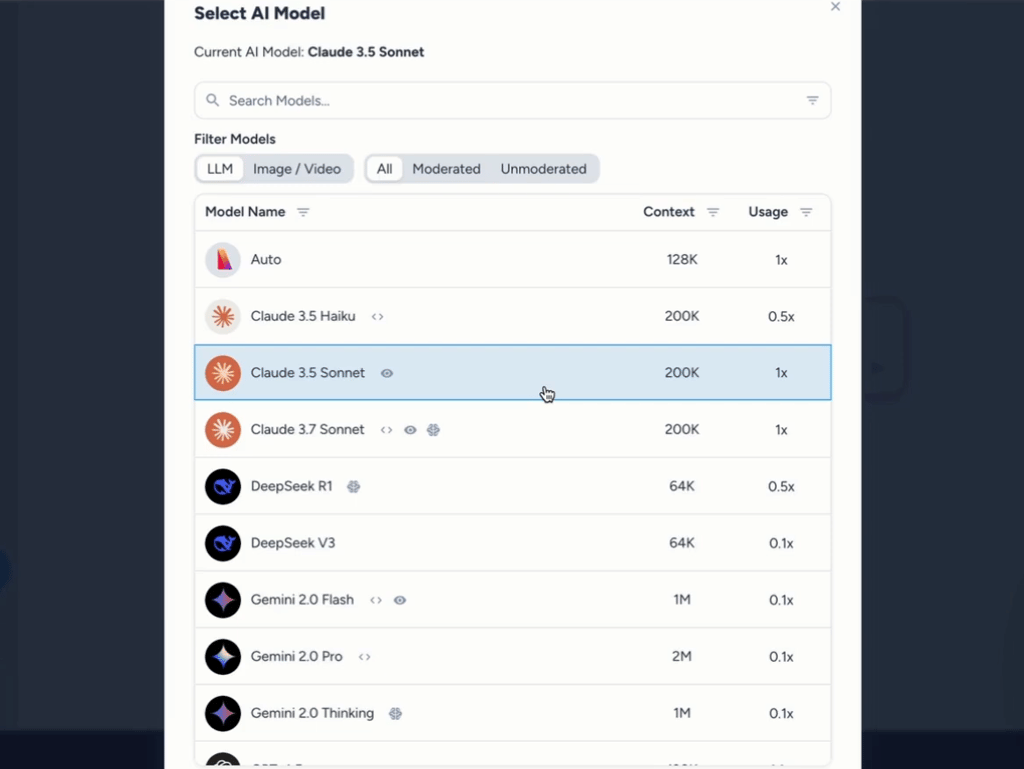
You enter one prompt, but see parallel responses from GPT-4, Claude, Gemini, and more, making quality differences very visible.
With its brand voice, you can upload examples of your writing style. New outputs then adjust tone and style to match. This matters for content consistency across channels.
Finally, preloaded prompts help you get started. You can save, organize, and share prompts across projects.
Freelancers, small teams, creators who want to move fast, compare models, and maintain voice consistency.
7. Poe (by Quora) – best for exploring community-built AI bots
| Starting price: | $4.99/month |
| Aggregates: | Major LLMs (GPT, Claude, Gemini, etc.) + 1000s of user-built bots |
| Top features: | Cross-model chat, mobile & desktop parity, bot marketplace, multimodal access |
| Who it’s for: | Everyday users, students, and experimenters exploring diverse AI models in one app |
Poe (by Quora) offers a marketplace-style aggregator approach. In addition to core models, users and developers build and share specialized bots.
Need a bot that understands your product documentation? It likely exists. Want one optimized for a niche domain? You can find or build it.
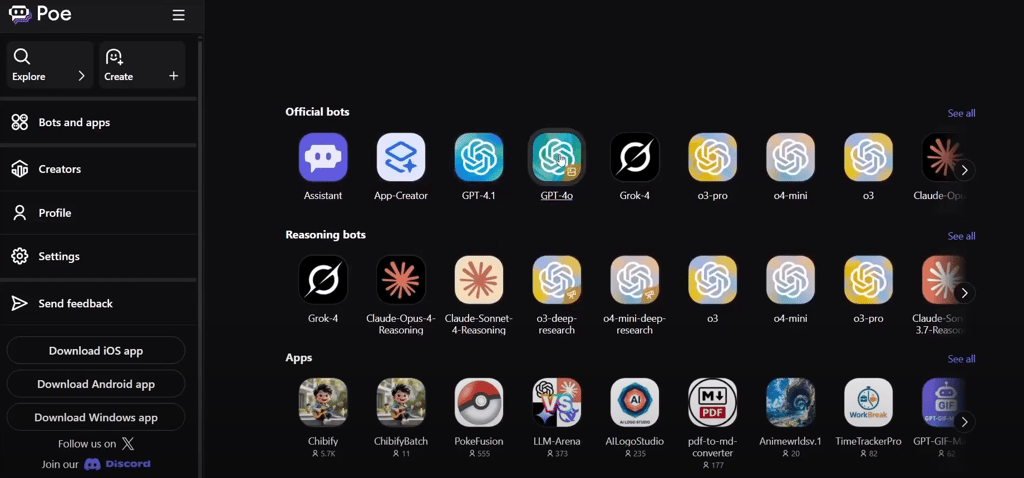
Poe’s free tier gives daily access with rate limits. Pro expands capacity and priority access during peak times. Its mobile app is well-developed, offering near parity with the desktop interface, making Poe very useful across devices.
Trending bots, rating systems, and discovery layers help users find useful bots they might never have considered trying. Even non-developers can create bots by writing instructions, selecting base models, and publishing them to the marketplace.
Explorers who want to test many AI personalities, mobile-first users, and creators who want highly specialized bots without building from scratch.
Comparing the top AI aggregators
Here's how our top picks stack up side-by-side:
| Platform | Privacy and compliance | Starting price | Approx. model count/scope | Strongest UX/UI | Business and team features |
| nexos.ai | Doesn’t train on user data; allows for setting custom guardrails; SOC 2 Type 2 and ISO 27001-certified; GDPR-compliant | $9.75/month | Over 200 AI models | Unified AI workspace, which lets teams securely collaborate, compare multi-model outputs | Custom virtual teammates, integrations with apps like Google Workspace, browser extension for inline summaries, drafting, and data extraction |
| Claude (Anthropic) | Very strong (by default does not train on user data, strong privacy guarantees) | $17.00/month | Multiple Claude models (Opus, Sonnet, Haiku) and contextual scaling | Clean, polished interface; strong for long-form work | Project memory, document uploads, model selection, team access |
| Sintra | Very strong (claims no third-party sharing, secure workspaces) | $15.60/month | 12 helpers (specialized bots) covering many tasks | Functional, minimal-clutter interface; context retention across sessions | Team seats, workspace sharing, Brain AI for context; some gaps in granular governance |
| Motion | Good (SOC-style compliance often claimed) | $19.00/month | Agent workflows rather than fixed models | Visual workflow builder is standout | Agent orchestration, templates, API hooks |
| Make AI | Good (depends on connected tool permissions) | $9.00/month | Can route to many models via connectors | Integrated deeply into SaaS workflows | Workflow templates, automation, routing, team access |
| Magai | Very good (claims model access without hidden fees) | $20.00/month | 25+ model options (via aggregator access) | Very intuitive; split-screen comparisons | Prompt library, shared workspaces, but lighter on enterprise features |
| Poe | Good (community bots, user moderation) | $4.99/month | 50+ bots/models in marketplace | Strong mobile + desktop parity | Bot marketplace, shared history, bot creation, limited team features |
Who would need to use an AI aggregator?
AI aggregators aren’t universal tools. They shine for specific users who juggle diverse models, workflows, or datasets.
Solo creators
Writers, editors, designers, and other content makers often switch between image tools, summarizers, and copy editors. Aggregators let you stay in one place instead of bouncing between apps. In broader studies, generative AI users report saving about 5.4% of their work hours weekly, which for a 40-hour worker means ~2.2 hours saved.
Teams and businesses
Enterprises must manage licenses, enforce data policies, and unify workflows. Team-oriented aggregators enable centralized billing, role-based permissions, and access control. Organizations implementing AI tools also report 49% speak of cost reductions in service operations.
Developers
Developers often need to compare models, measure response latency, and build fallback logic. Aggregators offer unified APIs that route between models seamlessly. In a controlled experiment, AI assistance cut developer task time by about 21%. These platforms simplify benchmarking and production orchestration across models.
Researchers and analysts
When you’re studying text, summarization, predictions, or bias, you want to see how multiple models respond to the same input. Aggregators let you query many models in parallel, identify consensus or divergence, and analyze model behavior empirically, something vital to rigorous research workflows.
Conclusion
AI aggregators have become the backbone of modern productivity. They eliminate the need to juggle separate subscriptions, switch between tools, and constantly re-enter context. From creative work to enterprise automation, these platforms are redefining how teams and individuals interact with AI.
After months of testing, nexos.ai proved to be the best AI aggregator in 2026 for business users. It combines multiple specialized assistants, privacy-focused Brain AI, and team-ready collaboration features that replace a full stack of standalone apps.
Still, every aggregator offers its own advantage. Motion shines for workflow automation, Claude stands out for long-form and privacy-focused work, while Magai and Poe cater to creators and experimenters. Whatever your workflow, there’s a platform built for it and it’s only the beginning of what AI consolidation can achieve.
FAQ
What is an AI aggregator?
An AI aggregator is a platform that provides access to multiple AI models, tools, or information sources through a single interface. Instead of subscribing to ChatGPT, Claude, and Gemini separately, you access all three through one aggregator
What is the No.1 AI tool in 2026?
Our research and hands-on testing found that nexos.ai leads the AI aggregator field for 2026. It provides access to 200+ AI models in one platform, making it easy to choose and compare models for tasks ranging from content creation and marketing to coding and data analysis.
Is my data safe when using an AI aggregator?
Data safety depends on the specific aggregator. Top platforms like Sintra and Claude implement strong encryption, don't train on your data, and comply with privacy regulations.