Vellum AI review: LLMOps platform built for teams shipping AI to production
Being behind major reports like The Mother of All Breaches and RockYou2024, our in-house cybersecurity experts and journalists provide unbiased, real-world testing and in-depth analysis.
We maintain complete transparency by openly sharing our testing methodologies with our audience.
Learn more
Vellum is an LLMOps platform built for engineering and product teams. It helps teams build, test, evaluate, and monitor LLM-powered applications, covering the journey from prototype to production. In this Vellum AI review, I examine whether those capabilities hold up in real-world use.
Teams building AI-powered features like copilots, chatbots, or multi-step agents will get the most out of Vellum. It works well for managing prompts and monitoring AI systems in production, though it is worth knowing upfront that it requires engineering involvement, and the user cap can become restrictive as teams grow.
I reviewed Vellum together with the Cybernews research team, going through platform documentation, pricing, G2 and Capterra reviews, and independent technical assessments to get a clear picture of where it delivers and where it falls short.
What follows covers what Vellum AI is, its core features, how to get started, pricing, security, real-world usage patterns, and how it stacks up against alternatives.
Quick overview of Vellum AI
| Rating | |
| Brief description | Vellum gives teams the infrastructure to manage prompts, run evaluations, deploy AI workflows, and keep an eye on how models behave once they're in production |
| Key specifications | Prompt versioning, automated evaluations, workflow orchestration, RAG support, production monitoring, observability dashboards, model experimentation, and multi-model integrations |
| Pricing | Free plan available; paid plans start at $25.00/month; Enterprise pricing is custom |
Vellum AI: what works and what to watch
Vellum is built for teams that need structured control over prompts, workflows, and evaluations in production AI systems. Here’s what stands out when using it in practice:
What Vellum AI actually is and why it exists
Vellum helps teams stay on top of the many moving parts involved in LLM development. Prompt versions, testing, deployment, and monitoring tend to end up scattered across spreadsheets, scripts, and internal tools without a dedicated platform. Vellum puts those pieces in one place, making them easier to manage as things scale.
Once prompts and workflows are set up in Vellum, teams can test them against real datasets and push them live through the platform's API. Updating a prompt does not require redeploying the entire application, which saves time when making changes. After launch, Vellum gives you monitoring and tracing tools to investigate issues and understand what is happening in production.
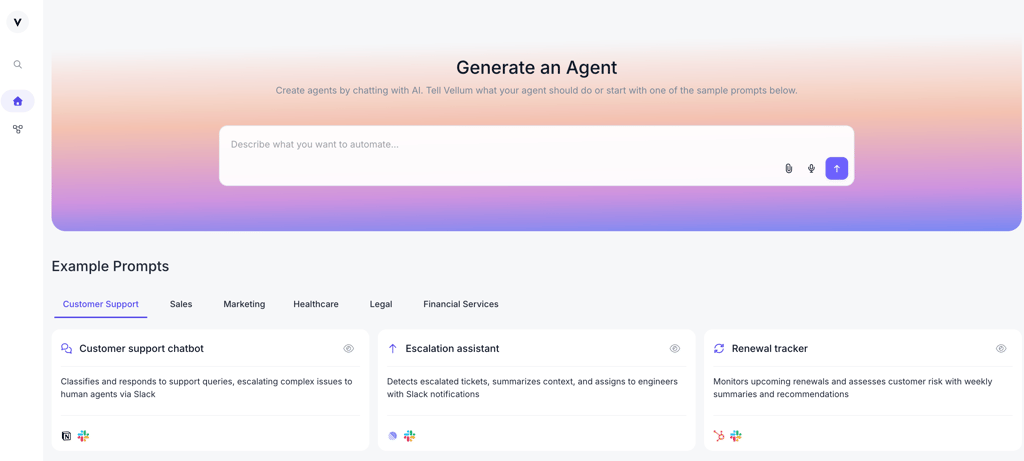
Vellum is built around three main capabilities. Prompt management, which lets you version, compare, and test prompts across different models. Workflow orchestration connects multiple AI steps into a single pipeline. Evaluation gives teams a way to catch issues before they ever reach real users.
Who gets the most out of Vellum AI
Vellum is not the kind of platform that works equally well for every team. After going through the platform in detail, it became clear that it suits certain workflows and team structures better than others:
Best fit for:
- AI engineers and product teams dealing with prompt changes, quality issues, or debugging in production.
- Teams building AI features that involve multiple steps or models working together.
- Cross-functional teams where engineers and non-technical teammates need to work on AI features together.
- Startups and scale-ups in regulated industries that need audit trails and compliance support.
Not the right fit for:
- Solo developers, because the platform is designed for team collaboration.
- Teams of more than 5 people, as the user cap applies across paid plans, and Enterprise pricing is custom.
- Non-technical teams expecting to build production AI features without engineers involved.
Inside the Vellum AI platform
I reviewed Vellum’s core capabilities alongside the Cybernews research team, focusing on the modules that define its value for teams shipping LLM features to production.
Prompt Studio: engineering and versioning
Prompt Studio is where most teams spend most of their time. It gives engineers and non-technical teammates a shared space to write, compare, and version-control prompts without touching application code.
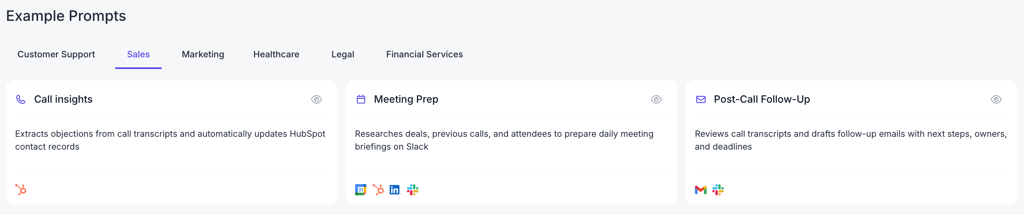
You can test the same prompt across multiple models at once, making it much easier to compare output quality before settling on a direction. Every change is tracked, and reverting to an earlier version takes only seconds if something goes wrong.
The editor supports Jinja templating, function calling, and a few-shot examples. Engineers get the control they need, while product managers and domain experts can make changes without waiting on a developer.
Workflow Builder: multi-step LLM pipelines
For teams building more complex AI features, Vellum provides a visual canvas for connecting prompts, tools, APIs, and retrieval steps into a single workflow. That makes it easier to manage systems with multiple moving parts, rather than relying on a collection of separate scripts and services.
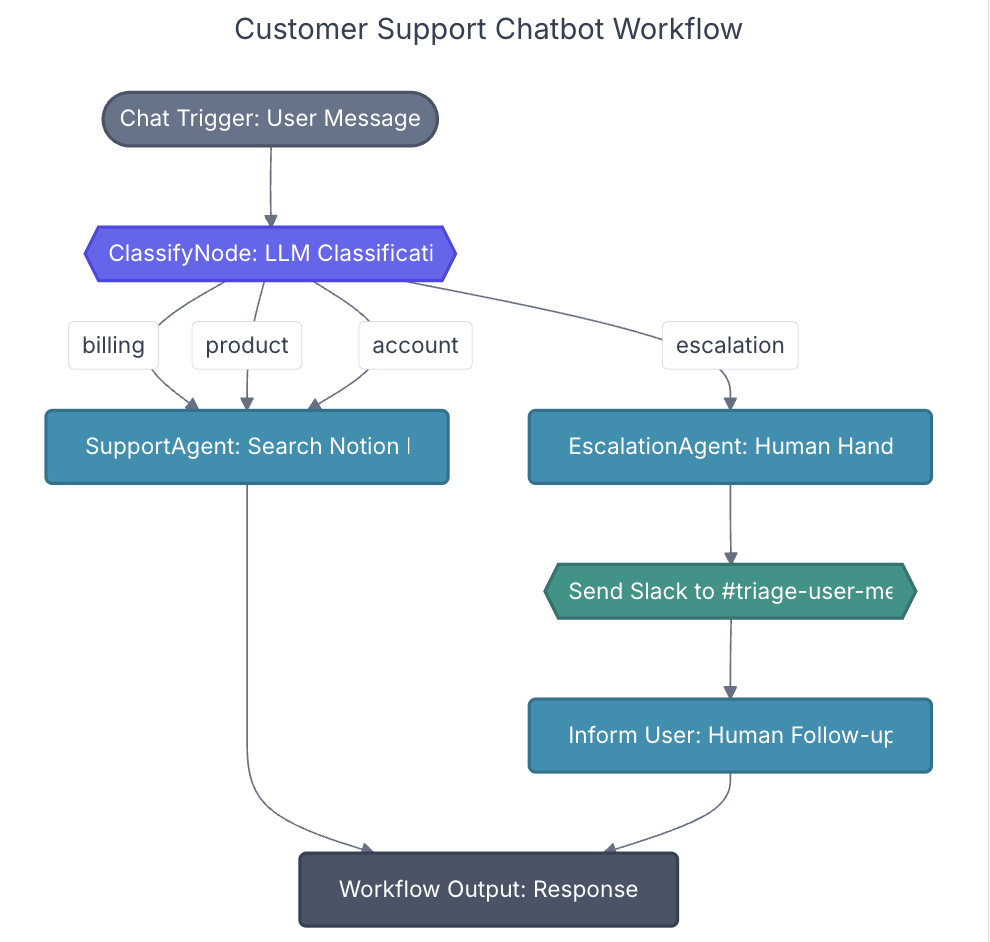
The visual builder and the Python and JavaScript SDK stay in sync, so teams can work however suits them without losing consistency. Updating a workflow does not require redeploying the entire application, simplifying the whole process.
In August 2025, Vellum added the ability to describe a workflow in plain language and have it built automatically. That was a great addition for teams that want to move fast without getting too deep into the technical setup.
Evaluation Framework: test-driven AI development
Testing is a key part of how Vellum is used. Instead of shipping a prompt change and dealing with issues after the fact, teams can build datasets and run test suites before deployment to catch problems early.
LLM-as-judge scoring lets you evaluate outputs on things like accuracy, safety, and tone, going beyond a basic pass or fail. It also integrates with CI/CD pipelines, so every prompt or model change is automatically checked before going live. Online evaluations do the same for real production traffic.
There are a few limitations worth noting. Setting up effective LLM-as-judge rubrics takes time to get right, and custom metrics require Python or TypeScript knowledge, which puts them out of reach for non-technical team members.
Document Retrieval (RAG)
Vellum supports uploading and indexing your own documents to use as context in LLM calls. It handles chunking, semantic search, and filtered retrieval, which covers most standard RAG setups.
What’s more interesting is how evaluation extends into RAG workflows. Teams can test retrieval separately from generation, which helps surface issues that would otherwise be easy to miss. In practice, retrieval problems often only surface after deployment, making them harder to trace back.
One limitation is the free tier. Document indexing is capped, so teams working with larger datasets will likely hit the limit quickly and need to move to a paid plan.
Monitoring, tracing, and observability
Once AI features are live, Vellum provides the tools needed to understand what is actually happening behind the scenes. Every workflow run is logged with inputs, outputs, latency, token usage, costs, and model responses, making it easier to investigate issues when something breaks.
The platform also includes dashboards for tracking performance over time. Teams can monitor latency, error rates, token costs, and quality trends from a single place, in real time. Tracking such metrics significantly reduces the risk of negatively affecting users.
One limitation is that integrations with external monitoring platforms, such as Datadog, are only available on the Enterprise plan. An upgrade would probably be inevitable for teams already using external observability tools.
Getting started with Vellum AI
Getting started with Vellum is straightforward, and the Free plan is generous enough to build and test small LLM features rather than just explore the interface. You don’t need a credit card to get started, which makes it easy to try before committing. The setup process looks like this:
- Go to app.vellum.ai and create an account
- Connect your LLM provider keys (such as OpenAI, Anthropic, or others)
- Open the Prompt Studio and start by writing and testing a prompt against different models
- Move into workflows and add basic steps like retrieval, LLM calls, and output formatting
- Create a small test set with real examples and run evaluations to see how the system performs
- Deploy your setup through Vellum’s API so your application uses Vellum instead of a raw model
- Use the dashboard to review traces, latency, and output quality once traffic starts flowing
A few things become clear pretty quickly once you start using it. The Free plan is fairly limited for active testing, as setup typically requires a developer and involves some upfront configuration work. Teams with more than 5 users will also hit the cap and need to upgrade to a higher plan.
Vellum AI pricing: what teams actually pay for
Vellum offers a tiered pricing model with Free, Pro, Business, and Enterprise plans. The paid plans increase credits, workflow capacity, concurrency limits, data retention, and team-scale features, while Enterprise pricing is customized for larger organizations.
| Plan | Price | Key features | Key limits |
| Free | $0.00/month | Prompt Studio, Workflow Builder, basic RAG, core evaluations, and ad-hoc credit top-ups | 30 credits/month, 1 concurrent workflow run, X-small workflow server, up to 30 days of data retention |
| Pro | $25.00/month | Prompt Studio, Workflow Builder, evaluations, ad-hoc credit top-ups, automatic credit top-ups, and multiple environments | 100 credits/month, 4 concurrent workflow runs, small workflow server, up to 90 days of data retention |
| Business | $50.00/month | Prompt Studio, Workflow Builder, evaluations, ad-hoc credit top-ups, automatic credit top-ups, multiple environments, multiple workspaces | 100 credits/month, 12 concurrent workflow runs, small workflow server, up to 1 year data retention |
| Enterprise | Custom pricing | Dedicated Slack support, onboarding services, DPAs, BAA, and custom contracts | Custom limits, custom workflow server size, contract-based setup |
The Free, Pro, and Business plans are publicly priced, while Enterprise pricing is only available on request. It's also worth mentioning that Vellum doesn't include model usage in its subscription fees, so API costs from your chosen LLM provider are charged separately.
What users consistently say about Vellum AI
Prompt versioning and side-by-side model comparison are the two features that come up most in user feedback and actually stand out when going through the platform. Teams that previously managed prompts in spreadsheets describe the shift as a major improvement. Several reviewers also mention faster iteration cycles, moving AI feature development from weeks to days.
One thing that stands out in user feedback and doesn’t always come up in tool reviews is customer support. Vellum's team is cited repeatedly on G2 as genuinely responsive and invested in helping teams succeed, rather than just pointing to documentation.
The most common frustration is the 5-user cap, which often pushes growing teams into Enterprise conversations sooner than expected. Evaluation setup also takes time to get right. And for teams expecting to get up and running without engineering support, the initial setup can come as a surprise.
Vellum AI vs alternatives
While Vellum is often compared with enterprise AI platforms, it serves a different purpose. Rather than acting as an employee-facing assistant or chatbot platform, Vellum focuses on helping teams build, test, evaluate, and monitor LLM-powered applications throughout the development lifecycle.
| Tool | Best for | Technical barrier | Evaluation depth | Pricing feel | Key difference |
| Vellum AI | Teams shipping LLM features to production | Medium (engineering required) | Strong (online and offline evaluations) | Tiered subscription model | Built for prompt management, evaluations, workflows, and observability |
| Moveworks AI | Enterprise employee AI assistants | Very high | N/A | Custom enterprise pricing | Focused on employee support and workplace automation rather than LLM development |
| Kore AI | Enterprise conversational AI | Very high | N/A | Custom enterprise pricing | Built for enterprise chatbots and customer interactions rather than LLMOps |
Among the three, Vellum is the best fit for teams building AI products and features rather than deploying enterprise assistants. It is designed specifically for developing, testing, and monitoring LLM-powered applications.
Best alternative: nexos.ai
Different AI platforms solve different problems. Some are built primarily for engineering teams managing prompts, evaluations, and production AI systems, while others focus more on helping organizations automate work with AI. That's why it can be useful to look beyond traditional LLMOps platforms depending on how your team plans to use AI.
What stood out to me about nexos.ai is that it feels more focused on business workflows than AI development. Compared to Vellum, it is less focused on prompt management and evaluation workflows. Instead, it is geared more toward helping teams automate day-to-day processes across different tools.
nexos.ai combines AI agents, automation, integrations, and multiple AI models in a single platform. It helps teams connect tools, automate routine tasks, and build AI-powered workflows from one place. For teams looking to use AI across everyday operations, it offers a different approach from Vellum.
Verdict: is Vellum AI worth it for your team?
Vellum is built for engineering and product teams that have moved past early prototyping and need more structure around how LLM features are built and shipped. It is not the right fit for teams expecting a no-code experience or clear pricing without talking to sales first.
Best reasons to use it:
- Evaluation framework spots quality issues before they reach real users.
- Visual and code-based workflows mean engineering and non-technical teammates can collaborate without constant handoffs.
- Works with multiple LLM providers, so you are not tied to a single model or vendor.
Reasons to look elsewhere:
- The 5-user cap and custom Enterprise pricing make it harder to plan without a sales conversation.
- Non-technical users can contribute, but cannot ship production AI features on their own.
For a broader look at what is available, our AI tools directory, best AI agent builders, and best no-code AI agent builders are worth exploring.
FAQ
Is Vellum AI free to use?
Yes, Vellum AI offers a Free plan with no credit card required, covering Prompt Studio, basic RAG, and core evaluations. It is enough to explore the platform, though active teams will hit the execution limits quickly and need to upgrade.
Does Vellum AI work with any LLM provider?
Yes, Vellum AI is model-agnostic. It supports OpenAI, Anthropic, Google, and custom models, and switching between providers does not require rewriting your application code.
What is the difference between Vellum AI and LangSmith?
Both are LLMOps platforms, but Vellum takes a broader approach, covering prompt management, workflow orchestration, and evaluation in one place. LangSmith is more focused on tracing and observability within the LangChain ecosystem.
Does Vellum AI support on-premises or VPC deployment?
Yes, but only on the Enterprise plan. Teams on Free, Pro, or Business plans are on shared infrastructure. VPC deployment requires a custom Enterprise contract.
Is Vellum AI suitable for non-technical teams?
No, non-technical teammates can work on prompts in Prompt Studio, but the initial setup requires engineering involvement, and custom metrics require Python or TypeScript knowledge.