Seedance 2.0 review 2026: testing the next-gen AI video generator
Being behind major reports like The Mother of All Breaches and RockYou2024, our in-house cybersecurity experts and journalists provide unbiased, real-world testing and in-depth analysis.
We maintain complete transparency by openly sharing our testing methodologies with our audience.
Learn more
Seedance 2.0 is the new model of an AI video generator released by ByteDance in February 2026. Owned by the same company behind TikTok and CapCut, Seedance 2.0 promises to generate cinematic videos by processing text, video, images, and audio references simultaneously.
With so much AI slop online, I’m suspicious about every AI video generator that claims to change video production overnight. That’s why the Cybernews research team and I tested Seedance 2.0 to see whether it actually generates professionally produced videos. Along with it, I checked its motion realism, prompt control, and performance. Below, you’ll find the test results, comparison with other tools, and pricing breakdown.
Quick overview
- Best for: short-form content creators who need advanced control over entertaining and informative videos
- Great for: marketing agencies that aren’t afraid of AI-generated content
- Not ideal for: content creators who need real human faces – Seedance 2.0 has strict censorship, and its videos may contain AI artifacts
Pros and cons of Seedance 2.0
What changed in Seedance 2.0?
Seedance 2.0 is the next evolution of Seedance 1.5 Pro. According to the official ByteDance release, the new model uses SeedVideoBench-2.0 as an engine and has improvements in the following aspects:
- Multimodal input. Along with textual prompts, Seedance 2.0 allows users to upload images, videos, and audio as references for the final output.
- Better motion consistency. The new model has better temporal and visual consistency across frames.
- Advanced camera and creative controls. Users can change lighting, composition, camera movement, and overall visual style via the uploaded reference content and textual prompts.
- Longer clip generation. Now, it supports generating 15-second high-resolution videos with synchronized audio and lip sync.
Hands-on testing: creating videos with Seedance 2.0
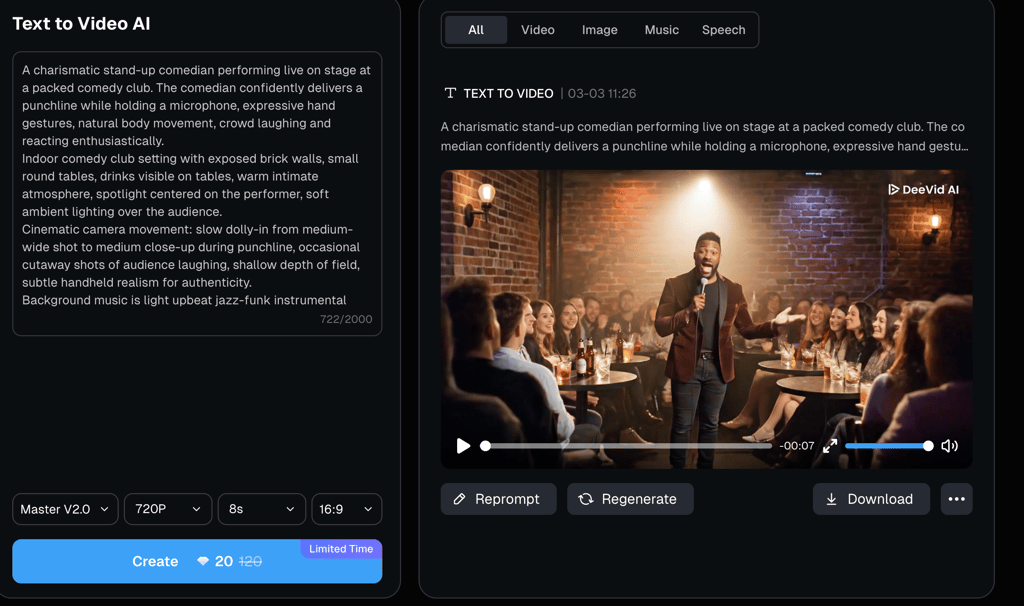
Since the full version of Seedance 2.0 isn’t yet directly available outside China, I tested it via the third-party platform, DeeVid AI. I used a standard prompt structure to describe the video elements in the following order: subject, setting, action, camera, lighting, and audio. Feel free to learn more about prompt engineering in our article.
Video quality breakdown
The video generation took around 30 seconds, which is fast for a realistic video. Even though the requested length was 8 seconds, the result was a second shorter. Overall, the output was of medium quality.
Motion realism and smoothness
The camera movement was the best part about Seedance 2.0 – it was natural and fully replicated the requested dolly-in. The video even had subtle micro-movements mimicking a real camera operator, and the depth of field adjusted naturally as well. However, there was a sudden switch of shot to the audience, which felt too abrupt.

Character consistency and visual fidelity
Both the comedian and the audience remained stable across all frames. The tool kept the characters consistent without sudden switches of faces and facial expressions. The video, though, had this distinctive AI smoothness that can be easily spotted.
While in motion, I didn’t notice any unnatural elements. However, once I paused the video, the AI revealed its main pitfall – distorted hands in the clapping audience. Moreover, the bottles on the tables had garbled characters on their labels.
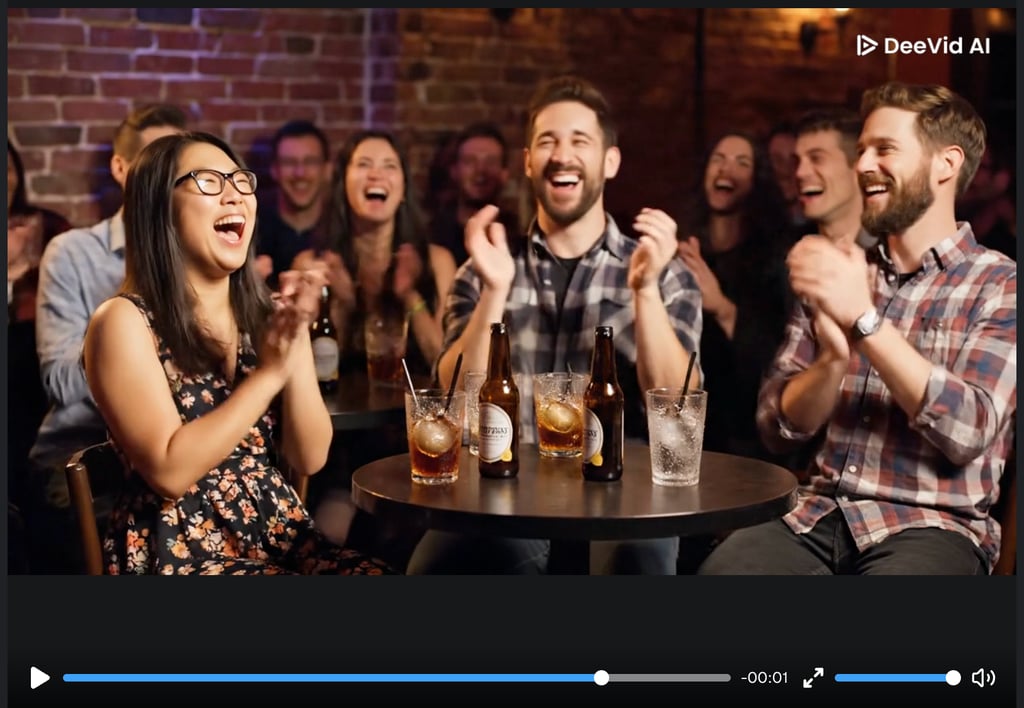
The main character itself didn’t have any bodily distortions and looked the most realistic of all the people shown. The video moves very fast, so it takes real effort to notice these unnatural details.
Prompt accuracy and audio quality
Seedance 2.0 fully complied with my prompt and generated a funny joke on its own, without me explicitly prompting it. I liked that the comedian’s short punchline was aligned with the camera movement, as well as the audience’s reaction, which added to the naturalness. Moreover, the speech was perfectly lip-synced, and the requested soft jazz played quietly in the background, without interfering with the comedian’s voice.
Limitations and technical constraints
All the best AI video generators have similar limitations, at least at their current stage of development. Here are the main drawbacks of Seedance 2.0 that I noticed:
- Clip length limits. The length of video clips is limited to 15 seconds. While it’s longer than the previous model, it’s still insufficient for producing more in-depth videos.
- Access is limited. As of March 2026, access to Seedance 2.0 is limited to mainland China. Users can try out its limited functionality only via third-party platforms.
- Artifacts and distortions. While they may go unnoticed due to the high speed of videos, the tool is prone to adding unnatural details and struggles with legible text. The combination of such details and the overall smoothed-out effect is a big giveaway of AI-generated content.
- Strict censorship. Seedance 2.0 is strict about copyright laws and may block uploading real faces as references. So, if you want to include specific human models in your videos, it’s better to go for such tools as Synthesia, which we also tested hands-on.
- Credit or generation caps. This drawback concerns those who use Seedance 2.0 via third-party platforms. Since it’s a new model, video generation with Seedance 2.0 requires premium subscriptions or consumes more credits.
Pricing, credits, and cost per video
Pricing and credit consumption depend on the platform you use. The official Xiaoyunque App is currently available only in China, and its subscription starts from around $7.20/month. Keep in mind that the signup requires a Chinese phone number.
Users from other parts of the world can access Seedance 2.0 through third-party platforms. For example, the subscription to DeeVid AI starts at $10.00/month when paid annually, includes free trial credits, and allows generating up to 40 videos per month. Another popular choice is Seedance2ai.app, which starts at $9.90/month when paid annually, doesn’t offer a free trial, and allows generating up to 80 videos per month.
Seedance 2.0 vs other AI video generators
Seedance 2.0 offers the best of both worlds: advanced camera controls and easy, intuitive use. However, there are other tools with a slightly different focus. Here are some of them:
- Runway. The platform has professional-level tools for advanced camera and creative control – we tested it in this Runway review. Overall, it’s for long-form video makers and marketers looking to create motion-rich, high-quality videos. Moreover, Runways offers a timeline interface for moving video shots and the ability to edit your own videos with AI, not only the generated ones.
- Pika. Pika is a lightweight, fast video generation tool for beginners. It’s a good choice for short-form content creators who generate videos optimized for social media and with quick visual and audio effects. You can take a look at the viral videos generated in Pika.
- Luma. Luma is famous for its ability to turn images, videos, and text prompts into 3D models, which is great for game developers. Marketing and product teams can use it to generate promotional clips and animations. Luma's speeds are also exceptional.
- Higgsfield. Higgsfield hosts different video generation models, including Sora 2, Nano Banana 2, and Kling 3.0. You can choose anything depending on your goal, use a big UGC library, and create your unique AI character to reproduce in multiple videos.
I put together a quick comparison table to help you choose the right AI video generator:
| Ease of use | Camera control | Standout feature | Native audio generation | Price | Free trial | |
| Seedance 2.0 | Easy | Supports multi-camera narrative flow and input references | Supports multimodal inputs for references | Yes, and has lip sync | From $7.20/month, depending on the platform | Depends on the platform |
| Runway | Moderate | Has multi-angle camera control, motion brushes, and reference inputs | Professional post-production tools, like object removal and animating characters via reference videos | Not native, and lip sync is optional | From $12.00/month | ✅ Yes |
| Pika | Very easy | Limited camera control | Pikaffects for adding surreal effects like inflating objects | Yes, has lip sync and sound effects | From $8.00/month | ✅ Yes |
| Luma AI | Easy | Has basic camera movement controls and cinematic presets | 3D model creation from photo, video, and text prompts | Yes, and has lip sync | From $7.99/month | ✅ Yes |
| Higgsfield | Moderate | Has cinematic presets | Access to multiple video generation AI models | Has native audio and lip sync, depending on the model | From $9.00/month | ✅ Yes |
Who should upgrade to Seedance 2.0?
Upgrade to Seedance 2.0 makes sense if:
- You want narrative-style video generation. Seedance 2.0 keeps characters consistent across frames and has strong multi-shot continuity.
- 15-second clips are enough for you. Seedance 2.0’s upper length limit is 15 seconds. While that may seem short, it’s longer than some other video generators focused on speed and ease of use.
- You work with multimodal inputs. The model accepts images and videos as references, along with textual prompts. It’s a great way to show AI how the characters should look and move without complex prompt engineering.
- You want the videos generated with audio. Seedance 2.0 automatically generates high-quality music, speech, and audio effects for your videos. So, you don’t need to add separate audio tracks to each clip.
Despite all its advantages, Seedance 2.0 isn’t worth it if you:
- You want advanced tools for the camera and creative controls. Seedance 2.0 isn’t a good choice for deep custom video post-production, as the controls are mainly concentrated within the prompts. On the other hand, tools like Runway have director-style controls for changing camera angles or adjusting shots on a timeline.
- You need deep custom audio editing. Seedance 2.0 generates audio but doesn’t support advanced mixing, scoring, or voice-over.
- You want a free tier. It’s a new model, so it won’t be available for free anytime soon. If you’re a casual creator or a beginner, it’s better to go for something more stable.
Final verdict
Seedance 2.0 is definitely worth it if you want to keep up with the newest developments in video generation. The model processes multiple inputs at once, generates high-quality audio tracks with perfect lip sync, and excels at camera movements.
However, it’s not perfect yet. My test showed that even though the generation looks high-quality on the surface, it’s still visibly AI, with individual video frames showing body distortions and illegible characters instead of clean, readable text. Still, let’s wait until it becomes directly available outside of China – maybe by this time, ByteDance will have fixed the issues, and Seedance 2.0 will actually reveal itself as a breakthrough in AI video generation.
FAQ
What is Seedance 2.0 used for?
Seedance 2.0 is used for generating videos with AI. Users can not only write textual prompts but also upload reference images and videos for AI to replicate the camera movements, visuals, and characters. One of the standout features of Seedance 2.0 is its native audio generation, which automatically generates and embeds an audio track into the video.
Is Seedance 2.0 free?
No, Seedance 2.0 isn’t free because it’s a new model. Moreover, it’s currently available outside China only via third-party platforms like Seedance2ai.app and DeeVid AI. So, the price and free trials depend on the provider.
How long can Seedance 2.0 videos be?
Seedance 2.0 videos can be up to 15 seconds, which is longer than some other short clip generators. However, the length limit can be stricter if you access it through a third-party platform.
Is Seedance better than Runway?
Seedance isn’t better than Runway – they serve different audiences. Runway is a more advanced, professional-level video post-production suite that includes tools for timeline editing, masks, motion brushes, and zoom and pan controls. Seedance is for casual short-form video creators who want quick AI generators with decent camera movement controls.