Best no-code AI agent builders
Being behind major reports like The Mother of All Breaches and RockYou2024, our in-house cybersecurity experts and journalists provide unbiased, real-world testing and in-depth analysis.
We maintain complete transparency by openly sharing our testing methodologies with our audience.
Learn more

If you want to build AI agents without writing code, you’re probably stuck choosing between tools that all promise automation but work very differently. This guide is about finding the best no-code AI agent builders for support, internal workflows, and business automations.
I know the frustration: you don’t want to learn a framework just to automate a simple workflow, you’ve seen agents break on edge cases, and you need something your team can own. That’s why I tested leading tools together with the Cybernews research team, using the same scenarios and tasks to see which could deliver working agents without coding.
Below, I highlight the best tools overall, best for beginners, best for complex workflows, best budget options, and more.
What you’ll learn from this guide:
- Which tool fits your use case
- Where each platform struggles
- How agents differ from workflows
- What to watch for before committing

Best no-code AI agent builders – shortlist
- n8n – best for complex logic and self-hosted AI agents
- Gumloop – best agent-native builder for sales and Slack-driven teams
- nexos.ai – best for centralized AI agent workflows
- Zapier – best for instant AI automations across 8000+ apps
- Make – best for advanced visual logic with strong cost control
- Bubble – best for building full web apps with embedded AI agents
The best no-code AI agent builders compared
Before we dive deeper into each of the best AI tools, it helps to see them side by side. Pricing models, free tiers, and what they’re actually best at vary a lot, even when the marketing sounds identical. Here’s the quick comparison I use to check fit before committing time to any single platform.
| Tool | Overall rating | Standout features | Starting price | Free/trial version | Best for |
| n8n | Visual automation builder, 1300+ integrations, extensive HTTP/API support, self-hosting option, RBAC (Admin/Editor/Viewer) | $20.00/month | Free 14-day trial, no credit card required | DevOps + complex custom workflows | |
| Gumloop | Slack-triggered agent flows, natural-language workflow builder (Gummie), built-in LLM credits | $30.00/month | Free version with 1 seat and 2000 credits/month | Sales, marketing, and growth teams | |
| nexos.ai | Ready-made agent templates, integrations with Slack, Google Workspace, SharePoint, and multiple AI models in one platform | €20/month/user | - | Small teams that want all-in-one easy to use tool | |
| Zapier | 8000+ integrations, Copilot-based agent builder, HTTP API support, 99.9% SLA (Enterprise) | $19.99/month | Free version with 400 activities/month | Quick SaaS automations for small teams | |
| Make | Visual drag-and-drop builder, 3000+ integrations, HTTP API support, AES-256 encryption, ISO 27001 compliance | $9.00/month | Free version with 1000 credits per month | Budget-friendly advanced workflows | |
| Bubble | Full-stack app development environment, API connector, 6000+ community plugins, SOC 2 Type II compliance | $59.00/month | Free version with 50,000 workload units/month | Building full apps with embedded agent behavior |
6 best no-code AI agent builders – our detailed list
Now, let’s look at each platform in detail. I built the same sample agents with every tool to see how they actually behave, not just how they’re marketed. Below, I break down what each one does best, where it gets tricky, and who should seriously consider it.
1. n8n – best no-code AI agent builder for complex logic and self-hosted control

| Overall rating: | |
| Standout features: | Visual workflow builder with extensive HTTP/API control and self-hosting support |
| Starting price: | $20.00/month |
| Best for: | DevOps teams and workflows with complex custom logic |
n8n is the best pick if you want full control. It’s a visual automation builder, but it doesn’t box you into preset paths. In my testing, this was the easiest platform to bend around weird real-world requirements. I'm talking about scenarios when my agent needs to pull data from two places, transform it, and then decide what to do next.
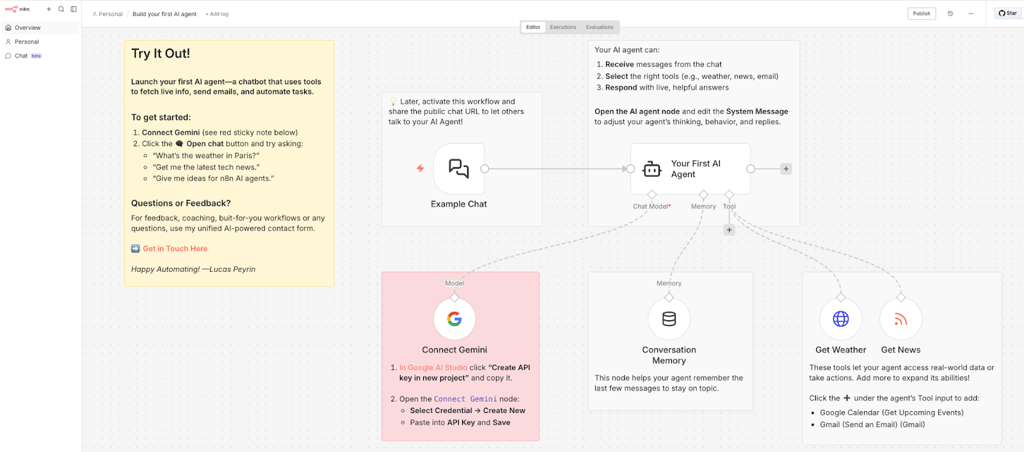
Model-wise, n8n can work with any major LLM through LangChain, and it also has native nodes for providers like OpenAI, Anthropic, Gemini, and Mistral. The important catch: you bring your own credentials. There’s no free built-in model convenience here, so you’re responsible for API keys, usage costs, and picking the model that matches your workload.
Where n8n really shines is integrations and custom calls. You get 1300+ app integrations (Slack, Gmail, SQL, and more), and if something isn’t covered, the HTTP request node gives you a very direct way to hit APIs anyway.
On the governance side, n8n Cloud is SOC 2 and GDPR compliant, and it supports role-based access control with Admin, Editor, and Viewer roles. Hosting is flexible too: cloud by default, self-hosting if you need your data to stay inside your infrastructure. Support contracts with an SLA and predefined response times based on issue severity are available at an additional cost.
2. Gumloop – best no-code AI agent builder for Slack-native teams and built-in model access

| Overall rating: | |
| Standout features: | Slack-triggered agent workflows with built-in LLM credits |
| Starting price: | $30.00/month |
| Best for: | Sales, marketing, and growth teams |
Gumloop positions itself as an AI-first workflow platform, and in practice, it feels that way. Instead of starting from a traditional automation canvas, you’re building agents meant to be triggered in context, especially inside Slack.
In my testing, the Slack integration was the biggest difference. You can tag an agent directly in Slack to initiate a flow. That keeps everything inside the workspace your team already uses instead of forcing people into a separate automation dashboard. It's ideal for sales or growth teams that live in Slack all day. One of my experiments included finding the most upvoted AI-related posts on Reddit.
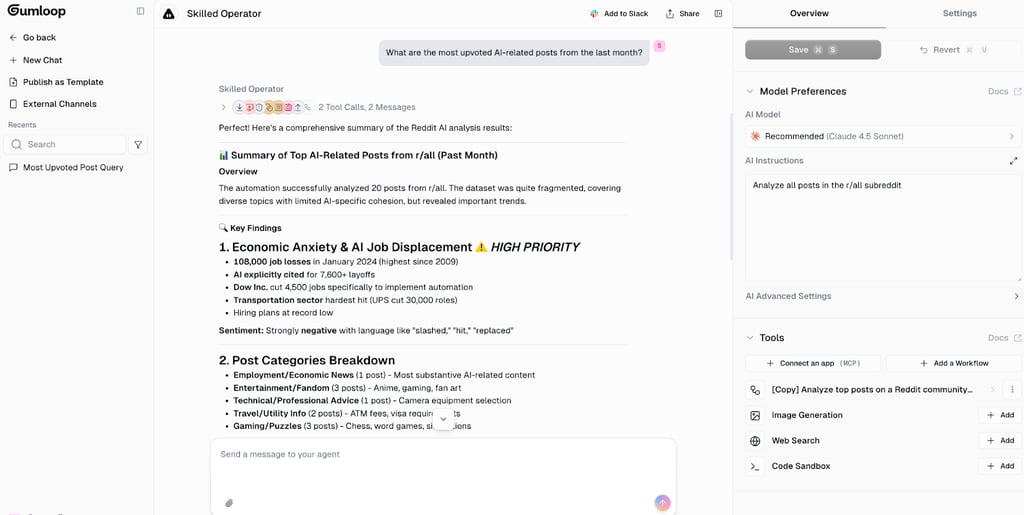
Model access is also structured differently from most competitors. Gumloop provides built-in access to major LLMs – including OpenAI, Claude, Perplexity, LLaMa, Grok, Gemini, and DeepSeek – through a credit system. You can also connect your own API keys if you want full control over usage and billing. If your team doesn’t want to manage model credentials upfront, the built-in credit system lowers the setup friction.
The platform supports 150+ integrations, including Google Workspace, Slack, and Jira. Some third-party data providers, like Hunter and ZoomInfo, need paid credits, though. That’s important if your workflows rely heavily on enrichment or outbound prospecting tools. Custom API calls are supported via custom nodes and MCP servers, which gives more advanced teams room to extend beyond native integrations.
Gumloop states compliance with SOC 2, GDPR, and HIPAA standards. The Enterprise plan adds audit logs, incognito mode, role-based access control, and a self-hosted Virtual Private Cloud deployment option.
3. nexos.ai – best for managing AI agents in one place
| Overall rating: | |
| Standout features: | Ready-to-use agent templates |
| Starting price: | €20/month/user |
| Best for: | Teams that want an easy-to-use, all-in-one tool |
nexos.ai is one of the most business-focused no-code AI agent builders I have tested. Instead of concentrating purely on automation logic, the platform is designed around creating, organizing, and managing AI agents in one centralized workspace.
During testing, I built several AI agents for tasks like market research, internal document search, and content summarization. What I liked most was how easy it was to keep workflows, knowledge sources, and AI conversations connected in one place instead of juggling separate tools.

The platform supports multiple AI models within the same workspace, including OpenAI, Claude, and Gemini. I found this useful when comparing outputs across models or switching between faster and more advanced reasoning tasks.
nexos.ai also includes ready-made AI agent templates, which helped speed up setup significantly. Instead of building everything manually, I could start with prebuilt structures for use cases like research assistants, customer support, or internal knowledge agents.
Another thing that stood out during testing was the integration ecosystem.nexos.ai connects with tools like Slack, Google Drive, Notion, SharePoint, GitHub, and Microsoft apps, allowing agents to access both external and internal company knowledge. In practice, this made the AI outputs feel much more contextual and useful for business workflows.
Compared to platforms like n8n, nexos.ai feels less technical and more collaborative. n8n gave me deeper workflow customization and more control over automation logic. On the other hand, nexos.ai felt noticeably easier when it came to quickly launching and managing AI agents. I also didn’t have to deal with complicated node-based setups or API-heavy configurations as much.
4. Zapier – best no-code AI agent builder for connecting thousands of SaaS tools quickly

| Overall rating: | |
| Standout features: | 8000+ integrations with Copilot-based agent builder |
| Starting price: | $19.99/month |
| Best for: | Quick SaaS automations for small and mid-sized teams |
Zapier’s main advantage is simple: it connects to almost everything. With more than 8000 integrations, it covers most mainstream SaaS tools without any custom work. In my testing, I built agents that interacted with CRMs, forms, email platforms, and databases without any workarounds. My experimental Reddit hunts also yielded impressive results.

The agent builder is based on Zapier Copilot. You define how the agent should behave and connect it to actions inside your existing Zaps. If you’ve used Zapier before, the structure feels familiar. You’re still working inside triggers and actions – the agent logic sits on top of that foundation. You can connect other LLMs through API integrations. I like the flexibility, but that also means handling your own credentials and configuration outside the default setup.
Zapier supports custom API calls through HTTP requests in the editor, so you’re not limited to prebuilt connectors. The company states compliance with SOC 2, GDPR, and CCPA standards.
On Teams and Enterprise plans, you can assign roles like Owner, Admin, Member, Super Admin, Viewer, and Editor. Higher tiers also add domain capture, app restrictions, action restrictions, and custom data retention controls. Enterprise customers are covered by a 99.9% uptime SLA.
Zapier runs as a cloud-only platform. That keeps setup straightforward, but there’s no self-hosted option for teams that need it.
5. Make – best no-code AI agent builder for complex visual workflows with tight cost control

| Overall rating: | |
| Standout features: | Visual scenario builder with 3000+ integrations and HTTP modules |
| Starting price: | $9.00/month |
| Best for: | Teams building multi-step workflows without overspending early |
Make is built around a canvas. You place modules on it, connect them, and define how data moves from one step to the next. If your agent needs branching logic (“if this, then that; otherwise, do something else”), the visual layout makes it easier to see what’s happening.
In testing, I found it more convenient than linear automation tools when flows started getting layered. You can follow the path with your eyes. That helped me a lot once I moved beyond simple triggers.
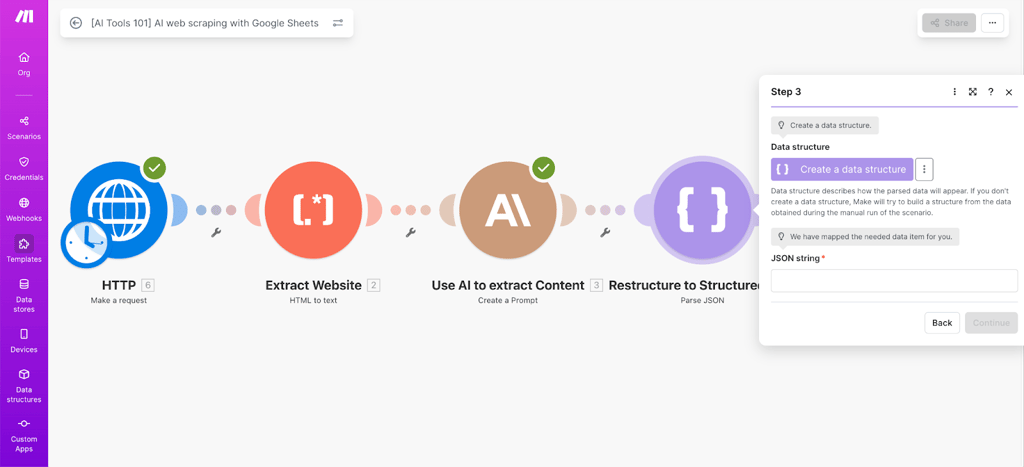
It supports over 3000 native integrations. When something isn’t available out of the box, you can use HTTP modules to call external APIs directly. That keeps it flexible enough for internal systems or less common tools.
Model access requires your own API keys. If you want to connect OpenAI, Gemini, or Claude, you configure it yourself. There’s no bundled credit system here. You get control over model choice and billing, but you’re also responsible for managing it.
From a compliance standpoint, Make states SOC 2, ISO 27001, and GDPR alignment and uses AES-256 encryption. Role-based access is available with roles like Owner, Admin, Member, Accountant, and App Developer.
It runs in the cloud, with selectable server locations depending on your plan. Public documentation doesn't list standard uptime SLA guarantees.
6. Bubble – best no-code AI agent builder for full web apps with built-in AI capabilities

| Overall rating: | |
| Standout features: | Full-stack app builder with API connector and 6000+ plugins |
| Starting price: | $59.00/month |
| Best for: | Teams building complete web applications with embedded AI agents |
Bubble is much more than a simple agent builder. It’s a full app development environment. Instead of dropping an agent into an existing workflow tool, you’re building the entire product around it. UI, database, logic, user accounts – everything lives inside Bubble. Then, you connect AI through API calls.
In testing, this felt very different from the other platforms. You’re not wiring together triggers and actions on a canvas. You’re designing screens, setting backend workflows, and defining how the agent fits into the application itself.
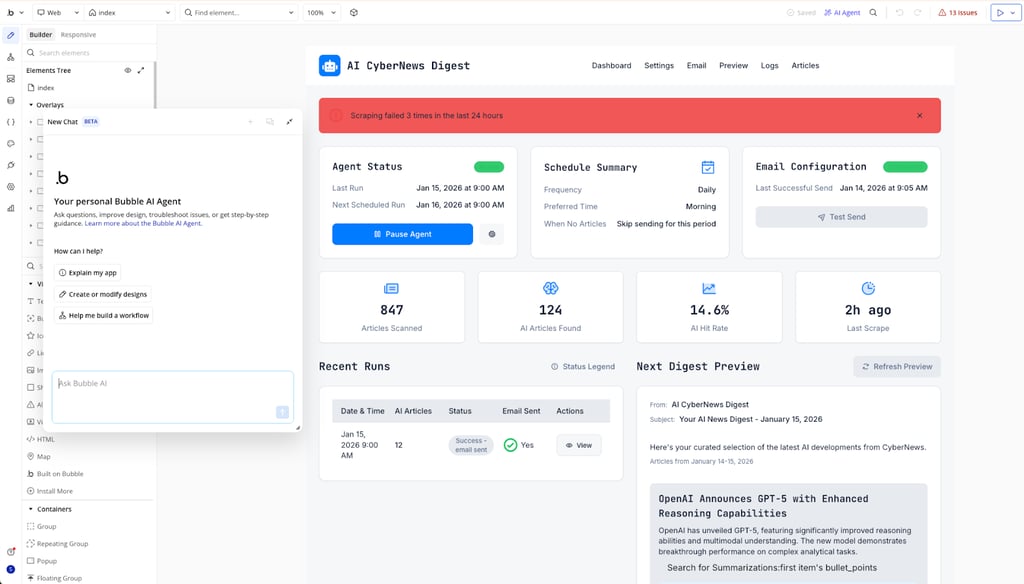
Model support works through API connectors. Bubble includes a native AI model to help with app development, but for production functionality, you’ll connect providers like OpenAI or others through API keys. That gives flexibility, but it’s more setup than with tools bundling AI credits.
Integration depth comes from its API connector and plugin ecosystem. There are over 6000 community plugins available, which expand what you can connect without writing code. If something isn’t covered, you can usually wire it up through APIs.
Bubble has SOC 2 Type II, ISO 27001, and CSA CAIQ certifications, along with GDPR alignment. Data is encrypted using AES-256. Enterprise plans add centralized user management, so admins can control app access per user.
Bubble runs as a cloud platform, with selectable server locations and additional customization options on Enterprise tiers.
What are no-code AI agent builders?
No-code AI agent builders are tools that let you create working AI agents without writing application code. Instead of building a model from scratch, you’re defining how it behaves, what systems it can access, and what it should do in response to certain inputs.
In practice, that means building agents that answer support questions, pull information from internal databases, or take action inside other apps. In my testing, I set up a support assistant that drafted replies based on documentation. I also built an internal lookup agent that fetched CRM data and returned structured answers.
You can also create workflow-style agents. In my case, one agent classified incoming messages, called an external API, and then created a ticket automatically. Another triggered follow-up emails after updating a record. These aren’t static automations – they make decisions step by step based on context.
Behind the scenes, these platforms connect a large language model to tools and connectors. You define prompts or instructions, attach integrations, and decide what the agent is allowed to access. Some platforms maintain short-term memory during a session. Triggers, like chat inputs, webhooks, forms, or schedules, determine when the agent runs.
AI agent builder vs AI workflow: what’s the difference?
People often treat an agent and automation as interchangeable, but they’re not. Once you actually build something with both, the gap becomes clear. An AI agent works toward an outcome, not a fixed script. You give it a goal and access to tools. From there, it decides what to do next. It might call one integration, look at the result, then choose a different tool based on what it sees. It can repeat steps if needed. Some platforms let it remember earlier inputs during the same session, which changes how it responds later.
In my testing, this showed up quickly. One agent classified an incoming request, checked a database, pulled extra data from an API, and only then generated its final answer. The sequence wasn’t rigid. It adjusted as it went.
An AI workflow runs on predefined logic:
- If X, then Y
- If a condition is true, move to the next block
- If not, take the other branch
Everything is mapped out ahead of time, and that predictability is useful. Workflows are easier to trace when something breaks because there’s no dynamic decision-making happening in the background.
Here’s how to decide when to use which tool:
- An agent makes more sense for open-ended tasks. For example, helping someone troubleshoot an issue.
- I recommend a workflow if the process is deterministic. Like sending a follow-up email three days after signup, for example.
Why do no-code AI agent builders matter today?
After weeks of testing, here are some factors that look relevant to me:
- Most teams don’t have the time to create custom AI projects from scratch. Even when engineering resources are available, they’re usually tied to core product work. That’s where no-code agent builders come in.
- The biggest shift I’ve seen is speed. Ops, support, and marketing teams can prototype their own agents without waiting in a development queue. Instead of writing a spec and handing it off, they can test an idea directly. If it works, engineers can refine it later. If it doesn’t, the experiment ends quickly. The time from idea to working MVP agent drops from weeks to days.
- Cost is another factor. Building a custom AI workflow means development time, infrastructure setup, monitoring, and ongoing maintenance. With these platforms, hosting and updates are included in the subscription. You’re paying for usage and access, not for standing up and maintaining backend systems yourself. Templates and pre-built components also cut down setup time.
- Finally, these tools solve a practical problem. Most SaaS systems don’t talk to each other cleanly. CRMs, help desks, databases, and document systems all live in separate silos. No-code agent builders act as glue. They connect those systems and let an agent move information between them without a custom integration project every time.
Features to consider when choosing a no-code AI agent builder
There are countless platforms that can make working AI agents. What separates my picks is how they handle complexity, scale, and real-world use. Here’s what I actually look at before committing.
How the tools are built (editor and UX)
You’ll spend hours inside the editor. So the layout matters. Some tools use a visual canvas. Others rely on forms and configuration panels. Neither is automatically better. What matters is this: can you still understand your own logic two weeks later?
In my testing, the real friction showed up when something failed. If logs are vague or execution traces are hard to follow, even simple fixes become annoying. A good builder makes it obvious what ran, what didn’t, and why.
Integrations and actions
Agents don’t do much in isolation. They need access. Native connectors for email, Slack, CRMs, databases, and help desks save time. But sooner or later, you’ll hit a tool that isn’t prebuilt. That’s when API calls and webhooks start to matter. If a platform limits you to only what’s listed in its marketplace, you’ll feel it quickly.
Control over AI behavior
This is where things got real in my testing circuit. Can you clearly define instructions? Can you separate system behavior from user input? Can you restrict which tools the agent is allowed to call?
Without boundaries, agents become unpredictable. In my experience, unpredictable systems don’t last long in production. Model flexibility is also worth thinking about. You may not care today, but switching providers later shouldn’t require rebuilding everything.
Monitoring and reliability
Once an agent is live, you need visibility. You should be able to see past runs and errors to understand which step broke. Ideally, you can retry or set fallback paths instead of letting the whole flow fail. Version control matters too. If an update causes issues, rolling back should be simple.
Security, roles, and access
As soon as more than one person touches the platform, the structure becomes important. Who can edit? Who can only view? Where are API keys stored? How long is data retained? These details don’t feel urgent at the beginning. They become urgent once the agent is handling real information.
Pricing and scaling
The starting price is rarely the real price. Look at usage limits, runs, credits, users, agents, and whatever other metric the platform uses. A tool that feels cheap during testing can look very different once it runs every day. That’s when scaling costs show up.
Expert tips for building an app without coding
After testing multiple platforms, one pattern kept repeating: the tools weren’t the problem. The scope was. Here’s what actually helps:
- Start with a narrow problem. Pick one clear task. Not “handle all support” or “automate marketing.” Something specific, like triaging incoming support tickets by topic and priority. The broader the goal, the faster things get messy. Start small, make it work, and then expand.
- Design the flow before touching the builder. Before opening the editor, sketch the logic. It can be a rough diagram or even bullet points on paper. Map out what should happen first, what happens if data is missing, and what happens if the answer is unclear. Most issues I ran into weren’t technical – they were edge cases I hadn’t thought through.
- Add tools gradually and test every step. Don’t connect everything at once. Start with the agent answering questions without external actions. Then, let it read from the documentation. Only after that should it start creating tickets, updating records, or sending emails. Each added capability increases risk. Test thoroughly before stacking the next one.
- Set guardrails and fallbacks early. Decide upfront when the agent should stop and escalate to a human. Define clear handoff rules. Add review flags for uncertain outputs. Log important actions so you can audit them later. An agent doesn’t need to solve everything, and you have to tell it when to step back.
Final verdict: which no-code AI agent builder should you choose?
All of these AI tools can build working agents. The difference shows up in who’s building them, how complex the workflows are, and how much control you actually need. Here are my best picks by use case:
- n8n is best for complex flows. Strong API control, deeper logic paths, and self-hosting make it the most flexible option here.
- Gumloop is best for first-time builders. Built-in model credits and Slack-native triggering make it easier to launch something functional without heavy setup.
- nexos.ai is best for centralized AI workflows. Multi-model support, built-in AI agents, and business tool integrations make it easier to manage AI tasks.
- Zapier is best for small and mid-sized teams. Massive integration coverage and a familiar workflow structure reduce setup friction.
- Make is the best budget-friendly option. Lower monthly price with solid visual logic for multi-step workflows.
Here are some of my additional tips:
- If you mainly want to automate support, choose tools with a strong knowledge base and ticketing integrations.
- If your data is in SaaS CRMs and sheets, prioritize integrations over deep coding features.
- If compliance and access control are critical, pick tools with roles, environments, and clear data policies.
If I were choosing today, I’d use n8n to build serious internal automation, Gumloop to test an idea quickly, Zapier for fast SaaS-heavy workflows in smaller teams, and Bubble only when the agent is part of a full application.
FAQ
Do I need coding skills to use a no-code AI agent builder?
Not necessarily, but it depends on the platform. You can use tools like Gumloop or Zapier without writing any code. Others, like n8n or Bubble, allow JavaScript or API configuration, so a certain comfort level with technical concepts helps. You don’t have to be a developer, but logic skills matter.
Can these tools connect to my existing apps and databases?
In most cases, yes. Platforms like Zapier and Make support thousands of integrations out of the box. If your system isn’t listed, tools like n8n and Make support HTTP requests or API calls, which expand compatibility beyond native connectors.
How safe is it to let an AI agent perform actions automatically?
It can be safe if you configure it properly. You define what tools the agent can access and when it should escalate to a human. Features like role-based access control, logging, and guardrails reduce risk. Without those boundaries, automation becomes harder to manage.
How much do no-code AI agent builders typically cost?
Monthly pricing often starts in the $10–$50 range. Costs scale based on usage, including task runs, credits, or the number of users. Small prototypes stay affordable. Production workloads increase expenses quickly.
What’s the difference between a chatbot and an AI agent in these tools?
A chatbot mainly responds to messages, while an AI agent can take action. In these platforms, agents can call APIs, update records, trigger workflows, and then decide the next step based on results. The difference is execution, not just conversation.