Kling 3.0 review (2026): is this the AI director creators have been waiting for?
Being behind major reports like The Mother of All Breaches and RockYou2024, our in-house cybersecurity experts and journalists provide unbiased, real-world testing and in-depth analysis.
We maintain complete transparency by openly sharing our testing methodologies with our audience.
Learn more

AI video generation tools have evolved rapidly, but only a few truly redefine creative production. Kling 3.0 is one of those rare breakthroughs – a unified multimodal video engine designed for cinema-grade visuals, physics-accurate motion, and perfectly synchronized native audio that goes far beyond the animated clips most AI tools produce.
After several weeks of hands-on testing, our Cybernews research team explored Kling 3.0 to see whether it actually delivers on its ambitious promise. In this Kling AI review 2026, I break down what the tool is, how it works, what makes it stand out from rivals like Pika, Runway, and Hailuo AI, and whether it’s truly worth using for creators, brands, and filmmakers looking to push visual storytelling further.
Overview: who Kling AI 3.0 is for
- Best for: professional creators producing short films, product ads, or previsualizations that demand cinematic visuals and synchronized sound
- Great for: structured storytelling with multiple shots, characters, and realistic motion
- Not ideal for: casual users, quick single-shot videos, or those with limited time or credit budgets
Suggested rating: 4.0
What makes Kling 3.0 different from previous Kling models
Kling 3.0 represents a true evolution from earlier releases, transforming from a simple video generator into a unified cinematic engine. It operates as a multimodal system, combining text, images, video, and native audio generation in a single seamless pass. This allows characters to speak naturally, environments to carry ambient sound, and every element to align within a single coherent scene rather than separate stitched layers.
The model’s enhanced physics and motion coherence mark another breakthrough. Kling 3.0 simulates gravity, balance, and inertia to make body movements, fabric interactions, and lighting believable. Faces remain stable across frames, and camera motion feels fluid – producing clips that look filmed rather than rendered.
Its cinema-grade output supports up to 4K HDR with high motion fidelity, retaining detail during dynamic scenes or complex lighting. This level of polish makes Kling 3.0 suitable for short films, advertising, and concept visualization.
Finally, upgraded narrative intelligence introduces multi‑shot continuity within a single prompt. The system interprets transitions, camera angles, and emotional pacing like a virtual director. Together, these innovations make Kling 3.0 less an incremental update and more a redefinition of what AI‑driven video creation can achieve.
Key video features and tools of Kling AI 3.0
To evaluate Kling AI 3.0, I focused on its core upgrades that define this release, from a multi‑modal generation engine and native audio and lip‑sync capabilities to a physics‑aware motion system and more. The goal was to see how these new, unified features improve on the older version’s workflow, test how closely the outputs match prompts, and pinpoint where its cinematic engine still meets limitations.
Multi‑modal generation engine
Kling AI 3.0 brings all creative inputs together in one place. You can type a scene description, upload a few reference images, or even include short video clips, and the system blends everything into a single workflow. Instead of treating each input separately, Kling now understands them as parts of the same creative vision. This means characters, backgrounds, and lighting stay consistent from start to finish, even in complex scenes.
Earlier versions supported text and image guidance too, but they often struggled with continuity – faces or objects could shift slightly between frames. In Kling 3.0, that’s mostly resolved thanks to tighter integration and smarter scene interpretation. As a result, creators can plan their ideas more precisely and see the finished video align closely with what they imagined, whether for short films, storyboards, or product ads.
Native audio and lip sync
A major upgrade in Kling 3.0 is its ability to create audio and video together. The model doesn’t just make visuals – it also generates dialogue, ambient sounds, and sound effects at the same time. This keeps lips, voices, and background noises perfectly in sync, so everything feels more natural. You no longer have to add audio manually or fix mismatched speech in editing.
Compared to earlier versions, Kling 3.0 offers much smoother timing and supports multiple characters speaking in the same scene. Voices sound more consistent, and the system even adds subtle details, such as footsteps echoing or wind moving through the trees. The result is a video that already feels professionally mixed right out of the tool. For creators, this not only saves editing time but also makes AI‑made videos sound more immersive and believable.
Physics‑aware video motion
One of Kling 3.0’s most noticeable improvements is how people and objects move. Using a physics‑aware motion system, the model makes actions – like walking, turning, or interacting with objects – look far more natural. Characters now have realistic weight and balance, and small details such as hair, clothing, or reflections respond naturally to motion and light.
Previous models often produced stiff or floaty movements, which made clips feel animated rather than filmed. In 3.0, motion is smoother and more stable, with fewer visual glitches or distorted limbs. Scenes that used to break immersion now play out reliably from frame to frame. This upgrade helps creators capture lifelike movement without complex editing or compositing, making Kling 3.0 especially useful for storytelling, product visuals, or any content that needs expressive, believable motion.
Multi‑shot narrative and camera control
Kling 3.0 now understands filmmaking logic. You can describe a sequence – like a wide shot that zooms into a close‑up – and it automatically includes those transitions in a single generation. This multi‑shot narrative feature turns simple prompts into short cinematic sequences rather than one‑off clips. Camera angles, focus, and lighting remain consistent, so the story feels smoother and better connected.
In older versions, users had to create each shot separately and manually combine them, which often broke continuity. The new camera control system changes that by letting you add clear direction within your prompt, such as “pan left” or “cut to close‑up.” The result feels much closer to what a director might shoot on set.
Pro‑level output
Kling 3.0 raises the bar with professional‑level video quality. It can now render clips in true 4K resolution with support for 16‑bit HDR, giving every frame sharper contrast and richer color depth. The difference is noticeable: highlights look cleaner, shadows hold detail, and movement stays crisp even in fast or complex scenes.
Earlier versions were limited to 1080p, which was fine for previews but not for serious production work. With 3.0, users can create export‑ready footage that looks polished enough for marketing videos, short films, or cinematics. However, note that access to 4K exports depends on the subscription plan, but the quality upgrade is visible across all output modes. For most creators, this means spending less time on color correction or post‑production – Kling 3.0’s final renders already look refined and film‑ready straight out of the engine.
Text-to-video generation
When reviewing Kling's previous versions, I started with the most basic text-to-video generation. First, I had to choose the model, pick the aspect ratio, select the duration, choose a style, and then write the prompt and generate. I described a woman with blue hair and a red leather jacket standing on a snowy street, slowly turning toward the camera as snow falls around her.
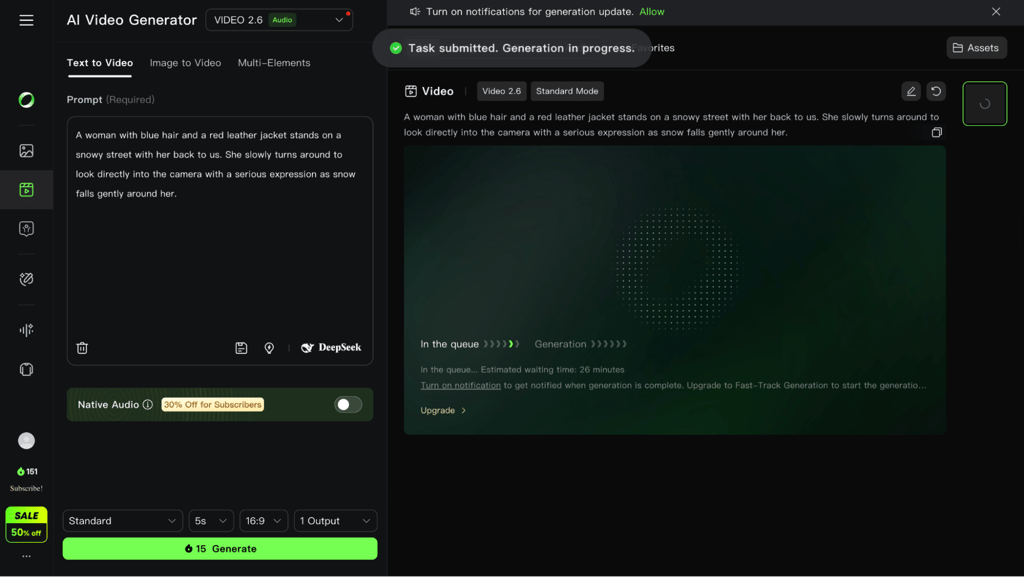
Initially, I tested the free Kling AI version, which, to my surprise, had a remarkably long queue. It took close to an hour to start. Upgrading unlocked Fast Track generation, which cut the wait down to 3 minutes. Finally, the video matched the prompt reasonably well. While the skin looked a little pale, the lighting and the pace of the turn did feel natural.
Kling listens closely to direction, but it performs best when the prompt reads like one shot in motion. Write it as a small scene: subject, camera angle, one clear action, and the lighting you want. Keeping it to one subject and doing one thing helps avoid weird behaviors.
Image-to-video and multi-image references
Next, I tested how Kling AI handles animation from a still image. I first used Gemini to generate an AI portrait.
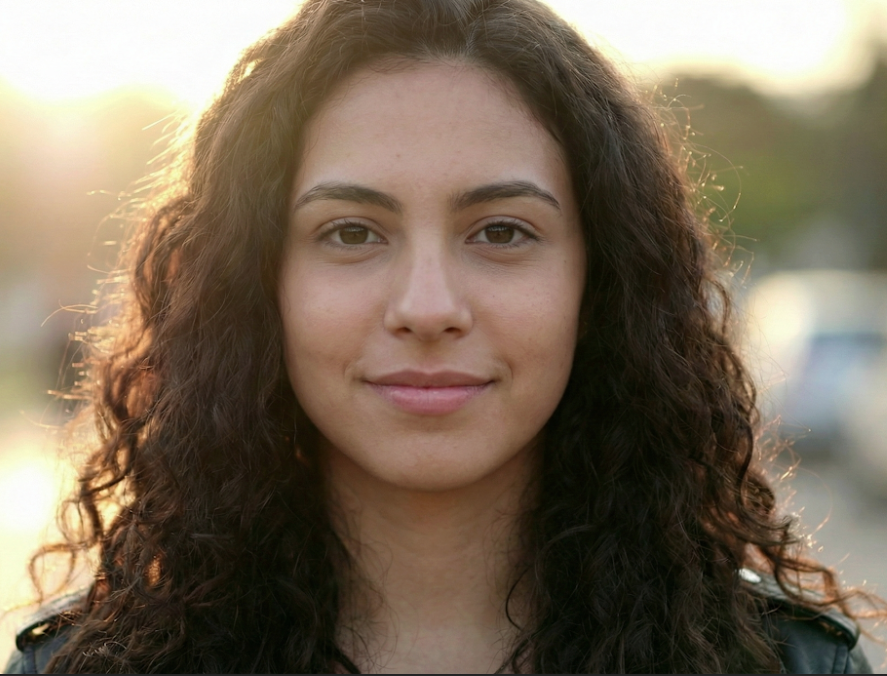
Then I asked Kling AI to generate a video of wind moving through the woman’s hair with cinematic lighting, and I also enabled sound effects.
In the end, the generation took about 4 minutes, and the result looked ok. The hair reacted convincingly to the wind, and the lighting matched my notes.
However, I don’t know why it added an earring when the hair lifted, since I never asked for that. Additionally, some individual hair strands in the background remained still, indicating that it struggles with rendering many small details when left to its own. Lastly, the audio included some random lip-smacking-type sounds, which is strange.
Luckily, this feature becomes better when you upload several images of the same person. Multi-image references help Kling maintain consistency for a character across different scenes. That can help with brand mascots or recurring characters in a story. When animating stills, you can request simple moves like pans, zooms, or a slow dolly to add motion without breaking the image.
Elements
Using the Elements tool (available only with the VIDEO 1.6 model), I moved on to Elements testing. I added a portrait from my first test and generated a new one with Gemini.
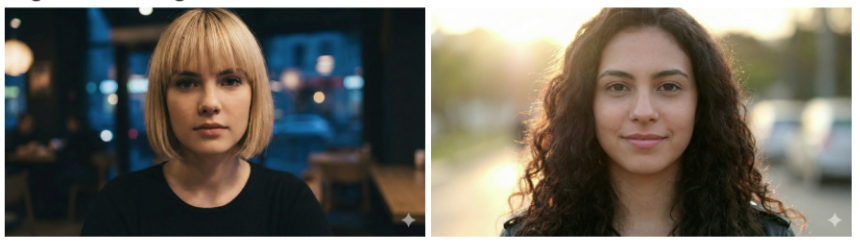
This feature enables training Kling AI with characters, allowing me to reuse them for continuity. I can select and edit faces, clothing, or choose any manual change here. For testing purposes, I just asked Kling AI to generate a video of these two girls hugging.
The output looked good overall. There were small, unnatural movements, but the characters stayed recognizable. Kling does not generate a background during this process, so you need to describe one if you want more than a blank scene. The sound generation did not match the clip accurately, although the camera zoom behaved exactly as requested.
Multi-Elements: add, delete, and swap
Kling AI's Multi-Elements lets users combine up to 4 reference images for characters, objects, or scenes into dynamic videos via add, swap, or delete actions. I tested each one using the same base video.
Add test
I picked the earlier generated video, uploaded a new reference portrait I had generated, and selected the girl to add to the video. After that, I confirmed the region to use and asked Kling AI to add it to the video.
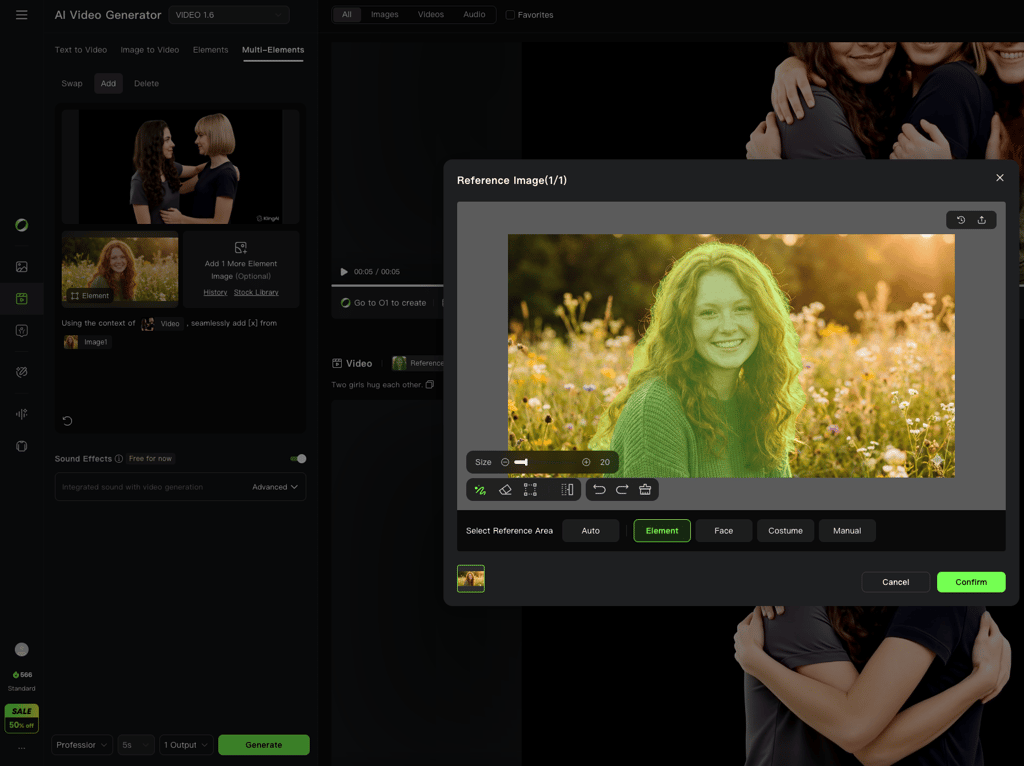
The generation took about 5 minutes, and Kling AI inserted the third girl correctly. The only issue was that her eye contact direction was slightly off, but she blended into the scene logically.
Delete test
I then tried removing a blonde girl from the group. First, I selected the blonde girl and asked Kling AI to delete her.
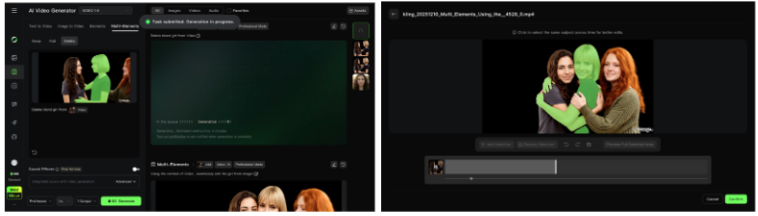
To my surprise, instead of erasing the character, Kling replaced her with a new redhead. Even after clarifying that nothing should be added, the video still contained 3 girls. In short, the deletion feature did not work as intended.
Swap test
Finally, I tested swapping the blonde girl with a redhead from a reference photo.
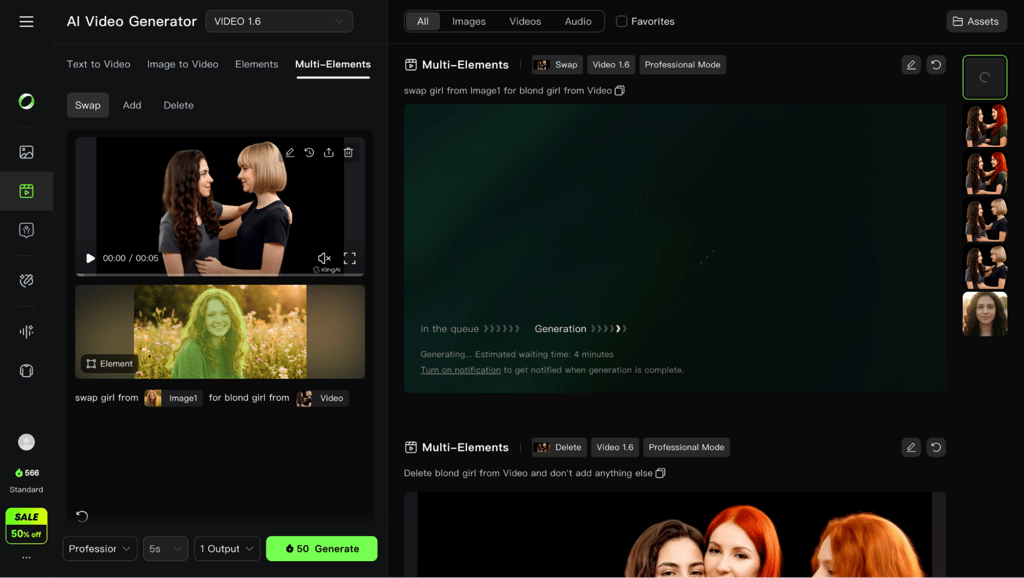
Kling made a change, but it swapped the wrong person. The brunette girl was replaced instead. Kling AI appears to struggle with identifying specific individuals when multiple similar faces are present.
Lip sync
I also tested lip sync with a short phrase: “Hello, and have a good day.”
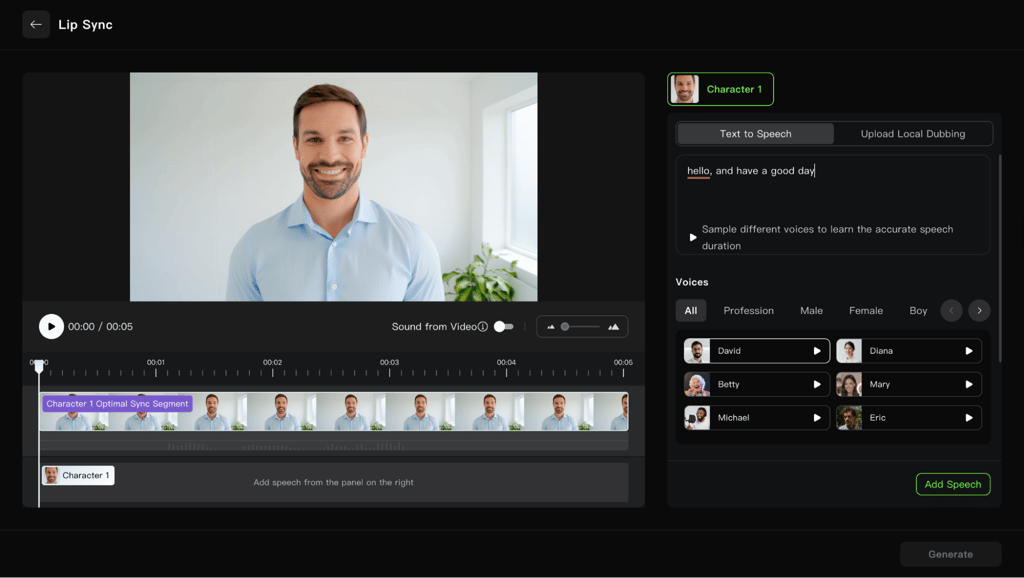
After selecting a voice, Kling synced the lip movements in the clip. In the case where the person was already speaking, the results were very good. And while the silent videos still worked, the feature's motion appeared slightly less natural. Overall, it performs best in English and other major languages.
Credits, effects, and add-ons
Kling uses a credit system across all plans. Each video consumes credits depending on the resolution, duration, and features used. Longer clips, higher-quality settings, and multi-element workflows cost more. You will find tiered plans such as Standard, Pro, Premier, and Ultra. You can also top up with extra credits or gift cards.

Some platforms like VEED, Artlist, and Envato’s VideoGen offer Kling AI with basic credits, effects, lighting, and simple audio for quick previews. However, for detailed editing and final polish, a traditional video editor like Adobe Premiere Pro is still needed since Kling doesn’t fully replace post-production tools yet.
Limitations and technical constraints
Kling AI 3.0 is a major step forward, but like any evolving technology, it still faces notable challenges. The latest version transitions from a clip generator into a true scene‑level directing system, offering higher fidelity and more creative control than Kling’s previous models. However, from my perspective, several technical and practical constraints keep it from feeling fully production-ready.
One recurring issue is physics hallucination in complex scenes. While character motion looks far more natural than before, the system still struggles with non‑human physics – things like water splashing, glass reflections, or drifting fabric can morph or ripple unnaturally mid-frame. This limits realism in highly detailed or dynamic environments.
Another shortcoming is temporal decay. As a 15‑second generation progresses, background details and secondary character features sometimes soften or distort slightly. This is especially noticeable when the camera pans or the lighting changes midway through a sequence.
Kling’s expanded 4K/60fps Professional Mode also comes at a high computational cost. Generating one high‑resolution clip can take five to ten minutes and consume a significant number of credits, which slows experimentation and iteration for creators who depend on quick feedback loops.
Overall, Kling 3.0 proves that large‑scale, multimodal video generation is achievable. Still, it needs refinement in long-form consistency, material physics, and processing efficiency before it can serve as a mainstream production tool for extended cinematic projects.
Pricing, credits, and value for money
Kling AI offers multiple subscription tiers that mainly scale on monthly credits, generation speed, and priority access. Here’s a quick snapshot of Kling AI’s pricing:
| Plan | Best for | Monthly price | Credits per month | Video output and limits | Key features |
| Basic | Casual testing | $0.00 | None | Limited trial clips | 66 credits per day, allows low-resolution, watermarked videos to be rendered in slower queues, login-based trials only |
| Standard | Light creators and social clips | $6.99 | 660 credits | ~3300 images or ~33 standard videos | Fast-track generation, watermark removal, video extension, and image upscaling |
| Pro | Regular creators | $25.99 | 3000 credits | ~15,000 images or ~150 standard videos | Faster queue, priority access to new features, native audio, VIDEO 2.6 (free), and VIDEO O1 (daily 3 free uses) |
| Premier | High-volume content production | $64.99 | 8000 credits | ~40,000 images or ~400 standard videos | Fastest queue priority, Video 2.6 – Voice Control (free), VIDEO O1 (daily 3 free uses), native audio |
| Ultra | Teams and heavy users | $127.99 | 26,000 credits | ~130,000 images or ~1300 standard videos | Best per-credit value, beta feature access, and highest queue priority |
Kling AI 3.0 runs on a credit‑based system, where each generation consumes credits based on clip length, resolution, and feature complexity. Larger, higher‑quality, or audio‑enabled videos require more credits.
Here’s what’s new in Kling AI 3.0:
- Free credits now reset daily instead of monthly, and no longer roll over
- Paid plans now support native 4K generation and longer clip duration options
- Integrated audio and voice sync are now built directly into the rendering pipeline
- High-end 4K or audio-enabled clips consume significantly more credits than before
Compared to its previous models, the 3.0 version offers more creative control and higher-quality output, though heavy users may find credit consumption and rendering time increase with pro-level features. Even so, Kling still offers better value than rivals like Runway AI, especially when it comes to short, realistic 1080p productions.
Kling AI 3.0 vs other AI video generators
AI video tools have started to split into two main categories:
- Simulators that focus on realistic world physics and visual accuracy
- Directing tools that emphasize storytelling, editing control, and scene composition
Kling AI 3.0 clearly falls into the second group, as it’s designed for creators who want to direct how their videos unfold rather than just simulate motion. Here’s a quick comparison of Kling AI and other popular AI video generators to help you see how they differ in terms of workflow:
| Model | Functional framework | Best use case |
| Kling AI 3.0 | The Director: best for structured storytelling with native audio and multi-shot cuts | Short-form ads and social content |
| OpenAI Sora | The Simulator: focuses on deep world physics and object permanence rather than specific UI controls | VFX-heavy B-roll and complex environmental shots |
| Runway (Gen-3) | The Editor: strongest integration with post-production tools and Motion Brush precision | High-concept artistic projects |
| Seedance 2.0 | The Reference Master: uses an @mention system to replicate motion from existing videos | eCommerce and precise character animation |
| Higgsfield | The Virtual Studio: organizes models into a Gear Rack workflow with lens and focal length presets | Professional filmmakers requiring optical physics |
After testing numerous AI video tools over the past year, I found that Kling AI acts as a Visual Director and excels at creating realistic motion and consistent characters. By contrast, tools like Sora function more like a Simulator, better suited for complex storytelling. Runway’s Gen‑3 model integrates tightly with post‑production pipelines, while Seedance 2.0 can mirror real‑world motion from uploaded videos. Finally, Higgsfield positions itself as a Virtual Studio, offering a Gear Rack system with lens and lighting presets.
Overall, Kling is a great choice for narrative control and structured storytelling, especially for focused scenes. Its multi‑shot direction, native audio, and cinematic camera logic make it a standout for short ads, creative pitches, and social content. However, if your work demands maximum physical accuracy – like intricate environmental physics, complex object interactions, or precise motion replication – tools like Sora, Seedance, or Higgsfield may serve you better.
Best use cases for Kling AI 3.0 (and where it’s too early)
Kling AI 3.0 excels in structured, short‑form video production. Here’s what works best and what doesn’t:
- Social media shorts and ads. Kling is strongest with realistic faces, natural motion, and cinematic lighting. Ideal for reels, TikToks, short ads, and 15-second product promos. Less ideal: crowded scenes or heavy text overlays.
- Educational content and explainers. Single-presenter clips, demos, tutorials, and walkthroughs render clearly with reliable lip‑sync. Less ideal: fast‑paced animations with intricate diagrams.
- Animated shorts and storyboarding. Use multi‑shot prompts to test camera angles, pacing, and mood. Great for previsualization. Less ideal: long narratives beyond 15 seconds.
- Product marketing and promos. Product close-ups and lifestyle-style shots look polished thanks to Kling’s physics‑aware motion and HDR lighting. Less ideal: complex multi‑object scenes like busy kitchen demos.
- Game development and previsualization. Quick character motion tests and environmental framing without full CG builds. Less ideal: high‑detail crowd simulations or physics‑heavy destruction.
Keep the subject count low, avoid intricate physics (water, crowds), and plan for 3–15 second clips. For anything longer or more complex, use Kling as a starting point and finish in traditional editing software.
Final verdict
Kling is worth it for the right creator. 3.0 delivers cinematic multi‑shot sequences, realistic motion, and native audio – ideal for short ads, social content, and storyboarding. Among its main advantages are director‑level camera control, 4K HDR output, and cohesive storytelling. When it comes to drawbacks, Kling is credit‑heavy, has occasional physics glitches, and is limited to 15 seconds.
In my opinion, Kling is perfect for marketers and indie filmmakers. However, skip it if you need long‑form or complex crowd scenes.
FAQ
How is Kling AI 3.0 different from Kling AI?
From single-shot clip generation in earlier versions, Kling 3.0 evolves into a full directing tool. Key upgrades include multi-shot sequences (2–6 scenes with automatic transitions), 3–15 second durations, locked character consistency, native text rendering, and improved physics for realistic motion – all in a unified multimodal workflow.
Does Kling 3.0 generate audio and synced dialogue?
Yes, Kling 3.0 produces native audio directly in the video pipeline, including character dialogue, sound effects, and ambient noise with precise lip sync. Unlike prior versions that added audio separately, it's generated simultaneously for seamless synchronization across languages and scenes.
Can Kling 3.0 produce 4K cinematic videos?
Yes, it supports native 4K resolution at up to 60fps in professional modes (via paid plans), with HDR color and high motion fidelity.
Which AI video tools are competitors to Kling 3.0?
Top rivals include OpenAI Sora, Runway Gen-3, Seedance 2.0, and Higgsfield. Kling stands out for narrative control, while others emphasize simulation or precision.
What hardware do I need to use Kling AI?
You can use Kling from a web browser. No special hardware is required, but a stable internet connection helps.
Can I use Kling AI videos commercially?
Yes. Kling generally allows commercial use, but check the terms of service and any licensing rules for specific models and third-party audio. We recommend reading the licensing section before publishing paid work.