Gemini 3 Pro review – hands-on with Google's new "senior engineer"


 Follow us
New AI releases are often accompanied by a lot of hype. Google’s Gemini 3 Pro is no different, with some claiming that it’s essentially a “senior engineer”. These kinds of claims are usually hyperbolic, which is why I decided to verify them for myself.
In order to help you learn more about Google’s latest LLM, I checked its main selling points, including advanced reasoning, its Antigravity coding interface, and video analysis capabilities. Is this the AI to replace pros like programmers or engineers? Keep reading this Gemini 3 Pro review to find out.
What is Gemini 3 Pro?
Gemini 3 Pro is essentially Google’s answer to ChatGPT-5, the latest AI model to be released, designed to be clever, concise, and more direct than its predecessor, Gemini 2.5. While most previous LLM models were built to generate text, Gemini 3 Pro is geared for coding and generative UI, rather than simple text generation.




Key features and interface
To thoroughly test the Gemini 3 Pro, with the assistance of the Cybernews research team, I conducted a series of tests to verify the accuracy of Google's claims. In particular, I focused on its advanced reasoning, Antigravity coding interface, and video analysis.
My hands-on tests – capabilities and features
To start, let’s look at the features promised by Google. Gemini 3 Pro is said to offer advanced reasoning better than its previous model. Note that there is no specific interface for this advanced reasoning. Instead, it’s simply present throughout all of your Gemini Pro 3 use. There is a separate mode for Gemini 3 Deep Think, which is only available with Google AI Ultra.
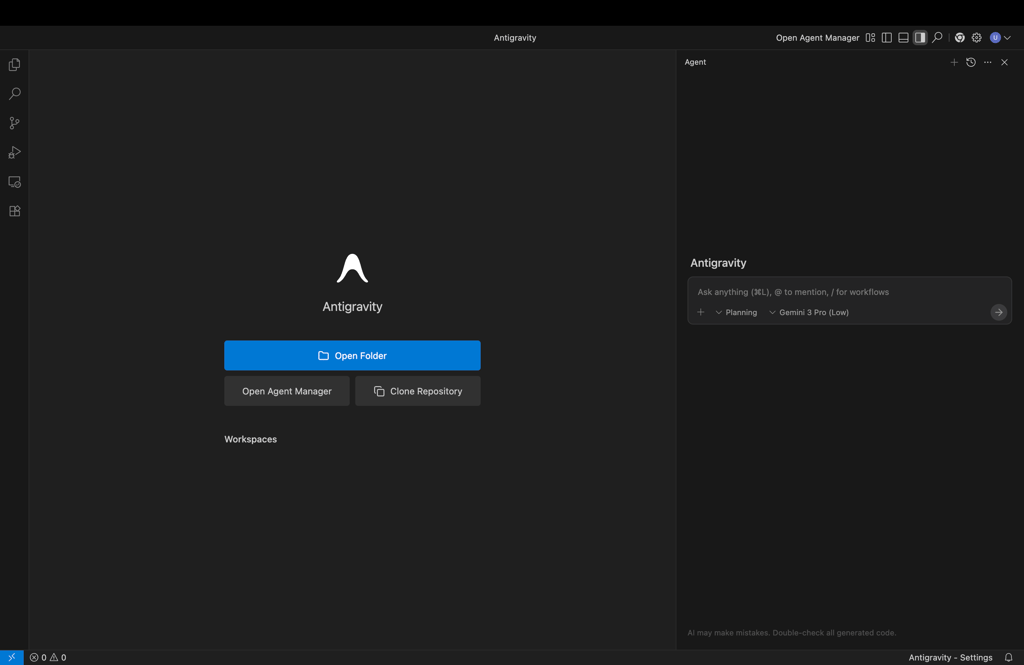
The first new visible feature is Gemini 3’s Antigravity coding editor. Rather than an in-browser code editor, Antigravity is a separate application you download to your Windows, Mac, or Linux. Antigravity can create more complex apps, building multiple files.
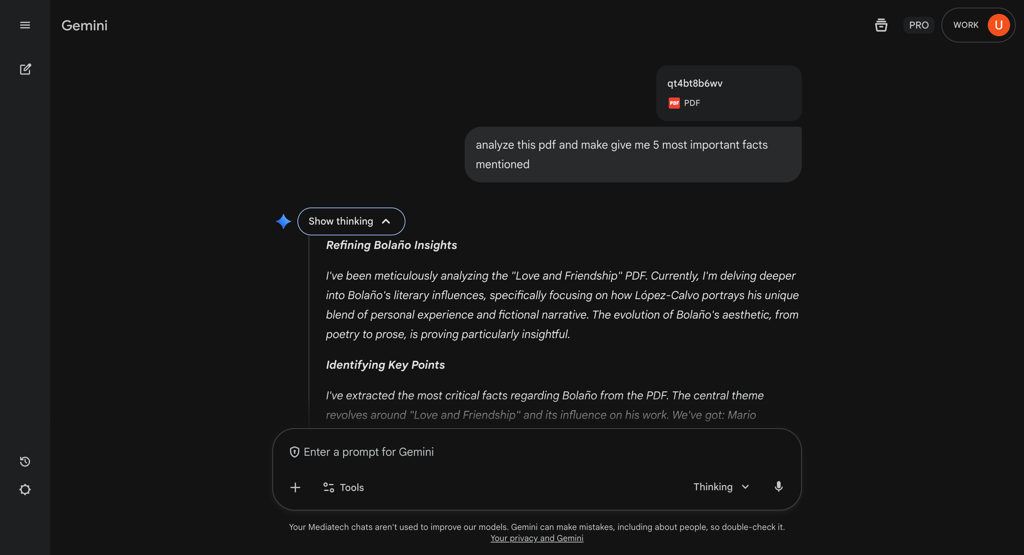
Another feature boasted by Gemini 3 Pro is its multimodal vision. This means that Gemini should be able to analyze everything, from complex PDFs with tables and graphics to videos.
Multimodal vision is built into the regular Gemini chatbot. When I tested it, Gemini proved to be more than capable of analyzing a complex PDF. I really appreciated the fact that I didn’t have to prompt it separately, as the analysis is built into the chatbot.
Reasoning and puzzles
Google claims that Gemini has had a massive jump in reasoning capabilities, with good reason. Gemini’s reasoning capabilities were confirmed when it scored the highest marks yet on Humanity’s Last Exam – the most complex trial designed to test LLM knowledge, reasoning, and multimodal abilities. It also scored high marks in other LLM tests.
To confirm these skills, I used the following prompt, asking a question from the GPQA Diamond free set
You are a careful PhD‑level reasoner. Solve the question step by step, keep explanations concise, then give one final answer. Question: "A textile dye containing an extensively conjugated pi-electrons emits light with energy of 2.3393 eV. What color of light is absorbed by the organic compound?
Gemini provided the correct answer (red), accompanied by a graphic explanation from Shutterstock to illustrate its reasoning. It was very detailed and went through the process. GPT-5 similarly answered correctly, although it didn't go into nearly as much detail. Finally, Claude 4.5 Sonnet gave a lengthy explanation, but unfortunately picked the wrong color.
Gemini stood out to me in this test, and it definitely showed why it performed so well in the AI lab tests it was subjected to. If you’re looking for a product that is capable of complex reasoning and answering extremely hard questions, Gemini is definitely worth a look.
Antigravity coding and app generation
Antigravity is Google’s very own IDE (integrated development environment), which allows you to use the power of Gemini to build advanced applications. In order to test it out, I decided to ask the app to build me a simulation of the solar system.
At first, the model struggled to get any results. This was likely due to the load on the Antigravity servers. The model also seems to have problems with more complex prompts, so I’d recommend breaking down your development into stages to avoid overwhelming it.
Eventually, as the server load went down, I managed to generate a realistic simulation of the solar system. It also had a zooming functionality, which I appreciated as an extra.

The generation only took around 5 minutes once the server issues subsided. Since Antigravity is an IDE, I could easily access the code to read or modify it. Overall, Antigravity is a real step up from the previous Canvas coding mode, giving you far bigger coding capabilities.
That said, can it replace a senior engineer? I wouldn’t say so. The code still requires supervision from an experienced human, and the lack of such supervision may impact system security and other aspects. It’s certainly very helpful when inserted into the workflow, but I wouldn’t go laying off experienced professionals just yet.
Video analysis
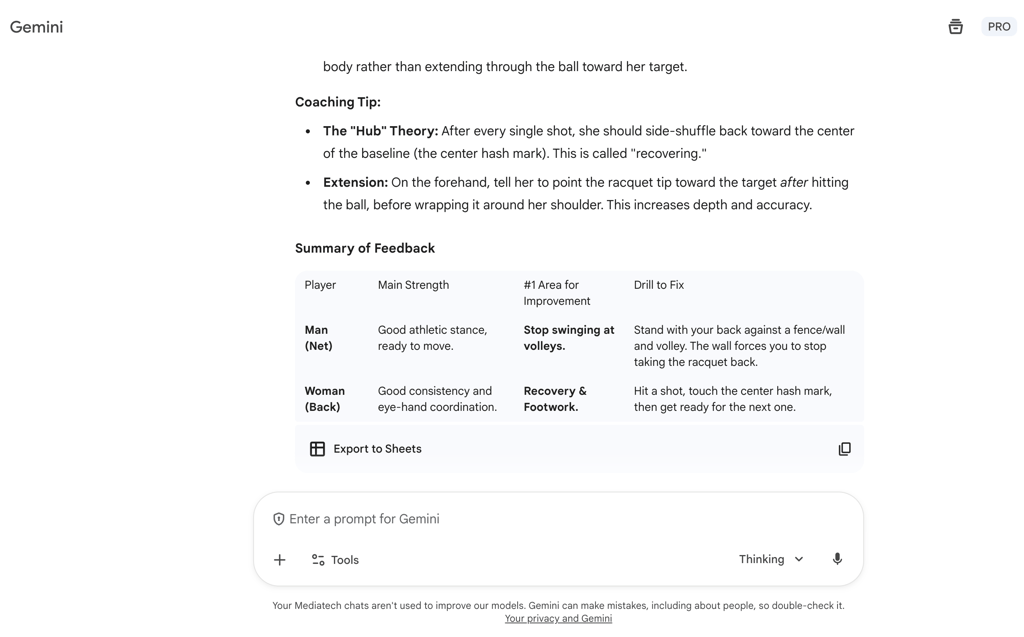
I next tested Gemini 3 Pro’s advertised multimodal analysis capabilities. To push it to the limit, I found a video of people playing pickleball and asked the model to analyze the gameplay with the following prompt:
Give me coaching or a technical analysis of this video of people playing pickleball.
The results were excellent. Gemini provided precise tips based on the video, highlighting strengths and weaknesses for the players, and offering drills to demonstrate areas for improvement. I then double-checked its performance with a tennis video, and it correctly identified the sport, going on to deliver a detailed analysis of the players’ games, giving timestamps and clear instructions. It also created a spreadsheet summarizing each player’s performance.
Finally, I also wanted to check its research capabilities in combination with analysis. Decided to give it a play from an actual game to analyze. I showed it a video of a Steve Nash buzzer-beater from 2012 to analyze. It used reasoning and sources to identify the players on the floor correctly and described the play in detail.
When asked what the Bucks could’ve done to stop Nash from scoring, it gave an excellent overview of what their defensive strategy should’ve been. There, it picked up on details that only someone with basketball experience would understand. Overall, I’m impressed with how perceptive the model is.

Power vs price
Gemini 3 Pro is priced similarly to the previous versions of Gemini. It ranges from a free version to a $249.99/month Google AI Ultra version, offering various amounts of credits for use, with only the Ultra plan providing access to Gemini 3 Deep Think. Here’s a breakdown:
| Price | Access to Gemini 3 Pro | Gemini 3 Pro usage allowance | Gemini 3 Deep Think access | |
| Free | $0.00 | ✅ Yes | Low | ❌ No |
| Google AI Pro | $19.99/month | ✅ Yes | Medium | ❌ No |
| Google AI Ultra | $249.99/month | ✅ Yes | Highest | ✅ Yes |
Along with wider Gemini 3 Pro access, the Pro and Ultra plans also increase your Google Drive storage and provide broader access to video generation with the Veo 3.1 model, making them powerful options.
For regular users, I suggest using Gemini 3 Pro only for the most advanced tasks. The $249.99/month Google AI Ultra price tag is prohibitive, and Pro’s usage limits can run out pretty quickly, especially when performing complex tasks. That’s why I’d avoid asking Gemini 3 Pro to write my emails, or prepare a shopping list – leave that to the less advanced models.
In terms of token use, Vellum.ai’s testing shows that Gemini 3 Pro is one of the more affordable flagship models, with an input cost of $2.00 per 1 million tokens and an output cost of $12.00 per 1 million tokens. Here’s how this compares with other flagship models:
| Input cost/1M tokens | Output cost/1M tokens | |
| Gemini 3 Pro | $2.00 | $12.00 |
| Gemini 2.5 Pro | $1.25 | $10.00 |
| ChatGPT-5.1 | $1.25 | $10.00 |
| Claude Sonnet 4.5 | $3.00 | $15.00 |
| Deepseek V3 | $0.27 | $1.10 |
As you can see, except for Deepseek, which was designed to be low-priced, most of the models have a fairly similar input/output cost. While Gemini’s 2.5 version is less expensive, the jump in power definitely makes a difference. However, if you’re looking for a model that will provide the most value for your money, I’d definitely recommend ChatGPT-5.
Gemini 3 Pro vs the competition
To compare Gemini 3 Pro to other LLMs, I considered several third-party tests. Each test checked a different aspect of an LLM’s capabilities, and Gemini 3 Pro scored excellent results in them. Here’s a breakdown:
| Model/Test | Humanity’s Last Exam (Overall skills) | GPQA Diamond by Artificial Analysis (Reasoning) | SWE Bench (Agentic coding) | AIME 2025 (Math) |
| Gemini 3 Pro | 38.3% | 90.8% | 74.2% | 95.7% |
| ChatGPT-5 | 25.3% | 87.1% | 65.0% | 98.7% |
| Grok 4 | 24.5% | 87.7% | - | 92.7% |
| Claude 4.5 | 13.7% (Sonnet) | 83.4% (Sonnet) | 74.4% (Opus) | 91.3% (Opus) |
Overall, the Gemini 3 Pro has proven to be highly effective in some of the toughest tests it has been exposed to, scoring top in most categories and being among the top performers in those it hasn’t scored top in. As of right now, I’d say that if you’re looking for a multidisciplinary LLM, Gemini 3 Pro is the best choice.
Conclusion
With the release of Gemini 3 Pro, it’s becoming quite clear that the AI arms race remains to be led by Google and OpenAI. While ChatGPT-5 became the go-to choice for many upon its release, Gemini 3 Pro now delivers a strong competitor that surpasses OpenAI’s product in many categories.
If you’re looking for an advanced multidisciplinary AI that’s capable of everything from video analysis to coding applications, Gemini 3 Pro is an excellent choice. I particularly appreciate the addition of the Antigravity IDE, which is a big step up from its Canvas mode. If you’re a heavy user looking to get the most mileage out of your AI, ChatGPT-5 is still more efficient. And if you’re looking for an AI just to write your emails, I definitely wouldn’t use up Gemini 3 Pro’s tokens for that – Gemini 2.5 will be faster and more cost-effective.
Finally, to answer the most important question – does it replace a senior engineer? No. While it will definitely help senior engineers with their tasks, it still needs a skilled operator to get the most out of it. That said, it can be an excellent thought partner for performing complex tasks, ranging from coding applications to advanced physics simulations, and I feel advanced professionals will definitely get the most use out of Gemini 3 Pro.
FAQ
What is Gemini 3 Deep Think?
Gemini 3 Deep Think is Gemini’s most advanced reasoning mode, only available with the $249.99/month Google AI Ultra Plan.
Is Gemini 3 Pro free?
Yes, Gemini 3 Pro is free. However, its use on the free version is limited compared to the Google AI Pro and Google AI Ultra plans.
Can Gemini 3 Pro really replace a software engineer?
No, Gemini 3 Pro can’t replace a software engineer. While it can create code and speed up production, it still requires oversight by an engineer to ensure it avoids bugs and other issues.
Why does Gemini 3 Pro use so many tokens?
Gemini 3 Pro uses more tokens than Gemini 2.5 Pro due to its more advanced and complex reasoning. While being more expensive than ChatGPT-5, it’s still comparable to other flagship models like Claude 4.5.