Best AI CMS in 2026
Being behind major reports like The Mother of All Breaches and RockYou2024, our in-house cybersecurity experts and journalists provide unbiased, real-world testing and in-depth analysis.
We maintain complete transparency by openly sharing our testing methodologies with our audience.
Learn more

In this article, I help you choose the best AI CMS for content planning, creation, and management. I have tested each platform together with the Cybernews researchers, focusing on AI features, content workflows, and overall value.
AI is revolutionary, but it is not limitless. When testing selected tools, I analyzed whether they actually speed up my content production or just add excessive steps. SEO is an important aspect as well, and the Cybernews experts helped me evaluate the quality and accuracy of AI-generated keywords.
I start this list with the powerful Contentful, a professional headless CMS to fuel generated and SEO-optimized content to websites and apps. I also review Sanity, another top-notch headless CMS. I include Squarespace, a very beginner-friendly website and content creation tool.
Find my review of the Jetpack plugin that enhances WordPress with AI features. Content Hub is B2B-oriented with a strong focus on sales. And the Webflow visual development platform will help animate websites. Throughout, I explain how exactly AI is integrated into each tool, its real benefits, pitfalls, and ideal users.

Best AI CMS – shortlist
- Contentful – best AI CMS overall
- Squarespace – best AI CMS for beginners
- Content Hub (HubSpot) – best AI CMS for sales
- WordPress with Jetpack – best WordPress AI plugin
- Webflow – best AI visual website development
- Sanity – best AI CMS for developers
The best AI CMS compared
Before diving into individual reviews, a side-by-side comparison table gives you a quick overview of each CMS’s features, pricing, and suitability for your needs.
| Contentful | Squarespace | Content Hub | Wordpress with Jetpack | Webflow | Sanity | |
| Overall rating | ||||||
| Architecture | Headless and API-first | SaaS | SaaS within HubSpot CRM | WordPress plugin | SaaS | Headless |
| Standout feature | Large-scale content updates | No-code website building | Cross-channel content translation | WordPress AI upgrade | Visual website code generation | Schema-aware AI copilot |
| Scalability and performance | High | Low-medium | Medium-high | High | Medium-high | High |
| Flexibility and customization | High | Low | Medium | High | High | High |
| Localization and releases | Advanced | Basic | Medium | Advanced | Medium | Advanced |
| AI support and automation | Wide range of AI actions | Web design generation and optimization | Marketing AI agents | In-editor co-pilot | Visual AI assistant | Schema-aware agent |
| Security and governance | Enterprise-grade | Standard SaaS | High (within HubSpot) | Depends on the extension | High | Enterprise-grade |
| Starting price | $300.00/month | $9.50/month | $9.00/month/seat for the Starter plan, and $450.00/month for the Professional plan | $4.95/month | $14.00/month | $15.00/seat/month, enterprises contact sales |
| Free trial | 30-day free trial | 14-day free trial | 14-day free trial | One-time only 20 free requests | Limited free version | Offers a free version and a limited free trial |
| Best for | Enterprise-level content management | Website building from scratch | AI-powered sales optimization | Enhancing WordPress with AI | Visually appealing website creation | Developer-led teams and projects |
6 best AI CMS – our detailed list
Below are six detailed AI CMS reviews with our testing data, key AI features, pricing, and pros and cons.
1. Contentful – top AI-powered CMS overall
| Overall rating: | |
| Standout feature: | 30 AI automation actions, multiple platform updates via API, works with custom-built LLMs |
| Starting price: | $300.00/month |
| Trial information: | Offers free version, 30-day free trial, exclusive premium trial for enterprises |
| Best for: | Large enterprise content management, simultaneous multiple platform content updates |
Contentful is the best AI-powered web content management system for product updates on multiple platforms. It is not beginner-friendly and has a steep learning curve. Setting up an account is easy, but I was immediately asked for my coding knowledge, so prior development experience is advisable.
Contentful is headless with an API-first approach. A headless CMS is a content management system that stores and organizes content but delivers it via APIs, allowing developers to build and design the front end independently across websites, apps, and other digital platforms.
Instead of a front-facing drag-and-drop editor, you will be creating reusable components. You can then push those components to websites, apps, and blog posts via API, updating all platforms simultaneously.
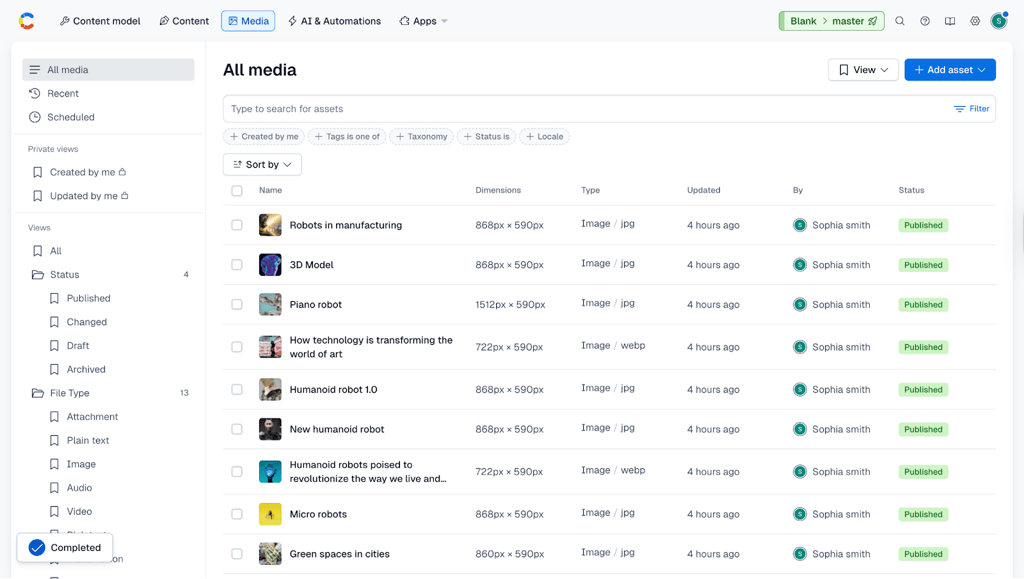
Although I found its dashboard complex at first, AI integration throughout the platform also helps make the first content models. I especially liked that there's a separate AI & Automation tab. AI actions include translation, alt text generation, brand consistency checker, product categorization, SEO optimization, and much more.
This tool is model-agnostic. You can connect it to a desired large language model or use a custom LLM built and tailored to your needs. It expands Contentful's capabilities as you can add apps for A/B testing, marketing automation, localization, etc.
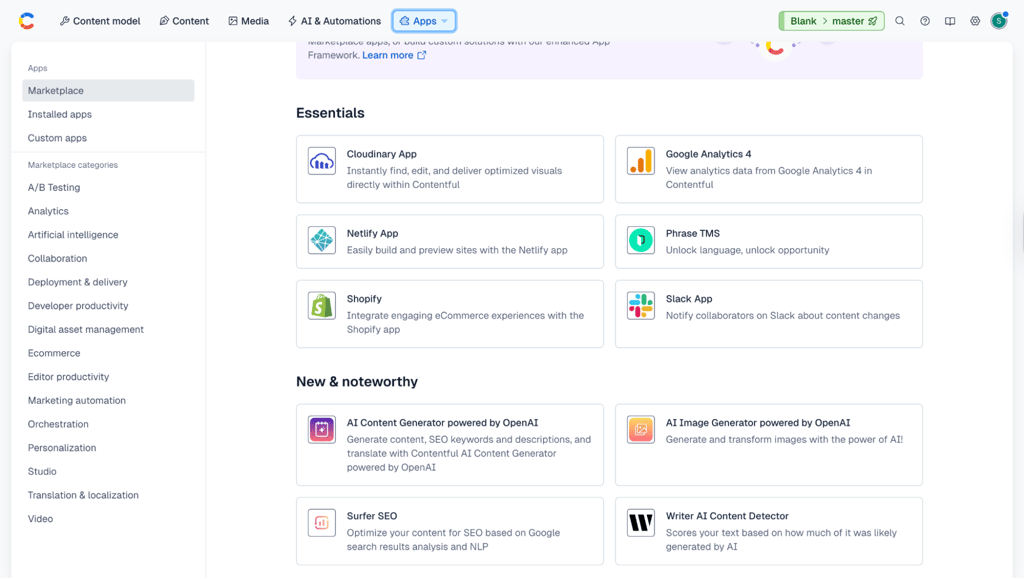
Made for teams, Contentful has collaboration and governance tools. You can define who has the rights to modify workflow and publish entries with role-based models. I also liked that you can automate the following actions, so after a human supervisor verifies the AI output, the AI can immediately jump to the next task.
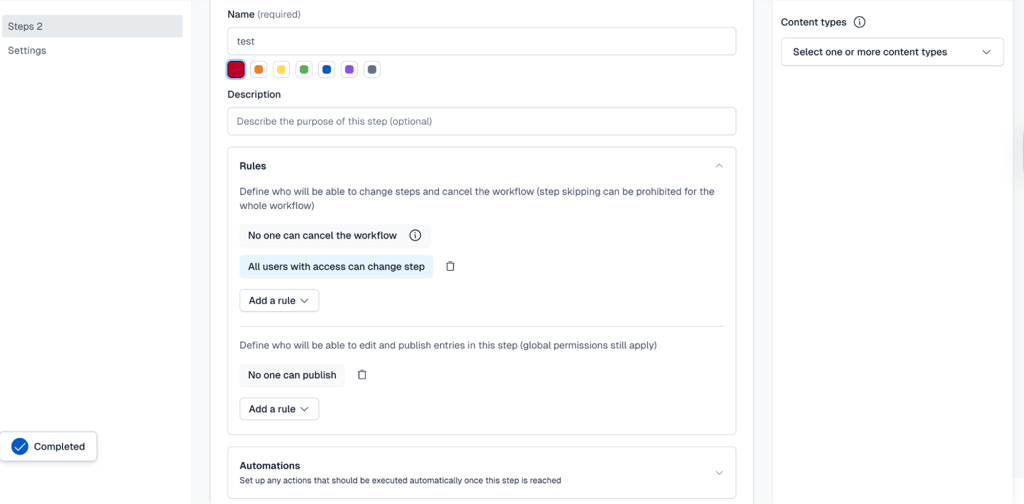
Contentful feels more like developing a database than building a website. I recommend it for tech-heavy, dev-first teams that manage products across multiple platforms.
2. Squarespace – intuitive AI website builder for beginners

| Overall rating: | |
| Standout feature: | Website design templates, AI search optimization, and very easy to use |
| Starting price: | $9.50/month |
| Trial information: | 14-day free trial |
| Best for: | Personal blogs and projects, small business websites |
Squarespace now integrates AI from the very start. Upon creating an account, it asks several questions about your website goals, content, and brand voice. Then, its AI generates a template you can start working with. It took less than five minutes to come up with the layout seen below. This makes it perfect for beginners.
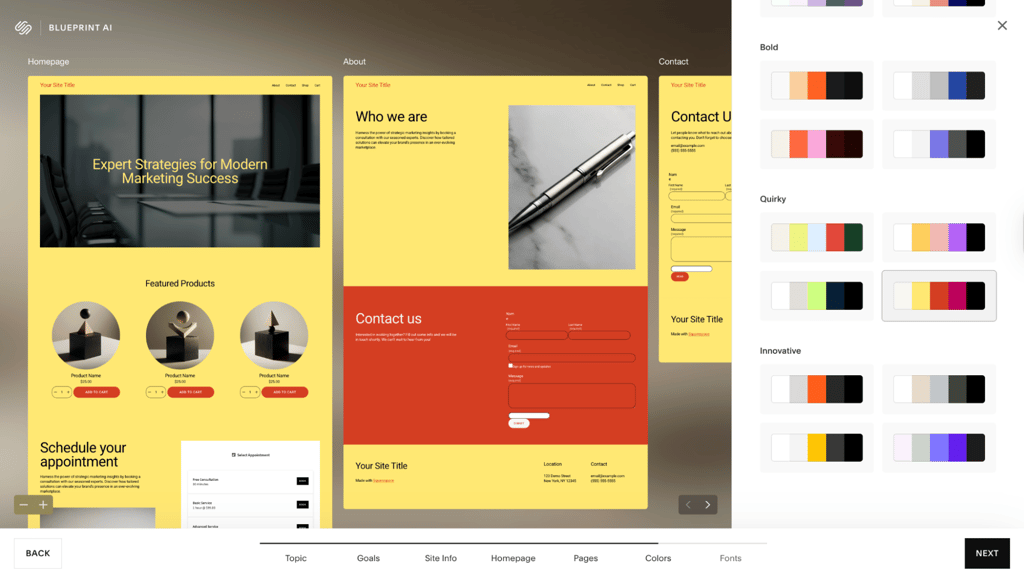
I found navigating Squarespace effortless and highly recommend it for personal blogs and website building beginners. The AI now powers numerous aspects, including content generation, email marketing, product categorization, etc. It has recently added an AI-automated recurring invoice generator for selling memberships, subscriptions, and physical goods.
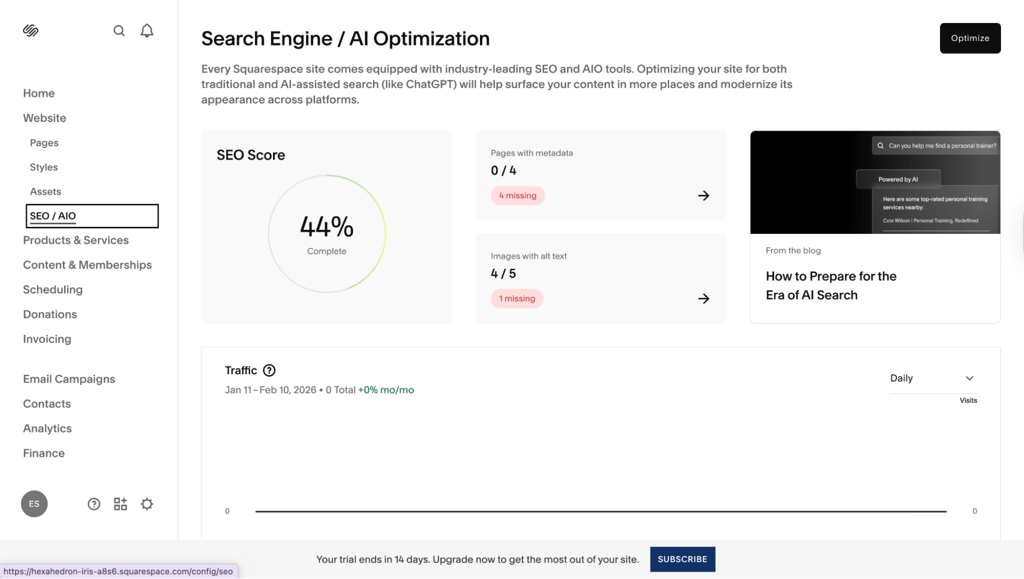
Squarespace AI also expands to SEO. Firstly, it scans existing websites for SEO gaps, like missing titles and alt texts. However, I found it a bit restrictive, as it controls the exact URL structure and the robots.txt file, which you cannot edit manually. On the other hand, it's more of a set-and-forget optimizer that encompasses AI optimization to increase visibility in AI chats.
I recommend Squarespace for personal projects and small businesses. Its Fluid Engine drag-and-drop website builder leaves enough room for customization. If you misplace blocks and create negative space, AI will make adjustments as well as generate mobile and tablet-friendly versions.
These aren't random suggestions. Similar to Contentful or Content Hub, Squarespace also marks down your personality model. Its suggestions are brand-aligned from the early start.
3. Content Hub (HubSpot) – all-in-one content management platform for sales
| Overall rating: | |
| Standout feature: | No-code website creation, sales optimization, buyer intent analysis |
| Starting price: | $9.00/month/seat for the Starter plan, and $450.00/month for the Professional plan |
| Trial information: | 14-day free trial |
| Best for: | Medium-to-large businesses, sales-driven content generation |
Content Hub is an AI-powered CMS within HubSpot CRM that's best used for sales websites. The first thing I noticed is how easy it is to start your project. Its onboarding process is very similar to Squarespace, but you will soon notice that HubSpot is much more scalable, and also costs a lot more.
Upon registration, Content Hub offers templates for a landing page or website. 17 and 23, respectively, on a free version, and hundreds on the paid HubSpot Asset Marketplace. In a compact tutorial, it shows you how the editor works, quick actions, and sidebar options. I clicked to add new elements, and Content Hub offered to generate a feature list, a countdown timer, CTA buttons, etc.
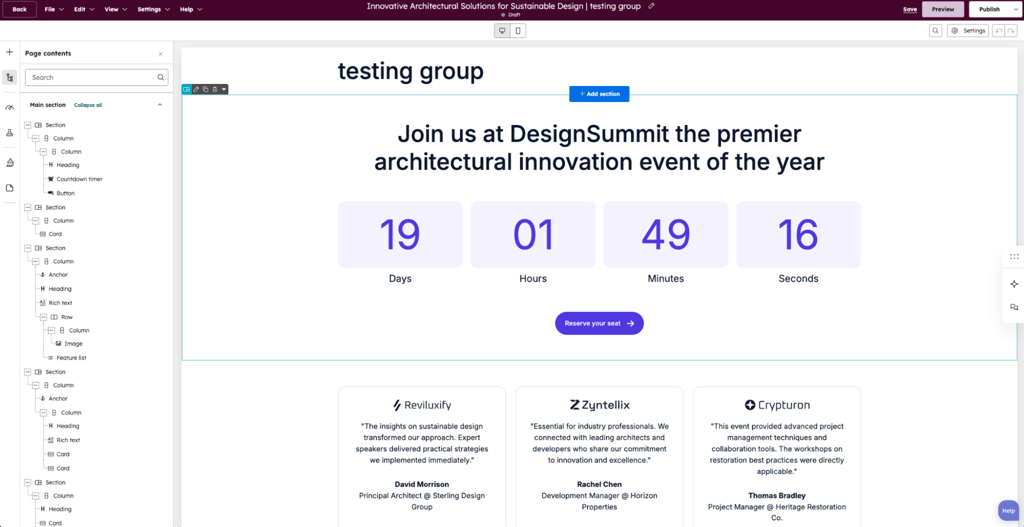
Keep in mind that for HubSpot, everything is a possible conversion. For personal blogs, that may be a too-sales-driven approach. But for medium-to-large businesses, AI streamlines all lifecycle stages from lead generation to retention.
Content generation is where HubSpot AI, called Breeze, shines most. Marketing managers can generate a single blog post or landing page, and Breeze will transform it into emails, podcast scripts, social media posts, and other types of media.
For me, its most outstanding feature is intent-based marketing. It uses reverse IP lookups to identify visitors, such as those from the top 500 Fortune companies, and align marketing messages with enterprise-level buyers.
On a less positive note, it's indicative of online surveillance. However, you will find SOC 2 Type II and SOC 3 audits, an ISO 27001 security certificate, and compliance with GDPR, HIPAA, and other data privacy frameworks.
4. WordPress with Jetpack – AI optimization for WordPress sites

| Overall rating: | |
| Standout feature: | Enhances Gutenberg Editor with AI, CSS, and shortcode generation, a wide range of additional benefits |
| Starting price: | $2.75/month |
| Trial information: | One-time only 20 free requests |
| Best for: | Solopreneurs, bloggers, WordPress specialists |
Jetpack is not a standalone AI CMS, but a plugin for WordPress CMS that adds AI functionality. It also adds features like anti-spam protection, malware scanning, and cloud backups, providing a wide range of additional benefits. Now, to my experience focusing on Jetpack CMS AI.
JetPack plugs AI into the WordPress Gutenberg editor. As WordPress is likely the most popular CMS worldwide, many existing users can now enhance its features. If you had issues adding tables to your WordPress websites before, AI now takes care of such tasks.
I found Jetpack AI somewhat limited, but more due to its relation to the WordPress platform. Unlike Content Hub or Squarespace, it does not generate entire webpages but optimizes what is already on WordPress. However, I found its code generator valuable. Modifying the front-end allows endless website customization, making it feel less generic and more unique to your tone.
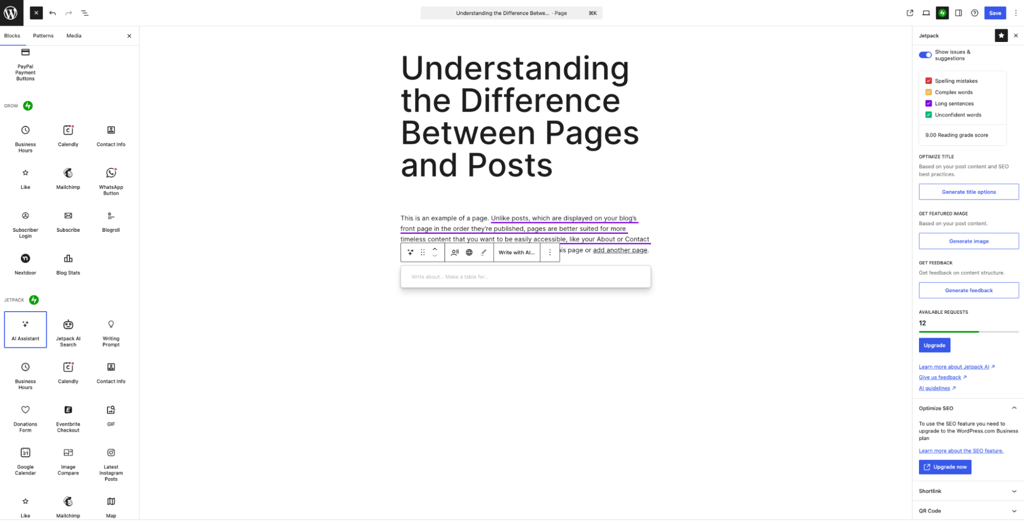
Jetpack AI can translate your content into 12 languages. It is reasonably priced, but keep in mind you are locked within WordPress. Also, benefits like SEO optimization, social media marketing, and CRM features require additional payments.
5. Webflow – excellent visual AI code generation

| Overall rating: | |
| Standout feature: | Clean front-end code, good third-party integrations, and highly customizable AI website generation |
| Starting price: | $14.00/month |
| Trial information: | Offers a free limited plan |
| Best for: | Design-driven businesses, companies with an active online presence |
Webflow is a design and functionality-oriented AI web content management system. I used it to create a portfolio, and it automatically added two interactive buttons and a navigation bar with dropdown menus.
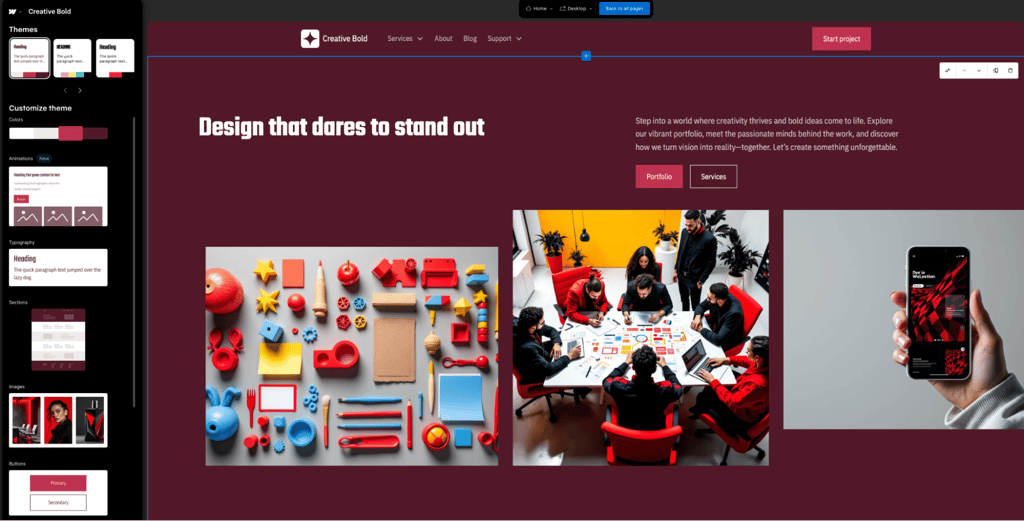
Interactivity is Webflow's selling point, as it allows creating custom components from 45+ native elements. I started by creating a simple button inside a div block (website container), and Webflow nested a backlink in it.
Using Webflow wasn't hard, but my prior front-end experience (although limited to only four months) helped me understand the underlying process. You can also import components from its App Marketplace, which saves a lot of time instead of prompting each one separately.
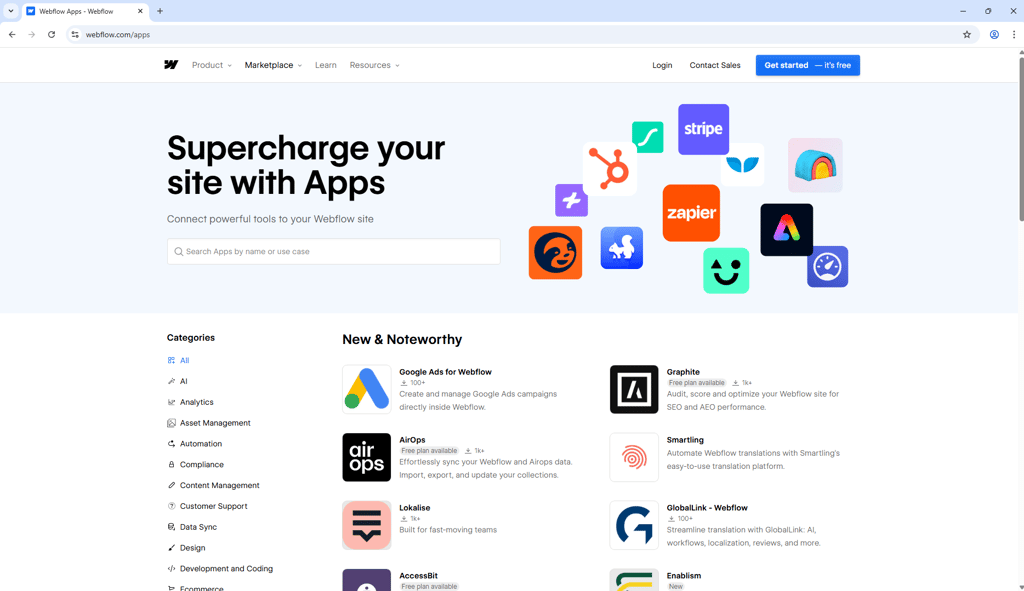
Webflow offers integrations with Stripe, Zapier, HubSpot, FluidSEO, and others. However, its most scalable plan is limited to 15,000 ecommerce items, which is not enough for large businesses and e-shops.
Do not confuse Webflow’s interactivity with full-stack applications. In 2026, it discontinued User Accounts features, and it does not generate backend logic that would accept user data. However, it generates clean and deployable front-end code, as my Cybernews front-end colleagues confirmed during review.
I recommend Webflow to solopreneurs and businesses with an active online presence. Of the six on this list, I consider it the best unique AI-powered website generator. Webflow is not beginner-friendly and has a steep learning curve, but it pays off with a more refined feel.
6. Sanity – multi-channel content updates

| Overall rating: | |
| Standout feature: | Schema-aware content agent, API content updates |
| Starting price: | $15.00/seat/month, enterprises should contact sales |
| Trial information: | Offers a free version and a limited free trial |
| Best for: | Developer-led teams and projects |
Sanity markets itself as a Content Operating System instead of a standard CMS. First, it requires good development knowledge. Second, Sanity requires a professional onboarding and tech-savvy team to upkeep it.
At first, Santity asks you standard questions, like your project's scope, name, and your development experience. It then asked me to add used tools that already require at least some front-end knowledge.
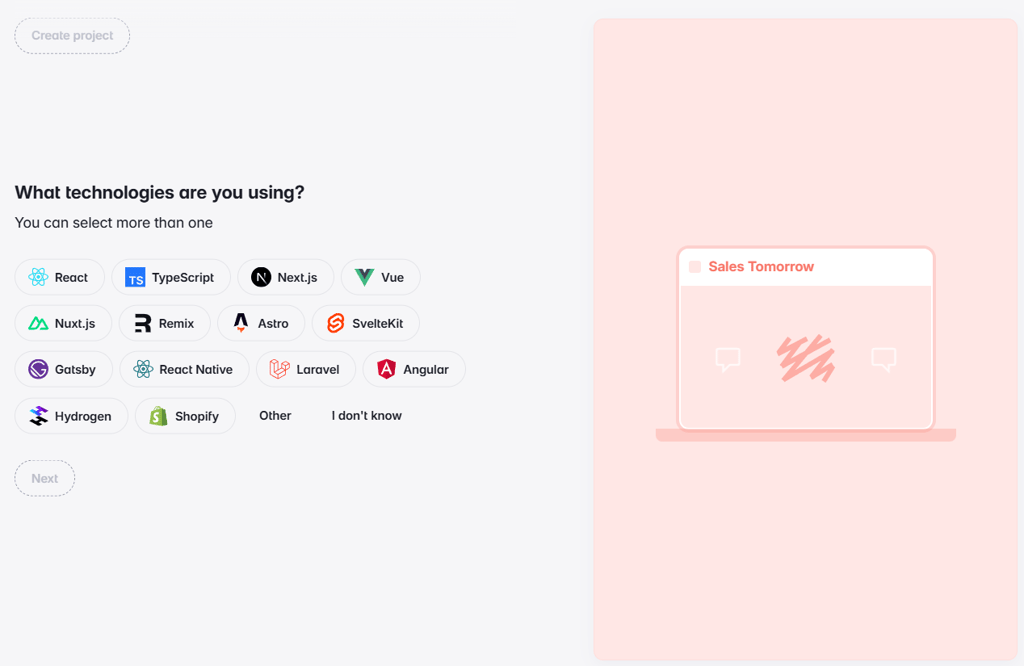
I then landed on the main dashboard. Here, Sanity guides me to start the first project, which is essentially building a content component database, which I will then connect to a real project. Sanity offers guides for non-developers on using its command line interface, as this is a code-first CMS.
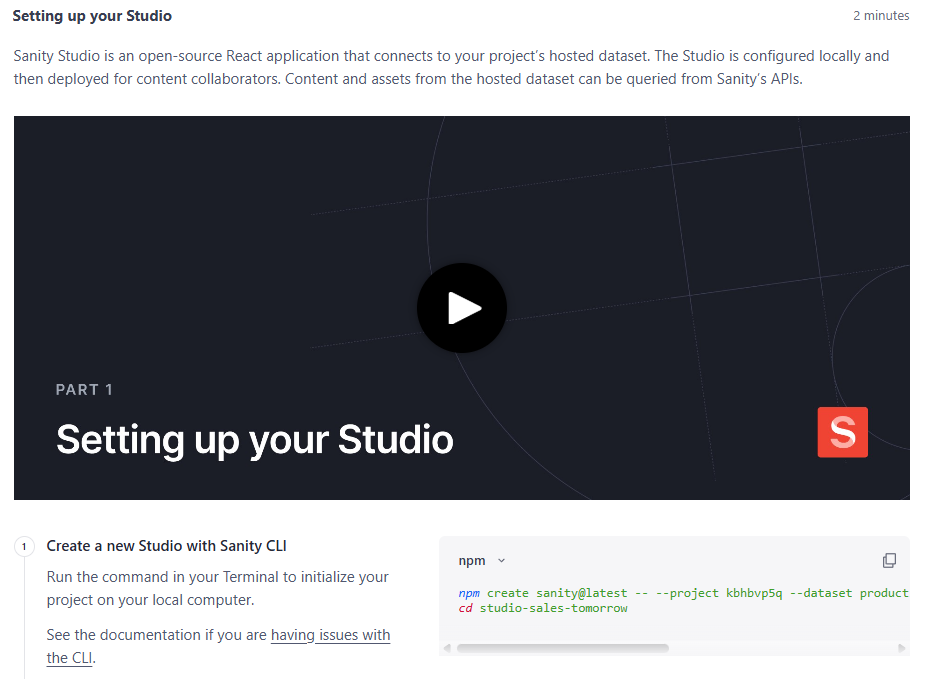
Similarly to Contentful, you will be creating content components that you can then feed to your projects via the Sanity API. Another similarity is that both CMS's are ReactJS-oriented.
This is a dev-first platform that now integrates AI Copilot. Headless CMS's are not for the faint of heart, so a proactive assistant brings this tool closer to professional copywriters. Its strongest selling point is the schema-ware AI copilot. It analyzes and understands the context so that suggested content does not break any code rules.
What is AI in CMS, and why does it matter in 2026?
In 2026, AI is no longer a separate CMS tool, but integrated throughout the platform. The content generation has moved from a sophisticated, yet often bland, text output to a proactive assistant. The AI now responds differently on landing pages than blog posts and marks off-brand and biased phrasing.
CMS AI also streamlines digital asset management. It looks up assets by keywords and auto-crops images, taking care of mobile vs desktop responsive design. It can handle SEO in real-time, identifying content gaps, and also AI search optimization, which is a brand-new field and a challenge for most writers.
An AI web content management system not only assists with content generation, rewriting, and summarization. It also handles metadata tagging, image generation, and personalization. It is a massive shift from, let's say, 2023, where much of the AI content was copied from ChatGPT conversations.
In 2026, the AI understands your content model and business taxonomy. At this turning point, it experiences a qualitative leap, rolling out significant improvements as OpenAI spearheads a $500 billion AI development project in 2026.
With AI, content marketers and editors can scale tasks like social media posting or proofreading. Product and documentation managers can now update knowledge base articles, product descriptions, and ads with new features using AI APIs. The same applies to agencies managing multiple sites and developer-led teams seeking faster workflows without quality drop.
How AI can improve content workflows
CMS AI is now about practical improvement, providing teams with real value for its adoption. Here are three fields where it's most evident.
Faster content production and iteration
AI reduces writer's block to a minimum. Its proactive core offers topic ideas that are contextual, relevant, and align with brand positioning. A few bullet points are enough to generate first drafts. Large language model (LLM)-based AI assistants benefit from the entire business repository, providing better output with fewer prompts.
AI streamlines reformatting, turning blog posts into emails into landing pages. Alongside adjusting length, it also modifies tone and adds bullet points, depending on the chosen format. It can then create multiple emails, landing pages, and CTA buttons for A/B tests.
Smarter metadata and structure
AI CMS assistant suggests titles, descriptions, and tags. It selects the best options based on your internal business glossary and the massive information it gets from LLM databases. Meta descriptions are cross-referenced with real search statistics, as HubSpot does with its Content Hub.
Other content tasks AI streamlines are writing TL;DR summaries, updating pricing, and making mobile app snippets. AI also populates headless CMS fields sent to the front-end, which is occasionally a complex task for copywriters, from my experience. Based on existing content, it creates interlinking strategies, streamlining link architecture.
Better collaboration between content and developers
Content writers, managers, and developers are intertwined. However, their collaboration is often rocky, primarily because content writers rarely speak in JavaScript. The distance between the two is finally diminishing, as AI validates writers' inputs before pushing them to websites or apps.
AI also efficiently converts text documents, like a Word doc, into JSON or other formats that the dev code expects. Contentful is a great example, as it creates content components similar to components in ReactJS, mirroring its logic. It helps two systems, the content and the coding, communicate more similarly, pushing content updates through APIs more quickly.
Essential AI features to look for in a CMS
Let's shift from theory to practice, so here are five essential CMS AI features you should look for.
Editor-level assistance
AI should be embedded in your editor. It should inspect and understand within which CMS field it operates, providing accurate suggestions. For example, Sanity's AI will not suggest 200-word texts to fields limited to 50.
AI also manages style and tone. Webflow lets you choose between professional or passionate, and these aren't mere collections of affective keywords. LLMs evaluate how these emotions are expressed through your particular brand and can translate them into multiple other languages.
SEO and metadata intelligence
SEO optimization now can happen in near-real time. AI suggests titles and meta titles, breaks chunks of text into smaller, organized headers, and fills in alt texts.
It is undeniably comfortable, but I value its other aspects more. CMS tools like HubSpot, which partners closely with Semrush, can access SEO repositories. It aggregates millions of keyword data points for SEO specialists who focus on the creative process instead.
Content modeling and structure awareness
AI structural awareness is essential, as pushing content that breaks the app or website layout is a critical mistake. AI should make suggestions based on your business glossary and taxonomy, which it handles well.
We'll get to AI limits and downsides shortly. If you find that this sounds salesy, it's because AI has indeed proved highly capable, but not without human supervision.
Workflow and governance
In 2026, AI CMS is a lot about governance and reliability. Users must feel safe delegating tasks to AI, and that means they must have control over it.
One solution is automatically saving AI content to drafts, waiting for human approval. My listed tools also log version changes, so that you can roll back if something fails. Role-based access to AI also ensures that only human supervisors with the required experience can verify and greenlight AI changes.
Integrations and extensibility
Lastly, your CMS AI should be open to custom LLM models, additional plugins, and extensions. Connectors to popular LLMs like ChatGPT or Gemini via API let you select the preferred choice per task. Tools like Contentful are model-agnostic, so you can easily connect a custom-trained LLM that fits the situation better.
How to use AI in CMS properly
During our tests, coupled with my own experience using AI as a writer's assistant, the benefits are palpable. However, AI introduces unique challenges, like all other software that integrates into business processes.
My primary advice is to treat AI within assistant boundaries, and never as a set-and-forget autopilot. Content mills use AI this way, but businesses seeking better brand positioning and ranking on Google will likely experience a drop instead.
Keep in mind that in 2026, Google prioritizes the E-E-A-T framework. It stands for Experience, Expertise, Authoritativeness, and Trustworthiness. AI CMS tools can help you reach these goals, but without human creativity, they lack in all four fields. Blogs, self-help tutorials, and product descriptions built solely on AI will not rank well within this framework.
Instead of prompting AI to create a blog post or any other content from scratch, provide a base it can work upon. Similar to how LLMs train on data, your AI CMS works on an internal business glossary and taxonomy. Human editors must review and verify AI output before pushing it live.
To summarize:
- Always review AI-generated copy for accuracy, tone, and claims
- Define high-risk fields where AI actions are restricted to a minimum
- Keep version logs so that you can always roll back in case of errors
- A human expert pushes content live, not AI
- Ensure the final output is compliant with international data security frameworks
Challenges of AI CMS
You have to take the good with the bad, and that applies perfectly to AI. Alongside robust benefits, there are very real setbacks you should know of. Here are essential AI CMS issues to avoid.
Quality and consistency of generated content
- Generic content. Without human editing and a business taxonomy to work with, AI output will be generic. Even if it looks good to the eye, it will likely be downranked in search engines.
- Lack of style. Each brand has its own voice. Give your AI CMS an example to follow.
- Tool specifics. Different CMS that work with different LLMs produce their own outputs. You should evaluate which tool suits you best in the beginning.
Factual accuracy and liability
- AI hallucinations. LLMs require correct input for accurate output. Otherwise, they produce AI hallucinations.
- AI restrictions. Some tasks should never be delegated to AI fully, such as drafting legal document final versions.
- Log changes. Always store previous versions of whatever content the AI is modifying.
Overreliance and workflow clutter
- AI spamming. Ensure your team uses AI to streamline their tasks, but do not do it for them.
- AI exhaustion. If you provide editors with 50 different copies of an AI-generated CTA button, it lowers production speed.
Data and privacy concerns
- Third-party reliance. Make sure your AI does not forward personally identifiable and otherwise sensitive user data to third parties.
- Data privacy. Whenever possible, refrain from granting AI access to protected personal data.
- Data retention. Verify that AI data retention adheres to international laws, like GDPR.
Final verdict: which AI CMS is right for you?
All listed tools excel in their own fields, so it's not a better-or-worse ranking. Here's how I would evaluate each CMS AI feature to pick the best tool.
For businesses with a variety of products across multiple sales platforms, a headless CMS works best. API-first AI CMS tools like Contentful update all content simultaneously using components from their repositories.
Small teams and solopreneurs should opt for tools like Squarespace or WordPress with Jetpack. They are much more beginner-friendly, offer drag-and-drop editors, and don't cost an arm and a leg.
Developer and design-heavy teams require tools aligned with their expertise level. Webflow comes to my mind, as it offers outstanding website customization options, but requires advanced front-end knowledge to make the best out of it.
Lastly, for sales-driven teams, Content Hub considers each element as a possible conversion channel. It also works within the HubSpot CRM, so if you're already using it, Content Hub AI customization makes it even better.
FAQ
What is the best AI CMS for a small business website?
Squarespace is the best AI CMS for a small business website. It provides an easy-to-use drag-and-drop editor. In 2026, it added an AI-automated invoice generator, excellent for kickstarting small businesses.
Can I safely use AI to write all my blog posts in a CMS?
No, AI should not replace all blog posts in a CMS. At the first stages, it must receive brand-aligned content input to produce publishable texts, which human supervisors review before going live.
Do I need a headless CMS to benefit from AI features?
That depends. A headless CMS is highly beneficial for scaling content updates across multiple platforms simultaneously. However, solopreneurs and small-to-medium businesses with fewer services can do with AI-powered text and website generators.
Which AI CMS works best for multi-language sites?
Contentful is the best CMS for multi-language sites. You can localize either entire sites or specific segments, and it works with over 50+ languages.
How do I control what content is sent to external AI providers?
It is best to establish a role-based access model to control what is sent to external AI providers. Human supervisors must inspect and verify AI actions before the AI processes the data via APIs.