OpenAI Prism review (2026): my analysis of OpenAI’s lesser-known AI system
Being behind major reports like The Mother of All Breaches and RockYou2024, our in-house cybersecurity experts and journalists provide unbiased, real-world testing and in-depth analysis.
We maintain complete transparency by openly sharing our testing methodologies with our audience.
Learn more
OpenAI Prism caught my attention as one of the newer tools from OpenAI, and I wanted to see for myself what it actually brings to the table. Together with the Cybernews research team, I went through the available documentation, explored demos, analyzed early user feedback, and tried it out myself to better understand how it works and where it fits within the broader OpenAI ecosystem.
Overview
- Best for: researchers, students and academics, and technical writers who need a dedicated workspace for drafting, editing, and collaborating on scientific papers using LaTeX with AI support
- Great for: organizing complex documents, managing references, real-time co-author collaboration, and leveraging AI to improve writing clarity and structure
- Not ideal for: casual users who just want simple AI content generation
What is OpenAI Prism meant to do?
OpenAI is tackling some big challenges: making AI more reliable, easier to monitor, safer to manage, and better aligned with enterprise needs. It's not just about generating text or code anymore. It's about helping AI behave predictably, giving users ways to review its outputs, and supporting responsible use in professional settings.
While tools like ChatGPT help with generating content and Codex focuses on programming tasks, more complex environments demand deeper analysis and governance tools. I imagine large enterprises and organizations in fields like academic research, finance, and pharma and biotech are likely to benefit most from Prism in the future, especially when they need more control over AI systems.
How OpenAI Prism fits into the OpenAI ecosystem
Prism doesn't replace other OpenAI tools – it works alongside them. ChatGPT is great for generating content and answering questions, while Codex focuses on coding tasks. Prism, however, is built to keep a close eye on AI itself. It helps teams see what the AI is doing, spot potential issues, and make sure it behaves as expected. In other words, it provides insights and controls you won't find in ChatGPT or Codex alone.
Prism is a user-facing app that anyone can use directly, not an API product, and it isn't limited to enterprise users. Its more advanced controls are still developing, but it provides a platform for responsible AI use in situations that require careful oversight.
How OpenAI Prism works
When I tested Prism, I worked directly in its editor, applying prompts to LaTeX files and selected text. The AI’s suggestions appeared instantly within the document as tracked edits, accompanied by short notes explaining each change.
I noticed that the editing and collaboration experience was designed to feel live, since everything happens in a shared online workspace with instant previews. The AI's help felt more like asking and getting a response. I asked for a specific task, then I reviewed what it produced.
Compared with chat-based models, Prism is designed to work directly on LaTeX projects, helping the user edit the document structure and formatting and apply changes to the files rather than just giving text to copy and paste.
For autonomy, I stayed in charge of the intent and the final result. Prism could automate parts of writing and formatting by proposing or applying edits when I asked, but I still decided what to keep.
Core capabilities of OpenAI Prism
Unlike typical conversational AI tools, Prism is built for more organized workflows, letting users handle multiple sections, documents, or tasks at once. This approach makes it easier to review AI outputs and manage a more complex workflow. I will break down Prism's core capabilities below.
Structured analysis and evaluation
OpenAI Prism is not just another chat interface where you paste text and get a reply. Instead, it brings AI into the document workspace, so the model can use more context about what you are working on. Rather than only responding to a single isolated prompt, it considers nearby sections, equations, figures, and references.
Because the AI is working inside the project, it can help revise text, organize content, update citations, and keep a complex manuscript more consistent. It can also flag potential gaps in logic and suggest improvements based on the broader document context. This makes analysis and editing feel like a natural part of the writing workflow.
Overall, Prism feels closer to working with an editing assistant on a full research writing project than simply asking questions and getting standalone answers.
Oversight, monitoring, or review workflows
Prism isn’t just a safety or governance dashboard. Its design naturally addresses those concerns by bringing AI directly into your document workflow. Because the model can see more of what you’re working on, it can point out inconsistencies, unclear reasoning, or areas that might need extra attention. In that way, it acts like an integrated check, highlighting potential issues that might otherwise slip through in a long or complex manuscript.
Prism does not enforce formal safety rules or provide comprehensive governance controls, such as enterprise access limits or audit trails. However, Prism makes it easier to review and check AI outputs before using them. This gives users more confidence that the suggestions and edits they apply are accurate and aligned with their goals.
Seeing suggestions and edits appear directly in your document encourages you to think critically about what the AI recommends, instead of taking it at face value. For anyone who cares about using AI responsibly, this focus on context and review makes working with Prism feel safer and more controlled.
Non-chat-based task handling
Prism isn’t built around single prompts and isolated replies like a typical chat interface. Instead, it embeds an OpenAI model directly into a document workspace, so it can use the structure of your project, including sections, equations, figures, and references, as a working context. This allows the AI to better understand what you are working on and to offer suggestions that fit the overall document.
Because of this integration, Prism is designed for organized work such as drafting and revising scientific writing, formatting LaTeX, and coordinating edits with collaborators without constantly switching tools. It also supports tasks that involve suggesting or editing multiple sections of the same document. Users can move through their work more smoothly, handling multiple sections or tasks together rather than one at a time.
This approach makes Prism feel less like a chat assistant and more like an intelligent editor. It provides support across a project from start to finish, helping users keep the document consistent and improve the quality of their work.
Practical use cases: where OpenAI Prism could actually be useful
When I tested OpenAI Prism, I wanted to move beyond theory and see how it performs in realistic situations. I focused on scenarios where simple chat-based AI tools often fall short.

One workflow I tried was internal AI evaluation. I uploaded a draft research paper and asked Prism to review the methodology section for logical gaps and unsupported claims. Because Prism's AI operates within the document with full context, the suggestions were tied to specific sections, making it easier for me to compare and revise them carefully. I could clearly see what was changed and why. This could be useful to teams that need to verify AI-assisted writing before publication.
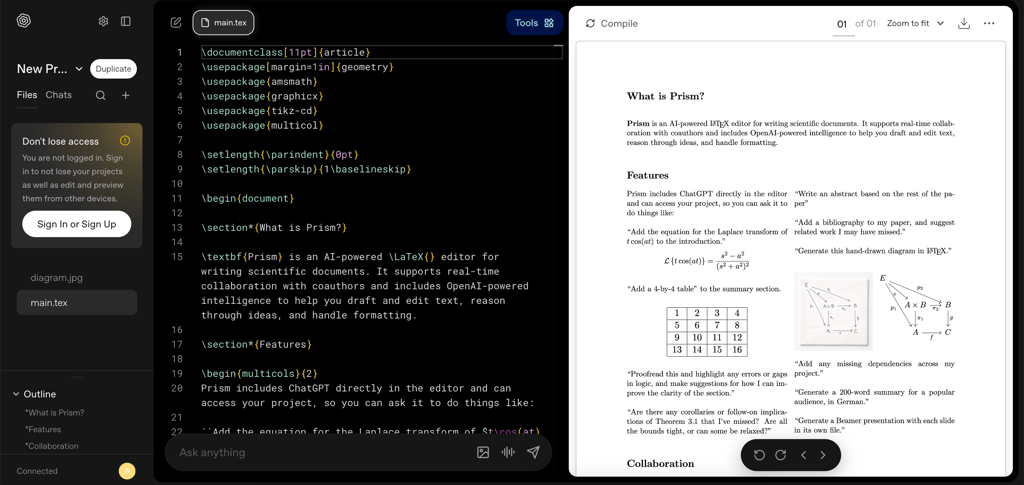
I also tested Prism for structured analysis and verification tasks. I asked it to check whether the results in my draft research paper matched the data I had described earlier. For example, I included a few statistical claims and wanted to see if they were properly supported.
Prism highlighted a spot where a claim of significance lacked clear supporting evidence, and it showed me exactly where in the document the issue was. I did not have to jump back and forth between files or notes, as everything happened right in the paper. This built-in checking would be especially helpful in academic or pharmaceutical projects, where it is important to ensure every statement is accurate and backed by data.
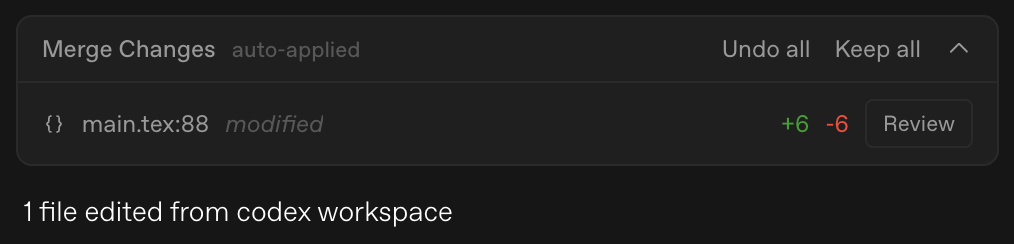
For enterprise workflows, I imagined how a compliance team might use Prism. Instead of pasting policy text into a chat window, they could keep everything in a single workspace. I tried a simple exercise by adding internal guidelines and asking Prism to review a draft report against them. The workflow inside the editor made it easier for me to see where the draft did or did not align with the rules.
When I asked a chat-style tool to check my research paper, it returned suggestions in a separate window, and I had to manually match them to the draft. With Prism, the AI worked directly inside the document, highlighting specific passages in context. This made it easier to verify results and understand the changes, especially in workflows where accuracy and structure matter.
Overall, I found Prism most useful in situations that require transparency and structured review. In projects where accountability matters more than quick answers, its ability to understand the whole document at once made a noticeable difference. I personally felt more in control of the final result.
Limitations, access restrictions, and unanswered questions
Even though Prism shows a lot of promise, documentation and official guides are still limited. Some features are not fully detailed, so users need to explore them themselves, which can make learning the full capabilities slower and less predictable.
Prism's communication sometimes promises more than the current experience delivers. In the free workspace today, features such as advanced monitoring dashboards, deeper enterprise controls, and complete version history are still in progress or only partially available. Because of this, the practical feature set can feel narrower than the marketing suggests.
Finally, most users may never even need Prism. If you just want a conversational AI or simple text editing, tools like ChatGPT are easier and faster to use. Prism really shines only in structured projects that focus on longer documents, so for many casual users, it may feel like more than they need.
OpenAI Prism vs other OpenAI tools
When comparing Prism to other OpenAI tools, I do not see it as a replacement. Instead, I see it as serving a different purpose.
Compared to ChatGPT, the difference becomes clear immediately. ChatGPT is built for conversation. I use it when I want quick answers, brainstorming help, or content generation. Prism, on the other hand, is designed for working inside structured documents. It focuses on reviewing, editing, and managing longer projects in context.
Prism also differs from Codex in its purpose. Codex is used for programming tasks and writing code. Prism is not a coding assistant. While it can help with improving technical writing, it is meant for projects that focus on longer documents rather than software development.
Additionally, Prism is different from OpenAI’s enterprise offerings. Those focus on large teams with security and governance features. Prism helps individuals or small teams manage structured document projects. I find it works best alongside enterprise systems, giving a hands-on workspace for reviewing and organizing complex documents.
Prism focuses on specialized workflows that involve long or complex documents. Rather than replacing ChatGPT or other OpenAI tools, it lets users review, edit, and manage content directly within a structured workspace. This makes it easier to keep large projects consistent and organized.
What users are saying about OpenAI Prism
Early feedback on Prism is mixed but informative. On Reddit, many users appreciate that Prism lets them keep LaTeX editing, collaboration, and AI assistance in one place. Some community posts describe it as a big step forward for technical writing, especially given that it's free to use.
Testers on Reddit also note limitations. Prism can struggle with complex documents or those containing a lot of mathematical content, and its assistance sometimes feels basic compared with standalone AI models. Many still rely on tools like ChatGPT for more thorough edits.
Outside Reddit, some tech blogs and review sites highlight Prism's unified workflow and the time it can save when drafting papers. They also raise concerns about adopting it over the long term, handling data properly, and how using AI to assist with writing might affect research accuracy.
Overall, community feedback indicates that Prism can be useful for structured writing tasks and for managing longer documents in a single workspace. Many users remain cautious, as occasional slow performance and missing advanced features make it better suited to specific projects than to general use.
Pricing and availability
Right now, Prism is available to anyone with a personal ChatGPT account, so the access is public. Users can start exploring its features immediately.
There is no public pricing beyond the free workspace, and OpenAI has not shared details about potential paid or enterprise tiers. This means organizations looking for advanced features or more control will need to wait for the future release.
For now, the free workspace works well for individual researchers, students, and small teams. It supports managing structured document projects, performing internal AI evaluation, and improving writing clarity. Casual users who only need basic AI assistance may find Prism excessive.
Who should pay attention to OpenAI Prism?
Prism is a good fit for enterprises, AI researchers, and advanced teams that need more control over AI workflows. It works well for organizations that require structured evaluation, internal AI oversight, or careful management of complex document projects. The editing and review features inside the documents help maintain consistency and make it easier to track changes suggested by the AI.
Prism is probably not relevant to casual users, content creators, or anyone who mainly needs a quick text generation or general productivity tools. Tools like ChatGPT are faster and simpler for those purposes. Prism is suitable for projects that require careful review, editing that considers the full context, and workflows that are easy to follow and manage. Teams working on research, compliance, or technical documentation are likely to benefit most from its features.
Final verdict
OpenAI Prism is worth considering for teams and individuals who manage complex documents, need structured review, or require internal AI oversight. Its biggest strengths are editing that takes the full context into account, integrated AI assistance, and organized workflows that improve clarity and consistency.
However, it is not suited for casual users or general content creation. Limitations include missing advanced features, occasional slow performance, and uncertainty about the paid or enterprise tiers, making it better suited to specialized use.
FAQ
What is OpenAI Prism?
OpenAI Prism is a structured AI workspace designed for drafting, editing, and reviewing complex LaTeX documents. It integrates AI directly into a shared editor, allowing users to revise text, manage references, and evaluate full manuscripts in context, rather than using a chat interface.
Is OpenAI Prism publicly available?
Yes, OpenAI Prism is available to anyone with a personal ChatGPT account and currently offers a free workspace. However, advanced enterprise features and deeper governance controls are not yet available.
How is Prism different from ChatGPT?
Prism differs from ChatGPT because it operates directly within structured documents rather than through a conversational interface. Instead of generating standalone replies, it edits and reviews content in context, applying suggestions directly within LaTeX projects.
Is OpenAI Prism an experimental tool?
Yes, Prism appears to be a developing tool with some features still in progress. While it supports structured editing and contextual AI review, advanced monitoring dashboards, deeper enterprise controls, and complete version history are not yet fully available.