I've tested ChatGPT 5.2 – my first impressions
Being behind major reports like The Mother of All Breaches and RockYou2024, our in-house cybersecurity experts and journalists provide unbiased, real-world testing and in-depth analysis.
We maintain complete transparency by openly sharing our testing methodologies with our audience.
Learn more

ChatGPT 5.2 launched just days ago, promising a massive leap in professional capabilities and human-like thinking abilities. It claims to handle complex coding, deep research, and intricate spreadsheets better than any predecessor. But does it actually live up to the hype?
OpenAI’s latest release, ChatGPT 5.2, is being labeled as the "most advanced frontier model" for professional work. The company claims it can save heavy users up to 10 hours a week and significantly reduce hallucinations. With new modes like Instant, Thinking, and a high-tier Pro model, it seems positioned to take on Google’s Gemini 3 Pro and Claude Opus 4.5 head-on.
In this ChatGPT 5.2 review, I put it to the test so you don't have to. I tried it hands-on – from coding 3D simulations to generating complex financial spreadsheets – to see where it excels and where it might still leave you frustrated.
Quick overview of ChatGPT 5.2
ChatGPT 5.2 is the latest iteration of OpenAI’s flagship model, introducing distinct modes for different workflows: the Instant mode for quick answers, Thinking mode for complex reasoning (which can be adjusted from Light to Heavy), and Pro mode for enterprise-grade tasks.
It boasts improved vision capabilities, a 30% reduction in hallucinations, and a massive context window that actually remembers details. It’s designed not just to chat, but to execute long-horizon tasks like building web apps or conducting deep equity research.
| Best for |
Professional coding, complex data analysis, and business ideation.
|
| Price | The Plus plan ($20.00/month) includes access to ChatGPT 5.2 Instant and Thinking modes, while the Team plan adds collaboration features and provides the same model access as Plus unless the organization separately subscribes to Pro. Access to the 5.2 Pro mode requires a Pro subscription at $200.00/month. |
| Free version | Limited access to base models, no Pro access. |
| Key features | Adjustable thinking time, improved vision analysis, state-of-the-art spreadsheet generation, and advanced coding agents. |
What is ChatGPT 5.2?
ChatGPT 5.2 is an upgrade that fundamentally changes how the AI processes information. Unlike previous versions that rushed to answer, 5.2 introduces a thinking process – similar to OpenAI's o1 or Google's Deep Think – where the model deliberates, plans, and self-corrects before responding.
You now have a choice of models:
- Instant. Fast, low-latency responses for simple queries.
- Thinking. The workhorse for reasoning, with adjustable duration (Standard, Extended, Heavy).
- Pro. A high-compute model for massive tasks, available only on higher-tier plans.
I tested these modes to see if the thinking actually resulted in better performance.
Features of ChatGPT 5.2
When you select the Thinking model, you can literally see the AI pausing to work through the logic. I ran a series of stress tests to see if these new capabilities translate to real-world utility.
Coding and web simulations
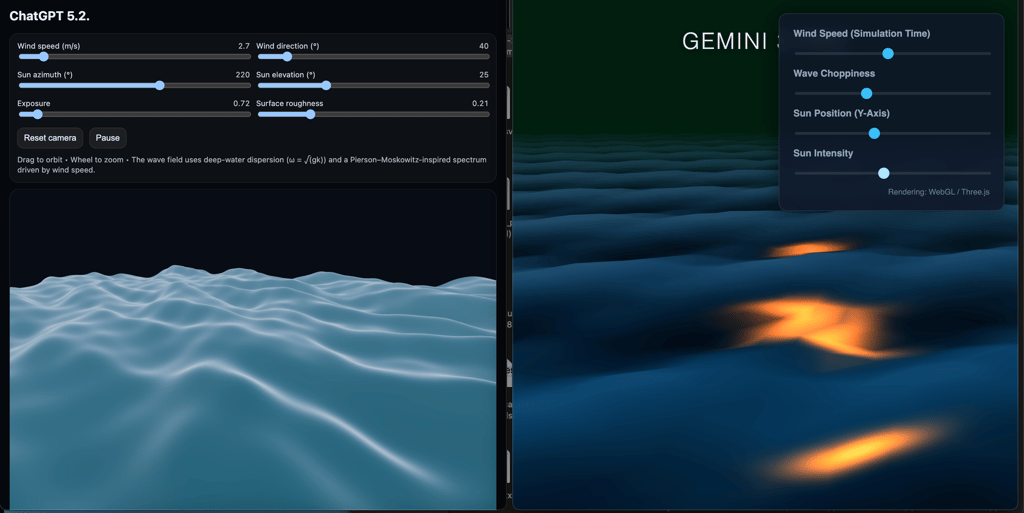
One of the boldest claims is improved software engineering. To test this, I asked it to code a single-page HTML ocean wave simulation with specific requirements: realistic physics, adjustable wind speed, and lighting controls.
The result was genuinely impressive. In a single shot, it generated a fully functional, aesthetically pleasing interactive app. I could adjust the wave height and sun direction instantly. Compared to a similar test with Gemini 3 Pro (which felt a bit more 2D and cartoonish), GPT 5.2's physics and calm UI presets felt far more polished.
Spreadsheet and data handling
For a long time, Claude was the king of AI-generated spreadsheets. ChatGPT 5.2 seems to have taken that crown.
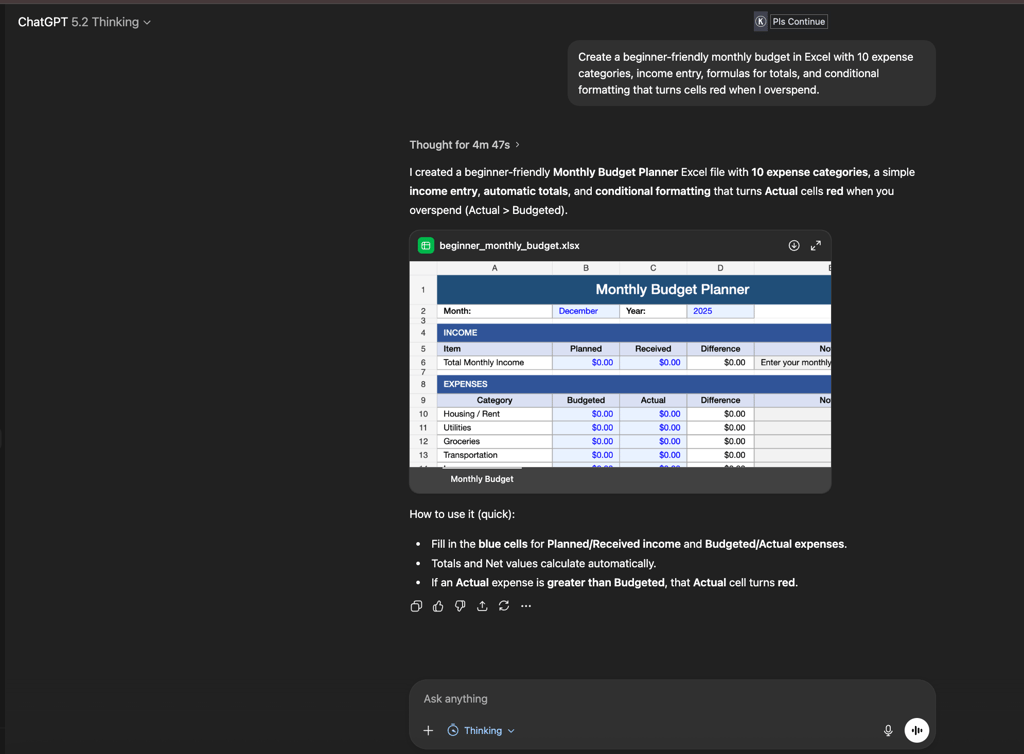
I gave it a complex prompt: "Create a beginner-friendly monthly budget in Excel with 10 expense categories, income entry, formulas for totals, and conditional formatting that turns cells red when I overspend."
It didn't just give me a text table; it generated a downloadable .xlsx file. When I opened it, everything worked: formulas were linked, the layout was clean, and the conditional formatting triggered exactly as requested. It handled this just as well as Claude Opus 4.5, which is high praise
Real-life problem solving and planning
This is where the human-like quality really shines. I moved away from complex business talk and treated the AI like a helpful friend. I asked for unique birthday gift ideas for my dad, who has everything, loves 70s rock music, but hates clutter.
Previous models would usually just suggest a vinyl record or headphones. However, GPT 5.2 gave me hyper-specific, creative suggestions, like a framed art print of the soundwaves from his favorite Led Zeppelin song or a digital subscription to a specific classic rock history masterclass. It felt like advice from someone who actually understood the assignment.
I also pushed it with a heavy research task: planning a full 10-day family trip to Italy on a strict budget, specifically asking to avoid tourist traps. It thought for nearly 15 minutes (yes, you have to be patient), but the result was incredible. It didn't just list cities; it gave me a detailed day-by-day itinerary, specific train routes between towns, and even found local restaurant recommendations that fit my price range. It essentially did the work of 20 open browser tabs in one go.
Vision capabilities
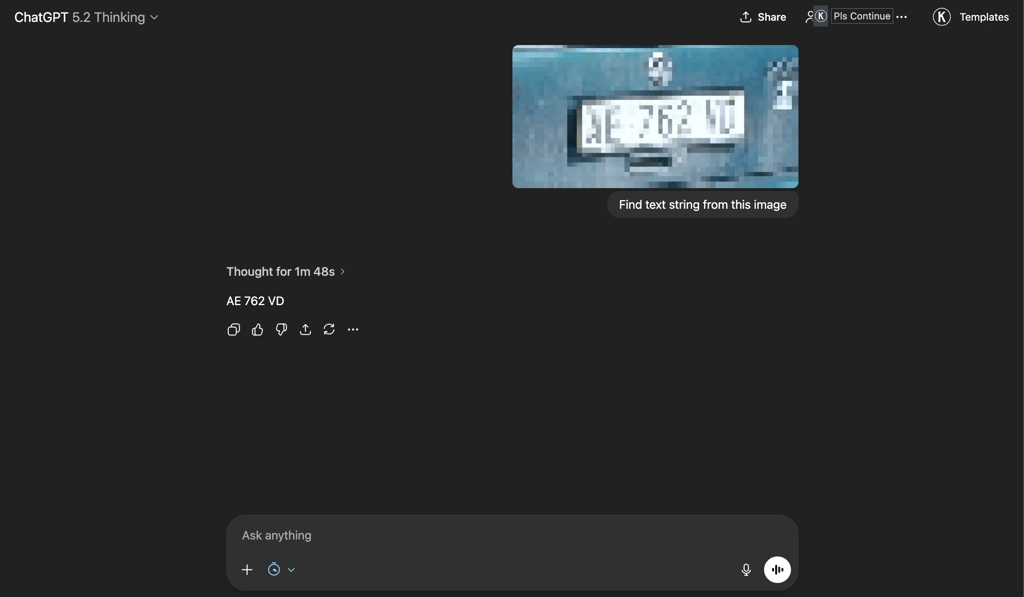
To test the limits of the vision model, I tried something that usually trips up AI: reading text from a terrible, highly pixelated image. I uploaded a zoomed-in, blurry crop of a license plate that was barely readable to the naked eye.
Instead of guessing immediately, the model went into Thinking mode for a solid 1 minute and 48 seconds. That is a long wait for a simple question, but the result was worth it. It correctly deciphered the string AE 762 VD, effectively acting like a forensic analyst. Where previous models would hallucinate random numbers or say the image was too blurry, 5.2 actually took the time to stare at the pixels and figure it out.
ChatGPT 5.2 pricing
If you’re curious what ChatGPT agent costs to use, here’s a quick breakdown. The agent is available only to paying users – how many messages you get depends on your subscription tier. Below is a simplified comparison of each plan:
| Subscription plan | Monthly cost | Agent/Thinking access | 5.2 Pro access |
| Free | $0.00 | ❌ No | ❌ No |
| Plus | $20.00 | ✅ Yes (Standard/Thinking) | ❌ No |
| Team | $25.00/user | ✅ Yes (Standard/Thinking) | ❌ No |
| Pro | $200.00 | ✅ Yes (Full access) | ✅ Yes |
To sum it up: the standard Thinking model in the Plus plan is likely enough for 95% of users. The $200.00/month Pro plan is strictly for power users who need massive compute power for tasks like 30-minute deep research sessions.
My honest opinion about ChatGPT 5.2
After testing it extensively, I can say that ChatGPT 5.2 is a great update. It doesn't just chat better; it works better. The reliability in coding (specifically one-shot web apps) and the ability to handle Excel files correctly make it a legitimate productivity tool rather than just a novelty.
However, the laziness issue in coding persists in standard modes, and the wait times for heavy thinking can be a workflow killer if you're in a rush. If you are doing standard writing or simple queries, you might not notice a huge difference from 5.1. But for complex, multi-step projects? It’s currently the model to beat.
FAQ
How good is ChatGPT agent?
In my testing, these models are similar. GPT 5.2 has caught up on coding and spreadsheets, which were previously Claude's strongholds. GPT 5.2's Thinking mode generally offers better logical planning for complex tasks, though Claude still has a slightly more concise writing style.
Can I use ChatGPT 5.2 for free?
No, the advanced 5.2 models, especially those with thinking capabilities, are locked behind the Plus, Team, and Pro subscriptions.
What is the difference between Thinking and Pro models?
The Thinking model is excellent for most reasoning tasks and is available to Plus users. At $200.00/month, the Pro model allows for significantly longer compute times and larger context handling, designed for deep research that might take 20-30 minutes to generate a single response.
Does ChatGPT 5.2 still hallucinate?
Yes, but less so. OpenAI claims a 30% reduction in hallucinations with the ChatGPT 5.2 version. In my citation test regarding the origin of the phrase black hole, it correctly identified that Einstein didn't coin it (it was John Wheeler in 1967), passing a test that many previous models failed.