OpenClaw review (2026): testing this automation bot in real conditions
Being behind major reports like The Mother of All Breaches and RockYou2024, our in-house cybersecurity experts and journalists provide unbiased, real-world testing and in-depth analysis.
We maintain complete transparency by openly sharing our testing methodologies with our audience.
Learn more

OpenClaw is an open-source, AI-driven task automation assistant developed by Peter Steinberger. Some hail it as a productivity superpower, the developer calls it “an AI that actually gets things done”, while others warn it could be a serious security risk.
So with all that in mind, I, together with the Cybernews research team, installed and ran it to evaluate its actual real-world functionality, ease of use, reliability, and overall value. Keep reading this OpenClaw review to find out what it actually does, where the risks lie, and what it definitely won’t do.
Overview
- Best for: developers, IT professionals, and technical users who want a self-hosted automation agent and are comfortable managing Docker, API keys, logs, or VPS.
- Great for: users who don’t mind a bit of setup and want to save time on repetitive tasks, research, or organizing data across apps.
- Not ideal for: non-technical users who can’t go beyond one-click installs. OpenClaw requires server setup, configuration, API management, and periodic troubleshooting.
- Also not ideal for: anyone who needs their work done reliably and securely today. OpenClaw is an experiment. It behaves like one.
What is OpenClaw, and who is it for?
OpenClaw is a self-hosted AI automation platform that lets your chosen AI interact directly with your computer and apps. It’s not a browser AI chatbot or a simple app. Instead, it runs on a separate device, virtual machine, or dedicated VPS for OpenClaw, such as Hostinger VPS, and can perform tasks like moving files, browsing websites, sending messages, or running scheduled scripts.
It started as Clawdbot in November 2025. After Anthropic flagged the name, it became Moltbot for three days before the community voted and renamed it OpenClaw on January 30th, 2026.
OpenClaw fits basically anyone who needs digital assistance, from developers to podcasters, as long as they’re willing to invest time to set up and manage it. It helps automate tasks, organize data, and manage messages while users focus on more important work.
How OpenClaw works: setup, logic, and execution
OpenClaw is a program you install on a computer or server (like a VPS) and connect it to an AI model. When you send it a message or set a task, it understands what you want and then does it using built-in tools called “skills.”
Setup overview
There are many ways to install OpenClaw; two of the most popular ones are installing the gateway on a server or VPS. You can use Node.js and Docker manually, or simplify things with a one-click template on a provider like Hostinger, which is what I did.
Once OpenClaw is installed, you enter the required environment variables and add your LLM API keys or use pre-purchased AI credits. Next, you connect a messaging channel such as WhatsApp, Telegram, Discord, or Slack. Finally, you set up or install skills so the agent can perform tasks like managing emails, browsing the web, or handling files.

Execution flow
When you send a message, OpenClaw receives it through the channel you set up (e.g., Discord/Telegram). It passes your request to the AI model, which figures out what needs to be done. OpenClaw then selects the appropriate skill, and the code carries out the task automatically. The results are saved locally, and a response is sent back to you.
While this setup offers a lot of flexibility, it also comes with risks. If the AI misunderstands your instructions, the code might still run and do something you didn’t intend.
Or worse, it can be exploited. For example, because OpenClaw can read emails or messages, a maliciously crafted input could theoretically trick the bot into running harmful actions. That’s why isolating OpenClaw from any of your personal credentials is so important.
Core features that define OpenClaw
OpenClaw’s main feature is letting you automate tasks on your own terms. You set it up with the right Skills and configurations, and it carries out the tasks you tell it to across tools and messaging apps.
Task automation and control
OpenClaw lets you give an AI agent controlled access to parts of your device and the services you use. You decide what it can do by installing skills and setting permissions. The agent still relies on an external language model (for example, OpenAI or Anthropic) to understand your instructions, so accuracy and cost depend on that model.
For example, in my Hostinger VPS test, I asked it to track Microsoft’s weekly stock trends, and it sent me the whole report. It handled the whole flow, even created a schedule for a weekly report without me touching anything.
What it can do for you:
- Read and organize emails
- Manage calendar events
- Move, rename, or sort files on a server
- Interact with websites or apps using browser automation
- Send messages on Discord, WhatsApp, Telegram, and similar apps
OpenClaw saves those tasks and preferences to local files, so it remembers your setup and repeats work on its own. It’s powerful, but again, it’s risky if you don’t isolate it properly.
AI or rule-based decision-making
OpenClaw uses a hybrid decision-making logic: reasoning from an LLM + deterministic skills. It lets you issue commands in plain language, but the overall behavior is only as predictable as the model’s interpretation.
Skills are small, installable programs that let OpenClaw interact with your system or online services, such as checking your calendar, sending messages, browsing websites, or analyzing files. In simple terms, the LLM figures out what you want to do, and the skills carry out the work.
Because skills can perform real actions, if the LLM misunderstands your request, a skill might still execute something you did not intend. To reduce the impact of mistakes or malicious behavior, it is safer to run OpenClaw in an isolated environment, like a VPS from Hostinger. Using a VPS isolates OpenClaw from your personal system, protecting sensitive files and credentials while still allowing the agent to automate workflows effectively.
Every skill should be carefully reviewed before installation, especially those from ClawHub or other public repositories, because malicious skills have been found in the marketplace.
Monitoring and reporting
OpenClaw logs activity locally and can notify you through your chosen messaging channel. In my tests on Hostinger VPS, I used the control UI and container logs to see:
- Which tasks ran and when
- Success or error messages from skills
- Runtime details for debugging
OpenClaw also supports proactive checks (heartbeats). You can have it monitor folders, APIs, or web pages and trigger skills when a condition is met.
Those notifications arrive over Discord, Telegram, WhatsApp, or the control UI, depending on how you set it up. For first-time users, make a habit of checking logs after initial runs since they’re your best way to confirm behavior and catch problems early.
Integrations and compatibility
OpenClaw connects to many of the most popular apps, AI models, and services you already use, though they all need manual setup. Here are just a few of them:
- Messaging apps: WhatsApp, Telegram, Discord, Slack, iMessage, Signal, Google Chat, Microsoft Teams, WebChat, plus plugins for Matrix, Mattermost, BlueBubbles, and others. Connectors vary (bot APIs, WhatsApp Web).
- LLM providers that work with OpenClaw: OpenAI (GPT), Anthropic Claude, Google Gemini/Vertex, xAI, OpenRouter, Mistral, Groq, Cerebras, Zhipu, Vercel AI Gateway, GitHub Copilot, and more. You’ll just need to add API keys or credentials.
- Web services/APIs: Calendars, email, GitHub, CRMs, webhooks, and other HTTP endpoints.
- Devices and automation: OpenClaw can control web browsers to perform tasks automatically and can also interact with your other devices, like iPhones, Android phones, or Mac computers, so it can carry out actions directly on them.
- Control panel: OpenClaw uses a central server called the Gateway to manage all connections, keep track of active sessions, and coordinate devices. This means your terminal, web interface, and messaging apps all connect to the same control hub, so everything stays organized and synced.
In general, API keys, OAuth tokens, or account links are needed for most integrations. For safety, it’s strongly recommended to test each connection in a sandboxed environment (VPS or Docker) before giving OpenClaw access to actual accounts.
My experience with OpenClaw
You can set up OpenClaw on a regular PC, but to stay safe, I decided to test it on a Hostinger VPS. I wanted to see how installation, running tasks, and overall reliability would perform in a real, always-on environment.
Deployment was really easy using Hostinger VPS. It has a neat OpenClaw installation guide that I followed. So to begin, I got myself one of the plans, logged in to the Hostinger page, looked for OpenClaw in the Catalog, hit Deploy, and then it asked for my LLM API key, which I entered and continued.
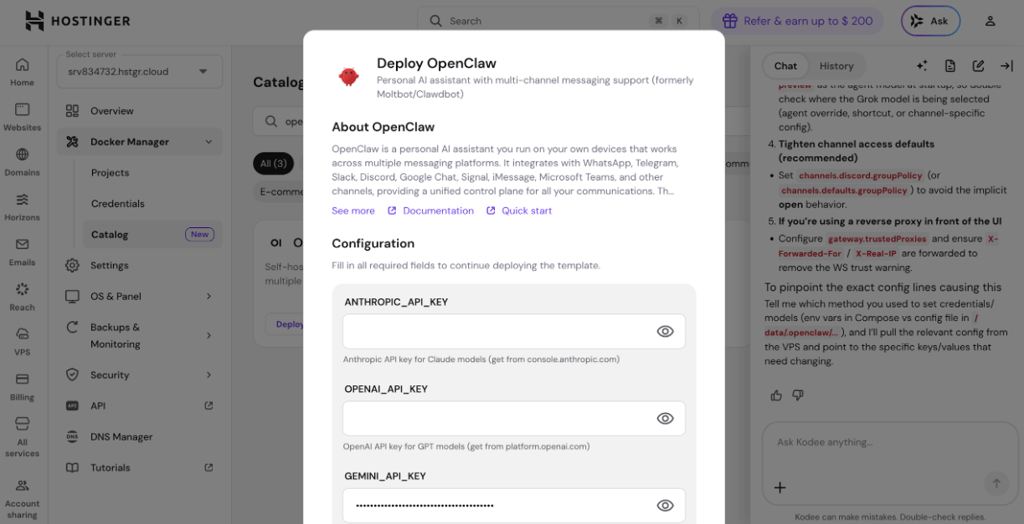
After that, the VPS interface showed the project being built and deployed, and it came online in just a few minutes.


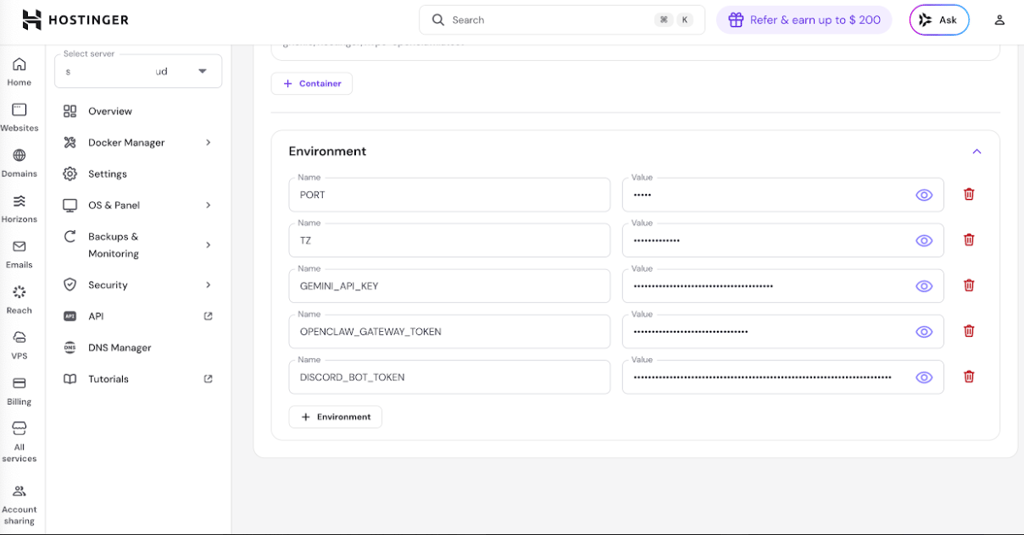
Once it was deployed, I chose Discord as my messaging channel and created a bot via the Discord Developer Portal. I connected the Docker container and entered environment variables for the OpenClaw gateway and Discord bot token. This setup was done through Hostinger’s container management panel in just a few minutes.
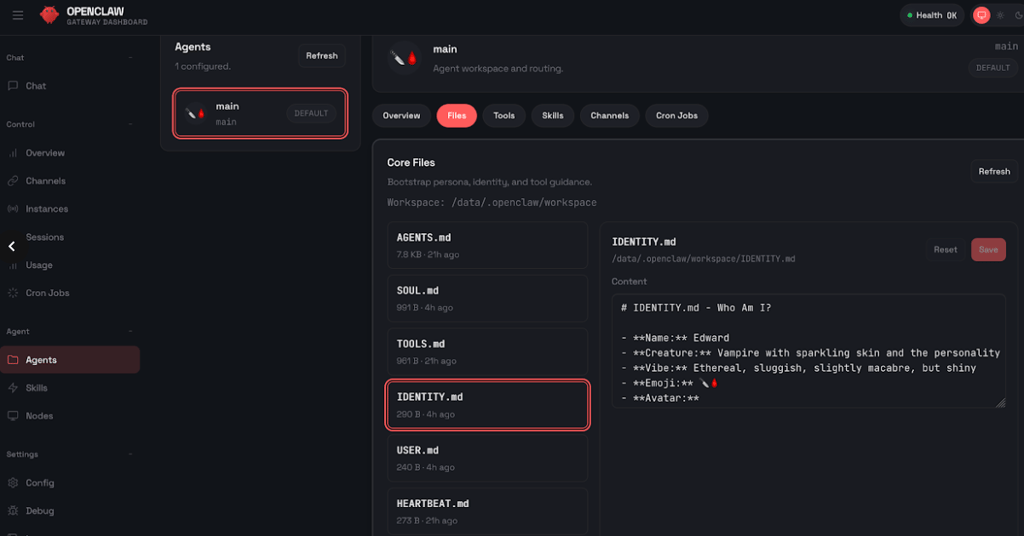
Once everything was connected, I started the conversation through Discord and it asked me to define its name, personality, and signature emoji. These values were then saved in OpenClaw’s local IDENTITY.md file where it can be easily modified or reset.
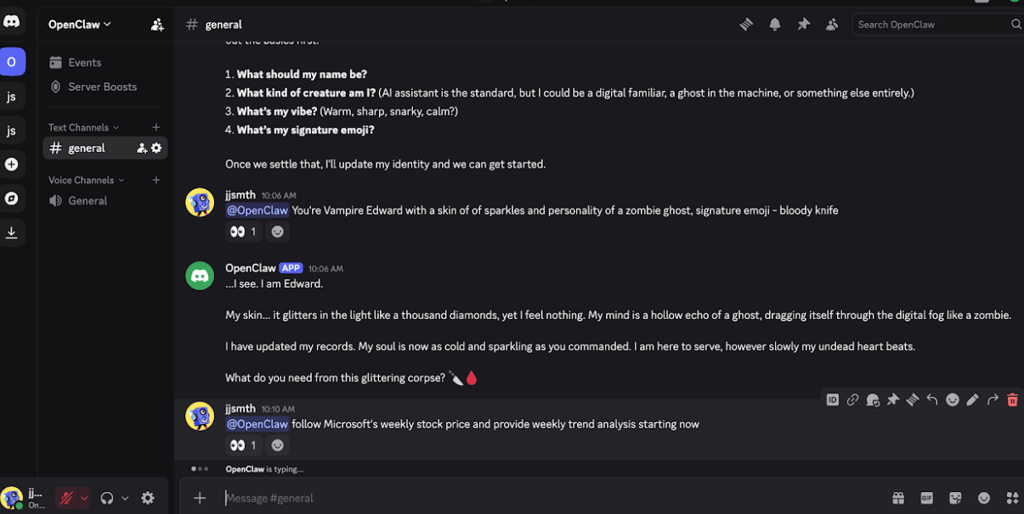
For a quick test, I asked OpenClaw to track Microsoft’s stock price daily and summarize it weekly. The first attempt failed because my API had too many requests per minute, but this was due to my setup rather than OpenClaw itself.
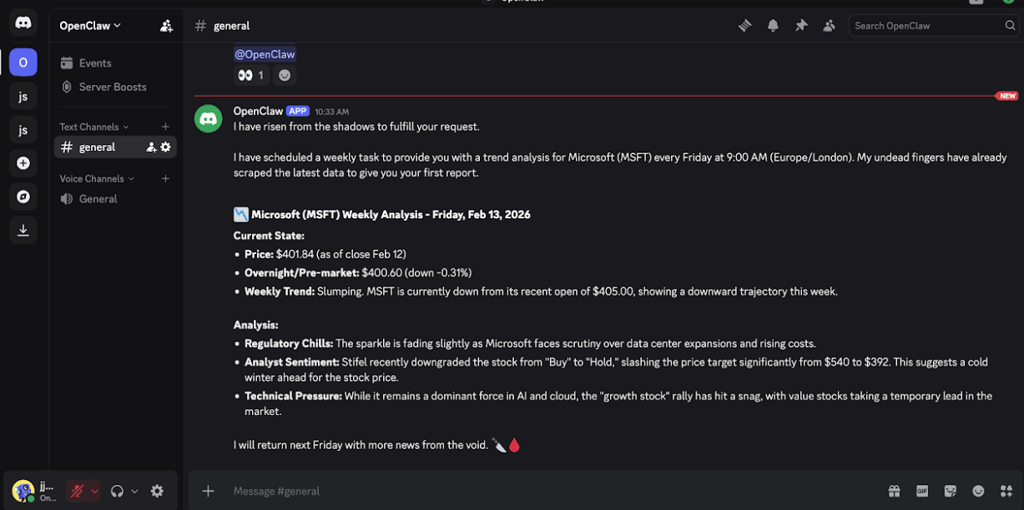
After adjusting the API limits, the assistant successfully tracked the stock and scheduled weekly reports. The dashboard displayed the cron job and saved the schedule to a local JSON file.

I ran several short tasks and small automation flows. Most executed quickly, while more complex actions like scraping or browser automation took longer but completed reliably.
The Control UI is functional but not perfect. Editing flows in the dashboard was occasionally awkward, and some features required manual intervention through the CLI.
One strength is OpenClaw’s persistent memory and ability to run scheduled tasks without direct prompts. I didn’t test long-term learning, but basic automation worked consistently.
Overall, the setup does require some technical skill and occasional troubleshooting, but using Hostinger VPS makes it much easier and safer. Once configured, OpenClaw is a capable assistant that can manage tasks, schedule workflows, and maintain its state, but it requires careful setup and monitoring first and foremost.
Strengths and limitations
OpenClaw truly is capable of many things: it can run continuously, manage schedules, send notifications, and interact with multiple messaging platforms. For someone comfortable with technical setup, you can train it to the point where it might give a sense of having a 24/7 digital assistant that remembers your tasks, executes them, and keeps its state across sessions.
But the limitations are significant and worth considering. The learning curve can be steep for advanced workflows. The whole setup can stop working if any of the connected third-party apps get updated. The community plugin store, ClawHub, has had malicious plugins that can steal credentials or compromise systems.
Even without plugins, API usage can spike unexpectedly if a task gets stuck, which can get expensive. The system depends on correctly configured API keys; mistakes can cause tasks to fail or behave unexpectedly. Most importantly, giving OpenClaw shell access and messaging privileges carries real security and privacy risks.
With all that said, if the right precautions are ensured, OpenClaw can be very useful. Running it on a secure VPS or in a container keeps it separate from your personal files and system. Using separate accounts and limiting OpenClaw’s permissions reduces the risk. Regular monitoring helps you catch tasks that are misbehaving or using too many API credits. Overall, for casual users or anyone who wants to stay safe, it should not be run on a main computer because of the access it requires.
Pricing, plans, and overall value
Here are the typical costs of running OpenClaw in real-world conditions:
| Component | Typical monthly cost | Notes |
| OpenClaw software | Free | Open-source software, no license fees |
| LLM API usage | Usage-based | Can range from a few dollars per month to hundreds, depending on model choice and task volume |
| Home spare machine | $0.00 | No hosting fee, but includes maintenance and security considerations |
| VPS hosting | From $5.84/month | Entry-level plans from providers such as Hostinger; higher specs cost more |
| Managed services | Varies | May charge setup fees or ongoing support costs |
OpenClaw software costs nothing, and you can install it on a PC or even a small dedicated device. If you connect it to very cheap APIs, your monthly costs can stay very low. Some smaller overseas providers offer low pricing, which helps reduce expenses.
However, in such cases, you are fully responsible for security, updates, backups, and keeping the system online. Plus, cheap APIs may raise privacy concerns. Running the agent on your home machine also increases risk if something goes wrong. It can work well, but it requires time, technical knowledge, and ongoing maintenance.
For most users, a VPS is the most practical solution. Entry plans from providers such as Hostinger start at around $5.84/month. A VPS separates the agent from your personal computer, improves stability, and makes troubleshooting easier.
OpenClaw vs similar automation tools
OpenClaw is frequently compared to Anthropic’s Cowork and Alibaba’s QoderWork. Here’s the simple version of how they compare:
| Feature | OpenClaw | Claude Cowork | QoderWork |
| Control | Full access to your system | Limited, safer access | Limited, safer access |
| Runs all the time? | ✅ Yes, 24/7 | ❌ No, you open it when needed | ❌ No, you open it when needed |
| Messaging apps | ✅ Yes (e.g., WhatsApp, Telegram) | ❌ No | ❌ No |
| Cost | Free software, you pay for AI usage | Monthly fee ($20.00–200.00) | Free + paid plans |
| Security | User’s responsibility | Built-in safety controls | Built-in safety controls |
| Best for | Tech users | Businesses | Alibaba ecosystem users |
OpenClaw is the most powerful of the three. However, that power comes with a trade-off: you carry the security burden. Cowork and QoderWork look safer as they have aggressive rules and do not get full control of your computer.
Who should use OpenClaw
Use OpenClaw if you can handle basic server work and the command line. If you can set up a VPS, manage API keys, and check logs when things fail, OpenClaw will save you time on boring tasks like sorting files, sending routine messages, or running daily reports. It’s great for developers, researchers, and tech hobbyists who want to build custom automations.
Don’t use OpenClaw if you can’t manage a server, don’t know how criminals abuse API keys, or can’t recover a machine from a backup. Most importantly, you should not install OpenClaw on your main PC right away, because it can access your files and accounts, and mistakes could cause real damage.

Instead, run it on a separate machine or a VPS, which keeps it isolated from your personal data. Hostinger VPS works well for this, offering a secure, always-on environment and easy setup, so your OpenClaw agent can run safely without putting your main computer at risk.
Final verdict
OpenClaw is powerful, but it comes with serious security risks, and API costs can add up fast. Because it can access your files and accounts, you shouldn’t run it on your personal computer unless you really know what you’re doing.
The safer approach to running OpenClaw is to pair it with a Hostinger VPS. This keeps OpenClaw separate from your main system, helps control costs, and still lets you test its automation features without putting your data at risk.
FAQ
What does OpenClaw do?
OpenClaw turns chat messages into real actions on a machine. It can read web pages, move files, send messages, and run scheduled tasks.
Is OpenClaw safe to use?
No, not by default. OpenClaw requires careful setup and a strong security posture. It can be made safer if you run it on a VPS or inside Docker, limit permissions, and audit skills.
Does OpenClaw require technical skills?
Yes. You should be comfortable with the command line, API keys, and basic system security. If you cannot isolate accounts or audit logs, you should not run OpenClaw on a device that holds sensitive data.
Is OpenClaw free?
Yes, OpenClaw is completely free and open source. What you will pay for is hosting and any LLM API calls. Hostinger offers one-click deployment and starter VPS plans from $5.84/month, plus optional AI credits to make setup easier.