Manus Max review: is the advanced autonomous agent worth upgrading to?
Being behind major reports like The Mother of All Breaches and RockYou2024, our in-house cybersecurity experts and journalists provide unbiased, real-world testing and in-depth analysis.
We maintain complete transparency by openly sharing our testing methodologies with our audience.
Learn more

Manus Max is the premium, more powerful version of Manus’ autonomous AI platform that claims it can handle bigger tasks faster and with better results. I tested it to see if it actually feels like an upgrade over standard Manus AI, especially for complex, multi-step, and long-running workflows. I worked with Cybernews researchers and ran the same tasks on both versions, focusing on what matters most in real-life use.
In this Manus Max review, I look at its features, performance, and pricing. I also compare it with other autonomous AI tools to see where it fits in today’s market.
What is Manus Max?
Manus Max is the advanced version of Manus AI, built for heavier workloads and more demanding tasks. It was introduced in 2025 as more people started using AI for real work, not just chat, and the demand for autonomous agents grew.
Note that Manus Max isn’t a separate product. It’s an upgraded tier inside the same Manus platform. You still use the same core interface and tools, but Max improves performance further. The main difference comes down to how well it handles long, multi-step workflows without losing context.
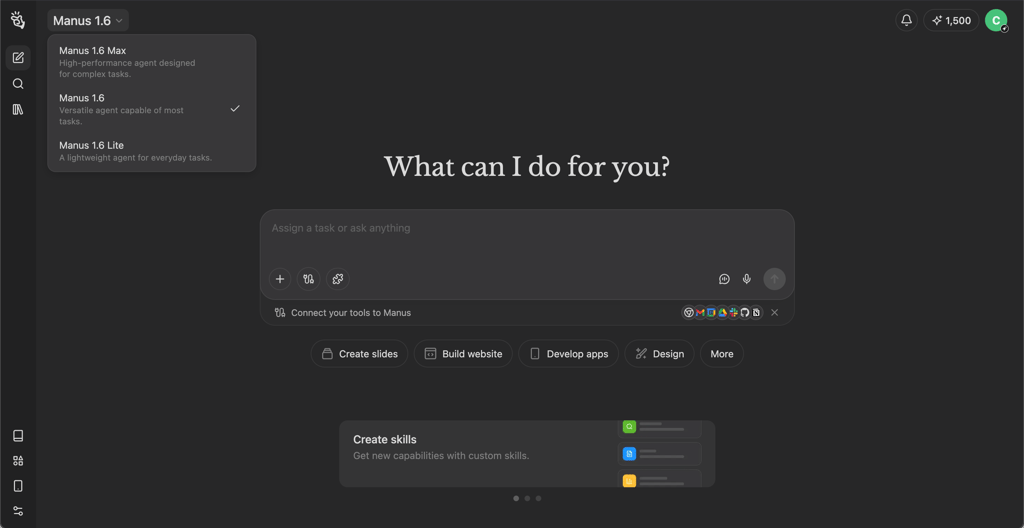
Manus Max is designed for users who want an AI agent that has more autonomy, can work on a single task for a longer time without stopping, and requires fewer manual steps. That’s why Manus Max is more suited for power users, small teams, or anyone running advanced workflows. So if you mainly use AI for quick answers, standard Manus AI will be enough.
How Manus Max works
Manus Max is built for people who want a powerful AI tool that can do more than respond to single prompts. It focuses on longer, more complex workflows where planning and follow-through matter. Below, I break down how Manus Max operates and what that means in real-world use.
Advanced autonomous task execution model
Manus Max is built to handle complex task trees without getting lost. In simple terms, it can take a big goal, break it into smaller steps, and keep moving through them in the right order. That matters a lot when a task has many moving parts.
Manus Max follows deeper chains of subtasks with fewer mistakes than standard Manus AI. It also needs less guidance from the user mid-process. Instead of stopping after every step to ask what to do next, Max keeps going and makes better decisions on its own.
Like other Manus agents, it runs inside a secure Ubuntu sandbox environment with internet access and a persistent file system. This setup helps it stay organized during long workflows. It can remember what it already did, store files, and continue the work without constantly resetting the context.
Enhanced multi-agent architecture
Manus Max uses more specialized agents that focus on different parts of a task. Instead of one general agent trying to do everything, Max runs small helpers in parallel, each tuned for planning, execution, or checking results. As an example, the Wide Research tool runs parallel sub-agents, and each sub-agent gets only one item to process. This ensures that the output doesn’t decrease in quality as the number of items increases.
There’s also better coordination between the parts that plan a workflow and the parts that actually carry it out. Max keeps planning and execution linked, so it doesn’t forget what it decided earlier or lose direction during long runs. This cuts down on repeated prompts or manual fixes, which creates less work for you. Because these specialized agents share context, Manus Max shows higher tolerance for long-running tasks.
Asynchronous execution and real outcomes at scale
Manus Max supports asynchronous execution, which means it can keep working in the background while you do other things. You don’t have to sit and watch every step. Instead, you can start a task, let it run, and come back later to review the results. This approach fits the way real work actually happens.
The trade-off is that you may have to wait longer for the final output. But in return, Manus Max delivers something more complete. This matters most for research-heavy and operational tasks.
Key features and capabilities
Manus Max focuses on one thing: turning prompts into finished deliverables, not just chat responses. In my tests, it consistently aimed for complete outputs like web apps, spreadsheets, and full working projects. The results looked impressive, but they also revealed clear trade-offs in cost, accuracy, and how the agent handles uncertainty.
High-level goal definition with fewer constraints
Manus Max handles broad goals with confidence, but not always in the way I expected. When I gave it an intentionally vague prompt (“Research and compare Notion, Coda, and Slite. I’m not sure what I’m looking for yet”), it didn’t ask a single clarifying question. Instead, it treated the request like a build order and delivered a polished interactive comparison web app.
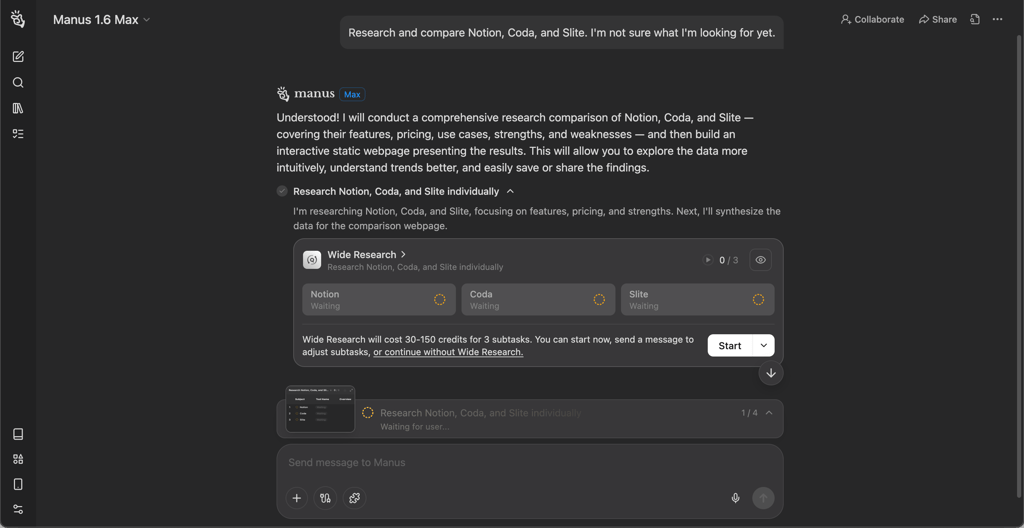
From a user perspective, this is both a strength and a weakness. Max can fill in the blanks and produce something usable without extra input, but it can also ignore uncertainty. In the same test, the standard Manus AI asked smart questions first, which I found to be more helpful.
Deeper research and data synthesis
Manus Max works well when you ask for multi-source research and for the results to be turned into a clear output. In my competitive landscape test, I asked Max to perform a competitive landscape analysis covering at least 10 software vendors serving insurance agencies in the US. Max created a sortable web page and a spreadsheet with multiple tabs. What stood out most to me was the analysis itself. It added clear positioning summaries, useful insights, and even an extra product comparison table that I didn’t ask for but actually found useful.
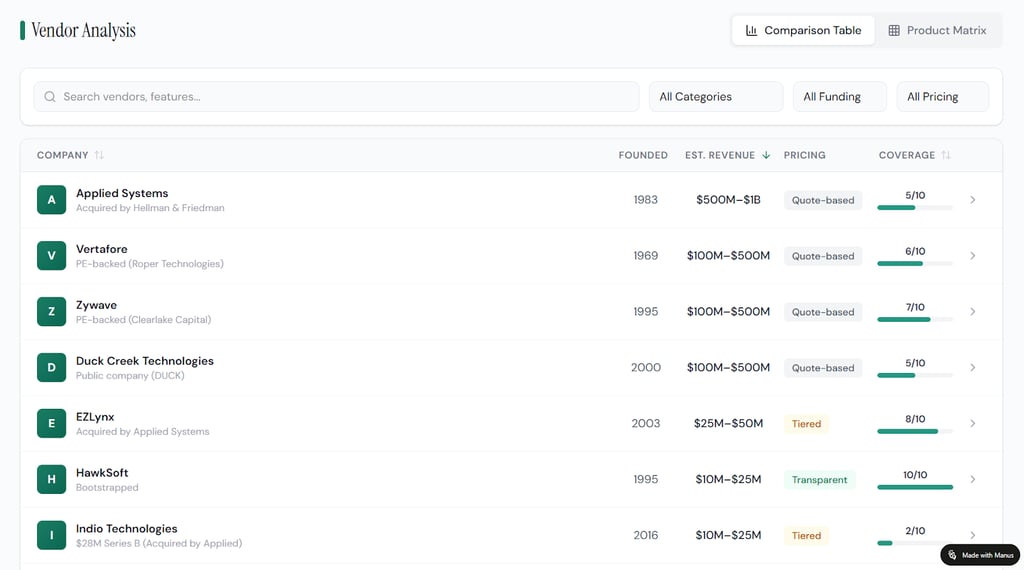
However, this is also where its biggest risk shows up. The report had a 25% error rate in ownership and funding data, including high-profile companies where the correct information is easy to verify. For cybersecurity and business readers, that matters – these outputs look authoritative, so mistakes can mislead decisions.
Code generation and automation
For code generation, Manus Max was the most impressive agent. I asked it to build a full task management web app with authentication, dashboards, drag-and-drop ordering, and exports. It delivered a working app in about 10 minutes, and all core features worked well.
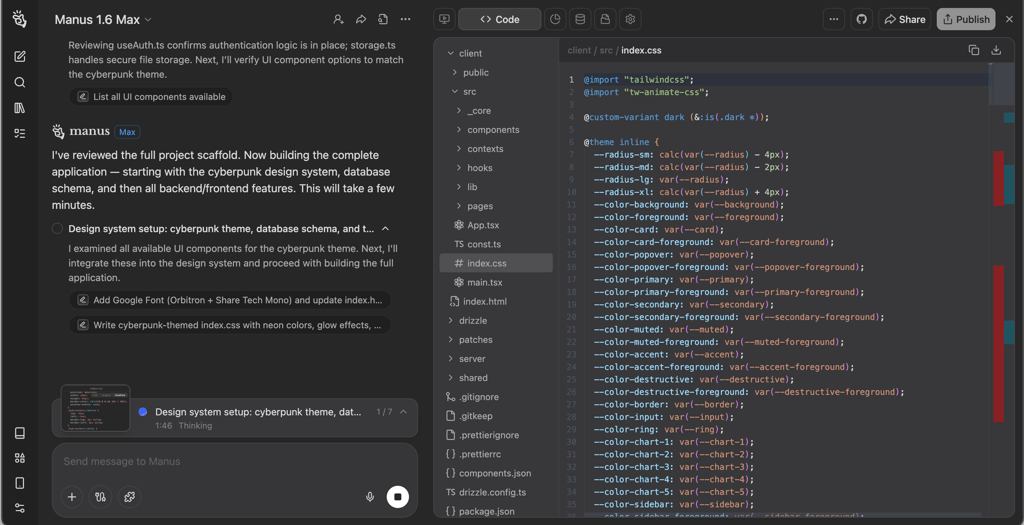
What I liked most was that Max behaved like a real builder, not just a code writer. It provided a development plan, asked for a theme, and delivered an app that I could log in to and test right away. The standard Manus 1.6 also produced a working app, but it felt less complete and had visible issues like a broken page and missing task-level features. If you want fast prototypes or internal tools, Manus Max is genuinely good at it.
Long-form output and long-running workflows
It’s clear that Manus Max can produce long, complex outputs and tends to produce more complete outputs than Manus 1.6. It consistently delivered full artifacts in my tests – interactive web pages, spreadsheets, and structured content that felt ready to publish or hand off. It also works well for workflows that involve multiple stages, like research > synthesis > spreadsheet > web dashboard.
That said, the credit cost makes Manus 1.6 Max hard to justify for daily work. In my testing, I used up my free trial credits in 1.5 prompts. The predicted credit use also didn’t match my actual usage (600 vs 795 credits, respectively), which can make budgeting difficult. This makes it hard to use Max for ongoing objectives unless you’re on a higher-tier plan and treat it like a premium production tool.
Pricing and plans
Manus uses a credit-based system, so your real cost depends on how heavy your tasks are. Here’s a quick comparison of the free and paid plans, along with the number of credits they allow.
| Free | Standard | Customizable | Extended | |
| Price (annual billing) | $0.00/month | $17.00/month | $34.00/month | $167.00/month |
| Credits | 1000 | 4000 | 8000 | 40000 |
| Agent access | Manus 1.6 Lite | Manus 1.6 Lite, 1.6, 1.6 Max | Manus 1.6 Lite, 1.6, 1.6 Max | Manus 1.6 Lite, 1.6, 1.6 Max |
| Concurrent tasks | 1 | 20 | 20 | 20 |
| Scheduled tasks | 2 | 20 | 20 | 20 |
The Free plan gives you a small monthly credit pool of 1000 credits, a daily refresh of 300 credits, and access to Manus 1.6 Lite. It’s fine for testing the interface, but it’s not built for serious work. Most importantly, Manus Max isn’t available on the free tier.
Paid plans scale mainly through monthly credits and feature access. The Standard plan, from $17.00/month, offers 4000 credits, supports up to 20 concurrent tasks, and gives you access to Manus 1.6 and 1.6 Max. It’s a good entry point for light automation, short research, and smaller outputs. The Customizable plan, from $34.00/month, increases credits to 8000, though you can adjust this number. It also adds more advanced tools, which makes it a better fit for regular content, research, and structured deliverables.
For heavy workloads, the Extended plan, from $167.00/month, gives you 40,000 credits. This is the only tier where Manus Max starts to make financial sense for frequent use. Compared to Manus 1.6, Manus 1.6 Max produces higher-quality outputs, but this comes at four to eight times the credit cost – in my tests, Max used 1500 credits for 1.5 prompts. Note that you can also buy extra credits, and they don’t expire.
Overall, Manus Max pricing works best for professionals and teams who need polished high-stakes deliverables that can justify the premium price. Other than that, Manus 1.6 will be good enough for cost-efficient, decent outputs on clear tasks.
Pros and cons of Manus Max
Here’s an overview of what worked well with Manus Max and where it fell short in my tests with real tasks. These pros and cons are also based on my comparisons with standard Manus AI, which should help you decide which agent is better suited for your needs.
Manus Max vs other advanced AI agents
Manus Max feels closer to an “agent that builds” than a chat assistant. Compared with standard Manus AI (Manus 1.6), Max provides higher-quality artifacts, such as web dashboards, spreadsheets, and more polished user interfaces. However, it also costs more per task in credits. I recommend reserving it for work where the final output really matters. Max also improves one-shot task success and runs Wide Research sub-agents for deeper parallel research.
The main difference between Manus Max and ChatGPT (GPT-4/4o) and Claude-style agents is execution style. ChatGPT and Claude are excellent at drafting, reasoning, and iterating with you in the loop. Manus Max focuses more on doing the whole job from start to finish on its own, which can feel faster when you want a finished artifact, not a long back-and-forth.
Compared to workflow automation tools like Lindy and Zapier AI, Manus Max focuses more on completing the task and giving you a finished result. Lindy and Zapier AI focus more on connecting your apps and automating the same workflows again and again. If you mainly need lots of integrations, Zapier is usually the safer choice. If you want more flexible AI-style automations, Lindy is closer to that.
Final word
After my hands-on tests, I can conclude that Manus Max is clearly an advanced autonomous AI. It produces full, polished outputs with less guidance from the user than standard agents. It can save a lot of time and deliver something you can actually use or share.
But Max isn’t perfect. It uses credits very quickly, and its cost can add up fast if you run big or frequent tasks. It also doesn’t ask clarifying questions on vague prompts, which can lead to assumptions you didn’t want.
In 2026, Manus Max makes sense for people who need complete deliverables and can budget for the higher credit use. For everyday work or light research, standard Manus versions or other AI tools may be more practical.
What’s the difference between Manus AI and Manus Max?
Manus Max is the more powerful tier of Manus AI. It aims to handle bigger, multi-stage workflows with more autonomy, producing more complete outputs, while standard Manus AI is better for lighter tasks with lower credit usage.
Is Manus Max worth the higher price?
Manus Max can be worth the higher price if you need complete output like dashboards, reports, or apps and can budget for high credit use. For everyday or small tasks, the cost is too high.
Can Manus Max automate real business workflows?
Yes, Manus Max can automate real business workflows end to end, but you should check outputs and plan for credit costs. It’s best for defined workflows where quality results matter.