Best AI music video generator for 2026
Being behind major reports like The Mother of All Breaches and RockYou2024, our in-house cybersecurity experts and journalists provide unbiased, real-world testing and in-depth analysis.
We maintain complete transparency by openly sharing our testing methodologies with our audience.
Learn more

AI music video generators are tools that use artificial intelligence to create both the music and the visuals of a video. With just a prompt, you can turn an idea into a polished clip in minutes.
These tools have surged in popularity as short-video platforms like TikTok and YouTube Shorts dominate online content. Since these platforms thrive on quick, visually striking clips, AI music video generators give creators an easy and affordable way to keep up.
And it’s not just musicians using them. Independent creators, marketers, and even small businesses are leaning on AI to grab attention without big budgets. The appeal is simple: no expensive equipment, no deep editing skills – just creativity.
I’ve been testing many of the most talked-about AI video makers this year, and a few stood out from the rest. In this guide, I share the best AI music video generators of 2026 and highlight which ones are truly worth your time.
My top 3 AI music video creators: shortlist
Here are my top 3 AI music video generators for 2026 with quick highlights to get you started. For in-depth overviews, head over to the detailed list.
- LTX Studio – best all-in-one AI video studio
- RunwayML – best for advanced video editing
- Kaiber – best for artistic, stylistic, and experimental visuals
How AI music video generators work
AI music video generators combine the power of artificial intelligence and machine learning to turn raw ideas into polished music videos. At their core, these systems are trained on vast datasets of songs, visuals, and editing patterns. By analyzing how beats, melodies, and imagery work together in real music videos, the AI learns to generate new ones that feel natural and engaging.
Most tools start with text-to-video generation. You can type in a short prompt – let’s say “dreamy neon city at night” – and upload a track or let the AI compose one for you. The generator then creates visuals from scratch or selects from millions of video assets to match the requested style. Some platforms even let you fine-tune details like color palettes, camera effects, or transitions for more control.
The real magic lies in synchronization – the AI automatically detects rhythm, tempo, and mood from the music. It matches scene changes to drum hits, adjusts motion intensity to rising energy, and shifts color tones to reflect the emotion of different music sections. For example, it might flash neon visuals during a bass drop or switch to calm, slow-motion scenes for a mellow bridge.
In practice, this means creators can focus on creativity and storytelling, while the AI handles the technical side – timing, pacing, and editing – making professional-looking music videos accessible to everyone.
Best AI music video generator tools 2026: detailed list
Here’s my detailed list of the best AI music video generators in 2026, featuring in-depth overviews to help you find the perfect tool for your needs.
1. LTX Studio – best overall choice for an all-in-one AI video creation platform
| Suitable for: | Filmmakers, narrative-focused musicians, and marketers |
| Top features: | Complete production suite, multi-scene workflow |
| Video length: | Up to 60 seconds |
| Starting price: | $15.00/month |
| Free version: | ✅ Yes |
LTX Studio is my top recommendation for a true all-in-one AI video creation platform – especially when it comes to music videos that need story and style. It’s from Lightricks, the same company behind Facetune and Videoleap, so I expected a smooth experience, and I wasn’t disappointed.
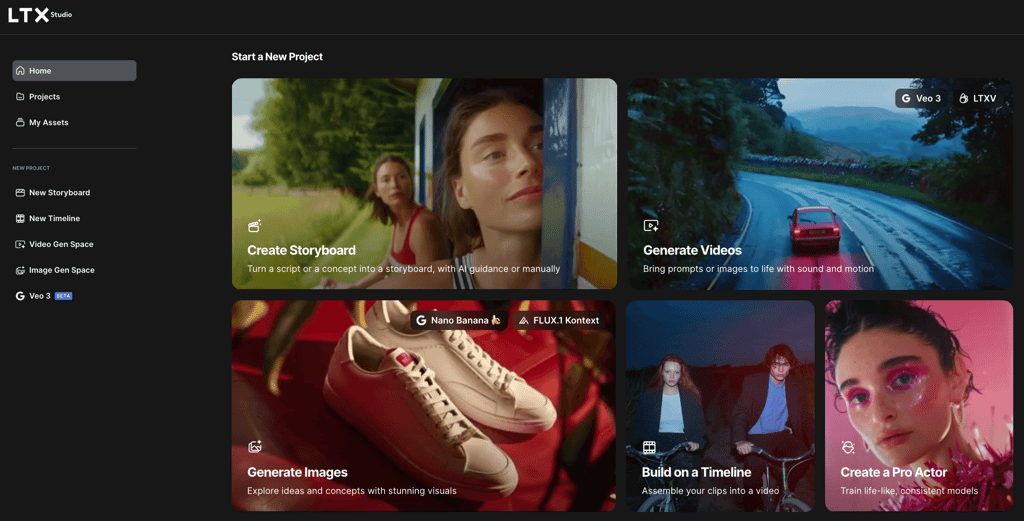
Getting started was quick. After creating my account and logging in, LTX Studio opened its full toolbox for me: storyboarding, image and video generation, multi-scene management, and custom model training. I love that I could pick between the LTXV and VEO video models or even upload start and end frames to guide the look of my music video.
For my test, I chose the LTXV video model and uploaded the start frame. I used the following prompt: “An old movie theater building with flickering neon lights on a rainy night.”
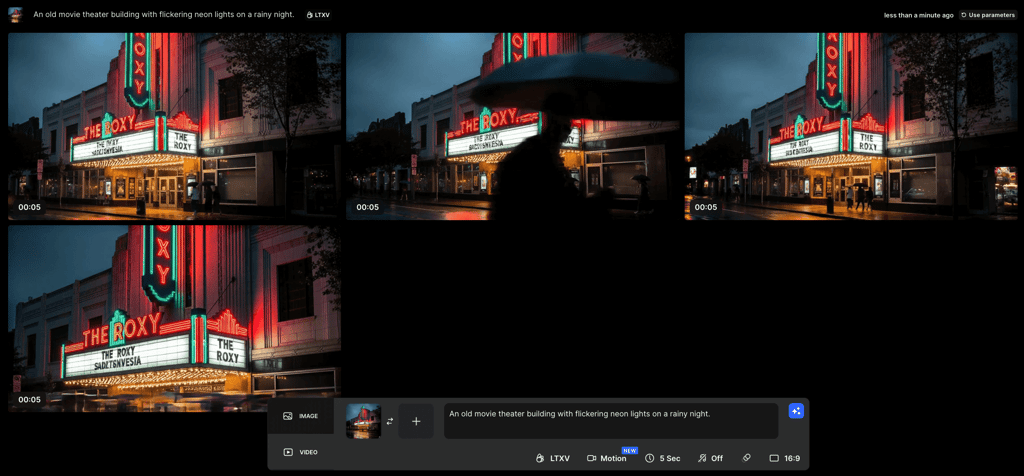
LTX Studio created a four-scene video that actually told a little story. Each scene felt like a continuation – with unique yet consistent visuals and style. The neon and rain were atmospheric and moody, and while there were some weird details (like text warping), the results looked impressively realistic for AI. I could edit each scene individually, tweak the mood, or regenerate any that didn’t fit.
What stood out for me the most with this tool was the multi-scene workflow, style and character consistency, and super flexible editing tools. The interface is friendly – drag, drop, and click to preview or adjust. Speed isn’t an issue either, considering my video was ready in a few minutes. I could export in MP4 and higher-quality formats if I wanted, though the free plan has some limitations on downloads and HD export.
Plans start at $15.00/month (or $12.00/month on a yearly subscription) with more expensive tiers for extra computing power and commercial rights. Still, you can try a free plan to see how it fits your workflow.
LTX Studio is ideal for anyone who wants narrative music videos – indie filmmakers, artists, marketers, and even smaller brands.
2. RunwayML – best for advanced and professional-grade video editing

| Suitable for: | VFX artists, filmmakers, and creative agencies |
| Top features: | Gen-1 (Video-to-Video), Motion Brush, advanced editing controls |
| Video length: | Up to 40 seconds, depending on the model |
| Starting price: | $15.00/month |
| Free version: | ✅ Yes |
RunwayML is the best platform for advanced AI-powered video editing and VFX. If you’re a filmmaker, VFX artist, or creative agency that needs more than just simple generation, RunwayML is packed with features for you. Its background in AI video is deep, and it’s now on its fourth generation of video models, with constant improvements in quality and flexibility.
After signing up, I got 125 free credits, enough for a basic test video. Everything runs in the browser – no heavy downloads or special hardware. The workflow starts in a chat window, and the video must be generated from an initial frame picture, either generated or imported by the user. I uploaded a picture of an ancient Aztec city, then gave my prompt: “Generate a video of a live ancient Aztec city, with bustling streets and people going on their daily routines.”
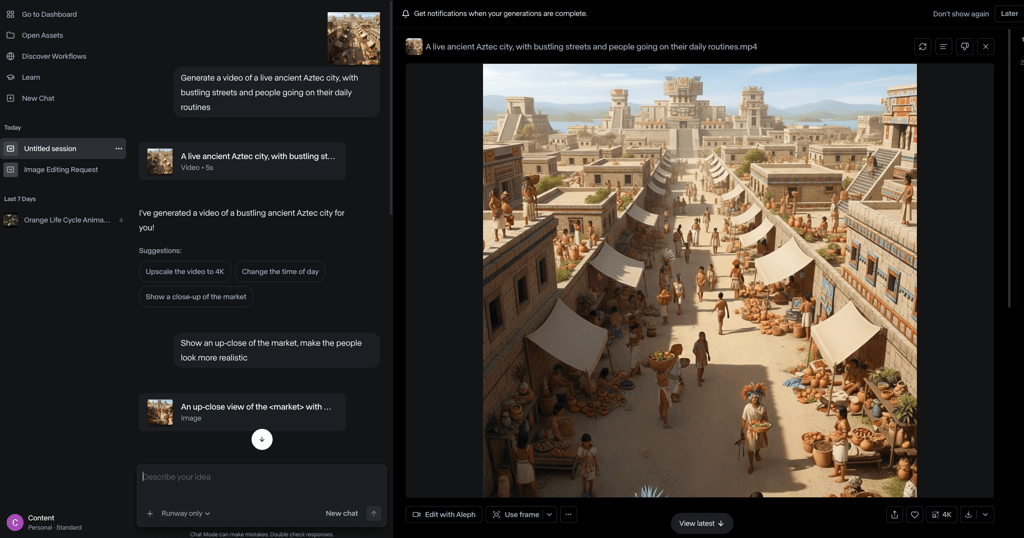
RunwayML took that single image and built a four-second video, adding movement and life, like people walking and clouds drifting overhead. There were occasional glitches – people fading or morphing unexpectedly – but the overall effect was surprisingly immersive.
What sets RunwayML apart? Features like Gen-1 and Gen-4 for transforming videos or animating images, Motion Brush for making specific objects move, and a robust editor with camera controls, upscaling, and background removal. I could fine-tune timing, trim clips, add shakes, upscale to 4K, and tweak color and style – all with just a few clicks or extra prompts.
The interface is professional but approachable, with everything organized and easy to access. Export options include MP4, while pro plans go up to 4K and commercial rights. Video renders are fast, so you can download or share instantly.
My main impression is that anyone who needs advanced customization – VFX professionals, agencies, or storytellers who want to blend AI with manual editing – will benefit greatly from using RunwayML.
Same as with LTX Studio, plans start at $15.00/month, with free options for experimenting (though you'll get a watermark on exports). If you want creative control and pro editing tools, RunwayML is the powerhouse to reach for.
3. Kaiber – top choice for experimental video styles
| Suitable for: | Established and indie musicians, digital artists, and creative agencies |
| Top features: | Distinct animation styles |
| Video length: | From 3 seconds up to 8 minutes, depending on the creation method |
| Starting price: | $29.00/month |
| Free version: | ❌ No |
Kaiber is a strong choice for truly artistic, experimental, and one-of-a-kind music visuals. It’s built a strong reputation, especially after powering Linkin Park’s official “Lost” music video, which proves just how professional the results can be. Musicians, digital artists, and agencies all use Kaiber for unique, style-rich video content.
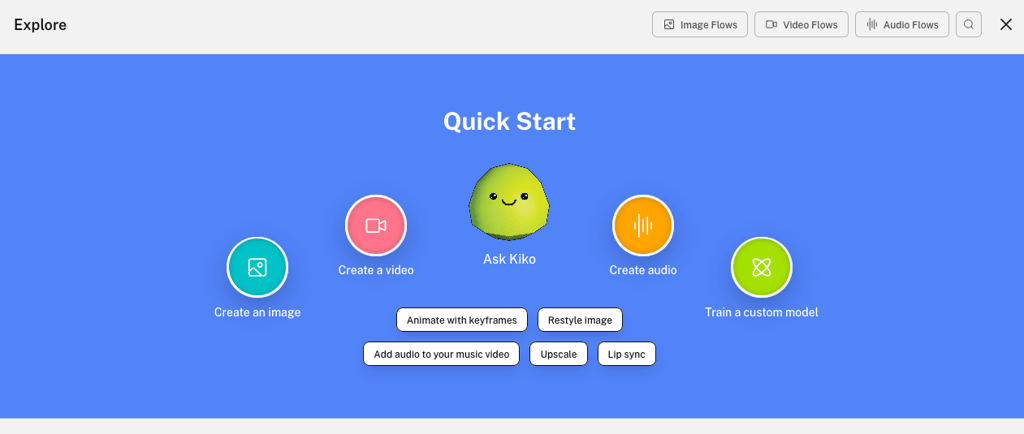
Starting out was simple. I created my account, logged in, and got immediate access to options for creating images, videos, audio, or even training custom models. For music videos, Kaiber let me pick from several video models (like Veo, Kling, LTX, or Runway) – so there’s lots of flexibility. I built my video using both a text prompt and a reference image, which usually helps guide the style and storytelling.
For my test, I uploaded an anime-style astronaut image and used the prompt: “An astronaut in a futuristic, sleek silver suit plants a vibrant, glowing seed in the red, dusty soil of Mars at dawn.”
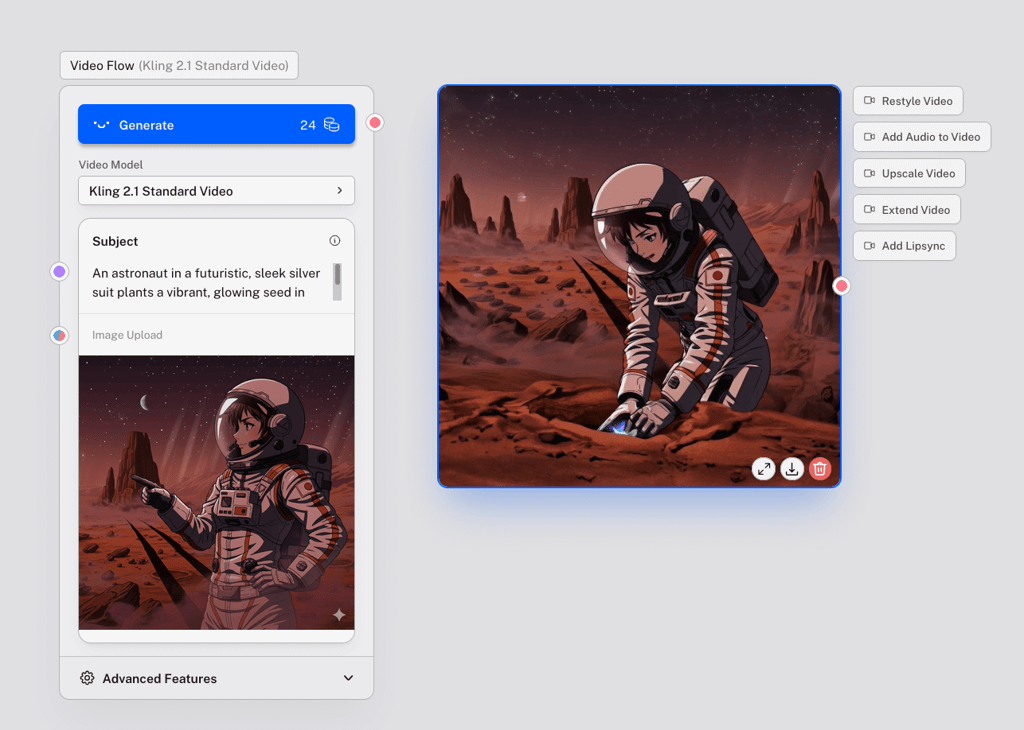
Kaiber turned this into a five-second animated video, keeping the character’s look and the moody, sci-fi vibe from my input. The results were genuinely creative, with beautiful lighting and surreal, dreamlike transitions. And even though there were minor logical quirks, the style stayed consistent.
Kaiber stands out with signature animation modes like Flipbook (for hand-drawn, evolving art), Motion (smoother and more cinematic), and Transform (for remaking your own clips with new styles). I could set the output length, choose aspect ratio, evolve level, and pick audio-reactive features so visuals sync with the beat. Video editing is quick, and there are plenty of premium looks to explore. The interface feels modern and creative, perfect for fast tweaks and previews.
Finished videos are downloadable in high quality, but there’s no free plan. You can opt for a Flex plan with pay-as-you-go credits or a subscription from $29.00/month.
4. Neural Frames – specialized AI tool for music video creation
| Suitable for: | Indie musicians, electronic music producers, and visual artists |
| Top features: | Autopilot, the ability to generate a video from an audio file |
| Video length: | 10 minutes maximum |
| Starting price: | $19.00/month |
| Free version: | ✅ Yes |
If you want a tool built solely for music video creation, not just an AI video generator with audio tacked on, Neural Frames is for you. This platform is designed for musicians, producers, and artists who want their music to drive the visuals directly, with results that feel interpretive and often strikingly abstract.
Creating an account was quick. I got 20 free credits, which allowed me to test out a few seconds of video without spending a thing. Neural Frames offers multiple ways to start: I could generate a video from an image, a prompt, or just use the brilliant Autopilot feature.
With Autopilot, all you need to do is simply upload your audio track. Neural Frames instantly analyzes the mood, BPM, and lyrics, and then storyboards the video around it. The process is seamless: upload, maybe tweak a prompt or style image, then let the AI do the heavy lifting.
For my test, I entered this prompt: “A blue race car speeding through the night, neon-lit cityscape, high-definition, vibrant, stylized, abstract expressionism, Cubist influences, moody, dark tones, dramatic lighting, dynamic.” Once I picked my favorite AI-generated image, Neural Frames let me select music, tune the prompt, apply AI effects, adjust camera moves, and set frame options.
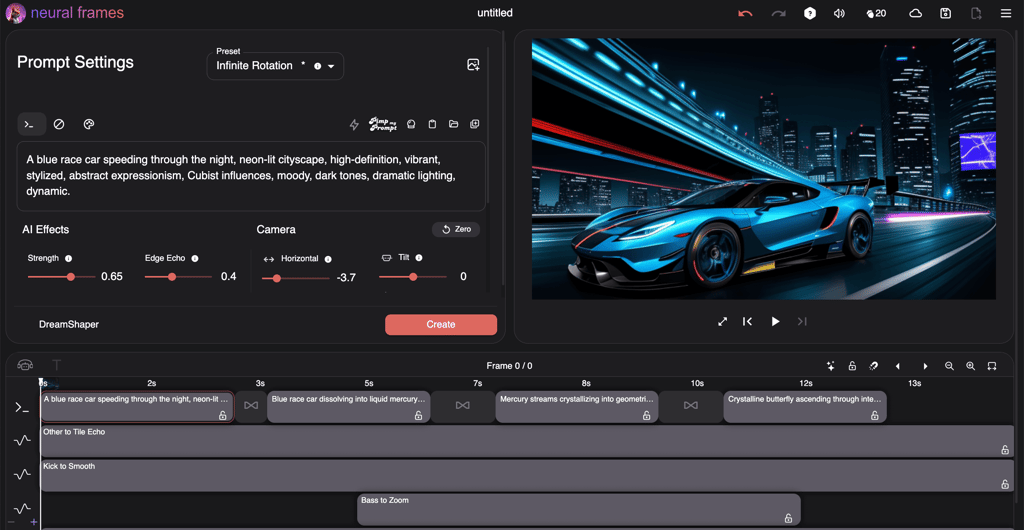
In just a few clicks, I had a psychedelic, abstract video – far from a literal interpretation, but powerfully synced to the chosen audio’s rhythm and energy. The 12 seconds I generated with free credits were quickly rendered and easily exported to 720p.
Among Neural Frames’ unique features, the most prominent are audio-reactive visualizations from real music stems, DAW-style timeline editing, 1:1 character consistency, and access to advanced models like Kling and Seedance. This editor gives you complete control down to individual frames, but you can also let Autopilot create everything in minutes.
Pro plans start at $19.00/month and unlock full HD, 4K, more models, and commercial rights. There’s even a free version for limited-time testing.
5. Shai Creative – best for cinematic, narrative-driven music videos
| Suitable for: | TikTok and YouTube creators, social media marketers, and musicians |
| Top features: | Lyric-to-video synchronization |
| Video length: | Unspecified |
| Starting price: | $9.00/month |
| Free version: | ✅ Yes |
Shai Creative is a great tool for creating narrative-driven music videos that feel perfectly synced to lyrics. It’s designed for creators who want to build engaging visual stories, especially on platforms like TikTok, YouTube Shorts, and Instagram Reels. It positions itself as a creative co-pilot and focuses heavily on simplifying the creation process from a single input – like lyrics.
Signing up was as straightforward as with other tools on my list, and I got 20 free credits to start making AI-generated storyboards. The process begins with uploading your song or script and a simple prompt describing your concept. Shai then creates a storyboard scene-by-scene with AI-generated images that align with your lyrics or story beats.
For my test, I used the prompt: “A lone samurai in traditional armor draws a katana with a slow, smooth motion. The scene is set on a rainy night in a Japanese forest.” Shai quickly generated 12 storyboard images that captured the moody atmosphere.
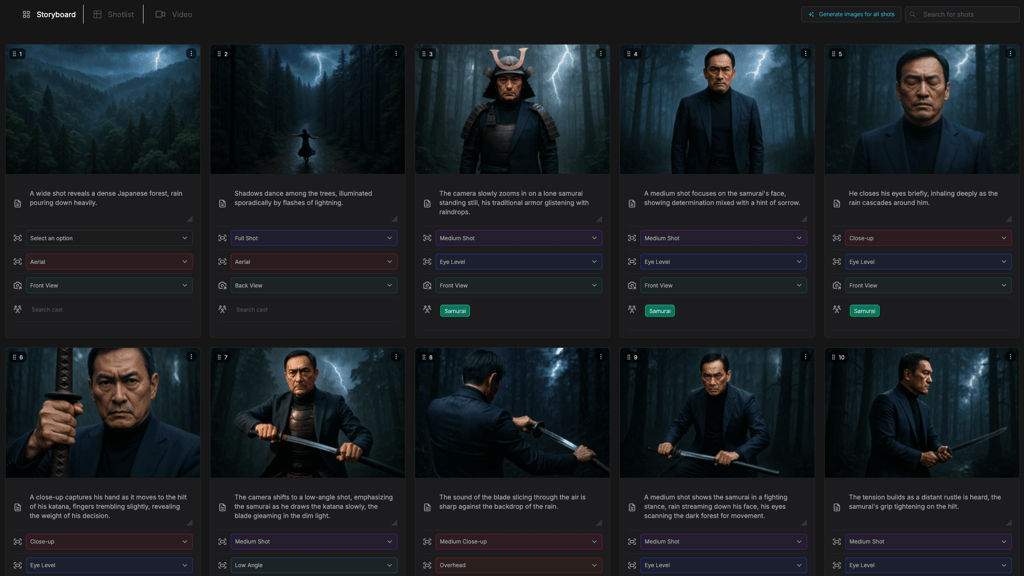
While the AI struggled a bit with keeping the main character consistent, the storyboard visually told the story well. Each image can be expanded into short video clips, and the AI helps evolve the scenes smoothly from frame to frame.
Unique to Shai is its strong lyric-to-video synchronization, storyboard shot list generator, and real-time editing that lets you tweak camera angles, movements, and shot timing. The web-based interface is clean and intuitive, making the creative process fast and accessible – no technical skills required.
You can export your videos, but only premium users get full video generation and higher resolution options. Plans start at $9.00/month, with a free tier that allows you to explore storyboarding basics.
Free AI song maker tool limitations
Free AI song maker tools come with useful features, but there are also quite a few important limitations you should keep in mind:
- Limited credits or daily usage. Most free plans restrict how many songs or videos you can generate each day or month.
- Short song lengths. Free versions often limit track length, typically to under a minute or two.
- Watermarks or branding. Generated content frequently includes platform logos or watermarks that can’t be removed.
- No commercial rights. Free users usually don’t get full rights to use the generated music or videos commercially.
- Restricted downloads and formats. Download options can be limited to low-quality formats or prevent offline saving.
- Lower video quality. Free exports are often capped at lower resolutions (720p or even below).
- Limited customization. Access to advanced editing options, styles, or fine-tuning parameters is usually blocked.
- Few style and/or genre options. Free plans may offer only a handful of genres or visual styles compared to paid tiers.
- No stems or multi-track access. The ability to separate vocals, instruments, or export stems is often unavailable with free tools.
- Fewer outputs per prompt. You get fewer variations or generations per input, limiting experimentation.
- Limited storage or cloud access. Free accounts generally have small or no cloud storage for projects and outputs.
Being aware of these limitations should help you set realistic expectations and decide when upgrading to paid plans is worthwhile.
Pros and cons of AI music video tools
AI music video generators offer great accessibility for beginners, allowing almost anyone to create engaging videos without specialized skills. They speed up content creation dramatically, making them excellent for quickly generating videos for platforms like YouTube, TikTok, and Instagram, as well as for advertising purposes.
In addition, these tools provide a wide variety of styles and moods, letting creators experiment and test ideas cost-effectively and at scale. They also integrate easily into daily content workflows, helping creators keep their audiences consistently engaged with fresh visuals.
However, there are quite a few flaws to AI-generated music videos. First of all, they can sometimes feel generic or repetitive because the output depends heavily on training data. This can limit emotional depth and originality, making it hard to achieve truly unique storytelling. Licensing and copyright remain critical concerns, as unclear ownership of AI-generated content can cause legal complications.
Furthermore, the quality of outputs can widely vary depending on the complexity and the AI model used. Users often face less creative control compared to manual editing, which may frustrate creators seeking specific artistic visions. Ethical issues also arise around data use, bias, and deepfake risks.
As such, while AI music video tools are powerful, time-saving aids, keep in mind that they work best when balanced with human input and careful attention to legal and ethical considerations.
Future of AI in music videos
The future of AI in music videos is moving fast and promises some exciting changes. AI is helping artists create fresh and original visuals by acting as a creative partner rather than replacing human input altogether. This collaboration between human creativity and AI is opening new doors for innovation and speeding up video production.
More creators and companies are adopting AI tools to produce videos faster and more affordably. AI also allows for easy customization and experimentation with new styles. However, as AI advances, it raises important ethical questions about copyright, authorship, and content authenticity that need ongoing attention.
Looking ahead, AI music videos will likely become more immersive and personalized, potentially including interactive and virtual reality elements. These changes will make video content more engaging for fans and give artists new ways to express their vision. Balancing AI’s power with human creativity will be key to making the most of this technology’s potential in music video production.
Conclusion
AI tools are growing rapidly in popularity, and the music industry is no exception. The best AI music video generators are making it easier than ever for creators to produce high-quality, engaging videos quickly and affordably. Whether for TikTok, YouTube, or Instagram, these tools help musicians, marketers, and content creators stand out with visually striking content.
Among the top choices, LTX Studio stands out as the best all-in-one AI music video creation platform. It offers powerful multi-scene workflows and consistent storytelling, which is ideal for musicians and marketers looking to create narrative-driven music videos. With intuitive editing and flexible exports, it combines ease of use with professional features. For those wanting both creativity and control, LTX Studio is a fantastic place to start your AI music video journey.
FAQ
Do AI music video generators include music as well as visuals?
Yes, many AI music video generators do both – they can generate music and matching visuals together, or let you upload your song and create a video around it. This flexibility suits different creator needs.
How long can AI-generated music videos be?
Video length varies by platform. Free plans often limit videos to 30–60 seconds, while paid options usually support full-length songs and longer clips, perfect for professional releases.
Do these tools let me customize visuals after generation?
Yes, some AI tools provide editing options to tweak scenes, effects, or sync with lyrics. However, many tools offer only fixed videos with no post-generation edits. Pay close attention to available customization options when choosing an AI music video generator that fits your needs.
Can AI music videos be monetized on YouTube?
Yes, if the videos show real human creativity and add value beyond simple AI outputs. Avoid low-effort or repetitive AI-generated content to meet YouTube’s rules for monetization.