Speechify review: features, pricing, and who it’s for
Being behind major reports like The Mother of All Breaches and RockYou2024, our in-house cybersecurity experts and journalists provide unbiased, real-world testing and in-depth analysis.
We maintain complete transparency by openly sharing our testing methodologies with our audience.
Learn more

Speechify is one of the most popular TTS (text-to-speech) apps across desktop, mobile, and browser. It promises to turn any text – PDFs, emails, web pages, printed documents – into natural-sounding audio, complete with voice customization, optical character recognition (OCR) scanning, and cross-device syncing.
TTS tools, in general, have gone mainstream. They’re now essential for assisting people with vision impairment, staying focused while multitasking, or making reading more accessible. Whether you’re a student, a busy professional, or someone navigating loss of sight or dyslexia, you’re likely to encounter TTS tools if you haven’t already.
I tested Speechify firsthand across platforms, digging into its real-world performance, pricing, and user feedback. I wanted to find out if it’s as smart and seamless as it claims, or just another overhyped productivity tool.
In this Speechify review, I’ll break down the AI tool's core features, usability, plans, and where it stands out or falls short, among other similar services. If you’re wondering whether it’s worth paying for Speechify in 2026, this hands-on review has you covered.
Speechify AI review
Need to make a quick decision? Below is a brief overview of Speechify AI.
| Pricing (paid plans): | From $11.58/month |
| Key features: | Natural-sounding voices, OCR scanning, speed control, multi-language support, and cross-platform sync |
| Free version: | ✅ Yes |
| Best for: | Studying, productivity, accessibility, and multitasking |
What is Speechify?
Speechify is an AI TTS tool that reads written content aloud using natural-sounding voices. It works with PDFs, web pages, emails, and even printed text via OCR. Available on web, desktop, mobile, and as a Chrome extension, it supports multiple languages and adjustable speeds. Speechify is ideal for students, professionals, visually impaired people, and users with dyslexia or ADHD. It also improves accessibility and helps you absorb content hands-free – whether for studying, multitasking, or overcoming reading difficulties.
Who should use Speechify
Speechify isn’t just for one type of user – it’s built to support a range of needs. It combines usability and accessibility in a way that suits both productivity-focused users and those with specific learning or reading needs. Here’s who will benefit most from using it:
- Students and learners. Speechify can turn textbooks, PDFs, research papers, and lecture notes into audio. This makes studying more efficient, especially for auditory learners or those reviewing materials on the go.
- Professionals handling large volumes of text. If your workday involves reading reports, emails, or long-form documents, Speechify helps reduce screen time and increase focus by letting you listen instead of read.
- People with dyslexia, ADHD, or visual impairments. The app was originally designed with accessibility in mind. Its natural-sounding voices, high-speed playback, and OCR scanning can make reading less frustrating and more inclusive for neurodivergent users or those with vision challenges.
- Multitaskers who prefer listening over reading. Whether you’re commuting, cooking, or working out, Speechify makes it easy to consume written content hands-free. Cross-platform syncing means you can switch between devices without losing your place in the text.
Key features of Speechify
Speechify comes with practical tools designed to make reading faster, easier, and more accessible. Here are its core features and how they function:
-
Natural-sounding AI voices. Speechify offers over 200 voice options, including multiple accents and tones. In my tests, most voices seemed relatively natural, even when played at 2-times or 3-times speed. This could be due to celebrity partnerships, meaning you can actually hear famous people reading to you. It’s a big improvement over the robotic speech many TTS tools still use, but those capable of detecting sophisticated AI would know the difference.

- OCR scanning. You can take a photo of printed text and have it read aloud. I used this with printed study materials and it worked well, though layout-heavy pages (like tables) can occasionally confuse it.
- Speed and pitch controls. Playback speed is highly customizable, up to around 5 times. It’s ideal for skimming long content, though very high speeds can slightly reduce voice clarity.
- Cross-platform syncing. Speechify keeps your progress synced across devices. I switched between my phone and laptop seamlessly while listening to the same article.
- Chrome extension and app integrations. With the browser extension, you can read web pages, emails, and Google Docs aloud instantly – no copy-pasting required.
- Audio export and offline playback. Speechify lets you download audio versions of your converted text, making it easy to listen offline. I used this with Wi-Fi switched off. As long as the file was processed beforehand, playback worked fine. Just some advice: creating new audio still requires an internet connection, since the text-to-speech processing happens in the cloud.
Speechify’s features are clearly designed for both productivity and accessibility, and in my experience, they deliver consistently.
Speechify: pricing and plans
Speechify has one free and two paid plan options. The free plan has limited voices and daily use caps, enough mainly for light, occasional listening. To unlock premium voices, higher speeds, and offline access, you’ll need a paid subscription. It’s a pricier option, but aimed at users who rely on text-to-speech daily.
| Plan | Price | Voices | Features | Speed |
| Free | Free | 10 robotic ones | Plain TTS | Up to 1.5x |
| Monthly | $29.00/month (free trial available) | 200+ natural ones | 60+ languages, offline MP3 downloads, skipping and importing, AI summaries and chats | Up to 5x |
| Yearly | $11.58/month ($138.96 total, free trial available) | 200+ natural ones | 60+ languages, offline MP3 downloads, skipping and importing, AI summaries and chats | Up to 5x |
Speechify free vs premium versions
Speechify offers a free plan, but most of its standout features sit behind a paywall, and that makes a big difference in day-to-day use.
The free plan gives you access to a limited set of basic voices, which sound noticeably more robotic compared to the natural tones offered in premium. You can listen to text at standard speeds (up to around 1.5x) and import basic content, but advanced features like highlighting, fast skipping, or summaries aren’t available.
It’s enough for testing the tool or using it occasionally, but you’ll quickly hit limitations with longer texts or frequent use. Another downside is that when simply creating an account, you still need to input your payment details, as Speechify directs you to the premium plan’s free trial.
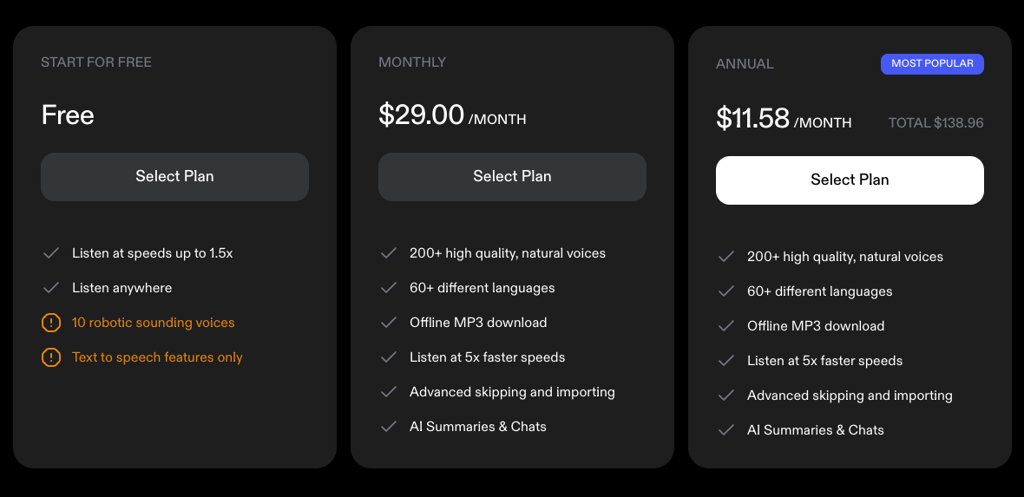
The premium plan unlocks over 200 high-quality, natural-sounding voices across multiple languages. You also get faster playback speeds – up to 5x – along with offline audio downloads, better import options for PDFs and images, unlimited listening, and cloud storage for your library.
In real-world use, the difference is clear. The free version works for casual needs, but if you rely on TTS regularly for studying, work, or accessibility, the premium upgrade drastically improves the experience. Voice quality, speed, and advanced tools all feel smoother and more polished. From my personal experience, I’d say the free version feels a lot more stunted than the paid one, and is a bad example of what Speechify can actually do.
Getting started with Speechify
Speechify has a simple and streamlined setup process. By answering a few direct questions and providing your payment details, you can start using it in just a couple of minutes. There’s also an option to briefly test it without going through the setup process, but success is not guaranteed. Below you will find how to set up Speechify on your device.
I used my laptop, but it’s pretty much the same on any platform:
-
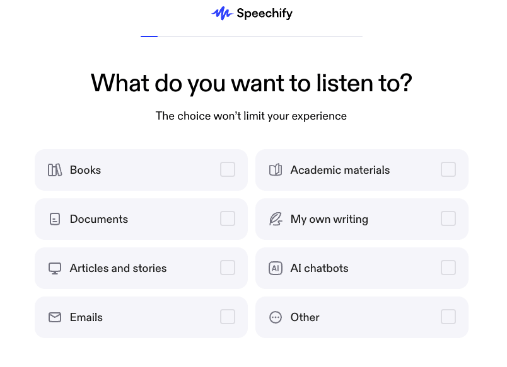
Answer the basic questions. Once you select your plan (applies to the free one as well), Speechify will ask you a series of questions, ranging from the purpose of why you want to use it to the most common use cases for you.
-
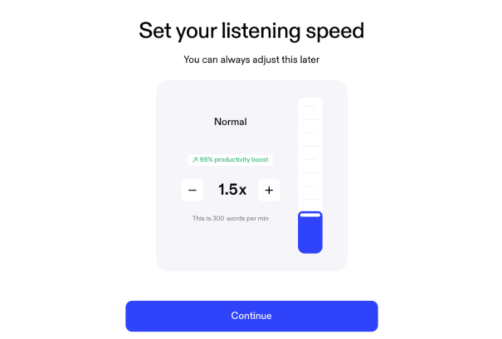
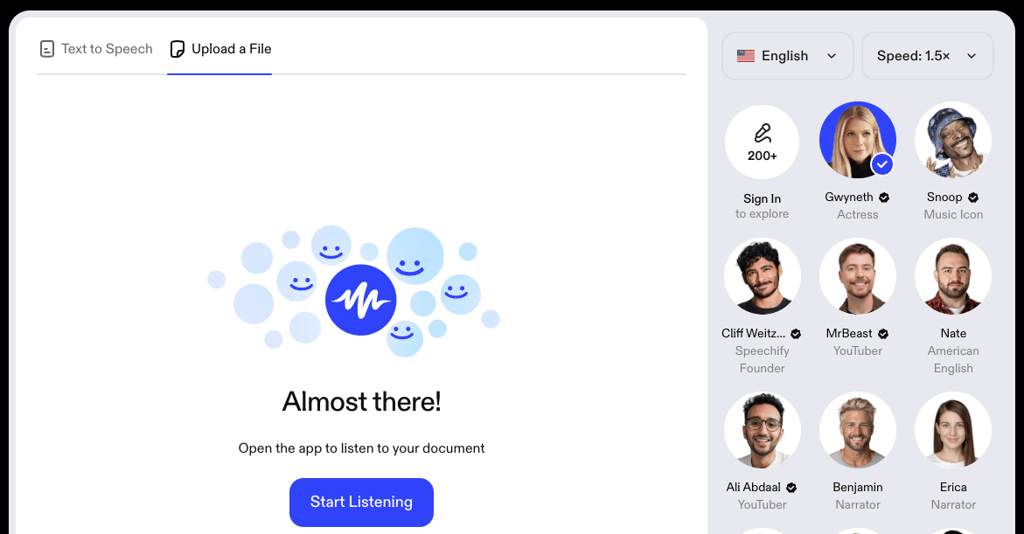
Select your modifications. You can pick your TTS voice, including some famous names, and listening speed.
- Create an account. You can use Google, Apple, or Facebook, or simply enter your email and create a password.
-
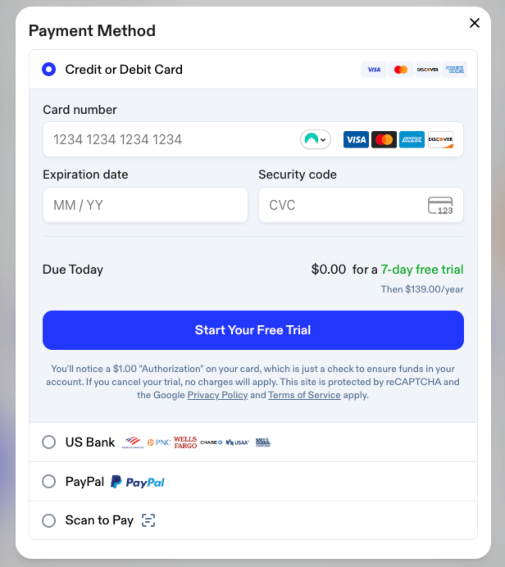
Enter your payment information. If you’re getting a free trial, this applies to you, too. Speechify accepts credit or debit cards, several of the main US bank account transfers, PayPal, or Scan to Pay options.
-
Use Speechify. You can upload a document or get it to directly generate text to speech.
Speechify: user reviews
I analyzed user feedback across different platforms, such as forums (Reddit) and app reviews (TrustPilot), as well as verified user ratings. There’s a clear mix of praise and critique that aligns well with what I experienced during testing.
Many users highlight voice quality and convenience as major positives. People appreciate how Speechify’s natural‑sounding voices make long articles, PDFs, and emails easier to digest, especially compared with basic built-in screen readers. They also mention that listening can significantly cut down on reading time. Verified reviewers often point out the accessibility benefits too, noting it helps with studying or daily tasks where reading is challenging.
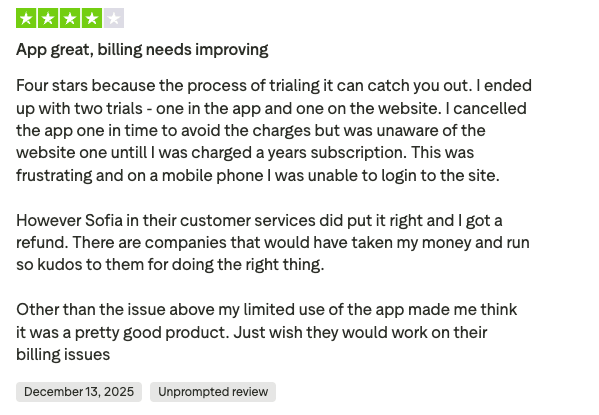
On the flip side, pricing and subscription handling come up regularly. Some find the cost high compared with some other TTS tools, and a few users report confusion around trial cancellations or annual charges. There are also occasional mentions of bugs or formatting issues when reading complex documents, especially academic texts with footnotes or layout irregularities.
Combined with my own testing, the sentiment makes sense: Speechify excels in voice realism and ease of use, but the platform feels strongest for frequent listeners who benefit from premium features rather than casual users on the limited free plan.
Final verdict: is Speechify worth it?
After testing Speechify myself, I’d say it’s best suited for people who listen to text daily, like students, professionals, or people with reading challenges. The voice quality is certainly one of the best on the market, and features like OCR, high-speed playback, and cross-platform sync make it genuinely useful.
That said, it’s easy to confuse the free plan with free trial, and pricing can be on the higher end. If you only need to use TTS tools occasionally, there are cheaper options. But for serious users who value audio clarity and convenience, Speechify’s premium tier delivers. In my case, the upgrade was worth it, but only so I could test all the available features and functionalities that the free plan does not have.
FAQ
Is Speechify free to use?
Yes, Speechify offers a free plan with limited features, standard voices, and daily usage caps. Its most advanced tools, like natural-sounding voices, higher speeds, and offline playback, are only available in the paid version. However, the paid version has a limited-duration free trial, too.
Does Speechify work offline?
Somewhat – Speechify doesn’t convert text to speech offline, but paid users can download audio after it’s generated online. You’ll need an internet connection to process text, but can listen later without Wi-Fi.
What languages does Speechify support?
Speechify supports over 60 languages, including English, Spanish, French, German, Italian, and Japanese. Voice options vary by language, including accents.
Can Speechify replace audiobooks or screen readers?
Somewhat – Speechify can replace audiobooks for reading personal content aloud and works well as a screen reader alternative. However, it lacks professional narration and full accessibility features in some specialized readers.
Is Speechify suitable for students with learning difficulties?
Yes, Speechify is well-suited for students with dyslexia, ADHD, or reading fatigue. Its natural voices, adjustable speeds, and OCR support help make studying more accessible and less stressful.