Soundraw AI music generator review: is it worth it for content creators?
Being behind major reports like The Mother of All Breaches and RockYou2024, our in-house cybersecurity experts and journalists provide unbiased, real-world testing and in-depth analysis.
We maintain complete transparency by openly sharing our testing methodologies with our audience.
Learn more
Music is one of the hardest parts to get right for creative videos. This is not because of a lack of options, but because you have to think about the right tools, copyright rules, and whether a track actually fits the mood you’re trying to build.
That’s where Soundraw comes in – an AI music generator that creates original tracks without stock libraries or licensing worries. You set the mood, genre, tempo, and length, then fine-tune what the AI composes.
AI music generation matters because content creation moves fast. Videos, podcasts, games, ads, and social clips all need music, often on tight deadlines. Instead of settling for generic tracks, tools like Soundraw aim to give creators flexible music that adapts to their content.
Together with the Cybernews research team, I tested Soundraw hands-on. In this review, I break down my results. I check whether Soundraw delivers high-quality, customizable music, how easy the interface is to use, and whether it’s worth paying for compared to alternative tools.
Quick overview of Soundraw AI music generator
| Best for | Content creators, filmmakers, YouTubers, podcasters, and game developers who need fast, royalty-free music |
| Key features | AI-generated music, mood/genre/tempo control, track length adjustment, section-based editing, royalty-free licensing |
| Free version | Yes (music can be generated, but downloads require a paid plan) |
| Starting price | From $11.04/month (Creator plan, billed monthly) |
Pros and cons of Soundraw AI music generator
Soundraw focuses on doing one thing well – generating royalty-free music quickly, without licensing stress or complex workflows. It’s clearly built for creators who value speed and control over deep musical experimentation. While the tool is flexible and easy to use, it does come with a few creative limitations depending on your needs.
What is Soundraw, and how does it work?
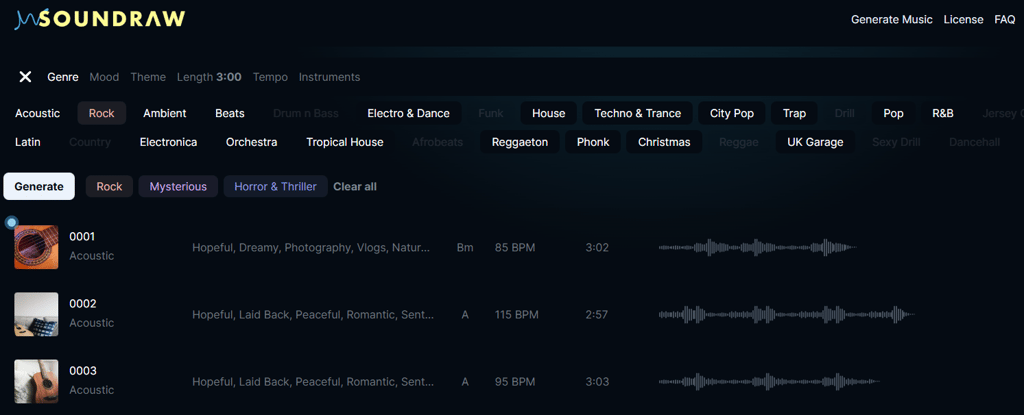
Soundraw is an AI-powered music generation tool. It lets you create original, royalty-free tracks by selecting parameters like genre, mood, tempo, and length. Instead of browsing stock libraries, the AI composes music on demand and allows you to tweak structure and instrumentation until it fits your project.
Soundraw uses its own in-house music training, which means tracks are unique and not recycled from existing songs. It’s built for everyone from non-musicians to professional creators – YouTubers, filmmakers, podcasters, and game developers. All generated music is royalty-free for commercial use, with no attribution required, making licensing simple and stress-free.
Who should use Soundraw
Soundraw works best for creators who need original, royalty-free music fast, without getting into complex music production. It’s designed for practical, everyday use across different content formats:
- Video creators and vloggers. Ideal for YouTube videos, vlogs, reels, shorts, and long-form content where background music needs to match pacing and mood. Soundraw lets you generate multiple variations and quickly adjust tracks to fit your edits without copyright concerns.
- Game developers. Useful for indie developers and small studios who need background music for menus, levels, or ambient scenes. It works well for prototyping and early builds and can also cover basic music needs for released games.
- Podcasters and content creators. A good fit for intros, outros, transitions, and subtle background tracks. You can add music to episodes and social clips without worrying about copyright strikes or licensing limitations.
- Marketing teams and advertisers. Well-suited for ads, product videos, social media campaigns, and branded content. The ability to quickly generate and tweak multiple tracks helps when testing different creatives or formats.
Professional musicians and composers may find Soundraw too limited if they need deep composition control, advanced layering, or detailed sound design. In those cases, traditional music production tools are a better choice.
Soundraw core features and creative control
Soundraw focuses on instrumental, royalty-free music generation with an emphasis on customization rather than one-click results. In my testing, the core experience is about guiding the AI – choosing genre, mood, tempo, and structure. Then you can refine tracks until they fit your project. The features below cover the main tools users interact with most when creating music.
Genre, mood, and tempo selection
When you use Soundraw, you guide the AI through a set of predefined tags and filters. This is different from text-to-music prompts, where you can try typing exactly what you want, like with Mubert.
With Soundraw, you select things like genre, mood, tempo, theme, and instrument focus, and these choices shape how the track is generated. This approach feels well structured – especially if you’re not a musician. After reviewing the tool, I think it works well for common creative needs like background music for videos or podcasts. However, it’s also where some limitations start to show.
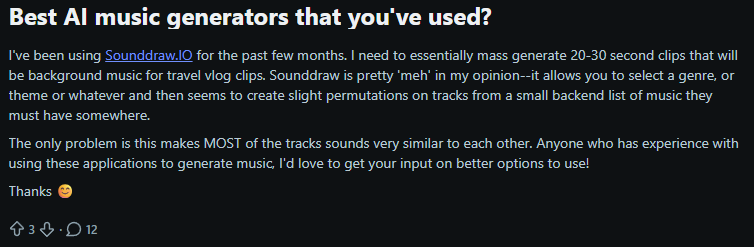
Reddit reviewers often mention that the generated music can feel repetitive or slightly similar over time, especially within the same genre and mood combinations.
I can confirm this from my own testing – many generated tracks sound a bit flat and safe. They work best as background music for games, vlogs, or ads rather than as standout musical pieces. That said, experimenting more with different themes and mood combinations does help, and with some trial and error, you can get results that are genuinely usable for real projects.
Track customization and editor
The interface shows the full track structure, divided into 8-second segments that range from quiet to extreme. From there, I can control volume, intensity, and how many musical layers are active in each section – melody, backing, bass, drums, and fills. Each of these layers can be adjusted independently every 8 seconds, including their intensity, which gives you a surprising amount of control over how the track builds and evolves.
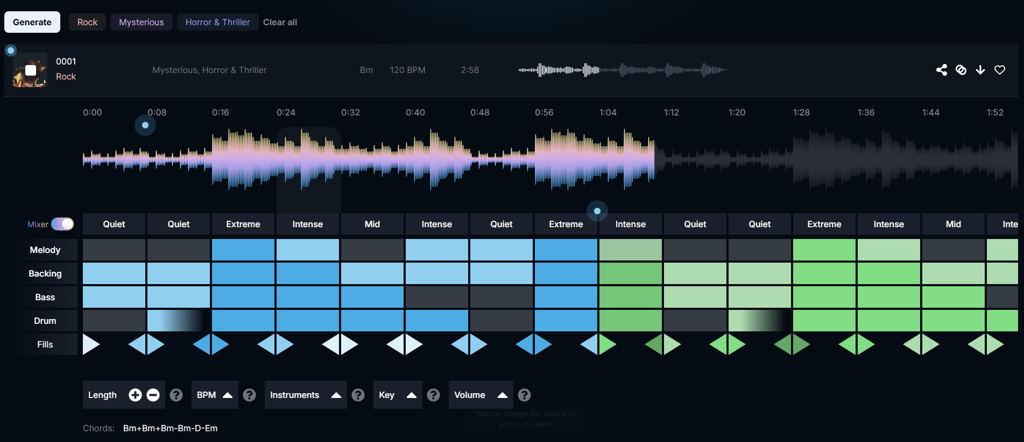
Most AI music generators, like Mubert or Soundful, lean toward one-click generation. You pick a mood or genre, hit generate, and get a finished track. If it’s not right, your only real option is to regenerate the entire song and hope the next version is closer. That’s fast, but it’s also a bit of a gamble – especially when you’re trying to match music to a specific edit or timing.
Web-based workflow and integrations
Soundraw is a web-based AI music generator that runs entirely in your browser, with no software downloads required. This makes it easy to start or continue projects from any modern device and fits naturally into cloud-based content workflows.
For video editors and social creators, Soundraw plays nicely with tools you already use. Its API is integrated into platforms like Canva and Wondershare Filmora, so you can spin up custom tracks right inside those editors, syncing mood and pacing directly with your visuals.
As Soundraw is online-only, it won’t work offline. While users don’t heavily criticize Soundraw for this, broader AI-music discussions show some creators do see the lack of offline or local access as a limitation, especially when working on the go or with unstable connections.
Creative flexibility and customization
Soundraw is built around a clean, browser-based workflow that favors speed and accessibility over deep production control. Everything happens in one place – generate, tweak, export – with no plugins, installs, or DAW integration required. That makes it easy to jump in and iterate fast, especially when you’re working against a deadline.
In terms of customization, Soundraw offers macro-level control. You can edit song structure at a bar level, extend or shorten sections, and adjust energy or intensity per part. There’s also limited stem-like control inside the editor – you can mute or emphasize elements – but exports remain a single mixed track, not true stems.
This level of control works best for content creators, video editors, and marketers who want background music without technical overhead. Producers or composers who rely on detailed mixing, real stems, or DAW-style precision may find the workflow restrictive rather than empowering.
Soundraw AI user experience and workflow
Soundraw’s user experience leans toward friendly and intuitive, but it has a few quirks. Starting a track is as easy as picking a mood, genre, or tagging a few keywords. The AI uses those tags to craft something directionally right, which most users find satisfying and fast. It’s definitely simpler than tools that drop you straight into a DAW-like grid on day one, so beginners feel less intimidated.
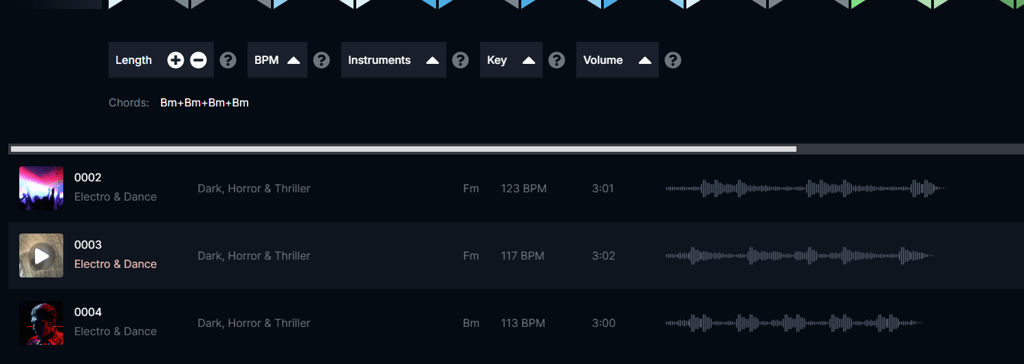
Customization is where the curve gently rises. Tuning BPM, swapping instruments, and reworking structure is doable, but it’s not the same as full DAW control. You’re adjusting sections and energy rather than dragging every MIDI note. Some competitors lean harder into power features, so “pro” users coming from Logic/Ableton might feel a bit boxed in at first – there’s a learning moment in understanding how Soundraw’s sliders and section editor map to the music you hear.
Exporting is straightforward: generate, hit export, and drop the stereo file into your project. The quirk is the lack of true stems, which reviewers often call out – it’s easy to use but limited if you want deeper post-production control.
Licensing and legal considerations
Soundraw uses a royalty-free licensing model, which makes things fairly straightforward for creators. Music generated on the platform can be used in both personal and commercial projects without paying ongoing royalties or worrying about copyright strikes. In practice, this means you can safely use Soundraw tracks in YouTube videos, podcasts, livestreams, ads, social media content, games, and client work, and you’re allowed to monetize that content.
There are a few important boundaries to keep in mind. Soundraw music can’t be registered with Content ID systems (like YouTube Content ID), since the license is shared across users. That’s a common rule with AI music tools, but it’s still worth noting upfront.
Rights can also vary by plan. While creator-focused plans cover most media use, distribution on streaming platforms like Spotify or Apple Music may require a higher-tier or artist-focused plan – often with the expectation that you further modify the track before release.
Pricing of Soundraw
Soundraw offers several tiers depending on how you plan to use the music. There’s no fully free plan – you can test the editor and generate tracks, but downloads and commercial rights require a subscription.
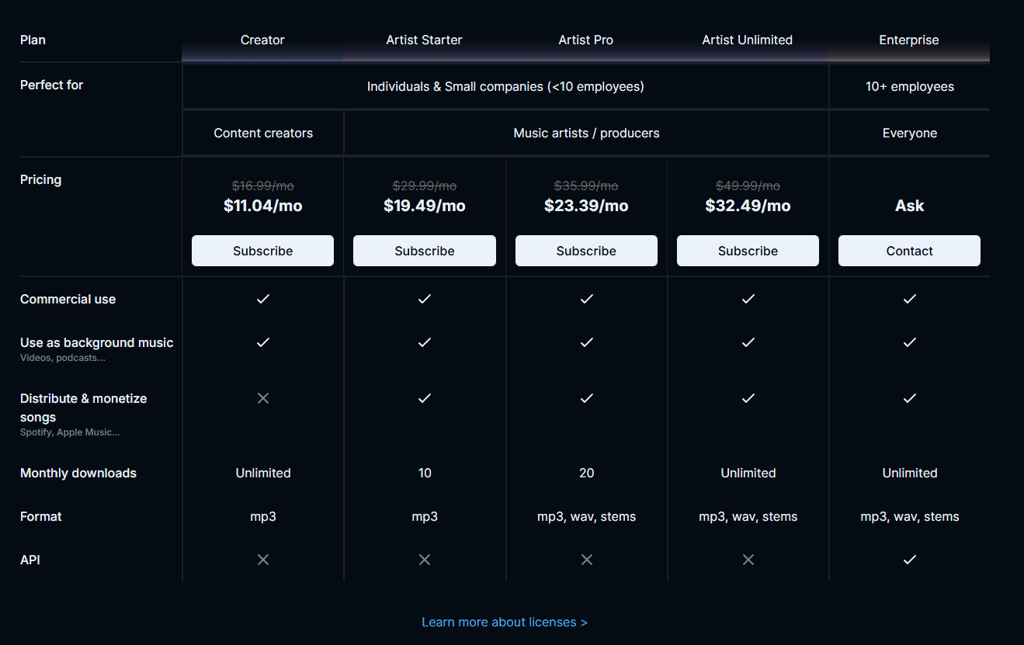
The Creator plan is priced at $11.04/month and is aimed at content creators. It includes unlimited MP3 downloads and full royalty-free rights for videos, podcasts, ads, and client work. It’s good value if you need background music fast and don’t require WAV files or stems.
The Artist Starter plan costs $19.49/month. It’s designed for musicians who want to distribute and monetize tracks on streaming platforms, but it limits you to 10 MP3 downloads per month and doesn’t include stems.
Artist Pro, at $23.39/month, increases the limit to 20 downloads and unlocks WAV files and stems, making it more suitable for post-production and mixing.
The Artist Unlimited plan costs $32.49/month and removes download limits entirely while offering MP3, WAV, and stem exports, making it the best value for heavy users and producers.
Soundraw: real user feedback
User feedback around Soundraw is fairly mixed, but patterns do emerge. On Reddit and other review sites, many creators describe it as easy to pick up and genuinely useful for background music, especially for YouTube videos, podcasts, and social content where speed matters more than originality.
Users like how quickly they can generate something usable without touching a DAW or worrying about licensing.
That said, more experienced musicians tend to be more critical. A common complaint is that tracks can feel formulaic or repetitive, with limited variation once you’ve used the tool for a while.
Some also mention a small learning curve – not because the interface is complex, but because Soundraw’s way of shaping music (sections, energy, sliders) takes a bit of adjustment if you’re used to traditional production tools.
Overall, feedback suggests Soundraw excels at convenience but may frustrate users seeking depth or uniqueness.
Soundraw AI music generator vs competitors
Here’s a quick comparison table showing Soundraw alongside a few popular AI music generators – Suno AI, AIVA, and Soundful – so you can see how they stack up on key creative and practical points:
| Tool | Best for | Key features | Pricing | Output quality |
| Soundraw | Content creators, video background music | Mood and genre-based generation, section and bar-level editing, royalty-free license | Paid plans that start from $11.04/month | Consistent, clean instrumentals; great for background use |
| Suno | Full songs with vocals | Text-to-song generation, vocals + instrumentals, fast ideation | Free tier + paid plans that start from $8.00/month | Impressive and expressive, but less controllable |
| AIVA | Classical, cinematic, complex compositions | Deep composition controls, orchestral styles, export flexibility | Free tier + paid plans that start from $11.00/month | High-quality, structured, more “composer-like” |
| Soundful | Quick, simple music generation | Text-based prompts, minimal editing, instant results | Free tier + paid plans that start from $5.00/month | Fun and usable, but often generic |
Quick takeaway: Soundraw sits in the middle – more control than one-click generators like Soundful, and pricing is similar to other competitors. It’s strongest when you need reliable, license-safe background music, not experimental or artist-driven tracks.
How we test music generators (methodology)
Final verdict: is Soundraw music generator worth it?
Soundraw is worth it if you want fast, simple to generate, royalty-free music. It’s easy to use and lets you shape the mood, tempo, and structure without needing any music production skills.
On the other hand, it has limits. The genre range isn’t huge, there are no vocals, and deeper creative control depends on future updates. If you’re chasing complex or very unique sounds, it may feel a bit basic.
For content creators and podcasters, it’s a solid, time-saving choice. Brands can use it for ads and social content without licensing worries. Musicians will likely see it more as an idea generator than a full music-making tool.
FAQ
Can Soundraw music be used commercially?
Yes. Music you generate on Soundraw comes with a royalty-free license, so you can use it commercially in YouTube videos, podcasts, ads, livestreams, and client work without owing royalties (as long as you’re on a paid plan).
Does Soundraw offer a free plan?
No. There isn’t a forever-free plan with downloads. You can try the editor and generate tracks, but to download and use music legally, you need a paid subscription.
Can Soundraw generate vocals?
No. Soundraw currently focuses on instrumental music and doesn’t produce sung vocals or vocal melodies.
What formats can I export music in?
Export options depend on your plan – basic plans typically offer MP3, while higher tiers unlock WAV and sometimes stems for more detailed post-production.
How does Soundraw compare to other AI music tools?
Soundraw is easier and faster for customizable background tracks than many rivals. It offers more structure control than simple text-to-music tools, but it lacks vocals and deep composition features found in tools like Suno AI or AIVA.