I reviewed CrewAI vs n8n – can they actually work together?
Being behind major reports like The Mother of All Breaches and RockYou2024, our in-house cybersecurity experts and journalists provide unbiased, real-world testing and in-depth analysis.
We maintain complete transparency by openly sharing our testing methodologies with our audience.
Learn more
CrewAI and n8n are workflow automation platforms – both are self-hosted and have web versions, but that’s where their similarities end. CrewAI is a Python-based, open-source multi-agent framework where you can create Crews of AI agents that collaboratively solve complex reasoning tasks. Its web-based platform, CrewAI AMP, isn’t as customizable as the code-first version, but it has a visual drag-and-drop builder, CrewAI Studio, which makes it accessible to ops and non-technical teams.
n8n is an open-source automation platform with a visual, drag-and-drop workflow builder with native AI agent capabilities. Unlike CrewAI, it’s mainly used for connecting systems and routing data rather than deep reasoning and autonomous agent collaboration.
I tested both CrewAI and n8n together with the Cybernews research team, building agentic workflows in each to understand how they actually behave in real life. Based on the tests:
- CrewAI is the right tool when complex reasoning and agent collaboration are the core problems
- n8n wins when handling structured workflows is the priority
The two can complement each other if you need to gather and route real-world data, as well as deeply analyze and synthesize it
CrewAI vs n8n: quick comparison
| n8n | CrewAI | |
| Rating | ||
| Key features | Visual canvas, 1,000+ app nodes, and conditional branching | Role-playing agents, shared memory, and autonomous task delegation |
| Pros and cons |
|
|
| Who’s it for? | Technical ops and marketing teams, who automate standardized workflows | Python-first coders who automate unpredictable, non-standardized workflows |
| Free version | ✅ Yes, free web version and free if open source | ✅ Yes, free web version and free if open source |
| Price |
|
|

Architecture and philosophy: two very different animals
Based on my research, I made a feature comparison table of n8n vs CrewAI:
| n8n | CrewAI | |
| Primary abstraction | Nodes and workflows | Agents and tasks |
| Builder interface | Visual drag-and-drop |
|
| AI approach | Deterministic step execution | Autonomous reasoning |
| Multi-agent support | Manual node wiring | Native, hierarchical delegation |
| Workflow determinism | High | Low |
| Self-hosting | ✅ Yes | ✅ Yes |
| Open-source | ✅ Yes | ✅ Yes |
| Integrations model | 1,000+ integration nodes | Custom Python tools |
| LLM flexibility | High (API and local) | High (API and local) |
| Pricing model | Charges per workflow execution | Charges per Crew execution |
| Maturity | Mature, stable platform | Rapidly evolving platform |
| Target user | Technical ops teams | Python developers |
How each platform organizes intelligence
CrewAI organizes intelligence as a hierarchy of autonomous agents. Here, LLMs decide for themselves how to achieve a goal without your step-by-step instructions. You only define:
- Agents’ skills, context, and tools
- Tasks or what needs to be accomplished and what the output should look like
- Crew or cluster of agents organized sequentially or hierarchically with a manager agent
If an agent fails, it can autonomously try a different approach without manual intervention. That’s why debugging here means reading through text logs, agent traces, and Python tracebacks to understand why an agent made a certain decision or hallucinated.
n8n organizes intelligence as nodes in a directed workflow. Unlike CrewAI, it views AI not as a free-thinking entity but as an engine behind a predictable, predefined workflow.
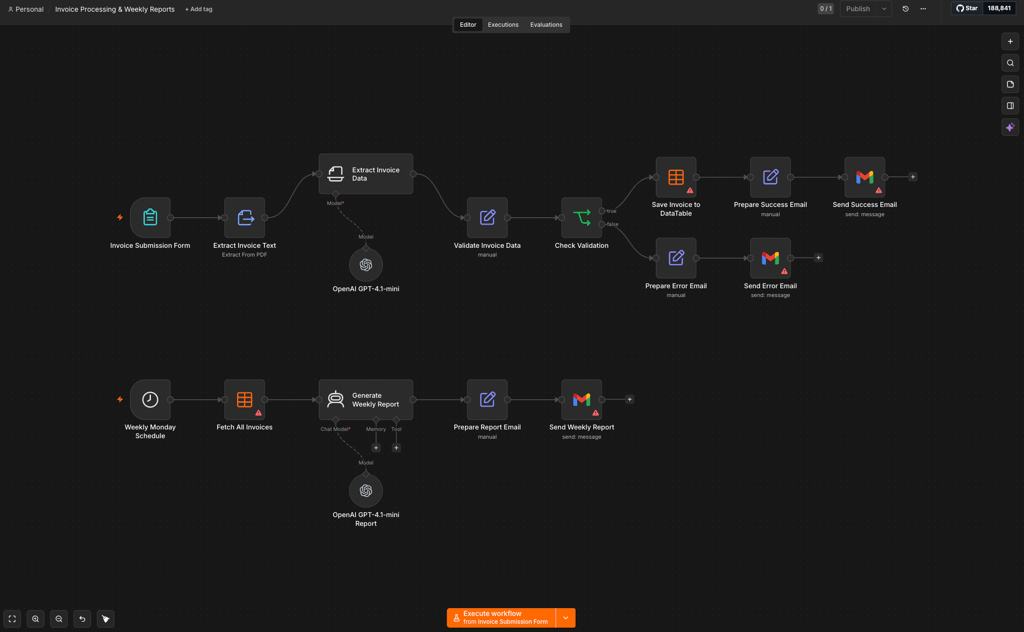
So, here, data flows from one node (a single workflow step) to the next in JSON format. AI Agents here are one of the node types, and they also simply process the exact JSON files handed to them by the previous step and pass the output to the next step.
Conditional branching and debugging are obvious in n8n thanks to the visual canvas. You can click on any node, look at the exact JSON files that entered and exited it, and re-run every single piece of the pipeline.
Building experience: code vs canvas
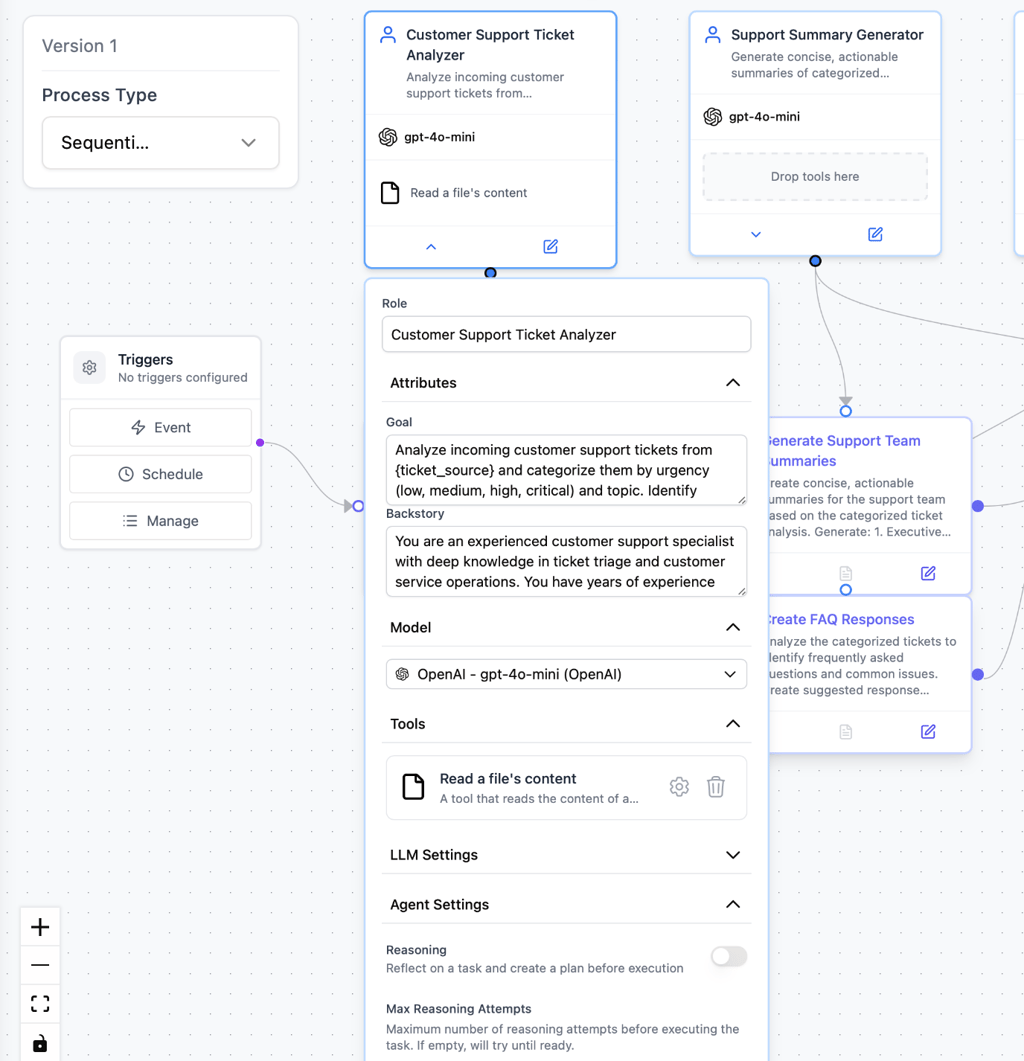
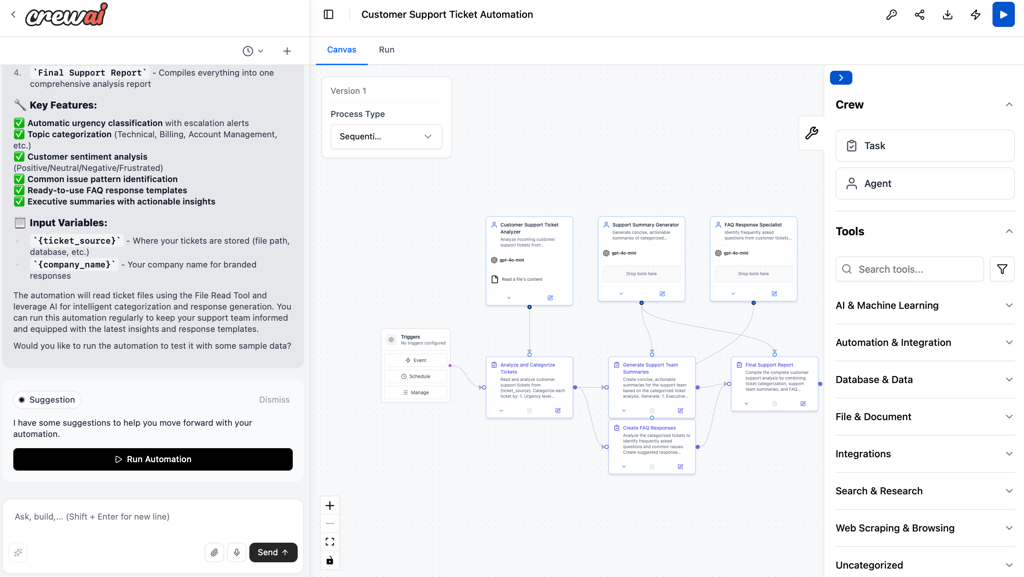
There are two ways to build the first agent workflow in CrewAI: using the code-based, open-source framework or using the visual CrewAI Studio. I decided to build a simple workflow in CrewAI Studio with three AI agents that interact sequentially. Each agent was given precise instructions and strict guardrails for its outputs.
The process was rather straightforward, considering that AI can prebuild the workflow based on your prompt and give you recommendations for a more efficient setup. I think that you can get used to the Studio interface quickly if you have experience with Zapier or Make. Moreover, it allows you to connect to GitHub and GitLab and use existing community code templates for your agents.
CrewAI’s local version is strictly code-based and doesn’t have a visual builder – you can read more about it in our step-by-step CrewAI guide. In short, it allows you to build a more customized and secure workflow via manually defining your agents, tasks, and Crews using Python and YAML.
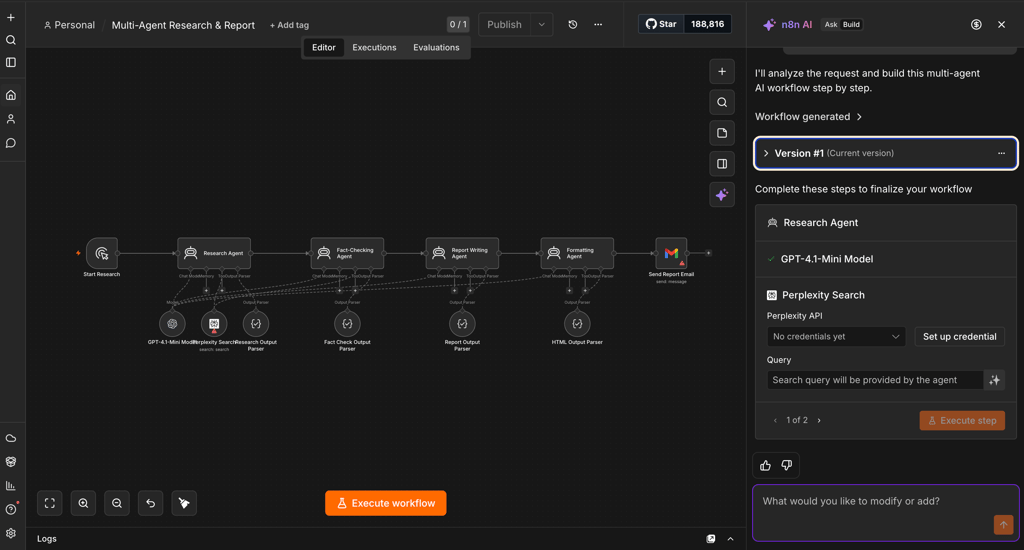
In n8n, I described what I wanted in the AI-based chat, and within a minute, my workflow was ready. I manually checked each node's configuration, updated the LLMs, tweaked the output prompts, and clicked Execute workflow.
My simple research-and-report workflow didn’t require extensive automation knowledge, but something more advanced definitely would. You can read more about building workflows in our n8n review, but I can surely say it feels more technical than CrewAI’s Studio.
It doesn’t have short explanations next to every feature, relies on more specialized terminology, and shows JSON data and precise data mapping between steps. That said, it doesn’t require coding at all, though you can easily add JavaScript nodes and SQL queries if needed.
So, while both tools have a visual builder:
- CrewAI is the developer-first ecosystem. While its Studio is beginner-friendly, its open-source version is the one that’s truly powerful. It’s perfect for Python developers who build apps where AI needs to reflect, research, and handle unpredictable tasks that rigid workflows would be too complex to map out.
- n8n is better for technical ops or marketing teams – it requires an understanding of data structures but not coding. It’s great for automating standardized business processes like routing support tickets, drafting emails, and syncing CRMs.
AI agent depth: reasoning, memory, and multi-agent coordination
AI agent depth is about how much agents remember and learn and how well they can collaborate with each other without human intervention. CrewAI is the gold standard here. Its agents have:
- Short-term memory for the current session
- Long-term memory, where they store insights and build a knowledge base across runs
- Entity memory, where they keep track of specific people, places, or concepts
CrewAI’s agents also act and think autonomously. For example, if you set up a hierarchical Crew, the manager agent can automatically evaluate the goal, decide which worker agent is best suited for a certain subtask, review their work, and send it back for revisions. You can even connect multiple Crews by adding Flows to create complex workflows where entire AI teams hand off data to each other.
n8n’s AI Agent nodes only know what you explicitly feed them. You can attach a standard buffer memory for the current run, but it lacks built-in long-term memory or learning capabilities across sessions (unless you manually build the logic to store and retrieve those insights). Also, an n8n AI agent is fully dependent on your instructions and can’t autonomously route tasks or engage another agent.

Integrations: connecting the outside world
CrewAI connects to 27+ tools and business apps, including Salesforce, Slack, Jira, and Zapier, which gives access to over 8,000 additional integrations. It can connect to your proprietary tools as well, but you have to write a Python script to wrap around your tool’s API.
n8n, on the other hand, was initially built as an API integration layer. It offers 400+ core nodes and 600+ community-built nodes, which are basically pre-configured, drag-and-drop integrations for CRMs, databases, email providers, and social platforms.
What I like the most is that n8n automatically handles OAuth authentication, data pagination, and credential management. If a tool isn't in the library, you simply drop in an HTTP Request node to visually map a REST API call – the same works for proprietary software.
Since the tools function differently, teams often use them together. It may look like this: n8n collects data, listens for webhooks like a new customer email, pulls data from Airtable or a CRM, formats it, and passes it to CrewAI. Then, CrewAI’s agents analyze the data, come up with a strategy, and generate a personalized response to return the finished product to n8n. Finally, n8n executes the final step, like sending the email via Gmail and logging the entire interaction in Salesforce.
Setup and first workflow: what the first hour looks like
In my experience, the first hour in the open-source CrewAI includes the following steps:
- Install Python (versions 3.10–3.13) and the uv package manager
- Start your project via the command line interface (CLI), run , which automatically generates your project directory, and choose your preferred LLM provider and model
- Define your agents and tasks in agents.yaml and tasks.yaml files and handle the orchestration and execution logic in crew.py and main.py files
- Set your LLM provider API keys within a local .env file
Overall, if you’re used to working with the terminal-based local setup, it takes 30 to 60 minutes from installation to building the first Crew. Non-developers may go for CrewAI AMP, where you simply create an account, select a template, and deploy directly in the browser with zero local setup.
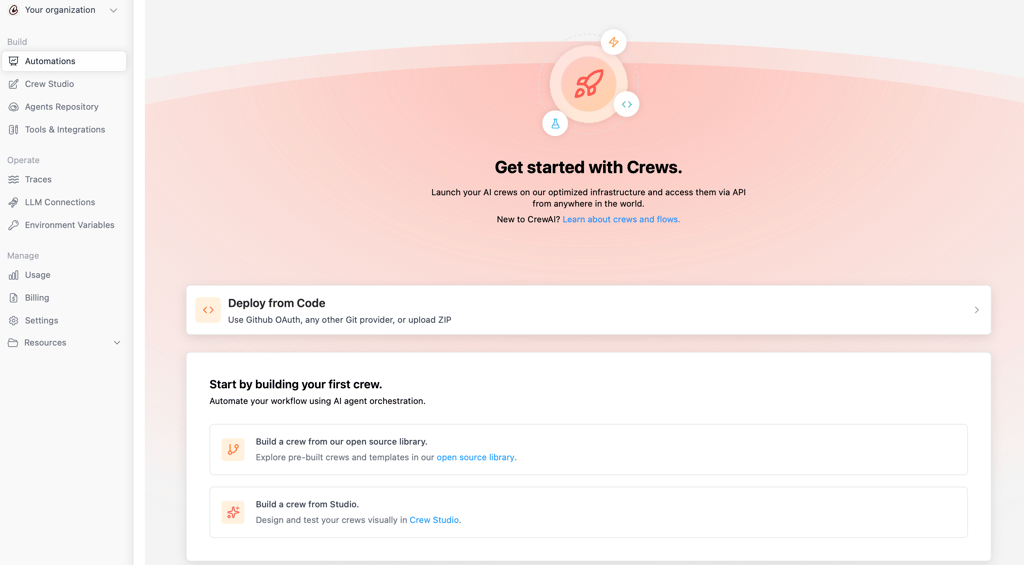
The setup of n8n’s cloud version is even faster: you sign up, open a blank canvas or choose a template, authenticate the needed third-party apps, and trigger your first workflow in less than 20 minutes.
Another way to use n8n is self-hosting for better control and data privacy. The most popular path here is via Docker, where you need to:
- Pull the official n8n/n8n Docker image
- Create a persistent volume to not lose data on restart
- Run the container
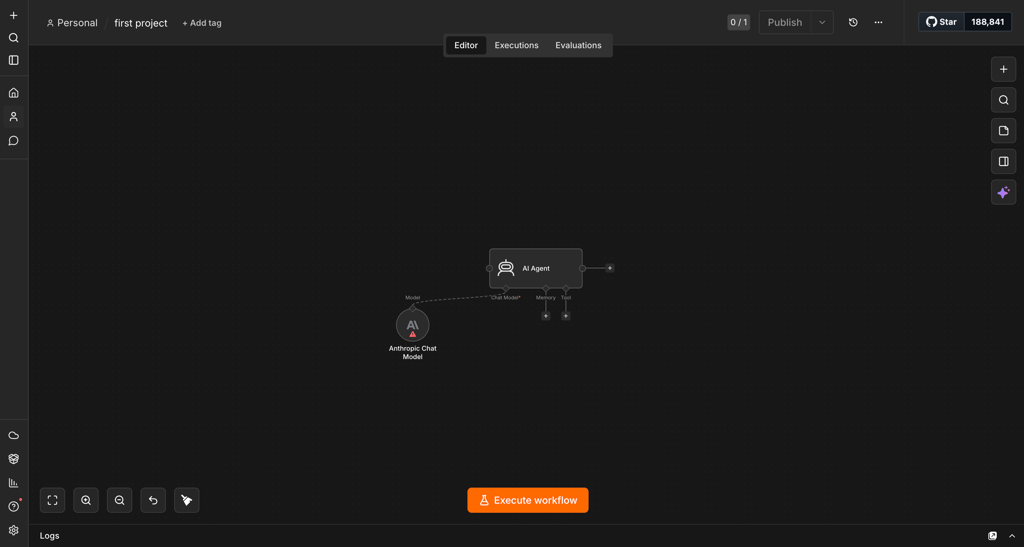
The process takes 10–20 minutes if you’re comfortable working with Docker. Then, in both cloud and local n8n, you can build an AI workflow by dragging an AI Agent node onto the canvas and connecting it to a Chat trigger and a Model node.
I’ve noticed a few difficulties during the initial setup that you may also stumble upon:
- Python version conflicts in CrewAI. You need to make sure to use Python 3.10–3.13. Other versions may not be compatible with CrewAI’s dependencies.
- Vague agent instructions in CrewAI. If you write brief or vague goals in your YAML files, agents may hallucinate interactions with the assigned tools and experience output drift.
- Credential scope errors in n8n. When connecting third-party apps via OAuth, you may authorize the app but forget to check the required permission scopes, which will lead to errors.
- Not testing individual nodes in n8n. It’s hard to isolate and fix the exact failing step if you run the whole workflow at once, so debug and test individual nodes separately.
Pricing: open-source free vs execution-based plans
Both n8n and CrewAI are free if self-hosted – you only pay for your LLM API keys and hosting. However, their web-based cloud versions have paid plans.
First, n8n has a 7-day free trial for each plan and charges per workflow execution. For example, its Starter plan includes 2,500 workflow executions with unlimited steps, while Pro and Business plans allow for a minimum of 10,000 and 80,000 executions, respectively. AI chat-based workflow builder credits are limited and are available only for the n8n cloud.
| n8n plan | Price |
| Starter | $20.00 |
| Pro | $50.00 |
| Business | $800.00 |
| Enterprise | Custom |
CrewAI charges per Crew execution, no matter how many AI agents work within it. It offers only 2 plans: Free (50 workflow executions per month) and Custom (custom price and workflow executions).
When to reach for CrewAI vs n8n
Based on my research, there are 5 scenarios where each tool performs better:
1. Multi-step research and synthesis pipelines. CrewAI is great for open-ended, creative, and research-heavy tasks. Its agents share memory and context, so you can set up Writer, Editor, and Researcher agents that collaborate and improve the output step by step. n8n can also connect multiple AI nodes sequentially, but it doesn’t have built-in agent-to-agent reasoning and reflection.
Workflow example: gather data → analyze → write draft → review and refine
2. SaaS integration and data routing. This is exactly what n8n was built to do – move structured data between platforms. For the same pipeline in CrewAI, a Python developer would have to write custom code for every single integration.
Workflow example: pull from CRM → enrich data → send Slack alert → log in database
3. Scheduled reporting or monitoring. n8n has precise scheduling triggers and predictable execution paths. You know exactly what data is being pulled and where it’s going at exactly 9:00 AM every Monday.
Workflow example: fetch weekly database metrics → summarize trends → email the team
4. Complex AI reasoning where AI agents challenge each other. CrewAI’s agents can question their own assumptions, find edge cases, and debate the best path forward. Also, its hierarchical process, where a manager agent delegates tasks to worker agents, reviews their output, and sends it back for revisions, is something the workflow-based n8n simply can’t replicate.
Workflow example: you ask to create a business plan → manager agent delegates subtasks to worker agents → worker agents research and draft → manager agent revises and finalizes
5. AI-assisted customer support triage. In n8n, an incoming ticket triggers a webhook, an AI Agent node classifies the intent, and standard workflow logic routes it to the correct team. It’s clean and easy to troubleshoot, while using CrewAI for this adds unnecessary latency and unpredictability to a process that needs strict, structured triage.
Workflow example: receive webhook → classify intent with AI → route to department → update CRM
What developers and teams say in the wild
The Cybernews research team and I reviewed public feedback from GitHub, Reddit (r/AI_Agents), G2, and developer community posts to gather the common sentiment about n8n and CrewAI.
CrewAI user reviews
Developers praise how fast they can go from zero to a working multi-agent system. Also, many are surprised that a proper definition of an agent’s persona results in very creative outputs.
They also really liked the removal of LangChain as a hard dependency because it caused version conflicts and slow installation. Of course, many enjoy how active and large CrewAI’s GitHub community is, so anyone can quickly find solutions to common bugs.
Users mostly complain that agents can easily lose the plot and hallucinate tool use when the prompts aren't very rigid. Also, building highly complex workflows requires more trial, error, and debugging than with standard frameworks. Token usage is unpredictable as well, since agents communicate autonomously and reflect on their own work.
n8n user reviews
In n8n, users enjoy its visual, intuitive drag-and-drop builder and its ability to connect to almost any SaaS platform without custom API wrappers. Developers also love execution logs, which let them inspect the exact JSON files on every node, making it easy to fix broken workflows. Finally, the self-hosting option via Docker is a big advantage for users who need strict data sovereignty or want to avoid monthly cloud subscriptions.
Teams looking for autonomous AI collaboration are often disappointed. Building a multi-agent system in n8n requires physically wiring nodes together, so it’s the human who creates the routing paths, not the AI. Then, while self-hosting is free, users complain about the maintenance as they need to manage database migrations, update Docker containers, and handle server security.
CrewAI vs n8n: how to decide
Choosing between CrewAI and n8n is actually simple: go for CrewAI if you need complex AI reasoning and choose n8n for straightforward data routing.
Here are more detailed reasons to choose CrewAI:
- You have Python developers comfortable with multi-agent frameworks
- You need autonomous agent collaboration when they reason about each other's work, delegate tasks, and refine their own outputs
- You want flexible LLM support and already pay for API keys
- You’re prototyping or researching with agentic AI patterns, not primarily integrating SaaS tools
Go for n8n if you:
- Want a visual workflow builder accessible to both technical non-developers and developers
- Need to connect many SaaS tools, APIs, and databases, especially with prebuilt nodes
- Prefer cost-predictable, self-hostable infrastructure with a proven production track record
- Are adding AI as one intelligent step within a broader workflow, not building an agent-first system
You can also use these AI tools simultaneously (which is one of the most popular application scenarios) if your workflow has both a heavy integration layer and a reasoning layer.
Best alternative: nexos.ai
CrewAI and n8n sit at two ends of the automation spectrum: a code-first multi-agent reasoning platform vs a visual workflow-first tool with thousands of integrations. If you feel neither option fits well with your workflow, try out nexos.ai.
nexos.ai basically bridges the gap between these two extremes by offering a completely no-code agent builder. It allows you to deploy autonomous AI agents, similar to CrewAI, with native integrations like n8n. It’s a middle ground for ops and marketing teams who need the deep intelligence of autonomous agents without writing Python or manually wiring complex workflow nodes.
FAQ
Can CrewAI and n8n work together in the same pipeline?
Yes, CrewAI and n8n can work together in the same pipeline. In this case, CrewAI can be responsible for the reasoning behind the pipeline, while n8n is for data routing and integration with SaaS tools and APIs. For example, n8n can pull data from CRMs or web sources, send it to CrewAI for analysis, and send the final output to the responsible team.
Do I need to know Python to use CrewAI?
Yes, it’s better to know Python to use CrewAI to the full extent. While it has a cloud version, CrewAI AMP with the visual workflow builder CrewAI Studio, it still requires coding for complex, deeply customized automations.
Which is better for production reliability at scale?
n8n is better for strict production reliability because it relies on deterministic, step-by-step workflows that are highly predictable, auditable, and easier to monitor at scale. CrewAI, in turn, relies on AI autonomy, which can lead to unpredictable execution and output drift at a large scale if the agents aren’t defined by strict guardrails and code.
How do their AI agent capabilities actually differ?
The main difference is the autonomy level. CrewAI supports native multi-agent collaboration, with its agents sharing memory, debating, and autonomously delegating tasks to one another. n8n, on the other hand, uses single-agent nodes where AI executes a specific task according to the scenario written by a human.
Which is cheaper to run for a small team?
n8n is cheaper – while both offer free self-hosted options, CrewAI's agents talk to each other and loop through tasks, which can consume a massive amount of API tokens. n8n's predictable workflows use fewer tokens.