CrewAI review 2026: my honest verdict on multi-agent AI
Being behind major reports like The Mother of All Breaches and RockYou2024, our in-house cybersecurity experts and journalists provide unbiased, real-world testing and in-depth analysis.
We maintain complete transparency by openly sharing our testing methodologies with our audience.
Learn more
CrewAI is an open-source Python framework for orchestrating teams of AI agents in role-based, collaborative frameworks. I reviewed CrewAI together with the Cyberenews research team, testing both the open-source framework and the paid AMP (Agent Management Platform) across real workflow scenarios.
Based on my experience, CrewAI is best for multi-agent task delegation in complex research-and-execute pipelines and automating structured workflows without rebuilding the infrastructure from scratch. What frustrated me was the steep Python requirements and the execution-based pricing, which significantly increases the overall cost. In my opinion, CrewAI is suitable for developer teams building production-grade agentic automation – solo users and non-technical teams may have a hard time with it.
In this CrewAI review 2026, I cover in detail the CrewAI architecture, features, how to get started, pricing, common use cases, user feedback, and alternative options. Continue reading to find out whether CrewAI is what you were looking for all this time – or if an alternative is better for your needs.
Quick overview of CrewAI
| Best for: | Engineering teams and enterprises |
| Key features: | Role-based agent architecture, deterministic flows, monitoring and tracing, visual workflow builder |
| Free version: | ✅ Yes |
| Starting price: | Custom |
Pros and cons of CrewAI
What CrewAI is (and how it works)
CrewAI is a multi-agent AI orchestration framework. Rather than being a chatbot-based AI tool for general automations or a low-code app builder, CrewAI orchestrates complex workflows and pipelines by distributing tasks among role-based AI agents.
These agents take as input data sources, API calls, file content, user prompts, and database queries, and then coordinate sequentially, in parallel, or conditionally to produce structured documents, enriched data, API responses, automated reports, or action triggers. For example, a research-and-compile pipeline may have four role-based agents – a Researcher, a Writer, an Analyst, and a Manager – that each have specific responsibilities and tasks to execute.
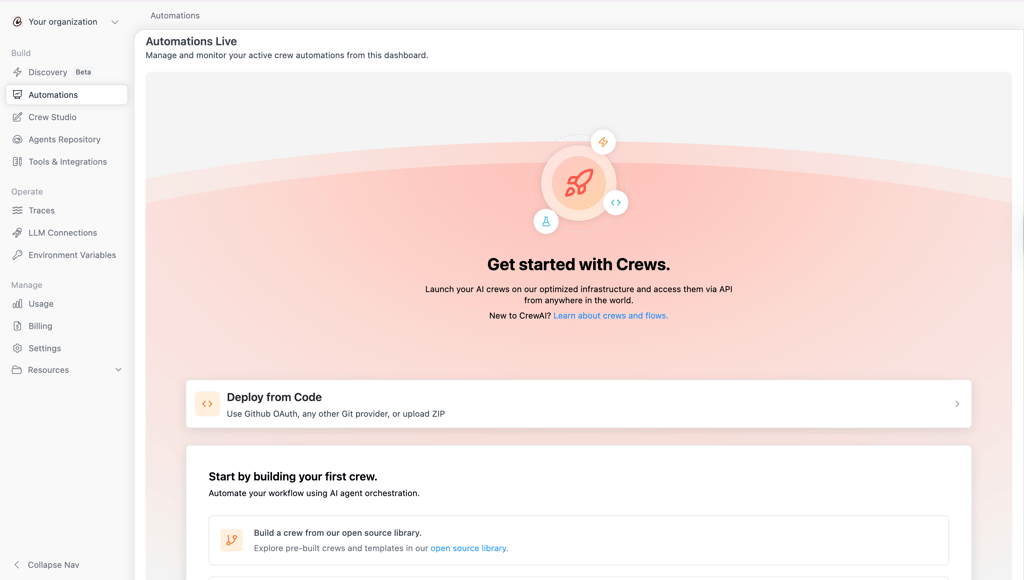
CrewAI is therefore a key tool for replacing fragile scripts, manual repetitive tasks, and single-agent LLM calls that lack delegation and specialization. It helps to take your business operations to a completely new level.
Finally, CrewAI supports two framework modes: Crews and Flows. The Crews mode is more flexible and LLM-driven, with role-based agents collaborating on specific tasks. The Flows mode is more deterministic and event-driven, great for reproducible and auditable execution.
Who is CrewAI best for?
CrewAI is an advanced tool that addresses quite specific business needs. It is also more advanced than a simple no-code app builder or a chatbot, and requires extensive Python knowledge. Here’s a short decision guide on which teams will benefit from CrewAI the most:
Best-fit users:
- Engineering teams building multi-agent automation pipelines who are comfortable with Python
- Enterprises running complex workflows that can't be served by single-agent tools, such as research, content production, lead scoring, and compliance checking
- AI and ML teams prototyping agentic workflows that need rapid iteration with any LLM provider
- Organizations with self-hosting requirements – CrewAI’s open-source framework lets you run entirely on your own infrastructure
- Developers needing LLM model flexibility – with CrewAI, there is no lock-in to one provider, as it supports OpenAI, Anthropic, Groq, and local models
Not the best fit for:
- Non-technical teams or solo users without Python expertise – CrewAI requires Python knowledge for more complex automations
- Teams requiring fully deterministic, auditable outputs at every step – CrewAI agent behavior can drift if Flows are not carefully implemented, and the risk of that happening is quite high
- Organizations in strict compliance environments that require on-premises self-hosting with zero cloud dependency – CrewAI’s full AMP feature set is cloud-hosted
CrewAI key features and capabilities
With the Cybernews research team, I reviewed CrewAI's feature set, focusing on the capabilities that actually affect day-to-day development and production use. The features we reviewed include the central automation modes – Crews and Flows – as well as LLM support, tool integrations, the AMP suite, and the visual Crew Studio builder.
Role-based agent architecture and Crews
CreawAI’s Crews feature is what makes the tool stand out the most. As a user, you can define AI agents with a specific role, including their goal and backstory, and assign them specific tools. Such definitions ensure that the AI agents’ behaviors are coherent and specialized – and take a lot less time than prompting a single LLM. Further, you can orchestrate several different agents to work together.
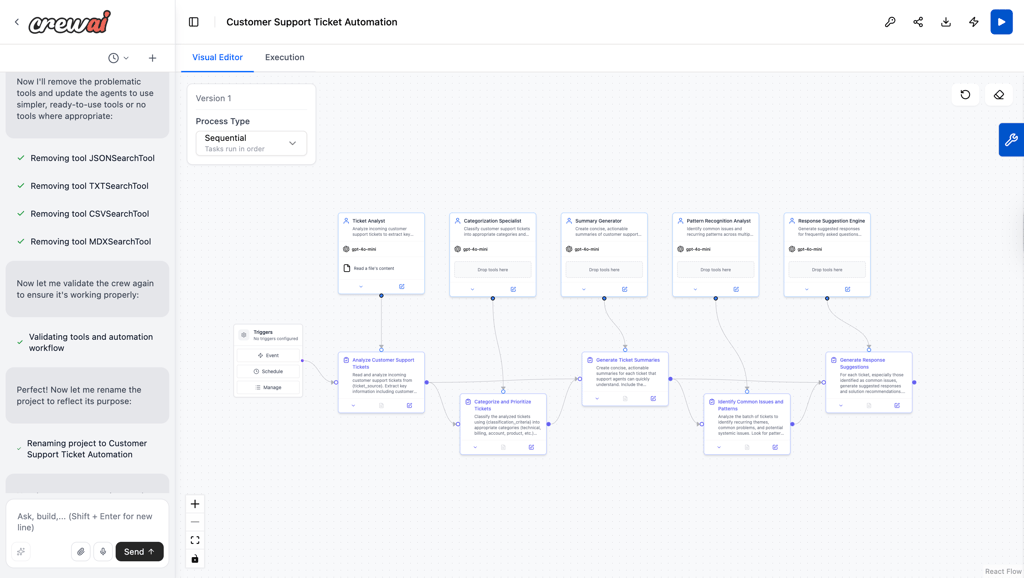
For example, our research team created a 2-agent content crew, including a researcher and a writer, to produce publication-ready content as well as research reports from a single URL input. Setting this up was surprisingly easy. All we did was describe what the workflow is for, and CrewAI generated the workflow logic. We made some manual edits to the workflow, but there is also an option to ask CrewAI to make the changes. It also proactively suggests improvements, which is a nice touch.
Some points of caution we encountered in our testing were the role and backstory hallucinations resulting from poor agent definition. Also, circular delegation can impact the overall workflow, so it’s best to avoid it.
Flows: deterministic pipelines and event-driven logic
Flows is a mode of workflow production for reproducible and auditable execution paths. These paths include conditions, loops, error handling, and state management. It is a more structured alternative to the purely autonomous Crews mode.
Flows are especially useful or even critical when reliability, auditability, and reproduction are the most important. For example, Flows would work well for a data enrichment pipeline that fetches CRM records, enriches them via API, validates the outputs, and writes to a database. Such a pipeline can be restarted from any step in case of failure, and can reduce some ambiguity resulting from the autonomous multi-agent orchestration. However, the Flow mode also adds a lot of complexity and requires continuous oversight, which makes it a bit of an overkill for simple sequential tasks.
LLM support and tool integrations
CrewAI supports any LLM, including from OpenAI, Anthropic, Groq, and Ollama (for local deployments). This means that there is no vendor lock-in – you will be able to swap models without the need to rewrite agent logic. For example, if you want to switch from OpenAI to Anthropic for cost reasons, you can do so without a single change in environment variables.
CrewAI also provides access to more than 60 built-in tools that cover web search, file I/O, code execution, SQL queries, and API calls. With them, you no longer need to write custom code for common operations. On the other hand, be aware that third-party integrations, such as CRM or SaaS apps, will require custom tool wrappers. In this sense, CrewAI is a bit less convenient than tools like Zapier.
Monitoring, tracing, and guardrails (AMP)
The paid production-grade agent management platform (AMP) lets you trace, run history and step-level inspection, detect hallucinations via faithfulness scoring, mask PII, and use guardrails. For example, in case of a failed Crew run, AMP can help detect which agent step drifted as well as the exact input or output at each step – this makes it much easier to correct faulty workflows.
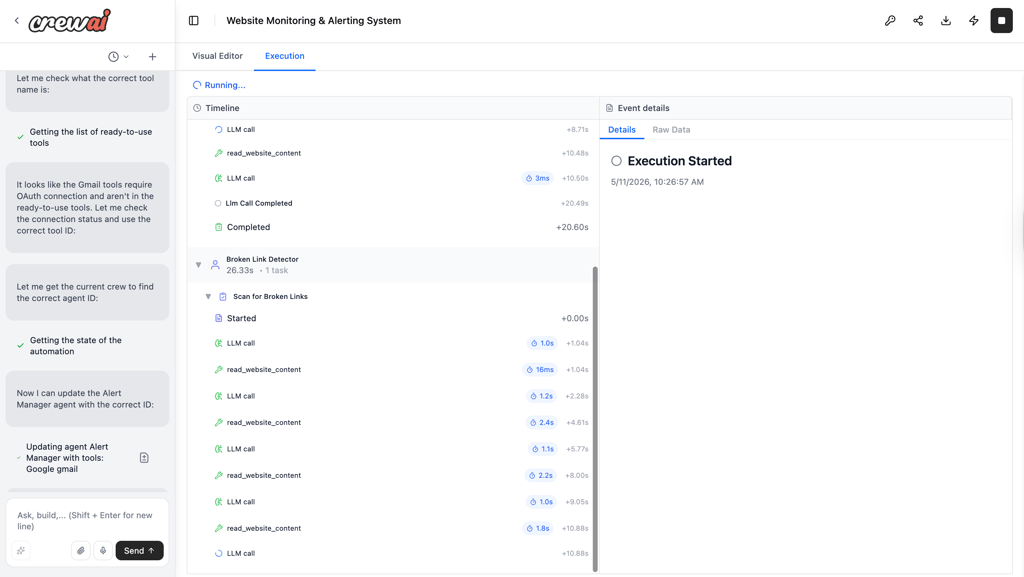
The reasoning behind adding the AMP is that the open-source CrewAI framework doesn’t have built-in observability. This means that without AMP, you will need to build your own logging and monitoring solutions. On the other hand, you’ll need to consider your budget, since the CrewAI AMP is a paid option with custom pricing.
CrewAI Studio: visual builder and team collaboration
As part of the AMP, CrewAI Studio is a paid workflow builder for non-engineers and users unfamiliar with Python. It is a drag-and-drop builder for agent configuration and agent design. With it, you can conduct visual Crew tests, manage collaboration access via seats and roles, and even export to Python code.
The core use case for CrewAI Studio is users with no engineering background or experience prototyping and reviewing workflows before hand-off to developers and deployment, such as demos and stakeholder alignment. The possibility of exporting workflows to Python makes it easier for engineers to deploy approved and tested workflows.
The CrewAI Studio interface is clean and easy to navigate. What I especially appreciated was the AI guidance and proactive suggestions for workflow improvements inside the Studio environment. In some cases, such as changing report delivery from Slack to Gmail, the AI made all the changes itself, with no manual adjustments needed from my side.
The only downside to CrewAI Studio is that it is cloud-only and part of AMP. This means that open-source users do not get access to the visual interface.
Getting started with CrewAI
To start with CrewAI, you can take two paths: the open-source framework or the AMP cloud platform path. The open-source framework is free, but requires Python knowledge, operates as a code-only environment, and can be set up locally. On the other hand, the AMP is account-based and includes a visual builder but does not offer a local setup option.
We tested both paths – here are short guides for each:
Path 1 – open-source setup checklist
- Verify Python 3.10-3.13 installation. Run python 3.-- version in your terminal. If python is not installed, download it from python.org. We used version 3.12.7 for our tests.
-
Install the uv package manager. On macOS or Linux run:
curl -LsSf https://astral.sh/uv/install.sh | shand activate it withsource $HOME/.local/bin/env -
Install CrewAI command-line interface. Run
uv tool install crewai. -
Create your project. Run
crewai create crew my_crew. Select template 1 and your preferred AI model. We used ChatGPT-4o mini for testing. -
Set your LLM API key. Open the
.envfile in your project folder, and add your API key. Keep in mind that for CrewAI to run on any LLM, credits or a billing-enabled account is required. - Define your agents and tasks in YAML or Python.
-
Run your Crew. Navigate to your project folder and run
crewai run. Your agents will start working, and the output will be saved to report.md.
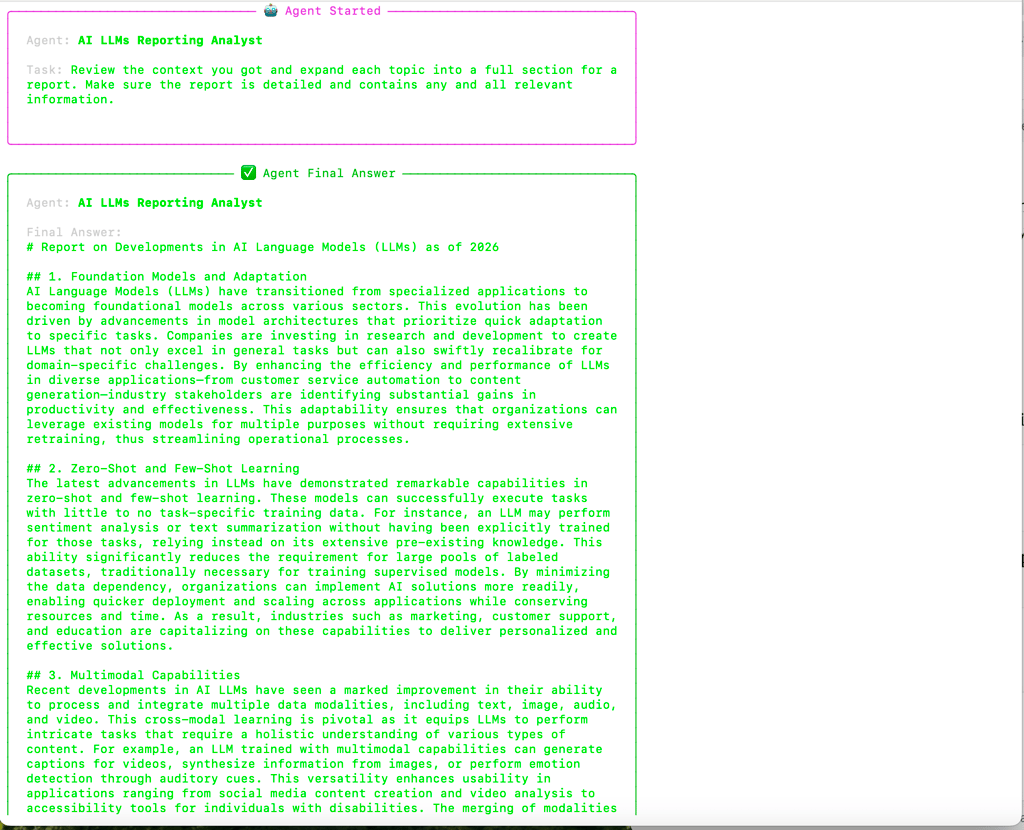
Overall, setting up the open-source option may take some time, especially if you are not familiar with Python. In our tests, we ran into some issues, such as settings that needed manual adjustment and some minor API key issues. What really helped was that CrewAI provides excellent documentation and even videos to guide you through the setup project. The overall impression was that the first workflows can take some time to understand, but once you do, it becomes relatively easy.
Path 2 – AMP cloud setup checklist
- Create your CrewAI account and log in.
- Open CrewAI Studio and set up your API keys.
- Create a new workflow. AI assistance might be helpful at this point.
- Deploy the workflow.
- To monitor the workflow, navigate to the Executions tab.
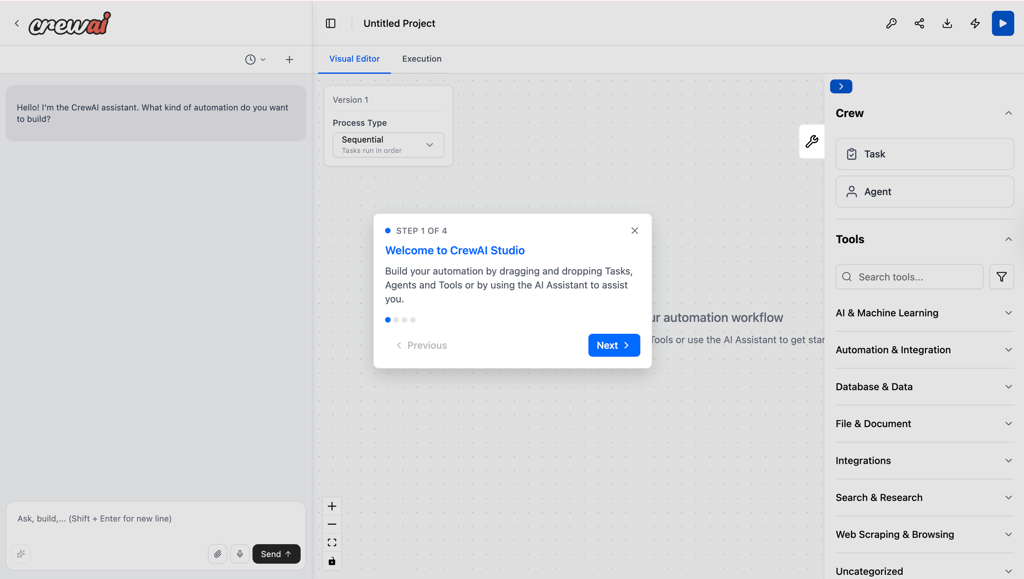
Simple first workflow example (starter crew)
Our sample workflow was a Research and Writer agent workflow. The idea behind it is simple:
- You, the user, provide an input topic
- The Research agent searches the web and summarizes the findings
- The Writer agent drafts a structured output
- The final result is saved as formatted report
Customer support and community
CrewAI has a pretty extensive support and community network, including but not limited to documentation, an active Discord support channel, and community templates. For example, the r/AI_Agents subreddit has real production discussions, which may help with edge cases. On GitHub, CrewAI has more than 47K stars.
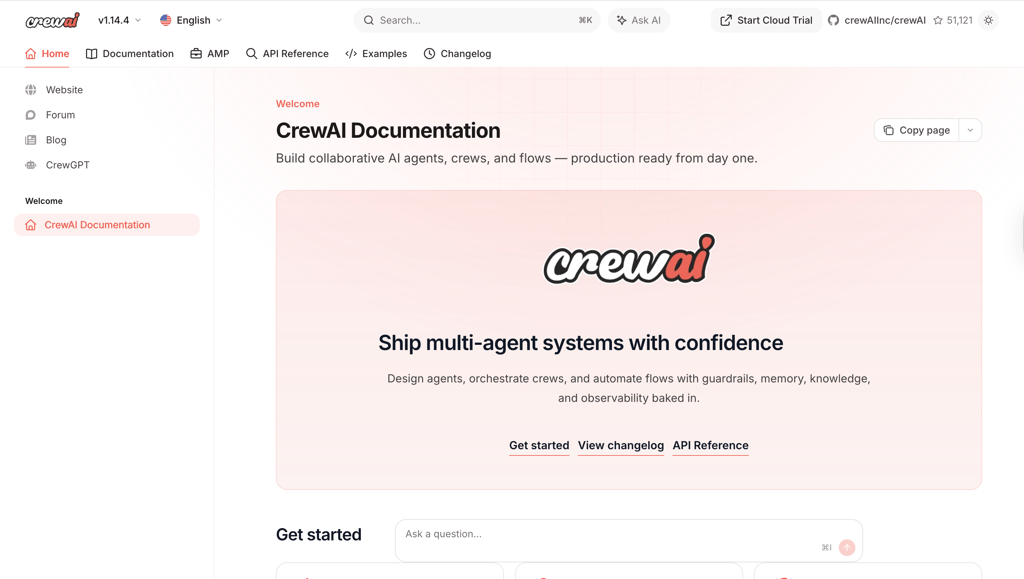
Here are all the support channels for CrewAI:
- Documentation on docs.crewai.com. The documentation covers everything from agents, tasks, tools, flows, and LLM connections to deployment. It has technical depth, which makes it a useful resource for developers. However, for non-technical users, it might be a little less useful.
- Active Discord community server. It is the fastest route to answers on framework-level questions.
- crewAIInc and crewAI on GitHub Issues. The space has active maintainers and includes regular releases (v1.14 by early 2026). However, before filing an issue, make sure to check for known bugs.
- Enterprise support, which includes a dedicated CSM and SLA for Enterprise tier customers. Unfortunately, it is not available for users below the Enterprise level.
- Community templates are available in AMP and on GitHub. I found that their quality varies, but in general, they cover pretty common use cases, such as content pipelines, lead scoring, and research automation.
Scalability, privacy, and security
CrewAI does offer some privacy and security guardrails with its paid Enterprise AMP plans, but security still largely remains the user’s responsibility.
Here are some aspects of CrewAI security to keep in mind:
- Running CrewAI as an open-source framework means that security is entirely your responsibility. There are no built-in auth, audit logs, or access controls in the open-source framework.
- Self-hosting can ensure full data control, but security infrastructure still remains your responsibility.
- The AMP Enterprise tier offers some built-in security, such as PII detection and masking, role-based access, secret manager integration, audit trails, and SSO. Additionally, this tier runs Crews in isolated VPCs and includes SOC2 and HIPAA compliance.
- Sensitive credentials, personally identifiable information (PII), and confidential business data should not flow through prompts unless you have a data processing agreement with an LLM provider. Every prompt and step in a given CrewAI workflow is carried over by the LLM API call to the LLM provider, which is why you should exercise extreme caution with sensitive data.
Additionally, if you have plans to scale your projects with CrewAI, it will be useful to keep certain factors in mind:
- Execution limits are hard caps. CrewAI offers no overage billing, and the agents stop when the quota is hit. Therefore, you should plan headroom carefully.
- Complex flows with many agents and external API calls can consume executions faster than expected.
- Flows are better for production reliability than Crews, since there is less autonomy and stricter, deterministic rules.
- Rate limits from LLM providers may result in failure. To mitigate this, it’s recommended to build retry logic or use CrewAI’s built-in error handling.
- Maintenance overhead grows with workflow complexity, which means that you should plan for periodic retuning as LLM behavior evolves.
Plans, pricing, and what you get
CrewAI has two modes of access. The open-source framework is completely free – you pay only for LLM API usage and your own hosting. The paid AMP cloud platform uses tiered execution-based plans, with pricing only visible after account creation. Here’s a summary of the AMP pricing:
| Plan | Price | Best for | Key limits | Notable features |
| Basic | Free | Solo users or small teams | No on-site support and training, limited executions/month | Visual editor and AI copilot, GitHub integration, 50 workflow executions/month |
| Enterprise | Custom | Enterprises, developer teams | Custom pricing can be difficult to estimate for tight budgets | Free trial, private infrastructure option, on-site support |
Something to keep in mind with the AMP platform is how executions are counted. If you run a full Crew one time, it counts as one execution, no matter how many agents or steps there are. This means that complex flows spend less executions, but executions with many agents and steps can be less reliable and lead to hallucinations. Therefore, caution and careful balance assessment are crucial here.
CrewAI real-world use cases
Based on our research and testing, here are some real-world examples where CrewAI actually excels:
- Content production pipeline. This is a stable, high-value, and one of CrewAI's most cited production use cases. The basic workflow follows as such: researcher agent scrapes sources, Writer agent drafts, Editor agent refines – the output is a publishable article.
- Lead scoring and enrichment work well when scoring logic is defined precisely and outputs are validated. The basic workflow includes a CRM trigger to the Research agent pulling company data to the Analyst agent scoring it against ICP, with the result being written back to CRM.
- Automated research reports are common in analyst and investment teams. The workflow they often use is a prompt or a schedule triggering agents to search, synthesize, and format a report on a defined topic.
- Customer support works for structured support categories, but is less reliable for edge cases requiring judgment. The basic structured support workflow is as follows: classified incoming tickets are routed to specialist agents, who then draft response suggestions.
- Code review and documentation are popular, but for proper implementation, they require careful output validation. The general workflow is to pass a codebase or PR for agents to analyze, summarize, and generate documentation or review comments.
User feedback: the patterns that show up
CrewAI has a huge community both on GitHub and Discord, and is frequently discussed on the r/AI_Agents subreddit. Here are some patterns that users mention in their feedback for CrewAI, especially when discussing specific use cases or recurring issues:
What users like
- You can go from a workflow idea to a prototype very fast
- The role/goal/backstory pattern produces coherent agent behavior when defined well
- Active GitHub and Discord community with responsive maintainers
- Open-source framework is genuinely useful without paying
What users complain about
- Building complex agentic Flows requires significant trial and error, which prolongs the testing-to-production timeline
- Execution-based pricing escalates fast, and the pricing being hidden behind account creation and login is frustrating to buyers
- Agents tend to drift with non-deterministic outputs in production without careful Flows implementation
- Users are missing native integrations with SaaS tools
- Production-grade observability is paywalled behind AMP, and the free framework has no built-in monitoring, which users consider a huge oversight
CrewAI vs competitors
Here’s how CrewAI compares to its competitors in terms of use cases, ease of use, flexibility, pricing, and drawbacks:
| Tool | Best for | Ease of use | Flexibility | Pricing feel | Biggest drawback |
| CrewAI | Python developers, multi-agent orchestration and workflows | Low for non-developers, high for Python engineers | Very high: open-source, code-first, customizable agents and tools | Efficient if you self-host | Requires Python skills, infrastructure decisions, and more setup than no‑code tools |
| Gumloop | Non-technical teams building no-code AI workflows and agents | Very easy: drag‑and‑drop workflow canvas, no code | High within visual workflows; less low-level control than code frameworks | Accessible for SMB teams | Complex logic can get messy; less suited for custom agent logic |
| DustAI | Product teams embedding AI workflows and retrieval into apps | Moderate: more technical than no‑code | High for data + LLM orchestration | Platform pricing is aligned to usage and teams | Less focused on multi-agent autonomy and more on pipelines and knowledge workflows |
| Lindy | Business users wanting AI agents that operate over tools with minimal setup | Very easy: SaaS UI and not much configuration | Medium-high: good actions/integrations, but opinionated vs open frameworks | Premium automation assistant per user per team | Less customizable at the framework level, risk of single provider lock-in |
In summary, CrewAI is the right choice when you have Python engineers and need multi-agent depth. For non-technical teams, Lindy or Gumloop remove the setup friction, and DustAI is a better alternative for complex flows rather than multi-agent orchestration.
Final verdict: should you use CrewAI?
CrewAI is the strongest open-source multi-agent framework available right now for Python developers. If you have the technical talent, it's the fastest path from idea to a working multi-agent system. If you don't have Python developers, it's the wrong tool.
Best reasons to choose CrewAI:
- Fastest prototyping speed in the multi-agent AI tools space. You can build a working Crew in under an hour from scratch.
- Genuine LLM flexibility. You can swap providers and use local models – there is no single provider lock-in.
- Strong community and active development. In v1.14, the most complained-about limitation (Langchain dependency) was removed. CrewAI has active communities on Discord and Reddit.
Reasons to look elsewhere:
- If you don't have Python knowledge or developers, Lindy, Gumloop, or similar no-code tools are more practical.
- If your budget is tight and you need to scale. The pricing jump from the Basic plan is steep with no middle ground.
- If you need deterministic, fully auditable outputs without building Flows carefully. CrewAI agent behavior is inherently probabilistic.
FAQ
Is CrewAI safe for sensitive data?
Yes, CrewAI is safe for sensitive data if you use the AMP Enterprise plan. It includes appropriate safeguards for PII and is HIPAA compliant. However, the open-source framework does not include any security measures, so sensitive data security and privacy is your responsibility.
What are the main limits on the free plan?
The free open-source framework is unlimited but requires Python knowledge. The Basic AMP plan is free and offers 50 workflow executions per month, access to the visual editor, and GitHub integration, but lacks on-site support.
Do I need to know Python to use CrewAI?
Yes, you need solid Python knowledge for the open-source framework to define agents and tasks and run your Crews, especially for complex workflows. You don’t need to know Python with the paid AMP platform. The CrewAI Studio provides a visual, drag-and-drop builder that allows non-engineers to create and deploy workflows without writing Python code.
How hard is it to maintain CrewAI workflows over time?
Managing multi-agent AI workflows requires significant maintenance with increasing complexity and as LLM behavior evolves. Therefore, periodic re-tuning is necessary to ensure reliability, especially for complex Flows.
Which alternative is best if CrewAI isn't a fit?
If you lack Python skills, try Lindy or Gumloop for no-code simplicity. However, for complex data and LLM orchestration within advanced pipelines rather than multi-agent autonomy, DustAI is a better fit.