Glide review 2026: complete hands-on evaluation of no-code app builder
Being behind major reports like The Mother of All Breaches and RockYou2024, our in-house cybersecurity experts and journalists provide unbiased, real-world testing and in-depth analysis.
We maintain complete transparency by openly sharing our testing methodologies with our audience.
Learn more

Many people struggle to transform spreadsheets into fully operational apps or websites without coding. Glide solves the issue by helping non-programmers create apps using spreadsheets such as Google Sheets, Excel, or Glide Tables. Built-in AI helps smooth out work and edit the app without coding.
In this Glide review, I look at how the platform performs in 2026, when cost efficiency, speed, and easy-to-use internal tools matter more than ever. I cover the product’s usability, real testing results, pricing, pros/cons, and who it’s best for.
Quick overview of Glide
| Best for: | Simple, data-driven apps and internal tools, quick no-code app creation |
| Key features: | Prebuilt components, AI-powered features, built-in logic and workflows, real-time data updates |
| Free version: | ✅ Yes |
| Starting price: | $19.00/month |
Pros and cons
Here’s a summary of what stood out to me during testing, along with the areas where Glide still has room for improvement.
What is Glide?
Glide is a no-code AI platform that transforms Google Sheets, Excel, Airtable, or other databases into intelligent and responsive apps that work seamlessly on both mobile and desktop devices. The platform aims to make software creation fast and accessible for people without a programming background.
Users can build and style pages using visual components, such as dashboards, and set up workflows. Glide relies on drag-and-drop builders, visual editors, and pre-built components, which makes app creation easier to manage and understand.
Apps built with Glide are delivered as progressive web apps (PWAs), which can be accessed via a browser or QR code and installed like native apps. They aren’t published on the Apple or Google app stores, but this allows for faster deployment and easier updates.
What Glide actually offers: core features and capabilities
Glide enables users to quickly create functional applications by combining structured data, visual design tools, and automation features. Its core capabilities focus on making app creation easy. In this part, I will discuss Glide’s core features and capabilities.
Spreadsheet-powered app creation
Glide is built around structured data. Users can connect to different data sources, such as Google Sheets, Excel, Airtable, or the app's own Glide Tables, which serve as the app’s backend. Meaning that once you synchronize your data, Glide pulls information from it and generates the app’s interface based on that data.
Fortunately, when you need to edit or update data in the spreadsheet, you don’t need to synchronize it again with your app. Once you add the table and make any changes, they will automatically be reflected in your app.
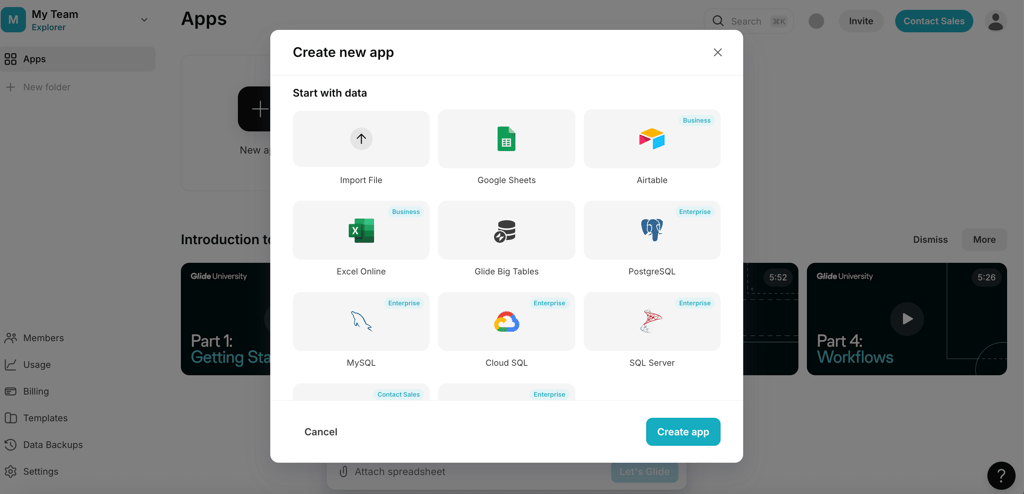
In case you are aiming for more complex apps, Glide also supports various larger databases such as MySQL, PostgreSQL, Microsoft SQL Server, as well as cloud databases like Google Cloud SQL.
Visual drag-and-drop builder
The app interface is created using Glide’s visual layout editor. Users add components such as lists, tables, rich text, additional content (e.g., images or audio), and additional actions by selecting them from a component panel.
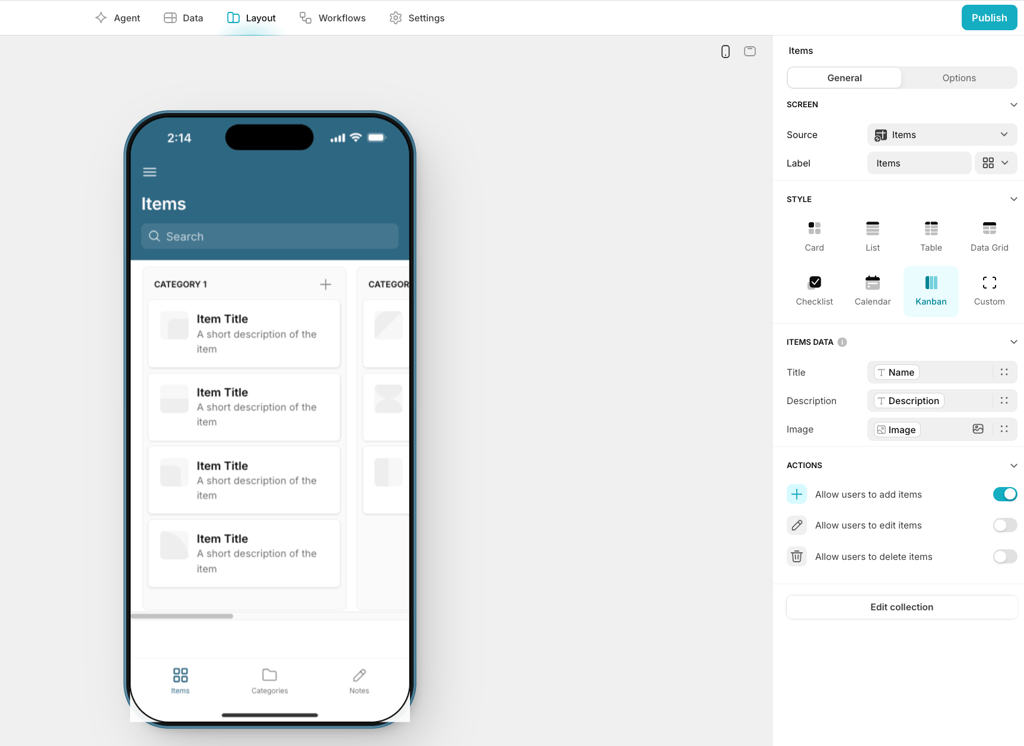
Each component can be customized individually. For example, when I chose a card style, I was able to edit all the information that must be shown in each card, such as a picture, publication date, author, and more, depending on the database. While editing it, I could see a real-life result in the center of the screen. I really appreciated the convenience of switching between mobile and desktop views as well.
At first, the design abilities might seem somewhat limited. In my experience, Glide offers enough options, and you can get creative even with what it proposes. Overall, it makes app building easier as the added styles are uniform, and any added colors will automatically fit the app’s interface nicely. If you need a more complex design or already have one in mind, Glide might not be the best fit for you.
Templates and user experience
Glide provides a library of pre-built application templates, with hundreds of possible options. Whether users need an app for business tools, dashboards, CRM, or events, they can choose a template and copy it. They can then edit the interface, workflows, and data to better fit their needs.
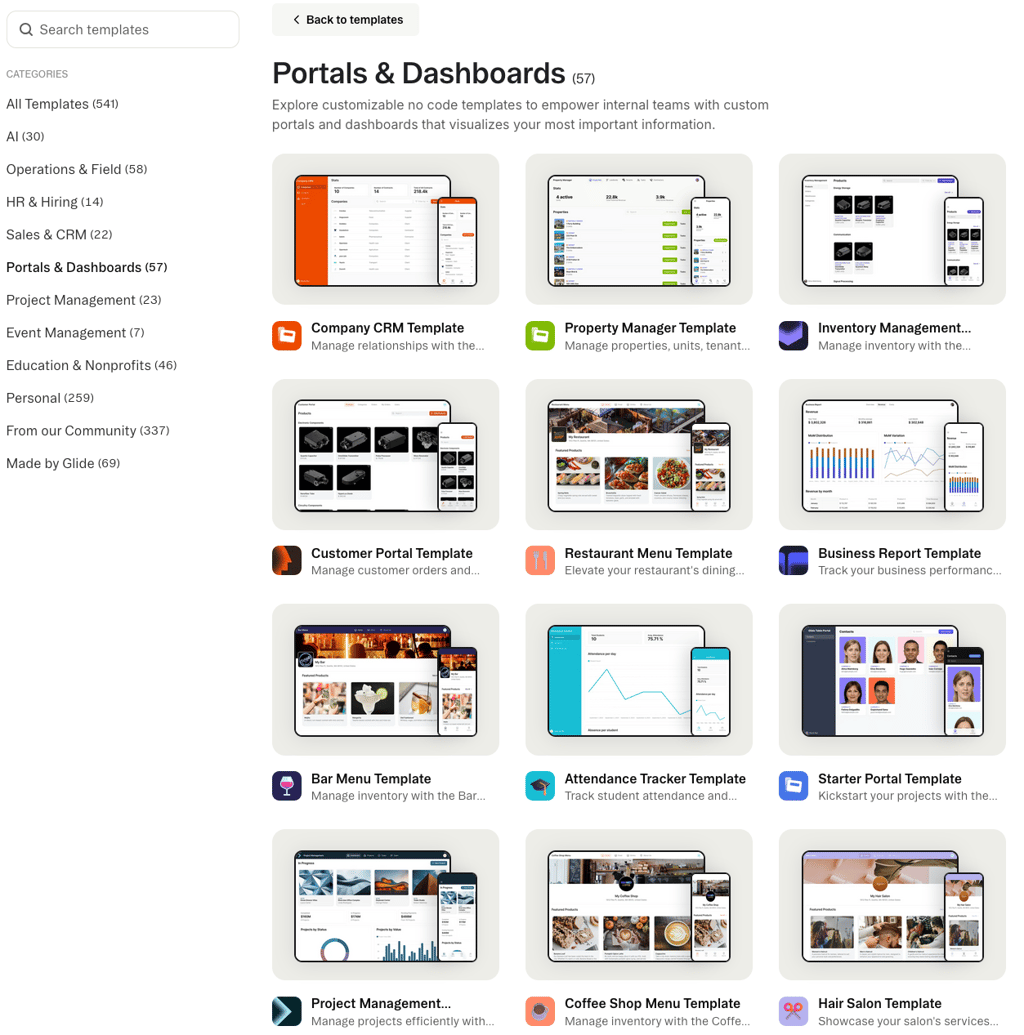
While there are plenty of free options, you might need to pay additionally for the more advanced templates. For example, for a simple 1-person booking app template, you will need to pay $4.99, but a more complex one will cost you $199.99.
Templates can be very helpful if you have a vision. With hundreds of templates, you can find the right one and make some minor changes in the design. Templates will save you time and will let you create an app that is already polished and well put together.
Workflow automation and logic
Basic app interactions can be edited via the platform’s Layout section. It allows users to add new components to the application and determine how they behave when interacted with.
For more advanced automation, Glide provides a node-based workflow editor that lets you automate actions triggered by events in your app, such as button clicks or form submissions.
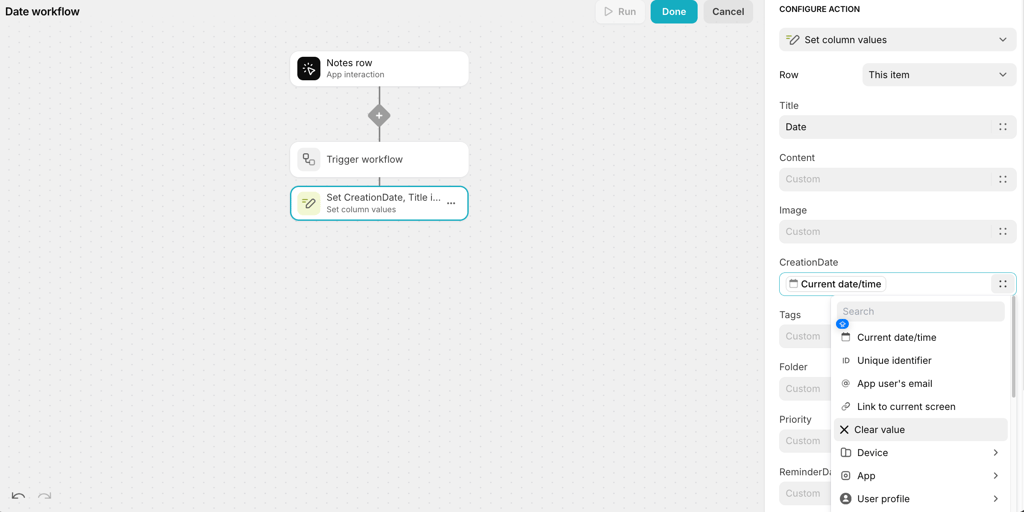
On the downside, workflows are not beginner-friendly. Without a doubt, they provide a high level of control, especially in the context of no-code app builders, but figuring it out can be difficult if you’re a first-time user.
Collaboration and access control
As a platform heavily focused on business projects, Glide lets you manage teams within its native dashboard. Account administrators can add new users by sending them links or adding them by entering their email addresses.
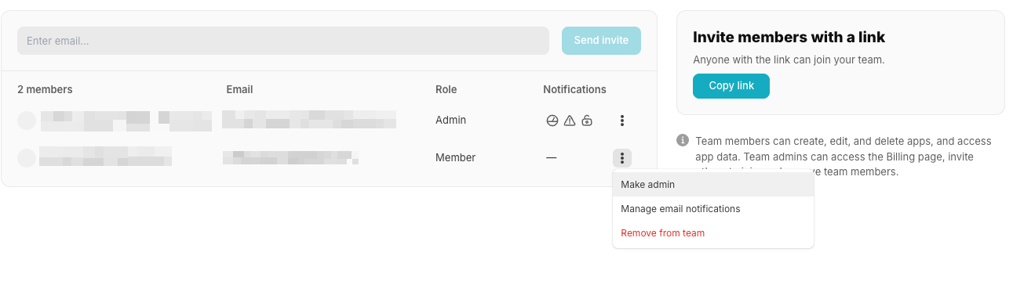
The newly added members can be assigned specific permissions, which can determine which folders are accessible and the level of control over created apps. A single account can create several teams, each of which can have unique members with different permission levels.
It’s also useful that Glide separates members from users. You can add members who will have access to all your projects in Glide and to all the templates you bought. In the meantime, users are added to each project separately and will only have access to that project.
My Glide experience: ease of building apps and usability
From my time working with Glide, I found its interface very intuitive. In my opinion, it won’t be a hassle for users without a technical background to figure out how things work.
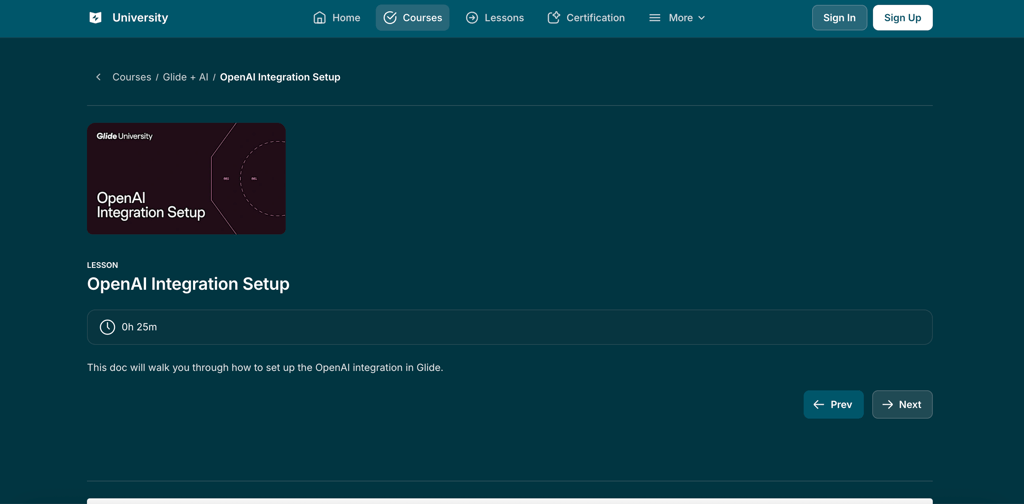
Before I started building my app, I watched onboarding videos. They were short and provided a good introduction; although, it’s also possible to figure out most features without them. What stood out to me was that by clicking More after videos, you are redirected to Glide University. This is where you can actually find some very useful and specific things.
In addition to that, the AI prompts were useful as well. Once you give a command to the chat, Glide adjusts the app and then proposes the next steps that you possibly could take. They didn’t always match my logic, but sometimes I used them for ideas on what to add to my app.
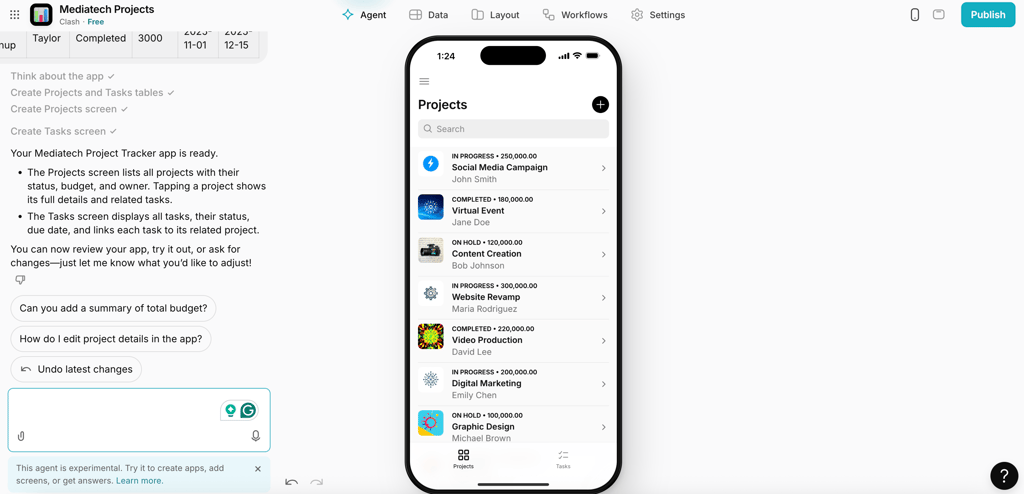
AI prompts sound ideal, but some friction points do exist. For example, the hidden settings. I needed to go through a couple of sidebars and click on different buttons a couple of times to figure out how to edit not the whole style of my app, but only one part, such as image style.
Considering all the factors, I would say that creating a fully functioning app may take anywhere from a few hours to a day, depending on the complexity. In my case, it took me about two hours, but I mostly spent that time improving the design and updating the layout.
Pricing and value – which is best for you?
Glide offers a variety of plans depending on your app’s size, the number of data sources, and the size of your team. Here is a list of key features each plan provides, along with prices and long-term value evaluation.
| Plan | Free | Explorer | Maker | Business | Enterprise |
| Price (yearly subscription) | Free | $19.00/month | $49.00/month | $199/month | Custom pricing |
| Number of apps | Unlimited drafts | 1 app | 3 apps | Unlimited apps | Unlimited apps |
| Number of users | 1 editor | 100 users logged in with the same credentials | Unlimited users logged in with the same credentials | 30 unique users | Custom users |
| Data sources | Glide Tables, and import from Google Sheets, Excel, CVS | Glide Tables, and import from Google Sheets, Excel, CVS | Glide Tables, Google Sheets and import from Google Sheets, Excel, CVS | Glide Tables, Google Sheets, Airtable, Excel | HubSpot, Stripe, QuickBooks, Intercom, PostgreSQL and 100 others |
| API access | ❌ No | ❌ No | ❌ No | ✅ Yes | ✅ Yes |
| Workflows | ❌ No | ✅ Yes | ✅ Yes | ✅ Yes | ✅ Yes |
| File storage | 500MB | 10GB | 25GB | 500GB | Custom |
| Rows | Up to 25K | Up to 25K | Up to 50K | Up to 100K | Custom |
| Updates | ❌ No | 250 | 500 | 5000 | Custom |
| Price per additional update | ❌ No | $0.02 | $0.02 | $0.02 | Custom |
| Support | Community Support | AI Support | Glide Support | Glide Express Support | Glide Priority Support and Account Manager |
| Best for | Good for testing and learning, but not for long-term use | Good entry-level, but limitations become noticeable as apps grow | Good for solo-builders, but the cost will increase with expanded usage | Strong long-term value for business, replacement for custom development | High value at scale, justified mainly for large organizations |
The Glide plan you choose completely depends on your needs and use case. If you’re experimenting and still figuring out what type of app you need, the Explorer plan is the best starting point. Based on my experience, the Free plan is too limited to give a real understanding of Glide’s capabilities.
The Maker plan is a good option if you’re working with Google Sheets data that needs to be updated over time, as it’s the cheapest plan that allows data synchronization. Choose the Business plan for more advanced or complex applications. It removes key limitations and gives you the flexibility needed to create powerful features without restrictions.
Who should actually use Glide?
Glide is a solid option when you don’t have any app-building experience, and you don't need a very complicated platform. It is fast, offers useful AI prompts, and provides a high level of control if you are ready to take on the challenge of understanding its workflows. However, it’s quite pricey and has somewhat limited design abilities.
If you’re looking for alternatives, there are several platforms that cater to different needs. Platforms like Bubble and FlutterFlow will suit people with some app-building experience. These tools allow the creation of more complex applications with advanced data models and workflows. In addition, while Glide apps are delivered as PWAs, meaning they run in a browser, Bubble and FlutterFlow can create fully deployable native apps.
If you are looking for a less complex platform, Softr may be worth considering. In many ways, it’s similar to Glide, but it can provide greater design flexibility. Softr also offers deeper integration with multiple sources, including Airtable, Google Sheets, HubSpot, SQL, and Notion. However, Glide offers more capabilities with its AI features and workflow capabilities.
FAQ
Is Glide free to start?
Yes, Glide offers a free subscription. It includes unlimited drafts, 25K rows, and one editor. These features would be enough to get to know the AI before upgrading.
Can you publish apps to app stores?
No, Glide does not let you publish apps to app stores. Instead, it uses progressive web apps (PWAs), which enable users to access apps directly through their browser.
What data sources does Glide support?
Glide supports Google Sheets, CSV, Excel, and its own Glide tables. The Business plan also synchronizes Airtable together with the already mentioned data sources. The Enterprise plan will help you organize workflows with HubSpot, Stripe, QuickBooks, Intercom, PostgreSQL, and others.
Does Glide offer AI features?
Yes, Glide offers generative AI features (Glide AI). It will help you work with Columns and Actions. Glide AI automates workflows and manages data from various sources, including text, images, documents, and audio.