My honest review of ChatGPT agent for 2026
Being behind major reports like The Mother of All Breaches and RockYou2024, our in-house cybersecurity experts and journalists provide unbiased, real-world testing and in-depth analysis.
We maintain complete transparency by openly sharing our testing methodologies with our audience.
Learn more
ChatGPT agent launched in July 2025, adding a new layer of automation and customization to the AI experience. This agent claims it can handle tasks with more context, memory, and even a bit of personality. But can it really do that? Book travel? Buy groceries? Reserve a meeting time?
Even Sam Altman, CEO of OpenAI, posted a disclaimer when announcing the launch. He called it experimental and cutting-edge – something powerful but not yet suited for high-stakes tasks or anything involving sensitive information. He urged users to give agents only the minimum access needed and warned that malicious actors might try to manipulate the system.
In this ChatGPT agent review, I put it to the test so you don’t have to. I tried it hands-on to see where it works well, and where it gets scary, especially when it comes to your privacy.
Quick overview of ChatGPT agent
ChatGPT agent is a new OpenAI feature that lets the AI take actions on your behalf using its own virtual computer. It can browse the web, fill out forms, book things, and even run software tools to get stuff done for you. It remembers context, thinks through steps, and can handle bigger goals, like planning a trip or organizing your inbox. You just tell it what you want, and it figures out the how. You can connect it to your calendar, files, or other apps if needed. But with all that power, you’ve also got to think twice about what kind of access you’re giving it.
| Best for: |
AI assistant and custom task automation
|
| Price | Included in Pro, Plus, and Team subscriptions, starting from $20.00/month |
| Free version | No ❌ |
| Key features | Autonomous task execution, web browsing, form-filling, multi-step reasoning and planning, integration with external tools like calendars, user-controlled permissions for access, and privacy |
What is a ChatGPT agent mode?
ChatGPT agent is a new mode inside ChatGPT that lets AI do things for you, not just chat. It’s a task-performing assistant built on GPT-4o. It can use tools like a web browser, a code interpreter, or your files.
The agent promises to handle more complex, multi-step tasks by itself. You give it a goal, and it figures out the steps. For example, I asked it to research the best budget laptops, compare specs, and send me a summary with a table and a presentation. And it did just like that. Worked for about 30 minutes and gave me a decent summary with a really budget-looking presentation.
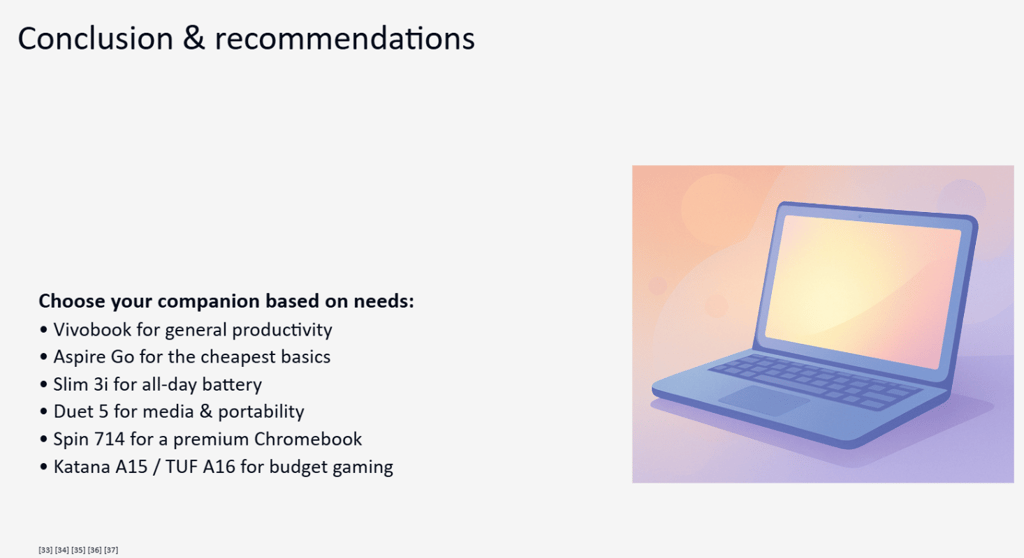
ChatGPT agent is not just answering questions, it’s acting on them. Actually, anytime you prompt the agent with a new task, you’ll see how it opens his own desktop. Then you can literally watch how it’s reading through articles to help you prepare for a trip, or how it analyzes articles of the best laptop reviews, in my case.

You can also connect it to things like your calendar or email if you want it to go further. But that’s optional – and worth thinking through carefully.
Features of ChatGPT agent
When you choose to use Agent mode on ChatGPT, you’ll see a quick summary of what it can really do – create reports, spreadsheets, presentations, and act on your behalf. I ran a few quick tests to see if they’re really working like promised. Below is a deeper look at what each of the features means.
Custom workflows
ChatGPT agent can be your own marketing assistant, a coding helper, or a customer support bot. You can define how they behave, what tools they use, and even their tone of voice. To check how it works with a custom scenario, I asked the agent to build me a customer support chatbot that would be capable of answering three questions:
- What are your business hours?
- How can I reset my password?
- Where are you located?
It worked for around 39 seconds and generated a Python script for a bot I requested.

Since I’m not familiar with coding, I asked the agent to show me whether it really worked. To demonstrate, it opened its virtual desktop again and ran the code through its Python shell.
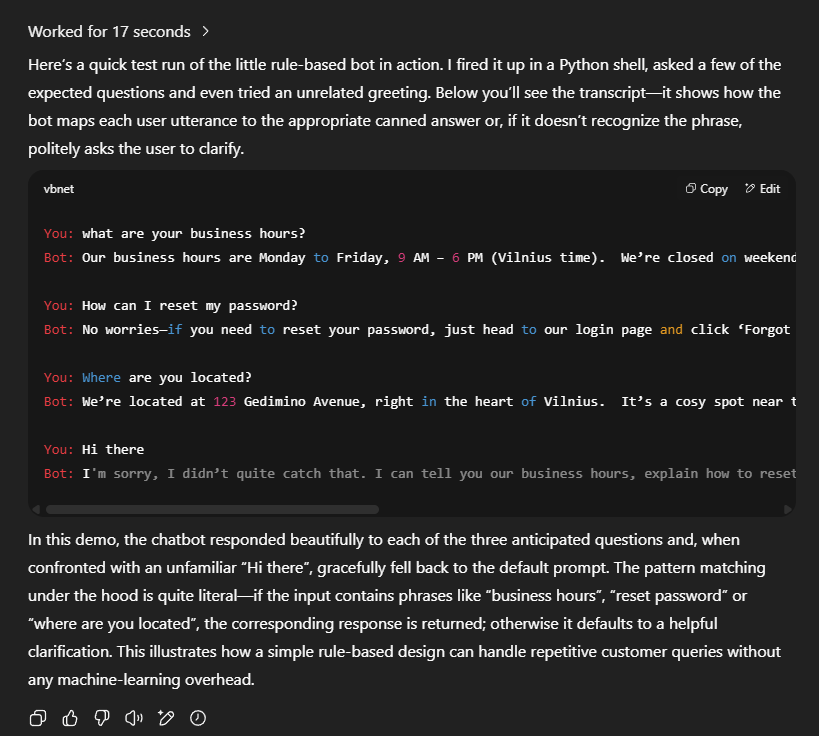
After the demonstration, the agent explained how the bot worked and showed how it was set up to ask for clarification if a question wasn’t clear, using its own patterns. I really appreciated how clearly it explained everything. It helped me understand the logic behind the code much more easily.
File and spreadsheet handling
The agent can organize data, create formulas, clean up messy entries, and even build dashboards. If you're tracking budgets or analyzing reports, it can help you get it done faster. To test Excel’s capabilities with the ChatGPT agent, I picked one of the suggested prompts:
“Build an Excel DCF for Cheniere Energy with the first projection year set to 2025, link LNG price decks across the Revenue tab, convert every hard-typed operating-cost line into driver-based formulas that trace back to nameplate capacity and utilization, map sustaining vs. growth CapEx in the Cash-Flow tab (growth = 55 % of total CapEx each year), and build the debt-service schedule so that the cost-of-debt line uses each tranche's effective interest rate. Finally, reconcile retained earnings and add a two-way sensitivity table (WACC x terminal-growth) above the valuation output.”
I was surprised how quickly it generated the results, explained its calculation logic in around 6 minutes, and even added an Excel file with different tabs for review.
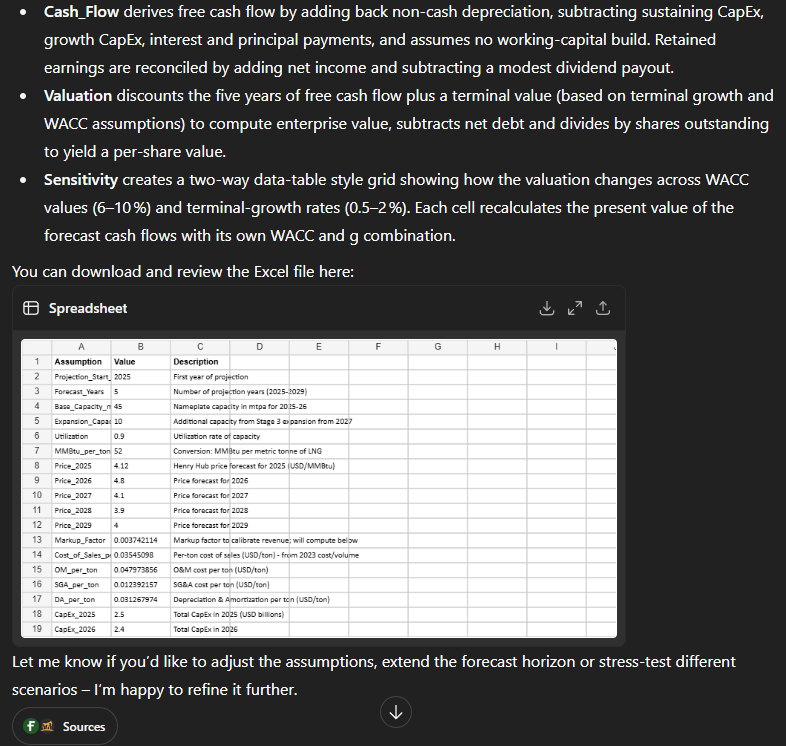
After running this test, I didn’t feel like analyzing the model myself, so I asked Perplexity to review the results. It didn’t find any contradictions. So, I’d say this tool could actually be useful when working with Excel.
Presentations and slideshows
Give the ChatGPT agent a topic, and it’ll create slides with clear titles, bullet points, and speaker notes. It can even use design tools to turn them into visual decks. When I asked the agent to compare budget laptops, I also tasked it with creating a full presentation. The information it gathered was solid, but the presentation itself didn’t look very professional.
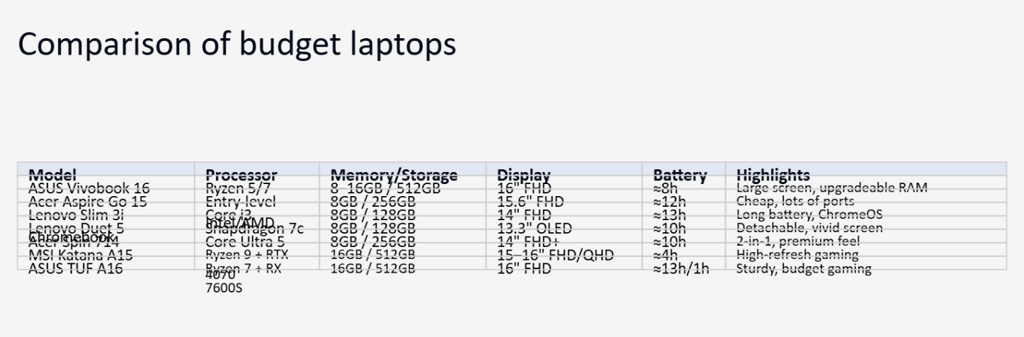
When you prompt ChatGPT to create a specific image, the results tend to be better. You’d need a very detailed prompt for the agent to get everything right on the first try. But with a bit of input on your part, I think it can turn out to be a pretty solid presentation.
Still, the agent’s real strength lies in research and presenting information clearly.
Web research and booking automation
Need to look something up or gather info from multiple sources? ChatGPT agent can search the web, compare results, and summarize findings. It can also take action, like booking appointments or sending emails, depending on how it’s set up.
I was really curious to see how the ChatGPT agent's booking feature works, so I decided to test it with a simple task – I asked it to find a few hotels in central Paris.
Once it gave me the list, I picked one and asked it to book that hotel with a refundable rate for September 20-21, for two adults in one room.
Since the agent already had all the details, it took about 4 minutes to pick the booking website, select the hotel and room, mark the refundable rate, and navigate all the way to the payment page. It stopped here and asked me to take over the browser to fill in the payment details to complete the booking.

When I clicked Take over, ChatGPT agent showed me a disclaimer saying that this step “may put your data at risk,” as it could “expose your data to malicious sites.”

Since there was a Learn more option, I checked to see what kind of risks are involved when entering data into this system. Apparently, the main risk comes from prompt injection attacks. This happens when malicious content (like a blog comment) tricks the agent into performing actions you didn’t ask for – such as sending your sensitive data (like a password reset code) to a harmful website.
Well, after that explanation, I’m not really sure how this ChatGPT agent feature is supposed to be used. In theory, it sounds great, but in practice, your data could end up being exposed.
Email, calendar, and app integrations
Agents can connect to your Google Calendar and Gmail (with your permission). They can schedule meetings, send emails, and remind you about tasks.
If you want the agent to schedule a meeting in your calendar, the process is similar to asking it to complete any specific task. You provide all the details (date, time, meeting title, participants) and ask it to book it.
The agent then navigates to the Google Calendar (or any of your chosen services) login page and prompts you to take over to enter your login details. At this point, it shows the same disclaimer, reminding you of the potential risks.
Once I clicked I understand, it opened the agent’s slightly blurry virtual desktop, where I could enter my credentials and verify that it’s really me logging in. After successfully signing in, I clicked Finish controlling and let the agent complete the rest.

And yep – it works. The meeting gets scheduled. Just one tip: if you’re trying this at home, definitely change your password afterward. Better safe than sorry.
ChatGPT agent pricing
If you’re curious what ChatGPT agent costs to use, here’s a quick breakdown. The agent is available only to paying users – how many messages you get depends on your subscription tier. Below is a simplified comparison of each plan:
| Subscription plan | Monthly cost | Agent access | Monthly agent messages |
| Free | $0.00/month | ❌ No | – |
| Plus | $20.00/month | ✅ Yes | 40 messages |
| Pro | $200.00/month | ✅ Yes | 400 messages |
| Team (per user) | $25.00/month (billed annually) | ✅ Yes | 40 messages |
| Enterprise | Custom | Coming soon | – |
To sum it up: the agent isn’t available on the Free plan, but it comes with Plus, Pro, and Team subscriptions. Plus is great if you want a try of what the agent can do, while Pro is better suited for heavy, multi-step automation. With the Team plan, you get more customization and collaboration perks.
My honest opinion about the ChatGPT agent
When OpenAI released the ChatGPT agent, it really seemed like a next-level tool – something that could completely change the way we do research. And in some ways, it does. The problem is, many of the things it advertises it can do are exactly the things you’re usually advised not to let it do.
Sure, it saves time with research – that part I get. But booking flights or hotels? Personally, I always triple-check those kinds of reservations myself. Letting a virtual assistant take over something like that feels risky.
After digging through Reddit threads, I noticed people are split into two camps. Some are excited, saying it's a powerful tool that can handle nearly anything. Others call it nonsense, arguing it’s too dangerous to trust it with sensitive data.
That said, I can see the value for companies looking to automate processes. Today, 85% of organizations are using some form of AI. Still, large businesses often prefer to build their own in-house agents, for that same reason: data privacy concerns.
I’ve been using the ChatGPT agent mostly for simple tasks – mainly research-related ones, like planning trips, comparing products, or analyzing competitor websites for a fictional business idea. For these kinds of use cases, the agent is honestly the most useful – it handles deep research impressively well.
I also experimented with a few prompts: I asked it to create a simple game that could be opened and tested directly in the browser. I’d say the idea worked out well – the interface actually turned out pretty nice: simple, but visually appealing, even though my prompt wasn’t all that detailed.

I also tested the agent for booking hotels and scheduling meetings. While everything works as expected, it’s not a tool I’d recommend for handling sensitive information.
Benefits of using ChatGPT agent
ChatGPT agent is a big step forward in AI automation. It lets people and businesses use smart assistants that can handle complex tasks with little help. Such agents remember what you’ve said, work with different tools, and adjust based on new info or feedback. With strong reasoning skills and memory, they can turn everyday tasks into smooth, efficient processes – and they’re available 24/7. These are the key reasons I find the ChatGPT agent useful:
- Performs multi-step tasks automatically. You can ask it to plan a 10-day trip to Japan or create a budget spreadsheet, and it will handle everything from research to formatting without follow-up instructions.
- Interacts with real tools. The agent can use a virtual browser, file system, code interpreter, and even control slides or spreadsheets, giving it real power to act on your requests.
- Reduces time spent on manual work. Whether it’s analyzing data, summarizing PDFs, or comparing product specs, it can take over the boring parts and deliver ready-to-use results.
- Customizes actions to your needs. You can tell it exactly how you want things done – like formatting styles, tone of writing, or how deep the research should go.
- Assists with research-heavy tasks. Perfect for competitor analysis, travel planning, workshop prep, or comparing multiple services – it digs through info and presents clear summaries.
- Handles files. Upload a CSV, Excel, or PDF, and the agent can read, clean, transform, and analyze the data inside – all without third-party tools.
- Helps prototype ideas. Need a quick website mockup or a chatbot demo? It can generate working HTML/CSS/JS code or build prototypes you can test right in your browser.
ChatGPT agent limitations and downsides
While ChatGPT agent is undeniably powerful, it’s not without its flaws. After reviewing this tool and playing with several prompts, I can now say why it might not be the best fit for every task:
- No access on the Free plan. You’ll need a paid subscription (Plus or higher) to use the agent at all.
- Requirement for access to your data or accounts. For tasks like booking or scheduling, the agent needs access to calendars, emails, or login credentials, which raises privacy concerns.
- Slow performance on complex tasks. Some actions take several minutes to process, especially when using tools like the browser or code interpreter.
- Risk of misuse or prompt injection. If tricked by malicious prompts or content, the agent could leak information or take unintended actions – OpenAI itself warns about this.
- Blurry browser experience. When the agent hands over control (e.g., for logins), the virtual desktop looks fuzzy and may feel awkward to use.
Best ChatGPT Agent alternatives
ChatGPT Agent is a powerful AI assistant, but it’s not the only option out there. Depending on your needs - whether it’s real-time access, long-form reasoning, or open-source flexibility - there are several strong alternatives. Here are some of the best I’ve tested, based on specific use cases:
- Grok 4 (X AI). A smart alternative for users active on X (formerly Twitter). Grok integrates directly with the platform and provides quick, witty, and often real-time answers - especially when it comes to trending topics. It also supports multimodal input and creative generation, though it lacks the app and plugin ecosystem of ChatGPT.
- Claude 4.1 Opus. This is a top choice for anyone needing long-form content or deep reasoning. Claude can handle massive inputs (up to 200K tokens), making it ideal for analyzing documents, writing essays, or solving multi-step logic tasks. It’s slightly slower than GPT-4o in some cases, but great for thoughtful, structured responses.
- Gemini 1.5 Pro. Developed by Google, Gemini is best for users who rely on Google Workspace. It connects smoothly with Gmail, Docs, and Drive, and is especially good for productivity tasks and summarizing large files. While it still lags behind ChatGPT in some creative tasks, it’s catching up fast.
- Perplexity AI. A strong contender for research-focused users. Perplexity pulls real-time data from the web and cites sources clearly, making it great for answering factual or up-to-date questions. It’s fast, accurate, and doesn’t require plugins for browsing - but it’s not ideal for creative or long-form writing.
- Mistral Mixtral. If you’re a developer or privacy-focused user, Mixtral is a solid open-source option. It handles large contexts, works offline with the right setup, and offers transparency and control. It’s not as user-friendly as ChatGPT Agent but gives you more flexibility in custom use cases.
Each of these tools brings something unique to the table. But in my experience, ChatGPT agent offers one of the most well-rounded blends of creativity, reasoning, and ease of use - making it a reliable everyday assistant.
ChatGPT agent: final verdict
After several weeks of testing, I can say this: ChatGPT agent is both impressive and imperfect. It’s not the magical, do-it-all assistant just yet – but it’s getting close. For research, summarization, simple automation, and creative experiments, it’s incredibly useful. It saves time, thinks through steps, and handles context better than any previous AI assistant I’ve used.
But when it comes to sensitive tasks – anything involving personal data, payments, or access to private accounts – I’d still tread carefully. It's a promising tool with real potential, especially for those who know how to guide it well. Just remember: it’s smart, but not foolproof.
FAQ
How good is ChatGPT agent?
In my opinion, ChatGPT agent is a good AI assistant that can handle complex, multi-step tasks like research, planning, coding, and file analysis with minimal input. It’s highly effective for productivity and automation – just be cautious with sensitive data, as it’s still not foolproof.
Is ChatGPT agent worth it?
Yes, the ChatGPT agent is worth it if you regularly handle research-heavy, repetitive, or multi-step tasks – it can save you hours by automating the busywork. Just keep in mind it’s best used for low-risk tasks, as it still needs supervision when handling sensitive data or accounts.
Is ChatGPT agent the same as regular ChatGPT?
No, ChatGPT agent is like the upgraded, action-ready version of regular ChatGPT. While regular ChatGPT just chats and answers questions, the agent can actually do things for you: browse the web, analyze files, fill out forms, run code, and perform multi-step tasks using its virtual computer.
Can ChatGPT agent make mistakes?
Yes, ChatGPT agent can definitely make mistakes. It might misinterpret your prompt, click the wrong thing, take too long, or even act unpredictably – especially if the task is complex or the instructions aren’t clear. That’s why it’s powerful, but still needs human oversight.
Is ChatGPT agent included in the Free plan?
No, ChatGPT agent is not included in the Free plan. You’ll need a Plus, Pro, or Team subscription to access it – with the Plus plan starting at $20/month.