Pictory AI review 2026
Being behind major reports like The Mother of All Breaches and RockYou2024, our in-house cybersecurity experts and journalists provide unbiased, real-world testing and in-depth analysis.
We maintain complete transparency by openly sharing our testing methodologies with our audience.
Learn more

Pictory AI is making waves in the content creation world as a cutting-edge AI-powered platform that's revolutionizing how we create and edit videos. From small content creators to large marketing teams, an increasing number of professionals are turning to this innovative tool to streamline their video production workflow.
Together with the Cybernews research team, I've extensively tested numerous AI video creation tools to help you make informed decisions. For this Pictory AI review, I thoroughly tested its features, analyzing everything from video generation capabilities to collaboration tools. I examined real user experiences, tested performance across different use cases, and evaluated how it compares to competing platforms.
Quick overview of Pictory AI
| Rating: | |
| Overall rank: | #5 out of 5 AI video generators |
| Price: | Starts from $19.00/month |
| Free trial: | Yes |
What is Pictory AI?
Pictory AI is an AI-powered video editing platform that helps marketers, YouTubers, and content creators easily transform existing content into polished, shareable videos. This AI video tool applies artificial intelligence to effortlessly create stunning videos from text-based content like scripts, blog posts, and essays. The platform boasts an easy-to-use interface that removes the need for specialized video editing skills, so it’s suitable for video editing newbies as well as pros.
Powerful features, such as auto text-to-speech, customizable templates, and a massive library of royalty-free visuals, make it stand out. Its AI-generated video solution is perfect for social media marketing, content repurposing, and scaling video production. Its ease of use and AI tools that save users time make it better than regular editors.
Whether you need to create promotional clips or supplement long-form videos, the Pictory video editor does the hard work and produces professional output. Its focus on efficiency and accessibility makes it a game-changer for anyone trying to create powerful video content.

COUPON CODE: DEALDAY50
Pros and cons of Pictory AI
Now, Let me go over the pros and cons of using Pictory AI. This is a combination of user reviews on Pictory like ease of use, complaints about limits and functionality.
Key features of Pictory AI
Pictory revolutionizes video creation with cutting-edge technologies that save time and produce professional results. Here's a deeper look at its main features.
Script-to-video conversion
Users of Pictory's script-to-video tool can quickly convert written scripts to gorgeous videos in minutes. This tool is ideal for marketers, educators, and content creators who want to choose visuals, insert excellent voice-overs, and export clean designs quickly. No more manual editing is required, saving valuable time.
Automatic video summarization
The Pictory AI video summarization feature cuts lengthy videos into quick-to-watch, engaging highlights. It’s perfect for breaking down webinars, podcasts, or meetings into bite-sized clips for social media. The tool aims to create maximum impact with minimal effort, as auto-detection identifies important moments.
Text-based video editing
Pictory's text-to-video editor simplifies video editing to the same degree as document editing. Users can simply edit video material with text, eliminating silences and filler phrases. This straightforward functionality helps reduce the steep learning curve associated with traditional video editing software.
Extensive stock media library
The stock media library houses millions of royalty-free images, video clips, and over 15,000 music tracks. It gives users the ability to add high-quality media to any video so that they can create unparalleled content with no extra resources.
Audio to Video workflow
Pictory rolled out a new audio-to-video workflow in October 2025, and I’ve been testing it recently. It’s designed to take a simple voice recording and automatically turn it into a complete video with captions, visuals, and branding available.
After selecting the new Audio to Video option on the dashboard, I uploaded an MP3 file (it also supports WAV, up to 5GB or 180 minutes). Once uploaded, I selected the language of my recording, and Pictory automatically generated a transcript.
The transcript editor is where most of the preparation happens. I could refine the text by removing stuttering or filler words, making minor edits, and styling captions before moving forward. From there, clicking Create video prompted the AI to break my audio into short scenes and match each one with relevant visuals.
After the automatic part, I still had complete control over the final look. I could swap out visuals, adjust the captions, and apply my own brand colors and logo. There’s also the option to add a voice-over or background music, although I mainly focused on maintaining consistency with my own style in the visuals.
Pictory AI’s audio-to-video feature will be most useful for podcasters, educators, or content creators who already have recorded material. It will definitely help them turn their audio into something more visual without requiring a lot of time spent on editing.
Benefits of Pictory features
Integrating these advanced tools, Pictory simplifies video production for professionals and makes it easy for anyone to create quality videos quickly. AI-based automation saves creators valuable time spent on editing, allowing them to focus on their storytelling and engaging with their audience.
With its script-to-video functionality and seamless text-based editing, Pictory is a game-changer for anyone serious about nailing their content creation process.
Pictory AI plans and pricing
Pictory offers flexible subscription plans to suit different video creation requirements. All plans have basic features, video minutes, and resources. Subscribers can add advanced tools as necessary.
Here's an overview:
| Plan | Monthly cost | Video minutes | Key features |
| Starter | $19.00 | 200 | Basic AI tools, 2M Storyblocks videos, 1 brand kit, unlimited standard voices |
| Professional | $29.00 | 600 | Advanced AI tools, video summarization, 18M videos, 5 brand kits, premium voices |
| Team | $99 | 1800 | Collaboration workspace, team training, API automation, 10 brand kits |
| Enterprise | Custom pricing | Custom | Custom tools, unlimited brand kits, priority support a dedicated success manager |
Free trial availability
Other than Enterprise, all plans include a Pictory free trial that lets users experience the features without risk before enrolling. This ensures transparency and helps users decide whether it is a worthwhile tool for their projects.
What’s included in the Pictory free plan?
While Pictory doesn’t offer a permanent free plan, it does provide a 14-day free trial to test its AI video maker features. However, the free trial is severely limited. You get up to 15 minutes of video creation total, and each video can only be up to 5 minutes long. All videos created with the free trial feature a Pictory watermark. After the trial ends, you can still log in and access your projects, but downloading videos requires a paid subscription.
You can test most of the features, such as converting text into videos, utilizing the AI editor (with uploads of up to 1GB), summarizing videos, creating videos from images or audio, and even converting PowerPoint slides into videos.
One cool thing is that the free trial gives you access to certain features that even the introductory paid subscription doesn't. For example, you get access to Getty stock images, 5 premium stock credits, and 5 hyper-realistic AI voice minutes.
Overall, if you’re searching for a free AI video maker to create longer or watermark-free videos, you will have to subscribe to one of its plans. It’s only designed to give new users a quick look at the platform, rather than a full-fledged free video creation experience.
Comparing value for money
Pictory's pricing is competitive with other affordable AI video solutions. Its script-to-video conversion, massive media libraries, and text-based editing make it stand out from competitors like Veed and Descript. With powerful AI voices and video summarizing capabilities, Pictory is very handy for professionals.
No matter if you are a single producer or part of a larger team, Pictory's pricing structure offers scalability and affordability. This flexible price structure helps make Pictory the best option for efficient video creation.
Who should use Pictory AI?
Pictory AI is designed to accommodate a variety of users, making it invaluable for anyone looking to streamline video creation. Here’s who will benefit the most from Pictory AI:
- Podcasters and audio-content creators who want to turn audio episodes or interviews into engaging video content for YouTube, TikTok, or LinkedIn.
- Social media managers will find it one of the best AI tools for video creators because it allows you to create quick, engaging, branded video pieces. This makes it easy for social media campaigns to benefit from image and video content with automatic captions that are easy to share.
- Small business owners can convert their website content – like blog posts and product pages – into engaging videos that can greatly enhance their online presence and marketing efforts.
- Content creators like YouTubers, TikTokers, and influencers can create high-quality videos and get professional broadcasts out in minutes rather than days.
- Educational professionals can use Pictory to create educational videos and course content quickly. Its AI voice-over options make it easy to craft compelling learning materials.
- Marketing teams will love Pictory’s video marketing tools, allowing them to create promotional clips and branded highlights more easily and consistently.
Overall, Pictory AI is an excellent choice for anyone looking to create impactful videos quickly and effectively.
Interface and user experience
Pictory's streamlined video editor makes the editing process user-friendly for all experience levels. Its interface makes it easy for beginners to produce high-quality videos without having technical knowledge beforehand. At the same time, advanced users can leverage ever-more-streamlined tools to get professional results in a fraction of the time.
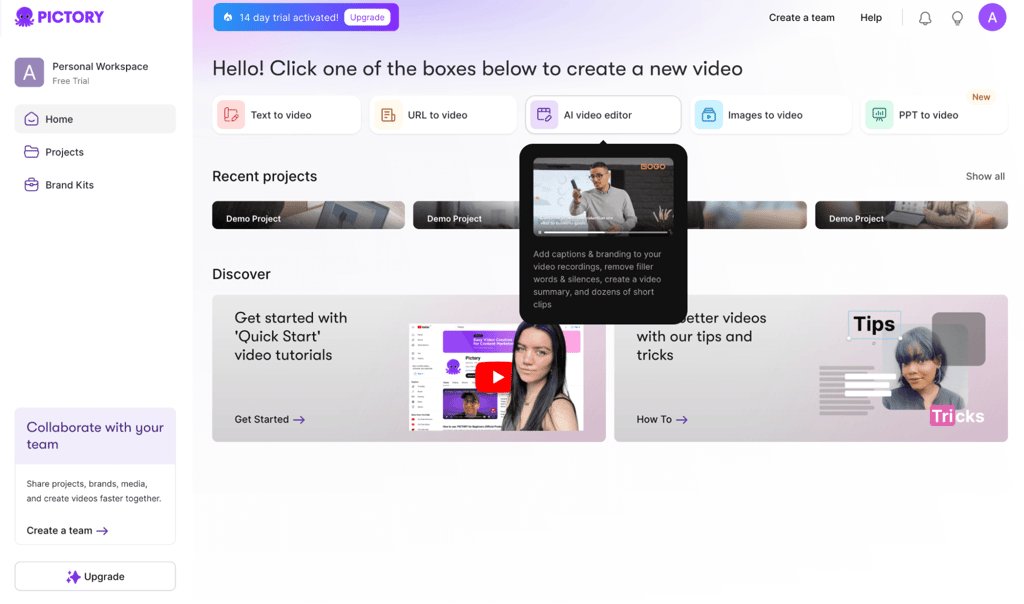
This Pictory user dashboard is well-organized, with intuitive navigation menus and drag-and-drop features, allowing you to easily convert text to video or add captions. Newbies will love how the platform guides them through the process step-by-step, while seasoned editors can jump right into some of the most advanced features, such as AI narration and branding tools.
In addition, the design incorporates accessibility features, such as keyboard shortcuts and support for screen readers, making it inclusive for all users. There’s even a real-time preview panel that enables creators to see their edits as they make them. These features make Pictory a leading video editing choice for newcomers and veterans.
Another area where the interface excels is collaboration. It offers team-sharing options that enable many users to work on one project simultaneously. This app also helps you maintain alignment throughout the content creation process.
Whether by creating branded clips or turning blog posts into engaging videos, Pictory’s platform is hard at work turning concepts into well-rounded material. The intuitive dashboard allows users to easily find tools and finish projects with ease.
Pictory AI alternatives
When evaluating AI video editing tools, it's essential to consider how Pictory compares to its competitors.
Pictory vs Synthesia
Pictory provides an easy-to-use interface for summarizing long-form content into short, branded videos. It’s especially useful for content marketers looking to repurpose existing content. Synthesia, on the other hand, is unique in that it generates videos with AI avatars. This is perfect for creating human-like videos without the use of actors.
Pictory vs Veed
Veed is a powerful video editing platform with many features, such as text overlays, subtitles, and effects that can help you create high-quality videos. It is also useful for users who need extensive editing features. In contrast, Pictory specializes in creating short, engagement-driven videos from long-form content, making it best suited for repurposing content. While Veed offers comprehensive editing capabilities, Pictory's AI-powered method simplifies video production, allowing content creators to allocate the time saved elsewhere.
Pictory vs Runway
Runway provides AI video editing features such as background removal and real-time collaboration. It’s aimed at professionals who need high-end editing capabilities. Unlike its competitors, Pictory is simple, effective, and has a low learning curve, helping you create quick videos from existing content. Runway has more complicated editing tools, but Pictory scores in terms of price and speed, which is why many people choose it.
Although Pictory provides an efficient and affordable option for creating short videos out of long-form content, competitors like Synthesia, Veed, and Runway have specialized features that may better meet individual needs. As for the comparison, the best choice here purely depends on users' needs and how much they prefer performance over simplicity.
Other AI tools you might be interested in:
Conclusion
After thoroughly testing Pictory AI, I can confidently state that, given its robust features, it provides excellent value for money. Pictory's versatility, ease of use, and video-producing process made it stand out consistently in my testing.
This is a huge asset for marketers, educators, and content providers, as it can instantly turn any text, URL, or long-form content into an engaging video in a few clicks once it fully understands the input. Whether you're a beginner with no previous video editing experience or a seasoned professional looking for a speedy and organized solution, Pictory AI is here to assist you.
One of the main features I value is Pictory's user-friendliness. Despite my vast knowledge of video creation, I still find myself using Pictory because of its ease of use. The platform is perfect for anyone who requires high-quality movies quickly because of its AI-driven automation, which drastically cuts down on editing time.
In my opinion, Pictory is one of the best AI video tools. It’s a good option for many users, from business owners to influencers and educators. So, is Pictory AI worth a shot? Yes, I absolutely think so if you want an intuitive, time-saving tool for video creation. Pictory AI has made good on its promise of democratizing professional-grade video production for everyone.
FAQ
Is Pictory AI beginner-friendly?
Yes, Pictory AI is highly beginner-friendly. It offers an intuitive interface that makes it easy for those with no prior video editing experience to create professional-looking videos. The platform automates complex tasks using AI, letting users focus on content creation without getting bogged down in technical details.
Can you customize videos with Pictory?
Yes, Pictory enables video customization. It also has some automation elements, but you can manually tweak the videos, add your own text, select different fonts, upload images, and add your branding. The unlimited customization capabilities make sure that the videos created are personalized and suited to your custom needs or style.
Is Pictory AI free or paid?
Pictory AI is a paid service, but it offers a very limited free trial. This trial allows you to see if this tool works for your video creation needs without getting a subscription. Pictory offers a competitive pricing plan that offers a lot of value.
Is Pictory worth it?
Yes, Pictory is worth it, especially for users who need to create high-quality videos without spending too much time or effort. Given its user-friendly features, automation, and customization options, it provides excellent value for content creators, marketers, and businesses looking to streamline their video production process.
What does a Pictory free plan include?
The Pictory free plan is actually a 14-day free trial that lets you test its AI video tools with 15 minutes of total video creation. You can turn text, images, audio, or slides into short videos, try auto-captioning, and explore limited premium media and AI voice features.